
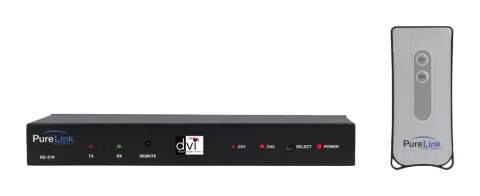
Package Contents
Please make sure all of the following items are included in the package:
- DS-21R Unit
- 5V Power Supply Adapter
- User Manual
Product Overview
- DVI Link DVI switch allows number of digital video sources to share one video display.
- Our unique switch allows easy switching between different digital video sources with remote control unit or with a manual switching button place on the unit itself.
- Perfect for home theater systems.
- No more hassles of manually plugging in different DVI connectors to view different video sources (e.g., DVD, Satellite receiver, computer, TiVo).
Main Features
- High Quality Picture - No Signal Loss and Digital Noise Free Our switchers are built to deliver the highest quality picture preserving the native resolutions of the video sources without any signal loss. At the same time, the digital noises that may affect the picture quality will be eliminated. Due to the nature of the digital signals and passing through multiple stages of connection when using switchers, it is important to eliminate the digital noises and boost the signal strength to preserve/enhance the video signal quality.
- Signal Amplification for signal reliability and long length signal transmission. Our 5V power adapter supplies adequate power to amplify the video signals from different video sources. This is necessary as the overall length from the video source to the displays is longer when using the switches (distance from the video source to the switch + distance from the switch to the display). In most cases, the overall distance that the DVI signal will need to travel is over 10ft. Due to the nature of DVI signals, amplification is necessary to warrant the video quality and reliability. (Without amplification, there may be occasional blackouts or blinking effects) With this amplification feature, your video display can be extended up to 2300ft using our fiber optical DVI cables.
- Compact and Practical Design Our switchers have all of the DVI ports, power supply jack and RS232 port in the back of the unit allowing it to be mounted on any racks or with any other components. In the front, there will be a remote control sensor, selector switch, RS232 LED indicators and channel indicators.
- Remote Control Unit with Discreet Channel selections Remote Control Units with discreet channel selection feature is included in all our switches. The channel buttons on the remote control unit will allow you to change video sources easily and quickly.
- RS232 Control Our switches also feature RS232 Control. Our switches are capable of being controlled by a remote computer. This is extremely helpful for many applications where you need to automatically switch the video inputs. Example: If you connect a PC to our switcher, you can program it to automatically switch the sources. If you want to display input 1 for 1 hour and then switch to input 2, you can do this with the PC. The RS232 LED indicators in the front will allow you to check the communication between the PC and the switch. Most other products require additional control box for this function.
Video Connection
- Connect your video source’s DVI output port to the DVI switch’s DVI input port using standard DVI cables (not included). (Make sure all your DVI sources and the display is turned off before connecting the cables)
- Connect your DVI display’s DVI input port to DVI switch’s DVI output port. (Make sure your DVI display is turned off before connecting the cables)
- Plug the 5V power supply into the switch’s power input port.
- Plug the 5V wall-mount power supply into the wall outlet.
- Turn on your display.
- Turn on your video sources.
- Use your remote control unit to switch channels. Or use the select button on the front panel of the switch to change channels.
RS232 Control Connection
RS232 connection allows the user to interface the DVI LINK switch with a serial port on a computer or other control device. The computer or other control device may require additional software for various control functions.
RS232 Control Information
Our DS-21R and DS-41R use pin#2 and #3 and the assignments are as follows;
- Control computer's RS232 pin# 2 is connected to our DVI switch's pin#3
- Control computer's RS232 pin# 3 is connected to our DVI switch's pin#2
The control protocols are as follows
- Channel 1 request is ascii code "@001*" and the response back to the computer is "!"
- Channel 2 request is ascii code "@002*" and the response back to the computer is "!"
- Channel 3 request is ascii code "@003*" and the response back to the computer is "!"
- Channel 4 request is ascii code "@004*" and the response back to the computer is "!"
Technical Specification
| Model | DS-21R |
|---|---|
| Input Signal | Dual DVI-D Female ports |
| Output Signal | DVI-D Female port |
| Supporting Display Resolutions | UXGA (1600 X 1200 at up to 85Hz) (1920 X 1080 at up to 60Hz) |
| Frequency bandwidth | 1.65 Gbps (Single Link) |
| Conformations | DVI version 1.0 With HDCP |
| Power Rating | DC 5V, 2A Adapter included |
| Dimension (W X D X H) | 6.7 X 4.75 X 1.2 In. | 170.18 x 120.65 x 30.48 mm |
| Weight | 1.35 Lbs | 612.35 g |
Warranty
One (1) Year Warranty
Dtrovision LLC warrants that each DVI Link DVI Switch is free from defects due to faulty materials or improper workmanship for a period of one (1) year. Dtrovision further warrants that any part which proves defective in materials or workmanship within one(1) year, will be replaced or repaired at no cost to the user. Labor to replace defective parts will be done without charge. Provided the equipment is returned to Dtrovision prepaid, Insured and properly packaged. Prior return authorization must be obtained from your local dealer.
This warranty is void if the warranted part has been altered or subjected to abuse or misuse.
This warranty is in lieu of all other warranties expressed or implied including, without limitation, any implied warranty or any implied warranty of fitness for a particular purpose. Dtrovision shall have the final right to determination as to the existence and cause of any defect and its appropriate adjustment in accordance with the terms of this warranty. In no event shall Dtrovision be liable for any consequential or collateral damages.
Warranty Limitation and Exclusion
Dtrovision shall have no further obligation under the foregoing limited warranty if the product has been damaged due to abuse, misuse, neglect, accident, unusual physical or electrical stress, unauthorized modifications, tampering, alterations, or service other than by Dtrovision or its authorized agents, causes other than from ordinary use or failure to properly use the Product in the application for which said Product is intended.
Legal & Compliance
Product identification
Model: PRO-DS-21R – manual version 1.0
Trademarks and disclaimer
Product model and logo are trademarks. All other company and product names mentioned are trademarks of their respective owners. All rights reserved. No part of this publication may be copied or reproduced without prior written permission. We reserve the right to make changes to the device, packaging or manual and accept no liability for misprints.
Disposal of electrical and electronic equipment
WEEE reg. no.: DE 93847290
The crossed-out wheelie bin symbol on the product, packaging or in this manual means that electrical and electronic equipment must not be disposed of with household waste at the end of its life. Hand in old devices free of charge at a public collection point or return them to a distributor obliged to take them back. Remove batteries and lamps that can be removed without destroying the device before handing it in, and delete any personal data stored on the device. Details are regulated by national law. By returning old devices you help protect the environment.
Packaging
Dispose of packaging separately by material (paper/cardboard, plastics) via the local collection systems. Keep packaging material away from children – risk of suffocation. Packaging register LUCID: DE5958616449295.