
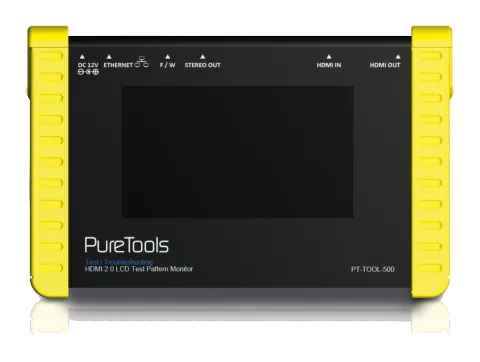
Safety and Notice
The PT-TOOL-500 HDMI 2.0 LCD Test Pattern Monitor has been tested for conformance to safety regulations and requirements, and has been certified for international use. However, like all electronic equipments, the PT-TOOL-500 should be used with care. Please read and follow the safety instructions to protect yourself from possible injury and to minimize the risk of damage to the unit.
- Follow all instructions and warnings marked on this unit.
- Do not attempt to service this unit yourself, except where explained in this manual.
- Provide proper ventilation and air circulation and do not use near water.
- Keep objects that might damage the device and assure that the placement of this unit is on a stable surface.
- Use only the power adapter and power cords and connection cables designed for this unit.
- Do not use liquid or aerosol cleaners to clean this unit. Always unplug the power to the device before cleaning.
Introduction
The PT-TOOL-500 HDMI 2.0 LCD Test Pattern Monitor is a versatile HDMI 2.0 toolbox with full bandwidth and HDCP 2.2 support. For ease of HDMI 2.0 installations, PT-TOOL-500 is equipped with both HDMI 2.0 pattern generator and analyzer. With this handy and portable gadget, users will appreciate at the built-in long hour operation chargeable battery, video patterns, touch panel control, cloud based firmware upgrade access and many other features such as HDCP analyzer or loop test in single piece of device. In the meantime, PT-TOOL-500 can support 8 channel LPCM audio with selectable sample rate. One more attractive feature of PT-TOOL-500 comes from bypassing HDMI input to the connected display or built-in 4.3” touch panel to allow users to verify HDMI sources instantly.
PT-TOOL-500 is the most cost effective HDMI 2.0 tool in the market to make HDMI installation much easier than ever.
Features
- 4K2K60 4:4:4 8bit, 4K2K60 4:2:0 10bit HDR pattern generator
- 4.3” touch panel
- Supports mouse control
- Supports user control device through Ethernet
- Firmware update through USB Flash Drive
- Supports user defined pattern up to 2GB
- Embedded LINUX KERNAL system with limitless extension
- Scrambler supported for videos over 340MHz output wise
- Loop test capability to provide statistics analysis for connection stability
- Supports HDMI loop through function
- HDCP test allow verify HDCP of HDMI source and transmit HDCP encrypted video
- Qualified physical layer performance to ensure the best compatibility
- Battery powered for portability, it can extend operation time with full load up to 4 hours
- Rechargeable battery design with short charging time about 2 hours.
Package Contents
Note: Before using the PT-TOOL-500, please plugging the power adapter to switch off the shipping mode.
- 1x PT-TOOL-500
- 1x IR blaster 1x IR receiver
- 2x DC 24V
- 1x User Manual
Specification
Technical
| Role of usage | Generator / Analyzer |
|---|---|
| Video bandwidth | Single link 600MHz [18Gbps] |
| HDMI compliance | HDMI 2.0 and below |
| HDCP compliance | HDCP 2.2 and below |
| Video Support | Up to 4K2K60 4:4:4 8bit, 4K2K60 4:2:0 10bit (HDR) |
| Video Format Support | HDMI |
| Audio support | 8ch LPCM up to 192K |
| Control | USB mouse / touch panel / Ethernet |
| ESD protection | Human body model — ±15kV [air-gap discharge] & ±8kV [contact discharge] |
| Input | 1x HDMI + 1xUSB + 1x RJ-45(Ethernet) |
| Output | 1x HDMI + 1x 3.5mm(Stereo) |
| USB Support | USB 2.0 |
| HDMI connector | Type A [19-pin female] |
| USB Connector | Type A |
| RJ-45 connector | WE/SS 8P8C with 2 LED indicators |
Mechanical
| Housing | Metal enclosure |
|---|---|
| Dimensions [L x D x H] | |
| Model | 105 x 166 x 42mm[4.1" x 6.6" x 1.7"] |
| Package | 371 x 170 x 77mm[1'5" x 6.7" x 3"] |
| Carton | 410 x 368 x 393mm[1'3" x 1'4" x 1'5"] |
| Weight | |
| Model | 765g [27oz] |
| Package | 1294g [2.8 lbs] |
| Power supply | 12V 5A DC / Battrery |
| Power consumption | 15 Watts |
| Operation temperature | 0~40°C [32~104°F] |
| Storage temperature | -20~60°C [-4~140°F] |
| Relative humidity | 20~90% RH [no condensation] |
Connection Diagram
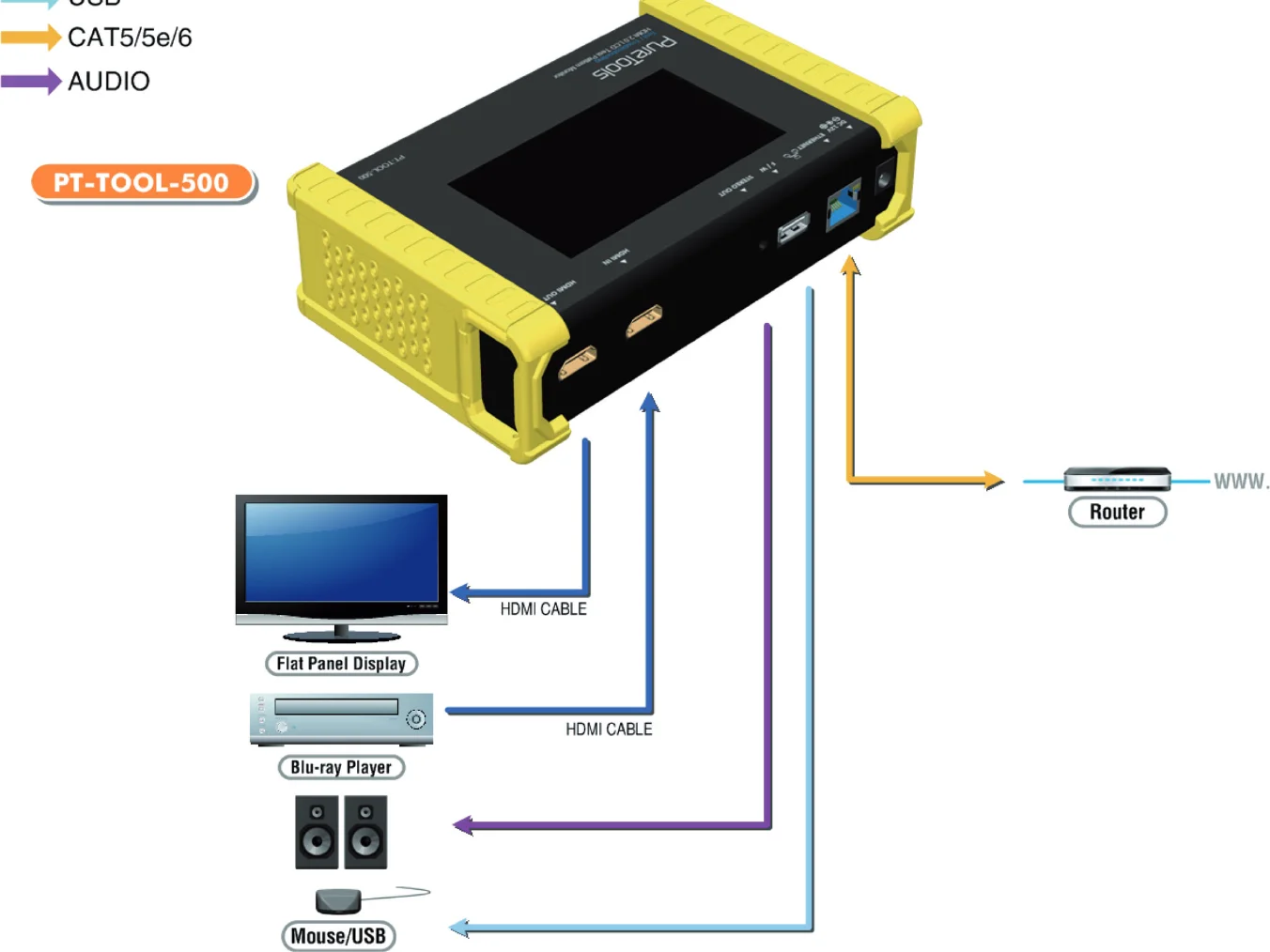
PT-TOOL-500 connection diagram with HDMI, USB, CAT5/5e/6, and AUDIO connections to Flat Panel Display, Blu-ray Player, Mouse/USB, and Router.
Panel Description
Front Panel
- OUTPUT: HDMI output
- INPUT: HDMI input
- Stereo Out: Analog audio output
- USB: Connect to USB device for control or firmware update
- Ethernet: Ethernet control
- +12V DC: 12V 5A DC power jack
- Power Switch: Power ON/OFF switch
- Touch Panel: Touch screen for control
1 2 3 4 5 6 7 8
Generator
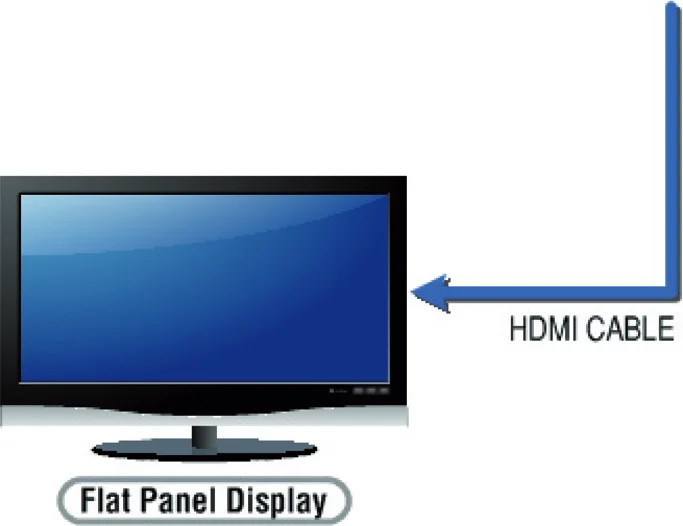
After making the physical connections between PT-TOOL-500 and the display device. User can select different generator function to display on the sink device under test.
PT-TOOL-500 as HDMI Generator
- Selecting the Signal Format PT-TOOL-500 provides different signal resolution and signal types for user to select. User can touch the Signal Format Tab to select the signal type (HDMI / DVI) and signal resolution (HDTV / PC).
The HDTV resolution is up to 4K2K 60Hz and PC resolution is up to 1920x1200 60Hz.
- Rendering Test Patterns on an HDTV PT-TOOL-500 provides multiple test patterns for user select to test HDTV. User can select the desired test pattern from the video pattern menu.
- User Defined Pattern Besides the embedded test patterns, PT-TOOL-500 also provides user defined patterns function for user to use custom test image. More details please see the Upgrade PT-TOOL-500 section.
- Testing Digital Audio on an HDTV or A/V Receiver The PCM Audio Tone menu provides user for test audio on HDTV or other A/V receivers. In the PCM SINE WAVE menu, user can set up the bits per sample, sample rate, level and audio channel.
- Testing HDCP on an HDMI TV or HDMI device PT-TOOL-500 provides user to test HDCP on an HDMI equipped HDTV. For more details please see the HDCP test section.
Receiver
PT-TOOL-500 as HDMI Analyzer
- Source Information from the HDMI source In the Test/Source menu, user can touch the read/refresh button to get the video format, source audio and packet
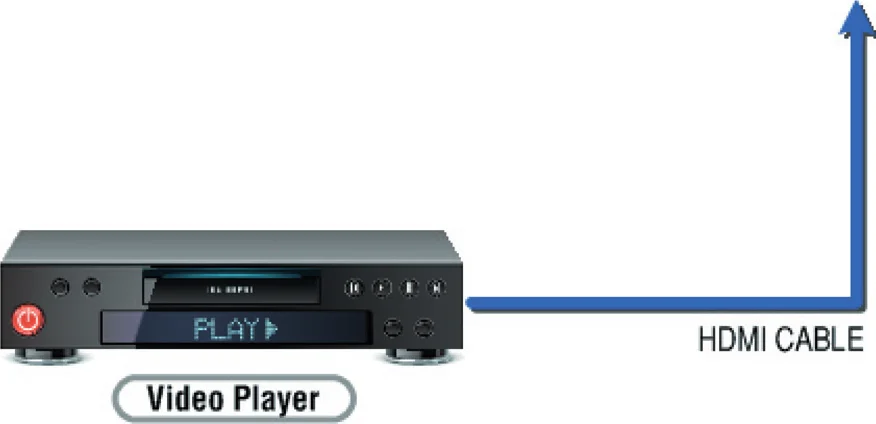
information from the HDMI source device.
- Testing the Video from the HDMI source PT-TOOL-500 supports the incoming video from HDMI source/device to ensure user is receiving a valid video signal by displaying the information of incoming signal. The video information also will inform user whether the HDCP is encrypted or not. Return to Video menu by touching the touch panel (please stay at least 5 seconds).
HDCP Test
PT-TOOL-500 as HDCP Receiver
PT-TOOL-500 as HDCP Transmitter
When PT-TOOL-500 set as receiver, it can verify HDCP of video player or other DUT (Device Under Test). PT-TOOL-500 provides three options (HDCP 1.4 / HDCP 2.2 / no HDCP) for users to select and confirm the HDCP authentication of DUT.
When PT-TOOL-500 set as transmitter, it can transmit HDCP encrypted video. PT-TOOL-500 also provides three modes (HDCP 1.4 / HDCP 2.2 / no HDCP) for you to select. If user wants to transmit HDCP encrypted video again, please select the Auto-Restart button.
Procedure for Testing HDCP
- Make the connection between the PT-TOOL-500 HDMI output port and the display.
- Select HDCP Test from the Sink Test Menu.
- Touch Enable HDCP 1.4 or Enable HDCP 2.2 button.
EDID Analysis
PT-TOOL-500 offers the most convenient way for user to analyze the EDID. You can verify, view and learn the EDID of an HDMI HDTV or other devices.
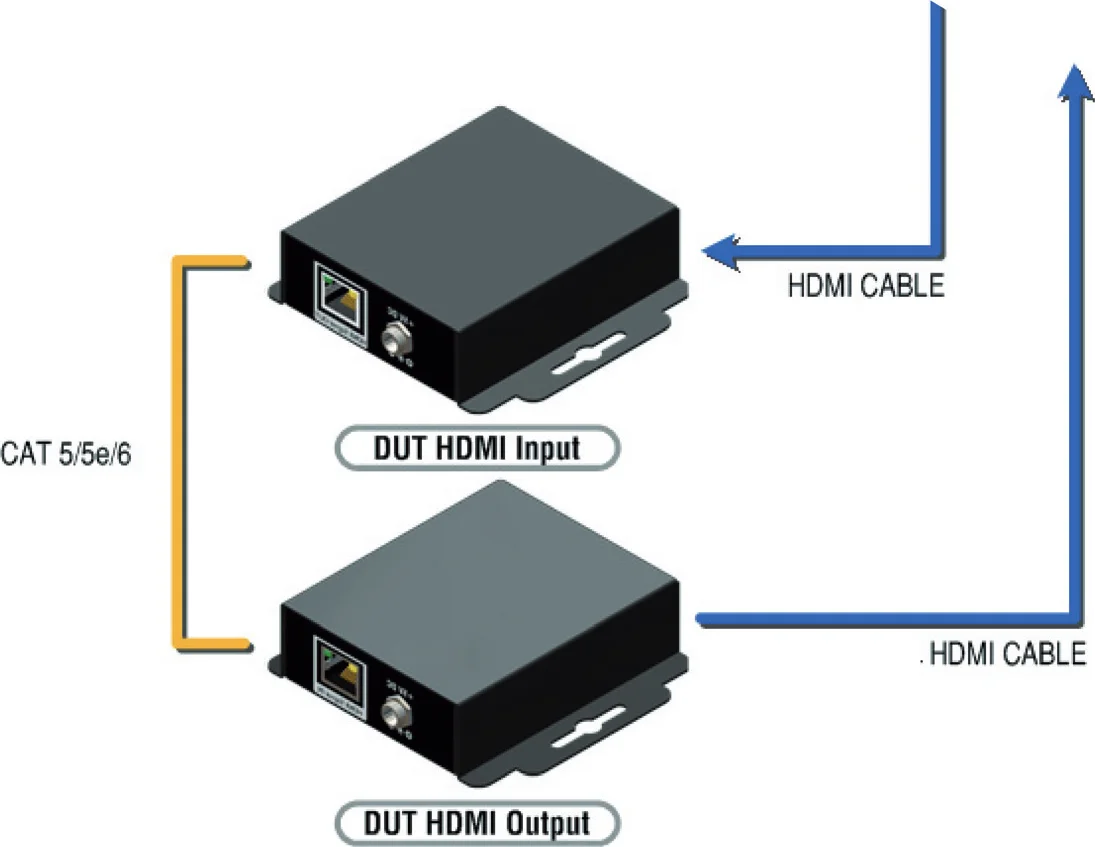
Procedure of EDID Analyze
- Make sure the connections between the PT-TOOL-500 HDMI output port and the device.
- Select EDID Analyze from the Sink Test Menu.
- Touch the Read button to get the EDID information of DUT.
Procedure of learning EDID from RX
- Make sure the connections between the PT-TOOL-500 HDMI output port and the device.
- Select EDID Analyze from the Sink Test Menu.
- Touch the Learn from RX button to learn the EDID. The EDID will be saved in the PT-TOOL-500 input port.
LOOP Test
PT-TOOL-500 offers the unique estimator for evaluating the quality of cables or DUT. Users can simply connect the cable or DUT to PT-TOOL-500 to form a loop, the monitor will examine the HDMI bitstream pixel by pixel. The measurement statistics will be displayed on screen and offer useful information for building up robust A/V system.
Procedure of Loop Test: only support 1080p@60, 4K2K 30Hz and 4K2K 60Hz resolution
- Make sure the connection between the PT-TOOL-500 and the DUT or cables.
- Select Loop Test from the Loop Test Menu.
- Set the test time and touch the START button. The PT-TOOL-500 will capture the signal from its transmitter through the loop and evaluate the transmission quality.
- The user interface of PT-TOOL-500 will be locked until testing terminated. Unless user wants to break off the test.
Judgement criteria:
| Test Result | Definition |
|---|---|
| Pass | The value of Bit Error Rate is less than 1 |
| Fail | The Bit Error Rate is more than 1 |
Caution: Plugging HDMI cable will influence the testing result, so please settle down the connection before starting running test.
Ethernet Control (Tcp/Ip)
| COMMAND | ACTION | RAMARK |
|---|---|---|
| 0x4d 0x53 0x5 0x0 0x0 0x5 0x1 | Res | Set output resolution Hexadecimal |
| 0x4d 0x53 0x5 0x0 0x0 0x5 0x2 | Get output resolution | |
| 0x4d 0x53 0x5 0x0 0x0 0x5 0x3 | Mode | Set output mode |
| 0x4d 0x53 0x5 0x0 0x0 0x5 0x4 | Get output mode | |
| 0x4d 0x53 0x5 0x0 0x0 0x5 0x5 | Depth | Set output color depth |
| 0x4d 0x53 0x5 0x0 0x0 0x5 0x6 | Get output color depth | |
| 0x4d 0x53 0x5 0x0 0x0 0x5 0x7 | Pattern | Set default pattern Hexadecimal |
| 0x4d 0x53 0x5 0x0 0x0 0x5 0x8 | Pattern | Set user pattern Hexadecimal |
| 0x4d 0x53 0x5 0x0 0x0 0x5 0x9 | Mute | Set audio mute |
| 0x4d 0x53 0x5 0x0 0x0 0x5 0xa | Get audio mute status | |
| 0x4d 0x53 0x5 0x0 0x0 0x5 0xb | Length | Set audio length |
| 0x4d 0x53 0x5 0x0 0x0 0x5 0xc | Get audio length | |
| 0x4d 0x53 0x5 0x0 0x0 0x5 0xd | Level | Set audio level |
| 0x4d 0x53 0x5 0x0 0x0 0x5 0xe | Get audio level | |
| 0x4d 0x53 0x5 0x0 0x0 0x5 0xf | Rate | Set audio sample rate |
| 0x4d 0x53 0x5 0x0 0x0 0x5 0x10 | Get audio sample rate | |
| 0x4d 0x53 0x5 0x0 0x0 0x5 0x11 | Number | Set audio channel number |
| 0x4d 0x53 0x5 0x0 0x0 0x5 0x12 | Get audio channel number | |
| 0x4d 0x53 0x5 0x0 0x0 0x5 0x13 | HDCP | Set TX HDCP on/off |
| 0x4d 0x53 0x5 0x0 0x0 0x5 0x14 | Get TX HDCP on/off | |
| 0x4d 0x53 0x5 0x0 0x0 0x5 0x15 | HDCP | Set RX HDCP on/off |
| 0x4d 0x53 0x5 0x0 0x0 0x5 0x16 | Get RX HDCP on/off |
PT-TOOL-500 also provides user control through Ethernet. The Ethernet control includes many major functions, it can offer user develop software to do advance setting. (TCP Port: 6133)
Received = ACK + Feedback Date
ACK: 0xaa 0xbb 0xcc
Feedback Date: Data0 Data1 Data2….
Reply Format:
Command Set:
Note: Bold word part please refer to corresponding table
Mode
| Index | Resolution |
|---|---|
| 0x0 | 720x480i@60 |
| 0x1 | 720x576i@50 |
| 0x2 | 720x480p@60 |
| 0x3 | 720x576p@50 |
| 0x4 | 1280x720p@60 |
| 0x5 | 1280x720p@59.94 |
| 0x6 | 1280x720p@50 |
| 0x7 | 1280x720p@30 |
| 0x8 | 1280x720p@29.97 |
| 0x9 | 1280x720p@25 |
| 0xa | 1920x1080i@60 |
| 0xb | 1920x1080i@59.94 |
| 0xc | 1920x1080i@50 |
| 0xd | N/a |
| 0xe | 1920x1080p@59.94 |
| 0xf | 1920x1080p@50 |
| 0x10 | 1920x1080p@30 |
| 0x11 | 1920x1080p@29.97 |
| 0x12 | 1920x1080p@25 |
| 0x13 | 1920x1080p@24 |
| 0x14 | 1920x1080p@23.976 |
| 0x15 | 640x480p@60 |
| 0x16 | 640x480p@75 |
| 0x17 | 800x600p@60 |
| 0x18 | 800x600p@75 |
| 0x19 | 1024x768p@60 |
| 0x1a | 1024x768p@75 |
| 0x1b | 1280x1024p@60 |
| 0x1c | 1280x1024p@75 |
| 0x1d | 1360x768p@60 |
| 0x1e | 1366x768p@60 |
| 0x1f | 1400x1050p@60 |
| 0x20 | 1600x1200p@60 |
| 0x21 | 1440x900p@60 |
| 0x22 | 1440x900p@75 |
| 0x23 | 1680x1050p@60 |
| 0x24 | 1680x1050pRB |
| 0x25 | 1920x1080pRB |
| 0x26 | 1920x1200pRB |
| 0x27 | 3840x2160p@60 |
| 0x28 | 3840x2160p@59.94 |
| 0x29 | 3840x2160p@50 |
| 0x2a | 3840x2160p@30 |
| 0x2b | 3840x2160p@29.97 |
| 0x2c | 3840x2160p@25 |
| 0x2d | 3840x2160p@24 |
| 0x2e | 3840x2160p@23.976 |
| 0x2f | 1920x1080p@60 |
| 0x30 | 4096x2160p@60 |
| 0x31 | 4096x2160p@59.94 |
| 0x32 | 4096x2160p@50 |
| 0x33 | 4096x2160p@30 |
| 0x34 | 4096x2160p@29.97 |
| 0x35 | 4096x2160p@25 |
| 0x36 | 4096x2160p@24 |
| 0x37 | 4096x2160p@23.976 |
| Index | Mode |
|---|---|
| 0x0 | DVI |
| 0x1 | RGB |
| 0x2 | YCbCr444 |
| 0x3 | YCbCr422 |
| 0x4 | YCbCr420 |
Depth
| Index | Depth |
|---|---|
| 0x0 | 8 Bit |
| 0x1 | 10 Bit |
| 0x2 | 12 Bit |
| 0x3 | 16 Bit |
Default Pattern
| Index | Default Pattern |
|---|---|
| 0x0 | SMPTE BAR |
| 0x1 | TV Bar 100% |
| 0x2 | TV Bar 75% |
| 0x3 | Checkfield |
| 0x4 | EQ |
| 0x5 | PLL |
| 0x6 | Ramp Red H 1 |
| 0x7 | Ramp Green H 1 |
| 0x8 | Ramp Blue H 1 |
| 0x9 | Ramp Red H 2 |
| 0xa | Ramp Green H 2 |
| 0xb | Ramp Blue H 2 |
| 0xc | Ramp Black to Red V |
| 0xd | Ramp Green V 1 |
| 0xe | Ramp Blue V 1 |
| 0xf | Ramp Red V 2 |
| 0x10 | Ramp Green V 2 |
| 0x11 | Ramp Blue V 2 |
| 0x12 | Stair Red 1 |
| 0x13 | Stair Red 2 |
| 0x14 | Stair Green 1 |
| 0x15 | Stair Green 2 |
| 0x16 | Stair Blue 1 |
| 0x17 | Stair Blue 2 |
| 0x18 | Stair White 1 |
| 0x19 | Stair White 2 |
| 0x1a | Red 100 |
| 0x1b | Green 100 |
| 0x1c | Blue 100 |
| 0x1d | White 100 |
| 0x1e | Gray 70 |
| 0x1f | Gray 40 |
| 0x20 | Black |
| 0x21 | Noise |
| 0x22 | Circle 1 |
| 0x23 | Circle 2 |
| 0x24 | Moire |
| 0x25 | V Stripe Red |
| 0x26 | V Stripe Green |
| 0x27 | V Stripe Blue |
| 0x28 | H Stripe Red |
| 0x29 | H Stripe Green |
| 0x2a | H Stripe Blue |
| 0x2b | Chess 1 |
| 0x2c | Chess 2 |
| 0x2d | Multi Burst |
| 0x2e | CZP |
| 0x2f | Overscan |
| Index | Default Pattern |
|---|---|
| 0x0 | Philips |
| 0x1 | Checker 3x3 |
| 0x2 | Checker 6x6-1 |
| 0x3 | Checker 6x6-2 |
| 0x4 | White 75 |
| 0x5 | White 50 |
| 0x6 | White 25 |
| 0x7 | Ramp W-1 |
| 0x8 | Ramp W-2 |
| 0x9 | Ramp W-3 |
| 0xa | Ramp W-4 |
| 0xb | Graybar32 R-1 |
| 0xc | Graybar32 G-1 |
| 0xd | Graybar32 B-1 |
| 0xe | Graybar32 W-1 |
| 0xf | Graybar32 R-2 |
| 0x10 | Graybar32 G-2 |
| 0x11 | Graybar32 B-2 |
| 0x12 | Graybar32 W-2 |
| 0x13 | Graybar64 R-1 |
| 0x14 | Graybar64 G-1 |
| 0x15 | Graybar64 B-1 |
| 0x16 | Graybar64 W-1 |
| 0x17 | Graybar64 R-2 |
| 0x18 | Graybar64 G-2 |
| 0x19 | Graybar64 B-2 |
| 0x1a | Graybar64 W-2 |
| 0x1b | User Add.. |
| 0x1c | User Add.. |
| 0x1d | …. |
User Pattern
Mute
| Index | Mute |
|---|---|
| 0x0 | OFF |
| 0x1 | ON |
Length
| Index | Length |
|---|---|
| 0x0 | 24 bits |
| 0x1 | 20 bits |
| 0x2 | 16 bits |
Level
| Index | Level |
|---|---|
| 0x0 | Level 0 |
| 0x1 | Level 1 |
| 0x2 | Level 2 |
| 0x3 | Level 3 |
| 0x4 | Level 4 |
| 0x5 | Level 5 |
| 0x6 | Level 6 |
| 0x7 | Level 7 |
Rate
| Index | Rate |
|---|---|
| 0x0 | 48 KHz |
| 0x1 | 96 KHz |
| 0x2 | 192 KHz |
| 0x3 | 32 KHz |
| 0x4 | 44.1 KHz |
Number
| Index | Number |
|---|---|
| 0x0 | 2 Ch |
| 0x1 | 2.1 Ch |
| 0x2 | 5.1 Ch |
| 0x3 | 6.1 Ch |
| 0x4 | 7.1 Ch |
TX HDCP
| Index | TX HDCP |
|---|---|
| 0x0 | off |
| 0x1 | HDCP 1.4 |
| 0x2 | HDCP 2.2 Type0 |
| 0x3 | HDCP 2.2 Type 1 |
RX HDCP
| Index | RX HDCP |
|---|---|
| 0x0 | off |
| 0x1 | HDCP 1.4 |
| 0x2 | HDCP 2.2 |
| 0x3 | HDCP 1.4 & HDCP 2.2 |
| Index | 0x0 | 0x1 | 0x2 | 0x3 | 0x4 |
|---|---|---|---|---|---|
| Rate | 48 KHz | 96 KHz | 192 KHz | 32 KHz | 44.1 KHz |
| Index | 0x0 | 0x1 | 0x2 | 0x3 | 0x4 |
|---|---|---|---|---|---|
| Number | 2 Ch | 2.1 Ch | 5.1 Ch | 6.1 Ch | 7.1 Ch |
| Index | 0x0 | 0x1 | 0x2 | 0x3 |
|---|---|---|---|---|
| TX HDCP | off | HDCP 1.4 | HDCP 2.2 Type0 | HDCP 2.2 Type 1 |
| Index | 0x0 | 0x1 | 0x2 | 0x3 |
|---|---|---|---|---|
| RX HDCP | off | HDCP 1.4 | HDCP 2.2 | HDCP 1.4 & HDCP 2.2 |
Rate
Number
TX HDCP
RX HDCP
Upgrade PT-TOOL-500
User can upgrade the firmware and pattern on the PT-TOOL-500 through the USB interface. If user encounters a problem with the upgrade, please contact the supplier of PT-TOOL-500.
Procedure of Firmware Upgrade:
Before updating the firmware of PT-TOOL-500, please ensure the file of new firmware files are in the root directory of USB Flash Drive. The file suffix is .dat.
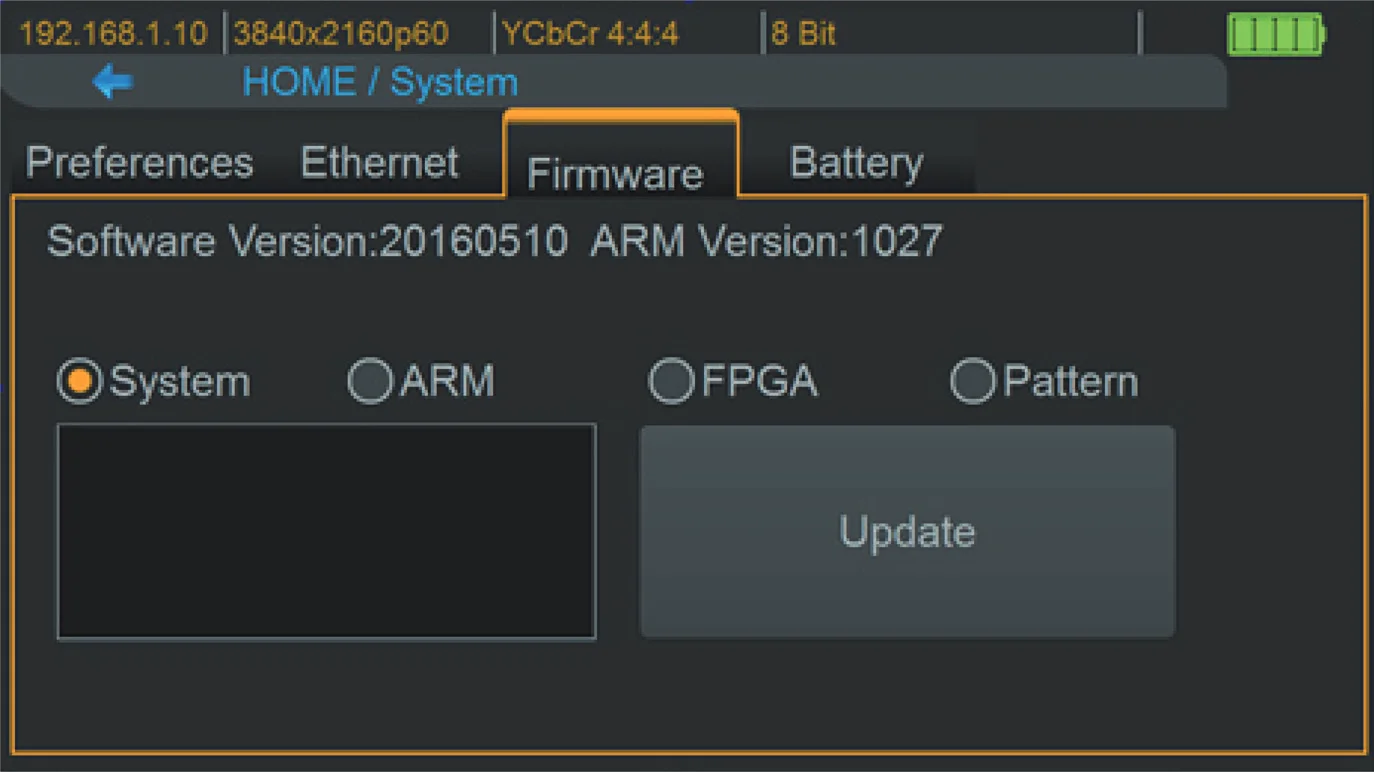
- Make sure the gui.dat and sysyem.dat files are in the root directory of USB.
- Connect the USB Flash Drive on PT-TOOL-500 USB interface.
- Select Firmware button from the System Menu and choose the GUI button.
- Touch the Update button to do firmware update. The process of firmware update will take about 3~5 seconds. While updating, please do not remove the USB Flash Drive.
- After completing the firmware update, please reboot the PT-TOOL-500.
- Select Firmware from the system Menu and choose the System button.
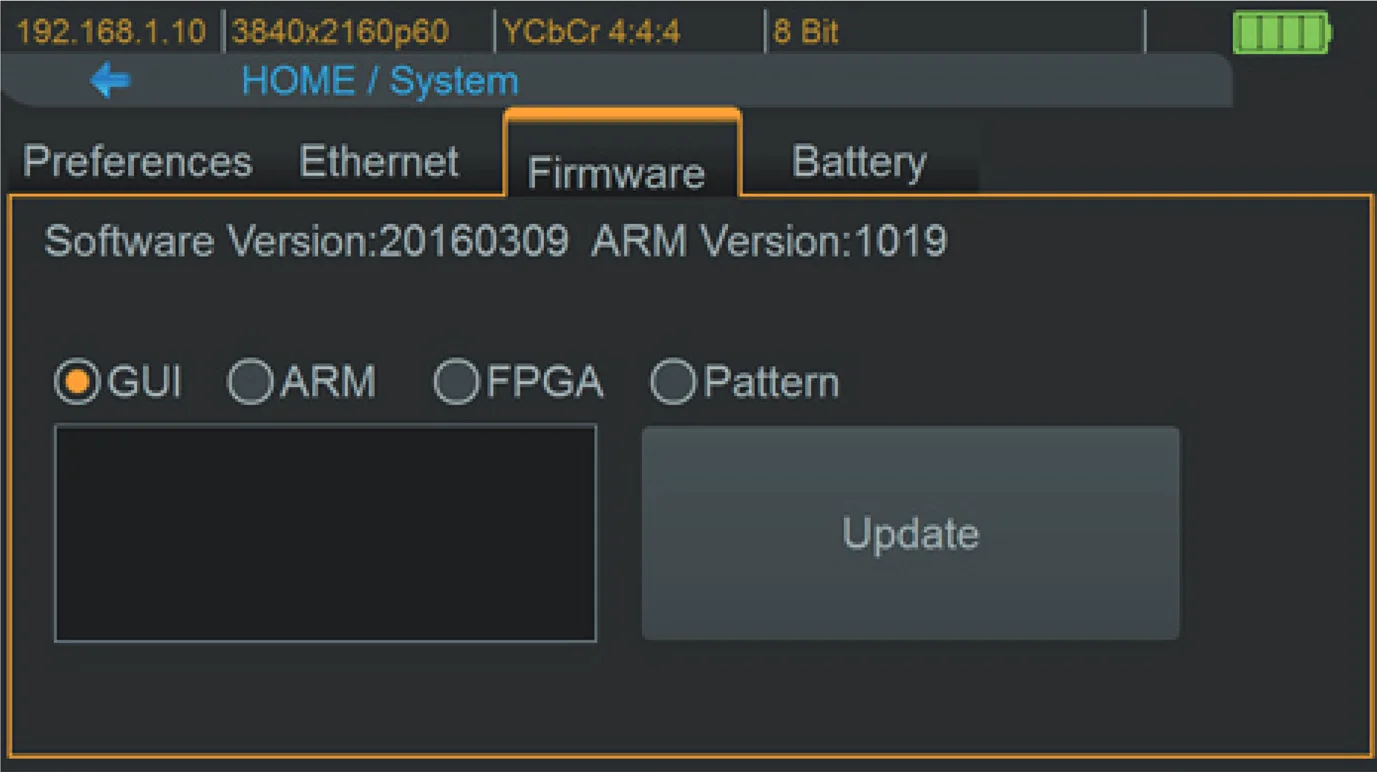
- Touch the Update button to do firmware update. The process of firmware update will take about 3~5 seconds. While updating, please do not remove the USB Flash Drive.
- After completing the firmware update, please reboot the PT-TOOL-500.
System
- Make sure the arm.dat file is in the root directory of USB.
- Connect the USB Flash Drive on PT-TOOL-500 USB interface.
- Select Firmware from the System Menu and choose the ARM button.
- Touch the Update button to do firmware update. The process of firmware update will take about 5~10 seconds. While updating, please do not remove the USB Flash Drive.
- Make sure the fpga.dat file is in the root directory of USB.
- Connect the USB Flash Drive on PT-TOOL-500 USB interface.
- Select Firmware from the System Menu and choose the FPGA button.
- Touch the Update button to do firmware update. The process of firmware update will take about 5~10 seconds. While updating, please do not remove the USB Flash Drive
ARM
FPGA
- Create a folder (folder name is usr_pic) on USB Flash Drive.
- Ensure the file of pattern which user desire to update on the PT-TOOL-500 is in the usr_pic directory of USB Flash Drive. The file suffix is .jpg.
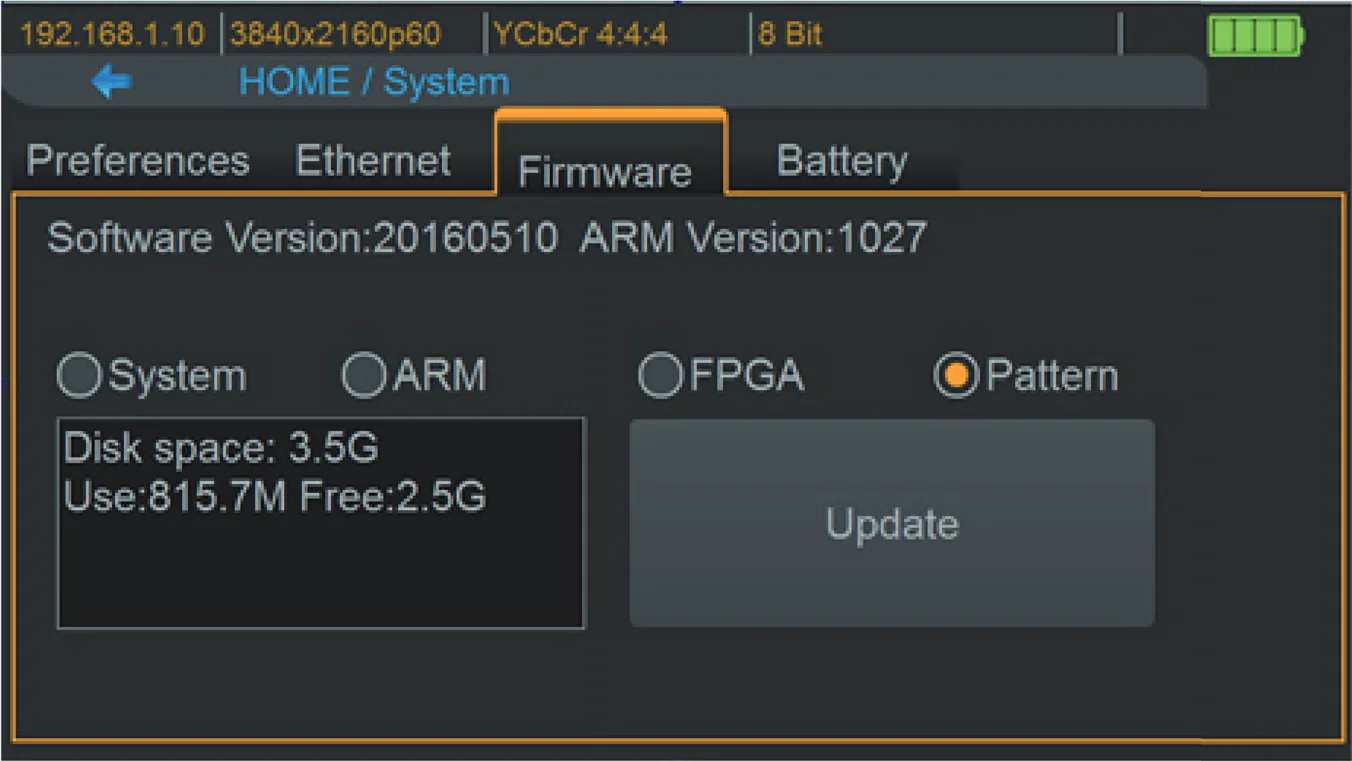
- Before updating the user defined pattern, please confirm the capacity of the PT-TOOL-500.
- Select Firmware from the System Menu and choose the Pattern button.
- Touch the Update button to upgrade the user defined pattern. The process running time will depend on the file size, please wait patiently.
Pattern
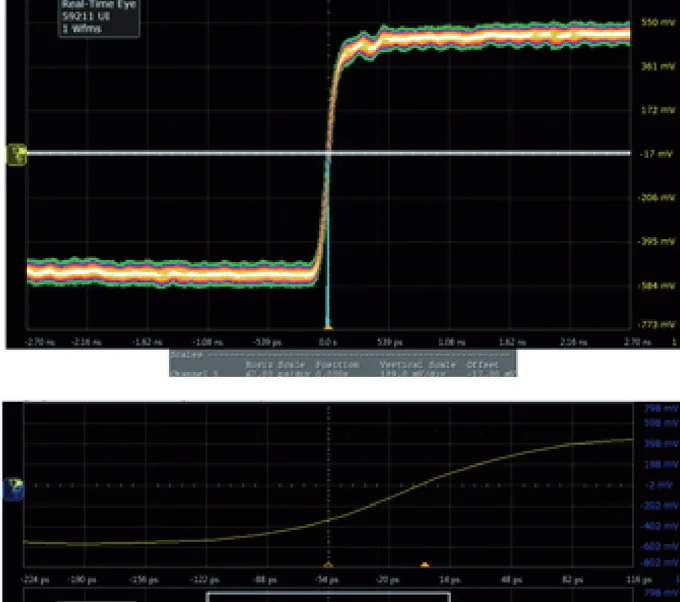
EYE Pattern
Summary of Results
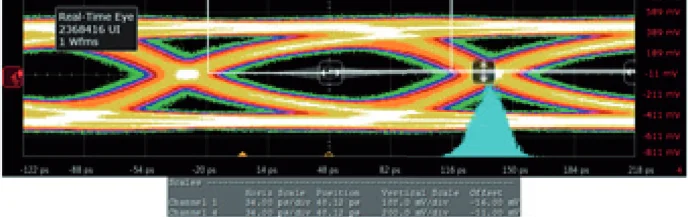
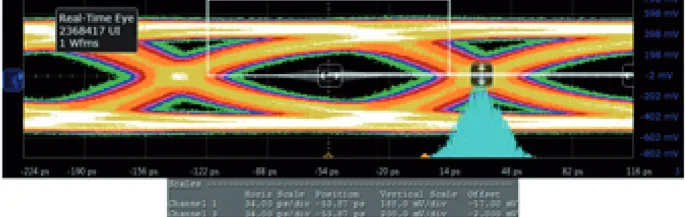
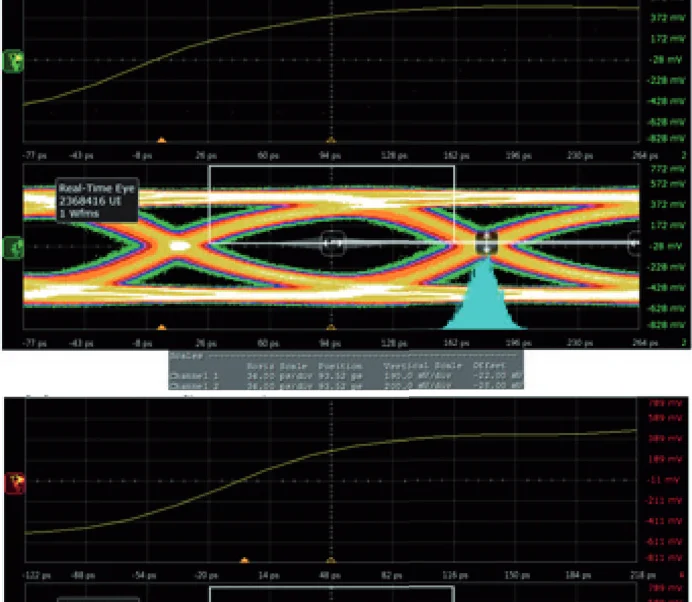
The device had been approved and supported by high performance oscilloscope (MSOX92004A) to make sure quality. The test result of this device (with Simplo battery) is shown as below:
*This result is representative of the PT-TOOL-500. Each PT-TOOL-500’s performance is closed to these results but not exactly the same.
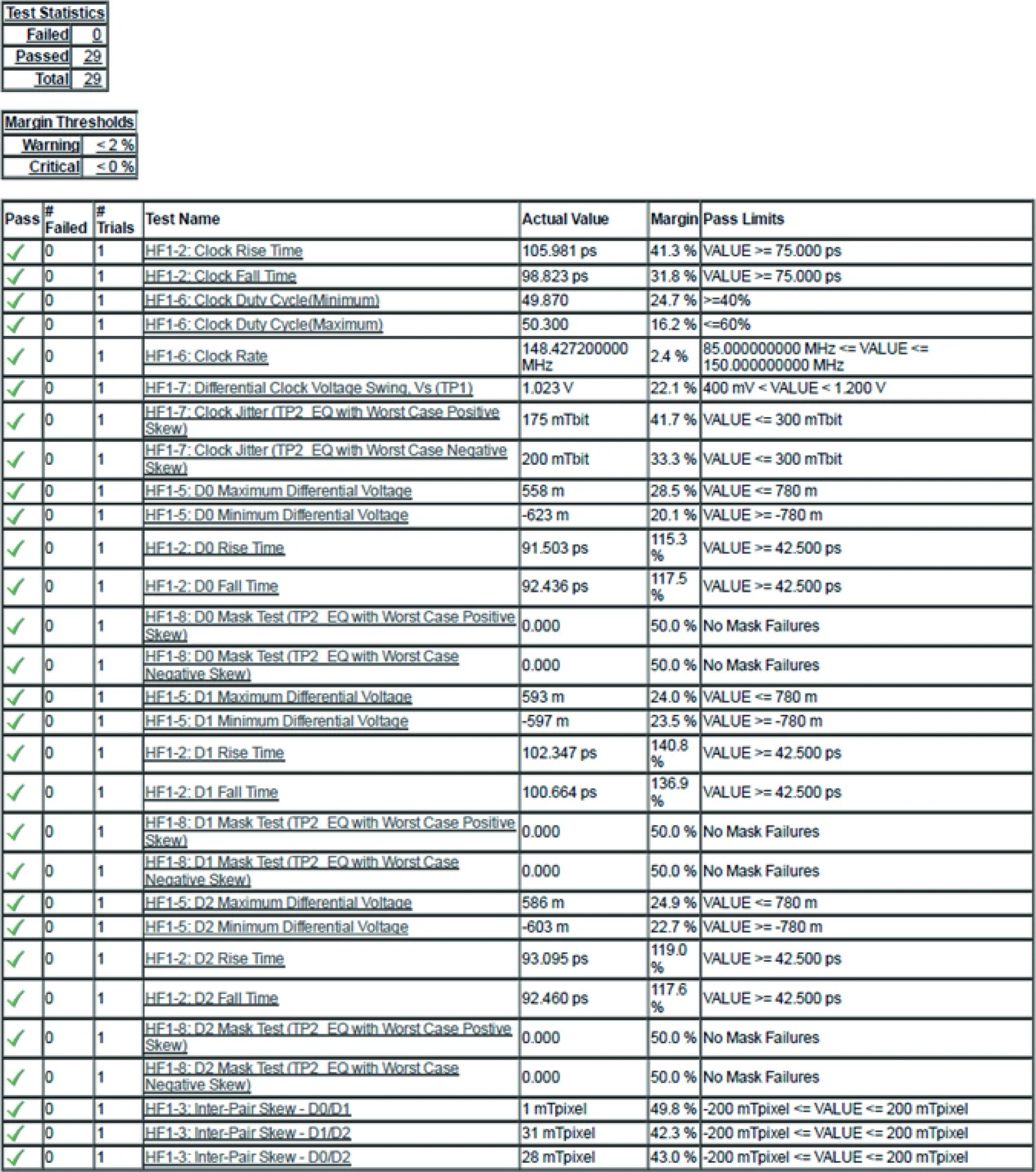
Clock Jitter and eye pattern
Warranty
Limited Warranty
The SELLER warrants the PT-TOOL-500 HDMI 2.0 LCD Test Pattern Monitor to be free from defects in the material and workmanship for 1 year from the date of purchase from the SELLER or an authorized dealer. Should this product fail to be in good working order within 1 year warranty period, The SELLER, at its option, repair or replace the unit, provided that the unit has not been subjected to accident, disaster, abuse or any unauthorized modifications including static discharge and power surges.
Unit that fails under conditions other than those covered will be repaired at the current price of parts and labor in effect at the time of repair. Such repairs are warranted for 90 days from the day of reshipment to the BUYER. If the unit is delivered by mail, customers agree to insure the unit or assume the risk of loss or damage in transit. Under no circumstances will a unit be accepted without a return authorization number.
The warranty is in lieu of all other warranties expressed or implied, including without limitations, any other implied warranty or fitness or merchantability for any particular purpose, all of which are expressly disclaimed.
Proof of sale may be required in order to claim warranty. Customers outside Taiwan are responsible for shipping charges to and from the SELLER. Cables are limited to a 30 day warranty and cable must be free from any markings, scratches, and neatly coiled.
The content of this manual has been carefully checked and is believed to be accurate. However, The SELLER assumes no responsibility for any inaccuracies that may be contained in this manual. The SELLER will NOT be liable for direct, indirect, incidental, special, or consequential damages resulting from any defect or omission in this manual, even if advised of the possibility of such damages. Also, the technical information contained herein regarding the PT-TOOL-500 features and specifications is subject to change without further notice.
Legal & Compliance
Product identification
Model: PT-TOOL-500 – manual version 1.0
Trademarks and disclaimer
Product model and logo are trademarks. All other company and product names mentioned are trademarks of their respective owners. All rights reserved. No part of this publication may be copied or reproduced without prior written permission. We reserve the right to make changes to the device, packaging or manual and accept no liability for misprints.
Disposal of electrical and electronic equipment
WEEE reg. no.: DE 93847290
The crossed-out wheelie bin symbol on the product, packaging or in this manual means that electrical and electronic equipment must not be disposed of with household waste at the end of its life. Hand in old devices free of charge at a public collection point or return them to a distributor obliged to take them back. Remove batteries and lamps that can be removed without destroying the device before handing it in, and delete any personal data stored on the device. Details are regulated by national law. By returning old devices you help protect the environment.
Packaging
Dispose of packaging separately by material (paper/cardboard, plastics) via the local collection systems. Keep packaging material away from children – risk of suffocation. Packaging register LUCID: DE5958616449295.