

 Tech Hub
Safety warnings
Caution: To prevent short circuits, this product should only be used inside and only in dry spaces. Do not expose the components to rain or moisture. Do not use the product close to a bath, swimming pool etc.
Caution: Do not expose the components of your systems to extremely high temperatures or bright light sources.
Caution: In case of improper usage or if you have altered and repaired the product yourself, all guarantees expire. PureLink does not accept responsibility in the case of improper usage of the product or when the product is used for purposes other than specified. PureLink does not accept responsibility for additional damage other than covered by the legal product responsibility.
Caution: This product is not a toy. Keep out of reach of children.
Caution: Do not open the product: the device may contain live parts. The product should only be repaired or serviced by a qualified expert.
Caution: Only connect the adapter to the mains after checking whether the mains voltage is the same as the values on the identification tags. Never connect an adapter or power cord when it is damaged. In that case, contact your supplier.
INTRODUCTION
Congratulations on your purchase of the PureLink CSW300, which allows you to send a connected HD signal wirelessly to your HDTV or HD projector.
The CSW300 is the ideal product for Wireless HD applications. Sometimes you may find that a cabled connection is not suitable, a long HDMI cable is not available or a cabled connection is just not an option. You can use the CSW300 for all of your HD wireless applications, such as home theatre, cross-room HD, meeting rooms or for game room applications.
The CSW300 also includes an easy remote control extension with the IR pass-through function, allowing control of the connected source, such as set-top box, Blu-ray player or other streaming player from the HDMI extender’s receiving end.
You can also connect up to 4 wireless receiver modules (CSW300-RX) to one single transmitter and simultaneously use the loop-through port. The overall system capacity is limited to a maximum of 4 sink devices at once. PureLink products are manufactured with the utmost precision and of top quality. Please read this manual carefully and follow the instructions in order to get the very results from this product.
PACKAGE CONTENT
- CSW300 (Set)
- 1x PureLink CSW300 Transmitter (TX)
- 1x PureLink CSW300 Receiver (RX)
- 4x Antenna
- 1x IR Receiver
- 1x IR Emitter
- 2x Power adapter 5V1A (Micro USB)
- 1x Manual
- CSW300-RX (Receiver)
- 1x PureLink CSW300 Receiver (RX)
- 2x Antenna
- 1x IR Receiver
- 1x Power adapter 5V1A (Micro USB)
- 1x Manual
CONNECTION
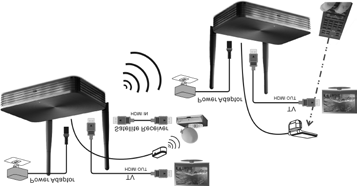
- Use an HDMI cable to connect the HDMI IN of the CSW300 transmitter with a source device. You can use another HDMI cable to connect the HDMI OUT to a display (Loop-Through).
- Use an HDMI cable to connect the HDMI OUT of CSW300 receiver to a display device.
- (Skip this step if you don‘t need IR Extension) Connect the IR emitter to the CSW300 transmitter. Then place the emitter in front of the source device’s IR receiver. Connect the IR receiver to the CSW300 receiver. Then place the receiver probe in place, accessible for your remote control.
- Connect a DC 5V1A power adapter to the power jack (MicroUSB) of the CSW300 transmitter.
- Connect the other DC 5V1A power adapter to the power jack (MicroUSB) of the CSW300 receiver.
- Connection completed and ready to use.
OPERATION
Installation
- Make sure your input AC voltage is compliant to the adapter specifications.
- Only use the power adapters provided with the CSW300. If you use your own adapter, make sure the power output is 5V DC, 1A.
- In a direct line-of-sight, the maximum range of A/V signal transmission can reach up to about 100 meters. This distance can be shortened by obstacles or walls placed between transmitter and receiver. The optimum indoor range is under 100m.
- To ensure a good infrared remote control operation, aim your remote control* at the IR receiver of the CSW300 and press the buttons firmly. For some remote controls it may be necessary to press and hold each button for about a second. The working angle of the IR receiver is +/- 15°.
- The remote controller has to be used within the distance of 0.3m - 5m at a working angle of +/- 15°.
Note: The max. transmission distance (100m) is reliant on optimum conditions. Other devices in the vicinity using the 5GHz band (WiFi networks or other wireless video transmitters) can lead to interference and a significant decrease of the transmission distance or picture stability.
Transmitter & Receiver Pairing MODE
- First press the “MODE” button on the receiver‘s box.
- You will see a message “Connecting through Pairing ... ” on screen.
- Then press the “MODE” button on the transmitter‘s box.
- Connection will be auto-established after once successfully paired. Wait for a few seconds for auto connection.
IR Extending Function
- Make sure the IR emitter has been installed properly on the transmitter‘s box.
- Make sure the IR receiver has been installed properly on the receiver‘s box.
- Use the remote control of your source device to control the source from the receiver‘s box.
Caution: Please do not cover CSW300 transmitter and receiver with any object! Those objects can block the air circulation and cause serious defects and injuries. The warranty will also be void.
LED INDICATION
There are LEDs and a UI for indication of system operation. For more detail, please check the table below:
| Condition | TX | RX | RX UI (TV Screen) |
|---|---|---|---|
| Power on | Solid RED | Solid RED | Startup image |
| Mode (Press the button) | RED Flashing | Solid Blue | Connection through pairing |
| No connection | Blue Flashing | Solid Blue | Scanning |
| Connection & Play | Solid Blue | Solid Blue | Video |
FREQUENTLY ASKED QUESTIONS
1. When there is no picture presented:
Make sure the direct connection from the source device to the sink device works properly. Check, if all connectors are connected well; check if all cables can support the transmission speed. High Speed HDMI cables from PureLink are recommended. Unplug the power cable to restart CSW300.
2. When there is no sound:
First, try to adjust the volume of the connected sink device (TV). Check cable connection to see if it works properly. Check cable to see if it supports video transmission only (DVI) or not. The HDCP encryption may not match very well at first connection; please unplug the power cable to restart CSW300.
3. When there is no 3D effect (Only for 3D hardware):
Make sure the 3D function of the 3D sink device is activated (set to AUTO or 3D ON). Make sure the 3D function of the 3D source device is activated (set to AUTO or 3D ON). Make sure that the power of the shutter glasses (if active 3D) is on. Check the power of CSW300. Make sure, you use the right glasses for the 3D technology in use (active or passive).
4. If the image is unstable or a snowing image shows on screen:
You might get interference from other wireless devices or heavy voltage sources inside the room (ex. WiFi Router, Microwave, air conditioner). Please keep CSW300 away from those sources of interference. The wireless transmission distance may be too far or blocked by a wall or another object. Please place CSW300 in another location where you can get good signal and video quality. Please change the direction of transmitter and receiver to get a better connection.
5. If the wireless connection fails:
Please make sure, the power of the connected source device is turned ON. Unplug the power cable to restart CSW300.
6. IF the IR extending function is not work:
Check, if the IR emitter is connected to the CSW300 transmitter and place the emitter in front of the source device’s IR receiver. The IR extending function of CSW300 works with all 30~60kHz IR remote control systems. Some IR remote control systems use other frequencies or the IR signal pulse is too short and will not work with the IR extending function. In case the IR function is not working due to interference, please re-plug the power to reconnect automatically.
7. “Loop Through” port transmits signal, but CSW300 receiver has no signal:
Ensure that the Rx connected sink device supports higher or equal resolutions as transmitted from Tx. The Rx side will follow the Tx side‘s resolution.
TECHNICAL DATA
Resolutions
| Supported HDTV resolution (HDMI) | 1080p, 720p, 576p, 480p |
|---|---|
| Supported PC Resolution (max.) | Max. 1920 x 1080 @60Hz (16:9), FullHD |
| Supported 3D formats | Frame Packing 1080p@24Hz,720p@50/60Hz |
| Supported audio formats (digital) | Compressed formats, PCM, AC3, Dolby 5.1 |
| Supported standards | HDMI/EDID 1.3, HDCP 2.0 |
Wireless
| Operating frequency | ca. 5GHz |
|---|---|
| Operating range | Up to 100m LOS |
| Latency | Max. 0.5 seconds |
Transmitter
| HDMI input | 1x |
|---|---|
| HDMI output | 1x |
| IR extender | Yes |
| Dimensions | 130.0 x 83.4 x 26.5mm |
Receiver
| HDMI output | 1x |
|---|---|
| Dimensions | 130.0 x 83.4 x 26.5mm |
Infrared
- Supported IR frequency: 30kHz - 60kHz
Power supply
- Switch mode power adapter: 100 - 240V AC @ 50-60Hz, 5V1A DC
Note: The manufacturer reserves the right to make changes in the hardware, packaging, manual and any accompanying documentation without prior notice.
Note: The terms HDMI, HDMI High-Definition Multimedia Interface and the HDMI Logo are trademarks or registered trademarks of HDMI Licensing LLC in the United States and other countries. CSW300 incorporates HDMI® technology.
REQUIREMENTS / CONFORMITY
This product is compliant with the following requirements:
CE-Conformity
With the CE-marking the manufacturer declares that the product complies with the essential requirements and guidelines of the relevant European directives.
- EMC-Directive (2004/108/EC)
- R&TTE- Directive (1999/5/EC)
- LVD- Directive (2006/95/EC)
WEEE-Conformity
- WEEE- Directive (2012/19/EU)
- RoHS- Directive (2011/65/EU)
Dispose off all electronic products by taking it to your local collection point, recycling center for such equipment or your specialized dealer. The product includes hazardous material that can cause harm to health and environment when disposed off incorrectly.
Please help to protect the environment in which we all live.
Note: The respective declarations are available on request from your dealer / reseller. For any questions regarding regulatory compliance of our products, contact your dealer or reseller. Before putting the product into operation please observe the respective country-specific regulations!
Enviromental Information for customers in the European Union
European Directive 2002/96/EC requires that the equipment bearing this symbol on the product and/or its packaging must not be disposed of with unsorted municipal waste.
The symbol indicates that this product should be disposed off separately from regular household waste streams. It is your responsibility to dispose of this and other electric and electronic equipment via designated collection facilities appointed by the government or local authorities. Correct disposal and recycling will help prevent potential negative consequences to the enviroment and human health. For more detailed information about the disposal of your old equipment, please contact your local authorities, waste disposal service or the shop where you purchased the product.
Legal & Compliance
Product identification
Model: CSW300 – manual version 1.0
Warranty and liability
The manufacturer grants the full statutory warranty on all new devices. As the manufacturer has no influence on installation, the warranty only applies to the product itself. If you detect a fault or damage, please contact your dealer and provide your sales slip or invoice as proof of purchase.
The manufacturer is not liable for damage to persons or property caused by improper installation, operation or maintenance not described in this manual. Do not alter or modify the product or its accessories. Any use other than described in this manual is not permitted and voids warranty and guarantee.
Trademarks and disclaimer
Product model and logo are trademarks. All other company and product names mentioned are trademarks of their respective owners. All rights reserved. No part of this publication may be copied or reproduced without prior written permission. We reserve the right to make changes to the device, packaging or manual and accept no liability for misprints.
WEEE reg. no.: DE 93847290
Packaging
Dispose of packaging separately by material (paper/cardboard, plastics) via the local collection systems. Keep packaging material away from children – risk of suffocation. Packaging register LUCID: DE5958616449295.