
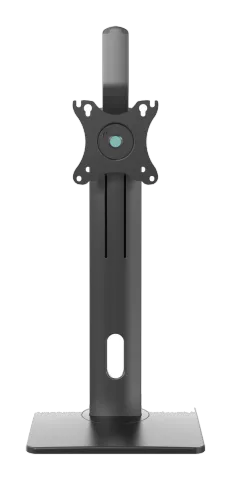
Monitor Desk Stand
PM-OFFICE-ST-01
75x75/100x100
17-32" 43-81cm
2-7kg 4.4-15.4lbs RATED
PureLink GmbH
Von-Liebig-Str. 10 | 48432 Rheine | Germany
Phone: +49 (0) 5971 800 299 0
Note: PureLink GmbH hereby declares that this product complies with Directive 1907/2006/EU and 2011/65/EU.
Read the entire instruction manual before you start installation and assembly. If you have any questions regarding any of the instructions or warnings, please contact your local distributor for assistance.
Caution: Use with products heavier than the rated weights indicated may result in instability causing possible injury.
- These mounting instructions are to be used exclusively for the mounting of the product described herein.
- Please ensure that the mounting surfaces can safely support the combined load of the equipment, arm and attached hardware and components.
- This product is intended for indoor use only. Using this product outdoors could lead to product failure and personal injury.
- Do not use this product for any application not specified in the installation instructions.
- Product is not for use as a shelf, step, or support for human weight or as a grab bar.
- The manufacturer is not liable for damage or injury caused by incorrect mounting, incorrect assembly or use.
- This product must be securely mounted to a supporting structure able to withstand the load. Keep the screws (and any tools) away from children.
- Only use attachments/accessories specified by the manufacturer. Do not modify the product in any fashion.
- Tighten all screws firmly, but do not overtighten. Overtightening screws may damage the parts and reduce their holding power.
IMPORTANT: Always mount the support securely and ensure that all screws and parts are installed and positioned safely.
- Check the product and its hardware regularly for secure attachment and proper function. If any parts are missing or faulty, contact your place of purchase for a replacement. Do not use defective or incomplete parts.
MAINTENANCE: Check that the product is secure and safe to use at regular intervals (at least every three months).
Parts List
| Part | Qty | Specification |
|---|---|---|
| A | x1 | |
| B | x1 | |
| C | x1 | |
| D | x1 | |
| E | x1 | |
| F | x1 | |
| G | x2 | M8x20 |
| H | x4 | M4x6 |
| I | x4 | M4x8 |
| J | x1 | M6x20 |
| K | x1 | 5mm |
| L | x1 | 6mm |
| M-A | x4 | M4x12 |
| M-B | x4 | M5x12 |
| M-C | x4 | D5 |
Step 1
A B G L
Step 2
Caution: To avoid possible injury do not use or operate the handle before the installation is complete.
D E H I C F J
Step 3
M-A M-B M-C
3mm
Too long Too Short
Step 4
K
Note: Adjust to the desired angle then tighten the screws using the Allen key as shown, alternating from each screw as you tighten them.
Legal & Compliance
Product identification
Model: PM-OFFICE-ST-01 – manual version 1.0
Warranty and liability
The manufacturer grants the full statutory warranty on all new devices. As the manufacturer has no influence on installation, the warranty only applies to the product itself. If you detect a fault or damage, please contact your dealer and provide your sales slip or invoice as proof of purchase.
The manufacturer is not liable for damage to persons or property caused by improper installation, operation or maintenance not described in this manual. Do not alter or modify the product or its accessories. Any use other than described in this manual is not permitted and voids warranty and guarantee.
Trademarks and disclaimer
Product model and logo are trademarks. All other company and product names mentioned are trademarks of their respective owners. All rights reserved. No part of this publication may be copied or reproduced without prior written permission. We reserve the right to make changes to the device, packaging or manual and accept no liability for misprints.
Packaging
Dispose of packaging separately by material (paper/cardboard, plastics) via the local collection systems. Keep packaging material away from children – risk of suffocation. Packaging register LUCID: DE5958616449295.