
Introduction
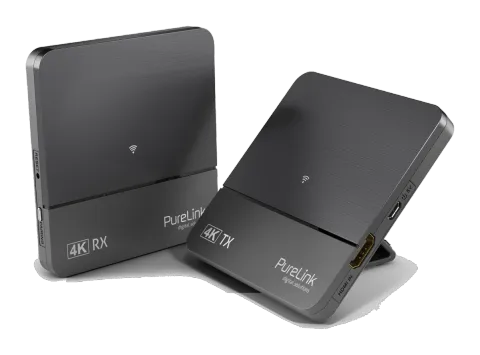
Thank you for purchasing HDMI 4K Wireless Extender. Your satisfaction is very important to us. HDMI 4K Wireless Extender is designed to make the use of your 4K equipment more comfortable and versatile. HDMI 4K Wireless Extender is the ideal product for UltraHD wireless applications. Sometimes you may find that a cabled connection is not suitable, a long HDMI cable is not available, or a cabled connection is just not an option. You can use the HDMI 4K Wireless Extender for your UltraHD wireless applications such as Home Theatre, meeting rooms, or game room applications.
Intended Use
This product is intended for indoor use only. Do not use it outdoors. Contact with moisture, e.g. in bathrooms, must be avoided under all circumstances. For safety and approval purposes (CE), you must not rebuild and/or modify this product. If you use the product for purposes other than those described above, the product may be damaged. In addition, improper use can cause hazards such as short circuiting, fire, electric shock etc. Read the instructions carefully and keep them. Make this product available to third parties only together with its operating instructions.
Intended Countries
Germany
Safety Instructions
Read the operating instructions carefully and especially observe the safety information. If you do not follow the safety instructions and information on proper handling in this manual, we assume no liability for any resulting personal injury or damage to property. Such cases will invalidate the warranty/guarantee.
- The device is not a toy. Keep it out of the reach of children and pets.
- Do not leave packaging material lying around carelessly. These may become dangerous playing material for children.
- Suffocation Risk! Keep packaging materials away from children!
- Protect the product from extreme temperatures, direct sunlight, strong jolts, high humidity, moisture, flammable gases, vapors and solvents.
- Do not place the product under any mechanical stress.
- If it is no longer possible to operate the product safely, take it out of operation and protect it from any accidental use.
- Safe operation can no longer be guaranteed if the product: • is visibly damaged, • is no longer working properly, • has been stored for an extended period in poor ambient conditions or • has been subjected to any serious transport-related stresses.
- Please handle the product carefully. Jolts, impacts or a fall even from a low height can damage the product.
- Also observe the safety and operating instructions of any other devices which are connected to the product.
- Consult an expert when in doubt about the operation, safety or connection of the device.
- This product contains radio frequency transmitters that emit electromagnetic fields. These electromagnetic fields may interfere with pacemakers, defibrillators, and other medical devices. Keep at least 6 inches (approximately 15 cm) of separation between your pacemaker or defibrillator and this product. If you suspect this product is interfering with your pacemaker or any other medical device, stop using it and consult your physician for information specific to your medical device.
- Make sure to observe the polarity and magnitude of the output voltage. Incorrect polarity or excessive voltage input leads to the destruction of the connected electrical appliance.
- Sufficient ventilation is essential when operating the product. Do not cover the product. Never place the product on a table cloth or on a carpet! Place it on a hard, flame resistant base.
- The product should not be used immediately after it has been brought from an area of cold temperature to an area of warm temperature. Condensed water might destroy the product. Wait until the product adapts to the new ambient temperature before use.
- Make sure that the output of the power adapter is not short-circuited.
Delivery Content
- 1x CSW200 Transmitter
- 1x CSW200 Receiver
- 2x Stand
- 2x DC 5V/1A Power Supply (Micro USB)
- 1x User Manual
Features
- Supports wireless transmission of HDMI up to 4K@30p
- No Compression No latency
- Ultra Wide Band 60GHz
- HDCP compliant
- Long distance up to 10m Line of Sight
- Low power consumption
Specifications
| Parameter | Value |
|---|---|
| Supported HDTV resolution (HDMI) | 480P, 576P, 720P, 1080P 24/30/60Hz, 4K 24/30Hz |
| Supported PC Resolution (max.) | Max. 4096 x 2160p@30 |
| Supported 3D formats | Frame Packing 1080p@24Hz,720p@50/60Hz |
| Supported audio formats (digital) | Compressed formats AC3, Dolby 5.1, DTS |
| Supported standards | HDMI, HDCP 2.0, HDMI1.4 |
| Wireless Frequency Band | 60G |
| Operating range | Up to 10m LOS |
| Latency | Max. Near 0 seconds |
| RF Power Output | 28dBm max. / Receive Level -70dBm min. |
| Transmitter HDMI input | 1x |
| Transmitter Dimensions | 95 x 100 x 21.8mm |
| Receiver HDMI output | 1x |
| Receiver Dimensions | 95 x 100 x 21.8mm |
| Power Supply | 2x 100-240V AC @ 50-60Hz, 5V1A DC |
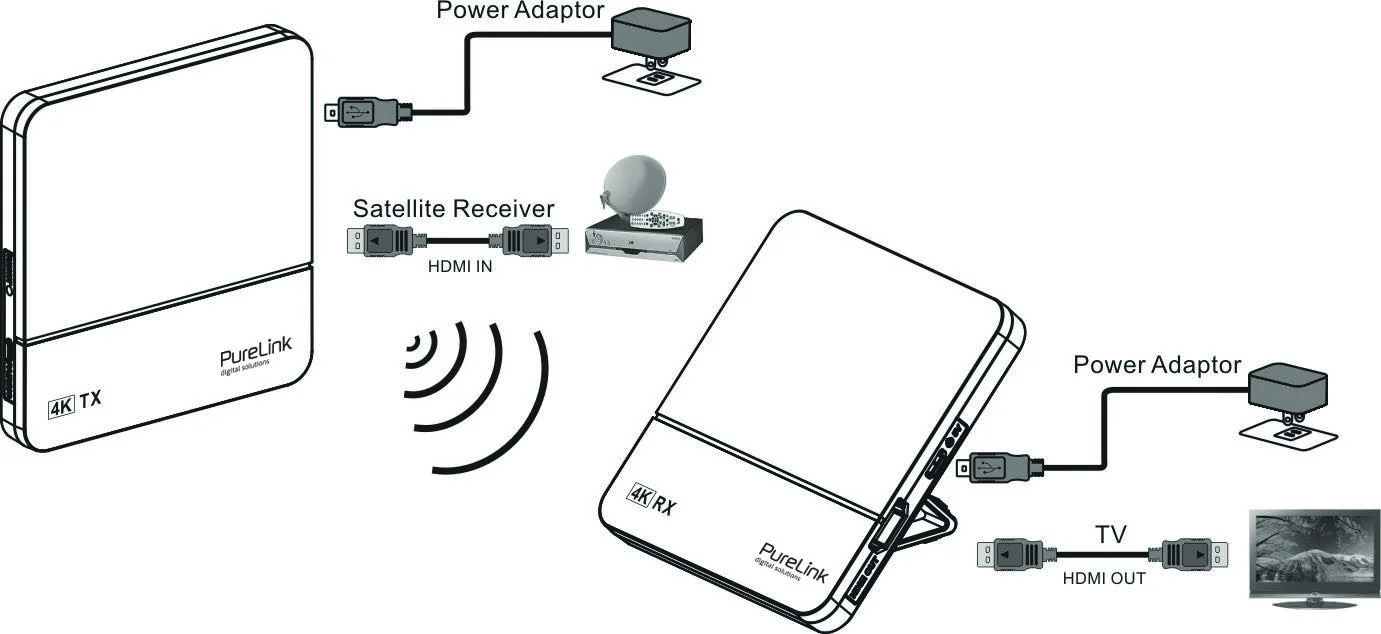
Connection Diagram
Connection
- Use HDMI cable to connect the HDMI IN of CSW200 Transmitter to a 4K Source device (Satellite receiver, CATV STB, BD player, PS4, Xbox)
- Use HDMI cable to connect the HDMI OUT of CSW200 Receiver to a 4K Display device (UltraHDTV, Projector)
- Install the Stand in the most stable state , the stand can put change 45 or 90 degree
- Connect a DC 5V/1A power adaptor to the Power Jack (Micro USB type) of CSW Transmitter and Receiver.
- Connection completed & ready to use.
Note: If no video signal on your display, please pairing the TX and RX first. (Press the PAIRING key of RX box and then press the PAIRING key of TX box).
Interface
Transmitter-Box (Side/Top): HDMI IN, 5V, RESET, PAIRING
Receiver-Box (Side): HDMI OUT, RESET, PAIRING, 5V
INTERFACE
Side TopTransmitter-Box ▲ Receiver-Box ▼ Side
HDMI IN
5V
RESET
PAIRING
HDMI OUT
RESET
PAIRING
5V
Operation
Installation
- Make sure your input AC voltage conforms to the adaptor specifications. (Only use the power adaptor provided with the CSW200. If you use your own adaptor, make sure the output connector is micro USB and power output is DC 5V /1A.)
- With direct line-of-sight, the maximum range of A/V signal transmission can reach up to about 10 metre, and this distance would be shortened by obstacles or walls placed between transmitter and receiver. (The optimum indoor range is less than 10 metre)
TX & RX Pairing Mode
- First Press “PAIRING” key once on the Receiver BOX.
- And then Press “PAIRING” key once on the Transmitter BOX.
- Connection will be auto-established after successfully paired.
LED Indication
| Condition | TX | RX |
|---|---|---|
| Star up Power on & No connection | WHITE LED Flashing | WHITE LED Flashing |
| PAIRING | WHITE LED Flashing | WHITE LED Flashing |
| Connection & Play | LED solid WHITE | LED solid WHITE |
Note: To prevent overheating, please do not cover CSW200 Transmitter and Receiver with any object.
Factory Reset
Press the Reset button and hold it for app. 1 second. When the LEDs flash, the CSW200 is being reset to factory settings. As soon as the LEDs light up white again, the reset is completed. The devices are automatically paired, no further manual pairing is required.
Troubleshooting / FAQ
- When there is no picture presented: Then please make sure that the direct connection from source device to sink device can work properly. Check if all connectors are connected well; check if all cables can support the transmission speed. High Speed HDMI cables are recommended. Unplug the power cable to restart CSW200.
- When there is no sound: Then please try to adjust the volume of TV. Check cable connection to see if it fits properly. Check cable to see if it supports video transmission only (DVI) or it is damaged already. HDCP may not match very well at first connection; please unplug the power cable to restart CSW200.
- If the video is unstable, or snowing image shows on screen: You might get interference from other wireless device or heavy power consumption house ware
Maintenance
There are no components located inside the product that require maintenance. Never open or attempt to dismantle the product.
Maintenance, modifications and repairs are to be performed exclusively by an expert or at a qualified shop.
If you have questions which remain unanswered by these operating instructions, contact our technical support service or other technical personnel.
Cleaning
Before cleaning the product, it must be disconnected from all other connected products.
Only use dry and soft cloth to clean the product housing of the.
Do not use abrasives or solvents.
Do not use any aggressive cleaning agents, rubbing alcohol or other chemical solutions as they can cause damage to the housing or cause malfunctions.
To clean the product, use a soft, dry cloth. Do not apply too much pressure to the housing as this may cause scratch marks.
You can easily remove dust using a soft bristled brush.
Warranty and Liability
The manufacturer guarantees full statutory warranty terms on all new devices.
As the manufacturer has no influence on installation, warranty only applies to the product itself.
If any fault or damage is detected on your product, please contact your dealer and provide your sales slip or invoice as evidence of the purchase, if necessary. Your dealer will repair the fault either on site, or send the device to the manufacturer. You make the work of our technicians considerably easier, describing possible faults in detail – only then can you be assured that intermittent faults, will be found and repaired with certainty!
The manufacturer is not liable for damages to persons or property caused by improper installation, operation or maintenance, not described in this manual.
Do not alter or modify the product or its accessories.
Any use other than described in this user`s manual is not permitted and causes loss of warranty, loss of guarantee, and non-liability.
CE Conformity
PureLink GmbH hereby declares that the CSW200 radio communication system complies with Directive 2014/53/EU.
The full text of the EU Declaration of Conformity is available at the following internet address:
www.purelink.de/ce/4251364718537_CE.pdf
Disposal of the device
WEEE-Reg. No.: DE 93847290
According to the European WEEE directive, any electrical and electronic equipment must not be disposed of along with consumer waste. As a consumer, you are committed by law to deposit electrical and electronic devices at public collecting points or to the dealer for free at the end of the device’s lifetime. Details are regulated in the respective national legislations. The Wheelie Bin symbol on the product, in the manual or on the packaging refers to these terms. With the return of your used devices you actively take part in protecting the environment.
Disclaimer
This product complies with the statutory national and European requirements. All company names and product names are trademarks of their respective owners.
We reserve our right for misprints and changes to the device, packaging or user manual.
The manufacturer reserves the right to make changes in the hardware, packaging, manual and any accompanying documentation without prior notice.
The terms HDMI, HDMI High-Definition Multimedia Interface and the HDMI Logo are trademarks or registered trademarks of HDMI Licensing LLC in the United States and other countries. CSW200 incorporates HDMI® technology.
Legal & Compliance
Product identification
Model: CSW200 – manual version 1.0
Packaging
Dispose of packaging separately by material (paper/cardboard, plastics) via the local collection systems. Keep packaging material away from children – risk of suffocation. Packaging register LUCID: DE5958616449295.