
Introduction
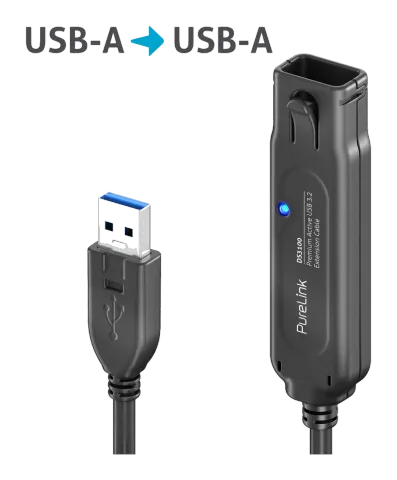
Thank you for purchasing the USB3.1 Gen. 1 Active Extension Cable. The active SuperSpeed USB 3.1 Gen.1 Active Extension Cable is an essential accessory for PC and Mac users to distribute USB peripherals such as hard drives, printers, mice, keyboards and USB hubs behind the desk or across the room. The integrated repeater chipset in the active USB cable is powered via USB to ensure SuperSpeed USB 3.1 Gen. 1 performance over longer distances than a normal USB extension cable. The combination of nickel-plated connectors, bare copper conductors and the shielding made of foil + braid provides superior cable performance and error-free data transmission.
Intended Use
Use is only permitted indoors, not outdoors. Contact with moisture, e.g. in bathrooms or similar environments, must be strictly avoided.
For safety and approval reasons (CE), do not modify and/or alter the product. If you use the product for purposes other than those described above, the product may be damaged. Furthermore, improper use can cause hazards such as short circuit, fire, electric shock, etc.
Please read the user manual carefully and keep it. Provide the product only together with the user manual when passing it on to third parties.
Safety Instructions
Please read the user manual carefully, paying particular attention to the safety instructions. If you do not follow the safety instructions and the instructions for proper handling in this user manual, we do not assume any liability for resulting personal or property damage. In such cases, the warranty/guarantee will also be void.
This product is not a toy. Keep it away from children and pets.
Do not leave packaging material lying around. This could become a dangerous toy for children.
Risk of suffocation! Keep packaging material away from children!
Protect the product from extreme temperatures, direct sunlight, strong shocks, high humidity, moisture, flammable gases, vapors, and solvents.
Do not subject the product to mechanical stress.
Scope of Delivery
- 1x USB 3.1 Gen. 1 Active Extension Cable, Black
- 1x User Manual
Features
- USB 3.1 Gen 1 / 3.0 specification, backward compatible with USB 2.0 / 1.1
- The active extension cable is powered via USB and operates an integrated repeater chipset that ensures SuperSpeed USB 3.1 Gen. 1 performance at longer lengths than a normal USB extension cable.
- Enjoy SuperSpeed USB 3.1 Gen. 1 data transfer rates of up to 5 Gbps.
- The premium USB 3.1 Gen. 1 extension cable features connectors with high strain relief for durability and a firm grip for easy plugging and unplugging.
- The combination of nickel-plated connectors, bare gold-plated conductors and shielding made of foil + braid provides superior cable performance and error-free data transmission.
Specifications
- Connector 1: USB Type A, plug
- Connector 2: USB Type A, socket
- SuperSpeed USB 3.0 with up to 5 Gbit/s data transfer rate
- Plug&Play, no driver installation required
| Cable Length & Daisy-Chain Connections |
|---|
| Article Number Length Daisy-Chain Connection |
| DS3100-0015 0.15m max. 5 connections |
| DS3100-050 5.00m max. 5 connections |
| DS3100-100 10.00m max. 3 connections |
| DS3100-150 15.00m max. 2 connections |
Troubleshooting / FAQ
Step 1
Check whether the device is switched on.
If the device still does not work, proceed to step
Step 2
Reconnect the device with DS3100-X and restart the host.
If the device still does not work, proceed to step 3.
Step 3.
Check the [Device Manager] on the host to verify whether it detects a new USB hub or not. If not, please try another USB port or switch to a different host and try again.
If it still does not work, please contact your dealer.
Maintenance
There are no components inside the product that require maintenance by you; therefore, never open/disassemble it.
Have maintenance, adjustments and repairs carried out exclusively by a qualified technician or specialist workshop.
If you have any questions that are not answered in this user manual, please contact our technical customer service or a qualified expert.
Cleaning
- Before cleaning, disconnect the product from all connected devices.
- Use only a dry, soft cloth to clean the product housing.
- Do not use abrasive cleaners or solvents.
- Under no circumstances use aggressive cleaning agents, cleaning alcohol or other chemical solutions, as this may damage the housing or impair the function.
- To clean, a dry, soft, and clean cloth is sufficient. Do not press too hard on the housing to avoid scratch marks.
Warranty and Liability
The manufacturer grants the statutory warranty on a new product.
Since the manufacturer has no influence on the installation of the product, the warranty only covers the product itself.
If a fault or defect is found on your product, please contact your specialist dealer and, if necessary, present your receipt or invoice as proof of purchase. Your dealer will either fix the fault on site or forward the product to the manufacturer. You make our technicians’ work much easier if you describe any faults in detail – only then can you be sure that even rarely occurring faults are reliably detected and eliminated!
The manufacturer is not liable for personal injury or property damage caused by improper installation, operation, or maintenance not described in this manual.
Do not alter or modify the product and its accessories.
Any use other than described in this operating manual is not permitted and will result in loss of warranty, guarantee, and liability exemption.
CE Conformity
PureLink GmbH hereby declares that this product series DS3100-X complies with Directive 2014/30/EU.
The full text of the EU Declaration of Conformity is available at the following internet address:
www.purelink.de
Device Disposal
WEEE Reg. No.: DE 93 847 290
Electrical and electronic devices must not be disposed of with household waste according to the European WEEE Directive. As a consumer, you are obliged under the ElektroG to return electrical and electronic devices free of charge to the designated public collection points or to the point of sale at the end of their service life. The respective national law regulates details. The symbol on the product, the user manual, or the packaging indicates these regulations. By properly recycling old devices in this way, you make an important contribution to protecting our environment.
Disclaimer
The product complies with the statutory, national, and European requirements. All company names and product designations mentioned are trademarks of their respective owners.
All rights reserved.
We reserve the right to make printing errors and changes to the product, packaging, or manual.
Legal & Compliance
Product identification
Model: DS3100-100 – manual version 1.0
Packaging
Dispose of packaging separately by material (paper/cardboard, plastics) via the local collection systems. Keep packaging material away from children – risk of suffocation. Packaging register LUCID: DE5958616449295.