
Contents, Glossary of terms
Glossary of terms
| Term | Description |
|---|---|
| HDBaseT | Technology used to convert HDMI into a format which can be carried over network cable. |
| IR RX & IR TX | Infrared (IR) Receiver (RX) and Transmitter (TX). The RX ‘receives’ a signal from another remote control and the TX ‘transmits’ it. (See page 12) |
| Tipping Point Compression (TPC) | Video content such as Ultra HD 4K 60 4:4:4 uses up to 18Gbps of data at any one time which is not possible over current HDBaseT technology. HDA makes transmission of 18Gbps content possible using TPC. Visually lossless, TPC only becomes active if HDBaseT’s threshold is breached, hence the term tipping point. |
| XTND transmitter | Part of the XTND pair. The XTND transmitter takes a HDMI signal and converts it into HDBaseT. The transmitter is installed at the source end of the setup. |
| XTND receiver | Part of the XTND pair. The XTND receiver takes the HDBaseT signal made by the XTND transmitter and converts it back to HDMI so that it can be connected to a display. |
In the box, Features
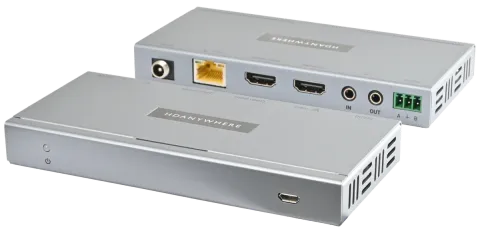
- x1 XTND 4K (100) with TPC Transmitter
- x1 XTND 4K (100) with TPC Receiver
- x2 Infrared Transmitter cable (1.5m) (IR TX)
- x2 Infrared (20-60Khz) Receiver cable (1.5m) (IR RX)
- x1 24V 1A Power Supply with adapters (UK,EU,US,AU)
- x2 Three-Pin Phoenix Connector
- x4 Mounting Brackets
- x1 User Manual
| Name | XTND 4K (100) with TPC |
|---|---|
| Product code | XTND4K1002TPC |
In the box
Caution: For optimum performance and safety, please read these instructions carefully before connecting, operating or configuring this product. Please keep this manual for future reference.
Note: Surge protection is recommended
This device contains sensitive electrical components that may be damaged by electrical spikes, surges, electric shock, lightning strikes, etc. The usage of surge protection systems is recommended in order to protect and extend the life of your system.
Features
- Supports video picture formats up to 4K@60Hz (4:4:4) including HDR and Dolby Vision*.
- Supports 18Gbps bandwidth
- 4K up to 100m (328ft)
- Digital audio support up to and including Dolby Atmos and DTS:X
- Audio extraction over stereo (source audio).
- Bi-directional IR & RS232
- CEC
- Bi-directional Power
- *Only Dolby Vision Low Latency Mode is supported at 60Hz over HDBaseT.
Specifications
| Parameter | Value |
|---|---|
| HDMI version | HDMI 2.0b |
| HDCP compliance | HDCP 2.2 & HDCP 1.4 |
| Video bandwidth | 18Gbps |
| Video resolution | Up to 4K@60Hz (4:4:4) with HDR* |
| Colour space | RGB, YCbCr 4:4:4, YUV 4:4:4, YCbCr 4:2:2/4:2:0 |
| Colour depth | 8-bit, 10-bit, 12-bit (1080p@60Hz) 8-bit (4K@60Hz) |
| HDR formats | HDR10, HDR10+, Dolby Vision, HLG (4K@30Hz)* |
| Video & audio I/O | Input: x1 HDMI Outputs: x1 HDMI, x1 HDMI (Mirror), x1 3.5mm Stereo Jack |
| Transmission distance | 1080p 150m (492ft) 4K 100m (328ft) |
| HDMI audio formats | PCM 2.0 / 5.1 / 7.1, Dolby Digital / Plus / EX / True HD / Atmos, DTS, DTS-EX, DTS-96 / 24, DTS High Res, DTS-HD Master Audio, DTS-X |
| Stereo audio formats | PCM 2.0 |
| Infrared | 20Khz - 60Khz |
| Parameter | Value |
|---|---|
| ESD protection | ±8kV (Air-gap discharge) ±4kV (Contact discharge) |
| Power consumption | 9.36W (Maximum) |
| Power supply | 24V 1A |
| Operating temperature | 0°C - 40°C / 32°F - 104°F |
| Storage temperature | -20°C - 60°C / -4°F - 140°F |
| Relative humidity | 20 - 90% (Non-condensing) |
| Housing | Aluminium |
| Colour | Grey (Carbonite) |
| Dimensions (W/D/H) mm | Transmitter: 140 x 65 x 18 Receiver: 140 x 65 x 18 |
| Weight | Transmitter: 124g Receiver: 124g |
| Package weight | 790g |
*Only Dolby Vision Low Latency Mode is supported at 60Hz over HDBaseT.
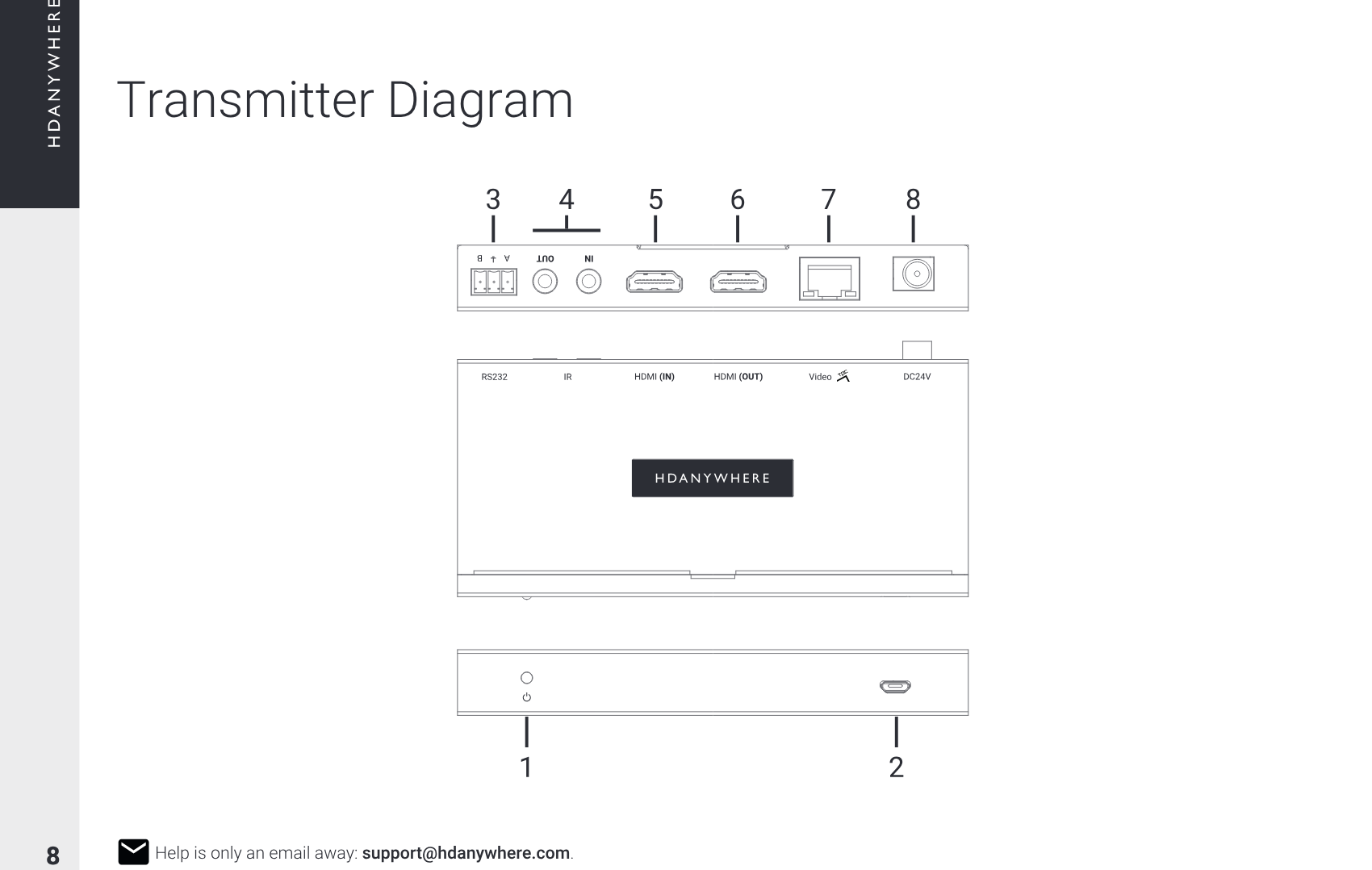
XTND 4K (100) with TPC transmitter port description
Transmitter Diagram
1
3 5 6 874
2
Description
- Power: Indicator light. If this light is on and solid then the XTND transmitter has power.
- Firmware: Micro USB port to update XTND firmware.
- RS232: Connect the three-pin phoenix connector to this port to send RS232 commands to the XTND receiver or vice-versa.
- IR (IN) / (OUT): Connect an IR TX to the “IR OUT” to enable remote (IR) control of any AV device local to the XTND transmitter. Connect an IR RX to the “IR IN” port to receive an IR command from a remote control to pass through to the XTND receiver.
- HDMI (IN): HDMI video input.
- HDMI (OUT): HDMI video output.
- VIDEO TPC: HDBaseT (RJ45) video output port. 18Gbps video will pass through using TPC. The HDBaseT port has two indicator lights. Left light: solid means connection between XTND transmitter and XTND receiver is good. Flashing means that the connection is poor. Off means that there is no connection detected. Right light: solid means HDCP is detected. Flashing means there is no HDCP. Off means no HDMI signal is detected.
- DC24V: Connect the supplied power supply to this port to provide power to the XTND transmitter and receiver.
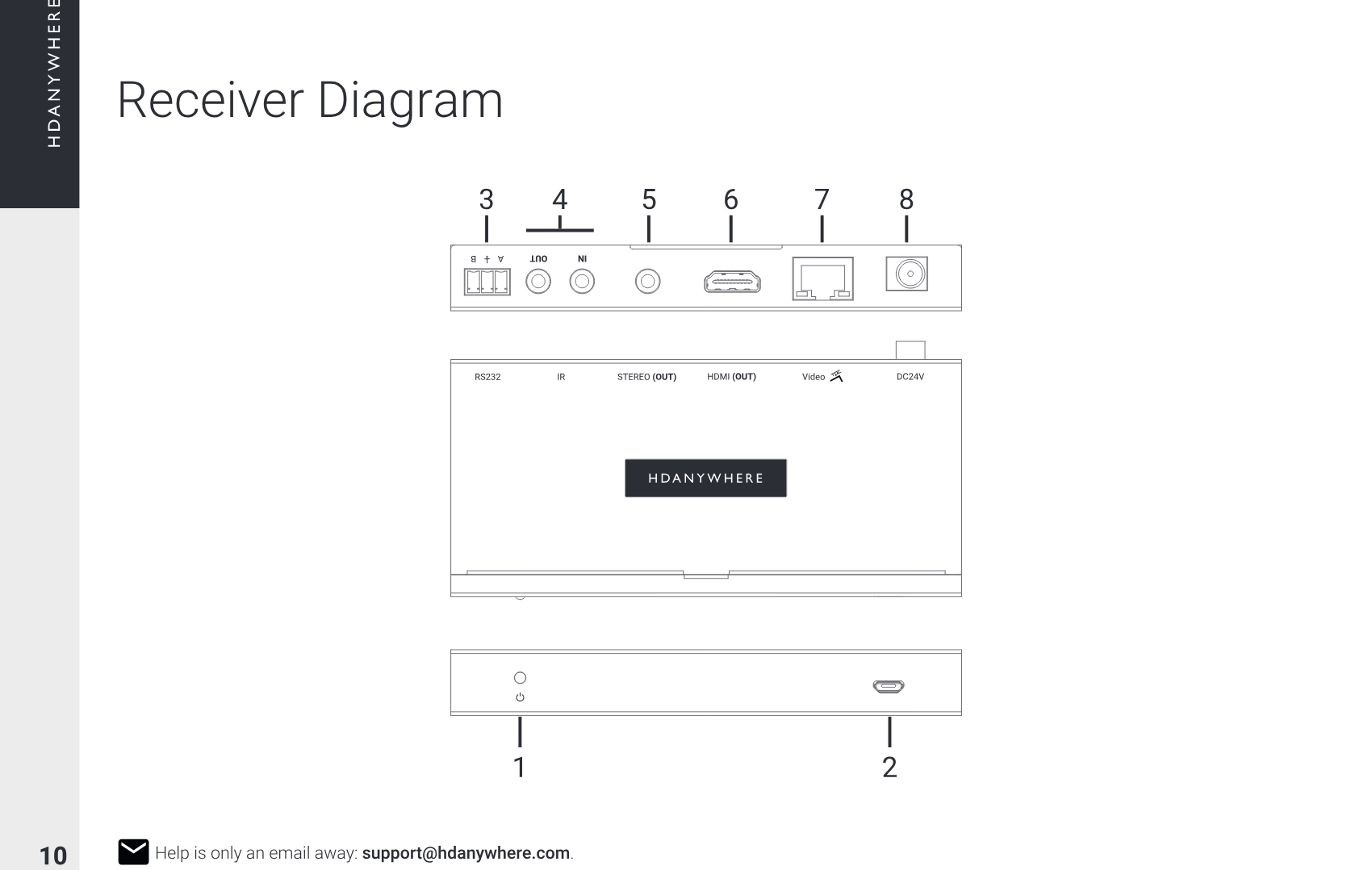
XTND 4K (100) with TPC receiver port description
Receiver Diagram
1
3 5 6 874
2
Description
- Power: Indicator light. If this light is on and solid then the XTND receiver has power.
- Firmware: Micro USB port to update XTND firmware.
- RS232: Connect the three-pin phoenix connector to this port to send RS232 commands to the XTND receiver or vice-versa.
- IR (IN) / (OUT): Connect an IR TX to the “IR OUT” to enable remote (IR) control of a display local to the XTND receiver. Connect an IR RX to the “IR IN” port to receive an IR command from a remote control to pass through to the XTND transmitter.
- Stereo (OUT): Outputs 2ch stereo (not downmixed) extracted from the HDMI (IN) on the XTND transmitter.
- HDMI (OUT): HDMI video output. Connect to your display to provide a picture.
- VIDEO TPC: HDBaseT (RJ45) video output port. 18Gbps video will pass through using TPC. The HDBaseT port has two indicator lights. Left light: solid means connection between XTND transmitter and XTND receiver is good. Flashing means that the connection is poor. Off means that there is no connection detected. Right light: solid means HDCP is detected. Flashing means there is no HDCP. Off means no HDMI signal is detected.
- DC24V: Connect the supplied power supply to this port to provide power to the XTND receiver and transmitter.
IR (Infrared) control, Testing IR works
IR (Infrared) control
XTND can send IR signals bi-directionally between the transmitter and receiver to control almost any AV device. Using this feature will allow you to use a remote control at either end of the XTND setup and pass that IR command from your display location back to the XTND transmitter or vice-versa.
Sending IR commands from a display ‘back’ to the XTND transmitter
To send commands in the other direction (from the source / XTND transmitter) to a display, simply follow the process above but swap any instance of an XTND transmitter with a XTND receiver.
- Connect an IR TX to port labelled “IR (OUT)” on the XTND transmitter.
- Place the IR TX bud (small tear drop part) in front of the IR window of the device that you wish to control.
- Connect an IR RX to port labelled “IR (IN)” on the XTND receiver.
- Place IR RX in line-of-sight of the remote control.
IR Transmitter (IR TX)
IR Receiver (IR RX)
1.5m
NC
Ground
Signal
Signal
Power
Power
Testing that IR works
This section aims to verify that your XTND’s IR control system is setup correctly and assumes that all other setup has been followed as per the instructions laid out in this manual. Please refer to the XTND wiring diagrams in this document to ensure that your setup matches that before proceeding with the verification below.
Testing operation from a display ‘back’ to the XTND transmitter
Start this test by ensuring that your XTND system is powered on and your source device (connected to your XTND transmitter) is being correctly displayed on screen. Check that your IR cabling is correctly connected to your XTND system (page 12) and that your remote control has a clear line-of-sight to the IR RX. Point your remote at the IR RX and test a remote control command for your source device. You should notice that it responds as if the source device was directly in front of you. If it worked then you have setup IR control correctly. Repeat this step at the XTND transmitter end to confirm control over displays.
Cabling
Currently you can use Cat6, Cat6e, Cat6a, Cat7 or Cat7a with XTND. Cat5e may work, but is not recommended, due to its limited bandwidth capabilities.
Optimum performance
Whichever network cable type you choose, ensure that the main wiring architecture is ‘solid core’ and not stranded ‘patch’ cabling. Patch cabling can be used for the last few metres of a run (e.g wallplate) but should be avoided over longer runs as signal transfer over stranded cores is significantly impacted. The use of pre-made leads is not recommended unless you can be absolutely sure of their construction credentials (i.e. solid core 568B). For optimum performance, use a single piece of Cat cable terminated directly at the transmitter and the receiver ends. Make sure to use the correct connector types (i.e. RJ45 solid core) crimp connectors.
Shielded cables
Shielded FTP cable is not a stipulation. However, if you are using this type of cable ensure compatible shielded accessories are used. Failure to terminate cable screen at all points can induce interference rather than eliminate it.
Patch panels and wall plates
If patch panels are terminated correctly then there is a minimal loss of distance. The use of wallplates and patch panels has the potential to cause increased resistance on the cable introducing pinch points for signal transmission and could reduce transmission lengths. TIP: Instead of using RJ45 wallplates use brush plates.
HDMI cabling
HDANYWHERE recommends using suitably robust and good quality HDMI cables. It is not advised to use passive HDMI cables over 5 metres in length either on the inputs or the outputs of the XTND system. Where HDMI cables longer than 5 metres are required, HDA recommends utilising its own brand of long distance HDMI cables or a suitable alternative.

Terminate using RJ45 connectors to 568B wiring standard.
1 2 3 4 5 6 7 8
12345678
Note: DO NOT USE ANY COPPER CLAD ALUMINIUM (CCA) Cat 6/7 CABLE.
Example wiring diagram, Power up sequence

Example wiring diagram
Note: This XTND system has been designed so that it can be installed in multiple ways. The purpose of the diagram is to illustrate a typical/example setup and assumes that you are already familiar with the basics of wiring and infrastructure. If you are unsure how you might install this device in to your property then contact support@hdanywhere.com or contact a HDA Pro (https://hdanywhere.com/dealers-and-installers/) for further assistance.
We have detailed a setup to show how the main feature-set of this XTND system could be used and demonstrated together.
In this diagram, an Apple TV is being extended to a projector with an additional mirrored output supplied to a local TV nearby. The projector is controlled by sending commands from its native remote control through the XTND system and reproduced at the XTND receiver location providing distance remote control of the projector. Audio is being extracted at the source and is carried to the XTND receiver where it is output as 2ch stereo (not downmixed) in to speakers.
- HDMI Cable
- Ethernet Cable
- 3.5mm Stereo
- HDBaseT
- IR RX/TX Cable
- Speaker Cable
Power up sequence
- Ensure that all devices are turned off.
- Connect HDMI source to “HDMI (IN)” port on the XTND transmitter.
- Connect the XTND transmitter and receiver together by using Cat 6/7 cable connected to the each end of the “Video TPC” port.
- Connect a display to the “HDMI (OUT)” port on the XTND receiver.
- If any devices require IR control, ensure that IR is connected at this stage as well (page 12).
- Plug in the supplied power lead in either the transmitter or receiver location. XTND will automatically power on. XTND power indicator LEDs should be lit and solid.
- Turn on the source device followed by the display.
- Ensure that your display is set to the correct AV channel.
- A picture should now be displayed.
Year Product Guarantee
2 Year Guarantee
WHO WE ARE
We are HD CONNECTIVITY LTD trading as HDANYWHERE (“HDA”), a limited company registered under number 06046737 in England and Wales with its registered offices at The Haysfield, Malvern, WR14 1GF, United Kingdom.
OUR GUARANTEE TO YOU
We, HDANYWHERE warrant to you, the end user of the HDA hardware (the “Products”) that on the date of delivery of the Products to you, and for a period of 2 years from that date of delivery, the Products shall:
- match any description that has been provided to you;
- be free from any significant defects in their design, the materials used to make them, and the way they are made;
- be of satisfactory quality (within the meaning of the Consumer Rights Act 2015); and
- be fit for any purpose held out by us.
This 2 year period, or, if the period has been extended to 3 years in accordance with paragraph 3, will be the “Guarantee Period”. We offer this guarantee to all our customers who are resident and have an address in Great Britain and Northern Ireland.
EXTENDING YOUR GUARANTEE (NOT APPLICABLE TO ANY XTND)
On registering your Products with the HDA Cloud, the guarantee offered in paragraph 2 by us will automatically extend for a period of one year, provided that your registration takes place within 30 days from the date of delivery. The one year guarantee extension starts automatically from the date that the original 2 year guarantee ends.
HOW TO CLAIM ON YOUR GUARANTEE AND YOUR REMEDIES
Subject to paragraphs 5 and 6 of this guarantee, Your sole remedies under Our guarantee to You are as follows:
- Up to 30 days: we will repair or replace your Products or provide you with a full refund of the price of the defective Products at your option.
- Up to 6 Months: we will repair or replace your Products. If we are unable to repair or replace your Products we will provide you with a full refund of the price of the defective Products.
- Up to 2 (3) Years: we will repair or replace your Products. If we are unable to repair or replace your Products we will provide you with a partial refund of the price of the defective Products based upon the devaluation of the Products since the time of purchase.
- give us notice in writing of your intention to claim under the guarantee during the Guarantee Period, and do so within a reasonable time after finding that some or all of the Products do not comply with the guarantee set out in paragraph 2;
- show that the Products that you claim are defective, have been examined by a HDA Pro or other authorised or suitably qualified installer, and that they have confirmed in writing that the suspected defect in the Products stems solely from a fault in the HDA hardware;
- give us a reasonable opportunity to examine the Products in question;
- provide us with an order number and a dated sales or delivery receipt from an HDA Distributor, HDA Pro or other authorised dealer, reseller or installer of the Products.
- obtain from us in advance of returning the Products a return merchandise authorisation and/or case number ; and
- (if asked to do so by us) return such Products to our place of business at our cost.
CIRCUMSTANCES WHERE YOUR GUARANTEE DOESN’T APPLY
- If you make any further use of the Products after giving us notice of an issue in accordance with paragraph 5;
- the defect arises because you failed to follow our oral or written instructions as to the storage, installation , use and maintenance of the Products;
- the defect arises as a result of your use of the Products with any other software or hardware that is not compatible with the Products;
- the products are used by you for any commercial purpose, including rental or demonstrative purposes;
- you alter or repair the Products without the written consent of HDA;
- the defect arises as a result of an act of god, fair wear and tear, or your misuse, abuse, unreasonable use, wilful damage, negligence, or abnormal storage of the Products or by any other causes unrelated to defective hardware or manufacturing;
- where the serial number has been altered, defaced or removed;
- where the warranty seal on the system has been altered, defaced or removed; or
- where the Products differ from their description as a result of changes made to ensure they comply with applicable statutory or regulatory requirements.
TRANSFERRING YOUR GUARANTEE TO SOMEONE ELSE
HDA will not accept any liability under such guarantee unless you are the original customer or can produce a letter or chain of letters from the original customer and subsequent customers (where appropriate) transferring the benefit of the guarantee to you.
PRODUCTS THAT ARE NOT COVERED BY THIS GUARANTEE
This guarantee does not cover products sold and clearly marked “as is”, “B-grade”, or with faults. This guarantee does not apply to any system software that is preinstalled in the HDA hardware, or is subsequently provided via update or upgrade releases. Any and all HDA software is licensed to you under the terms of a separate end user licence agreement found here: https://hdanywhere.com/legals
HOW THIS GUARANTEE WORKS WITH OUR EULA
We may void this guarantee if we reasonably believe that the HDA system has been used in a manner that violates terms of our separate End User Licence Agreement (EULA) for the HDA software. You assume all-risk and liabilities associated with the use of third party products in conjunction with the Products.
YOUR STATUTORY RIGHTS
This guarantees is in addition to your statutory rights (including under the Consumer Rights Act) which are not affected by this guarantee
GENERAL TERMS OF THIS GUARANTEE
- Except as provided in this guarantee, we shall have no liability to you in respect of the Products’ failure to comply with the guarantee set out in paragraph 2.
- We reserve the right to amend or withdraw this guarantee at any time although for the avoidance of doubt any guarantees that are in existence at such a time will be honoured.
- These Conditions shall apply to any repaired or replacement Product supplied by us.
GUARANTEE CONTACT INFORMATION
To contact (support@hdanywhere.com) or call HDANYWHERE Technical Support (call charges will depend on your telephone provider. Please check with your operator for exact charges). The team is available 9am - 5pm weekdays. To help us handle your query promptly, please have your invoice number and model SKU and serial ready.
Important information
Hereby, HDANYWHERE declares that this HDMI connectivity device is in compliance with the essential requirements and other relevant provisions of the following Directives: 2006/95/EC (LVD Directive); 2004/108/EC (EMC Directive); 1999/5/EC (R&TTE Directive). The full text of the EU declaration of conformity is available in the compliance section at HDANYWHERE.com/legals.
In some areas, the disposal of certain electronic devices is regulated. Make sure you dispose of or recycle your device in accordance with your local laws and regulations.
Conformity, Hire a HDA Pro
If cabling infrastructure, installation and control seem like too much to absorb and learn then why not hire a HDA Pro to do the work instead for you? Having your XTND system professionally installed should help to guarantee the system’s long-term performance and ensure that it blends neatly with your decor.
Find a HDA Pro anywhere in the world today https://hdanywhere.com/dealers-and-installers/

Let us know what you think. We would love to hear how we could further improve our products and services. If we can make something better, please let us know! support@hdanywhere.com
Copyright © HDANYWHERE. HDANYWHERETM is a trading name of HD Connectivity Ltd. Registered in England & Wales 06046737 VAT 913222367 HDANYWHERE assumes no responsibility for any inaccuracies that may be contained in this document. In no event will HDANYWHERE be liable for direct, indirect, special, incidental, or consequential damages resulting from any defect or omission in this document, even if advised of the possibility of such damages.
Legal & Compliance
Product identification
Model: HDA-258940 – manual version 1.0
Trademarks and disclaimer
Product model and logo are trademarks. All other company and product names mentioned are trademarks of their respective owners. All rights reserved. No part of this publication may be copied or reproduced without prior written permission. We reserve the right to make changes to the device, packaging or manual and accept no liability for misprints.
Disposal of electrical and electronic equipment
WEEE reg. no.: DE 93847290
The crossed-out wheelie bin symbol on the product, packaging or in this manual means that electrical and electronic equipment must not be disposed of with household waste at the end of its life. Hand in old devices free of charge at a public collection point or return them to a distributor obliged to take them back. Remove batteries and lamps that can be removed without destroying the device before handing it in, and delete any personal data stored on the device. Details are regulated by national law. By returning old devices you help protect the environment.
Packaging
Dispose of packaging separately by material (paper/cardboard, plastics) via the local collection systems. Keep packaging material away from children – risk of suffocation. Packaging register LUCID: DE5958616449295.