
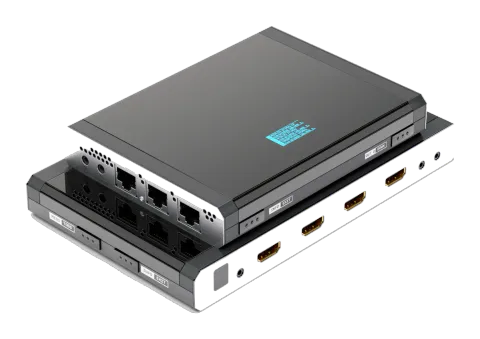
TX Overview
Team HDfury would like to thank you personally for purchasing the 4K Maestro TX!
This unique HDMI2.0b and HDCP2.3 HDBaseT device supports up to 4 inputs for true full 4K60 4:4:4 600MHz 18Gbps bandwidth signals over HDMI or HDBaseT transmission up to 330ft. It will allow you to solve any HDCP error, extract full HDMI audio and ARC/eARC up to Atmos HBR over TrueHD from ARC and eARC TVs to feed older AVR and Matrix any SD/HD/FHD/UHD/HDR/DV or PC signals up to 600MHz. Upscale or downscale any channel individually, display relevant information on OLED/OSD, select between multiple edid banks for each inputs. Inject, replace or translate HDR metadata and AVI infoframe. It is also capable of auto switching any sources including X1X, ATV4K, Shield, etc… Based on incoming content type it can send relevant RS232 commands to any RS232 controllable display. Control can be completed with IR codes, push buttons on the unit, via RS232 (MAC/WIN/Linux) or through embedded Webserver (for any web browser based device such as MAC/WIN/Linux computer or Android/iOS phones, tablets and others).
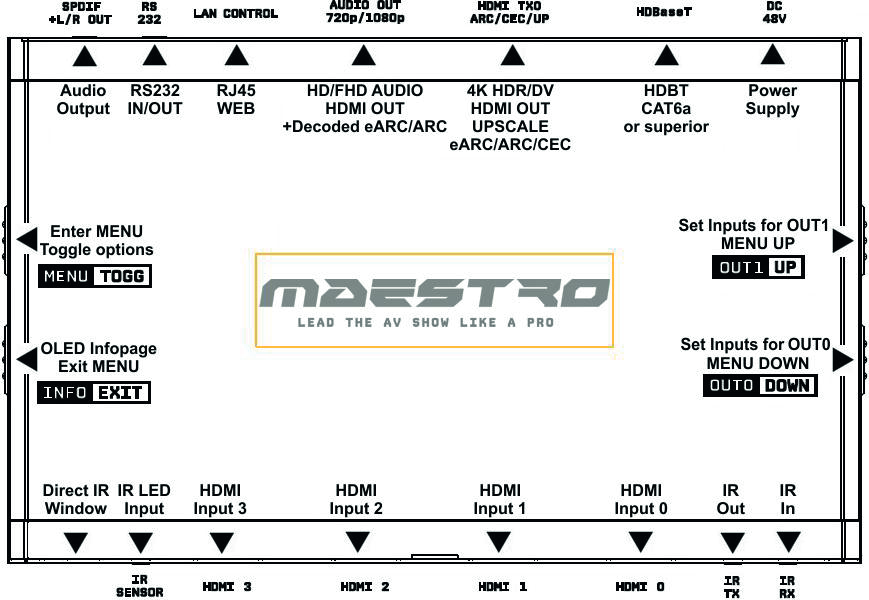
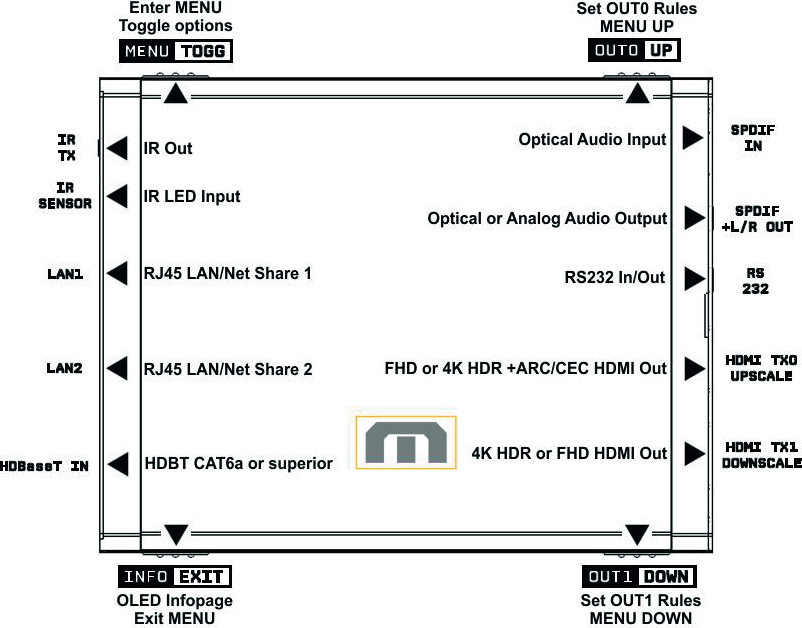
RX Overview
Team HDfury would like to thank you personally for purchasing the 4K Maestro RX!
This unique HDMI2.0b and HDCP2.3 HDBaseT RX device supports true full 4K60 4:4:4 600MHz 18Gbps bandwidth signals. Self-powered by Maestro TX thru POE, one HDbaseT input cable is enough to transmit Audio, IR signals, RS232, video signals and share Ethernet thru LAN Hub embedded. It will allow you to solve any HDCP error, Split or Matrix any SD/HD/FHD/UHD/HDR/DV or PC signals up to 600MHz, scale up or scale down any channel individually, display relevant information on OLED/OSD, Inject Infoframe and more. Control can be completed with IR codes, push buttons on the unit, via RS232 (MAC/WIN/Linux) or through embedded Webserver (for any web browser based device such as MAC/WIN/Linux computer or Android/iOS phones, tablets and others).
When not in use Maestro RX automatically goes in Power Saving mode to run cooler and save energy.
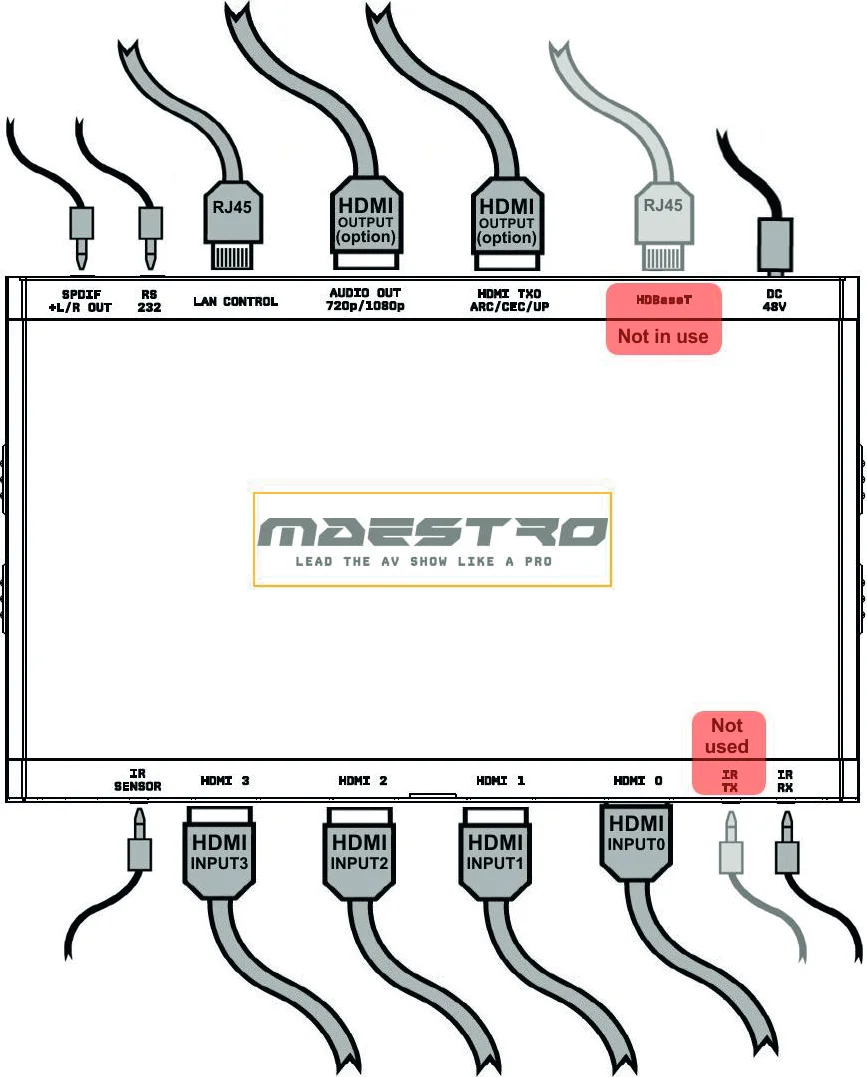
Connecting Cables to TX Central for a standalone use (without RX unit)
- Connect Power connector from Power supply (110-240V 1.2A IN & 48V 1A OUT).
- Connect a source via HDMI input cable to ANY HDMI input.
- Connect any other HDMI, sound, IR or RS232 cable that you might need (optional)
- HDbaseT and IR TX output shall not be used or connected (In RED on the above pic.)
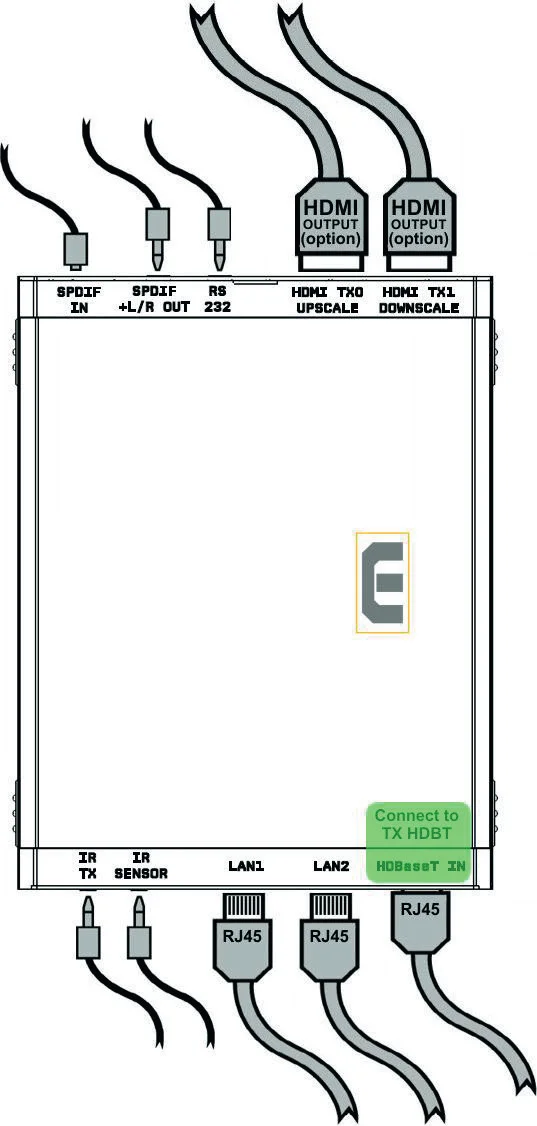
Connecting Cables to TX Central
- Connect Power connector from Power supply (110-240V 1.2A IN & 48V 1A OUT).
- Connect a source via HDMI input cable to ANY HDMI input.
- Connect any other HDMI, sound, IR or RS232 cable that you might need (optional)
- Connect a RJ45 network cable CAT6a or superior between HDBT OUT on TX to HDBT IN on RX
- HDMI cable must support 18Gbps if any 18Gbps source or sink is connected (except for Audio Out)
Connecting Cables to RX unit
- HDMI/HDCP 1.x devices must be connected to Downscale Output port.
- Make sure that you are using 600MHz certified or tested HDMI 4K cable if you plan to set up a 4K60 4:4:4 8b or 4K60 4:2:2 12b 600MHz/18Gbps link in your setup.
- Maestro RX operating temp can be as high as 50 Celsius degrees when processing 18 Gbps signals. It is normal.
TX Power/Status OLED
The Maestro TX OLED will turn ON when power supply is applied; Maestro Logo will be displayed followed by a similar default infopage to the one represented below.
[192.168.1.117]: Maestro TX IP address will be displayed here if LAN CONTROL RJ45 output is connected to your LAN/WAN router/switcher. mDNS and other way are available if you cycle OLED infopage.
[FW: 0.6]: Firmware Version of Maestro TX is reported here.
If any active input is connected, the default TX OLED infopage will indicate which input is active (IN1 on above pic). Maestro will process handshake with the active input and once completed the signal information will be displayed. 4K50 4:2:2 BT2020 12b LLDV 594MHz 2.2 on above pic.
If any sink is connected at TX0 output, TX0 section of the default OLED infopage will report its EDID name (LG TV on above pic) and its max supported resolution (4K60 4:4:4 8b BT2020 HDR on above pic) on the first line. Second line will display the current signal going to it, the small arrow on the right indicate if signal is upscaled ↑, Downscaled ↓or passing thru untouched →
Note: [OLED OFF]: Insufficient power, OLED timer expired (default 60s) or OLED OFF. Use the Maestro power supply; press any button if OLED timer expired and make sure the OLED is ON (refer to p.58).
Note: [OLED ON]: The Maestro TX unit is receiving power and is ready to accept an HDMI signal.
RX Power/Status OLED
The Maestro RX OLED will turn ON when power supply is applied; Maestro Logo will be displayed followed by a similar default infopage to the one represented below.
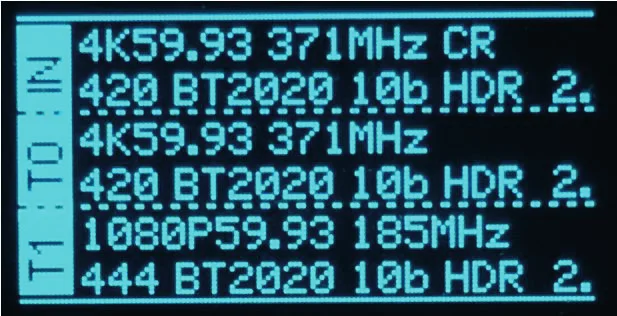
If any HDBT link from HDBT output of TX Central unit is connected to RX HDBT input and if any active input is connected to TX and routed to RX, the default RX OLED infopage will indicate the incoming signal information (IN on above pic).
If any sink is connected at TX0 or TX1 output of the RX unit, T0 and T1 sections of the default OLED infopage will report the current signal going to each of them.
The status of the RX OLED may be used for troubleshooting:
Note: [OLED OFF]: Insufficient power, OLED timer expired (default 60s) or OLED OFF. Use the Maestro power supply; press any button if OLED timer expired and make sure the OLED is ON (refer to p.61). If OLED stay OFF please make sure you are using at least CAT6a or superior Ethernet cable from TX HDBT or RX HDBT (min 6ft max 330ft for 18Gbps transmission)
Note: [OLED ON]: The Maestro RX unit is receiving power and is ready to accept an HDMI signal via HDBT from TX Central.

TX Menu/Toggle Button
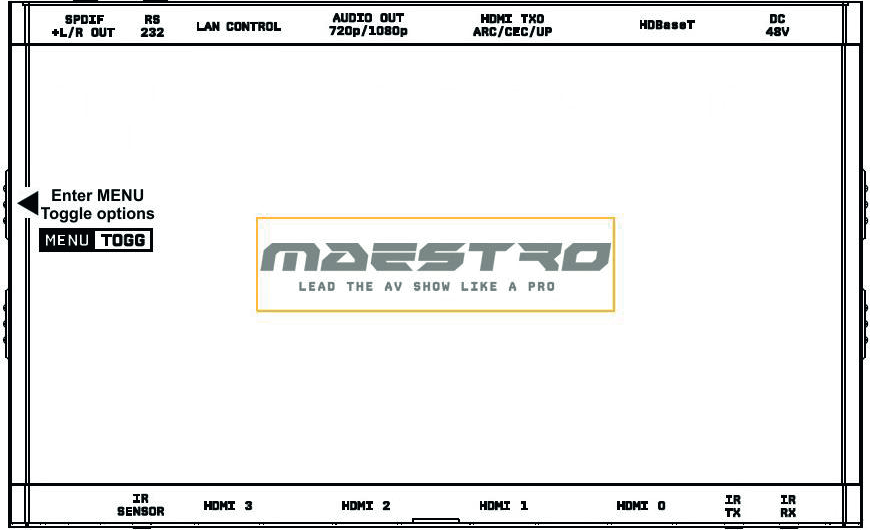
The 4K Maestro TX/RX offers 2 functions per push button.
- [MENU] Wake up from sleep/fade mode and/or Enter Maestro OLED MENU.
- [TOGG] When you are in Maestro OLED MENU, the TOGGLE button allows you to change and cycle any setting value.
Note: You can also control and change settings with IR codes, through RS232 for MAC/WIN/Linux or from the embedded TX Webserver for MAC/WIN/Linux PC or via Android/iOS smartphone/tablet or any web browser based device.
TX Info/Exit Button
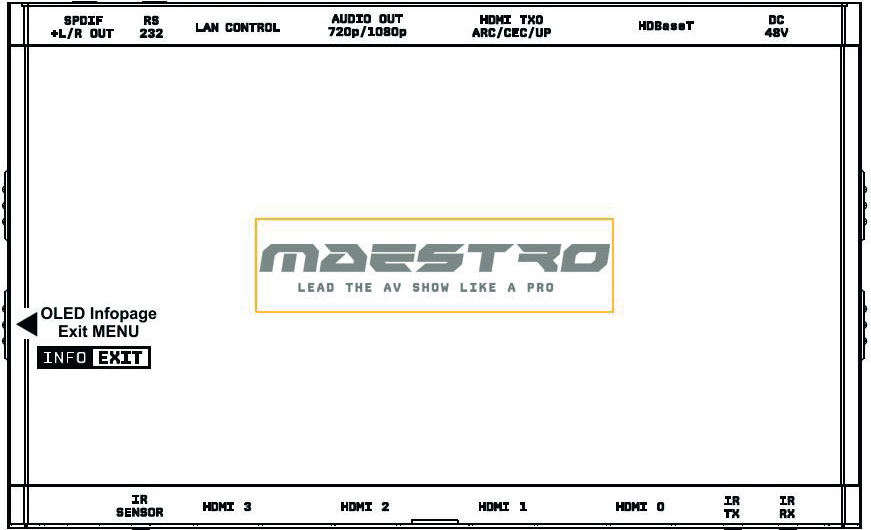
The 4K Maestro TX/RX offers 2 functions per push button.
- [INFO] Wake up from sleep/fade mode and/or Cycle OLED infopage: INFO > LAN INFO > HDR INFO > c2026
- [EXIT] When you are in Maestro OLED MENU, the EXIT button allows you to exit OLED MENU.
Note: You can also control and change settings with IR codes, through RS232 for MAC/WIN/Linux or from the embedded TX Webserver for MAC/WIN/Linux PC or via Android/iOS smartphone/tablet or any web browser based device.
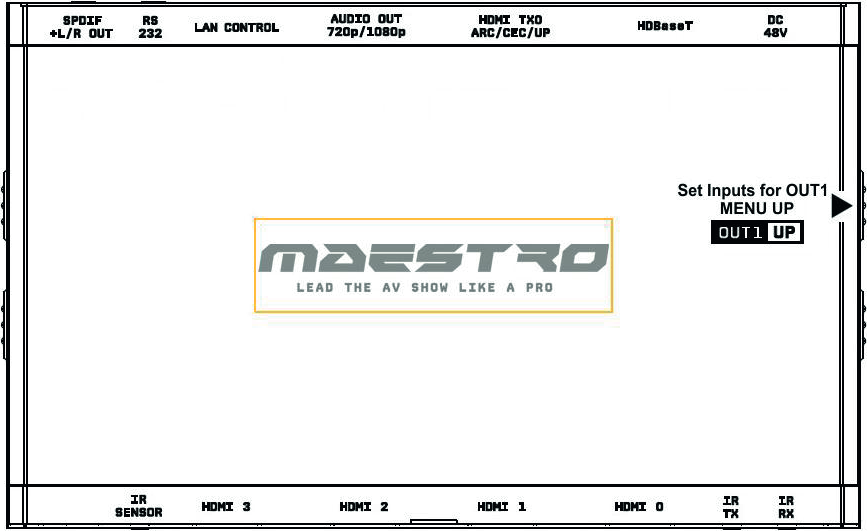
TX Out1/Up Button
The 4K Maestro TX/RX offers 2 functions per push button.
- [OUT1] Wake up from sleep/fade mode and/or set and switch active or inactive inputs for HDBT output.
- [UP] When you are in Maestro OLED MENU, the UP button allows you to navigate upward.
Maestro TX OLED/OSD will report info for up to two active inputs in default Matrix mode while only the current HDBT input is reported via OLED/OSD on Maestro RX.
Note: You can also control and change settings with IR codes, through RS232 for MAC/WIN/Linux or from the embedded TX Webserver for MAC/WIN/Linux PC or via Android/iOS smartphone/tablet or any web browser based device.
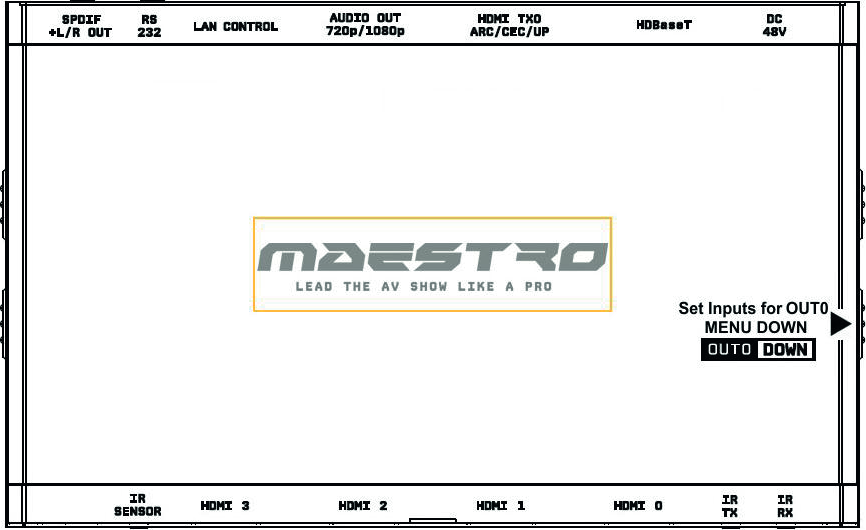
TX Out0/Down Button
The 4K Maestro TX/RX offers 2 functions per push button.
- [OUT0] Wake up from sleep/fade mode and/or set and switch active or inactive inputs for TX0 HDMI output.
- [DOWN] When you are in Maestro OLED MENU, the DOWN button allows you to navigate downward.
Maestro TX OLED/OSD will report info for up to two active inputs in default Matrix mode.
Note: You can also control and change settings with IR codes, through RS232 for MAC/WIN/Linux or from the embedded TX Webserver for MAC/WIN/Linux PC or via Android/iOS smartphone/tablet or any web browser based device.
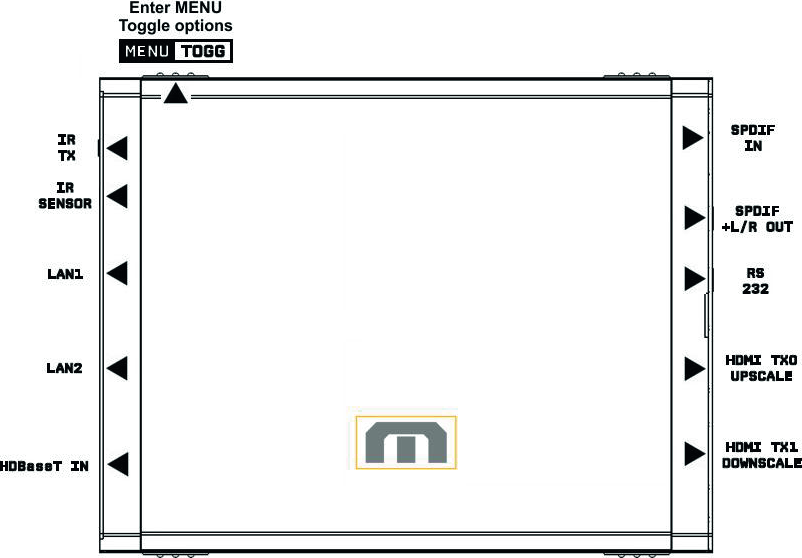
RX Menu/Toggle Button
The 4K Maestro TX/RX offers 2 functions per push button.
- [MENU] Wake up from sleep/fade mode and/or Enter Maestro RX OLED MENU.
- [TOGG] When you are in Maestro RX OLED MENU, the TOGGLE button allows you to change and cycle any setting value.
Note: You can also control and change settings with IR codes, through RS232 for MAC/WIN/Linux or from the embedded RX Webserver for MAC/WIN/Linux PC or via Android/iOS smartphone/tablet or any web browser based device.
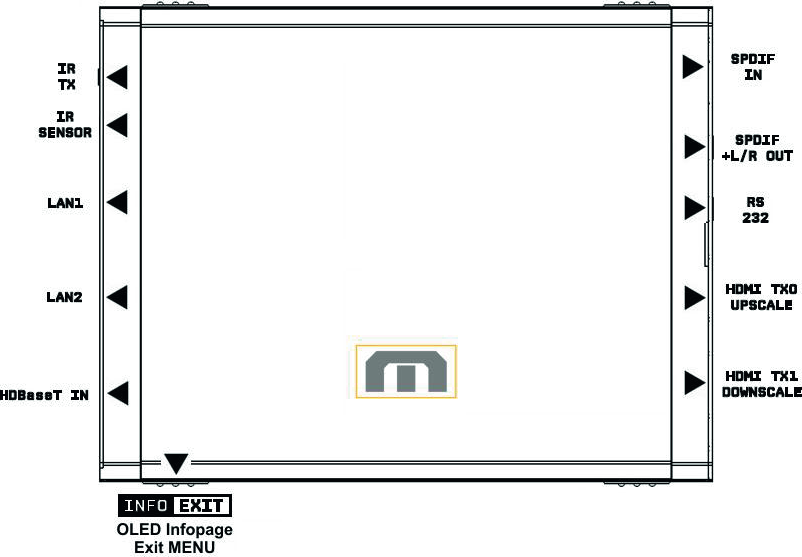
RX Info/Exit Button
The 4K Maestro TX/RX offers 2 functions per push button.
- [INFO] Wake up from sleep/fade mode and/or Cycle RX OLED infopage: INFO > LAN INFO > RX INFO > HDR1 INFO > HDR2 INFO > IF INFO > c2026
- [EXIT] When you are in Maestro RX OLED MENU, the EXIT button allows you to exit RX OLED MENU.
Note: You can also control and change settings with IR codes, through RS232 for MAC/WIN/Linux or from the embedded RX Webserver for MAC/WIN/Linux PC or via Android/iOS smartphone/tablet or any web browser based device.
RX Out1/Down Button
The 4K Maestro TX/RX offers 2 functions per push button.
- [OUT1] Wake up from sleep/fade mode and/or set rules for active or inactive outputs on TX1 HDMI output.
- [DOWN] When you are in Maestro RX OLED MENU, the DOWN button allows you to navigate downward.
Maestro RX OLED/OSD will report info for HDBT active input and up to two active outputs.
Note: You can also control and change settings with IR codes, through RS232 for MAC/WIN/Linux or from the embedded Webserver for MAC/WIN/Linux PC or via Android/iOS smartphone/tablet or any web browser based device.
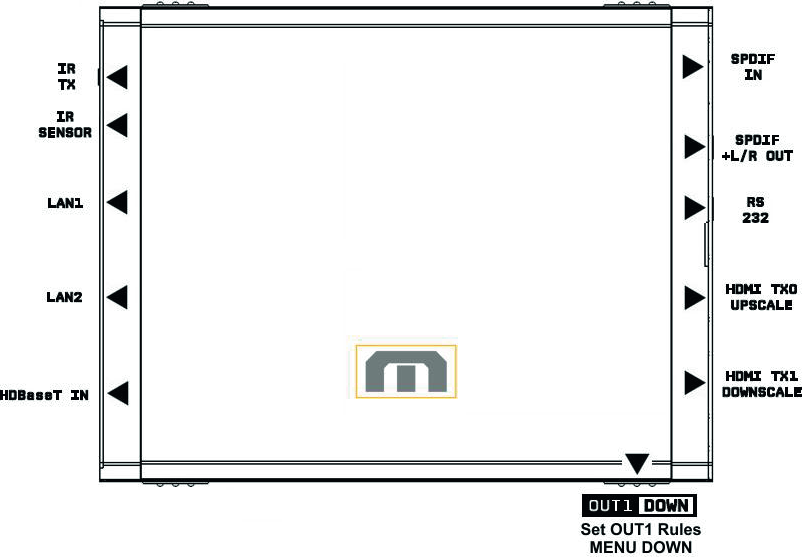
Help on IR connections
INPUT IR JACK
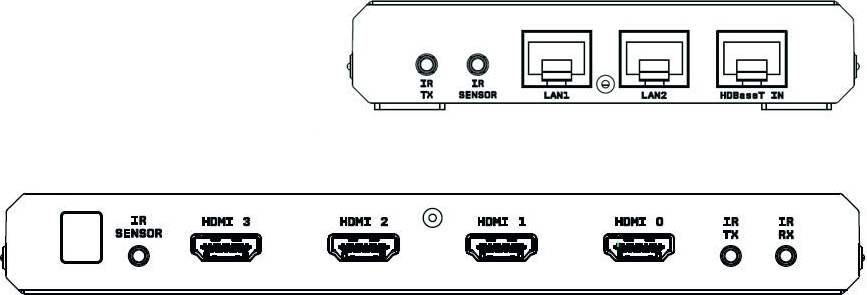
For an IR RX cable with LED receiver.
For Maestro TX Central and RX control and distributed control. This connection will be forwarded to Maestro RX via HDBT.
OUTPUT IR JACK
For an IR TX cable with LED transmitter (blaster or individual). Signal received by Maestro Central to RX via HDBT is output here.
Ex: LED cable attaches to TV to control TV volume with a RF remote (connected to system controller near Maestro Central)
OUTPUT IR JACK
For an IR TX cable with a LED transmitter (blaster or individual). Signal that was received by Maestro RX to TX via HDBT is output here.
Ex: LED cable attaches to AVR to control volume from near the TV where the Maestro RX is located.
INPUT IR JACK
For an IR RX cable with LED receiver. This connection will be used to control Maestro Central and RX as well as it is forwarded to Maestro Central over HDBT.
INPUT IR WINDOW
For local Maestro Central control. Not forwarded anywhere. A system controller will connect an IR TX LED on top here.
INPUT JACK
For a direct connection from system controller. It does not use LED/Light. For local Maestro Central and RX or distributed control. This connection will be forwarded to Maestro RX via HDBT
TX
RX
Help on LAN/RJ45 connections
RX
TX
HDBT CABLE FROM TX TO RX
Use CAT6A or superior of min length 6ft. Max length for 18Gbps 330ft/100m.
Power to RX (POE), IR signals, RS232, LAN, Audio and Video, they all travel between TX and RX through the same Ethernet cable.
RX LAN1 AND LAN2 RJ45
If TX LAN Control is connected to LAN/WAN (local router/switcher) and HDBT cable is linking TX to RX, then you can share LAN/WAN with any devices that support LAN/WAN via RJ45. Ex: Connect game console or Smart TV to Internet or media player to LAN.
If TX LAN Control is not connected to LAN/WAN (if no connection available at its location) then you can connect any RX LAN port to LAN/WAN (local router/switcher) and the other port as well as TX LAN CONTROL will have LAN/WAN access as well.
TX LAN CONTROL
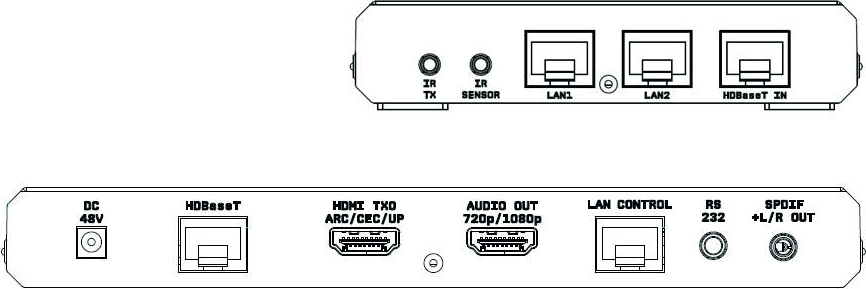
If TX LAN Control is connected to LAN/WAN (local router/switcher) and HDBT cable is linking TX to RX, then you can share LAN/WAN with any devices that support LAN/WAN via RX LAN1 And LAN2. Ex: Connect game console or Smart TV to Internet or media player to LAN.
If TX LAN Control is not connected to LAN/WAN (if no connection available at its location) then you can connect any RX LAN port to LAN/WAN (local router/switcher) and the other port as well as TX LAN CONTROL will have LAN/WAN access as well.
Tip: Connect any RJ45 connector (TX LAN Control, RX LAN1 or LAN2) to LAN/WAN and all others RJ45 will share the LAN/WAN access. One RJ45 to LAN/WAN is enough to access both TX and RX Webserver
Help on AUDIO/CEC/ARC/eARC connections
OLDER AVR OUTPUT
Any 1080p capable equipment can be connected to this output and get full HDMI sound and video. Make sure EDID presented by TX to the sources reflects its audio capabilities.
RX
TX
SPDIF 5.1 or L/R Analog OUTPUT
Extract and output HDMI sound coming from TX Central via HDBT, if selected in RX webserver. SPDIF can output ARC sound from TV connected at RX TX0 HDMI output.
eARC LINK
Maestro TX can extract up to Atmos HBR over TrueHD from capable eARC TV connected at TX0 and output it via AUDIO OUT to feed any AVR input capable of decoding such format.
HDMI AUDIO OUTPUT
Self-generated 720p/1080p video signal that can include full audio from: Any source devices at TX inputs, eARC or ARC from TX0, ARC from sink connected at RX TX0 and RX SPDIF IN
SPDIF or L/R Analog OUT
Extract HDMI sound coming from any source devices at TX inputs. SPDIF can also output ARC from TX0, ARC from sink connected at RX TX0 and RX SPDIF IN
SPDIF INPUT
Input optical Audio from TV or others. It can be retrieved via TX SPDIF output or TX HDMI Audio output.
No Audio format manipulation.
Maestro TX/RX cannot manipulate Audio and otherwise transform Audio format, what comes IN goes OUT untouched. Therefor if you plan to extract STEREO, incoming signal from HDMI source at TX inputs should be STEREO. If incoming signal from HDMI inputs are superior to STEREO (ex ATMOS) then STEREO output cannot be used.
CEC Master is always TX0 on both TX/RX
Accessing TX Web Server
It is mandatory for accessing Maestro TX web server to have an Ethernet cable connected between TX LAN CONTROL RJ45 connector and your local router or switcher. Alternatively as it is a mesh network, you can connect any LAN port of either TX or RX (including HDBT IN/OUT port) to a router/switcher and everything will be connected as well. In fact, on TX you can connect two LAN devices too or share an internet connection when used standalone without RX. (ex: plug in router to HDBT out on TX and some other device to the main LAN port)
By default both Maestro TX and RX use DHCP to retrieve an assigned IP automatically. You can set static IP for TX or RX device directly from their respective webserver config page.
In case you have setup a wrong Static IP and unit is not reachable anymore, you can set DHCP ON from OLED menu to retrieve access via dynamically assigned IP again (as in default mode).
There is 3 ways of accessing the TX web server:
- Universal way through IP address: Simply open up a web browser on any devices located on the same network than the TX unit and type in the IP address that appears on the TX OLED directly in the address bar of your web browser. (ex: 192.168.1.137)
- Hostname access: Instead of typing IP address directly, you can use the Hostname listed on TX OLED LAN INFO page (press INFO button to cycle OLED page till you see LAN INFO and Hostname listed). Simply open up a web browser from any devices located on the same network than the TX unit and type in the Hostname that appears on the TX OLED directly in the address bar of your web browser. (ex: http://MAESTRO-XX/) XX represents the 2 last digits of your Maestro TX unit unique serial number.
- mDNS access: For iOS/MAC devices, you might want to use mDNS access. Retrieve the mDNS address from TX OLED LAN INFO page (press INFO button to cycle OLED page till you see LAN INFO and mDNS address listed). Simply open up a web browser on any MAC/iOS devices located on the same network than the TX unit and type in the mDNS address that appears on the TX OLED directly in the address bar of your web browser. (ex: http://MAESTRO-XX.local/) XX represents the 2 lasts digits of your Maestro TX unit unique serial number.
Note: Please note that only IP address access is universal and should work across any web browser based devices as long as they are located on the same network. Others methods should work just fine in many cases but we cannot guarantee that they will always do, in case of issue accessing the webserver, please use IP address.
Accessing RX Web Server
It is mandatory for accessing Maestro RX web server to have an Ethernet cable connected between TX LAN CONTROL RJ45 connector and your local router or switcher and to have HDBT link between TX and RX unit (via CAT6A or superior). Alternatively as it is a mesh network, you can connect any LAN port of RX to a router/switcher and TX will be connected as well. By default both Maestro TX and RX use DHCP to retrieve an assigned IP automatically. You can set static IP for TX or RX device directly from their respective webserver config page.
In case you have setup a wrong Static IP and unit is not reachable anymore, you can set DHCP ON from OLED menu to retrieve access via dynamically assigned IP again (as in default mode).
There is 3 ways of accessing the RX web server:
- Universal way through IP address: Press INFO button to cycle OLED page till you see LAN INFO and IP address listed. Simply open up a web browser on any devices located on the same network than the TX unit and type in the IP address that appears on the RX OLED directly in the address bar of your web browser. (ex: 192.168.1.142)
- Hostname access: Instead of typing IP address directly, you can use the Hostname listed on RX OLED LAN INFO page (press INFO button to cycle OLED page till you see LAN INFO and Hostname listed). Simply open up a web browser from any devices located on the same network than the TX unit and type in the Hostname that appears on the RX OLED directly in the address bar of your web browser. (ex: http://MAESTRORX-XX/) XX represents the 2 last digits of your Maestro RX unit unique serial number.
- mDNS access: For iOS/MAC devices, you might want to use mDNS access. Retrieve the mDNS address from RX OLED LAN INFO page (press INFO button to cycle OLED page till you see LAN INFO and mDNS address listed). Simply open up a web browser on any MAC/iOS devices located on the same network than the TX unit and type in the mDNS address that appears on the RX OLED directly in the address bar of your web browser. (ex: http://MAESTRORX-XX.local/) XX represents the 2 last digits of your Maestro RX unit unique serial number.
Note: Please note that only IP address access is universal and should work across any web browser based devices as long as they are located on the same network. Others methods should work just fine in many cases but we cannot guarantee that they will always do, in case of issue accessing the webserver, please use IP address.
TX Web Server Top section
Immediately upon accessing the webserver you will end up on the default INFO page with the above top tier section displayed.
From that top tier section you will be able to retrieve the following information (also displayed on TX OLED default page and once you cycle info page with INFO button to reach LAN page info).
- Hostname: Display Maestro TX hostname for URL access
- mDNS: Display Maestro TX mDNS for URL access
- IP Address: Display the current IP Address of the Maestro TX
- FW: Display the current FW running on the Maestro TX.
RX Web Server Top section
Immediately upon accessing the webserver you will end up on the default INFO page with the above top tier section displayed.
From that top tier section you will be able to retrieve the following information (also displayed on RX OLED default page and once you cycle info page with INFO button to reach LAN page info).
- Hostname: Display Maestro RX hostname for URL access
- mDNS: Display Maestro RX mDNS for URL access
- IP Address: Display the current IP Address of the Maestro RX
- FW: Display the current FW running on the Maestro RX.
TX Web Server INFO Section
- SOURCE: When available, Display active source name currently outputting thru TX0 or TX1 output.
- IN TX0/IN TX1: Display the source name original video signal going thru TX0 or TX1 output.
- VIDEO TX0/TX1: Display the real video signal (if any operation on it) going out thru TX0 or TX1 output.
- AUDIO TX0/TX1: Display the audio signal info going out thru TX0 or TX1 output.
- EDID TX0/TX1: Display the EDID max capabilities of any connected sink at TX0 or TX1 output.
- PORT SELECTOR: Allow you to select which input is routed to TX0 or TX1 output.
- REFRESH: Refresh the current page.
RX Web Server INFO Section
- SOURCE: When available, Display active source name currently outputting thru TX0 or TX1 output.
- RX: Display the current active input signal received from the Maestro TX
- TX0: Display the real video signal (if any operation on it) going out thru TX0 output.
- TX1: Display the real video signal (if any operation on it) going out thru TX1 output.
- AUD: Display the audio signal info from the current active input signal from the Maestro TX.
- EDID TX0/TX1: Display the EDID max capabilities of any connected sink at TX0 or TX1 output.
- REFRESH: Refresh the current page.
TX Web Server EDID Section
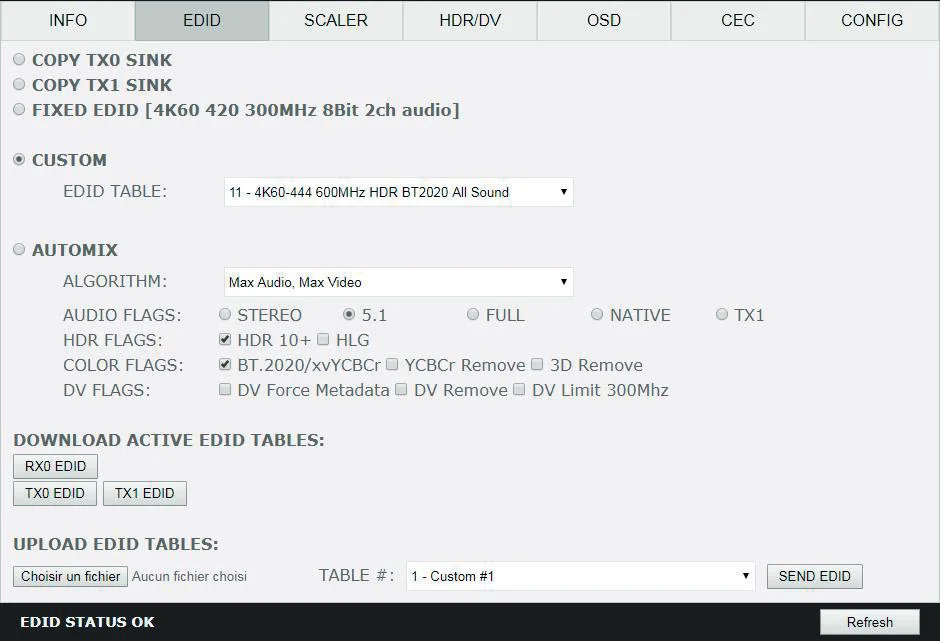
- [COPY TX0 SINK]: Use EDID from the device connected at TX0 output.
- [COPY TX1 SINK]: Use EDID from TX1 output (HDBT output defined by RX EDID rules).
- [FIXED EDID]: Use a 4K60 4:2:0 8b 300MHz 2ch Audio EDID.
- [CUSTOM]: Define individual EDID for each input from a list of 10 custom and 90 predefined EDID.
- [AUTOMIX]: Use dynamic EDID created by a choice of 5 EDID Algo and 13 EDID Flags.
- [DOWNLOAD ACTIVE EDID TABLES]: Download any EDID from any inputs or outputs.
- [UPLOAD EDID TABLES]: Select an EDID file and a Custom EDID Table# click SEND EDID to upload it.
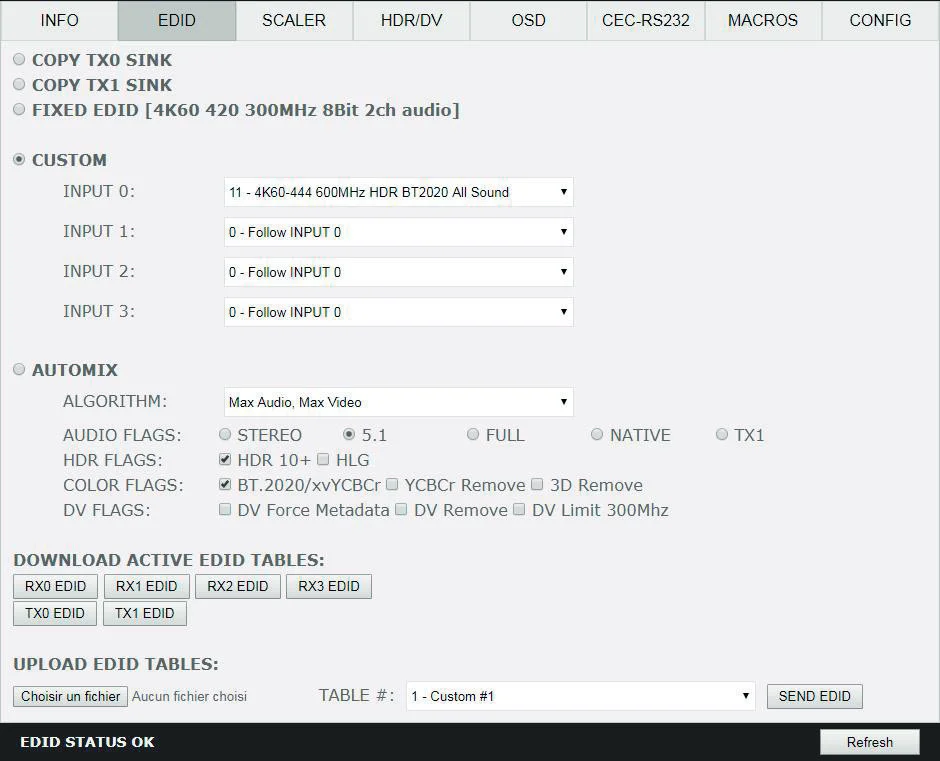
- [REFRESH]: Refresh the current page.
RX Web Server EDID Section
- [COPY TX0 SINK]: Use EDID from the device connected at TX0 output.
- [COPY TX1 SINK]: Use EDID from the device connected at TX1 output.
- [FIXED EDID]: Use a 4K60 4:2:0 8b 300MHz 2ch Audio EDID.
- [CUSTOM]: Define individual EDID for the HDBT input from a list of 10 custom and 90 predefined EDID.
- [AUTOMIX]: Use dynamic EDID created by a choice of 5 EDID Algo and 13 EDID Flags.
- [DOWNLOAD ACTIVE EDID TABLES]: Download any EDID from input or outputs.
- [UPLOAD EDID TABLES]: Select an EDID file and a Custom EDID Table# click SEND EDID to upload it.
- [REFRESH]: Refresh the current page.
Note: Download RX option could be useful if for example you want to double check the build capabilities
of an Automix EDID in your setup. Download TX option allow you to sniff the EDID from the sink device connected to the HDMI or HDBT output port of your Maestro TX/RX unit.
List of Custom EDID available
User can select an EDID from all below EDID tables or force the creation of an Automix EDID with below options.
FIXED EDID with L/R stereo
This mode is a 4K60 4:2:0 8b 300MHz stereo EDID table. It can be used as a security EDID to ensure a picture in every setup/situation. (Except for FHD and 4K30 Max sink device)
CUSTOM USE
Pick and use EDID from a selection of preloaded EDID tables or load any EDID bank of your choice. By default the selected EDID table is a 4K60 4:4:4 600MHz with Full Audio capabilities. When you select an EDID bank from the dropdown list of 100 different EDID tables available, there is nothing else to do, once you click one, the EDID of your choice will be loaded and HPD events will reset the signal to present your selected EDID automatically. Each input can have an individual EDID assigned.
- CUSTOM 1 [Default FULL no DV] + Full Sound + 3D
- CUSTOM 2 [FULL + LG DV] + Full Sound + 3D
- CUSTOM 3 [FULL + VIZIO DV] + Full Sound + 3D
- CUSTOM 4 [Q9FN ALLM VRR HDR10+] + Full Sound + 3D
- CUSTOM 5 [SONY A1 LLDV V2] + Full Sound + 3D
- CUSTOM 6 [LG35C7 DV V1] + Full Sound + 3D
- CUSTOM 7 [VIZIO M50E1 DV V0] + Full Sound + 3D
- CUSTOM 8
- CUSTOM 9
- CUSTOM 10
- 4K60-444 600MHz HDR BT2020 All Sound
- 4K60-444 600MHz HDR BT2020 SPDIF
- 4K60-444 600MHz HDR BT2020 Stereo
- 4K60-444 600MHz BT2020 All Sound
- 4K60-444 600MHz BT2020 SPDIF
- 4K60-444 600MHz BT2020 Stereo
- 4K60-444 600MHz All Sound
- 4K60-444 600MHz SPDIF
- 4K60-444 600MHz Stereo
- 4K50-444 600MHz HDR BT2020 All Sound
- 4K50-444 600MHz HDR BT2020 SPDIF
- 4K50-444 600MHz HDR BT2020 Stereo
- 4K50-444 600MHz BT2020 All Sound
- 4K50-444 600MHz BT2020 SPDIF
- 4K50-444 600MHz BT2020 Stereo
- 4K50-444 600MHz All Sound
- 4K50-444 600MHz SPDIF
- 4K50-444 600MHz Stereo
- 4K60-420 12bit HDR BT2020 All Sound
- 4K60-420 12bit HDR BT2020 SPDIF
- 4K60-420 12bit HDR BT2020 Stereo
- 4K60-420 12bit BT2020 All Sound
- 4K60-420 12bit BT2020 SPDIF
- 4K60-420 12bit BT2020 Stereo
- 4K60-420 12bit All Sound
- 4K60-420 12bit SPDIF
- 4K60-420 12bit Stereo
- 4K60-420 8-bit 300MHz HDR BT2020 All Sound
- 4K60-420 8-bit 300MHz HDR BT2020 SPDIF
- 4K60-420 8-bit 300MHz HDR BT2020 Stereo
- 4K60-420 8-bit 300MHz BT2020 All Sound
- 4K60-420 8-bit 300MHz BT2020 SPDIF
- 4K60-420 8-bit 300MHz BT2020 Stereo
- 4K60-420 8-bit 300MHz All Sound
- 4K60-420 8-bit 300MHz SPDIF
- 4K60-420 8-bit 300MHz Stereo
- 4K30-444 300MHz HDR BT2020 All Sound
- 4K30-444 300MHz HDR BT2020 SPDIF
- 4K30-444 300MHz HDR BT2020 Stereo
- 4K30-444 300MHz BT2020 All Sound
- 4K30-444 300MHz BT2020 SPDIF
- 4K30-444 300MHz BT2020 Stereo
- 4K30-444 300MHz All Sound
- 4K30-444 300MHz SPDIF
- 4K30-444 300MHz Stereo
- 4K30-RGB 300MHz HDR BT2020 ALL audio
- 4K30-RGB 300MHz HDR BT2020 SPDIF
- 4K30-RGB 300MHz HDR BT2020 Stereo
- 4K30-RGB 300MHz BT2020 ALL audio
- 4K30-RGB 300MHz BT2020 SPDIF
- 4K30-RGB 300MHz BT2020 Stereo
- 4K30-RGB 300MHz ALL audio
- 4K30-RGB 300MHz SPDIF
- 4K30-RGB 300MHz Stereo
- 4K24-422 12-bit HDR BT2020 All Sound
- 4K24-422 12-bit HDR BT2020 SPDIF
- 4K24-422 12-bit HDR BT2020 Stereo
- 4K24-422 12-bit BT2020 All Sound
- 4K24-422 12-bit BT2020 SPDIF
- 4K24-422 12-bit BT2020 Stereo
- 4K24-422 12-bit All Sound
- 4K24-422 12-bit SPDIF
- 4K24-422 12-bit Stereo
- 1080p60-444 12-bit HDR BT2020 All Sound
- 1080p60-444 12-bit HDR BT2020 SPDIF
- 1080p60-444 12-bit HDR BT2020 Stereo
- 1080p60-444 12-bit BT2020 All Sound
- 1080p60-444 12-bit BT2020 SPDIF
- 1080p60-444 12-bit BT2020 Stereo
- 1080p60-444 12-bit All Sound
- 1080p60-444 12-bit SPDIF
- 1080p60-444 12-bit Stereo
- 1080p24-444 12-bit HDR BT2020 All Sound
- 1080p24-444 12-bit HDR BT2020 SPDIF
- 1080p24-444 12-bit HDR BT2020 Stereo
- 1080p24-444 12-bit BT2020 All Sound
- 1080p24-444 12-bit BT2020 SPDIF
- 1080p24-444 12-bit BT2020 Stereo
- 1080p24-444 8-bit All Sound
- 1080p24-444 8-bit SPDIF
- 1080p24-444 8-bit Stereo
- 1080i60-444 8-bit All Sound
- 1080i60-444 8-bit SPDIF
- 1080i60-444 8-bit Stereo
- 720p60-444 8-bit All Sound
- 720p60-444 8-bit SPDIF
- 720p60-444 8-bit Stereo
- 480p60-444 8-bit All Sound
- 480p60-444 8-bit SPDIF
- 480p60-444 8-bit Stereo
Automix Mode
Create EDID based on mutual capabilities from sinks connected at output so it will always show a picture and audio (ideal for pass thru). Some Flags can be checked or unchecked so you can force and override some parameters to match your needs. Ex: If your TV is stereo and your AVR full sound and both are connected to each Maestro TX or RX outputs port, then depending of the algo in use, for some of them at least, by default, Automix will report Stereo as sound capabilities, by checking Full Audio flag you will force Automix to always report Full Audio no matter the real sound capabilities of the connected sink devices.
Enforceable flags available in Automix mode
- AUDIO Flags: 2.0 Stereo, 5.1 Multi, 7.1 Full Sound, Native, TX1
- HDR Flags: HDR10+, HLG
- COLOR Flags: BT.2020/xvYcc, YCbCr Remove, 3D Remove
- DV Flags: DV Force Metadata, DV Remove, DV Limit 300MHz
- 2.0 Stereo: Force the mixed EDID to present stereo sound capabilities.
- 5.1 Multi: Force the mixed EDID to present 5.1 multi-channel sound capabilities.
- 7.1 Full: Force the mixed EDID to present Full 7.1 sound capabilities.
- Native: Force the mixed EDID to present the setup native sound capabilities (best of HDBT and TX1).
- TX1: Force the mixed EDID to present the max audio capabilities from sink at TX1 output.
- HDR 10+: Force the mixed EDID to present HDR10+ support.
- HLG: Force the mixed EDID to present the HLG support.
- 2020/xvYCC: Force the mixed EDID to present BT2020 and xvYCC support.
- no YCbCr: Force the mixed EDID to present no support for YCbCr (useful to force RGB).
- no 3D: Force the mixed EDID to present no support for 3D.
- DV Force Metadata: Force the mixed EDID to present Dolby Vision support.
- DV Remove: Force the mixed EDID to present no support for Dolby Vision.
- DV Limit 300MHz: Force the mixed EDID to only present support for Dolby Vision at 300MHz.
Selectable algorithms available in Automix mode
- Min Mixed Capabilities
- Max Audio/Min Video
- TX0 Output Priority
- TX1 Output Priority
- Max Audio/Max Video
Note: All options are also available via IR or RS232
TX Web Server SCALER Section
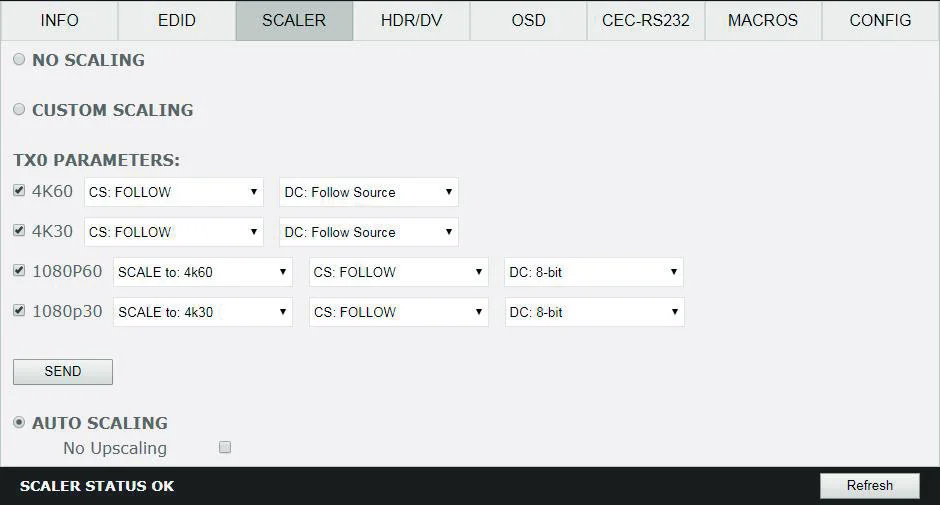
No Scaling: Set your unit to No Scaling for the signal to pass-through untouched
Custom Scaling: Set your Maestro TX unit to Custom Scaling to manually define the scaling parameters.
You can select between various type of resolutions, color space and deep color settings for TX0 upscale output port.
Available Color Space options: Follow Input (default), RGB FULL, RGB BT2020, 4:4:4 BT.709, 4:4:4 BT2020, 4:2:2 BT.709, 4:2:2 BT2020, 4:2:0 BT.709, 4:2:0 BT2020.
Available Deep Color options: Follow Input (default), 8-bit/24-bit, 10-bit/30-bit, 12-bit/36-bit, 16-bit/48-bit
Available 1080P60 Upscale options: SCALE to 4K60, REMAIN 1080P60
Available 1080P30 Upscale options: SCALE to 4K30, REMAIN 1080P30
SEND: Upload your custom scaling changes to the Maestro TX unit.
Auto Scaling: Set your unit to Auto Scaling to use automatic pre-sets for TX0 (Default setting)
NO UPSCALING: By default when using Auto Scaling, Maestro TX will upscale TX0 when possible, to disable this behavior or to let the sink/display performs the upscaling, you can check this option.
REFRESH: Refresh the current page.
RX Web Server SCALER Section
No Scaling: Set your unit to No Scaling for the signal to pass-through untouched
Custom Scaling: Set your Maestro RX unit to Custom Scaling to manually define the scaling parameters.
You can select between various type of resolutions, color space and deep color settings for both the upscale TX0 and downscale TX1 output ports.
Available Color Space options: Follow Input (default), RGB FULL, RGB BT2020, 4:4:4 BT.709, 4:4:4 BT2020, 4:2:2 BT.709, 4:2:2 BT2020, 4:2:0 BT.709, 4:2:0 BT2020.
Available Deep Color options: Follow Input (default), 8-bit/24-bit, 10-bit/30-bit, 12-bit/36-bit, 16-bit/48-bit
Available 1080P60 Upscale options: SCALE to 4K60, REMAIN 1080P60
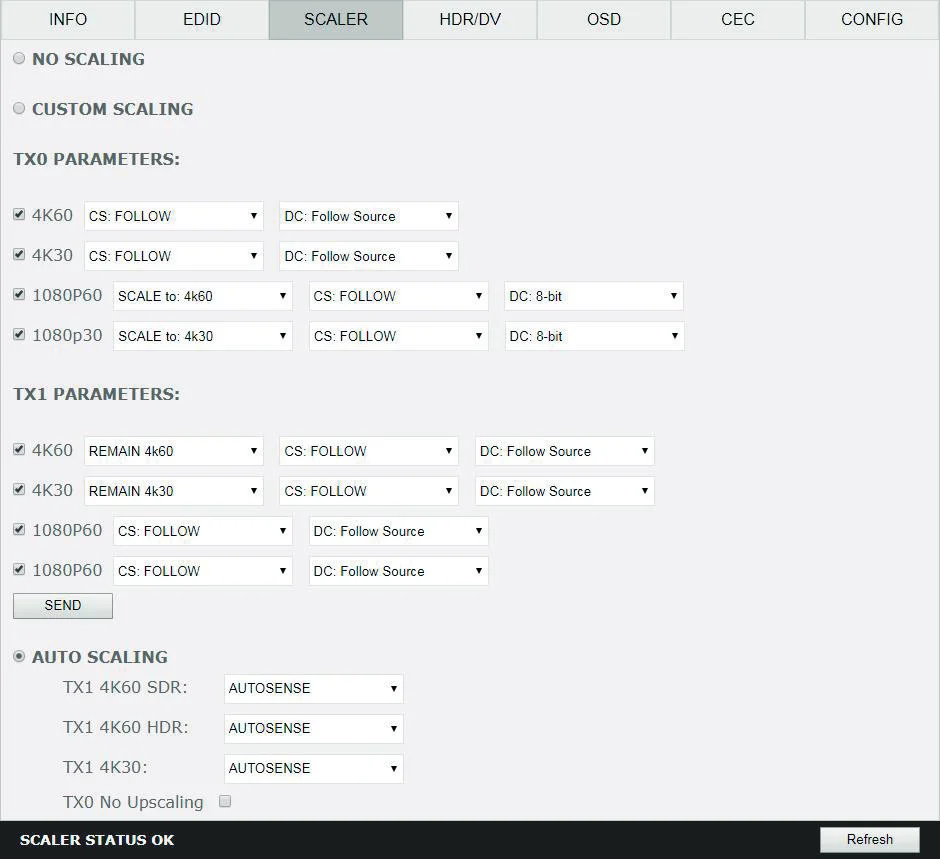
Available 1080P30 Upscale options: SCALE to 4K30, REMAIN 1080P30
Available 4K60 Downscale options: REMAIN 4K60, SCALE to 1080P60
Available 4K30 Downscale options: SCALE to 4K30, SCALE to 1080P30
SEND: Upload your custom scaling changes to the Maestro RX unit.
Auto Scaling: Set your unit to Auto Scaling to use automatic pre-sets for TX1. By default unit will use auto-sense.
TX1 4K60 SDR PRESET: This forces any 4K50 or 4K60 input to come out as 4K60 420 8bit 300MHz or 1080p60 444 12-bit or 1080p60 444 8-bit. A neat profile for people who only have a 300MHz display with 4K60 420 8-bit support or older HDMI revision equipment that only support 1080p (deep color or not). If EDID allows the player to send HDMI 2.0 formats, they will be accepted by the display due to Maestro RX scaling/chroma changes.
TX1 4K60 HDR PRESET: This forces 4K50 and 4K60 422 HDR input to come out as 4K60 420 12-bit, 4k60 420 8-bit 300MHz or 1080p60 444 12-bit or 1080p60 444 8-bit. A neat profile for people who only have a 300MHz display with 4K60 420 10 or 8-bit support. If EDID allows the player to send HDMI 2.0 formats, such as all HDR modes, they will be accepted by the display due to Maestro RX scaling/chroma changes.
TX1 4K30 PRESET: This forces any 4K24/25/30 to come out as 4K24/25/30 444/RGB 8-bit 300MHz, 1080p30 444 12-bit or 4K24/25/30 422 12-bit 300MHz. A neat profile if you have a 300MHz display. If EDID allows the player to send HDMI 2.0 formats, they will be accepted by the display due to Maestro RX scaling/chroma changes.
TX0 NO UPSCALING: By default when using Auto Scaling, Maestro RX will upscale TX0 when possible, to disable this behavior or to let the sink/display performs the upscaling, you can check this option.
REFRESH: Refresh the current page.
TX Web Server HDR/DV Section
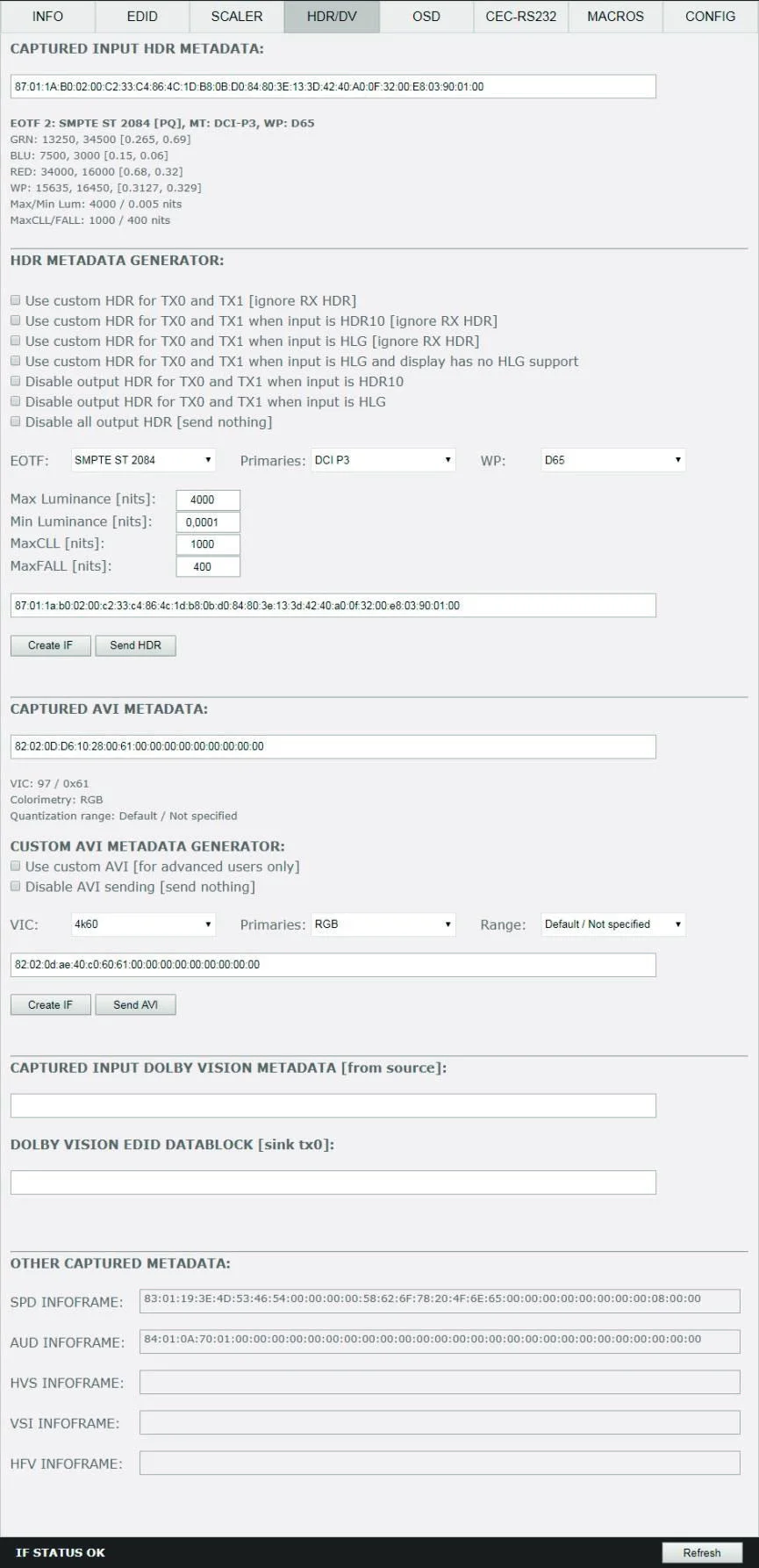
CAPTURED HDR METADATA: If the source at input is sending HDR InfoFrame metadata then the information is captured, extracted and displayed in this text box. HDR metadata is also deciphered and displayed in human readable format.
CUSTOM HDR METADATA GENERATOR: This section will allow you to create your own custom HDR metadata and inject it on the current signal by adding it or replacing the existing HDR metadata.
Use custom HDR for TX0 and TX1: Unchecked by default, once activated it will turn ON the HDR mode of any HDR display. Upon clicking Use custom HDR for TX0 and TX1 the CUSTOM HDR IF that is defined by dropdowns and input fields below and then created [Create IF] and displayed in the text box in HEX format gets sent. This way you can define what the InfoFrame actually is. This is stored also in Maestro TX and is persistent over hot-plugs and power cycles. If incoming signal is already HDR, the original HDR metadata that comes with will be ignored [ignore RX HDR].
Use custom HDR for TX0 and TX1 when input is HDR10: Unchecked by default, once activated it will turn ON the HDR mode of any HDR display only if incoming signal is already HDR, the original HDR metadata that comes with will be ignored [ignore RX HDR].
Use custom HDR for TX0 and TX1 when input is HLG: Unchecked by default, once activated it will turn ON the HDR/HLG mode of any HDR/HLG display only if incoming signal is already HLG, the original HLG metadata that comes with the input signal will be ignored [ignore RX HLG]. Ex: render HLG content on HDR display.
Use custom HDR for TX0 and TX1 when input is HLG and display has no HLG support: Unchecked by default, once activated it will turn ON the HDR mode of any HDR/HLG display only if incoming signal is already HLG and TV have no support for it. Ex: If two TVs are connected and one if HLG and other non-HLG. Then if you turn off the HLG TV the metadata will be automatically changed.
Disable output HDR for TX0 and TX1 when input is HDR10: Unchecked by default, once activated Maestro TX will intercept and cancel all incoming HDR10 metadata, HLG metadata will still pass-thru.
Disable output HDR for TX0 and TX1 when input is HLG: Unchecked by default, once activated Maestro TX will intercept and cancel all incoming HLG metadata, HDR10 metadata will still pass-thru.
Disable all output HDR: Unchecked by default, once activated Maestro TX will intercept and cancel all incoming HDR metadata. [send nothing]
Note: Disable HDR modes was introduced to allow some JVC PJ owners to apply their own Gamma curves for HDR content and allow their PJ Dynamic Iris to work when content is HDR and/or HLG. They can be used with others display that allow custom Gamma Curve to be applied on incoming signal or to boost nits value for some LG TVs or to render HLG content on HDR display, etc..
EOTF: Select between SDR Luminance Range, HDR Luminance Range, HLG ITU-R BT.2100-0 or SMPTE ST 2084 values to be used in the custom HDR metadata creation.
Primaries: Select between DCI P3, ITU-R BT 709-5 or ITU-R BT2020-2 values to be used in the custom HDR metadata creation.
White Point: Select the white point value to be used in the custom HDR metadata creation.
Max Luminance: Select the Max Luminance value to be used in the custom HDR metadata creation (valid from 1 to 65535)
MaxCLL: Select the MaxCLL value to be used in the custom HDR metadata creation (valid from 1 to 65535)
Min Luminance: Select the Min Luminance value to be used in the custom HDR metadata creation (valid from 1 to 65535)
MaxFALL: Select the MaxFALL value to be used in the custom HDR metadata creation (valid from 1 to 65535)
Create IF: Use the previous defined values to create the Custom HDR metadata.
Send HDR: Send the custom created HDR metadata. Please note that Enable Custom HDR or any Custom HDR modes must be activated first, to stop the sending of the custom HDR metadata, uncheck Enable Custom HDR. If Enable Custom HDR is activated then by pressing the Send HDR button, the metadata injection does not stop, it just changes values, useful to avoid TV resync.
Default Value: Restore the default HEX value of the custom HDR metadata.
CAPTURED AVI METADATA: If the source is sending AVI infoFrame then the information is captured, extracted and displayed in this text box on GUI. HEX value is deciphered and VIC, Colorimetry and Range are exposed in human readable format.
CUSTOM AVI INFOFRAME GENERATOR: Build and send out any custom AVI Infoframe of your choice.
Use custom AVI: Upon clicking Use custom AVI, the IF that is defined in the Custom AVI text box gets used. This way you can define what the InfoFrame actually is. This is stored also in Maestro TX and is persistent over hotplugs and power cycles. This way customer can for example activate BT2020 mode in the TV even though content doesn't sent the correct InfoFrame. The AVI mod is really meant for advanced users only because incorrect values can blank the screen and since the settings are saved even power up won't help until reset.
Disable AVI: When checked, Disable AVI will prevent AVI InfoFrame from source to reach the connected sink at Maestro TX/RX output and also stop sending Custom AVI if set previously. This feature can be useful for some DVI display or some monitor that do not work well when receiving an AVI InfoFrame.
VIC: Select the VIC code to use in the Custom AVI Hex field.
Primaries: Select the Primaries value to use in Custom AVI Hex field
Range: Select the range value to use in the Custom AVI Hex field.
Create IF: Use the previous defined values to create the Custom AVI metadata.
RX Web Server HDR/DV Section
Captured Input HDR Metadata
If the source at TX input is sending HDR InfoFrame metadata via HDBT to RX unit then the information is captured, extracted and displayed in this text box. HDR metadata is also deciphered and displayed in human readable format.
HDR Metadata Generator
This section will allow you to create your own custom HDR metadata and inject it on the current signal by adding it or replacing the existing HDR metadata.
- Use custom HDR for TX0 and TX1 : Unchecked by default, once activated it will turn ON the HDR mode of any HDR display. Upon clicking Use custom HDR for TX0 and TX1 the CUSTOM HDR IF that is defined by dropdowns and input fields below and then created [Create IF] and displayed in the text box in HEX format gets sent. This way you can define what the InfoFrame actually is. This is stored also in Maestro TX and is persistent over hot-plugs and power cycles. If incoming signal is already HDR, the original HDR metadata that comes with will be ignored [ignore RX HDR].
- Use custom HDR for TX0 and TX1 when input is HDR10 : Unchecked by default, once activated it will turn ON the HDR mode of any HDR display only if incoming signal is already HDR, the original HDR metadata that comes with will be ignored [ignore RX HDR].
- Use custom HDR for TX0 and TX1 when input is HLG : Unchecked by default, once activated it will turn ON the HDR/HLG mode of any HDR/HLG display only if incoming signal is already HLG, the original HLG metadata that comes with the input signal will be ignored [ignore RX HLG]. Ex: render HLG content on HDR display.
- Use custom HDR for TX0 and TX1 when input is HLG and display has no HLG support : Unchecked by default, once activated it will turn ON the HDR mode of any HDR/HLG display only if incoming signal is already HLG and TV have no support for it. Ex: If two TVs are connected and one is HLG and other non-HLG. Then if you turn off the HLG TV the metadata will be automatically changed.
- Disable output HDR for TX0 and TX1 when input is HDR10 : Unchecked by default, once activated Maestro TX will intercept and cancel all incoming HDR10 metadata, HLG metadata will still pass-thru.
- Disable output HDR for TX0 and TX1 when input is HLG : Unchecked by default, once activated Maestro TX will intercept and cancel all incoming HLG metadata, HDR10 metadata will still pass-thru.
- Disable all output HDR : Unchecked by default, once activated Maestro TX will intercept and cancel all incoming HDR metadata. [send nothing]
Note: Disable HDR modes was introduced to allow some JVC PJ owners to apply their own Gamma curves for HDR content and allow their PJ Dynamic Iris to work when content is HDR and/or HLG. They can be used with others display that allow custom Gamma Curve to be applied on incoming signal or to boost nits value for some LG TVs or to render HLG content on HDR display, etc..
- EOTF : Select between SDR Luminance Range, HDR Luminance Range, HLG ITU-R BT.2100-0 or SMPTE ST 2084 values to be used in the custom HDR metadata creation.
- Primaries : Select between DCI P3, ITU-R BT 709-5 or ITU-R BT2020-2 values to be used in the custom HDR metadata creation.
- White Point : Select the white point value to be used in the custom HDR metadata creation.
- Max Luminance : Select the Max Luminance value to be used in the custom HDR metadata creation (valid from 1 to 65535)
- MaxCLL : Select the MaxCLL value to be used in the custom HDR metadata creation (valid from 1 to 65535)
- Min Luminance : Select the Min Luminance value to be used in the custom HDR metadata creation (valid from 1 to 65535)
- MaxFALL : Select the MaxFALL value to be used in the custom HDR metadata creation (valid from 1 to 65535)
- Create IF : Use the previous defined values to create the Custom HDR metadata.
- Send HDR : Send the custom created HDR metadata. Please note that Enable Custom HDR or any Custom HDR modes must be activated first, to stop the sending of the custom HDR metadata, uncheck Enable Custom HDR. If Enable Custom HDR is activated then by pressing the Send HDR button, the metadata injection does not stop, it just changes values, useful to avoid TV resync.
- Default Value : Restore the default HEX value of the custom HDR metadata.
Captured AVI Metadata
If the source is sending AVI infoFrame then the information is captured, extracted and displayed in this text box on GUI. HEX value is deciphered and VIC, Colorimetry and Range are exposed in human readable format.
Custom AVI InfoFrame Generator
- Use custom AVI : Upon clicking Use custom AVI, the IF that is defined in the Custom AVI text box gets used. This way you can define what the InfoFrame actually is. This is stored also in Maestro TX and is persistent over hotplugs and power cycles. This way customer can for example activate BT2020 mode in the TV even though content doesn’t send the correct InfoFrame. The AVI mod is really meant for advanced users only because incorrect values can blank the screen and since the settings are saved even power up won’t help until reset.
- Disable AVI : When checked, Disable AVI will prevent AVI InfoFrame from source to reach the connected sink at Maestro TX/RX output and also stop sending Custom AVI if set previously. This feature can be useful for some DVI display or some monitor that do not work well when receiving an AVI InfoFrame.
- VIC : Select the VIC code to use in the Custom AVI Hex field.
- Primaries : Select the Primaries value to use in Custom AVI Hex field
- Range : Select the range value to use in the Custom AVI Hex field.
- Create IF : Use the previous defined values to create the Custom AVI metadata.
- Send AVI : Replaces the current incoming AVI with the custom defined one in the text box. This way customer can for example activate BT2020 mode in the TV even though content doesn’t send the correct InfoFrame. This string is also saved in Maestro TX and is persistent over hotplugs and power cycles. The AVI mod is really meant for advanced users only because incorrect values can blank the screen and since the settings are saved even power up won’t help until reset. Please note that upon clicking, Use Custom AVI will automatically send the current stored AVI metadata value, to stop the sending of the custom AVI infoframe, uncheck Use Custom AVI. If Use Custom AVI is activated then by pressing the Send AVI button, the infoframe injection does not stop, it just changes values, useful to avoid TV resync.
Captured Input Dolby Vision Metadata
Dolby ID and HEX data from the DV source.
Dolby Vision EDID Datablock
Maestro TX will automatically sniff, display and save any Dolby Vision mandatory string from a connected sink at TX0 output. Once stored, this mandatory string can be used in Automix to ensure that the DV stream from the source is compatible with the sink. Once the DV string of a display is saved, you can insert other equipment like an AVR in between in the chain and still have the right DV signal passthru to the sink. Additionally, the datablock value is fully deciphered in human readable format.
- SPD INFOFRAME : Display the captured Source Product InfoFrame.
- AUD INFOFRAME : Display the captured Audio Format information, if PCM this usually gives the sample rate and number of speakers, if bitstream then usually this infoframe just inform the default which is “refer stream header”.
- HVS INFOFRAME: HDMI VENDOR SPECIFIC : Display HDMI Vendor Specific InfoFrame.
- VSI INFOFRAME: VENDOR SPECIFIC : Display HDMI2.0 version of HDMI VSIF
- HFV INFOFRAME: HDMI FORUM VSIF : If the source is sending Vendor Specific Infoframe then the information is captured, extracted and displayed in this text box on GUI.
- REFRESH : Refresh the current page.
TX Web Server OSD Section
[OSD SETUP]: Enable or Disable the OSD feature of Maestro TX.
[OSD FADE]: Set the timer in seconds before OSD fade out, 0 = never (always ON)
[OSD LOCATION X, Y]: Set the X and Y value of the OSD location at 1080p, values are multiplied by 2 when the stream is 4K.
[OSD COLOR FRONT, BACK, LEVEL]: Set the Text Color [FRONT 0-31], Background Color [BACK 0-31] and Background transparency [LEVEL 0-7] for the OSD.
[OSD INFO]: Select or unselect the information that must be displayed on your Maestro TX OSD. Available options are: Source name, Video Field, Video IF, HDR RX/TX info, HDR IF, Audio field, RX Video info, RX HDR info, Ignore Metadata Change.
[OSD MASK SETUP]: Enable of Disable the use of OSD Mask.
[MASK LOCATION x0,y0,x1,y1]: Defines the coordinates of the top left and bottom right corner of your OSD Mask at 1080p. Values are multiplied by 2 when the stream is 4K
[OSD MASK LEVEL]: Select the level of transparency for your OSD Mask. Value range is from 1 to 7.
[OSD GRAYSCALE]: Select the level of grayscale for your OSD Mask. Value range is from 0 to 15.
[SEND]: For any changes in the above parameters, click SEND to upload them to your Maestro TX/RX unit.
[OSD TEXT ENABLE]: Enable or disable the OSD Custom Text, once activated, the custom text defined in the text field will be displayed on screen.
[NEVER FADE]: If you want to keep the OSD Custom text even after OSD info faded away, make sure this option is enabled.
[OSD TEXT X,Y]: Set the X and Y value of the OSD Custom Text at 1080p, values are multiplied by 2 when the stream is 4K
[SEND]: For any changes in the above parameters, click SEND to upload them to your Maestro TX unit.
[REFRESH]: Refresh the current page.
RX Web Server OSD Section
[OSD SETUP]: Enable or Disable the OSD feature of Maestro RX.
[OSD FADE]: Set the timer in seconds before OSD fade out, 0 = never (always ON)
[OSD LOCATION X, Y]: Set the X and Y value of the OSD location at 1080p, values are multiplied by 2 when the stream is 4K.
[OSD COLOR FRONT, BACK, LEVEL]: Set the Text Color [FRONT 0-31], Background Color [BACK 0-31] and Background transparency [LEVEL 0-7] for the OSD.
[OSD INFO]: Select or unselect the information that must be displayed on your Maestro TR OSD. Available options are: Source name, Video Field, Video IF, HDR RX/TX info, HDR IF, Audio field, RX Video info, RX HDR info, Ignore Metadata Change.
[OSD MASK SETUP]: Enable of Disable the use of OSD Mask.
[MASK LOCATION x0,y0,x1,y1]: Defines the coordinates of the top left and bottom right corner of your OSD Mask at 1080p. Values are multiplied by 2 when the stream is 4K
[OSD MASK LEVEL]: Select the level of transparency for your OSD Mask. Value range is from 1 to 7.
[OSD GRAYSCALE]: Select the level of grayscale for your OSD Mask. Value range is from 0 to 15.
[SEND]: For any changes in the above parameters, click SEND to upload them to your Maestro TX/RX unit.
[OSD TEXT ENABLE]: Enable or disable the OSD Custom Text, once activated, the custom text defined in the text field will be displayed on screen.
[NEVER FADE]: If you want to keep the OSD Custom text even after OSD info faded away, make sure this option is enabled.
[OSD TEXT X,Y]: Set the X and Y value of the OSD Custom Text at 1080p, values are multiplied by 2 when the stream is 4K
[SEND]: For any changes in the above parameters, click SEND to upload them to your Maestro RX unit.
[REFRESH]: Refresh the current page.
TX Web Server CEC/RS232 Section
[ENABLE CEC] must be checked in order to apply the selected dropdown options to the Maestro TX unit. Once activated it allows Maestro TX to answer and process CEC requests and commands and appear on the TV CEC network map. Uncheck it if you do not want Maestro TX to answer external CEC requests or process Internal CEC commands. Unchecking will remove Maestro TX from the Root(TV) network map but CEC commands for connected sinks or sources will still pass-thru.
[CEC TYPE] Video Processor (Default) is the device type to choose if you have an AVR in your setup and if you want to use that AVR for ARC or CEC.
[CEC TYPE] Audio Processor is the device type to choose if you want Maestro TX ARC feature to be ON (Sound from TV ARC to Maestro TX HDMI audio out, 5.1 Optical Out or Jack Analog Stereo output.
[Enable DD+/ATMOS ARC]: If your AVR is capable of accepting more than Dolby Digital or DTS or if can take 192khz Audio via its optical input, you can use Maestro TX to extract DD+ and Atmos from TV embedded streaming APPS and forward it to your AVR via the Maestro TX HDMI audio out or optical output. Only a very few AVR on the market can support 192khz via optical in such case, use HDMI audio out to feed DD+/ATMOS to your AVR input.
[SEND CEC TEST COMMAND]: Enter the CEC command of your choice in this text field in HEX format. If you are not sure about how to format your command, we recommend you to visit the very well done cec-o-matic website made by Kwikwai.
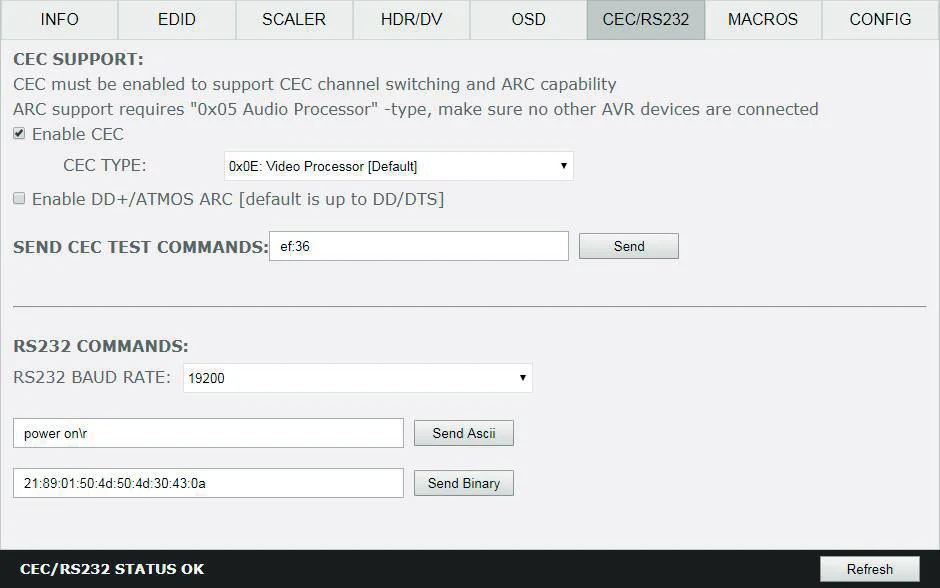
[RS232 COMMAND]: Allow you to test RS232 command to make sure your unit is properly configured and ready to communicate via RS232.
[RS232 BAUD RATE]: Set the RS232 link speed (default 19200)
[Send Ascii]: Once RS232 command have been entered in Ascii format, use this button to send it out.
[Send Binary]: Once RS232 command have been entered in HEX/Binary, use this button to send it out.
[REFRESH]: Refresh the current page.
Note: CEC/ARC master is TX0, if you want ARC from the TV; you need to connect your TV ARC capable input to Maestro TX HDMI TX0 OUTPUT and set the unit as Audio Processor under Maestro TX CEC device type.
Note: Note on eARC: eARC does not rely on CEC, therefor it is not needed to select any CEC options in order to extract up to Dolby Atmos HBR over TrueHD from capable eARC TV. That is always done automatically and forwarded to HDMI audio out of the Maestro TX so you can feed any AVR input with it.
RX Web Server CEC/RS232 Section
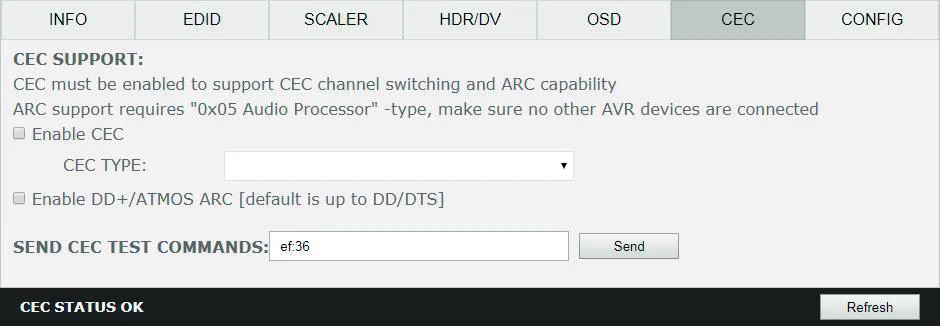
[ENABLE CEC] must be checked in order to apply the selected dropdown options to the Maestro RX unit. Once activated it allows Maestro RX to answer and process CEC requests and commands and appear on the TV CEC network map. Uncheck it if you do not want Maestro RX to answer external CEC requests or process Internal CEC commands. Unchecking will remove Maestro RX from the Root(TV) network map but CEC commands for connected sinks or sources will still pass-thru.
[CEC TYPE] Video Processor (Default) is the device type to choose if you have an AVR in your setup and if you want to use that AVR for ARC or CEC.
[CEC TYPE] Audio Processor is the device type to choose if you want Maestro RX ARC feature to be ON (Sound from TV ARC back to Maestro TX HDMI audio out, 5.1 Optical Out or Jack Analog Stereo output.
[Enable DD+/ATMOS ARC]: If your AVR is capable of accepting more than Dolby Digital or DTS or if can take 192khz Audio via its optical input, you can use Maestro TX to extract DD+ and Atmos from TV embedded streaming APPS and forward it to your AVR via the Maestro TX HDMI audio out or optical output. Only a very few AVR on the market can support 192khz via optical in such case, use Maestro TX HDMI audio out to feed DD+/ATMOS to your AVR input.
[SEND CEC TEST COMMAND]: Enter the CEC command of your choice in this text field in HEX format. If you are not sure about how to format your command, we recommend you to visit the very well done cec-o-matic website made by Kwikwai.
Note: CEC/ARC master is TX0, if you want ARC from the TV; you need to connect your TV ARC capable input to Maestro RX HDMI TX0 OUTPUT and set the unit as Audio Processor under Maestro RX CEC device type.
Note: Note on eARC: eARC is only available from Maestro TX HDMI TX0 output.
TX Web Server MACROS Section
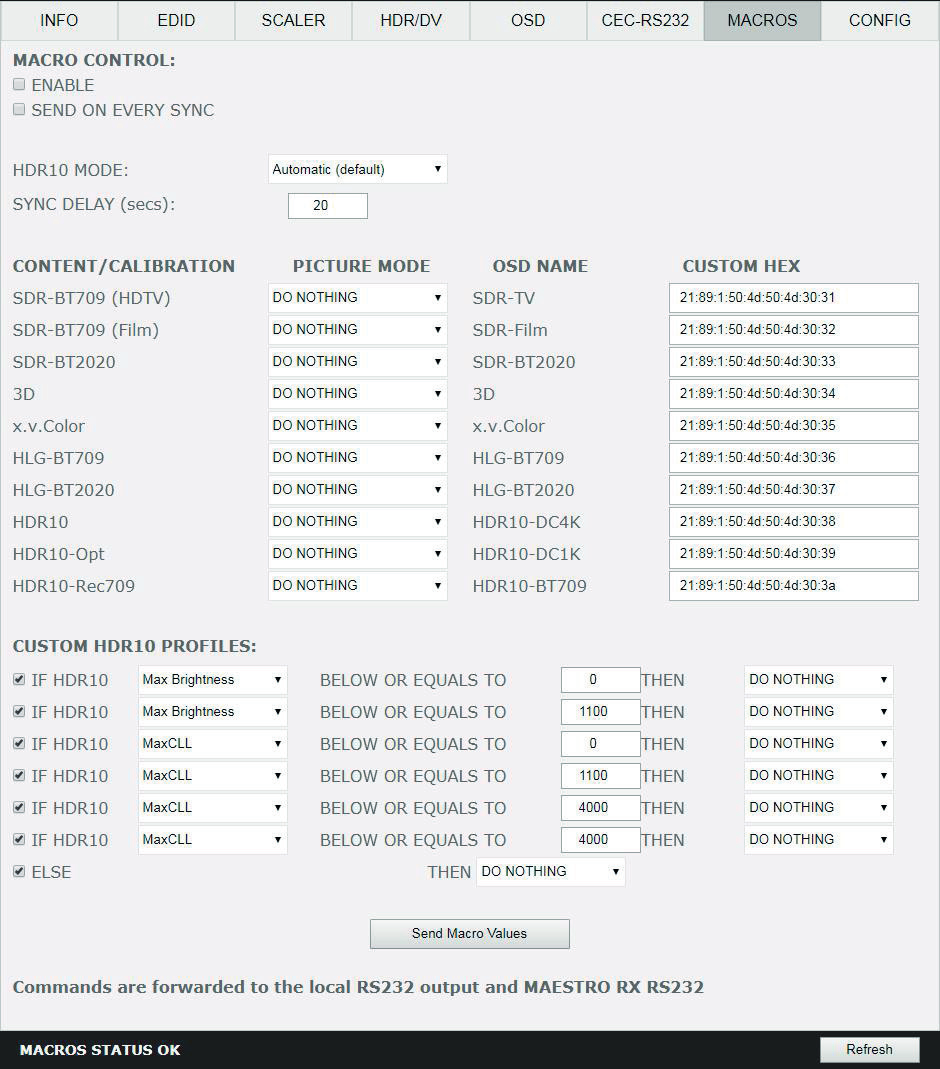
With the help of power users from the community, special automatic and custom macro has been developed for JVC Projectors. Kindly please refer to instructions posted here. Maestro TX/RX now allow to edit each command individually so you can instruct any RS232 capable display.
.eu
TX Web Server CONFIG Section
.eu
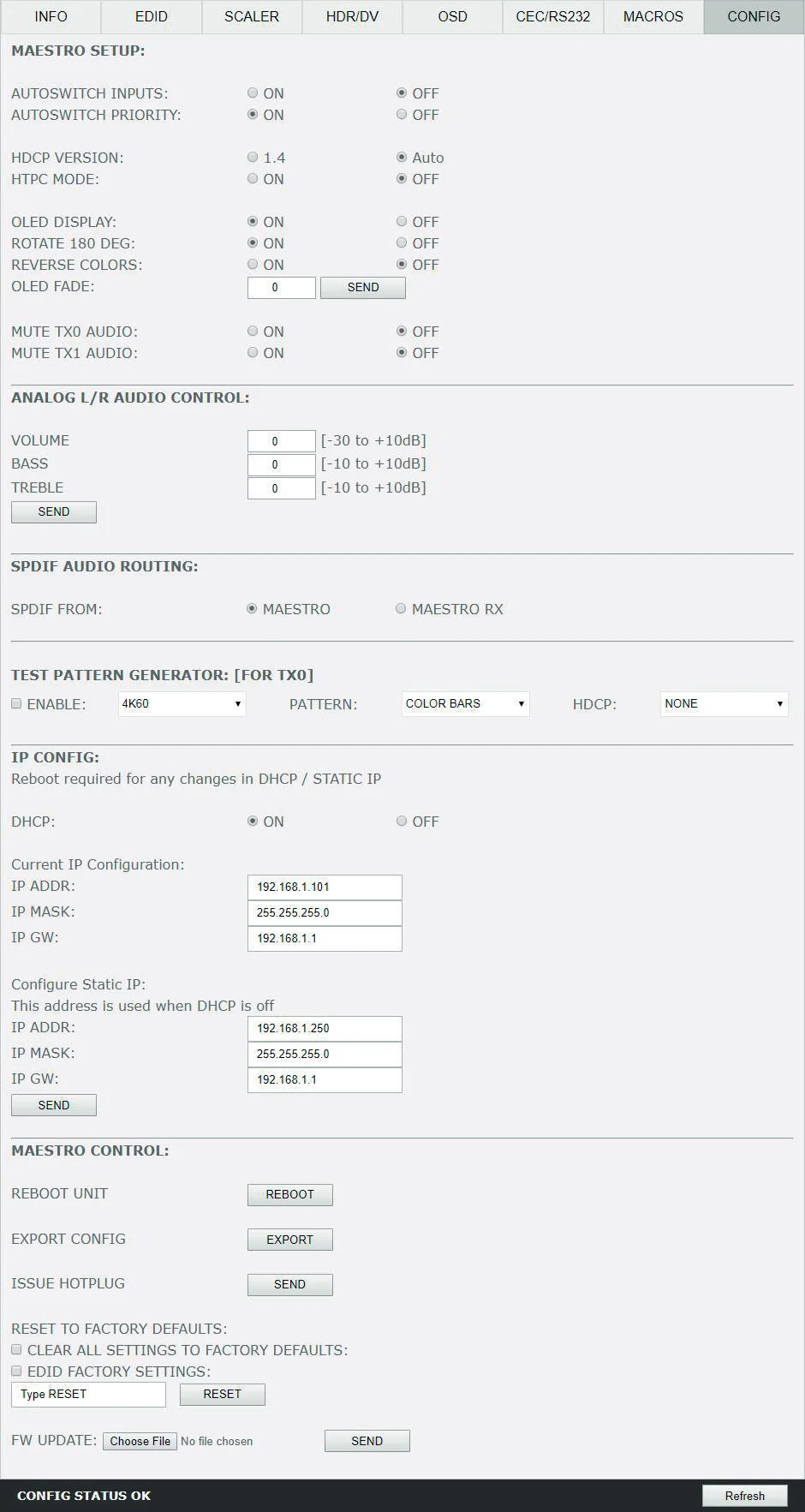
- AUTOSWITCH INPUTS : When activated, the new TMDS / Pixel clock Auto switch feature will force the Maestro TX unit to automatically switch to the active signal if the selected signal is lost. It can also auto switch source that keep sending +5V when in standby such as ATV4K, X1X, Shield and others.
- AUTOSWITCH PRIORITY : When input priority mode is enabled, as soon as a new active input is detected, Maestro TX will switch to it.
- HDCP VERSION : Allow you to select/force the HDCP revision of the TX1 Output Port.
- HTPC MODE : Useful if you have trouble with windows display and icons when resuming from stand-by mode. Please note that with default firmware HTPC mode is not compatible with HDCP signal.
- OLED DISPLAY : Enabled by default, Maestro TX OLED display can be turned ON/OFF at will. Some users might found the Maestro TX OLED display visually disturbing in their HT setup. You have the possibility to turn it off.
- ROTATE 180 DEG : OFF by default, based on your setup, you might prefer to flip the OLED display, once activated, this option will flip the Maestro TX OLED.
- REVERSE COLORS : OFF by default, once activated this option will reverse the Maestro TX OLED colors.
- OLED FADE : Allow you to define a custom timing in seconds before OLED FADE, set it to 0 for OLED to always stay active. Default is 60sec.
- MUTE TX0 AUDIO : If you use an AVR at HDMI audio out, you might want to disable sound going to equipment connected at TX0 output. Here you can mute the TX0 output sound.
- MUTE TX1 AUDIO : If you use an AVR at HDMI audio out, you might want to disable sound going to equipment connected at TX1 output (HDBT going to Maestro RX). Here you can mute the TX1 output sound.
- ANALOG L/R AUDIO CONTROL : This option will adjust the Analog Stereo output from this section. Volume, Bass and Treble control are available.
- SEND : After Volume, Bass or Treble values changes, click send to apply your changes.
- SPDIF AUDIO ROUTING : This option allow you to either root ARC from Maestro TX HDMI output TX0 or retrieve it from Maestro RX HDMI output TX0
- TEST PATTERN GENERATOR FOR TX0 : Once configured with dropdown field and enabled, this option will display a test pattern at TX0 output. It can be useful for testing equipment. 480p60, 720p60; 1080p60, 4k24 or 4K60 resolution are available, Pattern can be color bars, ramp1 or ramp2 and HDCP can be set to none, 1.4 or 2.2
- IP CONFIG : This section allows you to edit the way Maestro TX will retrieve its IP address. Any changes will only be applied after reboot (power cycle)
- DHCP : When set to ON, Maestro TX will retrieve a dynamic IP automatically.
- CURRENT IP CONFIGURATION : Display the current value of IP address, IP mask and IP gateway.
- CONFIGURE STATIC IP : Enter the IP address, IP mask and IP gateway of your choice for a static IP setup, DHCP needs to be OFF for using static IP values
- SEND : After any changes in IP configuration, click SEND to validate.
- REBOOT UNIT : Click REBOOT button to restart Maestro TX completely.
- EXPORT CONFIG : Allow you to export a txt file that include the full list of Maestro TX settings and some setup information that can be useful for support.
- ISSUE HOTPLUG : Click Send button to perform a soft-reset in your setup.
- CLEAR ALL SETTINGS TO FACTORY DEFAULTS : Type RESET in the factory def text field and click the available RESET button to clear all settings to factory defaults. Maestro TX power cycle needed.
- EDID FACTORY SETTINGS : Click the available check box to clear all EDID settings to factory defaults and type RESET in the test field. Finally click the RESET button and unit EDID will be reset to factory defaults.
- FW UPDATE : Select the Maestro TX firmware file and click SEND to upload it. Wait for Maestro TX to reboot automatically.
- REFRESH : Refresh the current page.
.eu
RX Web Server CONFIG Section
.eu
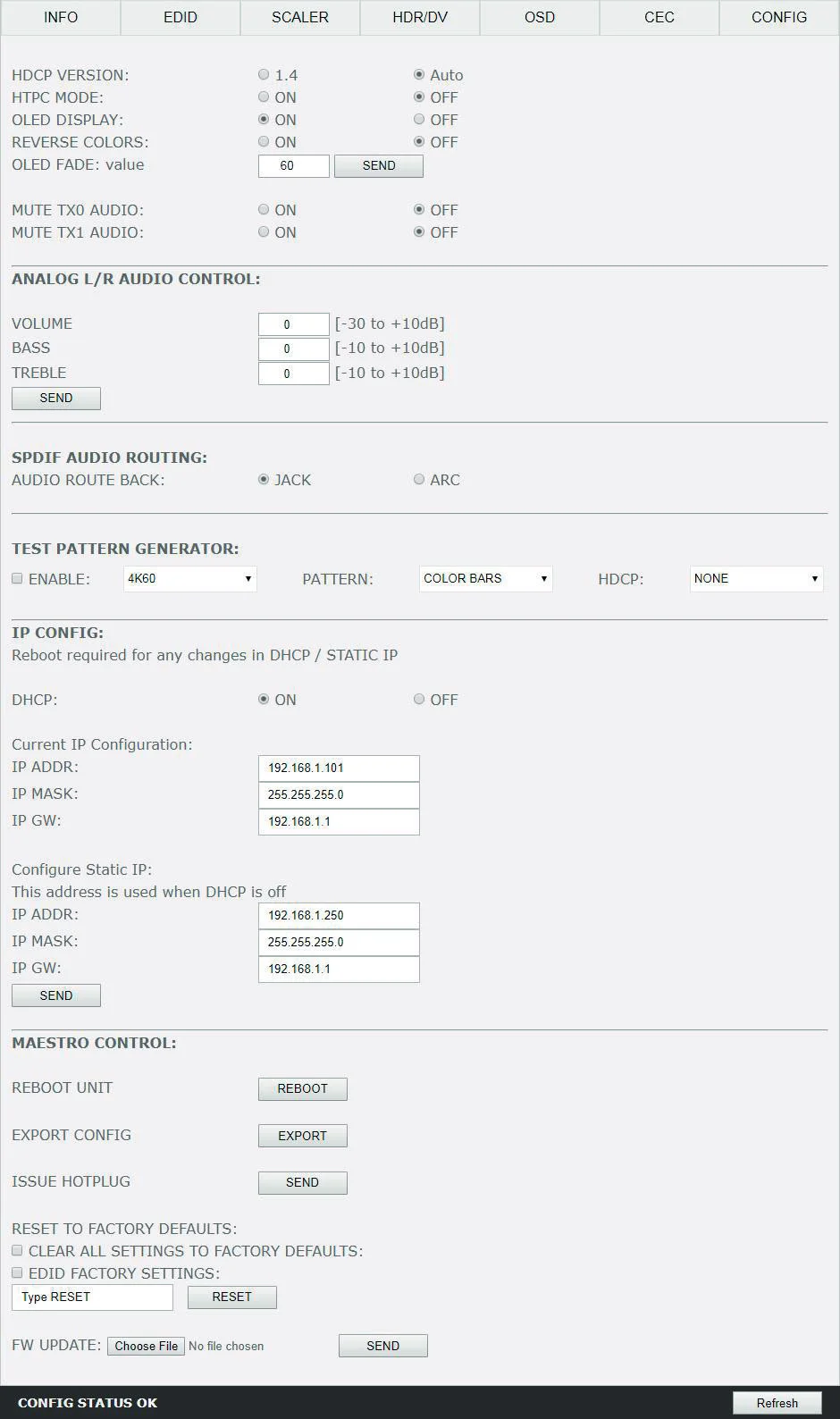
- HDCP VERSION : Allow you to select/force the HDCP revision of the Maestro RX Output Port.
- HTPC MODE : Useful if you have trouble with windows display and icons when resuming from stand-by mode. Please note that with default firmware HTPC mode is not compatible with HDCP signal.
- OLED DISPLAY : Enabled by default, Maestro RX OLED display can be turned ON/OFF at will. Some users might found the Maestro RX OLED display visually disturbing in their HT setup. You have the possibility to turn it off.
- REVERSE COLORS : OFF by default, once activated this option will reverse the Maestro RX OLED colors.
- OLED FADE : Allow you to define a custom timing in seconds before OLED FADE, set it to 0 for OLED to always stay active. Default is 60sec.
- MUTE TX0 AUDIO : If you use an AVR at HDMI audio out, you might want to disable sound going to equipment connected at TX0 output. Here you can mute the TX0 output sound.
- MUTE TX1 AUDIO : If you use an AVR at HDMI audio out, you might want to disable sound going to equipment connected at TX1 output (HDBT going to Maestro RX). Here you can mute the TX1 output sound.
- ANALOG L/R AUDIO CONTROL : This option will adjust the Analog Stereo output from this section. Volume, Bass and Treble control are available.
- SEND : After Volume, Bass or Treble values changes, click send to apply your changes.
- SPDIF AUDIO ROUTING : This option allow you to either root ARC from Maestro TX HDMI output TX0 or retrieve it from Maestro RX HDMI output TX0
- TEST PATTERN GENERATOR FOR TX0 : Once configured with dropdown field and enabled, this option will display a test pattern at TX0 output. It can be useful for testing equipment. 480p60, 720p60; 1080p60, 4k24 or 4K60 resolution are available, Pattern can be color bars, ramp1 or ramp2 and HDCP can be set to none, 1.4 or 2.2
- IP CONFIG : This section allows you to edit the way Maestro TX will retrieve its IP address. Any changes will only be applied after reboot (power cycle)
- DHCP : When set to ON, Maestro TX will retrieve a dynamic IP automatically.
- CURRENT IP CONFIGURATION : Display the current value of IP address, IP mask and IP gateway.
- CONFIGURE STATIC IP : Enter the IP address, IP mask and IP gateway of your choice for a static IP setup, DHCP needs to be OFF for using static IP values
- SEND : After any changes in IP configuration, click SEND to validate.
- REBOOT UNIT : Click REBOOT button to restart Maestro TX completely.
.eu
- EXPORT CONFIG : Allow you to export a txt file that include the full list of Maestro TX settings and some setup information that can be useful for support.
- ISSUE HOTPLUG : Click Send button to perform a soft-reset in your setup.
- CLEAR ALL SETTINGS TO FACTORY DEFAULTS : Type RESET in the factory def text field and click the available RESET button to clear all settings to factory defaults. Maestro TX power cycle needed.
- EDID FACTORY SETTINGS : Click the available check box to clear all EDID settings to factory defaults and type RESET in the test field. Finally click the RESET button and unit EDID will be reset to factory defaults.
- FW UPDATE : Select the Maestro TX firmware file and click SEND to upload it. Wait for Maestro TX to reboot automatically.
- REFRESH : Refresh the current page.
.eu
Updating your Maestro TX/RX Firmware via web browser
The Maestro TX/RX Firmware can be updated from any web browser based device.
If you meet any issue updating your Maestro firmware, please try using Chrome Browser on your device.
You can download the latest Firmware version for your Maestro TX/RX device from the Download Tab on the Maestro TX/RX Product page: here. If you are unsure about your Firmware version currently in use, simply refer to OLED display on your unit. Alternatively, FW version is reported on any header of any page when accessing the embedded web server.
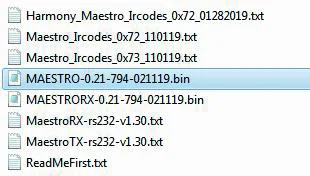
Once downloaded and extracted, you should have a directory on your computer with the following files
You will have to run both Maestro and Maestro RX Updates to successfully upgrade your Maestro TX/RX combo.
Note: Version number could be different depending on the FW revision you downloaded.
You can start by any of them; there is no particular order to respect.
However, you must update Maestro TX firmware from Maestro TX webserver, and update Maestro RX firmware from Maestro RX webserver.
After updating the Maestro TX or RX firmware, you will be prompted to refresh the webpage once unit
have rebooted, you won’t see any light or OLED info for about 15s as the unit is restarting and reconfiguring itself. Once ready, OLED and light will come back on.
Visit Maestro TX or RX webserver and browse to the bottom on the CONFIG section.
Click Choose File as shown on the above picture and select Maestro TX or RX firmware file accordingly to the web server you are currently surfing on.
.eu
Once correct Firmware file is selected, its name will appear on the config page. Simply click SEND button to start flashing the firmware to your unit.
During this process you will see the above message on the footer page of the config section.
Please wait a few seconds and do not disconnect your device while the upgrade process is running.
Once completed, you will see the above notification.
Simply wait for Maestro OLED to come back on and click REFRESH.
The top section of the web server and Maestro OLED should now indicate the new firmware version.
Congratulations, you have successfully updated your Maestro firmware update and your unit is now ready to operate with the benefits from the latest software additions. If you flashed Maestro TX first, you might want to repeat this process for Maestro RX by updating from Maestro RX webserver.
Public API/DLL: We have created a set of DLL/API package for Maestro TX/RX so anyone can interface their Windows software with Maestro TX/RX capabilities and build evaluation, testing, measurement, calibration and content creation workflows system.
IR/RS232: Maestro TX/RX can be fully controlled via IR or from any serial based computer such as Win, Max or Linux using RS232 interface. Complete list of IR and RS232 commands are included as a text file for convenience on all Firmware updater and GUI utility package.
.eu
CONFIG Export section of the web server
CONFIG Export section of web server:
By using the [CONFIG] > [EXPORT CONFIG] option, you will be able to save the current Maestro TX configuration and settings in a text file.
The file can then be shared with the community or for support reason.
Exported config file will present the active signal information, the EDID set for each RX and TX as well as the list of parameters.
{
"product": "MAESTRO",
"time": "11/02/2019 Ã 01:07:34",
"hostname": "MAESTRO-02",
"ipaddress": "192.168.1.137",
"version": "FW: 0.20",
"portseltx0": "0",
"portseltx1": "4",
"routinglock": "1",
"rxports": "0",
"RX0": " 4K59.934 RGB 8b HDR 593MHz ",
"RX1": " 4K59.934 RGB 8b HDR 593MHz ",
"TX0": "",
"TX1": " 4K59.934 RGB 8b HDR 593MHz CR",
"AUD0": " L-PCM 48kHz 2.0ch 16bit",
"AUD1": " L-PCM 48kHz 2.0ch 16bit",
"SINK0": "EDID not available",
"SINK1": "MAESTRO RX CONNECTED",
"SPD": "83:01:19:3e:4d:53:46:54:00:00:00:00:58:62:6f:78:20:4f:6e:65:00:00:00:00:00:00:00:00:08:00:00",
"SPD1": "",
"edidmode": "2",
"edidalgo": "4",
"edidtableinp1": "11",
"edidtableinp2": "0",
"edidtableinp3": "0",
"edidtableinp4": "0",
"edidbt2020": "1",
"edidyuv": "0",
"edidhdr": "1",
"edidhlg": "0",
"edidaudioflags": "16",
"ediddv": "0",
"ediddvremove": "0",
"ediddvlimit": "0",
"edid3d": "0",
"AVI": "82:02:0d:d6:10:28:00:61:00:00:00:00:00:00:00:00:00",
"HDR": "87:01:1a:b0:02:00:c2:33:c4:86:4c:1d:b8:0b:d0:84:80:3e:13:3d:42:40:a0:0f:32:00:e8:03:90:01:00",
"HDRCUSTOM": "87:01:1a:b0:02:00:c2:33:c4:86:4c:1d:b8:0b:d0:84:80:3e:13:3d:42:40:a0:0f:32:00:e8:03:90:01:00",
"AVICUSTOM": "82:02:0d:ae:40:c0:60:61:00:00:00:00:00:00:00:00:00",
.eu
"HVS": "",
"VSI": "",
"HFV": "",
"DV0": "",
"customhdr": "0",
"customavi": "0",
"disablehdr": "0",
"disableavi": "0",
"hdrcustomhdronly": "0",
"hdrcustomhlgonly": "0",
"hdr10disable": "0",
"hlgdisable": "0",
"hdrcustomhlgonlyauto": "0",
"AUD": "84:01:0a:70:01:00:00:00:00:00:00:00:00:00:00:00:00:00:00:00:00:00:00:00:00:00:00:00:00:00",
"osdenable": 1,
"osdfadesecs": 60,
"osdx": 20,
"osdy": 945,
"osdcolorfg": 21,
"osdcolorbg": 0,
"osdlevel": 7,
"osdMaskenable": 0,
"osdmaskx": 0,
"osdmasky": 950,
"osdmaskx1": 1920,
"osdmasky1": 1080,
"osdmasklevel": 3,
"osdmaskgray": 10,
"osdtextenable": 0,
"osdtextneverfade": 0,
"osdtextx": 20,
"osdtexty": 20,
"osdfieldsource": 1,
"osdfieldvideo": 1,
"osdfieldvideoif": 1,
"osdfieldhdr": 1,
"osdfieldhdrif": 1,
"osdfieldaudio": 1,
"osdfieldrxhdrforce": 0,
"osdfieldrxvideoforce": 0,
"osdfieldignoremetadata": 0,
"osdtextstr": "undefinedMAESTRO by HDFURY 2019",
"cecrequested": "2",
"cecla": "14",
"archbr": "0",
"baudrate": "19200",
"macroenable": 0,
"macroeverysync": 0,
"macrohdr10mode": 0,
"macrocustomen1": 1,
"macrocustomen2": 1,
"macrocustomen3": 1,
"macrocustomen4": 1,
"macrocustomen5": 1,
"macrocustomen6": 1,
.eu
"macrocustomen7": 1,
"macrocustom1mode": 0,
"macrocustom1value": 0,
"macrocustom1action": 0,
"macrocustom2mode": 0,
"macrocustom2value": 1100,
"macrocustom2action": 0,
"macrocustom3mode": 2,
"macrocustom3value": 0,
"macrocustom3action": 0,
"macrocustom4mode": 2,
"macrocustom4value": 1100,
"macrocustom4action": 0,
"macrocustom5mode": 2,
"macrocustom5value": 4000,
"macrocustom5action": 0,
"macrocustom6mode": 2,
"macrocustom6value": 4000,
"macrocustom6action": 0,
"macrocustom7action": 0,
"macrodrhdtv": 0,
"macrodrfilm": 0,
"macrodrbt2020": 0,
"macro3d": 0,
"macroxvcolor": 0,
"macrohlgbt709": 0,
"macrohlgbt2020": 0,
"macrohdr10": 0,
"macrohdr10opt": 0,
"macrohdr10bt709": 0,
"enclevel": "0",
"autosw": "0",
"autoswprio": "1",
"txaudioroute": "0",
"rxaudioroute": "0",
"htpc": "0",
"volume": "0",
"bass": "0",
"treb": "0",
"ipstatic": "staticip 192.168.1.250/255.255.255.0/192.168.1.1",
"ipactive": "activeip 192.168.1.137/255.255.255.0/192.168.1.1",
"nodhcp": "0",
"oled": "1",
"oledrot": "1",
"oledrev": "0",
"oledfade": "0",
"EDIDRX0": "00 ff ff ff ff ff ff 00 25 d4 01 00 01 00 00 00 0a 1c 01 03 80 00 00 78 0a ee 95 a3 54 4c 99 26 0f 50 54 a1 08 00 31 40 45 40 61 40 71 40 81 80 01 00 01 00 01 01 08 e8 00 30 f2 70 5a 80 b0 58 8a 00 50 1d 74 00 00 1e 02 3a 80 18 71 38 2d 40 58 2c 45 00 50 1d 74 00 00 1e 00 00 00 fd 00 0f 90 1e 88 3c 00 00 00 00 00 00 00 00 00 00 00 fc 00 56 45 52 54 45 58 0a 20 20 20 20 20 20 01 ef 02 03 5b 71 57 61 10 1f 60 13 05 14 20 21 22 5d 5e 5f 04 65 66 62 63 64 07 16 03 12 35 0f 7f 07 15 07 50 3d 1e c0 4d 02 00 57 06 01 5f 7e 01 67 7e 01 83 5f 00 00 e2 00 cf e2 0f 09 e3 06 0f 01 e3 05 e3 01 6e 03 0c 00 41 00 b8 3c 20 80 80 01 02 03 04 67 d8 5d c4 01 78 80 03 01 1d 80 18 71 1c 16 20 58 2c 25 00 40 84 63 00 00 9e 66 21 56 aa 51 00 1e 30 46 8f 33 00 50 1d 74 00 00 1e b5",
.eu
RS232 Control
MAESTRO TX/RX RS232 COMMAND LIST:
Maestro TX/RX RS232 jack expects the following plug signals:
TIP = TX [sends data out from Maestro TX/RX]
RING = RX [receives data to Maestro TX/RX]
SLEEVE = GND
Parameters: 19200, n, 1, no handshake
Every command is routed to the RX RS232 as well as the local Maestro control.
Note: If using RS232 to control Maestro TX each command must start with #maestro header and must end with a carriage return \r or a newline \n. If using IP/TELNET, there is no need for the #maestro header. Use only lowercase characters.
A generic command to write a value:#maestro set x y
where #maestro is the header and all commands start with this headerset - indicates value will be written to maestrox - target to be writteny - value or values
A generic command to read a value:#maestro get x
where #maestro is the header and all commands start with this headerget - indicates value will be read from maestrox - target to be read
Command list
#maestro set insel tx0 tx1where tx0 and tx1 is [0-3] input port, or [4] for follow
Ex. #maestro set insel 2 3
Set tx0 to input 2 and tx1 to input 3
#maestro set ipaddr xxx.xxx.xxx.xxxSets the static IP address. Active when dhcp is turned off.
Ex. #maestro set ipaddr 192.168.1.222
#maestro set ipmask xxx.xxx.xxx.xxxSets the static IP network mask. Active when dhcp is turned off.
Ex. #maestro set ipmask 255.255.255.0
#maestro set ipgw xxx.xxx.xxx.xxxSets the static IP gateway address. Active when dhcp is turned off.
Ex. #maestro set ipgw 192.168.1.1
#maestro set dhcp xSet the dynamic or static IP address selection. Dynamic = dhcp on; where x is [on / off]
Ex. #maestro set dhcp off
#maestro set autosw xwhere x is [on / off]; Enables or disables the autoswitch feature
Ex. #maestro set autosw off
#maestro set autoswprio xwhere x is [on / off]; Enables or disables the autoswitch priority feature
Ex. #maestro set autoswprio off
#maestro set edidmode xwhere x is [automix / custom / fixed / copytx0 / copytx1]
Ex. #maestro set edidmode automix
#maestro set edid audio xwhere x is [stereo / 51 / full / native / tx1]; Sets the automix EDID audio flag
Ex. #maestro set edid audio native
#maestro set edid bt2020 xwhere x is [on / off]; Sets the automix EDID bt2020 capability addition. Will not remove if existing on the sink - only adds if missing
Ex. #maestro set edid bt2020 on
#maestro set edid yuvremove xwhere x is [on / off]; Sets the automix EDID YUV/YCbCr capability force. Controls if the source sees a YCbCr capable sink
Ex. #maestro set edid yuvremove on
#maestro set edid hdr10 xwhere x is [on / off]; Sets the automix EDID hdr10 capability. Will not remove if existing on the sink - only adds if missing
Ex. #maestro set edid hdr10 on
#maestro set edid hlg xwhere x is [on / off]; Sets the automix EDID hlg capability. Will not remove if existing on the sink - only adds if missing
Ex. #maestro set edid hlg on
#maestro set edid dv xwhere x is [on / off]; Sets the automix EDID Dolby Vision capability. Will not remove if existing on the sink - only adds if missing
Ex. #maestro set edid dv on
#maestro set edid dvremove xwhere x is [on / off]; Sets the automix EDID to remove DV capability
Ex. #maestro set edid dvremove on
#maestro set edid dvlimit xwhere x is [on / off]; Sets the automix EDID Dolby Vision frequency capability to 300Mhz max
Ex. #maestro set edid dvlimit on
#maestro set edid 3dremove xwhere x is [on / off]; Sets the automix EDID to remove 3D capability. Controls if the source sees a 3D capable sink
Ex. #maestro set edid 3dremove on
#maestro set hdcp xwhere x is [14 / auto]; Sets the hdcp level. In auto mode, depending on sink capability uses hdcp 1.4 or 2.2
Ex. #maestro set hdcp auto
#maestro set scale xwhere x is [auto / custom / none]; Sets the scaling style for tx0 (tx1 is always automatic). In auto mode, optimizes according to the best sink capabilities
Ex. #maestro set scale auto
#maestro set autonoupscale xwhere x is [on / off]; Sets the mode for upscaling in tx0 output. Applies in "scale auto" mode only. In "scale auto" mode enables/disables upscaling of 1080p content automatically to 4k.
Ex. #maestro set autonoupscale off
#maestro set edidtableinp0 x
#maestro set edidtableinp1 x
#maestro set edidtableinp2 x
#maestro set edidtableinp3 x
where x is [1 - 100] for edidtableinp0 and [0 - 100] for others; Sets the custom EDID for corresponding input port. For ports 1-3 table number 0 indicates copy port 0 table
Ex. #maestro set edidtableinp0 11
#maestro set edidalgo xwhere x is [0 - 4]; Sets the automix algorithm 0 = Min video, min audio 1 = Min video, max audio 2 = Tx0 priority 3 = Tx1 priority 4 = Max video, max audio [default]
Ex. #maestro set edidalgo 4
#maestro set hdrcustom xwhere x is [on / off]; Starts to output custom HDR metadata and ignores any input received HDR metadata. Overrides all other hdrcustom options
Ex. #maestro set hdrcustom on
#maestro set hdrcustomhdr10only xwhere x is [on / off]; Starts to output custom HDR metadata if and only if the input is HDR10. This setting is used to replace the incoming HDR10 metadata.
Ex. #maestro set hdrcustomhdr10only on
#maestro set hdrcustomhlgonly xwhere x is [on / off]; Starts to output custom HDR metadata if and only if the input is HLG. This setting is used to replace the incoming HLG metadata.
Ex. #maestro set hdrcustomhlgonly on
#maestro set hdrcustomhlgonlyauto xwhere x is [on / off]; Starts to output custom HDR metadata if and only if the input is HLG and the sink has no HLG support. This setting is used to replace the incoming HLG metadata. Useful when turning on/off HLG capable sink while non-HLG sink is also connected.
Ex. #maestro set hdrcustomhlgonlyauto on
#maestro set hdrdisable xwhere x is [on / off]; Stops sending any HDR metadata content
Ex. #maestro set hdrdisable on
#maestro set hdrdisablehdr10only xwhere x is [on / off]; Stops sending any HDR metadata content if the input is HDR10
Ex. #maestro set hdrdisablehdr10only on
#maestro set hdrdisablehlgonly xwhere x is [on / off]; Stops sending any HDR metadata content if the input is HLG
Ex. #maestro set hdrdisablehlgonly on
#maestro set avicustom xwhere x is [on / off]; Starts to output custom AVI infoframe and ignores any input received AVI metadata.
Ex. #maestro set avicustom on
#maestro set avidisable xwhere x is [on / off]; Stops sending any AVI infoframe content
Ex. #maestro set avidisable on
#maestro set cec xwhere x is [on / off]; Sets the CEC engine
Ex. #maestro set cec on
IR Code List
For convenience, the complete list of IR codes is supplied in Pronto HEX files, it is recommended to always use the latest IR codes list that is included as a text file format with each firmware and GUI update. Maestro TX/RX IR codes have also been submitted to Logitech Harmony and iRule.
maestro_archbroff: NEC 0x76 0x3e
0000 006e 0000 0022 0156 00ab 0015 0015 0015 003f 0015 003f 0015 0015 0015 003f 0015 003f 0015
003f 0015 0015 0015 003f 0015 0015 0015 0015 0015 003f 0015 0015 0015 0015 0015 0015 0015 003f
0015 0015 0015 003f 0015 003f 0015 003f 0015 003f 0015 003f 0015 0015 0015 0015 0015 003f 0015
0015 0015 0015 0015 0015 0015 0015 0015 0015 0015 0015 003f 0015 003f 0015 1d0b
maestro_archbron: NEC 0x76 0x3d
0000 006e 0000 0022 0156 00ab 0015 0015 0015 003f 0015 003f 0015 0015 0015 003f 0015 003f 0015
003f 0015 0015 0015 003f 0015 0015 0015 0015 0015 003f 0015 0015 0015 0015 0015 0015 0015 003f
0015 003f 0015 0015 0015 003f 0015 003f 0015 003f 0015 003f 0015 0015 0015 0015 0015 0015 0015
003f 0015 0015 0015 0015 0015 0015 0015 0015 0015 003f 0015 003f 0015 1d0b
maestro_autonoupscaleoff: NEC 0x76 0x40
0000 006e 0000 0022 0156 00ab 0015 0015 0015 003f 0015 003f 0015 0015 0015 003f 0015 003f 0015
003f 0015 0015 0015 003f 0015 0015 0015 0015 0015 003f 0015 0015 0015 0015 0015 0015 0015 003f
0015 0015 0015 0015 0015 0015 0015 0015 0015 0015 0015 0015 0015 003f 0015 0015 0015 003f 0015
003f 0015 003f 0015 003f 0015 003f 0015 003f 0015 003f 0015 0015 0015 003f 0015 1d0b
maestro_autonoupscaleon: NEC 0x76 0x3f
0000 006e 0000 0022 0156 00ab 0015 0015 0015 003f 0015 003f 0015 0015 0015 003f 0015 003f 0015
003f 0015 0015 0015 003f 0015 0015 0015 0015 0015 003f 0015 0015 0015 0015 0015 0015 0015 003f
0015 003f 0015 003f 0015 003f 0015 003f 0015 003f 0015 003f 0015 0015 0015 0015 0015 0015 0015
0015 0015 0015 0015 0015 0015 0015 0015 0015 0015 003f 0015 003f 0015 1d0b
maestro_autoswoff: NEC 0x76 0x13
0000 006e 0000 0022 0156 00ab 0015 0015 0015 003f 0015 003f 0015 0015 0015 003f 0015 003f 0015
003f 0015 0015 0015 003f 0015 0015 0015 0015 0015 003f 0015 0015 0015 0015 0015 0015 0015 003f
0015 003f 0015 003f 0015 0015 0015 0015 0015 003f 0015 0015 0015 0015 0015 0015 0015 0015 0015
0015 0015 003f 0015 003f 0015 0015 0015 003f 0015 003f 0015 003f 0015 1d0b
maestro_autoswon: NEC 0x76 0x12
0000 006e 0000 0022 0156 00ab 0015 0015 0015 003f 0015 003f 0015 0015 0015 003f 0015 003f 0015
003f 0015 0015 0015 003f 0015 0015 0015 0015 0015 003f 0015 0015 0015 0015 0015 0015 0015 003f
0015 0015 0015 003f 0015 0015 0015 0015 0015 003f 0015 0015 0015 0015 0015 0015 0015 003f 0015
0015 0015 003f 0015 003f 0015 0015 0015 003f 0015 003f 0015 003f 0015 1d0b
maestro_autoswpriooff: NEC 0x76 0x15
0000 006e 0000 0022 0156 00ab 0015 0015 0015 003f 0015 003f 0015 0015 0015 003f 0015 003f 0015
003f 0015 0015 0015 003f 0015 0015 0015 0015 0015 003f 0015 0015 0015 0015 0015 0015 0015 003f
0015 003f 0015 0015 0015 003f 0015 0015 0015 003f 0015 0015 0015 0015 0015 0015 0015 0015 0015
003f 0015 0015 0015 003f 0015 0015 0015 003f 0015 003f 0015 003f 0015 1d0b
maestro_autoswprioon: NEC 0x76 0x14
0000 006e 0000 0022 0156 00ab 0015 0015 0015 003f 0015 003f 0015 0015 0015 003f 0015 003f 0015
003f 0015 0015 0015 003f 0015 0015 0015 0015 0015 003f 0015 0015 0015 0015 0015 0015 0015 003f
0015 0015 0015 0015 0015 003f 0015 0015 0015 003f 0015 0015 0015 0015 0015 0015 0015 003f 0015
003f 0015 0015 0015 003f 0015 0015 0015 003f 0015 003f 0015 003f 0015 1d0b
maestro_avicustomoff: NEC 0x76 0x46
0000 006e 0000 0022 0156 00ab 0015 0015 0015 003f 0015 003f 0015 0015 0015 003f 0015 003f 0015
003f 0015 0015 0015 003f 0015 0015 0015 0015 0015 003f 0015 0015 0015 0015 0015 0015 0015 003f
0015 0015 0015 003f 0015 003f 0015 0015 0015 0015 0015 0015 0015 003f 0015 0015 0015 003f 0015
0015 0015 0015 0015 003f 0015 003f 0015 003f 0015 0015 0015 003f 0015 1d0b
maestro_avicustomon: NEC 0x76 0x45
0000 006e 0000 0022 0156 00ab 0015 0015 0015 003f 0015 003f 0015 0015 0015 003f 0015 003f 0015
003f 0015 0015 0015 003f 0015 0015 0015 0015 0015 003f 0015 0015 0015 0015 0015 0015 0015 003f
0015 003f 0015 0015 0015 003f 0015 0015 0015 0015 0015 0015 0015 003f 0015 0015 0015 0015 0015
003f 0015 0015 0015 003f 0015 003f 0015 003f 0015 0015 0015 003f 0015 1d0b
maestro_avidisableoff: NEC 0x76 0x48
0000 006e 0000 0022 0156 00ab 0015 0015 0015 003f 0015 003f 0015 0015 0015 003f 0015 003f 0015
003f 0015 0015 0015 003f 0015 0015 0015 0015 0015 003f 0015 0015 0015 0015 0015 0015 0015 003f
0015 0015 0015 0015 0015 0015 0015 003f 0015 0015 0015 0015 0015 003f 0015 0015 0015 003f 0015
003f 0015 003f 0015 0015 0015 003f 0015 003f 0015 0015 0015 003f 0015 1d0b
maestro_avidisableon: NEC 0x76 0x47
0000 006e 0000 0022 0156 00ab 0015 0015 0015 003f 0015 003f 0015 0015 0015 003f 0015 003f 0015
003f 0015 0015 0015 003f 0015 0015 0015 0015 0015 003f 0015 0015 0015 0015 0015 0015 0015 003f
0015 003f 0015 003f 0015 003f 0015 0015 0015 0015 0015 0015 0015 003f 0015 0015 0015 0015 0015
0015 0015 0015 0015 003f 0015 003f 0015 003f 0015 0015 0015 003f 0015 1d0b
maestro_avoldown: NEC 0x76 0x5b
0000 006e 0000 0022 0156 00ab 0015 0015 0015 003f 0015 003f 0015 0015 0015 003f 0015 003f 0015
003f 0015 0015 0015 003f 0015 0015 0015 0015 0015 003f 0015 0015 0015 0015 0015 0015 0015 003f
0015 003f 0015 003f 0015 0015 0015 003f 0015 003f 0015 0015 0015 003f 0015 0015 0015 0015 0015
0015 0015 003f 0015 0015 0015 0015 0015 003f 0015 0015 0015 003f 0015 1d0b
maestro_avolup: NEC 0x76 0x5a
0000 006e 0000 0022 0156 00ab 0015 0015 0015 003f 0015 003f 0015 0015 0015 003f 0015 003f 0015
003f 0015 0015 0015 003f 0015 0015 0015 0015 0015 003f 0015 0015 0015 0015 0015 0015 0015 003f
0015 0015 0015 003f 0015 0015 0015 003f 0015 003f 0015 0015 0015 003f 0015 0015 0015 003f 0015
0015 0015 003f 0015 0015 0015 0015 0015 003f 0015 0015 0015 003f 0015 1d0b
maestro_ceclaaudioproc: NEC 0x76 0x3c
0000 006e 0000 0022 0156 00ab 0015 0015 0015 003f 0015 003f 0015 0015 0015 003f 0015 003f 0015
003f 0015 0015 0015 003f 0015 0015 0015 0015 0015 003f 0015 0015 0015 0015 0015 0015 0015 003f
0015 0015 0015 0015 0015 003f 0015 003f 0015 003f 0015 003f 0015 0015 0015 0015 0015 003f 0015
003f 0015 0015 0015 0015 0015 0015 0015 0015 0015 003f 0015 003f 0015 1d0b
maestro_ceclavideoproc: NEC 0x76 0x3b
0000 006e 0000 0022 0156 00ab 0015 0015 0015 003f 0015 003f 0015 0015 0015 003f 0015 003f 0015
003f 0015 0015 0015 003f 0015 0015 0015 0015 0015 003f 0015 0015 0015 0015 0015 0015 0015 003f
0015 003f 0015 003f 0015 0015 0015 003f 0015 003f 0015 003f 0015 0015 0015 0015 0015 0015 0015
0015 0015 003f 0015 0015 0015 0015 0015 0015 0015 003f 0015 003f 0015 1d0b
maestro_cecoff: NEC 0x76 0x3a
0000 006e 0000 0022 0156 00ab 0015 0015 0015 003f 0015 003f 0015 0015 0015 003f 0015 003f 0015
003f 0015 0015 0015 003f 0015 0015 0015 0015 0015 003f 0015 0015 0015 0015 0015 0015 0015 003f
0015 0015 0015 003f 0015 0015 0015 003f 0015 003f 0015 003f 0015 0015 0015 0015 0015 003f 0015
0015 0015 003f 0015 0015 0015 0015 0015 0015 0015 003f 0015 003f 0015 1d0b
maestro_cecon: NEC 0x76 0x39
0000 006e 0000 0022 0156 00ab 0015 0015 0015 003f 0015 003f 0015 0015 0015 003f 0015 003f 0015
003f 0015 0015 0015 003f 0015 0015 0015 0015 0015 003f 0015 0015 0015 0015 0015 0015 0015 003f
0015 003f 0015 0015 0015 0015 0015 003f 0015 003f 0015 003f 0015 0015 0015 0015 0015 0015 0015
003f 0015 003f 0015 0015 0015 0015 0015 0015 0015 003f 0015 003f 0015 1d0b
maestro_edid3dremoveoff: NEC 0x76 0x33
0000 006e 0000 0022 0156 00ab 0015 0015 0015 003f 0015 003f 0015 0015 0015 003f 0015 003f 0015
003f 0015 0015 0015 003f 0015 0015 0015 0015 0015 003f 0015 0015 0015 0015 0015 0015 0015 003f
0015 003f 0015 003f 0015 0015 0015 0015 0015 003f 0015 003f 0015 0015 0015 0015 0015 0015 0015
0015 0015 003f 0015 003f 0015 0015 0015 0015 0015 003f 0015 003f 0015 1d0b
maestro_edid3dremoveon: NEC 0x76 0x34
0000 006e 0000 0022 0156 00ab 0015 0015 0015 003f 0015 003f 0015 0015 0015 003f 0015 003f 0015
003f 0015 0015 0015 003f 0015 0015 0015 0015 0015 003f 0015 0015 0015 0015 0015 0015 0015 003f
0015 0015 0015 0015 0015 003f 0015 0015 0015 003f 0015 003f 0015 0015 0015 0015 0015 003f 0015
003f 0015 0015 0015 003f 0015 0015 0015 0015 0015 003f 0015 003f 0015 1d0b
maestro_amutetx0off: NEC 0x76 0x4e
0000 006e 0000 0022 0156 00ab 0015 0015 0015 003f 0015 003f 0015 0015 0015 003f 0015 003f 0015
003f 0015 0015 0015 003f 0015 0015 0015 0015 0015 003f 0015 0015 0015 0015 0015 0015 0015 003f
0015 0015 0015 003f 0015 003f 0015 003f 0015 0015 0015 0015 0015 003f 0015 0015 0015 003f 0015
0015 0015 0015 0015 0015 0015 003f 0015 003f 0015 0015 0015 003f 0015 1d0b
maestro_amutetx0on: NEC 0x76 0x4d
0000 006e 0000 0022 0156 00ab 0015 0015 0015 003f 0015 003f 0015 0015 0015 003f 0015 003f 0015
003f 0015 0015 0015 003f 0015 0015 0015 0015 0015 003f 0015 0015 0015 0015 0015 0015 0015 003f
0015 003f 0015 0015 0015 003f 0015 003f 0015 0015 0015 0015 0015 003f 0015 0015 0015 0015 0015
003f 0015 0015 0015 0015 0015 003f 0015 003f 0015 0015 0015 003f 0015 1d0b
maestro_amutetx1off: NEC 0x76 0x66
0000 006e 0000 0022 0156 00ab 0015 0015 0015 003f 0015 003f 0015 0015 0015 003f 0015 003f 0015
003f 0015 0015 0015 003f 0015 0015 0015 0015 0015 003f 0015 0015 0015 0015 0015 0015 0015 003f
0015 0015 0015 003f 0015 003f 0015 0015 0015 0015 0015 003f 0015 003f 0015 0015 0015 003f 0015
0015 0015 0015 0015 003f 0015 003f 0015 0015 0015 0015 0015 003f 0015 1d0b
maestro_amutetx1on: NEC 0x76 0x65
0000 006e 0000 0022 0156 00ab 0015 0015 0015 003f 0015 003f 0015 0015 0015 003f 0015 003f 0015
003f 0015 0015 0015 003f 0015 0015 0015 0015 0015 003f 0015 0015 0015 0015 0015 0015 0015 003f
0015 003f 0015 0015 0015 003f 0015 0015 0015 0015 0015 003f 0015 003f 0015 0015 0015 0015 0015
003f 0015 0015 0015 003f 0015 003f 0015 0015 0015 0015 0015 003f 0015 1d0b
maestro_edidalgo0: NEC 0x76 0x60
0000 006e 0000 0022 0156 00ab 0015 0015 0015 003f 0015 003f 0015 0015 0015 003f 0015 003f 0015
003f 0015 0015 0015 003f 0015 0015 0015 0015 0015 003f 0015 0015 0015 0015 0015 0015 0015 003f
0015 0015 0015 0015 0015 0015 0015 0015 0015 0015 0015 003f 0015 003f 0015 0015 0015 003f 0015
003f 0015 003f 0015 003f 0015 003f 0015 0015 0015 0015 0015 003f 0015 1d0b
maestro_edidalgo1: NEC 0x76 0x61
0000 006e 0000 0022 0156 00ab 0015 0015 0015 003f 0015 003f 0015 0015 0015 003f 0015 003f 0015
003f 0015 0015 0015 003f 0015 0015 0015 0015 0015 003f 0015 0015 0015 0015 0015 0015 0015 003f
0015 003f 0015 0015 0015 0015 0015 0015 0015 0015 0015 003f 0015 003f 0015 0015 0015 0015 0015
003f 0015 003f 0015 003f 0015 003f 0015 0015 0015 0015 0015 003f 0015 1d0b
maestro_edidalgo2: NEC 0x76 0x62
0000 006e 0000 0022 0156 00ab 0015 0015 0015 003f 0015 003f 0015 0015 0015 003f 0015 003f 0015
003f 0015 0015 0015 003f 0015 0015 0015 0015 0015 003f 0015 0015 0015 0015 0015 0015 0015 003f
0015 0015 0015 003f 0015 0015 0015 0015 0015 0015 0015 003f 0015 003f 0015 0015 0015 003f 0015
0015 0015 003f 0015 003f 0015 003f 0015 0015 0015 0015 0015 003f 0015 1d0b
maestro_edidalgo3: NEC 0x76 0x63
0000 006e 0000 0022 0156 00ab 0015 0015 0015 003f 0015 003f 0015 0015 0015 003f 0015 003f 0015
003f 0015 0015 0015 003f 0015 0015 0015 0015 0015 003f 0015 0015 0015 0015 0015 0015 0015 003f
0015 003f 0015 003f 0015 0015 0015 0015 0015 0015 0015 003f 0015 003f 0015 0015 0015 0015 0015
0015 0015 003f 0015 003f 0015 003f 0015 0015 0015 0015 0015 003f 0015 1d0b
maestro_edidalgo4: NEC 0x76 0x64
0000 006e 0000 0022 0156 00ab 0015 0015 0015 003f 0015 003f 0015 0015 0015 003f 0015 003f 0015
003f 0015 0015 0015 003f 0015 0015 0015 0015 0015 003f 0015 0015 0015 0015 0015 0015 0015 003f
0015 0015 0015 0015 0015 003f 0015 0015 0015 0015 0015 003f 0015 003f 0015 0015 0015 003f 0015
003f 0015 0015 0015 003f 0015 003f 0015 0015 0015 0015 0015 003f 0015 1d0b
maestro_edidaudio2ch: NEC 0x76 0x20
0000 006e 0000 0022 0156 00ab 0015 0015 0015 003f 0015 003f 0015 0015 0015 003f 0015 003f 0015
003f 0015 0015 0015 003f 0015 0015 0015 0015 0015 003f 0015 0015 0015 0015 0015 0015 0015 003f
0015 0015 0015 0015 0015 0015 0015 0015 0015 0015 0015 003f 0015 0015 0015 0015 0015 003f 0015
003f 0015 003f 0015 003f 0015 003f 0015 0015 0015 003f 0015 003f 0015 1d0b
maestro_edidaudio51ch: NEC 0x76 0x21
0000 006e 0000 0022 0156 00ab 0015 0015 0015 003f 0015 003f 0015 0015 0015 003f 0015 003f 0015
003f 0015 0015 0015 003f 0015 0015 0015 0015 0015 003f 0015 0015 0015 0015 0015 0015 0015 003f
0015 003f 0015 0015 0015 0015 0015 0015 0015 0015 0015 003f 0015 0015 0015 0015 0015 0015 0015
003f 0015 003f 0015 003f 0015 003f 0015 0015 0015 003f 0015 003f 0015 1d0b
maestro_edidaudio71ch: NEC 0x76 0x22
0000 006e 0000 0022 0156 00ab 0015 0015 0015 003f 0015 003f 0015 0015 0015 003f 0015 003f 0015
003f 0015 0015 0015 003f 0015 0015 0015 0015 0015 003f 0015 0015 0015 0015 0015 0015 0015 003f
0015 0015 0015 003f 0015 0015 0015 0015 0015 0015 0015 003f 0015 0015 0015 0015 0015 003f 0015
0015 0015 003f 0015 003f 0015 003f 0015 0015 0015 003f 0015 003f 0015 1d0b
maestro_edidaudionative: NEC 0x76 0x23
0000 006e 0000 0022 0156 00ab 0015 0015 0015 003f 0015 003f 0015 0015 0015 003f 0015 003f 0015
003f 0015 0015 0015 003f 0015 0015 0015 0015 0015 003f 0015 0015 0015 0015 0015 0015 0015 003f
0015 003f 0015 003f 0015 0015 0015 0015 0015 0015 0015 003f 0015 0015 0015 0015 0015 0015 0015
0015 0015 003f 0015 003f 0015 003f 0015 0015 0015 003f 0015 003f 0015 1d0b
maestro_edidaudiotx1: NEC 0x76 0x24
0000 006e 0000 0022 0156 00ab 0015 0015 0015 003f 0015 003f 0015 0015 0015 003f 0015 003f 0015
003f 0015 0015 0015 003f 0015 0015 0015 0015 0015 003f 0015 0015 0015 0015 0015 0015 0015 003f
0015 0015 0015 0015 0015 003f 0015 0015 0015 0015 0015 003f 0015 0015 0015 0015 0015 003f 0015
003f 0015 0015 0015 003f 0015 003f 0015 0015 0015 003f 0015 003f 0015 1d0b
maestro_edidautomix: NEC 0x76 0x1a
0000 006e 0000 0022 0156 00ab 0015 0015 0015 003f 0015 003f 0015 0015 0015 003f 0015 003f 0015
003f 0015 0015 0015 003f 0015 0015 0015 0015 0015 003f 0015 0015 0015 0015 0015 0015 0015 003f
0015 0015 0015 003f 0015 0015 0015 003f 0015 003f 0015 0015 0015 0015 0015 0015 0015 003f 0015
0015 0015 003f 0015 0015 0015 0015 0015 003f 0015 003f 0015 003f 0015 1d0b
maestro_edidbt2020off: NEC 0x76 0x26
0000 006e 0000 0022 0156 00ab 0015 0015 0015 003f 0015 003f 0015 0015 0015 003f 0015 003f 0015
003f 0015 0015 0015 003f 0015 0015 0015 0015 0015 003f 0015 0015 0015 0015 0015 0015 0015 003f
0015 0015 0015 003f 0015 003f 0015 0015 0015 0015 0015 003f 0015 0015 0015 0015 0015 003f 0015
0015 0015 0015 0015 003f 0015 003f 0015 0015 0015 003f 0015 003f 0015 1d0b
maestro_edidbt2020on: NEC 0x76 0x25
0000 006e 0000 0022 0156 00ab 0015 0015 0015 003f 0015 003f 0015 0015 0015 003f 0015 003f 0015
003f 0015 0015 0015 003f 0015 0015 0015 0015 0015 003f 0015 0015 0015 0015 0015 0015 0015 003f
0015 003f 0015 0015 0015 003f 0015 0015 0015 0015 0015 003f 0015 0015 0015 0015 0015 0015 0015
003f 0015 0015 0015 003f 0015 003f 0015 0015 0015 003f 0015 003f 0015 1d0b
maestro_edidcopytx0: NEC 0x76 0x1e
0000 006e 0000 0022 0156 00ab 0015 0015 0015 003f 0015 003f 0015 0015 0015 003f 0015 003f 0015
003f 0015 0015 0015 003f 0015 0015 0015 0015 0015 003f 0015 0015 0015 0015 0015 0015 0015 003f
0015 0015 0015 003f 0015 003f 0015 003f 0015 003f 0015 0015 0015 0015 0015 0015 0015 003f 0015
0015 0015 0015 0015 0015 0015 0015 0015 003f 0015 003f 0015 003f 0015 1d0b
maestro_edidcopytx1: NEC 0x76 0x1d
0000 006e 0000 0022 0156 00ab 0015 0015 0015 003f 0015 003f 0015 0015 0015 003f 0015 003f 0015
003f 0015 0015 0015 003f 0015 0015 0015 0015 0015 003f 0015 0015 0015 0015 0015 0015 0015 003f
0015 003f 0015 0015 0015 003f 0015 003f 0015 003f 0015 0015 0015 0015 0015 0015 0015 0015 0015
003f 0015 0015 0015 0015 0015 0015 0015 003f 0015 003f 0015 003f 0015 1d0b
maestro_edidcustom: NEC 0x76 0x1c
0000 006e 0000 0022 0156 00ab 0015 0015 0015 003f 0015 003f 0015 0015 0015 003f 0015 003f 0015
003f 0015 0015 0015 003f 0015 0015 0015 0015 0015 003f 0015 0015 0015 0015 0015 0015 0015 003f
0015 0015 0015 0015 0015 003f 0015 003f 0015 003f 0015 0015 0015 0015 0015 0015 0015 003f 0015
003f 0015 0015 0015 0015 0015 0015 0015 003f 0015 003f 0015 003f 0015 1d0b
maestro_edidcustomtable1: NEC 0x76 0x91
0000 006e 0000 0022 0156 00ab 0015 0015 0015 003f 0015 003f 0015 0015 0015 003f 0015 003f 0015
003f 0015 0015 0015 003f 0015 0015 0015 0015 0015 003f 0015 0015 0015 0015 0015 0015 0015 003f
0015 003f 0015 0015 0015 0015 0015 0015 0015 003f 0015 0015 0015 0015 0015 003f 0015 0015 0015
003f 0015 003f 0015 003f 0015 0015 0015 003f 0015 003f 0015 0015 0015 1d0b
maestro_edidcustomtable10: NEC 0x76 0x9a
0000 006e 0000 0022 0156 00ab 0015 0015 0015 003f 0015 003f 0015 0015 0015 003f 0015 003f 0015 003f 0015 0015 0015 003f 0015 0015 0015 0015 0015 003f 0015 0015 0015 0015 0015 0015 0015 003f 0015 0015 0015 003f 0015 0015 0015 003f 0015 003f 0015 0015 0015 0015 0015 003f 0015 003f 0015 0015 0015 003f 0015 0015 0015 0015 0015 003f 0015 003f 0015 0015 0015 1d0b
maestro_edidcustomtable100: NEC 0x76 0xf4
0000 006e 0000 0022 0156 00ab 0015 0015 0015 003f 0015 003f 0015 0015 0015 003f 0015 003f 0015 003f 0015 0015 0015 003f 0015 0015 0015 0015 0015 003f 0015 0015 0015 0015 0015 0015 0015 003f 0015 0015 0015 0015 0015 003f 0015 0015 0015 003f 0015 003f 0015 003f 0015 003f 0015 003f 0015 003f 0015 0015 0015 003f 0015 0015 0015 0015 0015 0015 0015 0015 0015 1d0b
maestro_edidcustomtable11: NEC 0x76 0x9b
0000 006e 0000 0022 0156 00ab 0015 0015 0015 003f 0015 003f 0015 0015 0015 003f 0015 003f 0015 003f 0015 0015 0015 003f 0015 0015 0015 0015 0015 003f 0015 0015 0015 0015 0015 0015 0015 003f 0015 003f 0015 003f 0015 0015 0015 003f 0015 003f 0015 0015 0015 0015 0015 003f 0015 0015 0015 0015 0015 003f 0015 003f 0015 0015 0015 1d0b
maestro_edidcustomtable12: NEC 0x76 0x9c
0000 006e 0000 0022 0156 00ab 0015 0015 0015 003f 0015 003f 0015 0015 0015 003f 0015 003f 0015 003f 0015 0015 0015 003f 0015 0015 0015 0015 0015 003f 0015 0015 0015 0015 0015 0015 0015 003f 0015 0015 0015 0015 0015 003f 0015 003f 0015 003f 0015 0015 0015 0015 0015 003f 0015 003f 0015 003f 0015 0015 0015 003f 0015 0015 0015 0015 0015 0015 0015 003f 0015 003f 0015 0015 0015 1d0b
maestro_edidcustomtable13: NEC 0x76 0x9d
0000 006e 0000 0022 0156 00ab 0015 0015 0015 003f 0015 003f 0015 0015 0015 003f 0015 003f 0015 003f 0015 0015 0015 003f 0015 0015 0015 0015 0015 003f 0015 0015 0015 0015 0015 0015 0015 003f 0015 003f 0015 0015 0015 003f 0015 003f 0015 003f 0015 0015 0015 0015 0015 003f 0015 0015 0015 003f 0015 0015 0015 0015 0015 0015 0015 003f 0015 003f 0015 0015 0015 1d0b
maestro_edidcustomtable14: NEC 0x76 0x9e
0015 0015 0015 003f 0015 003f 0015 003f 0015 003f 0015 0015 0015 0015 0015 003f 0015 003f 0015 0015 0015 0015 0015 0015 0015 0015 003f 0015 003f 0015 0015 0015 1d0b
maestro_edidcustomtable15: NEC 0x76 0x9f
0000 006e 0000 0022 0156 00ab 0015 0015 0015 003f 0015 003f 0015 0015 0015 003f 0015 003f 0015 003f 0015 0015 0015 003f 0015 0015 0015 0015 0015 003f 0015 0015 0015 0015 0015 0015 0015 003f 0015 003f 0015 003f 0015 003f 0015 003f 0015 003f 0015 0015 0015 0015 0015 003f 0015 0015 0015 0015 0015 0015 0015 0015 003f 0015 003f 0015 0015 0015 1d0b
maestro_edidcustomtable16: NEC 0x76 0xa0
0000 006e 0000 0022 0156 00ab 0015 0015 0015 003f 0015 003f 0015 0015 0015 003f 0015 003f 0015 003f 0015 0015 0015 003f 0015 0015 0015 0015 0015 003f 0015 0015 0015 0015 0015 0015 0015 003f 0015 0015 0015 0015 0015 0015 0015 0015 0015 0015 0015 003f 0015 0015 0015 003f 0015 003f 0015 003f 0015 003f 0015 003f 0015 0015 0015 003f 0015 0015 0015 1d0b
maestro_edidcustomtable17: NEC 0x76 0xa1
0000 006e 0000 0022 0156 00ab 0015 0015 0015 003f 0015 003f 0015 0015 0015 003f 0015 003f 0015 003f 0015 0015 0015 003f 0015 0015 0015 0015 0015 003f 0015 0015 0015 0015 0015 0015 0015 003f 0015 003f 0015 0015 0015 0015 0015 0015 0015 0015 0015 003f 0015 0015 0015 003f 0015 0015 0015 003f 0015 003f 0015 003f 0015 003f 0015 0015 0015 003f 0015 0015 0015 1d0b
maestro_edidcustomtable18: NEC 0x76 0xa2
0000 006e 0000 0022 0156 00ab 0015 0015 0015 003f 0015 003f 0015 0015 0015 003f 0015 003f 0015 003f 0015 0015 0015 003f 0015 0015 0015 0015 0015 003f 0015 0015 0015 0015 0015 0015 0015 003f 0015 0015 0015 003f 0015 0015 0015 0015 0015 003f 0015 0015 0015 003f 0015 003f 0015 0015 0015 003f 0015 003f 0015 003f 0015 0015 0015 003f 0015 0015 0015 1d0b
maestro_edidcustomtable19: NEC 0x76 0xa3
maestro_edidcustomtable2: NEC 0x76 0x92
0000 006e 0000 0022 0156 00ab 0015 0015 0015 003f 0015 003f 0015 0015 0015 003f 0015 003f 0015 003f 0015 0015 0015 003f 0015 0015 0015 0015 0015 003f 0015 0015 0015 0015 0015 0011 0015 003f 0015 0015 0015 003f 0015 0015 0015 0015 0015 003f 0015 0015 0015 0015 0015 003f 0015 003f 0015 0015 0015 003f 0015 003f 0015 0015 0015 003f 0015 0015 0015 1d0b
maestro_edidcustomtable20: NEC 0x76 0xa4
0000 006e 0000 0022 0156 00ab 0015 0015 0015 003f 0015 003f 0015 0015 0015 003f 0015 003f 0015 003f 0015 0015 0015 003f 0015 0015 0015 0015 0015 003f 0015 0015 0015 0015 0015 0011 0015 003f 0015 003f 0015 0015 0015 003f 0015 0015 0015 0015 0015 003f 0015 0015 0015 003f 0015 003f 0015 003f 0015 0015 0015 003f 0015 003f 0015 003f 0015 003f 0015 0015 0015 003f 0015 0015 0015 1d0b
maestro_edidcustomtable21: NEC 0x76 0xa5
0000 006e 0000 0022 0156 00ab 0015 0015 0015 003f 0015 003f 0015 0015 0015 003f 0015 003f 0015 003f 0015 0015 0015 003f 0015 0015 0015 0015 0015 003f 0015 0015 0015 0015 0015 0011 0015 003f 0015 003f 0015 0015 0015 003f 0015 003f 0015 0011 0015 0015 003f 0015 0015 0015 003f 0015 0015 0015 003f 0015 003f 0015 0011 0015 003f 0015 0015 0015 003f 0015 0015 0015 1d0b
maestro_edidcustomtable22: NEC 0x76 0xa6
0000 006e 0000 0022 0156 00ab 0015 0015 0015 003f 0015 003f 0015 0015 0015 003f 0015 003f 0015 003f 0015 0015 0015 003f 0015 0015 0015 0015 0015 003f 0015 0015 0015 0015 0015 0011 0015 003f 0015 003f 0015 003f 0015 0015 0015 003f 0015 0015 0015 003f 0015 003f 0015 0015 0015 0011 0015 0015 0015 003f 0015 003f 0015 0011 0015 0015 0015 003f 0015 0015 0015 1d0b
maestro_edidcustomtable23: NEC 0x76 0xa7
maestro_edidcustomtable24: NEC 0x76 0xa8
0000 006e 0000 0022 0156 00ab 0015 0015 0015 003f 0015 003f 0015 0015 0015 003f 0015 003f 0015 003f 0015 0015 0015 003f 0015 0015 0015 0015 0015 003f 0015 0015 0015 0015 0015 0011 0015 003f 0015 0011 0015 003f 0015 0011 0015 003f 0015 0011 0015 003f 0015 0011 0015 003f 0015 0011 0015 003f 0015 0011 0015 003f 0015 0011 0015 003f 0015 0011 0015 003f 0015 0011 0015 003f 0015 0011 0015 003f 0015 0011 0015 003f 0015 0011 0015 003f 0015 0011 0015 003f 0015 0011 0015 003f 0015 0011 0015 003f 0015 0011 0015 003f 0015 0011 0015 003f 0015 0011 0015 003f 0015 0011 0015 003f 0015 0011 0015 003f 0015 0011 0015 003f 0015 0011 0015 003f 0015 0011 0015 003f 0015 0011 0015 003f 0015 0011 0015 003f 0015 0011 0015 003f 0015 0011 0015 003f 0015 0011 0015 003f 0015 0011 0015 003f 0015 0011 0015 003f 0015 0011 0015 1d0b
maestro_edidcustomtable25: NEC 0x76 0xa9
0000 006e 0000 0022 0156 00ab 0015 0015 0015 003f 0015 003f 0015 0015 0015 003f 0015 003f 0015 003f 0015 0015 0015 003f 0015 0015 0015 0015 0015 003f 0015 0015 0015 0015 0015 0011 0015 003f 0015 0011 0015 0015 003f 0015 0011 0015 003f 0015 0011 0015 003f 0015 0011 0015 003f 0015 0011 0015 003f 0015 0011 0015 003f 0015 0011 0015 003f 0015 0011 0015 003f 0015 0011 0015 003f 0015 0011 0015 003f 0015 0011 0015 003f 0015 0011 0015 003f 0015 0011 0015 003f 0015 0011 0015 003f 0015 0011 0015 003f 0015 0011 0015 003f 0015 0011 0015 003f 0015 0011 0015 003f 0015 0011 0015 003f 0015 0011 0015 003f 0015 0011 0015 003f 0015 0011 0015 003f 0015 0011 0015 003f 0015 0011 0015 003f 0015 0011 0015 003f 0015 0011 0015 003f 0015 0011 0015 003f 0015 0011 0015 003f 0015 0011 0015 003f 0015 0011 0015 003f 0015 0011 0015 003f 0015 0011 0015 003f 0015 0011 0015 003f 0015 0011 0015 003f 0015 0011 0015 003f 0015 0011 0015 003f 0015 0011 0015 1d0b
maestro_edidcustomtable26: NEC 0x76 0xaa
0000 006e 0000 0022 0156 00ab 0015 0015 0015 003f 0015 003f 0015 0015 0015 003f 0015 003f 0015 003f 0015 0015 0015 003f 0015 0015 0015 0015 0015 003f 0015 0015 0015 0015 0015 0011 0015 003f 0015 003f 0015 003f 0015 0011 0015 0015 003f 0015 0011 0015 003f 0015 0011 0015 0015 003f 0015 0011 0015 003f 0015 0011 0015 003f 0015 0011 0015 003f 0015 0011 0015 003f 0015 0011 0015 003f 0015 0011 0015 003f 0015 0011 0015 003f 0015 0011 0015 003f 0015 0011 0015 003f 0015 0011 0015 003f 0015 0011 0015 003f 0015 0011 0015 003f 0015 0011 0015 003f 0015 0011 0015 003f 0015 0011 0015 003f 0015 0011 0015 003f 0015 0011 0015 003f 0015 0011 0015 003f 0015 0011 0015 003f 0015 0011 0015 003f 0015 0011 0015 003f 0015 0011 0015 003f 0015 0011 0015 003f 0015 0011 0015 003f 0015 0011 0015 003f 0015 0011 0015 003f 0015 0011 0015 1d0b
maestro_edidcustomtable27: NEC 0x76 0xab
0000 006e 0000 0022 0156 00ab 0015 0015 0015 003f 0015 003f 0015 0015 0015 003f 0015 003f 0015 003f 0015 0015 0015 003f 0015 0015 0015 0015 0015 003f 0015 0015 0015 0015 0015 0011 0015 003f 0015 0011 0015 0015 003f 0015 0011 0015 003f 0015 0011 0015 0015 003f 0015 0011 0015 003f 0015 0011 0015 003f 0015 0011 0015 003f 0015 0011 0015 003f 0015 0011 0015 003f 0015 0011 0015 003f 0015 0011 0015 003f 0015 0011 0015 003f 0015 0011 0015 003f 0015 0011 0015 003f 0015 0011 0015 003f 0015 0011 0015 003f 0015 0011 0015 003f 0015 0011 0015 003f 0015 0011 0015 003f 0015 0011 0015 003f 0015 0011 0015 003f 0015 0011 0015 003f 0015 0011 0015 003f 0015 0011 0015 003f 0015 0011 0015 003f 0015 0011 0015 003f 0015 0011 0015 003f 0015 0011 0015 003f 0015 0011 0015 003f 0015 0011 0015 003f 0015 0011 0015 003f 0015 0011 0015 003f 0015 0011 0015 003f 0015 0011 0015 003f 0015 0011 0015 003f 0015 0011 0015 003f 0015 0011 0015 003f 0015 0011 0015 003f 0015 0011 0015 003f 0015 0011 0015 003f 0015 0011 0015 1d0b
maestro_edidcustomtable28: NEC 0x76 0xac
0000 006e 0000 0022 0156 00ab 0015 0015 0015 003f 0015 003f 0015 0015 0015 003f 0015 003f 0015 003f 0015 0015 0015 003f 0015 0015 0015 0015 0015 003f 0015 0015 0015 0015 0015 0011 0015 003f 0015 003f 0015 003f 0015 0011 0015 0011 003f 0015 0011 0015 003f 0015 0011 0015 003f 0015 0011 0015 003f 0015 0011 0015 003f 0015 0011 0015 003f 0015 0011 0015 003f 0015 0011 0015 003f 0015 0011 0015 003f 0015 0011 0015 003f 0015 0011 0015 003f 0015 0011 0015 003f 0015 0011 0015 003f 0015 0011 0015 003f 0015 0011 0015 003f 0015 0011 0015 003f 0015 0011 0015 003f 0015 0011 0015 003f 0015 0011 0015 003f 0015 0011 0015 003f 0015 0011 0015 003f 0015 0011 0015 003f 0015 0011 0015 003f 0015 0011 0015 003f 0015 0011 0015 003f 0015 0011 0015 003f 0015 0011 0015 003f 0015 0011 0015 003f 0015 0011 0015 003f 0015 0011 0015 003f 0015 0011 0015 003f 0015 0011 0015 003f 0015 0011 0015 003f 0015 0011 0015 003f 0015 0011 0015 003f 0015 0011 0015 003f 0015 0011 0015 003f 0015 0011 0015 003f 0015 0011 0015 1d0b
maestro_edidcustomtable29: NEC 0x76 0xad
0000 006e 0000 0022 0156 00ab 0015 0015 0015 003f 0015 003f 0015 0015 0015 003f 0015 003f 0015 003f 0015 0015 0015 003f 0015 0015 0015 0015 0015 003f 0015 0015 0015 0015 0015 0011 0015 003f 0015 0015 0015 003f 0015 003f 0015 0011 0015 003f 0015 0011 0015 003f 0015 0011 0015 003f 0015 0011 0015 003f 0015 0011 0015 003f 0015 0011 0015 003f 0015 0011 0015 003f 0015 0011 0015 003f 0015 0011 0015 003f 0015 0011 0015 003f 0015 0011 0015 003f 0015 0011 0015 003f 0015 0011 0015 003f 0015 0011 0015 003f 0015 0011 0015 003f 0015 0011 0015 003f 0015 0011 0015 003f 0015 0011 0015 003f 0015 0011 0015 003f 0015 0011 0015 003f 0015 0011 0015 003f 0015 0011 0015 003f 0015 0011 0015 003f 0015 0011 0015 003f 0015 0011 0015 003f 0015 0011 0015 003f 0015 0011 0015 003f 0015 0011 0015 003f 0015 0011 0015 003f 0015 0011 0015 003f 0015 0011 0015 003f 0015 0011 0015 003f 0015 0011 0015 003f 0015 0011 0015 003f 0015 0011 0015 003f 0015 0011 0015 003f 0015 0011 0015 003f 0015 0011 0015 1d0b
maestro_edidcustomtable3: NEC 0x76 0x93
0000 006e 0000 0022 0156 00ab 0015 0015 0015 003f 0015 003f 0015 0015 0015 003f 0015 003f 0015 003f 0015 0015 0015 003f 0015 0015 0015 0015 0015 003f 0015 0015 0015 0015 0015 0011 0015 003f 0015 003f 0015 003f 0015 0011 0015 0015 003f 0015 0011 0015 003f 0015 0011 0015 0011 003f 0015 0011 0015 003f 0015 0011 0015 003f 0015 0011 0015 003f 0015 0011 0015 003f 0015 0011 0015 003f 0015 0011 0015 003f 0015 0011 0015 003f 0015 0011 0015 003f 0015 0011 0015 003f 0015 0011 0015 003f 0015 0011 0015 003f 0015 0011 0015 003f 0015 0011 0015 003f 0015 0011 0015 1d0b
maestro_edidcustomtable30: NEC 0x76 0xae
0000 006e 0000 0022 0156 00ab 0015 0015 0015 003f 0015 003f 0015 0015 0015 003f 0015 003f 0015 003f 0015 0015 0015 003f 0015 0015 0015 0015 0015 003f 0015 0015 0015 0015 0015 0011 0015 003f 0015 003f 0015 003f 0015 0011 0015 0011 003f 0015 0011 0015 003f 0015 0011 0015 003f 0015 0011 0015 003f 0015 0011 0015 003f 0015 0011 0015 003f 0015 0011 0015 003f 0015 0011 0015 003f 0015 0011 0015 003f 0015 0011 0015 003f 0015 0011 0015 003f 0015 0011 0015 003f 0015 0011 0015 003f 0015 0011 0015 003f 0015 0011 0015 003f 0015 0011 0015 003f 0015 0011 0015 003f 0015 0011 0015 003f 0015 0011 0015 003f 0015 0011 0015 003f 0015 0011 0015 003f 0015 0011 0015 003f 0015 0011 0015 003f 0015 0011 0015 003f 0015 0011 0015 003f 0015 0011 0015 003f 0015 0011 0015 003f 0015 0011 0015 003f 0015 0011 0015 003f 0015 0011 0015 003f 0015 0011 0015 003f 0015 0011 0015 003f 0015 0011 0015 003f 0015 0011 0015 003f 0015 0011 0015 003f 0015 0011 0015 003f 0015 0011 0015 1d0b
maestro_edidcustomtable31: NEC 0x76 0xaf
0000 006e 0000 0022 0156 00ab 0015 0015 0015 003f 0015 003f 0015 0015 0015 003f 0015 003f 0015 003f 0015 0015 0015 003f 0015 0015 0015 0015 0015 003f 0015 0015 0015 0015 0015 0011 0015 003f 0015 0015 0015 003f 0015 003f 0015 003f 0015 003f 0015 003f 0015 003f 0015 0011 0015 003f 0015 0011 0015 003f 0015 0011 0015 003f 0015 0011 0015 003f 0015 0011 0015 003f 0015 0011 0015 003f 0015 0011 0015 003f 0015 0011 0015 003f 0015 0011 0015 003f 0015 0011 0015 003f 0015 0011 0015 003f 0015 0011 0015 003f 0015 0011 0015 003f 0015 0011 0015 003f 0015 0011 0015 003f 0015 0011 0015 003f 0015 0011 0015 003f 0015 0011 0015 003f 0015 0011 0015 003f 0015 0011 0015 003f 0015 0011 0015 003f 0015 0011 0015 003f 0015 0011 0015 003f 0015 0011 0015 003f 0015 0011 0015 003f 0015 0011 0015 003f 0015 0011 0015 003f 0015 0011 0015 003f 0015 0011 0015 003f 0015 0011 0015 003f 0015 0011 0015 003f 0015 0011 0015 003f 0015 0011 0015 003f 0015 0011 0015 003f 0015 0011 0015 1d0b
maestro_edidcustomtable32: NEC 0x76 0xb0
0000 006e 0000 0022 0156 00ab 0015 0015 0015 003f 0015 003f 0015 0015 0015 003f 0015 003f 0015 003f 0015 0015 0015 003f 0015 0015 0015 0015 0015 003f 0015 0015 0015 0015 0015 003f 0015 003f 0015 0015 0015 003f 0015 003f 0015 0015 0015 0011 0015 003f 0015 003f 0015 0011 0015 003f 0015 003f 0015 0011 0015 003f 0015 003f 0015 0011 0015 003f 0015 003f 0015 0011 0015 003f 0015 003f 0015 003f 0015 0011 0015 003f 0015 003f 0015 003f 0015 003f 0015 0011 0015 003f 0015 003f 0015 003f 0015 0011 0015 0015 0015 003f 0015 0011 0015 003f 0015 0011 0015 003f 0015 0011 0015 003f 0015 0011 0015 003f 0015 0011 0015 003f 0015 0011 0015 1d0b
maestro_edidcustomtable33: NEC 0x76 0xb1
0015 003f 0015 0015 0015 0015 0015 0015 0015 003f 0015 003f 0015 0015 0015 003f 0015 0015 0015
003f 0015 003f 0015 003f 0015 0015 0015 0015 0015 003f 0015 0015 0015 1d0b
maestro_edidcustomtable34: NEC 0x76 0xb2
0000 006e 0000 0022 0156 00ab 0015 0015 0015 003f 0015 003f 0015 0015 0015 003f 0015 003f 0015
003f 0015 0015 0015 003f 0015 0015 0015 0015 0015 003f 0015 0015 0015 0015 0015 0015 0015 003f
0015 0015 0015 003f 0015 0015 0015 0015 0015 003f 0015 003f 0015 0015 0015 003f 0015 003f 0015
0015 0015 003f 0015 003f 0015 0015 0015 0015 0015 003f 0015 0015 0015 1d0b
maestro_edidcustomtable35: NEC 0x76 0xb3
0000 006e 0000 0022 0156 00ab 0015 0015 0015 003f 0015 003f 0015 0015 0015 003f 0015 003f 0015
003f 0015 0015 0015 003f 0015 0015 0015 0015 0015 003f 0015 0015 0015 0015 0015 0015 0015 003f
0015 003f 0015 003f 0015 0015 0015 0015 0015 003f 0015 003f 0015 0015 0015 003f 0015 0015 0015
0015 0015 003f 0015 003f 0015 0015 0015 0015 0015 003f 0015 0015 0015 1d0b
maestro_edidcustomtable36: NEC 0x76 0xb4
0000 006e 0000 0022 0156 00ab 0015 0015 0015 003f 0015 003f 0015 0015 0015 003f 0015 003f 0015
003f 0015 0015 0015 003f 0015 0015 0015 0015 0015 003f 0015 0015 0015 0015 0015 0015 0015 003f
0015 0015 0015 0015 0015 003f 0015 0015 0015 003f 0015 003f 0015 0015 0015 003f 0015 003f 0015
003f 0015 0015 0015 003f 0015 0015 0015 0015 0015 003f 0015 0015 0015 1d0b
maestro_edidcustomtable37: NEC 0x76 0xb5
0000 006e 0000 0022 0156 00ab 0015 0015 0015 003f 0015 003f 0015 0015 0015 003f 0015 003f 0015
003f 0015 0015 0015 003f 0015 0015 0015 0015 0015 003f 0015 0015 0015 0015 0015 0015 0015 003f
0015 003f 0015 0015 0015 003f 0015 0015 0015 003f 0015 003f 0015 0015 0015 003f 0015 0015 0015
003f 0015 0015 0015 003f 0015 0015 0015 0015 0015 003f 0015 0015 0015 1d0b
maestro_edidcustomtable38: NEC 0x76 0xb6
0000 006e 0000 0022 0156 00ab 0015 0015 0015 003f 0015 003f 0015 0015 0015 003f 0015 003f 0015
003f 0015 0015 0015 003f 0015 0015 0015 0015 0015 003f 0015 0015 0015 0015 0015 0015 0015 003f
0015 0015 0015 003f 0015 003f 0015 0015 0015 003f 0015 003f 0015 0015 0015 003f 0015 003f 0015
0015 0015 0015 0015 003f 0015 0015 0015 0015 0015 003f 0015 0015 0015 1d0b
.eu
maestro_edidcustomtable39: NEC 0x76 0xb7
0000 006e 0000 0022 0156 00ab 0015 0015 0015 003f 0015 003f 0015 0015 0015 003f 0015 003f 0015
003f 0015 0015 0015 003f 0015 0015 0015 0015 0015 003f 0015 0015 0015 0015 0015 0015 0015 003f
0015 003f 0015 003f 0015 003f 0015 0015 0015 003f 0015 003f 0015 0015 0015 003f 0015 0015 0015
0015 0015 0015 0015 003f 0015 0015 0015 0015 0015 003f 0015 0015 0015 1d0b
maestro_edidcustomtable4: NEC 0x76 0x94
0000 006e 0000 0022 0156 00ab 0015 0015 0015 003f 0015 003f 0015 0015 0015 003f 0015 003f 0015
003f 0015 0015 0015 003f 0015 0015 0015 0015 0015 003f 0015 0015 0015 0015 0015 0015 0015 003f
0015 0015 0015 0015 0015 003f 0015 0015 0015 003f 0015 0015 0015 0015 0015 003f 0015 003f 0015
003f 0015 0015 0015 003f 0015 0015 0015 003f 0015 003f 0015 0015 0015 1d0b
maestro_edidcustomtable40: NEC 0x76 0xb8
0000 006e 0000 0022 0156 00ab 0015 0015 0015 003f 0015 003f 0015 0015 0015 003f 0015 003f 0015
003f 0015 0015 0015 003f 0015 0015 0015 0015 0015 003f 0015 0015 0015 0015 0015 0015 0015 003f
0015 0015 0015 0015 0015 0015 0015 003f 0015 003f 0015 003f 0015 0015 0015 003f 0015 003f 0015
003f 0015 003f 0015 0015 0015 0015 0015 0015 0015 003f 0015 0015 0015 1d0b
maestro_edidcustomtable41: NEC 0x76 0xb9
0000 006e 0000 0022 0156 00ab 0015 0015 0015 003f 0015 003f 0015 0015 0015 003f 0015 003f 0015
003f 0015 0015 0015 003f 0015 0015 0015 0015 0015 003f 0015 0015 0015 0015 0015 0015 0015 003f
0015 003f 0015 0015 0015 0015 0015 003f 0015 003f 0015 003f 0015 0015 0015 003f 0015 0015 0015
003f 0015 003f 0015 0015 0015 0015 0015 0015 0015 003f 0015 0015 0015 1d0b
maestro_edidcustomtable42: NEC 0x76 0xba
0000 006e 0000 0022 0156 00ab 0015 0015 0015 003f 0015 003f 0015 0015 0015 003f 0015 003f 0015
003f 0015 0015 0015 003f 0015 0015 0015 0015 0015 003f 0015 0015 0015 0015 0015 0015 0015 003f
0015 0015 0015 003f 0015 0015 0015 003f 0015 003f 0015 003f 0015 0015 0015 003f 0015 003f 0015
0015 0015 003f 0015 0015 0015 0015 0015 0015 0015 003f 0015 0015 0015 1d0b
.eu
maestro_edidcustomtable43: NEC 0x76 0xbb
0000 006e 0000 0022 0156 00ab 0015 0015 0015 003f 0015 003f 0015 0015 0015 003f 0015 003f 0015
003f 0015 0015 0015 003f 0015 0015 0015 0015 0015 003f 0015 0015 0015 0015 0015 0015 0015 003f
0015 003f 0015 003f 0015 0015 0015 003f 0015 003f 0015 003f 0015 0015 0015 003f 0015 0015 0015
0015 0015 003f 0015 0015 0015 0015 0015 0015 0015 003f 0015 0015 0015 1d0b
maestro_edidcustomtable44: NEC 0x76 0xbc
0000 006e 0000 0022 0156 00ab 0015 0015 0015 003f 0015 003f 0015 0015 0015 003f 0015 003f 0015
003f 0015 0015 0015 003f 0015 0015 0015 0015 0015 003f 0015 0015 0015 0015 0015 0015 0015 003f
0015 0015 0015 0015 0015 003f 0015 003f 0015 003f 0015 003f 0015 0015 0015 003f 0015 003f 0015
003f 0015 0015 0015 0015 0015 0015 0015 0015 0015 003f 0015 0015 0015 1d0b
maestro_edidcustomtable45: NEC 0x76 0xbd
0000 006e 0000 0022 0156 00ab 0015 0015 0015 003f 0015 003f 0015 0015 0015 003f 0015 003f 0015
003f 0015 0015 0015 003f 0015 0015 0015 0015 0015 003f 0015 0015 0015 0015 0015 0015 0015 003f
0015 003f 0015 0015 0015 003f 0015 003f 0015 003f 0015 003f 0015 0015 0015 003f 0015 0015 0015
003f 0015 0015 0015 0015 0015 0015 0015 0015 0015 003f 0015 0015 0015 1d0b
maestro_edidcustomtable46: NEC 0x76 0xbe
0000 006e 0000 0022 0156 00ab 0015 0015 0015 003f 0015 003f 0015 0015 0015 003f 0015 003f 0015
003f 0015 0015 0015 003f 0015 0015 0015 0015 0015 003f 0015 0015 0015 0015 0015 0015 0015 003f
0015 0015 0015 003f 0015 003f 0015 003f 0015 003f 0015 003f 0015 0015 0015 003f 0015 003f 0015
0015 0015 0015 0015 0015 0015 0015 0015 0015 0015 003f 0015 0015 0015 1d0b
maestro_edidcustomtable47: NEC 0x76 0xbf
0000 006e 0000 0022 0156 00ab 0015 0015 0015 003f 0015 003f 0015 0015 0015 003f 0015 003f 0015
003f 0015 0015 0015 003f 0015 0015 0015 0015 0015 003f 0015 0015 0015 0015 0015 0015 0015 003f
0015 003f 0015 003f 0015 003f 0015 003f 0015 003f 0015 003f 0015 0015 0015 003f 0015 0015 0015
0015 0015 0015 0015 0015 0015 0015 0015 0015 0015 003f 0015 0015 0015 1d0b
maestro_edidcustomtable48: NEC 0x76 0xc0
0000 006e 0000 0022 0156 00ab 0015 0015 0015 003f 0015 003f 0015 0015 0015 003f 0015 003f 0015
003f 0015 0015 0015 003f 0015 0015 0015 0015 0015 003f 0015 0015 0015 0015 0015 0015 0015 003f
0015 0015 0015 0015 0015 0015 0015 0015 0015 0015 0015 0015 0015 003f 0015 003f 0015 003f 0015
003f 0015 003f 0015 003f 0015 003f 0015 003f 0015 0015 0015 0015 0015 1d0b
maestro_edidcustomtable49: NEC 0x76 0xc1
0000 006e 0000 0022 0156 00ab 0015 0015 0015 003f 0015 003f 0015 0015 0015 003f 0015 003f 0015
003f 0015 0015 0015 003f 0015 0015 0015 0015 0015 003f 0015 0015 0015 0015 0015 0015 0015 003f
0015 003f 0015 0015 0015 0015 0015 0015 0015 0015 0015 0015 0015 003f 0015 003f 0015 0015 0015
003f 0015 003f 0015 003f 0015 003f 0015 003f 0015 0015 0015 0015 0015 1d0b
maestro_edidcustomtable5: NEC 0x76 0x95
0000 006e 0000 0022 0156 00ab 0015 0015 0015 003f 0015 003f 0015 0015 0015 003f 0015 003f 0015
003f 0015 0015 0015 003f 0015 0015 0015 0015 0015 003f 0015 0015 0015 0015 0015 0015 0015 003f
0015 003f 0015 0015 0015 003f 0015 0015 0015 003f 0015 0015 0015 0015 0015 003f 0015 0015 0015
003f 0015 0015 0015 003f 0015 0015 0015 003f 0015 003f 0015 0015 0015 1d0b
maestro_edidcustomtable50: NEC 0x76 0xc2
0000 006e 0000 0022 0156 00ab 0015 0015 0015 003f 0015 003f 0015 0015 0015 003f 0015 003f 0015
003f 0015 0015 0015 003f 0015 0015 0015 0015 0015 003f 0015 0015 0015 0015 0015 0015 0015 003f
0015 0015 0015 003f 0015 0015 0015 0015 0015 0015 0015 0015 0015 003f 0015 003f 0015 003f 0015
0015 0015 003f 0015 003f 0015 003f 0015 003f 0015 0015 0015 0015 0015 1d0b
maestro_edidcustomtable51: NEC 0x76 0xc3
0000 006e 0000 0022 0156 00ab 0015 0015 0015 003f 0015 003f 0015 0015 0015 003f 0015 003f 0015
003f 0015 0015 0015 003f 0015 0015 0015 0015 0015 003f 0015 0015 0015 0015 0015 0015 0015 003f
0015 003f 0015 003f 0015 0015 0015 0015 0015 0015 0015 0015 0015 003f 0015 003f 0015 0015 0015
0015 0015 003f 0015 003f 0015 003f 0015 003f 0015 0015 0015 0015 0015 1d0b
maestro_edidcustomtable52: NEC 0x76 0xc4
0000 006e 0000 0022 0156 00ab 0015 0015 0015 003f 0015 003f 0015 0015 0015 003f 0015 003f 0015
003f 0015 0015 0015 003f 0015 0015 0015 0015 0015 003f 0015 0015 0015 0015 0015 0015 0015 003f
.eu
0015 0015 0015 0015 0015 003f 0015 0015 0015 0015 0015 0015 0015 003f 0015 003f 0015 003f 0015
003f 0015 0015 0015 003f 0015 003f 0015 003f 0015 0015 0015 0015 0015 1d0b
maestro_edidcustomtable53: NEC 0x76 0xc5
0000 006e 0000 0022 0156 00ab 0015 0015 0015 003f 0015 003f 0015 0015 0015 003f 0015 003f 0015
003f 0015 0015 0015 003f 0015 0015 0015 0015 0015 003f 0015 0015 0015 0015 0015 0015 0015 003f
0015 003f 0015 0015 0015 003f 0015 0015 0015 0015 0015 0015 0015 003f 0015 003f 0015 0015 0015
003f 0015 0015 0015 003f 0015 003f 0015 003f 0015 0015 0015 0015 0015 1d0b
maestro_edidcustomtable54: NEC 0x76 0xc6
0000 006e 0000 0022 0156 00ab 0015 0015 0015 003f 0015 003f 0015 0015 0015 003f 0015 003f 0015
003f 0015 0015 0015 003f 0015 0015 0015 0015 0015 003f 0015 0015 0015 0015 0015 0015 0015 003f
0015 0015 0015 003f 0015 003f 0015 0015 0015 0015 0015 0015 0015 003f 0015 003f 0015 003f 0015
0015 0015 0015 0015 003f 0015 003f 0015 003f 0015 0015 0015 0015 0015 1d0b
maestro_edidcustomtable55: NEC 0x76 0xc7
0000 006e 0000 0022 0156 00ab 0015 0015 0015 003f 0015 003f 0015 0015 0015 003f 0015 003f 0015
003f 0015 0015 0015 003f 0015 0015 0015 0015 0015 003f 0015 0015 0015 0015 0015 0015 0015 003f
0015 003f 0015 003f 0015 003f 0015 0015 0015 0015 0015 0015 0015 003f 0015 003f 0015 0015 0015
0015 0015 0015 0015 003f 0015 003f 0015 003f 0015 0015 0015 0015 0015 1d0b
maestro_edidcustomtable56: NEC 0x76 0xc8
0000 006e 0000 0022 0156 00ab 0015 0015 0015 003f 0015 003f 0015 0015 0015 003f 0015 003f 0015
003f 0015 0015 0015 003f 0015 0015 0015 0015 0015 003f 0015 0015 0015 0015 0015 0015 0015 003f
0015 0015 0015 0015 0015 0015 0015 003f 0015 0015 0015 0015 0015 003f 0015 003f 0015 003f 0015
003f 0015 003f 0015 0015 0015 003f 0015 003f 0015 0015 0015 0015 0015 1d0b
maestro_edidcustomtable57: NEC 0x76 0xc9
0000 006e 0000 0022 0156 00ab 0015 0015 0015 003f 0015 003f 0015 0015 0015 003f 0015 003f 0015
003f 0015 0015 0015 003f 0015 0015 0015 0015 0015 003f 0015 0015 0015 0015 0015 0015 0015 003f
0015 003f 0015 0015 0015 0015 0015 003f 0015 0015 0015 0015 0015 003f 0015 003f 0015 0015 0015
003f 0015 003f 0015 0015 0015 003f 0015 003f 0015 0015 0015 0015 0015 1d0b
.eu
maestro_edidcustomtable58: NEC 0x76 0xca
0000 006e 0000 0022 0156 00ab 0015 0015 0015 003f 0015 003f 0015 0015 0015 003f 0015 003f 0015
003f 0015 0015 0015 003f 0015 0015 0015 0015 0015 003f 0015 0015 0015 0015 0015 0015 0015 003f
0015 0015 0015 003f 0015 0015 0015 003f 0015 0015 0015 0015 0015 003f 0015 003f 0015 003f 0015
0015 0015 003f 0015 0015 0015 003f 0015 003f 0015 0015 0015 0015 0015 1d0b
maestro_edidcustomtable59: NEC 0x76 0xcb
0000 006e 0000 0022 0156 00ab 0015 0015 0015 003f 0015 003f 0015 0015 0015 003f 0015 003f 0015
003f 0015 0015 0015 003f 0015 0015 0015 0015 0015 003f 0015 0015 0015 0015 0015 0015 0015 003f
0015 003f 0015 003f 0015 0015 0015 003f 0015 0015 0015 0015 0015 003f 0015 003f 0015 0015 0015
0015 0015 003f 0015 0015 0015 003f 0015 003f 0015 0015 0015 0015 0015 1d0b
maestro_edidcustomtable6: NEC 0x76 0x96
0000 006e 0000 0022 0156 00ab 0015 0015 0015 003f 0015 003f 0015 0015 0015 003f 0015 003f 0015
003f 0015 0015 0015 003f 0015 0015 0015 0015 0015 003f 0015 0015 0015 0015 0015 0015 0015 003f
0015 0015 0015 003f 0015 003f 0015 0015 0015 003f 0015 0015 0015 0015 0015 003f 0015 003f 0015
0015 0015 0015 0015 003f 0015 0015 0015 003f 0015 003f 0015 0015 0015 1d0b
maestro_edidcustomtable60: NEC 0x76 0xcc
0000 006e 0000 0022 0156 00ab 0015 0015 0015 003f 0015 003f 0015 0015 0015 003f 0015 003f 0015
003f 0015 0015 0015 003f 0015 0015 0015 0015 0015 003f 0015 0015 0015 0015 0015 0015 0015 003f
0015 0015 0015 0015 0015 003f 0015 003f 0015 0015 0015 0015 0015 003f 0015 003f 0015 003f 0015
003f 0015 0015 0015 0015 0015 003f 0015 003f 0015 0015 0015 0015 0015 1d0b
maestro_edidcustomtable61: NEC 0x76 0xcd
0000 006e 0000 0022 0156 00ab 0015 0015 0015 003f 0015 003f 0015 0015 0015 003f 0015 003f 0015
003f 0015 0015 0015 003f 0015 0015 0015 0015 0015 003f 0015 0015 0015 0015 0015 0015 0015 003f
0015 003f 0015 0015 0015 003f 0015 003f 0015 0015 0015 0015 0015 003f 0015 003f 0015 0015 0015
003f 0015 0015 0015 0015 0015 003f 0015 003f 0015 0015 0015 0015 0015 1d0b
maestro_edidcustomtable62: NEC 0x76 0xce
0000 006e 0000 0022 0156 00ab 0015 0015 0015 003f 0015 003f 0015 0015 0015 003f 0015 003f 0015
003f 0015 0015 0015 003f 0015 0015 0015 0015 0015 003f 0015 0015 0015 0015 0015 0015 0015 003f
0015 0015 0015 003f 0015 003f 0015 003f 0015 0015 0015 0015 0015 003f 0015 003f 0015 003f 0015
0015 0015 0015 0015 0015 0015 003f 0015 003f 0015 0015 0015 0015 0015 1d0b
maestro_edidcustomtable63: NEC 0x76 0xcf
0000 006e 0000 0022 0156 00ab 0015 0015 0015 003f 0015 003f 0015 0015 0015 003f 0015 003f 0015
003f 0015 0015 0015 003f 0015 0015 0015 0015 0015 003f 0015 0015 0015 0015 0015 0015 0015 003f
0015 003f 0015 003f 0015 003f 0015 003f 0015 0015 0015 0015 0015 003f 0015 003f 0015 0015 0015
0015 0015 0015 0015 0015 0015 003f 0015 003f 0015 0015 0015 0015 0015 1d0b
maestro_edidcustomtable64: NEC 0x76 0xd0
0000 006e 0000 0022 0156 00ab 0015 0015 0015 003f 0015 003f 0015 0015 0015 003f 0015 003f 0015
003f 0015 0015 0015 003f 0015 0015 0015 0015 0015 003f 0015 0015 0015 0015 0015 0015 0015 003f
0015 0015 0015 0015 0015 0015 0015 0015 0015 003f 0015 0015 0015 003f 0015 003f 0015 003f 0015
003f 0015 003f 0015 003f 0015 0015 0015 003f 0015 0015 0015 0015 0015 1d0b
maestro_edidcustomtable65: NEC 0x76 0xd1
0000 006e 0000 0022 0156 00ab 0015 0015 0015 003f 0015 003f 0015 0015 0015 003f 0015 003f 0015
003f 0015 0015 0015 003f 0015 0015 0015 0015 0015 003f 0015 0015 0015 0015 0015 0015 0015 003f
0015 003f 0015 0015 0015 0015 0015 0015 0015 003f 0015 0015 0015 003f 0015 003f 0015 0015 0015
003f 0015 003f 0015 003f 0015 0015 0015 003f 0015 0015 0015 0015 0015 1d0b
maestro_edidcustomtable66: NEC 0x76 0xd2
0000 006e 0000 0022 0156 00ab 0015 0015 0015 003f 0015 003f 0015 0015 0015 003f 0015 003f 0015
003f 0015 0015 0015 003f 0015 0015 0015 0015 0015 003f 0015 0015 0015 0015 0015 0015 0015 003f
0015 0015 0015 003f 0015 0015 0015 0015 0015 003f 0015 0015 0015 003f 0015 003f 0015 003f 0015
0015 0015 003f 0015 003f 0015 0015 0015 003f 0015 0015 0015 0015 0015 1d0b
maestro_edidcustomtable67: NEC 0x76 0xd3
0000 006e 0000 0022 0156 00ab 0015 0015 0015 003f 0015 003f 0015 0015 0015 003f 0015 003f 0015
003f 0015 0015 0015 003f 0015 0015 0015 0015 0015 003f 0015 0015 0015 0015 0015 0015 0015 003f
0015 003f 0015 003f 0015 0015 0015 0015 0015 003f 0015 0015 0015 003f 0015 003f 0015 0015 0015
0015 0015 003f 0015 003f 0015 0015 0015 003f 0015 0015 0015 0015 0015 1d0b
maestro_edidcustomtable68: NEC 0x76 0xd4
0000 006e 0000 0022 0156 00ab 0015 0015 0015 003f 0015 003f 0015 0015 0015 003f 0015 003f 0015
003f 0015 0015 0015 003f 0015 0015 0015 0015 0015 003f 0015 0015 0015 0015 0015 0015 0015 003f
0015 0015 0015 0015 0015 003f 0015 0015 0015 003f 0015 0015 0015 003f 0015 003f 0015 003f 0015
003f 0015 0015 0015 003f 0015 0015 0015 003f 0015 0015 0015 0015 0015 1d0b
maestro_edidcustomtable69: NEC 0x76 0xd5
0000 006e 0000 0022 0156 00ab 0015 0015 0015 003f 0015 003f 0015 0015 0015 003f 0015 003f 0015
003f 0015 0015 0015 003f 0015 0015 0015 0015 0015 003f 0015 0015 0015 0015 0015 0015 0015 003f
0015 003f 0015 0015 0015 003f 0015 0015 0015 003f 0015 0015 0015 003f 0015 003f 0015 0015 0015
003f 0015 0015 0015 003f 0015 0015 0015 003f 0015 0015 0015 0015 0015 1d0b
maestro_edidcustomtable7: NEC 0x76 0x97
0000 006e 0000 0022 0156 00ab 0015 0015 0015 003f 0015 003f 0015 0015 0015 003f 0015 003f 0015
003f 0015 0015 0015 003f 0015 0015 0015 0015 0015 003f 0015 0015 0015 0015 0015 0015 0015 003f
0015 003f 0015 003f 0015 003f 0015 0015 0015 003f 0015 0015 0015 0015 0015 003f 0015 0015 0015
0015 0015 0015 0015 003f 0015 0015 0015 003f 0015 003f 0015 0015 0015 1d0b
maestro_edidcustomtable70: NEC 0x76 0xd6
0000 006e 0000 0022 0156 00ab 0015 0015 0015 003f 0015 003f 0015 0015 0015 003f 0015 003f 0015
003f 0015 0015 0015 003f 0015 0015 0015 0015 0015 003f 0015 0015 0015 0015 0015 0015 0015 003f
0015 0015 0015 003f 0015 003f 0015 0015 0015 003f 0015 0015 0015 003f 0015 003f 0015 003f 0015
0015 0015 0015 0015 003f 0015 0015 0015 003f 0015 0015 0015 0015 0015 1d0b
maestro_edidcustomtable71: NEC 0x76 0xd7
0000 006e 0000 0022 0156 00ab 0015 0015 0015 003f 0015 003f 0015 0015 0015 003f 0015 003f 0015
003f 0015 0015 0015 003f 0015 0015 0015 0015 0015 003f 0015 0015 0015 0015 0015 0015 0015 003f
0015 003f 0015 003f 0015 003f 0015 0015 0015 003f 0015 0015 0015 003f 0015 003f 0015 0015 0015
0015 0015 0015 0015 003f 0015 0015 0015 003f 0015 0015 0015 0015 0015 1d0b
maestro_edidcustomtable72: NEC 0x76 0xd8
0000 006e 0000 0022 0156 00ab 0015 0015 0015 003f 0015 003f 0015 0015 0015 003f 0015 003f 0015
003f 0015 0015 0015 003f 0015 0015 0015 0015 0015 003f 0015 0015 0015 0015 0015 0015 0015 003f
0015 0015 0015 0015 0015 0015 0015 003f 0015 003f 0015 0015 0015 003f 0015 003f 0015 003f 0015
003f 0015 003f 0015 0015 0015 0015 0015 003f 0015 0015 0015 0015 0015 1d0b
maestro_edidcustomtable73: NEC 0x76 0xd9
0000 006e 0000 0022 0156 00ab 0015 0015 0015 003f 0015 003f 0015 0015 0015 003f 0015 003f 0015
003f 0015 0015 0015 003f 0015 0015 0015 0015 0015 003f 0015 0015 0015 0015 0015 0015 0015 003f
0015 003f 0015 0015 0015 0015 0015 003f 0015 003f 0015 0015 0015 003f 0015 003f 0015 0015 0015
003f 0015 003f 0015 0015 0015 0015 0015 003f 0015 0015 0015 0015 0015 1d0b
maestro_edidcustomtable74: NEC 0x76 0xda
0000 006e 0000 0022 0156 00ab 0015 0015 0015 003f 0015 003f 0015 0015 0015 003f 0015 003f 0015
003f 0015 0015 0015 003f 0015 0015 0015 0015 0015 003f 0015 0015 0015 0015 0015 0015 0015 003f
0015 0015 0015 003f 0015 0015 0015 003f 0015 003f 0015 0015 0015 003f 0015 003f 0015 003f 0015
0015 0015 003f 0015 0015 0015 0015 0015 003f 0015 0015 0015 0015 0015 1d0b
maestro_edidcustomtable75: NEC 0x76 0xdb
0000 006e 0000 0022 0156 00ab 0015 0015 0015 003f 0015 003f 0015 0015 0015 003f 0015 003f 0015
003f 0015 0015 0015 003f 0015 0015 0015 0015 0015 003f 0015 0015 0015 0015 0015 0015 0015 003f
0015 003f 0015 003f 0015 0015 0015 003f 0015 003f 0015 0015 0015 003f 0015 003f 0015 0015 0015
0015 0015 003f 0015 0015 0015 0015 0015 003f 0015 0015 0015 0015 0015 1d0b
maestro_edidcustomtable76: NEC 0x76 0xdc
0000 006e 0000 0022 0156 00ab 0015 0015 0015 003f 0015 003f 0015 0015 0015 003f 0015 003f 0015
003f 0015 0015 0015 003f 0015 0015 0015 0015 0015 003f 0015 0015 0015 0015 0015 0015 0015 003f
0015 0015 0015 0015 0015 003f 0015 003f 0015 003f 0015 0015 0015 003f 0015 003f 0015 003f 0015
003f 0015 0015 0015 0015 0015 0015 0015 003f 0015 0015 0015 0015 0015 1d0b
maestro_edidcustomtable77: NEC 0x76 0xdd
0000 006e 0000 0022 0156 00ab 0015 0015 0015 003f 0015 003f 0015 0015 0015 003f 0015 003f 0015
003f 0015 0015 0015 003f 0015 0015 0015 0015 0015 003f 0015 0015 0015 0015 0015 0015 0015 003f
0015 003f 0015 0015 0015 003f 0015 003f 0015 003f 0015 0015 0015 003f 0015 003f 0015 0015 0015
003f 0015 0015 0015 0015 0015 0015 0015 003f 0015 0015 0015 0015 0015 1d0b
maestro_edidcustomtable78: NEC 0x76 0xde
0000 006e 0000 0022 0156 00ab 0015 0015 0015 003f 0015 003f 0015 0015 0015 003f 0015 003f 0015
003f 0015 0015 0015 003f 0015 0015 0015 0015 0015 003f 0015 0015 0015 0015 0015 0015 0015 003f
0015 0015 0015 003f 0015 003f 0015 003f 0015 003f 0015 0015 0015 003f 0015 003f 0015 003f 0015
0015 0015 0015 0015 0015 0015 0015 0015 003f 0015 0015 0015 0015 0015 1d0b
maestro_edidcustomtable79: NEC 0x76 0xdf
0000 006e 0000 0022 0156 00ab 0015 0015 0015 003f 0015 003f 0015 0015 0015 003f 0015 003f 0015
003f 0015 0015 0015 003f 0015 0015 0015 0015 0015 003f 0015 0015 0015 0015 0015 0015 0015 003f
0015 003f 0015 003f 0015 003f 0015 003f 0015 003f 0015 0015 0015 003f 0015 003f 0015 0015 0015
0015 0015 0015 0015 0015 0015 0015 0015 003f 0015 0015 0015 0015 0015 1d0b
maestro_edidcustomtable8: NEC 0x76 0x98
0000 006e 0000 0022 0156 00ab 0015 0015 0015 003f 0015 003f 0015 0015 0015 003f 0015 003f 0015
003f 0015 0015 0015 003f 0015 0015 0015 0015 0015 003f 0015 0015 0015 0015 0015 0015 0015 003f
0015 0015 0015 0015 0015 0015 0015 003f 0015 003f 0015 0015 0015 0015 0015 003f 0015 003f 0015
003f 0015 003f 0015 0015 0015 0015 0015 003f 0015 003f 0015 0015 0015 1d0b
maestro_edidcustomtable80: NEC 0x76 0xe0
0000 006e 0000 0022 0156 00ab 0015 0015 0015 003f 0015 003f 0015 0015 0015 003f 0015 003f 0015
003f 0015 0015 0015 003f 0015 0015 0015 0015 0015 003f 0015 0015 0015 0015 0015 0015 0015 003f
0015 0015 0015 0015 0015 0015 0015 0015 0015 0015 0015 003f 0015 003f 0015 003f 0015 003f 0015
003f 0015 003f 0015 003f 0015 003f 0015 0015 0015 0015 0015 0015 0015 1d0b
maestro_edidcustomtable81: NEC 0x76 0xe1
0000 006e 0000 0022 0156 00ab 0015 0015 0015 003f 0015 003f 0015 0015 0015 003f 0015 003f 0015
003f 0015 0015 0015 003f 0015 0015 0015 0015 0015 003f 0015 0015 0015 0015 0015 0015 0015 003f
0015 003f 0015 0015 0015 0015 0015 0015 0015 0015 0015 003f 0015 003f 0015 003f 0015 0015 0015
003f 0015 003f 0015 003f 0015 003f 0015 0015 0015 0015 0015 0015 0015 1d0b
maestro_edidcustomtable82: NEC 0x76 0xe2
0000 006e 0000 0022 0156 00ab 0015 0015 0015 003f 0015 003f 0015 0015 0015 003f 0015 003f 0015
003f 0015 0015 0015 003f 0015 0015 0015 0015 0015 003f 0015 0015 0015 0015 0015 0015 0015 003f
0015 0015 0015 003f 0015 0015 0015 0015 0015 0015 0015 003f 0015 003f 0015 003f 0015 003f 0015
0015 0015 003f 0015 003f 0015 003f 0015 0015 0015 0015 0015 0015 0015 1d0b
maestro_edidcustomtable83: NEC 0x76 0xe3
0000 006e 0000 0022 0156 00ab 0015 0015 0015 003f 0015 003f 0015 0015 0015 003f 0015 003f 0015
003f 0015 0015 0015 003f 0015 0015 0015 0015 0015 003f 0015 0015 0015 0015 0015 0015 0015 003f
0015 003f 0015 003f 0015 0015 0015 0015 0015 0015 0015 003f 0015 003f 0015 003f 0015 0015 0015
0015 0015 003f 0015 003f 0015 003f 0015 0015 0015 0015 0015 0015 0015 1d0b
maestro_edidcustomtable84: NEC 0x76 0xe4
0000 006e 0000 0022 0156 00ab 0015 0015 0015 003f 0015 003f 0015 0015 0015 003f 0015 003f 0015
003f 0015 0015 0015 003f 0015 0015 0015 0015 0015 003f 0015 0015 0015 0015 0015 0015 0015 003f
0015 0015 0015 0015 0015 003f 0015 0015 0015 0015 0015 003f 0015 003f 0015 003f 0015 003f 0015
003f 0015 0015 0015 003f 0015 003f 0015 0015 0015 0015 0015 0015 0015 1d0b
maestro_edidcustomtable85: NEC 0x76 0xe5
0000 006e 0000 0022 0156 00ab 0015 0015 0015 003f 0015 003f 0015 0015 0015 003f 0015 003f 0015
003f 0015 0015 0015 003f 0015 0015 0015 0015 0015 003f 0015 0015 0015 0015 0015 0015 0015 003f
0015 003f 0015 0015 0015 003f 0015 0015 0015 0015 0015 003f 0015 003f 0015 003f 0015 0015 0015
003f 0015 0015 0015 003f 0015 003f 0015 0015 0015 0015 0015 0015 0015 1d0b
maestro_edidcustomtable86: NEC 0x76 0xe6
0000 006e 0000 0022 0156 00ab 0015 0015 0015 003f 0015 003f 0015 0015 0015 003f 0015 003f 0015
003f 0015 0015 0015 003f 0015 0015 0015 0015 0015 003f 0015 0015 0015 0015 0015 0015 0015 003f
0015 0015 0015 003f 0015 003f 0015 0015 0015 0015 0015 003f 0015 003f 0015 003f 0015 003f 0015
0015 0015 0015 0015 003f 0015 003f 0015 0015 0015 0015 0015 0015 0015 1d0b
maestro_edidcustomtable87: NEC 0x76 0xe7
0000 006e 0000 0022 0156 00ab 0015 0015 0015 003f 0015 003f 0015 0015 0015 003f 0015 003f 0015
003f 0015 0015 0015 003f 0015 0015 0015 0015 0015 003f 0015 0015 0015 0015 0015 0015 0015 003f
0015 003f 0015 003f 0015 003f 0015 0015 0015 0015 0015 003f 0015 003f 0015 003f 0015 0015 0015
0015 0015 0015 0015 003f 0015 003f 0015 0015 0015 0015 0015 0015 0015 1d0b
maestro_edidcustomtable88: NEC 0x76 0xe8
0000 006e 0000 0022 0156 00ab 0015 0015 0015 003f 0015 003f 0015 0015 0015 003f 0015 003f 0015
003f 0015 0015 0015 003f 0015 0015 0015 0015 0015 003f 0015 0015 0015 0015 0015 0015 0015 003f
0015 0015 0015 0015 0015 0015 0015 003f 0015 0015 0015 003f 0015 003f 0015 003f 0015 003f 0015
003f 0015 003f 0015 0015 0015 003f 0015 0015 0015 0015 0015 0015 0015 1d0b
maestro_edidcustomtable89: NEC 0x76 0xe9
0000 006e 0000 0022 0156 00ab 0015 0015 0015 003f 0015 003f 0015 0015 0015 003f 0015 003f 0015
003f 0015 0015 0015 003f 0015 0015 0015 0015 0015 003f 0015 0015 0015 0015 0015 0015 0015 003f
0015 003f 0015 0015 0015 0015 0015 003f 0015 0015 0015 003f 0015 003f 0015 003f 0015 0015 0015
003f 0015 003f 0015 0015 0015 003f 0015 0015 0015 0015 0015 0015 0015 1d0b
maestro_edidcustomtable9: NEC 0x76 0x99
0000 006e 0000 0022 0156 00ab 0015 0015 0015 003f 0015 003f 0015 0015 0015 003f 0015 003f 0015
003f 0015 0015 0015 003f 0015 0015 0015 0015 0015 003f 0015 0015 0015 0015 0015 0015 0015 003f
0015 003f 0015 0015 0015 0015 0015 003f 0015 003f 0015 0015 0015 0015 0015 003f 0015 0015 0015
003f 0015 003f 0015 0015 0015 0015 0015 003f 0015 003f 0015 0015 0015 1d0b
maestro_edidcustomtable90: NEC 0x76 0xea
0000 006e 0000 0022 0156 00ab 0015 0015 0015 003f 0015 003f 0015 0015 0015 003f 0015 003f 0015
003f 0015 0015 0015 003f 0015 0015 0015 0015 0015 003f 0015 0015 0015 0015 0015 0015 0015 003f
0015 0015 0015 003f 0015 0015 0015 003f 0015 0015 0015 003f 0015 003f 0015 003f 0015 003f 0015
0015 0015 003f 0015 0015 0015 003f 0015 0015 0015 0015 0015 0015 0015 1d0b
maestro_edidcustomtable91: NEC 0x76 0xeb
0000 006e 0000 0022 0156 00ab 0015 0015 0015 003f 0015 003f 0015 0015 0015 003f 0015 003f 0015
003f 0015 0015 0015 003f 0015 0015 0015 0015 0015 003f 0015 0015 0015 0015 0015 0015 0015 003f
0015 003f 0015 003f 0015 0015 0015 003f 0015 0015 0015 003f 0015 003f 0015 003f 0015 0015 0015
0015 0015 003f 0015 0015 0015 003f 0015 0015 0015 0015 0015 0015 0015 1d0b
maestro_edidcustomtable92: NEC 0x76 0xec
0000 006e 0000 0022 0156 00ab 0015 0015 0015 003f 0015 003f 0015 0015 0015 003f 0015 003f 0015
003f 0015 0015 0015 003f 0015 0015 0015 0015 0015 003f 0015 0015 0015 0015 0015 0015 0015 003f
0015 0015 0015 0015 0015 003f 0015 003f 0015 0015 0015 003f 0015 003f 0015 003f 0015 003f 0015
003f 0015 0015 0015 0015 0015 003f 0015 0015 0015 0015 0015 0015 0015 1d0b
maestro_edidcustomtable93: NEC 0x76 0xed
0000 006e 0000 0022 0156 00ab 0015 0015 0015 003f 0015 003f 0015 0015 0015 003f 0015 003f 0015
003f 0015 0015 0015 003f 0015 0015 0015 0015 0015 003f 0015 0015 0015 0015 0015 0015 0015 003f
0015 003f 0015 0015 0015 003f 0015 003f 0015 0015 0015 003f 0015 003f 0015 003f 0015 0015 0015
003f 0015 0015 0015 0015 0015 003f 0015 0015 0015 0015 0015 0015 0015 1d0b
maestro_edidcustomtable94: NEC 0x76 0xee
0000 006e 0000 0022 0156 00ab 0015 0015 0015 003f 0015 003f 0015 0015 0015 003f 0015 003f 0015
003f 0015 0015 0015 003f 0015 0015 0015 0015 0015 003f 0015 0015 0015 0015 0015 0015 0015 003f
0015 0015 0015 003f 0015 003f 0015 003f 0015 0015 0015 003f 0015 003f 0015 003f 0015 003f 0015
0015 0015 0015 0015 0015 0015 003f 0015 0015 0015 0015 0015 0015 0015 1d0b
maestro_edidcustomtable95: NEC 0x76 0xef
0000 006e 0000 0022 0156 00ab 0015 0015 0015 003f 0015 003f 0015 0015 0015 003f 0015 003f 0015
003f 0015 0015 0015 003f 0015 0015 0015 0015 0015 003f 0015 0015 0015 0015 0015 0015 0015 003f
0015 003f 0015 003f 0015 003f 0015 003f 0015 0015 0015 003f 0015 003f 0015 003f 0015 0015 0015
0015 0015 0015 0015 0015 0015 003f 0015 0015 0015 0015 0015 0015 0015 1d0b
maestro_edidcustomtable96: NEC 0x76 0xf0
0000 006e 0000 0022 0156 00ab 0015 0015 0015 003f 0015 003f 0015 0015 0015 003f 0015 003f 0015
003f 0015 0015 0015 003f 0015 0015 0015 0015 0015 003f 0015 0015 0015 0015 0015 0015 0015 003f
0015 0015 0015 0015 0015 0015 0015 0015 0015 003f 0015 003f 0015 003f 0015 003f 0015 003f 0015
003f 0015 003f 0015 003f 0015 0015 0015 0015 0015 0015 0015 0015 0015 1d0b
maestro_edidcustomtable97: NEC 0x76 0xf1
0000 006e 0000 0022 0156 00ab 0015 0015 0015 003f 0015 003f 0015 0015 0015 003f 0015 003f 0015
003f 0015 0015 0015 003f 0015 0015 0015 0015 0015 003f 0015 0015 0015 0015 0015 0015 0015 003f
0015 003f 0015 0015 0015 0015 0015 0015 0015 003f 0015 003f 0015 003f 0015 003f 0015 0015 0015
003f 0015 003f 0015 003f 0015 0015 0015 0015 0015 0015 0015 0015 0015 1d0b
maestro_edidcustomtable98: NEC 0x76 0xf2
0000 006e 0000 0022 0156 00ab 0015 0015 0015 003f 0015 003f 0015 0015 0015 003f 0015 003f 0015
003f 0015 0015 0015 003f 0015 0015 0015 0015 0015 003f 0015 0015 0015 0015 0015 0015 0015 003f
0015 0015 0015 003f 0015 0015 0015 0015 0015 003f 0015 003f 0015 003f 0015 003f 0015 003f 0015
0015 0015 003f 0015 003f 0015 0015 0015 0015 0015 0015 0015 0015 0015 1d0b
maestro_edidcustomtable99: NEC 0x76 0xf3
0000 006e 0000 0022 0156 00ab 0015 0015 0015 003f 0015 003f 0015 0015 0015 003f 0015 003f 0015
003f 0015 0015 0015 003f 0015 0015 0015 0015 0015 003f 0015 0015 0015 0015 0015 0015 0015 003f
0015 003f 0015 003f 0015 0015 0015 0015 0015 003f 0015 003f 0015 003f 0015 003f 0015 0015 0015
0015 0015 003f 0015 003f 0015 0015 0015 0015 0015 0015 0015 0015 0015 1d0b
maestro_ediddvlimitoff: NEC 0x76 0x32
0000 006e 0000 0022 0156 00ab 0015 0015 0015 003f 0015 003f 0015 0015 0015 003f 0015 003f 0015
003f 0015 0015 0015 003f 0015 0015 0015 0015 0015 003f 0015 0015 0015 0015 0015 0015 0015 003f
0015 0015 0015 003f 0015 0015 0015 0015 0015 003f 0015 003f 0015 0015 0015 0015 0015 003f 0015
0015 0015 003f 0015 003f 0015 0015 0015 0015 0015 003f 0015 003f 0015 1d0b
maestro_ediddvlimiton: NEC 0x76 0x31
0000 006e 0000 0022 0156 00ab 0015 0015 0015 003f 0015 003f 0015 0015 0015 003f 0015 003f 0015
003f 0015 0015 0015 003f 0015 0015 0015 0015 0015 003f 0015 0015 0015 0015 0015 0015 0015 003f
0015 003f 0015 0015 0015 0015 0015 0015 0015 003f 0015 003f 0015 0015 0015 0015 0015 0015 0015
003f 0015 003f 0015 003f 0015 0015 0015 0015 0015 003f 0015 003f 0015 1d0b
maestro_ediddvoff: NEC 0x76 0x2e
0000 006e 0000 0022 0156 00ab 0015 0015 0015 003f 0015 003f 0015 0015 0015 003f 0015 003f 0015
003f 0015 0015 0015 003f 0015 0015 0015 0015 0015 003f 0015 0015 0015 0015 0015 0015 0015 003f
0015 0015 0015 003f 0015 003f 0015 003f 0015 0015 0015 003f 0015 0015 0015 0015 0015 003f 0015
0015 0015 0015 0015 0015 0015 003f 0015 0015 0015 003f 0015 003f 0015 1d0b
maestro_ediddvon: NEC 0x76 0x2d
0000 006e 0000 0022 0156 00ab 0015 0015 0015 003f 0015 003f 0015 0015 0015 003f 0015 003f 0015
003f 0015 0015 0015 003f 0015 0015 0015 0015 0015 003f 0015 0015 0015 0015 0015 0015 0015 003f
0015 003f 0015 0015 0015 003f 0015 003f 0015 0015 0015 003f 0015 0015 0015 0015 0015 0015 0015
003f 0015 0015 0015 0015 0015 003f 0015 0015 0015 003f 0015 003f 0015 1d0b
maestro_ediddvremoveoff: NEC 0x76 0x30
0000 006e 0000 0022 0156 00ab 0015 0015 0015 003f 0015 003f 0015 0015 0015 003f 0015 003f 0015
003f 0015 0015 0015 003f 0015 0015 0015 0015 0015 003f 0015 0015 0015 0015 0015 0015 0015 003f
0015 0015 0015 0015 0015 0015 0015 0015 0015 003f 0015 003f 0015 0015 0015 0015 0015 003f 0015
003f 0015 003f 0015 003f 0015 0015 0015 0015 0015 003f 0015 003f 0015 1d0b
maestro_ediddvremoveon: NEC 0x76 0x2f
0000 006e 0000 0022 0156 00ab 0015 0015 0015 003f 0015 003f 0015 0015 0015 003f 0015 003f 0015
003f 0015 0015 0015 003f 0015 0015 0015 0015 0015 003f 0015 0015 0015 0015 0015 0015 0015 003f
0015 003f 0015 003f 0015 003f 0015 003f 0015 0015 0015 003f 0015 0015 0015 0015 0015 0015 0015
0015 0015 0015 0015 0015 0015 003f 0015 0015 0015 003f 0015 003f 0015 1d0b
maestro_edidfixed: NEC 0x76 0x1b
0000 006e 0000 0022 0156 00ab 0015 0015 0015 003f 0015 003f 0015 0015 0015 003f 0015 003f 0015
003f 0015 0015 0015 003f 0015 0015 0015 0015 0015 003f 0015 0015 0015 0015 0015 0015 0015 003f
0015 003f 0015 003f 0015 0015 0015 003f 0015 003f 0015 0015 0015 0015 0015 0015 0015 0015 0015
0015 0015 003f 0015 0015 0015 0015 0015 003f 0015 003f 0015 003f 0015 1d0b
maestro_edidhdr10off: NEC 0x76 0x2a
0000 006e 0000 0022 0156 00ab 0015 0015 0015 003f 0015 003f 0015 0015 0015 003f 0015 003f 0015
003f 0015 0015 0015 003f 0015 0015 0015 0015 0015 003f 0015 0015 0015 0015 0015 0015 0015 003f
0015 0015 0015 003f 0015 0015 0015 003f 0015 0015 0015 003f 0015 0015 0015 0015 0015 003f 0015
0015 0015 003f 0015 0015 0015 003f 0015 0015 0015 003f 0015 003f 0015 1d0b
maestro_edidhdr10on: NEC 0x76 0x29
0000 006e 0000 0022 0156 00ab 0015 0015 0015 003f 0015 003f 0015 0015 0015 003f 0015 003f 0015
003f 0015 0015 0015 003f 0015 0015 0015 0015 0015 003f 0015 0015 0015 0015 0015 0015 0015 003f
0015 003f 0015 0015 0015 0015 0015 003f 0015 0015 0015 003f 0015 0015 0015 0015 0015 0015 0015
003f 0015 003f 0015 0015 0015 003f 0015 0015 0015 003f 0015 003f 0015 1d0b
maestro_edidhlgoff: NEC 0x76 0x2c
0000 006e 0000 0022 0156 00ab 0015 0015 0015 003f 0015 003f 0015 0015 0015 003f 0015 003f 0015
003f 0015 0015 0015 003f 0015 0015 0015 0015 0015 003f 0015 0015 0015 0015 0015 0015 0015 003f
0015 0015 0015 0015 0015 003f 0015 003f 0015 0015 0015 003f 0015 0015 0015 0015 0015 003f 0015
003f 0015 0015 0015 0015 0015 003f 0015 0015 0015 003f 0015 003f 0015 1d0b
maestro_edidhlgon: NEC 0x76 0x2b
0000 006e 0000 0022 0156 00ab 0015 0015 0015 003f 0015 003f 0015 0015 0015 003f 0015 003f 0015
003f 0015 0015 0015 003f 0015 0015 0015 0015 0015 003f 0015 0015 0015 0015 0015 0015 0015 003f
0015 003f 0015 003f 0015 0015 0015 003f 0015 0015 0015 003f 0015 0015 0015 0015 0015 0015 0015
0015 0015 003f 0015 0015 0015 003f 0015 0015 0015 003f 0015 003f 0015 1d0b
maestro_edidtopfollow: NEC 0x76 0x90
0000 006e 0000 0022 0156 00ab 0015 0015 0015 003f 0015 003f 0015 0015 0015 003f 0015 003f 0015
003f 0015 0015 0015 003f 0015 0015 0015 0015 0015 003f 0015 0015 0015 0015 0015 0015 0015 003f
0015 0015 0015 0015 0015 003f 0015 003f 0015 003f 0015 003f 0015 003f 0015 0015 0015 003f 0015
003f 0015 003f 0015 003f 0015 003f 0015 0015 0015 003f 0015 003f 0015 0015 0015 1d0b
maestro_edidyuvremoveoff: NEC 0x76 0x27
0000 006e 0000 0022 0156 00ab 0015 0015 0015 003f 0015 003f 0015 0015 0015 003f 0015 003f 0015
003f 0015 0015 0015 003f 0015 0015 0015 0015 0015 003f 0015 0015 0015 0015 0015 0015 0015 003f
0015 003f 0015 003f 0015 003f 0015 0015 0015 0015 0015 003f 0015 0015 0015 0015 0015 0015 0015
0015 0015 0015 0015 003f 0015 003f 0015 0015 0015 003f 0015 003f 0015 1d0b
maestro_edidyuvremoveon: NEC 0x76 0x28
0000 006e 0000 0022 0156 00ab 0015 0015 0015 003f 0015 003f 0015 0015 0015 003f 0015 003f 0015
003f 0015 0015 0015 003f 0015 0015 0015 0015 0015 003f 0015 0015 0015 0015 0015 0015 0015 003f
0015 0015 0015 0015 0015 0015 0015 003f 0015 0015 0015 003f 0015 0015 0015 0015 0015 003f 0015
003f 0015 003f 0015 0015 0015 003f 0015 0015 0015 003f 0015 003f 0015 1d0b
maestro_hdcp14: NEC 0x76 0x36
0000 006e 0000 0022 0156 00ab 0015 0015 0015 003f 0015 003f 0015 0015 0015 003f 0015 003f 0015
003f 0015 0015 0015 003f 0015 0015 0015 0015 0015 003f 0015 0015 0015 0015 0015 0015 0015 003f
0015 0015 0015 003f 0015 003f 0015 0015 0015 003f 0015 003f 0015 0015 0015 0015 0015 003f 0015
0015 0015 0015 0015 003f 0015 0015 0015 0015 0015 003f 0015 003f 0015 1d0b
maestro_hdcpauto: NEC 0x76 0x35
0000 006e 0000 0022 0156 00ab 0015 0015 0015 003f 0015 003f 0015 0015 0015 003f 0015 003f 0015
003f 0015 0015 0015 003f 0015 0015 0015 0015 0015 003f 0015 0015 0015 0015 0015 0015 0015 003f
0015 003f 0015 0015 0015 003f 0015 0015 0015 003f 0015 003f 0015 0015 0015 0015 0015 0015 0015
003f 0015 0015 0015 003f 0015 0015 0015 0015 0015 003f 0015 003f 0015 1d0b
maestro_hdrcustomoff: NEC 0x76 0x42
maestro_hdrcustomon: NEC 0x76 0x41
0000 006e 0000 0022 0156 00ab 0015 0015 0015 003f 0015 003f 0015 0015 0015 003f 0015 003f 0015
003f 0015 0015 0015 003f 0015 0015 0015 0015 0015 003f 0015 0015 0015 0015 0015 0015 0015 003f
0015 003f 0015 0015 0015 0015 0015 0015 0015 0015 0015 0015 0015 003f 0015 0015 0015 0015 0015
003f 0015 003f 0015 003f 0015 003f 0015 003f 0015 0015 0015 003f 0015 1d0b
maestro_hdrcustomon: NEC 0x76 0x41
0000 006e 0000 0022 0156 00ab 0015 0015 0015 003f 0015 003f 0015 0015 0015 003f 0015 003f 0015
003f 0015 0015 0015 003f 0015 0015 0015 0015 0015 003f 0015 0015 0015 0015 0015 0015 0015 003f
0015 0015 0015 0015 0015 003f 0015 0015 0015 0015 0015 0015 0015 003f 0015 0015 0015 003f 0015
003f 0015 0015 0015 003f 0015 003f 0015 003f 0015 0015 0015 003f 0015 1d0b
maestro_hdrdisableoff: NEC 0x76 0x44
0000 006e 0000 0022 0156 00ab 0015 0015 0015 003f 0015 003f 0015 0015 0015 003f 0015 003f 0015
003f 0015 0015 0015 003f 0015 0015 0015 0015 0015 003f 0015 0015 0015 0015 0015 0015 0015 003f
0015 003f 0015 003f 0015 0015 0015 0015 0015 0015 0015 0015 0015 003f 0015 0015 0015 0015 0015
0015 0015 003f 0015 003f 0015 003f 0015 003f 0015 0015 0015 003f 0015 1d0b
maestro_hdrdisableon: NEC 0x76 0x43
maestro_hotplug: NEC 0x76 0x16
0000 006e 0000 0022 0156 00ab 0015 0015 0015 003f 0015 003f 0015 0015 0015 003f 0015 003f 0015
003f 0015 0015 0015 003f 0015 0015 0015 0015 0015 003f 0015 0015 0015 0015 0015 0015 0015 003f
0015 0015 0015 003f 0015 003f 0015 0015 0015 003f 0015 0015 0015 0015 0015 0015 0015 003f 0015
0015 0015 0015 0015 003f 0015 0015 0015 003f 0015 003f 0015 003f 0015 1d0b
maestro_inputsel0: NEC 0x76 0x00
0000 006e 0000 0022 0156 00ab 0015 0015 0015 003f 0015 003f 0015 0015 0015 003f 0015 003f 0015
003f 0015 0015 0015 003f 0015 0015 0015 0015 0015 003f 0015 0015 0015 0015 0015 0015 0015 003f
0015 0015 0015 0015 0015 0015 0015 0015 0015 0015 0015 0015 0015 0015 0015 0015 0015 003f 0015
003f 0015 003f 0015 003f 0015 003f 0015 003f 0015 003f 0015 003f 0015 1d0b
maestro_inputsel1: NEC 0x76 0x01
0000 006e 0000 0022 0156 00ab 0015 0015 0015 003f 0015 003f 0015 0015 0015 003f 0015 003f 0015
003f 0015 0015 0015 003f 0015 0015 0015 0015 0015 003f 0015 0015 0015 0015 0015 0015 0015 003f
0015 003f 0015 0015 0015 0015 0015 0015 0015 0015 0015 0015 0015 0015 0015 0015 0015
003f 0015 003f 0015 003f 0015 003f 0015 003f 0015 003f 0015 003f 0015 1d0b
maestro_inputsel2: NEC 0x76 0x02
0000 006e 0000 0022 0156 00ab 0015 0015 0015 003f 0015 003f 0015 0015 0015 003f 0015 003f 0015
003f 0015 0015 0015 003f 0015 0015 0015 0015 0015 003f 0015 0015 0015 0015 0015 0015 0015 003f
0015 003f 0015 003f 0015 0015 0015 0015 0015 0015 0015 0015 0015 0015 0015 0015 0015 0015 0015
0015 0015 003f 0015 003f 0015 003f 0015 003f 0015 003f 0015 003f 0015 1d0b
maestro_inputsel3: NEC 0x76 0x03
maestro_jvcmacroMode0: NEC 0x76 0x02
maestro_jvcmacroMode1: NEC 0x76 0x03
maestro_jvcmacroMode2: NEC 0x76 0x04
0000 006e 0000 0022 0156 00ab 0015 0015 0015 003f 0015 003f 0015 0015 0015 003f 0015 003f 0015
003f 0015 0015 0015 003f 0015 0015 0015 0015 0015 003f 0015 0015 0015 0015 0015 0015 0015 003f
0015 0015 0015 0015 0015 003f 0015 0015 0015 0015 0015 0015 0015 0015 0015 0015 0015 003f 0015
003f 0015 0015 0015 003f 0015 003f 0015 003f 0015 003f 0015 003f 0015 1d0b
maestro_jvcmacroMode3: NEC 0x76 0x08
0000 006e 0000 0022 0156 00ab 0015 0015 0015 003f 0015 003f 0015 0015 0015 003f 0015 003f 0015
003f 0015 0015 0015 003f 0015 0015 0015 0015 0015 003f 0015 0015 0015 0015 0015 0015 0015 003f
0015 0015 0015 0015 0015 003f 0015 0015 0015 0015 0015 0015 0015 0015 0015 0015 0015 003f 0015
003f 0015 003f 0015 0015 0015 003f 0015 003f 0015 003f 0015 003f 0015 1d0b
maestro_jvcmacrooff: NEC 0x76 0x00
0000 006e 0000 0022 0156 00ab 0015 0015 0015 003f 0015 003f 0015 0015 0015 003f 0015 003f 0015
003f 0015 0015 0015 003f 0015 0015 0015 0015 0015 003f 0015 0015 0015 0015 0015 0015 0015 003f
0015 003f 0015 0015 0015 0015 0015 0015 0015 0015 0015 0015 0015 0015 0015 0015 0015 0015 0015
003f 0015 003f 0015 003f 0015 003f 0015 003f 0015 003f 0015 003f 0015 1d0b
maestro_jvcmacroon: NEC 0x76 0x01
0000 006e 0000 0022 0156 00ab 0015 0015 0015 003f 0015 003f 0015 0015 0015 003f 0015 003f 0015
003f 0015 0015 0015 003f 0015 0015 0015 0015 0015 003f 0015 0015 0015 0015 0015 0015 0015 003f
0015 003f 0015 003f 0015 003f 0015 0015 0015 003f 0015 003f 0015 0015 0015 0015 0015 0015 0015
0015 0015 0015 0015 003f 0015 0015 0015 0015 0015 003f 0015 003f 0015 1d0b
maestro_logoledoff: NEC 0x76 0x37
maestro_logoledon: NEC 0x76 0x36
0015 0015 0015 003f 0015 003f 0015 0015 0015 003f 0015 003f 0015 0015 0015 0015 0015 003f 0015
0015 0015 0015 0015 003f 0015 0015 0015 0015 0015 003f 0015 003f 0015 1d0b
maestro_oledfadeoff: NEC 0x76 0x31
0000 006e 0000 0022 0156 00ab 0015 0015 0015 003f 0015 003f 0015 0015 0015 003f 0015 003f 0015
003f 0015 0015 0015 003f 0015 0015 0015 0015 0015 003f 0015 0015 0015 0015 0015 0015 0015 003f
0015 003f 0015 0015 0015 0015 0015 0015 0015 003f 0015 003f 0015 0015 0015 0015 0015 0015 0015
003f 0015 003f 0015 003f 0015 0015 0015 0015 0015 003f 0015 003f 0015 1d0b
maestro_oledfadeon: NEC 0x76 0x30
0000 006e 0000 0022 0156 00ab 0015 0015 0015 003f 0015 003f 0015 0015 0015 003f 0015 003f 0015
003f 0015 0015 0015 003f 0015 0015 0015 0015 0015 003f 0015 0015 0015 0015 0015 0015 0015 003f
0015 0015 0015 0015 0015 0015 0015 0015 0015 003f 0015 0015 0015 003f 0015 0015 0015 003f 0015
003f 0015 003f 0015 003f 0015 0015 0015 003f 0015 0015 0015 003f 0015 1d0b
maestro_oledoff: NEC 0x76 0x50
maestro_oledon: NEC 0x76 0x4f
0000 006e 0000 0022 0156 00ab 0015 0015 0015 003f 0015 003f 0015 0015 0015 003f 0015 003f 0015
003f 0015 0015 0015 003f 0015 0015 0015 0015 0015 003f 0015 0015 0015 0015 0015 0015 0015 003f
0015 003f 0015 003f 0015 003f 0015 003f 0015 0015 0015 0015 0015 003f 0015 0015 0015 0015 0015
0015 0015 0015 0015 0015 0015 003f 0015 003f 0015 0015 0015 003f 0015 1d0b
maestro_oledpage1: NEC 0x76 0x55
0000 006e 0000 0022 0156 00ab 0015 0015 0015 003f 0015 003f 0015 0015 0015 003f 0015 003f 0015
003f 0015 0015 0015 003f 0015 0015 0015 0015 0015 003f 0015 0015 0015 0015 0015 0015 0015 003f
0015 003f 0015 0015 0015 003f 0015 0015 0015 003f 0015 0015 0015 003f 0015 0015 0015 0015 0015
003f 0015 0015 0015 003f 0015 0015 0015 003f 0015 0015 0015 003f 0015 1d0b
.eu
maestro_oledpage2: NEC 0x76 0x56
0000 006e 0000 0022 0156 00ab 0015 0015 0015 003f 0015 003f 0015 0015 0015 003f 0015 003f 0015
003f 0015 0015 0015 003f 0015 0015 0015 0015 0015 003f 0015 0015 0015 0015 0015 0015 0015 003f
0015 0015 0015 003f 0015 003f 0015 0015 0015 003f 0015 0015 0015 003f 0015 0015 0015 003f 0015
0015 0015 0015 0015 003f 0015 0015 0015 003f 0015 0015 0015 003f 0015 1d0b
maestro_oledpage3: NEC 0x76 0x57
0000 006e 0000 0022 0156 00ab 0015 0015 0015 003f 0015 003f 0015 0015 0015 003f 0015 003f 0015
003f 0015 0015 0015 003f 0015 0015 0015 0015 0015 003f 0015 0015 0015 0015 0015 0015 0015 003f
0015 003f 0015 003f 0015 003f 0015 0015 0015 003f 0015 0015 0015 003f 0015 0015 0015 0015 0015
0015 0015 0015 0015 003f 0015 0015 0015 003f 0015 0015 0015 003f 0015 1d0b
maestro_oledpage4: NEC 0x76 0x58
0000 006e 0000 0022 0156 00ab 0015 0015 0015 003f 0015 003f 0015 0015 0015 003f 0015 003f 0015
003f 0015 0015 0015 003f 0015 0015 0015 0015 0015 003f 0015 0015 0015 0015 0015 0015 0015 003f
0015 0015 0015 0015 0015 0015 0015 003f 0015 003f 0015 0015 0015 003f 0015 0015 0015 003f 0015
003f 0015 003f 0015 0015 0015 0015 0015 003f 0015 0015 0015 003f 0015 1d0b
maestro_oledpage5: NEC 0x76 0x59
0000 006e 0000 0022 0156 00ab 0015 0015 0015 003f 0015 003f 0015 0015 0015 003f 0015 003f 0015
003f 0015 0015 0015 003f 0015 0015 0015 0015 0015 003f 0015 0015 0015 0015 0015 0015 0015 003f
0015 003f 0015 0015 0015 0015 0015 003f 0015 003f 0015 0015 0015 003f 0015 0015 0015 0015 0015
003f 0015 003f 0015 0015 0015 0015 0015 003f 0015 0015 0015 003f 0015 1d0b
maestro_oledrevoff: NEC 0x76 0x52
0000 006e 0000 0022 0156 00ab 0015 0015 0015 003f 0015 003f 0015 0015 0015 003f 0015 003f 0015
003f 0015 0015 0015 003f 0015 0015 0015 0015 0015 003f 0015 0015 0015 0015 0015 0015 0015 003f
0015 0015 0015 003f 0015 0015 0015 0015 0015 003f 0015 0015 0015 003f 0015 0015 0015 003f 0015
0015 0015 003f 0015 003f 0015 0015 0015 003f 0015 0015 0015 003f 0015 1d0b
.eu
maestro_oledrevon: NEC 0x76 0x51
0000 006e 0000 0022 0156 00ab 0015 0015 0015 003f 0015 003f 0015 0015 0015 003f 0015 003f 0015
003f 0015 0015 0015 003f 0015 0015 0015 0015 0015 003f 0015 0015 0015 0015 0015 0015 0015 003f
0015 003f 0015 0015 0015 0015 0015 0015 0015 003f 0015 0015 0015 003f 0015 0015 0015 0015 0015
003f 0015 003f 0015 003f 0015 0015 0015 003f 0015 0015 0015 003f 0015 1d0b
maestro_oledrotateoff: NEC 0x76 0x54
0000 006e 0000 0022 0156 00ab 0015 0015 0015 003f 0015 003f 0015 0015 0015 003f 0015 003f 0015
003f 0015 0015 0015 003f 0015 0015 0015 0015 0015 003f 0015 0015 0015 0015 0015 0015 0015 003f
0015 0015 0015 0015 0015 003f 0015 0015 0015 003f 0015 0015 0015 003f 0015 0015 0015 003f 0015
003f 0015 0015 0015 003f 0015 0015 0015 003f 0015 0015 0015 003f 0015 1d0b
maestro_oledrotateon: NEC 0x76 0x53
0000 006e 0000 0022 0156 00ab 0015 0015 0015 003f 0015 003f 0015 0015 0015 003f 0015 003f 0015
003f 0015 0015 0015 003f 0015 0015 0015 0015 0015 003f 0015 0015 0015 0015 0015 0015 0015 003f
0015 003f 0015 003f 0015 0015 0015 0015 0015 003f 0015 0015 0015 003f 0015 0015 0015 0015 0015
0015 0015 003f 0015 003f 0015 0015 0015 003f 0015 0015 0015 003f 0015 1d0b
maestro_osdaudiooff: NEC 0x76 0x5e
0000 006e 0000 0022 0156 00ab 0015 0015 0015 003f 0015 003f 0015 0015 0015 003f 0015 003f 0015
003f 0015 0015 0015 003f 0015 0015 0015 0015 0015 003f 0015 0015 0015 0015 0015 0015 0015 003f
0015 0015 0015 003f 0015 003f 0015 003f 0015 003f 0015 0015 0015 003f 0015 0015 0015 003f 0015
0015 0015 0015 0015 0015 0015 0015 0015 003f 0015 0015 0015 003f 0015 1d0b
maestro_osdaudioon: NEC 0x76 0x5f
0000 006e 0000 0022 0156 00ab 0015 0015 0015 003f 0015 003f 0015 0015 0015 003f 0015 003f 0015
003f 0015 0015 0015 003f 0015 0015 0015 0015 0015 003f 0015 0015 0015 0015 0015 0015 0015 003f
0015 003f 0015 003f 0015 003f 0015 003f 0015 003f 0015 0015 0015 003f 0015 0015 0015 0015 0015
0015 0015 0015 0015 0015 0015 0015 0015 003f 0015 0015 0015 003f 0015 1d0b
maestro_osdcustomtextoff: NEC 0x76 0x8e
.eu
0000 006e 0000 0022 0156 00ab 0015 0015 0015 003f 0015 003f 0015 0015 0015 003f 0015 003f 0015
003f 0015 0015 0015 003f 0015 0015 0015 0015 0015 003f 0015 0015 0015 0015 0015 0015 0015 003f
0015 0015 0015 003f 0015 003f 0015 003f 0015 0015 0015 0015 0015 0015 0015 003f 0015 003f 0015
0015 0015 0015 0015 0015 0015 003f 0015 003f 0015 003f 0015 0015 0015 1d0b
maestro_osdcustomtexton: NEC 0x76 0x8f
0000 006e 0000 0022 0156 00ab 0015 0015 0015 003f 0015 003f 0015 0015 0015 003f 0015 003f 0015
003f 0015 0015 0015 003f 0015 0015 0015 0015 0015 003f 0015 0015 0015 0015 0015 0015 0015 003f
0015 003f 0015 003f 0015 003f 0015 003f 0015 0015 0015 0015 0015 0015 0015 003f 0015 0015 0015
0015 0015 0015 0015 0015 0015 003f 0015 003f 0015 003f 0015 0015 0015 1d0b
maestro_osdfadeoff: NEC 0x76 0x52
maestro_osdfadeon: NEC 0x76 0x53
maestro_osdhdrdetailoff: NEC 0x76 0x5a
0000 006e 0000 0022 0156 00ab 0015 0015 0015 003f 0015 003f 0015 0015 0015 003f 0015 003f 0015
003f 0015 0015 0015 003f 0015 0015 0015 0015 0015 003f 0015 0015 0015 0015 0015 0015 0015 003f
0015 0015 0015 003f 0015 0015 0015 003f 0015 003f 0015 0015 0015 003f 0015 0015 0015 003f 0015
0015 0015 003f 0015 0015 0015 0015 0015 003f 0015 0015 0015 003f 0015 1d0b
maestro_osdhdrdetailon: NEC 0x76 0x5b
0000 006e 0000 0022 0156 00ab 0015 0015 0015 003f 0015 003f 0015 0015 0015 003f 0015 003f 0015
003f 0015 0015 0015 003f 0015 0015 0015 0015 0015 003f 0015 0015 0015 0015 0015 0015 0015 003f
.eu
0015 003f 0015 003f 0015 0015 0015 003f 0015 003f 0015 0015 0015 003f 0015 0015 0015 0015 0015
0015 0015 003f 0015 0015 0015 0015 0015 003f 0015 0015 0015 003f 0015 1d0b
maestro_osdhdrifoff: NEC 0x76 0x5c
0000 006e 0000 0022 0156 00ab 0015 0015 0015 003f 0015 003f 0015 0015 0015 003f 0015 003f 0015
003f 0015 0015 0015 003f 0015 0015 0015 0015 0015 003f 0015 0015 0015 0015 0015 0015 0015 003f
0015 0015 0015 0015 0015 003f 0015 003f 0015 003f 0015 0015 0015 003f 0015 0015 0015 003f 0015
003f 0015 0015 0015 0015 0015 0015 0015 003f 0015 0015 0015 003f 0015 1d0b
maestro_osdhdrifon: NEC 0x76 0x5d
0000 006e 0000 0022 0156 00ab 0015 0015 0015 003f 0015 003f 0015 0015 0015 003f 0015 003f 0015
003f 0015 0015 0015 003f 0015 0015 0015 0015 0015 003f 0015 0015 0015 0015 0015 0015 0015 003f
0015 003f 0015 0015 0015 003f 0015 003f 0015 003f 0015 0015 0015 003f 0015 0015 0015 0015 0015
003f 0015 0015 0015 0015 0015 0015 0015 003f 0015 0015 0015 003f 0015 1d0b
maestro_osdhdrrxonlyoff: NEC 0x76 0x48
0000 006e 0000 0022 0156 00ab 0015 0015 0015 003f 0015 003f 0015 0015 0015 003f 0015 003f 0015
003f 0015 0015 0015 003f 0015 0015 0015 0015 0015 003f 0015 0015 0015 0015 0015 0015 0015 003f
0015 0015 0015 0015 0015 0015 0015 003f 0015 0015 0015 0015 0015 003f 0015 0015 0015 003f 0015
003f 0015 003f 0015 0015 0015 003f 0015 003f 0015 0015 0015 003f 0015 1d0b
maestro_osdhdrrxonlyon: NEC 0x76 0x49
0000 006e 0000 0022 0156 00ab 0015 0015 0015 003f 0015 003f 0015 0015 0015 003f 0015 003f 0015
003f 0015 0015 0015 003f 0015 0015 0015 0015 0015 003f 0015 0015 0015 0015 0015 0015 0015 003f
0015 003f 0015 0015 0015 0015 0015 003f 0015 0015 0015 0015 0015 003f 0015 0015 0015 0015 0015
003f 0015 003f 0015 0015 0015 003f 0015 003f 0015 0015 0015 003f 0015 1d0b
maestro_osdmaskoff: NEC 0x76 0x47
0000 006e 0000 0022 0156 00ab 0015 0015 0015 003f 0015 003f 0015 0015 0015 003f 0015 003f 0015
003f 0015 0015 0015 003f 0015 0015 0015 0015 0015 003f 0015 0015 0015 0015 0015 0015 0015 003f
0015 003f 0015 003f 0015 003f 0015 0015 0015 0015 0015 0015 0015 003f 0015 0015 0015 0015 0015
0015 0015 0015 0015 003f 0015 003f 0015 003f 0015 0015 0015 003f 0015 1d0b
.eu
maestro_osdmaskon: NEC 0x76 0x46
0000 006e 0000 0022 0156 00ab 0015 0015 0015 003f 0015 003f 0015 0015 0015 003f 0015 003f 0015
003f 0015 0015 0015 003f 0015 0015 0015 0015 0015 003f 0015 0015 0015 0015 0015 0015 0015 003f
0015 0015 0015 003f 0015 003f 0015 0015 0015 0015 0015 0015 0015 003f 0015 0015 0015 003f 0015
0015 0015 0015 0015 003f 0015 003f 0015 003f 0015 0015 0015 003f 0015 1d0b
maestro_osdoff: NEC 0x76 0x50
0000 006e 0000 0022 0156 00ab 0015 0015 0015 003f 0015 003f 0015 0015 0015 003f 0015 003f 0015
003f 0015 0015 0015 003f 0015 0015 0015 0015 0015 003f 0015 0015 0015 0015 0015 0015 0015 003f
0015 0015 0015 0015 0015 0015 0015 0015 0015 003f 0015 0015 0015 003f 0015 0015 0015 003f 0015
003f 0015 003f 0015 003f 0015 0015 0015 003f 0015 0015 0015 003f 0015 1d0b
maestro_osdon: NEC 0x76 0x51
0000 006e 0000 0022 0156 00ab 0015 0015 0015 003f 0015 003f 0015 0015 0015 003f 0015 003f 0015
003f 0015 0015 0015 003f 0015 0015 0015 0015 0015 003f 0015 0015 0015 0015 0015 0015 0015 003f
0015 003f 0015 0015 0015 0015 0015 0015 0015 003f 0015 0015 0015 003f 0015 0015 0015 0015 0015
003f 0015 003f 0015 003f 0015 0015 0015 003f 0015 0015 0015 003f 0015 1d0b
maestro_osdsourcenameoff: NEC 0x76 0x54
0000 006e 0000 0022 0156 00ab 0015 0015 0015 003f 0015 003f 0015 0015 0015 003f 0015 003f 0015
003f 0015 0015 0015 003f 0015 0015 0015 0015 0015 003f 0015 0015 0015 0015 0015 0015 0015 003f
0015 0015 0015 0015 0015 003f 0015 0015 0015 003f 0015 0015 0015 003f 0015 0015 0015 003f 0015
003f 0015 0015 0015 003f 0015 0015 0015 003f 0015 0015 0015 003f 0015 1d0b
maestro_osdsourcenameon: NEC 0x76 0x55
0000 006e 0000 0022 0156 00ab 0015 0015 0015 003f 0015 003f 0015 0015 0015 003f 0015 003f 0015
003f 0015 0015 0015 003f 0015 0015 0015 0015 0015 003f 0015 0015 0015 0015 0015 0015 0015 003f
0015 003f 0015 0015 0015 003f 0015 0015 0015 003f 0015 0015 0015 003f 0015 0015 0015 0015 0015
003f 0015 0015 0015 003f 0015 0015 0015 003f 0015 0015 0015 003f 0015 1d0b
maestro_osdvideofieldoff: NEC 0x76 0x56
0000 006e 0000 0022 0156 00ab 0015 0015 0015 003f 0015 003f 0015 0015 0015 003f 0015 003f 0015
003f 0015 0015 0015 003f 0015 0015 0015 0015 0015 003f 0015 0015 0015 0015 0015 0015 0015 003f
0015 0015 0015 003f 0015 003f 0015 0015 0015 003f 0015 0015 0015 003f 0015 0015 0015 003f 0015
0015 0015 0015 0015 003f 0015 0015 0015 003f 0015 0015 0015 003f 0015 1d0b
maestro_osdvideofieldon: NEC 0x76 0x57
0000 006e 0000 0022 0156 00ab 0015 0015 0015 003f 0015 003f 0015 0015 0015 003f 0015 003f 0015
003f 0015 0015 0015 003f 0015 0015 0015 0015 0015 003f 0015 0015 0015 0015 0015 0015 0015 003f
0015 003f 0015 003f 0015 003f 0015 0015 0015 003f 0015 0015 0015 003f 0015 0015 0015 0015 0015
0015 0015 0015 0015 003f 0015 0015 0015 003f 0015 0015 0015 003f 0015 1d0b
maestro_osdvideoifoff: NEC 0x76 0x58
0000 006e 0000 0022 0156 00ab 0015 0015 0015 003f 0015 003f 0015 0015 0015 003f 0015 003f 0015
003f 0015 0015 0015 003f 0015 0015 0015 0015 0015 003f 0015 0015 0015 0015 0015 0015 0015 003f
0015 0015 0015 0015 0015 0015 0015 003f 0015 003f 0015 0015 0015 003f 0015 0015 0015 003f 0015
003f 0015 003f 0015 0015 0015 0015 0015 003f 0015 0015 0015 003f 0015 1d0b
maestro_osdvideoifon: NEC 0x76 0x59
0000 006e 0000 0022 0156 00ab 0015 0015 0015 003f 0015 003f 0015 0015 0015 003f 0015 003f 0015
003f 0015 0015 0015 003f 0015 0015 0015 0015 0015 003f 0015 0015 0015 0015 0015 0015 0015 003f
0015 003f 0015 0015 0015 0015 0015 003f 0015 003f 0015 0015 0015 003f 0015 0015 0015 0015 0015
003f 0015 003f 0015 0015 0015 0015 0015 003f 0015 0015 0015 003f 0015 1d0b
maestro_poweroff: NEC 0x76 0x15
0000 006e 0000 0022 0156 00ab 0015 0015 0015 003f 0015 003f 0015 0015 0015 003f 0015 003f 0015
003f 0015 0015 0015 003f 0015 0015 0015 0015 0015 003f 0015 0015 0015 0015 0015 0015 0015 003f
0015 003f 0015 0015 0015 003f 0015 0015 0015 003f 0015 0015 0015 0015 0015 0015 0015 0015 0015
003f 0015 0015 0015 003f 0015 0015 0015 003f 0015 003f 0015 003f 0015 1d0b
maestro_poweron: NEC 0x76 0x16
0000 006e 0000 0022 0156 00ab 0015 0015 0015 003f 0015 003f 0015 0015 0015 003f 0015 003f 0015
003f 0015 0015 0015 003f 0015 0015 0015 0015 0015 003f 0015 0015 0015 0015 0015 0015 0015 003f
0015 0015 0015 003f 0015 003f 0015 0015 0015 003f 0015 0015 0015 0015 0015 0015 0015 003f 0015
0015 0015 0015 0015 003f 0015 0015 0015 003f 0015 003f 0015 003f 0015 1d0b
maestro_scaleauto: NEC 0x76 0x17
0000 006e 0000 0022 0156 00ab 0015 0015 0015 003f 0015 003f 0015 0015 0015 003f 0015 003f 0015
003f 0015 0015 0015 003f 0015 0015 0015 0015 0015 003f 0015 0015 0015 0015 0015 0015 0015 003f
0015 003f 0015 003f 0015 003f 0015 0015 0015 003f 0015 0015 0015 0015 0015 0015 0015 0015 0015
0015 0015 0015 0015 003f 0015 0015 0015 003f 0015 003f 0015 003f 0015 1d0b
maestro_scalecustom: NEC 0x76 0x18
0000 006e 0000 0022 0156 00ab 0015 0015 0015 003f 0015 003f 0015 0015 0015 003f 0015 003f 0015
003f 0015 0015 0015 003f 0015 0015 0015 0015 0015 003f 0015 0015 0015 0015 0015 0015 0015 003f
0015 0015 0015 0015 0015 0015 0015 003f 0015 003f 0015 0015 0015 0015 0015 0015 0015 003f 0015
003f 0015 003f 0015 0015 0015 0015 0015 003f 0015 003f 0015 003f 0015 1d0b
maestro_scalenone: NEC 0x76 0x19
0000 006e 0000 0022 0156 00ab 0015 0015 0015 003f 0015 003f 0015 0015 0015 003f 0015 003f 0015
003f 0015 0015 0015 003f 0015 0015 0015 0015 0015 003f 0015 0015 0015 0015 0015 0015 0015 003f
0015 003f 0015 0015 0015 0015 0015 003f 0015 003f 0015 0015 0015 0015 0015 0015 0015 0015 0015
003f 0015 003f 0015 0015 0015 0015 0015 003f 0015 003f 0015 003f 0015 1d0b
maestro_vsicustomoff: NEC 0x76 0x4a
0000 006e 0000 0022 0156 00ab 0015 0015 0015 003f 0015 003f 0015 0015 0015 003f 0015 003f 0015
003f 0015 0015 0015 003f 0015 0015 0015 0015 0015 003f 0015 0015 0015 0015 0015 0015 0015 003f
0015 0015 0015 003f 0015 0015 0015 003f 0015 0015 0015 0015 0015 003f 0015 0015 0015 003f 0015
0015 0015 003f 0015 0015 0015 003f 0015 003f 0015 0015 0015 003f 0015 1d0b
maestro_vsicustomon: NEC 0x76 0x49
0000 006e 0000 0022 0156 00ab 0015 0015 0015 003f 0015 003f 0015 0015 0015 003f 0015 003f 0015
003f 0015 0015 0015 003f 0015 0015 0015 0015 0015 003f 0015 0015 0015 0015 0015 0015 0015 003f
0015 003f 0015 0015 0015 0015 0015 003f 0015 003f 0015 0015 0015 003f 0015 0015 0015 003f 0015
0015 003f 0015 0015 0015 0015 0015 003f 0015 0015 0015 0015 0015 003f 0015 0015 0015 0015 0015
003f 0015 003f 0015 0015 0015 003f 0015 003f 0015 0015 0015 003f 0015 1d0b
maestro_vsidisableoff: NEC 0x76 0x4c
0000 006e 0000 0022 0156 00ab 0015 0015 0015 003f 0015 003f 0015 0015 0015 003f 0015 003f 0015
003f 0015 0015 0015 003f 0015 0015 0015 0015 0015 003f 0015 0015 0015 0015 0015 0015 0015 003f
0015 0015 0015 0015 0015 003f 0015 003f 0015 0015 0015 0015 0015 003f 0015 0015 0015 003f 0015
003f 0015 0015 0015 0015 0015 003f 0015 003f 0015 0015 0015 003f 0015 1d0b
maestro_vsidisableon: NEC 0x76 0x4b
0000 006e 0000 0022 0156 00ab 0015 0015 0015 003f 0015 003f 0015 0015 0015 003f 0015 003f 0015
003f 0015 0015 0015 003f 0015 0015 0015 0015 0015 003f 0015 0015 0015 0015 0015 0015 0015 003f
0015 003f 0015 003f 0015 0015 0015 003f 0015 0015 0015 0015 0015 003f 0015 0015 0015 0015 0015
0015 0015 003f 0015 0015 0015 003f 0015 003f 0015 0015 0015 003f 0015 1d0b
FAQ
What is the difference between Splitter and Matrix option, what are the options for each mode?
The below picture represents the available options for both mode.
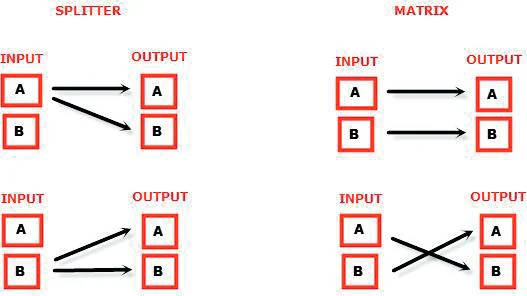
Can we pass-through 4K60 4:4:4 or any HDR signal and have one output at lower resolution ?
Yes, when connected correctly to the right downscale output port (TX1 on RX), Maestro RX will automatically scale down UHD to FHD if required by the connected SINK (Display, AVR or others). Similarly it can scale up FHD to UHD if required by the connected SINK to the upscale port (TX0 on both TX/RX).
My display is supposed to accept 4K60 4:4:4 signals but it does not work?
For most UHD TV set we tried, there are always extra configuration options to active in order to achieve a 4K60 4:4:4 600MHz link. For ex, on samsung: in order to enable the 444 colorspace for 4k in Samsung TV’s you must go to "settings" and "hdmi" and "UHD color" and enable it. Then also you must assign the HDMI port1 as "PC" in the tools menu. Only after these two steps will 600MHz be accepted. Similar activation tricks are required on most UHD TV’s. Additionally, most UHD TV’s only have specific ports that are 600MHz capable.
I have a PC mode on my TV (or a PC monitor) what resolutions are supported for graphics mode?
All PC graphics mode within the 600MHz bandwidth are supported, including ultra-high resolution such as WQSXGA, QUXGA, QFHD, WQUXGA, 4K.
What output resolution does the Maestro TX/RX support in HDTV mode?
All known SD, HD, Full HD and UHD formats are supported including: 480i50,480i60, 480p50, 480p60, 576p50, 576p60, 720p50, 720p60, 720p100, 720p120, 1080i25, 1080i30, 1080p24, 1080p25, 1080p30, 1080p48, 1080p50, 1080p60, 1080p72, 1080p75, 1080p96, 1440p50, 1440p60, 2160p24, 2160p25, 2160p30, 2160p50, 2160p60 (these are examples only, anything within the 600MHz bandwidth is supported.)
What version of HDMI does the Maestro TX/RX work with? Do I need HDMI 1.3/1.4a/2.0a/2.0b? Does it matter?
It does not matter. HDfury Maestro TX/RX works with any version of HDMI from 1.0 and up.
Do I need to set anything special in my HDMI source device to set the resolution correctly?
No. The HDfury Maestro TX/RX will be detected as 2160p60 4:4:4 capable device by your source and it will always accept and process the highest quality stream from your source devices. There is no need to set the HDMI source to any specific resolution.
Is there any latency (delay) introduced to the signal?
Virtually none. The latency added is in the order of a few pixel clocks only. Nothing noticeable at all.
What about long HDMI cable runs? Can I expect issues?
For 600MHz users must use "high speed" cables, or 600MHz/18Gbps certified, ideally the length should be between 6ft and 12ft for proper 600MHz/18Gbps pass-thru. For 4K30, 1080p or less almost all cables are ok. HDfury Maestro TX/RX acts as a HDMI repeater device. So having HDfury Maestro TX/RX in the path will amplify and recover the signal. You should not need any passive (or active) HDMI amplifiers, especially if you put the HDfury Maestro TX/RX in the middle of your cable run. If you previously had to use an amplifier, the HDfury Maestro TX/RX can most likely take its place. The HDfury Maestro TX/RX has been used with 50 foot (and longer) HDMI cables without issues including copper, active or fiber solutions.
How are the new lossless audio formats via HDMI input handled? E.g. DTS-HD/MA and DD/E-AC3: Are they stripped down to DTS core or Dolby Digital respectively to fit the requirements of the S/PDIF standard?
Lossless audio is transmitted through HDMI output only. HDfury Maestro TX/RX does not compress or otherwise downconvert the incoming audio. Only stereo and 5.1 sound can be output via SPDIF output. The analog output supports stereo only.
How do I hook up the audio from the Maestro TX/RX?
The Maestro TX/RX has both analog and digital (TOSLINK) audio output in one connector labeled "SPDIF + L/R". It's a 2-in-1 connector meaning that you can plug in either a 3.5mm stereo analog jack or a digital mini-TOLINK (3.5mm mini-jack) cable and get stereo analog sound or 5.1 Dolby/DTS digital sound out of the Maestro TX/RX. See further below for pictures of both types of connectors/cables. Maestro TX/RX 3.5mm mini-TOSLINK digital audio cable:
If you'd like to use a "regular" TOSLINK cable, use a 3.5mm Mini-TOSLINK to regular TOSLINK adapter:
A 3.5mm stereo audio cable can be used for connecting the Maestro TX/RX to a TV if you do not have a home theater setup (you only have 2 speakers in your TV):
Highlight Hardware Features
Maestro Exclusive: 18Gbps HDBT lossless transmission over 330ft/100m via CAT6A or superior
Maestro TX (Central) is featuring 4 HDMI inputs, 1 HDMI video output with scaling option and 1 dedicated HDMI full audio output at 720p or 1080p, LAN Control, HDbaseT output, RS232, L/R stereo or Optical 5.1 output, IR TX, IR RX, IR sensor, IR window, OLED display and 4 buttons on the side allowing to enter/exit and perform change in the device system menu.
Maestro RX device self-powered by the TX-Central is featuring HDbaseT input, 2 LAN port to share Internet connection with game console, TV or media player, 2 HDMI outputs with scaling capabilities, RS232, L/R stereo or Optical 5.1 output, SPDIF input, IR sensor, IR TX, OLED display and 4 buttons on the side to enter/exit system menu and perform changes in settings.
All inputs are capable of 4K HDR/HLG/DV/HDR10+ up to 18Gbps for video and support any sound format in existence today, all video outputs are capable of outputting 18Gbps and all sound formats as well whether they are on the TX-Central or the RX one.
Both units are always running in a Matrix/Scaler mode ensuring your setup remains optimized at its best capabilities.
4×3 Splitter/Switcher up to 4K60 4:4:4 600MHz 18Gbps + HDMI audio out
Splitting any signal up to 4K60 4:4:4 600MHz signal is now a reality, thanx to IR/RS232/push buttons or Webserver, you can easily switch between 4 inputs that will be replicated up to 3 outputs. HDCP conversion and scaling rules are auto configured and applied on the fly in order to always output the type of video signal and HDCP encryption that your display or sink device is expecting.
4×2 Matrix up to 4K60 4:4:4 600MHz 18Gbps + HDMI audio out + Downscaled output
Matrix solution is available for HDMI stream up to 4K60 4:4:4 8b, 4K60 4:2:2 12b, 4K120 4:2:0 8b or 8K30 4:2:0 8b. Process two 18Gbps signals at the same time from 2 sources to 2 sinks devices and eventually have one of the channel duplicated and converted in res/hdcp/chroma/color depth/color space/etc to a third output + HDMI audio out.
Highlight Video Features
HDR Fixer
Maestro TX/RX is capable of injecting and extracting live Infoframe and HDR metadata at any resolution in real time. Decipher incoming HDR/HLG/DV metadata and AVI infoframe, build your own Custom HDR metadata and AVI infoframe thru HDfury metadata and infoframe creator, translate HLG>HDR, replace or boost value from any metadata on the fly or simply disable all or just some of them. Additionally Maestro TX/RX also support VSIF, AUD, HVS, HFV and others infoframes.
EDID Manager with endless possibilities
Download EDID from any inputs or outputs, Upload or assign any EDID to any of the 4 inputs from a list of 100 predefined EDIDs (10 custom / 90 dedicated). It loads and reset HPD to present your chosen one automatically.
5 different EDID modes are available: Copy TX0, Copy TX1, Fixed EDID, Custom or Automix. In Automix EDID mode: 13 EDID flags can be forced and mixed thru 5 EDID Algorithms. Maestro TX/RX automatically sniff and store DV mandatory string from connected DV capable sink.
Ultimate capabilities Up&Down Scaler up to 4K60 4:4:4 600MHz/18Gbps
Always feeding best capabilities HDMI signal to connected sink devices, automatically or manually. No matter if you have HDMI first generation or second generation equipment, any devices always get the best possible signal in FHD(1080p) or UHD(2160p) GUARANTEED. Featuring Upscale, Downscale, Passthru and Bypass mode as well as Chroma Conversion, Color Space and Color Depth modification on the fly at 8, 10, 12 and 16bit for FHD, UHD and DCI 4096x2160p. Each output can be set with individual scaling rules.
Highlight Audio Features
Extract up to Atmos HBR over TrueHD from TV eARC Input to ANY AVR input (eARC-KEY World 1st)
eARC (for up to Atmos High Bit Rate over True HD) is possible when eARC TV is connected at Maestro TX HDMI video output, extracted sounds from TV APPS will be output from TX HDMI audio output that can feed any AVR input. eARC is a TX capability only.
Extract up to Atmos over DD+ from TV ARC Input to ANY AVR input (ARC-KEY World 1st)
ARC (for up to DD+/Atmos over DD+ bitstream) is possible from both RX HDMI video out and TX HDMI video out. When RX HDMI out is used to extract ARC, you can select either ARC or the RX local SPDIF input that get routed back to TX (it’s a selection). On TX you can select to route this Audio from RX to the HDMI3 (dedicated audio out) to feed any AVR input and/or optical output. Alternatively you can select either eARC/ARC from the TX0 on Maestro TX-Central and ignore the RX audio.
Max Audio capabilities and format extracted from any sources to feed any AVR input. (AVR-KEY)
Thru a dedicated HDMI Audio output, any HDMI sound format from any incoming signal is automatically extracted and forwarded via a 720p/1080p self-generated stream to feed any AVR input. High end ARC and eARC Audio format from TV apps are output to your AVR input thru the same HDMI Audio output.
HDMI Audio Extracting
HDfury Maestro TX/RX can extract HDMI audio up to 5.1 and pass-thru any sound format in existence today including Atmos and latest via HDMI while downscaling the video for older AVRs, it have a simultaneous output of analog L/R stereo and up to 5.1 optical S/PDIF via 3.5mm combo jack connector.
Highlight Convenience Features
Autoswitch ANY sources (World 1st)
TMDS/pixel clock switching, sole switch in the world capable of autoswitching sources such as ATV4K, X1X, Shield or any others sources devices who keep sending +5v in standby and that no switcher in the world can autoswitch.
Furiously advanced Web Server
If you though, like people claim, that we have the best Windows GUI software… Now discover the brand new HDfury Webserver. More powerful with more available options than any Windows GUI we ever did, controlling your HDfury has never been so easy, fast and elegant. No more driver installation or hassle of any kind, superfast in-system firmware update and wide compatibility with any web browser devices (Mac/Win/Linux/iOS/Android and others). Just type in your Maestro URL in your browser address bar and start controlling and supervising your setup!
HDMI Explorer (OSD/OLED/WEB)
Signal and setup info is everywhere and always available at first sight. Enhance your AV knowledge thru exact signal timing report with up to 3 digits decimals accuracy on frame rate. Display source name, resolution, chroma, colordepth, colorspace, hdcp, cst1, VIC, eotf, colorimetry, primaries, white point, max/min lum, maxCLL, maxFall, range and various infoframe (hdr, hlg, dv, spd, aud, hvs, vsi, hfv). Our new generation hardware is bringing HDMI explorer to another level, simply anything that travel thru is intercepted and exposed to the user via OLED display, On Screen Display or Web server.
RS232 Control your unit and command your display
Initially build for and by the JVC PJ owners community, Maestro is now capable of sending any custom RS232 commands to any RS232 capable display based on incoming signal types or particular metadata value. Decide which RS232 commands to send to your display when content is 3D, HDR10, SDR BT709, SDR BT2020 and more. All Maestro TX/RX controls are also available via RS232 commands in order to ensure a total control from any serial based computer.
TOTAL CONTROL
Maestro TX/RX can be controlled via IR/RS232/push buttons or any web browser based devices (MAC/WIN/Linux/Android/iOS/etc..) thru embedded Webserver. RS232 is compatible for any serial based computer, IR control and various physical buttons for configurations are also available. Thanks to the community, IR pronto code list is added to iRule and Logitech Harmony for even easier and seamless integration
HDMI/CEC TOTAL COMMANDER
HDfury Maestro TX/RX offers a unique CEC command manager, with CEC compatible equipment. CEC commands allow a HDMI device to send commands to connected HDMI devices.
Highlight HDCP Features
Unique HDCP Doctor
Providing a total of 15 HDCP 1.4 and 2.2 engines for decryption/encryption, HDfury Maestro TX/RX offers a total HDCP workaround solution including HDCP 2.2 > HDCP 1.4 and HDCP 1.4 > HDCP 2.2 both ways conversion within the same unit. It is capable of connecting any HDCP1.x or HDCP2.x source devices to any HDCP1.x or HDCP 2.x sink devices. Each RX block decrypts the input first whether its 1.x or 2.x. Then each output port can individually encrypts it to 1.4 or 2.2 or not encrypt it at all if it was not encrypted initially. Dual conversion can be operated on all channels simultaneously.
Display HDCP 2.2 Content with Non-HDCP2.2 Compliant Devices
HDCP 2.2 is the new copy-protection scheme for 4K UHD content. Source devices, including media servers and head-ends like Netflix, will encode their 4K content with this new scheme. TVs must be HDCP 2.2-enabled to play it, and everything in the video chain including switches and receivers must be compliant as well, or the display will go dark and/or display a HDCP error message. Bad news for consumers who have purchased expensive, high-bandwidth, processor-rich switchers, receivers and displays to accommodate 4K. Once Maestro TX/RX is an active part of your setup such issue will not bother you ever again.
Main Specifications
4x Input / 3x Output Splitter/Matrix/Scaler + Audio out (HDMI2.0b/HDMI1.4/DVI1.0 compatible)
- 4K60 4:4:4 600MHz 18Gbps Pass through
- 4K24/25/30/50/60 1080p24/25/30/50/60 Upscale/Downscale with or without colordepth maintained and with or without chroma conversion.
- Video Bandwidth - 18 GBP/sec.
- HDR10+/Dolby Vision Support.
- 4K 10, 12, 16 Bit Support
- 16 Bit Per Pixel Deep Color Depth Available (48 Bit)
- Max Res: 4K60 4:4:4 8b, 4K60 4:2:2 12b, 4K120 4:2:0 8b or 8K30 4:2:0 8b
- Signal Conversion: Resolution, Chroma Subsampling, Color Space, Color Depth, HDCP
- HDCP Doctor (HDCP Workaround solution to any HDCP error)
- HDCP 2.2 > HDCP 1.4 conversion
- HDCP 1.4 > HDCP 2.2 conversion
- HDCP x.x > HDCP x.x conversion
- Dual HDMI2.0b & HDMI 1.4 combined
- Dual HDCP 1.4 & HDCP 2.2 combined
CEC Support: For inter-device control between both inputs and the primary output TX0 HDMI channel.
OLED infoscreen and OSD to provide useful and insight view of signal information
Audio Extracting: Audio De-Embedder of Optical & Analog L/R
Advanced EDID management via USB, IR or Bluetooth APP
- Improved EDID Management solution with either a Selected EDID bank, Custom uploaded EDID, Self-generated Automix EDID or a Fixed basic EDID.
- Sniff EDID from connected sink devices, Save, Edit, Load any custom EDID table at any time.
- Select and pick any EDID of your choice from a preloaded list of EDID tables, it loads and reset HPD to present your chosen one automatically.
- AutoMix EDID feature will create a custom EDID by mixing both sink EDID connected to the splitter output ports.
- Some EDID flags can be forced in Automix such as: Stereo/5.1/Full/YCbCr/BT2020/HDR/3D
- Each input can run a specific/individual EDID.
Infoframe Modes: Capture, edit, block or replace HDR metadata, AVI & VSIF.
Read SPD, Audio, HDMI Vendor, HDMI Forum
Control Modes: IR, Windows GUI, RS232 for Linux/MAC/Win, Android/iOS with GoBlue.
HDMI Booster/Extender: Capable of extending 1080p resolution up to 15m. in and 15m. out (30m. total for 1080p), UHD resolution up to 10m.
HDMI Doctor: Solves most HDMI integration issues such as HDCP, EDID, HPD, and audio breakout.
Supported Audio/Video Signals
Supported Format: SD/HD/FullHD/UHD/4K30/4K60, basically INPUT/OUTPUT any video format up to 4K60 4:4:4 600MHz 18Gbps.
Supported Resolution examples: 480p/720p/1080i/1080p24/1080p25/1080p30/1080p50/1080p60/1440p50/1440p60/2160p24/2160p25/2160p30/2160p50/2160p60 and DCI
Support all UHD/BR and HDR standard resolution: 4K60 4:2:2 12bit BT2020 HDR, 4K60 4:2:0 10bit BT2020 HDR, 4K60 4:2:0 12bit, 4K30 4:4:4 12bit, ..
Support all VESA mode video formats (PC Resolutions) up to ultra-high resolution such as WQSXGA, QUXGA, QFHD, WQUXGA, 4K
Support any Audio format such as PCM at up to 192kHz, compressed audio (IEC61937), DSD, DST,DTS, DTS-HD, Dolby True HD, DTS-MA, HBR, DD+, DTS:X and Dolby Atmos.
Technical Specifications
- I/O: 4x HDMI In, 4x HDMI Out, IR, RS232, 3x RJ45, Analog Mini Jack, Optical S/PDIF Out.
- OLED Display: 3.12″ diagonal, 256×64, 16 blue colors (TX); 1” diagonal, 128x64, 2 colors (RX)
- Audio: PCM at up to 192kHz, compressed audio (IEC61937), DSD, DST, DTS, DTS-HD, Dolby True HD, DTS-MA and HBR.
- Power Supply: External 48 Volt
- Input Lag: <1ms (nanoseconds count)
- TX Product Dimensions: 4.5″L x 7.3″W x 0.9″H – in CM: 11.5 x 18.5 x 2.4 Weight: 520g – 1.15 LBS
- RX Product Dimensions: 4.3″L x 5.5″W x 0.9″H – in CM: 11 x 14 x 2.4 Weight: 410g – 0.9 LBS
- Shipping Dimensions: 6.3” x 4.2” x 3.3”, Weight: 16 oz
- Enclosure: Black PVC/black metal with Blue OLED
- Regulation: CE, EAC, FCC, RoHS, WEEE
Certifications
Maestro TX/RX CE Certification

Maestro TX/RX RoHS Certification

Maestro TX/RX FCC Certification

Pro Tips
- Dolby Vision: DV mode 0 and 1 travels thru 8b RGB container, so it is normal that Maestro TX/RX report RGB 8b when playing such DV mode. If Maestro TX/RX is not directly connected to your DV TV and you have equipment in between, please first connect Maestro TX or RX TX0 output to your TV input and let Maestro TX/RX boot up. Then disconnect and insert equipment in between. Maestro TX/RX will sniff the DV string from your TV EDID and present it to your source, therefor allowing you to go thru equipment that doesn’t support Dolby Vision.
- HDMI TX0 Output is CEC/ARC capable on RX, CEC/ARC and eARC capable on TX
- Ex of AVI InfoFrame: BT.2020 RGB 00:E8:64:5D:00 BT.2020 YCbCr 4:2:2 20:E8:64:5D:00 BT.2020 YCbCr 4:4:4 40:E8:64:5D:00 BT.2020 YCbCr 4:2:0 60:E8:64:5D:00 4k24 422 709 ycbcr no-bt2020 20:88:00:00 4k24 422 ycbcr bt2020 20:c8:60:00 4k24 444 709 ycbcr no-bt2020 40:88:00:00 4k24 444 ycbcr bt2020 40:c8:60:00 1080p 422 709 ycbcr no-bt2020 20:88:00:10 1080p 422 ycbcr bt2020 20:c8:60:10
- iRule use \x0D instead of \r (or \x0A for /n) to terminate the RS232 command string.
- Some sources like X1S or K8500 might need to have powercord removed/reconnected between EDID changes
- Atmos via ARC require HDMI Cable that support 192khz ARC, even if a cable support 600MHz video signal it can still fail for 192khz audio signal.
- You can read one, or mix two connected Sink EDIDs, apply forced flags and algo to it and then save it as an EDID file, thus creating your own Custom EDID variation.
- Any 4:2:2 signals is always processed at 12b and never clipped. That’s why it mentions “up to 12b”.
- Source VS Maestro TX/RX frame rate reported: Actually very few devices will report the correct frame rate. It is all about the clock frequency, the theory is 24/1.001 = 23.976023976 BUT there is no PLL (https://en.wikipedia.org/wiki/Phase-locked_loop) at the source that actually gives a corresponding clock which would yield that. So once a signal leaves the source, the clock is always off and usually ebbs and flows, means changes all the time. We just decided to show what it really is from the particular source rather than approximating what it should be as many are doing since they cannot report exact frame rate like we are doing with Maestro TX/RX.
Legal & Compliance
Product identification
Model: HDF0150 – manual version 1.0
Warranty and liability
The manufacturer grants the full statutory warranty on all new devices. As the manufacturer has no influence on installation, the warranty only applies to the product itself. If you detect a fault or damage, please contact your dealer and provide your sales slip or invoice as proof of purchase.
The manufacturer is not liable for damage to persons or property caused by improper installation, operation or maintenance not described in this manual. Do not alter or modify the product or its accessories. Any use other than described in this manual is not permitted and voids warranty and guarantee.
Trademarks and disclaimer
Product model and logo are trademarks. All other company and product names mentioned are trademarks of their respective owners. All rights reserved. No part of this publication may be copied or reproduced without prior written permission. We reserve the right to make changes to the device, packaging or manual and accept no liability for misprints.
Disposal of electrical and electronic equipment
WEEE reg. no.: DE 93847290
The crossed-out wheelie bin symbol on the product, packaging or in this manual means that electrical and electronic equipment must not be disposed of with household waste at the end of its life. Hand in old devices free of charge at a public collection point or return them to a distributor obliged to take them back. Remove batteries and lamps that can be removed without destroying the device before handing it in, and delete any personal data stored on the device. Details are regulated by national law. By returning old devices you help protect the environment.
Packaging
Dispose of packaging separately by material (paper/cardboard, plastics) via the local collection systems. Keep packaging material away from children – risk of suffocation. Packaging register LUCID: DE5958616449295.