
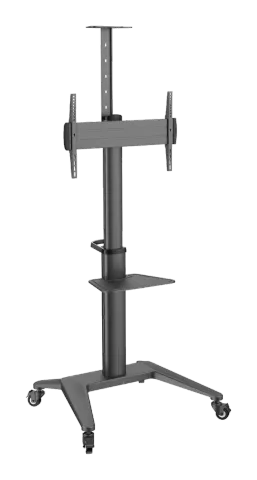
PDS-0002C
PureMounts® Premium TV Cart - Single Display up to 70", black
The PureMounts® PDS Series Premium Single Screen TV Cart supports displays from 37 to 70 inches with VESA compatibility up to 600x400 and a maximum weight capacity of 70kg. It features a total height of 2157mm, a tilt …
ManualFAQSpecificationsFAQ
What are the compatible TV sizes and maximum weight for the PureMounts® Premium TV Cart PDS-0002C?+–
The PureMounts® Premium TV Cart supports TV sizes from 37 to 70 inches (94-178 cm) and a maximum TV rated weight of 70kg (154lbs).
More:Specifications →
What VESA mounting patterns does the PureMounts® Premium TV Cart PDS-0002C support?+–
The TV cart is compatible with VESA patterns 200x200, 300x200, 300x300, 400x200, 400x300, 400x400, and 600x400.
More:Specifications →
What materials and colors are used in the construction of the PureMounts® Premium TV Cart PDS-0002C?+–
The cart is made of Aluminum, Steel, and Plastic and comes in the color black.
More:Product page →
What is the tilt range supported by the PureMounts® Premium TV Cart PDS-0002C?+–
The cart supports a tilt range of -12° to +5°.
More:Specifications →
What are the height markings from the floor to the center of the TV screen on the PureMounts® Premium TV Cart PDS-0002C?+–
The height markings range from 1250mm to 1600mm from the floor to the center of the TV screen.
More:Specifications →
What installation precautions should be taken when assembling the PureMounts® Premium TV Cart PDS-0002C?+–
Read the entire instruction manual before starting installation and assembly. Use the mounting screws provided and DO NOT OVER TIGHTEN mounting screws. Use safety gear and proper tools. The product should only be installed by professionals. Make sure the supporting surface safely supports the combined weight of the equipment and all attached hardware.
More:CAUTION →