
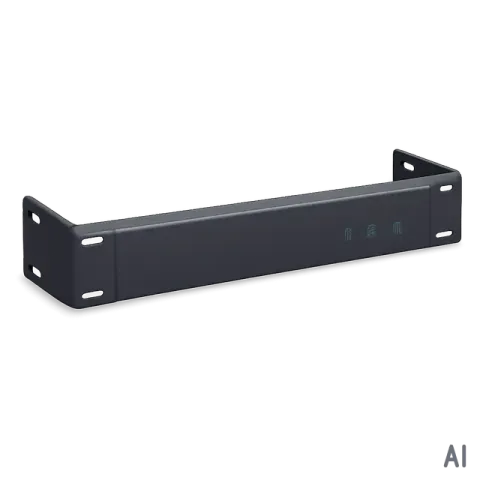
RF6 Package Contents
Please make sure all of the following items are included in the package;
- RF6 Frame
- Transmitter/Receiver modules (if purchased separately)
- DC 12V Power Supply Unit with a power cord
- Rack ears
- User Manual
General Specification
- RF6 is a revolutionary 19’’ 1-RU size rack mount assembly for DVI/HDMI fiber optic/CAT5 extension modules. Various transmitter and receiver modules are designed for slot-loading into the RF6 main frame.
- Able to mix DVI/HDMI and Fiber Optic/CAT5 extension, RF6 features one power supply for up to six modules per frame, eliminating a lot of small adapter type power supplies, housed in a 1 RU rack housing.
- Compact & durable design and lower power consumption makes it an ideal solution for connection for high definition video/audio signal of digital displays such as LCD/Plasma/LED displays and projectors.
- This pure fiber optic/CAT5 connection enables electrical noise free and EMI free that is ideal for long distance/mid-range extension of high definition DVI/HDMI signals with audio.
- Intuitive LCD panel on both RF6 show the status of the video and audio signals including the current signal image format and audio format. This information provides helpful diagnostic information.
| Model | RF6 |
|---|---|
| Input Signal | DVI, HDMI, 3.5mm Analog Audio Optional RS-232, IR |
| Output Signal | DVI, HDMI, 3.5mm Analog Audio Optional RS-232, IR |
| Supporting Display Resolutions | VGA ~WUXGA(up to 1920 x 1200 @ 60Hz) , 480i ~ 1080p |
| Max. Distance | CAT5 Modules: 1920x1200 @ 60Hz or at 1080p: 50M(165ft) 1280x1024 @ 60Hz or at 1080i: 60M(200ft) Fiber Modules: 1920x1200 @ 60Hz or at 1080p: 1,000M(3,300ft) 1280x1024 @ 60Hz or at 1080i: 1,530M(5,000ft) |
| Connector Type | DC Power Jack HDMI 19 Pin Female/DVI 20 Pin Female LC Receptacles with 4 cores RJ45 3.5mm Stereo Jack |
| Conformations | HDMI version 1.3/ DDWG DVI 1.0 With HDCP |
| Power Rating | DC +12V , 8W Max |
| Dimension | 17.3x6.7x1.7(inches) 440x170x44(mm) |
| Weight | 6.2 lbs (2.8 Kg) |
Operation and Reliability Specification
- Operating Environment Temperature: 50F ~ 104F (10℃~ 40℃) Humidity: 10% ~ 80% Altitude: 3,000m Max.
- Transit Environment Temperature: -13F ~ 140F (-25℃~ 60℃) Humidity: 5% ~ 95% Altitude: 15,000m Max.
- Storage Environment Temperature: -4F ~ -49F (-20℃~ 45℃) Humidity: 5% ~ 95% Altitude: 3,000m Max.
- Reliability MTBF: 90% at over 50,000 hours aging test In compliance with LCD Monitor reliability test standard
Main Features
- Zero loss & Zero noise delivery of digital high definition video and audio signal using optical conversion technology, RF6 delivers HD signals over fiber optic/Cat5 cables without loss or digital interference maintaining the clarity and colors. Noise cancellation and error correction logic enhances DVI/HDMI video and audio signals over long distance.
- Built-in signal repeater to support longer distance between the source and the RF6 and the display. This Signal Repeater logic supports up to 50ft copper based DVI/HDMI cables.
- Compact and Robust Module Design. 19’’ 1RU size
- Long Distance (Up to 5000ft at 1080i or lower signal) over cost effective multimode fiber optic cables.
- Mid-range (Up to 200ft at 1080i or lower signal) over cost effective RJ45 (CAT5/e/6) cables.
- Full EDID Management
- HDCP (High-bandwidth Digital Content Protection) Support.
- DDWG DVI 1.0 and HDMI version 1.3 Support.
- Signal Status LCD panel on both RF6 video and audio signal information is displayed on the LCD panels to help understand the signal even before the display is connected. Display Resolution, refresh rates and audio signal status are intuitively displayed on the modules.
- 1) Built-in EDID library Choose one from 14 pre-saved most widely used EDID
- 2) EDID Emulation Saving/Emulating display’s EDID in the RF6 transmitter module enhances reliability and compatibility with various displays.
Installation and Connection Instructions
- Turn off both the video source and the display before connecting any cables.
- Connect DVI/HDMI cable between the source and RF6/Stand-alone transmitter and between the RF6/Stand-alone receiver and the display.
- Cable Connection:
- Fiber Cable: Connect LC terminated fiber optic cables according to the picture below;
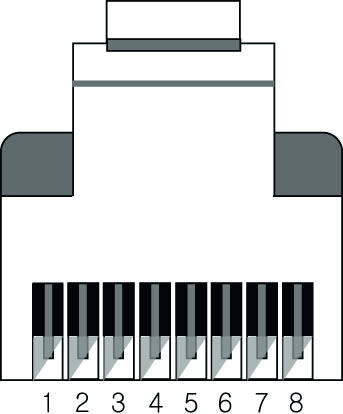
- CAT5 Cable: RT6 was designed to conform to TIA/EIA-568-B Standard. Please ensure that each PIN layout of RF6 is corresponding with the picture below before connecting the cable. Please note that CAT5e or above level cable enables to deliver better video quality and longer distance.
| Pin | TIA/EIA-568B Signal | Wire color |
|---|---|---|
| 1 | Orange/ White | TMDS Data2+ |
| 2 | Orange | TMDS Data2- |
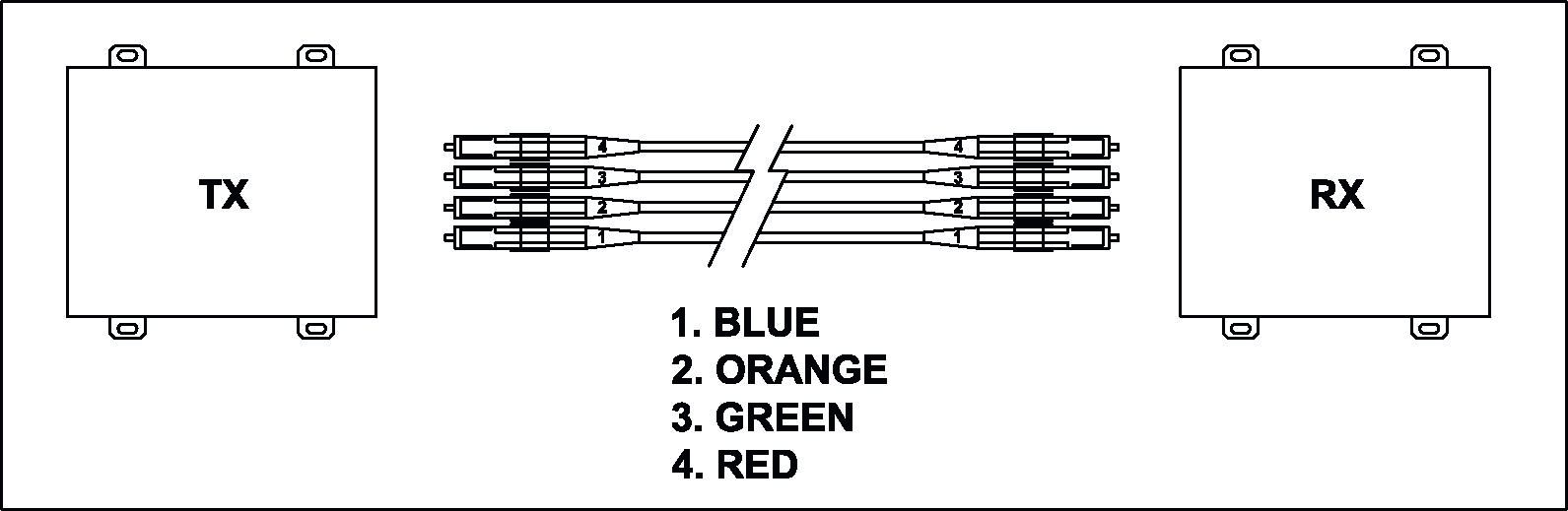
| 3 | Green/ White | TMDS Data1+ |
|---|---|---|
| 4 | Blue | TMDS Data0+ |
| 5 | Blue/ White | TMDS Data0- |
| 6 | Green | TMDS Data1- |
| 7 | Brown/ White | TMDS Clock+ |
| 8 | Brown | TMDS Clock- |
RF6 Specification
- Connect the power supply unit to both RF6/Stand-alone transmitter AND the RF6/Stand-alone receiver units.
- Turn on Display
- Turn on Video Source
RF6 Specification
- Dimensions: 17.3x6.7x1.7(inches) 440x170x44(mm)
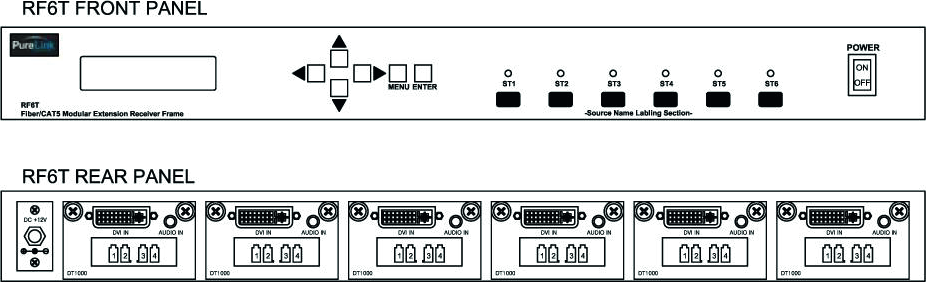
Front Panel
- LCD Display: 16*2 LCD
- ST 1 ~ 6 LED: Input Slot Check
- Power: Power on/off button
- ▲▼◀▶: Move button
- MENU: Menu button
- ENTER: Enter button
Rear Panel
- DVI/HDMI IN: DVI-D/HDMI Input
- Audio IN: 3.5mm Stereo Audio Input
- 1234: Fiber Optical Receptacles
- CAT-5 IN: RJ45 (CAT5/e/6) Receptacles
- DC +12V: 12V DC Power Supply Unit Input
Available Transmitter Modules
- DT1000: Optical, DVI, 3.5 Stereo, up to 6 modules can fit in RF6
- HT1000: Optical, HDMI, 3.5mm Stereo, up to 6 modules can fit in RF6
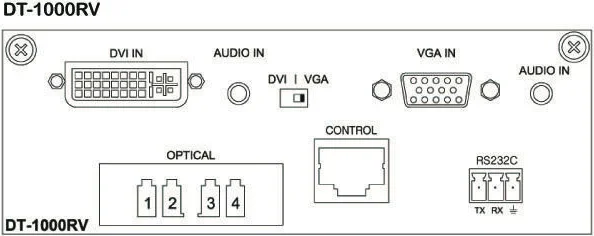
- DT1000RV: Optical, DVI, 3.5mm Stereo, RS-232, IR, up to 3 modules can fit in RF6
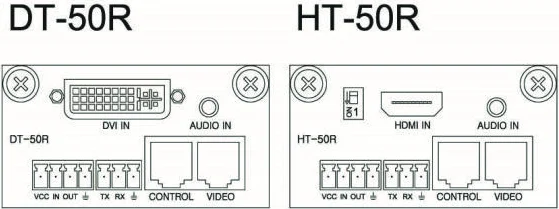
- DT50R: CAT5, DVI, 3.5mm Stereo, RS-232, IR, up to 6 modules can fit in RF6
- HT50R: CAT5, HDMI, 3.5mm Stereo, RS-232, IR, up to 6 modules can fit in RF6
- PM-CT101-RF6: CATx, HDMI input w/HDMI loop-thru out, 3.5mm Stereo, RS-232/422, IR, up to 3 modules can fit in RF6
- PM-CT102-RF6: CATx, HDMI or VGA input, 3.5mm Stereo, RS-232/422, IR, up to 3 modules can fit it RF6
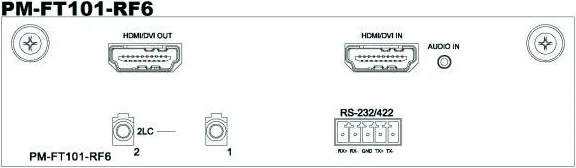
- PM-FT101-RF6: Optical, HDMI input w/HDMI loop-thru out, 3.5mm Stereo, RS-232/422, up to 3 modules can fit in RF6
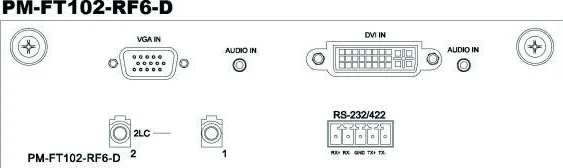
- PM-FT102-RF6: Optical, HDMI or VGA input, 3.5mm Stereo, RS-232/422, up to 3 modules can fit in RF6

- PM-CT101-RF6-D: CATx, DVI input w/DVI loop-thru out, 3.5mm Stereo, RS-232/422, IR, up to 3 modules can fit in RF6
- PM-CT102-RF6-D: CATx, DVI or VGA input, 3.5mm Stereo, RS-232/422, IR, up to 3 modules can fit it RF6
- PM-FT101-RF6-D: Optical, DVI input w/DVI loop-thru out, 3.5mm Stereo, RS-232/422, up to 3 modules can fit in RF6
- PM-FT102-RF6-D: Optical, DVI or VGA input, 3.5mm Stereo, RS-232/422, up to 3 modules can fit in RF6
Available Receiver Modules
- DR1000: Optical, DVI, 3.5mm Stereo, up to 6 modules can fit in RF6
- HR1000: Optical, HDMI, 3.5mm Stereo, up to 6 modules can fit in RF6
- DR1000RV: Optical, DVI, 3.5mm Stereo, RS-232, IR, up to 3 modules can fit in RF6
- DR50R: CAT5, DVI, 3.5mm Stereo, RS-232, IR, up to 6 modules can fit in RF6
- HR50R: CAT5, HDMI, 3.5mm Stereo, RS-232, IR, up to 6 modules can fit in RF6
- PM-CR101-RF6: CATx, HDMI output, 3.5mm Stereo, RS-232/422, IR, up to 3 modules can fit in RF6
- PM-CR102-RF6: CATx, HDMI output with Scaling, 3.5mm Stereo, RS-232/422, IR, up to 3 modules can fit it RF6
- PM-FR101-RF6: Optical, HDMI output, 3.5mm Stereo, RS-232/422, up to 3 modules can fit in RF6
- PM-FR102-RF6: Optical, HDMI output with Scaling, 3.5mm Stereo, RS-232/422, up to 3 modules can fit it RF6
- PM-CR101-RF6-D: CATx, DVI output, 3.5mm Stereo, RS-232/422, IR, up to 3 modules can fit in RF6
- PM-CR102-RF6-D: CATx, DVI output with Scaling, 3.5mm Stereo, RS-232/422, IR, up to 3 modules can fit it RF6
- PM-FR101-RF6-D: Optical, DVI output, 3.5mm Stereo, RS-232/422, up to 3 modules can fit in RF6
- PM-FR102-RF6-D: Optical, DVI output with Scaling, 3.5mm Stereo, RS-232/422, up to 3 modules can fit it RF6
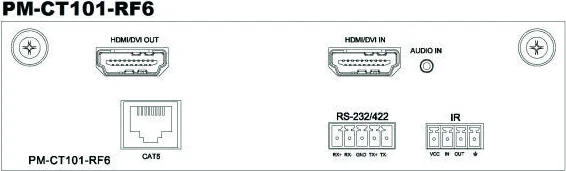
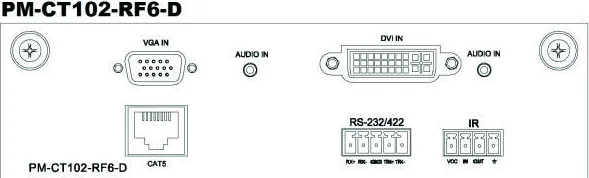
RF6 and available modules’ Compatibility Chart
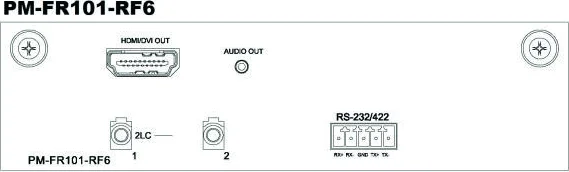
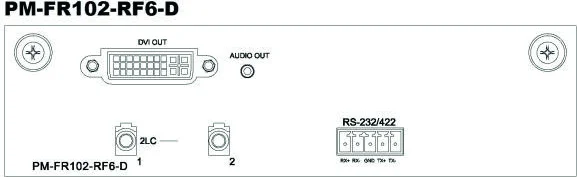
RF6 and available modules’ Compatibility Chart
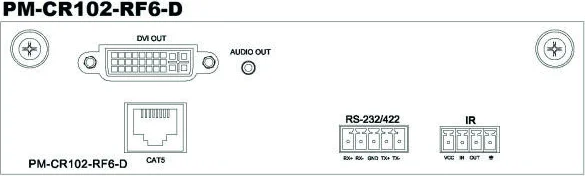
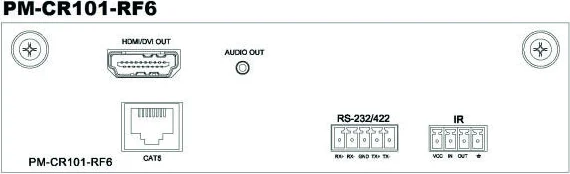
| Part # | Compatible Part # |
|---|---|
| RF6 (Transmitters) | DT2000R, DT2000, DT1000, DT1000R, DT1000RV, DT50R, HT2000, HT1000, HT1000R, HT50R, PM-CT101-RF6, PM-CT101-RF6-D, PM-CT102-RF6, PM-CT102-RF6-D, PM-FT101-RF6, PM-FT101-RF6-D, PM-FT102-RF6, PM-FT102-RF6-D |
| RF6 (Receivers) | DR2000R, DR2000, DR1000, DR1000R, DR1000RV, DR50R, HR2000, HR1000, HR1000R, HR50R, PM-CR101-RF6, PM-CR101-RF6-D, PM-CR102-RF6, PM-CR102-RF6-D, PM-FR101-RF6, PM-FR101-RF6-D, PM-FR102-RF6, PM-FR102-RF6-D |
| DT1000 | Compatible with DR1000, DRS1000, OBC II RX, OLC RX |
| HT1000 | Compatible with HR1000, HRS1000, HDX II RX |
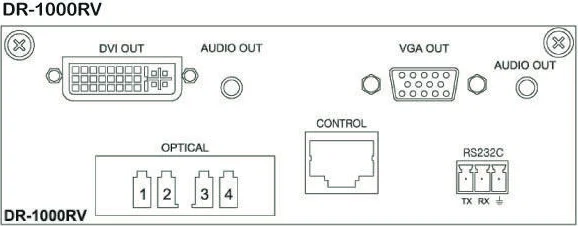
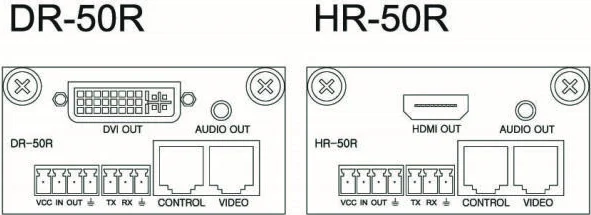
VIDEO EXTENDER
TX - RF6 (V1.00)
System Checking!
SLOT1 Check OK
SLOT4 Check N.C
SLOT5 Check OK
S L O T : 1 2 3 4 5 6
[ 1920 x 1080P/60 ]
S L O T : 1 2 3 4 5 6
[ Slot N .C ]
DT1000RV Compatible with DR1000RV, DWR1000RV, DWRS1000RV
DT50 Compatible with DR50, DRS50, DCE RX
HT50 Compatible with HR50, HRS50, HCE RX
DT50R Compatible with DR50R, DRS50R, DCE RX
HT50R Compatible with HR50R, HRS50R, HCE RX
DR1000 Compatible with DT1000, DTS1000, OBC II TX, OLC TX
HR1000 Compatible with HT1000, HTS1000, HDX II TX
DR1000RV Compatible with DT1000RV, DWT1000RV, DWTS1000RV
DR50 Compatible with DT50, DTS50, DCE TX
HR50 Compatible with HT50, HTS50, HCE TX
DR50R Compatible with DT50R, DTS50R, DCE TX
HR50R Compatible with HT50R, HTS50R, HCE TX
Operating Instruction (RF6)
- Initialization menu → Model name and Main Firmware Version → Input Slot Status Check → SLOT4 Check N.C: No module is connected to SLOT4 → SLOT5 Check OK: Input module is connected to SLOT5
- Main menu → When Slot is connected and input signal is detected → Display Selected Slot’s input signal information → When Slot is not connected
S L O T : 1 2 3 4 5 6
[ No Signal ]
- V i d e o I n f o
- SLOT Firm Ver
- E D I D I n f o
- Int EDID Save
- Ext EDID save
[ SLOT1 Time Info ]
1920 x1080P/60
- Slot N.C : No module is connected to Slot
- When Slot is connected but no input signal is detected
- No Signal: Module is connected but no input signal is detected
Note: User Left/Right (◀▶) button to move a cursor to the left and right. Selected Slot’s video timing will be displayed.
- Display each slot’s input video signal information
- Display each slot’s firmware version
- Display each slot’s saved EDID information
- Display EDID information from built-in EDID library
- Display EDID information from selected slot’s display device
Note: User Up/down (▲▼) button to move to the next sub-menu list. Press menu button to cancel and go back to the main menu.
Sub Menu detail
[ 1. Video Info ]
→ Display selected Slot #
Operating Instruction (RF6)
[ SLOT2 Firmware ]
Soft Ver. : 1.00
[ SLOT3 EDIDInfo ]
1600x1200 (TST)
[ SLOT4 Int EDID ]
→Sel : Up/Dn , Ent!
[ SLOT4 Int EDID ]
→ 800x600 60Hz
- Display input signal information
- User Left/Right (◀▶) button to select slot #
- User Up/down (▲▼) button to display selected slot’s information
- Press menu button to cancel and go back to the main menu
[ 2. Slot Firmware Version ]
→ Display selected Slot #
→ Display firmware version
- User Left/Right (◀▶) button to select slot #
- Press menu button to cancel and go back to the main menu
[ 3. Slot EDID Info ]
→ Display selected Slot #
→ Display EDID information
[ 4. Int EDID Save ]
→ Display selected Slot #
→ Choose EDID from a built-in EDID library list
→ Display selected Slot #
→ Display EDID information that will be saved to the module
- User Left/Right (◀▶) button to select slot #
- User Up/down (▲▼) button to see a built-in EDID library list (14 Pre-saved EDID)
- Press menu button to cancel and go back to the main menu
EDID List
- 800x600 60Hz , 1024x768 60Hz , 1280x768 60Hz , 1280x1024 60Hz
- 1360x768 60Hz , 1366x768 60Hz , 1400x1050 60Hz , 1600x900 60Hz
- 1600x1200 60Hz , 1680x1050 60Hz , 1920x1200 60Hz , HD1080i 60Hz
[ SLOT5 Ext EDID ]
EDID Set : Enter!
VIDEO EXTENDER
RX - RF6 (V1.00)
System Checking!
SLOT1 Check OK
SLOT4 Check N.C
SLOT5 Check OK
S L O T : 1 2 3 4 5 6
[ 1920 x 1080P/60 ]
S L O T : 1 2 3 4 5 6
[ Slot N .C ]
S L O T : 1 2 3 4 5 6
[ No Signal ]
HD1080p (2CH) , HD1080p(Multi)
[ 5. Ext EDID Save ]
→ Display selected slot #
→ Display EDID information that will be saved to the module
- User Left/Right (◀▶) button to select slot #
- Press Enter button to save EDID information from the selected slot’s display device
- Press menu button to cancel and go back to the main menu
- Initialization menu → Model name and Main Firmware Version → Input Slot Status Check → SLOT4 Check N.C: No module is connected to SLOT4 → SLOT5 Check OK: Input module is connected to SLOT5
- Main menu → When Slot is connected and input signal is detected → Display selected Slot’s input signal information → When Slot is not connected → Slot N.C : No module is connected to Slot → When Slot is connected but no input signal is detected
- V i d e o I n f o
- SLOT Firm Ver
[ SLOT1 Time Info ]
1920 x1080P/60
[ SLOT2 Firmware ]
Soft Ver. : 1.00
- No Signal: Module is connected but no input signal is detected
Note: User Left/Right (◀▶) button to move a cursor to the left and right. Selected Slot’s video timing will be displayed.
- Display each slot’s input video signal information
- Display each slot’s firmware version
Sub Menu detail
[ 1. Video Info ]
→ Display selected Slot #
→ Display input signal information
- User Left/Right (◀▶) button to select slot #
- User Up/down (▲▼) button to display selected slot’s information
- Press menu button to cancel and go back to the main menu
Technical Specification
| Parameter | Specification |
|---|---|
| Data Transfer Speed | Up to 2.25 Gbps (DVI Single Link), 10 Gbps (HDMI) |
| Frequency Range | 25 ~ 165 Mhz |
| Supporting Display Resolutions | 1080p / Up to WUXGA (1920X1200)@60Hz |
| I/O Signal Standard | DVI 1.0, HDMI 1.3, TMDS |
| Max Distance | CAT5 Modules: 1920x1200 @ 60Hz or at 1080p: 50M(165ft); 1280x1024 @ 60Hz or at 1080i: 60M(200ft) Fiber Modules: 1920x1200 @ 60Hz or at 1080p: 1,000M(3,300ft); 1280x1024 @ 60Hz or at 1080i: 1,530M(5,000ft) |
| Optical Source | 850 nm Vcsel |
| Optical Cable Specification | Multimode 50/125 or, 62.5/125 |
| Input Ports | DVI-D Female 29P / HDMI Female 19P / LC Receptacles x 4 cores / RJ45 / 3.5mm Stereo Jack |
| Output Ports | DVI-D Female 29P / HDMI Female 19P / LC Receptacles x 4 cores / RJ45 / 3.5mm Stereo Jack |
| Power Consumption | 8 Watts (Max) |
| Power Rating | 12V DC / 5A |
Warranty
Warranty Limitation and Exclusion
Dtrovision warrants this fiber optical HDMI extension cable to be free from defects in workmanship and materials, under normal use and service, for a period of two (2) year from the date of purchase from Dtrovision or its authorized resellers. If a product does not work as warranted during the applicable warranty period, Dtrovision shall, at its option and expense, repair the defective product or part, deliver to customer an equivalent product or part to replace the defective item, or refund to customer the purchase price paid for the defective product. All products that are replaced will become the property of Dtrovision. Replacement products may be new or reconditioned. Any replaced or repaired product or part has a ninety (90) day warranty or the reminder of the initial warranty period, whichever is longer. Dtrovision shall not be responsible for any software, firmware, information, or memory data of customer contained in, stored on, or integrated with any products returned to Dtrovision for repair under warranty or not.
Dtrovision shall have no further obligation under the foregoing limited warranty if the product has been damaged due to abuse, misuse, neglect, accident, unusual physical or electrical stress, unauthorized modifications, tampering, alterations, or service other than by Dtrovision or its authorized agents, causes other than from ordinary use or failure to properly use the Product in the application for which said Product is intended.
Legal & Compliance
Product identification
Model: PRO-RF6 – manual version 1.0
Trademarks and disclaimer
Product model and logo are trademarks. All other company and product names mentioned are trademarks of their respective owners. All rights reserved. No part of this publication may be copied or reproduced without prior written permission. We reserve the right to make changes to the device, packaging or manual and accept no liability for misprints.
FCC
This device complies with part 15 of FCC Rules and EN 55022/55024/61000-3 for CE certification. Operation is subject to the following two conditions: (1) this device may not cause harmful interference, and (2) this device must not accept any interference received, including interference that may cause undesired operation. This equipment has been tested and found to comply with the limits for a Class A digital device, pursuant to part 15 and 2 of FCC Rules and EN 55022/55024/61000-3 for CE certification. These limits are designed to provide reasonable protection against harmful interference when the equipment is operated in a residential installation.
Disposal of electrical and electronic equipment
WEEE reg. no.: DE 93847290
The crossed-out wheelie bin symbol on the product, packaging or in this manual means that electrical and electronic equipment must not be disposed of with household waste at the end of its life. Hand in old devices free of charge at a public collection point or return them to a distributor obliged to take them back. Remove batteries and lamps that can be removed without destroying the device before handing it in, and delete any personal data stored on the device. Details are regulated by national law. By returning old devices you help protect the environment.
Packaging
Dispose of packaging separately by material (paper/cardboard, plastics) via the local collection systems. Keep packaging material away from children – risk of suffocation. Packaging register LUCID: DE5958616449295.