
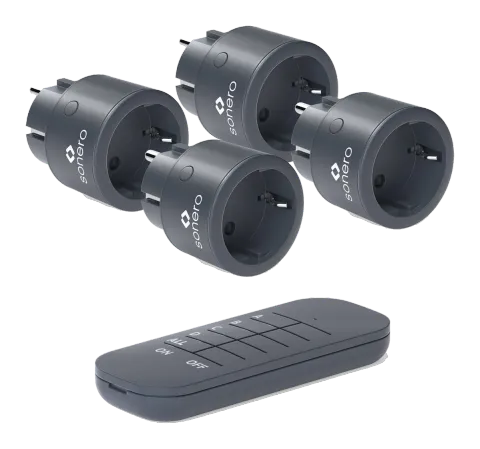
REMOTE POWER SOCKETS AND SETS
Intended Use
Use this product only in dry interior rooms. Other usage than described before is not allowed. This can cause fire hazard, electric shocks or short-circuits.
ATTENTION!
Read this manual completely and carefully. It is part of the product and contains important advice for a correct installation and usage. Keep this manual for further questions and passing to other persons.
NOTES ON SAFETY
Caution: Read the safety instructions completely and thoroughly and keep them in mind. There is a danger of electric shocks and fire!
Use the device only with 230V~ voltage.
- The total power of the connected devices must not exceed 2300 Watts.
- Your product and its accessories are no toys and children must not use it. It contains fragile, small and swallowable parts which can injure people, when used incorrectly!
- Remove and dispose of packaging materials - children could cut on it. There is also a danger of swallowing and inhaling smaller parts and insulating materials.
- Keep the product away from water, extreme heat, coldness or direct sun radiation.
- Furthermore, avoid vibrations, mechanical, magnetic and electro-magnetic influences, as well as liquid or dust contaminent.
- If defects, mechanical damages, disturbances or other problems occur that are not solvable with help of this manual, take the device out of work immediately and consult your dealer for questions, repair or change, as described in chapter “Warranty and Liability”.
- Attend to the terms of use in chapter “Intended Use“.
- The product must not be changed, reconstructed or modified in any way. It is not allowed to open the housing.
- Voltage-free only with unplugged mains plug! Disconnect the device from mains before cleaning, etc.
- Never use the remote sockets with devices endangering fire (e.g. electric irons, radiant heaters and similar devices) and do not use it without any attendance.
- Never use remote power sockets series-connected.
- Only plug the remote power socket to easily accessible mains sockets, to be able to unplug them quickly in case of emergency!

DELIVERY CONTENTS
| S-RCS011 | S-RCS111 | S-RCS112 | S-RCS113 | S-RCS114 | |
|---|---|---|---|---|---|
| Remote Power Socket (51230) anthracite | 1x | 1x | 2x | 3x | 4x |
| Remote Control (50131) anthracite | - | 1x | 1x | 1x | 1x |
| Battery Type CR2032, 3V (Remote Control) | - | 1x | 1x | 1x | 1x |
| Manual | 1x | 1x | 1x | 1x | 1x |
DESCRIPTION AND FUNCTION
Use the power sockets to remotely switch your electronic devices on and off. With a transmission of up to 30m and an integrated child safety device, you can control up to 4 mains sockets.
SPECIFICATIONS
| Operating voltage | 230V ~ / 50Hz |
|---|---|
| Operation display | LED |
| Max. current | 10A |
| Max. power | 2300W |
| Max. Transmission distance | up to 30m on open areas |
| Operating temperature | 0° to +35°C |
| Max. RF Power | 0dBm |
| Frequency | 433.92 MHz |
| Child protection | yes |
| Battery | CR2032, 3V |
| Protection category | IP20 |
| Protection class | I |
| Transmitter duty cycle | <10% |
| Receiver category | Category 2 |
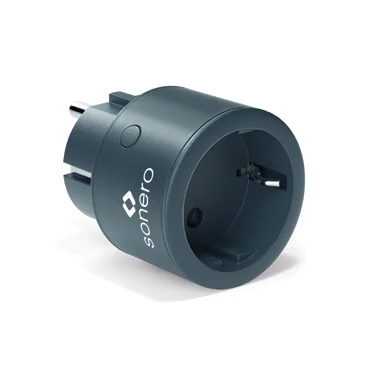

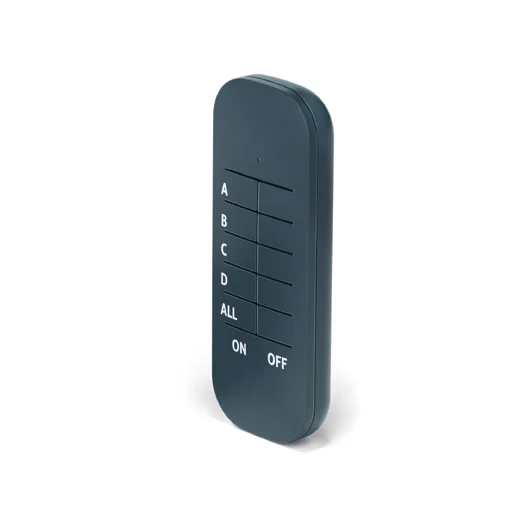
Dimensions and weight
| Remote power socket | Ø 48.9 x 70.3 mm / 62g |
|---|---|
| Remote control | 35.8 / 12.9 / 92.6 mm / 21.8g |
OPERATING
ACTIVATING/REPLACING THE BATTERY
- Remove the plastic stripe from the battery case.
- Replace the used battery with a new one of the same type opening the battery case. The insertion direction is marked on the product. Battery type: CR2032, 3V.
- Attend to the “Note on Waste Disposal”.
REMOTE CONTROL
- ON - channel A is on. OFF - channel A is off.
- ON - channel B is on. OFF - channel B is off.
- ON - channel C is on. OFF - channel C is off.
- ON - channel D is on. OFF - channel D is off.
- ON - channel ALL is on. OFF - channel ALL is off.
REMOTE POWER SOCKET
PAIRING:
- Plug the receiver into the socket. Press the teach button of the receiver for longer than 3 seconds and hold down for no more than 6 seconds. The control lamp of the receiver flashes which means that the receiver has entered into pairing mode. Now press the desired ON button on the remote control, the control lamp of the receiver will light up, and the pairing process is complete.
- In cases were more than one remote power socket is used, every power socket can have its individual, or combined, ON/OFF Channel. All remote power sockets will always be able to be switched ON and OFF by the ALL ON or OFF button on the remote control.
- To remove the pairing memory, either go into pairing more (see point 1: Pairing) and press the OFF button of the paired channel, or press the tech button longer than 6 seconds to directly remove the pairing memory.
CARE, MAINTENANCE, STORAGE AND TRANSPORT
- The device is free of maintenance - Never open the housing.
- Clean the product only with a dry and soft cloth and be careful to avoid scratches. Do not use detergents, chemicals or water. These can corrode the plastic material and also cause short-circuits.
- Store the device in a dry and dust-proof surrounding when not used for longer time. It must be stored out of reach for children.
- Retain the packaging to avoid damages during transport.
WARRANTY AND LIABILITY:
- The manufacturer grants a guarantee of 2 years.
- As the manufacturer has no influence regarding installation, the warranty only applies to the product itself.
- If you detect any fault or damage on your device, please contact your dealer and provide a proof of purchase (e. g. invoice). Your dealer will either repair the fault on site or send it back to the manufacturer. You can make the work of our technicians considerably easier by describing possible faults in detail – only this way anyone can be assured that faults occurring only rarely will be found and repaired with certainty!
- The manufacturer is not liable for damages or harm to persons and property, caused by improper installation or operation, not described in this guide. This includes, among others, any alteration and modification of the product and its accessories.
- Any use other than described in this guide is not permitted. A loss of warranty, loss of guarantee as well as the loss of the manufacturer’s liability are the consequences.
- Misprints and changes of the device, packaging or guide are subject to unannounced changes.
TROUBLESHOOTING
Remote socket does not react to remote control inputs
- Remove the plastic stripe inside the battery case.
- Mind the right battery’s polarity.
- Check the designated channel of the remote socket.
- Stay within the maximum reach of 30m and avoid placing objects between the remote socket and remote control.
LED does not light
- Use a working mains socket.
- The designated channel is switched OFF.
Material damage or open electronics caused by mechanical influences
- Do not touch the device and immediately consult your dealer.
- Mind the notes of safety as well as the specifications.
NOTES ON WASTE DISPOSAL
Disposal of the device
WEEE Reg -No.: DE 93 847 290
According to the European WEEE directive, any electrical and electronic equipment must not be disposed of along with consumer waste. As a consumer, you are committed by law to deposit electrical and electronic devices at public collecting points or to the dealer for free at the end of the device’s lifetime. Details are regulated in the respective national legislations. The Wheelie Bin symbol on the product, in the manual or on the packaging refers to these terms. With the return of your used devices you actively take part in protecting the environment.
Disposal of batteries
The user is legally obliged (directive 2006/66/EC) to return used batteries and rechargeable batteries. Disposing of used batteries in the household waste is prohibited! Batteries/rechargeable batteries containing hazardous substances are marked with the crossed-out wheelie bin. The symbol indicates that the product is forbidden to be disposed via the domestic refuse. The chemical symbols for the respective hazardous substances are Cd = Cadmium, Hg = Mercury, Pb = Lead.
You can return used batteries/ rechargeable batteries free of charge to any collecting point of your local authority, our stores or where batteries/ rechargeable batteries are sold. Consequently you comply with your legal obligations and contribute to environmental protection!
DECLARATION OF CONFORMITY
PureLink GmbH hereby declares that the S-RCS011, S-RCS111, S-RCS112, S-RCS113, S-RCS114 radio communication system comply with Directive 2014/53/EU. The full text of the EU Declaration of Conformity is available at the following internet address: www.sonero.de
INTERNATIONAL PROTECTION CLASSES ACCORDING TO DIN EN
Diagrams in accordance with DIN EN 60259
An additional letter K can be used for the second index figure for classes 4 and 6 to indicate higher requirements for road vehicles.
60529 (IEC 529/VDE 047 T1)
Version: 2022-06-02
S-RCS011
S-RCS111
S-RCS112
S-RCS113
S-RCS114
1x Remote Socket anthracite (51230)
1x Remote Socket anthracite (51230)
1x Remote Control anthracite (50131)
2x Remote Socket anthracite (51230)
1x Remote Control anthracite (50131)
3x Remote Socket anthracite (51230)
1x Remote Control anthracite (50131)
4x Remote Socket anthracite (51230)
1x Remote Control anthracite (50131)
IP CLASS
| Index | Foreign bodies protection |
|---|---|
| 0 | No protection against accidental contact, no protection against solid foreign bodies |
| 1 | Protection against contact with any large area by hand and against solid foreign bodies with Ø > 50 mm |
| 2 | Protection against contact with any large area by hand and against solid foreign bodies with Ø > 12 mm |
| 3 | Protection against tools, wires or similar objects with Ø > 2,5 mm, protection against foreign solid bodies with Ø > 2,5 mm |
| 4 | Protection against tools, wires or similar objects with Ø > 1 mm, protection against foreign solid bodies with Ø > 1 mm |
| 5 | Full protection against contact, protection against interior injurious dust deposit |
| 6 | Total protection against contact, protection against penetration of dust |
First index figure - (foreign bodies protection)
IP 2 0This product is classified as:
| Index | Water protection |
|---|---|
| 0 | No protection against water |
| 1 | Protection against vertical water drips |
| 2 | Protection against diagonal water drips (up to a 15° angel) |
| 3 | Protection against diagonal water drips (up to a 60° angel) |
| 4 | Protection against splashed water from all directions |
| 5 | Protection against water (out of a nozzle) from all directions |
| 6 | Protection against strong water (out of a nozzle) from all directions |
| 7 | Protection against ingress of water in case of temporary immersion (30 minutes) |
| 8 | Protection against ingress of water in case of continuous immersion, requirements under agreement of manufacturer and user |
| 9K | Protection against ingress of water during high pressure (8.000-10.000kPa) or steam cleaning from any direction |
Second index figure - (water protection)
IP 2 0This product is classified as:
sonero®
PureLink GmbH, Von-Liebig-Straße 10, 48432 Rheine, Germany
www.purelink.de
Legal & Compliance
Product identification
Model: S-RCS011 – manual version 1.0
Trademarks and disclaimer
Product model and logo are trademarks. All other company and product names mentioned are trademarks of their respective owners. All rights reserved. No part of this publication may be copied or reproduced without prior written permission. We reserve the right to make changes to the device, packaging or manual and accept no liability for misprints.
Batteries
Batteries must not be disposed of with household waste. Return used batteries free of charge to collection points or retailers.
Packaging
Dispose of packaging separately by material (paper/cardboard, plastics) via the local collection systems. Keep packaging material away from children – risk of suffocation. Packaging register LUCID: DE5958616449295.