
INTRODUCTION
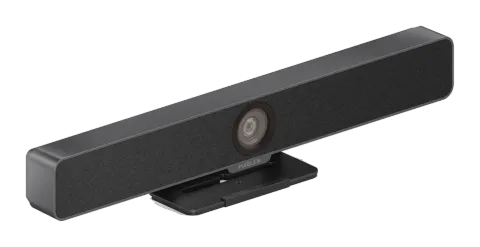
This product is an all-in-one meeting videobar with ultra-wide angle 4K camera, microphone and speaker. It is ideal for applications in huddle rooms, small meeting rooms, private offices and home offices.
FEATURES
- Wide angle 4K video camera with 120° FOV.
- 4 x MEMS digital microphone arrays with a range of 3 ~ 5 meters and an angle of 180°.
- 2 x 3W Stereo full range speakers with passive radiator bass enhancement.
- Includes AEC (Acoustic Echo Cancellation), AGC (Automatic Gain Control), ANS (Automatic Noise Suppression) and full duplex mode communication to make all participants feel like they are in the same room.
- Auto Framing / Speaker Tracking / Presenter Tracking based on AI technology makes meetings more intimate and friendly.
- Plug and play with excellent compatibility for OS and UC applications, such as Zoom, WebEx, Tecent meeting, Teams, etc.
- Windows and MAC OS App provided for easy control.
PACKAGE CONTENTS
- 1x Video Bar
- 1x DC 12V Power Adapter
- 1x Magnetic Lens Cap
- 1x Wall-mounted Bracket
- 6x Expansion Screws
- 6x Mounting Screws
SPECIFICATIONS
| AUDIO AND VIDEO | |
|---|---|
| Input/Output | 1 x USB-C |
| Video Resolutions (Max) | 3840x2160 @30Hz |
| Output Video Encoding | MJPEG/YUY2/H.264/H.265 | UVC 1.1 |
| CAMERA AND SENSOR | |
| Lens | Fixed focus |
| Sensor | 1/2.8'', CMOS, Effective Pixel: 8.0M |
| White Balance | Auto |
| Backlight Compensation | Auto |
| Digital Noise Reduction | 2D, 3D Digital noise reduction supported |
| Viewing Angle FOV | 120° |
| ePTZ | Supported | 5 x Digital Zoom |
| HDR | Supported |
| Tracking Mode | Auto Framing / Speaker Tracking / Presenter Tracking |
| SPEAKERPHONE | |
| Microphone | 4 x Linear microphone arrays with echo cancellation |
| Pick-up Range | 5m |
| Speaker | 2 x 3 W |
| COMMUNICATION AND CONTROL | |
| USB-C | USB Type-C female with locking |
| Control Method | Windows or MAC OS App |
| GENERAL | |
| Operating Temperature | 0°C ~ 40°C, 10% to 90%, non-condensing |
| Storage Temperature | -20°C ~ 60°C, 10% to 90%, non-condensing |
| MTBF | >30000h |
| Power Supply | DC12V 2A |
| Power Consumption (Max) | 6W |
| Dimension (Width x Height x Depth) | 460 mm x 97.43 mm x 61 mm (with Bracket) |
| Net Weight | 0.81 kg (with Bracket) |
| Gross Weight | 2.06 kg |
PANEL DESCRIPTION
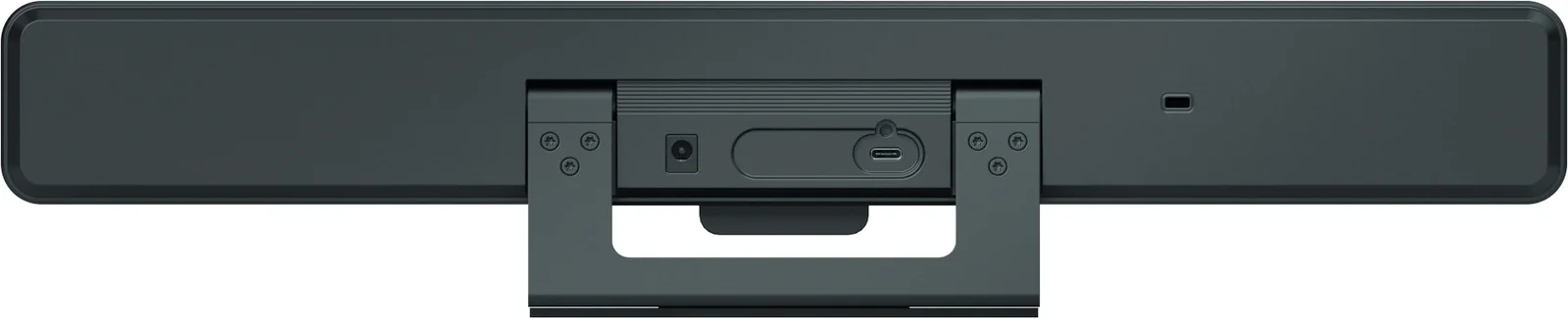
| ID | NAME | DESCRIPTION |
|---|---|---|
| 1 | Speaker | Outputs audio signal of the input source. |
| 2 | Microphone | 4 x Linear mic arrays for picking up sound. |
| 3 | Lens | Camera lens |
| 4 | Status LED | • Constant blue: The device is powered on. The device is in standby state. • Constant white: The device is working properly. • Blinking white quickly: The device is being upgraded. • Constant red: The device’s microphone is muted. |
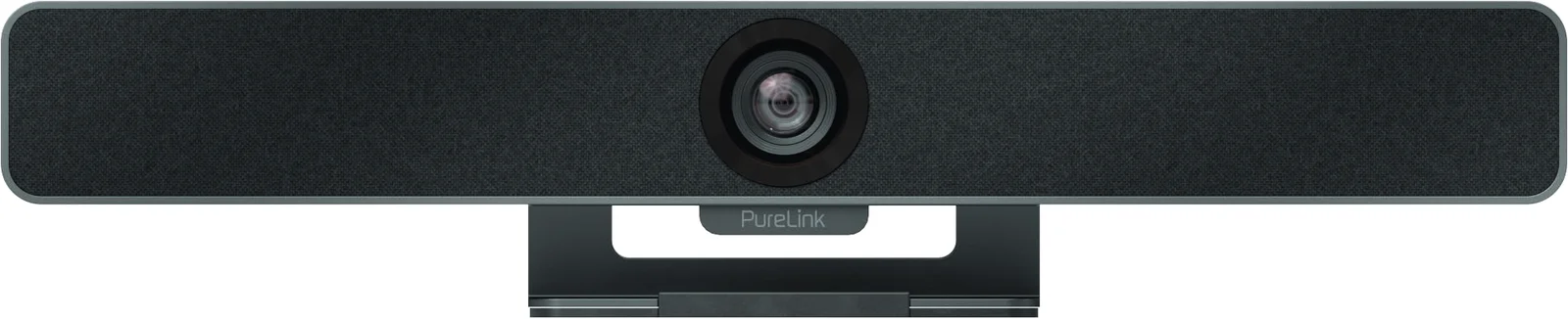
| ID | NAME | DESCRIPTION |
|---|---|---|
| 5 | Power | 12V 2A DC power input. Connect to the power adapter provided. |
| 6 | USB-C | USB Type C port. Connect to the PC for transmitting audio and 4K camera video signal using the USB-C cable provided. |
| 7 | Kensington security slot |
INSTALLATION
Note: Before installation, please ensure the device is disconnected from the power source.
To install the device on a monitor:
Place the device on the top of a monitor, then adjust the bracket’s angle so that the device stands firmly on the monitor.
To install the device on a tripod:
- Screw the tripod’s clip into the M12 thread hole at the device’s bottom.
- Secure the device along with the clip on the tripod, adjust to a position and height you desire.
To install the device on the wall:
- Drill holes in the wall you desire, then insert the expansion screws provided into the holes.
- Secure the wall-mounted bracket provided on the wall using the screws provided.
- Secure the device on the wall-mounted bracket.
Step 3 Step 4Step 1 Step 2
Stativ Clip
APPLICATION
Application 1 - Huddle/small room (for 2~7 people)
Application 2 – Private office/Home office
Note: After the device is connected to a computer, it can be detected by the system and specific applications in the name of the following:Model: VB200Camera: VB200Speaker: VB200Microphone: VB200
HDMI
USB A/V
HDMI
USB A/V
Controls-Videos
| ELEMENTS | DESCRIPTION/OPTIONS |
|---|---|
| Tracking Mode | Auto Framing (default): Camera tracks group participants automatically. Speaker Tracking: Camera tracks speakers automatically. Presenter Tracking: Camera tracks the first recognized presenter automatically. Off |
| Tracking Effect | Tracking effect is available when Auto Framing is enabled. Smooth (default): The tracking image moves smoothly in the frame. Immediate: The tracking image switches from one to another immediately in the frame. |
| Tracking Speed | Tracking speed is available when Auto Framing is enabled. Slow (default)/Normal/Fast |
| Mirror | Mirror image function On: Image flipped horizontally. Off (default setting): Image not flipped horizontally. |
| Powerline Frequency (Anti Flicker) | Change the frequency to prevent flicker in the video. 50Hz (default) /60Hz |
| HD | On (default): Turn on for better image quality. Off: Turn off for better compatibility. |
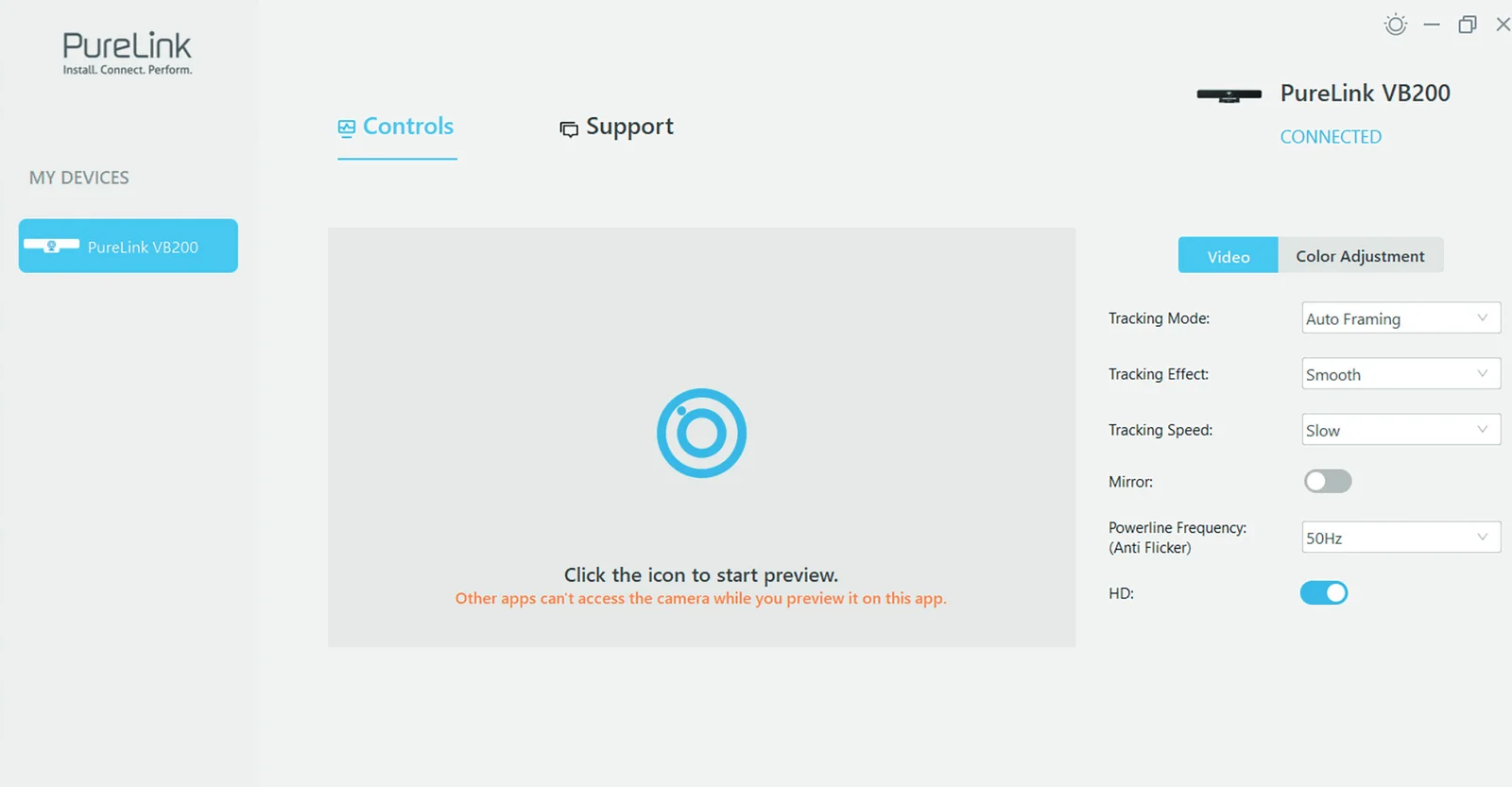
Note: Click this icon to enable camera preview.
Other Apps cannot use the camera until camera preview is disabled.
Controls-Color Adjustment
| ELEMENTS | DESCRIPTION/OPTIONS |
|---|---|
| Brightness | Adjust the brightness of the camera manually. |
| Contrast | Adjust the contrast of the camera manually. |
| Hue | Adjust the hue of the camera manually. |
| Saturation | Adjust the saturation of the camera manually. |
| Sharpness | Adjust the sharpness of the camera manually. |
| Default Settings | Restores all color parameters to their default values. |
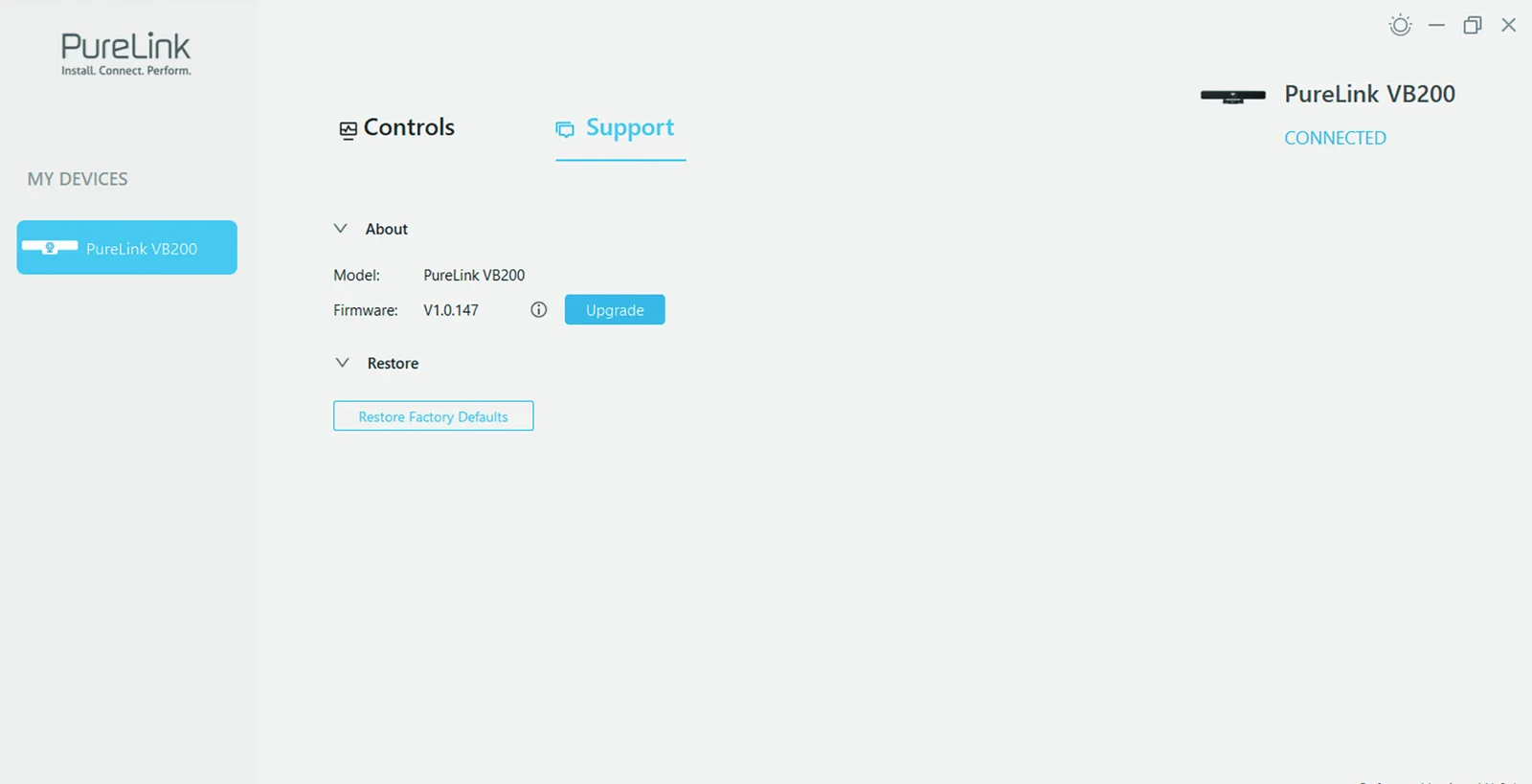
Support
| ELEMENTS | DESCRIPTION/OPTIONS |
|---|---|
| About | Displays device model and firmware information. |
| About-Upgrade | Select the firmware file and upload it for upgrade. |
| Restore | Restore Factory Defaults |
For further support or questions please contact us under
https://www.purelink.de/en/anfrage-formular-purelink.de
or scan the QR-code below
CE CONFORMITY
PureLink GmbH hereby declares that this product is in compliance with the essential requirements and other relevant provisions of the EMC Directive 2014/30/EU and the RoHS Directive 2011/65/EU amended by 2015/863/EU.
PureLink GmbH hereby declares that this product is in compliance with the essential requirements of the Electromagnetic Compatibility Regulations 2016 and all other applicable UK regulations.
The EU Declaration of Conformity is available here:
www.purelink.de
DISPOSAL OF DEVICE
WEEE-Reg.-Nr. DE 93847290
According to the European WEEE Directive, electrical and electronic equipment may not be disposed of with household waste. As a consumer, you are obliged to return electrical and electronic equipment free of charge at the end of its service life to the public collection points set up for this purpose or to the point of sale. Details on this are regulated by the respective national law. The symbol on the product, the instructions for use or the packaging refers to these regulations. Recycling old appliances in this way is an important contribution to the protection of our environment.
DISCLAIMER OF LIABILITY
Caution: PureLink GmbH will not be held liable, nor provide any warranty for damage resulting from improper installation, assembly and use of the product, or failure to observe the operating instructions and/or safety instructions.
Legal & Compliance
Product identification
Model: VL-VB200 – manual version 1.0
Warranty and liability
The manufacturer grants the full statutory warranty on all new devices. As the manufacturer has no influence on installation, the warranty only applies to the product itself. If you detect a fault or damage, please contact your dealer and provide your sales slip or invoice as proof of purchase.
The manufacturer is not liable for damage to persons or property caused by improper installation, operation or maintenance not described in this manual. Do not alter or modify the product or its accessories. Any use other than described in this manual is not permitted and voids warranty and guarantee.
Packaging
Dispose of packaging separately by material (paper/cardboard, plastics) via the local collection systems. Keep packaging material away from children – risk of suffocation. Packaging register LUCID: DE5958616449295.