
Aktiivinen
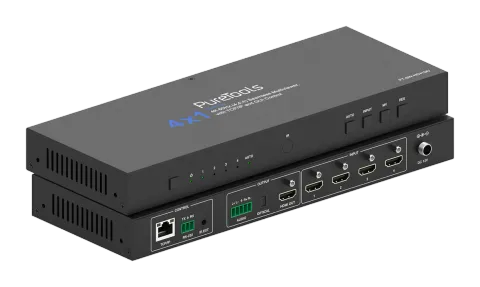
PT-SW-HD41MV
4x1-moninäkymäkytkin – 18G
PT-SW-HD41MV on 4x1 moninäyttö saumaton UHD-videoswitcher, jossa on neljä HDMI 2.0b -tuloa ja joka tukee videon resoluutioita jopa 4K 60 Hz (4:4:4) enintään 18Gbps videokaistalla. Se on yhteensopiva HDCP 2.2/1.x …
KäyttöohjeOhjaus (TCP/IP)UKKTekniset tiedotCESaatavilla olevat ohjausliitännät. Laajentakaa aktiivinen tyyppi nähdäksenne koko komentotaulukon.
Ei vastaavia komentoja.
API-komennot65 komentoaAktiivinen
LiitäntäRS232 Baud-nopeus: 9600, Data-bitti: 8, Stop-bitti: 1, Pariteetti: ei, TCP/IP Portti: 4001↓ CSV
Lähde: käyttöohje, luku API Commands, sivu 8
| Komento | Kuvaus | Esimerkki | Vastaus | |
|---|---|---|---|---|
| ? | Hae kaikkien komentojen luettelo | ? | help! | |
| help! | Hae kaikkien komentojen luettelo | help! | ||
| get model | Hae laitteen malli | get model | PT-SW-HD41MV | |
| status | Hae laitteen nykyinen tila | status | Please see "Status Feedback" sheet | |
| get version | Hae laiteohjelmiston versio | get version | BOOT: Vx.xx.xx MCU: Vx.xx.xx SCALER: xxxxxxxx-xx WEB: Vx.xx.xx | |
| power on | Käynnistä laite | power on | Power: on | |
| power off | Laitteen virran katkaisu | power off | Power: off | |
| get power | Hae nykyinen virrankäyttötila | get power | Power: on | |
| reboot | Käynnistä laite uudelleen | reboot | Reboot… | |
| reset | Nollaa yleiset asetukset oletusarvoihin (Vahvista kirjoittamalla "Yes", hylkää kirjoittamalla "No") | reset | Sure to reset universal settings to default? Type "Yes" after next prompt to confirm... | |
| reset all | Nollaa kaikki asetukset oletusarvoihin (Vahvista kirjoittamalla "Yes", hylkää kirjoittamalla "No") | reset all | Sure to reset all settings to default? Type "Yes" after next prompt to confirm… | |
| set front button x | Aseta etupaneelin painike lukittuna päälle/pois (x=0~1) x=0: Lukitsematon x=1: Lukittu | set front button 0 | Button: unlocked 0 | |
| get front button | Hae etupaneelin lukituksen tila (päällä/pois) | get front button | Button: unlocked | |
| set ir x | Aseta IR päälle/pois (x=0~1) x=0: Pois x=1: Päällä | set ir 1 | IR: on 1 | |
| get ir | Hae IR päälle/pois -tila | get ir | IR: on | |
| get temp | Hae laitteen sisäinen lämpötila | get temp | 65°C | |
| get uptime | Hae laitteen käyntiaika (Päivä:Tunti:Minuutti:Sekunti) | get uptime | 000:00:13:04 | |
| set input x edid y | Aseta Input (x=0~4) EDID (y=1~20) x=0: Kaikki Inputit x=1: HDMI Input 1 x=2: HDMI Input 2 x=3: HDMI Input 3 x=4: HDMI Input 4 y=1: 4K2K60_444, Stereo Audio 2.0 y=2: 4K2K60_444, Dolby/DTS 5.1 y=3: 4K2K60_444, HD Audio 7.1 y=4: 4K2K30_444, Stereo Audio 2.0 y=5: 4K2K30_444, Dolby/DTS 5.1 y=6: 4K2K30_444, HD Audio 7.1 y=7: 1080P, Stereo Audio 2.0 y=8: 1080P, Dolby/DTS 5.1 y=9: 1080P, HD Audio 7.1 y=10: 1920x1200, Stereo Audio 2.0 y=11: 1680x1050, Stereo Audio 2.0 y=12: 1600x1200, Stereo Audio 2.0 y=13: 1440x900, Stereo Audio 2.0 y=14: 1360x768, Stereo Audio 2.0 y=15: 1280x1024, Stereo Audio 2.0 y=16: 1024x768, Stereo Audio 2.0 y=17: 720p, Stereo Audio 2.0 y=18: Auto y=19: Käyttäjän määrittämä 1 y=20: Käyttäjän määrittämä 2 Oletus: 1 | set input 0 edid 1 | HDMI input 1 EDID: 4K2K60_444, Stereo Audio 2.0 HDMI input 2 EDID: 4K2K60_444, Stereo Audio 2.0 HDMI input 3 EDID: 4K2K60_444, Stereo Audio 2.0 HDMI input 4 EDID: 4K2K60_444, Stereo Audio 2.0 | |
| get input x edid | Hae tulon (x=0~4) EDID-tila x=0: Kaikki tulot x=1: HDMI Tul0 1 x=2: HDMI Tul0 2 x=3: HDMI Tul0 3 x=4: HDMI Tul0 4 | get input 0 edid | HDMI input 1 EDID: 4K2K60_444, Stereo Audio 2.0 HDMI input 2 EDID: 4K2K60_444, Stereo Audio 2.0 HDMI input 3 EDID: 4K2K60_444, Stereo Audio 2.0 HDMI input 4 EDID: 4K2K60_444, Stereo Audio 2.0 | |
| set user edid x | Aseta käyttäjän määritelty EDID (x=1~2) x=1: Käyttäjän määrittelemä 1 x=2: Käyttäjän määrittelemä 2 y = 00 FF FF FF ... (y on 256 tavua EDID-dataa) | set user edid 1 | User defined 1 EDID is loaded successfully | |
| get edid data x | Hae EDID-tiedot (x=0~4) x=0: Kaikki Inputit x=1: HDMI Input 1 x=2: HDMI Input 2 x=3: HDMI Input 3 x=4: HDMI Input 4 | get edid data 0 | HDMI 1 input EDID data HDMI 2 input EDID data HDMI 3 input EDID data HDMI 4 input EDID data | |
| set output res x | Aseta Output-resoluutio (x=1~15) x=1: 4096x2160p60 x=2: 4096x2160p50 x=3: 3840x2160p60 x=4: 3840x2160p50 x=5: 3840x2160p30 x=6: 3840x2160p25 x=7: 1920x1200p60RB x=8: 1920x1080p60 x=9: 1920x1080p50 x=10: 1360x768p60 x=11: 1280x800p60 x=12: 1280x720p60 x=13: 1280x720p50 x=14: 1024x768p60 x=15: Auto Oletus: 15 | set output res 1 | Output resolution: 4096x2160p60 | |
| get output res | Hae Output-resoluutio | get output res | Output resolution: 4096x2160p60 | |
| set output hdcp x | Aseta Output-HDCP-tila (x=1~2) x=1: HDCP 1.4 x=2: HDCP 2.2 Oletus: 1 | set output hdcp 1 | Output HDCP: HDCP 1.4 | |
| get output hdcp | Hae Output HDCP-tila | get output hdcp | Output HDCP: HDCP 1.4 | |
| set output vka x | Aseta Output-videon aktiivisen kuvan säilytystila (x=1~2) x=1: Musta näyttö x=2: Sininen näyttö Oletus: 1 | set output vka 1 | Output VKA pattern: black screen | |
| get output vka | Hae Output videon aktiivi tila | get output vka | Output VKA pattern: black screen | |
| set output itc x | Aseta Output-videotila (x=1~2) x=1: Videotila x=2: PC-tila Oletus: 1 | set output itc 1 | Output ITC: video mode | |
| get output itc | Hae Output videon tila | get output itc | Output ITC: video mode | |
| set output freeze x | Aseta Output-kuvan jäädytys päälle/pois (x=0~1) x=0: Pois x=1: Päällä | set output freeze 1 | Output freeze: on 0 | |
| get output freeze | Hae Output freeze-tila päälle/pois | get output freeze | Output freeze: on | |
| set auto switch x | Ota automaattinen vaihto käyttöön tai pois (x=0~1) x=0: Pois x=1: Päällä | set auto switch 0 | Auto switch: off 0 | |
| get auto switch | Hae automaattinen kytkentätoiminto | get auto switch | Auto switch: off | |
| set in source x | Reititä input-lähde outputiin (1~4) x=1: HDMI Input 1 x=2: HDMI Input 2 x=3: HDMI Input 3 x=4: HDMI Input 4 Oletus: 1 | set in source 1 | Output: HDMI input 1 | |
| get in source | Hae yksittäisen näytön tilassa valittu syöttölähde Outputille | get in source | Output: HDMI input 1 | |
| set multiview x | Aseta moninäyttötila (x=1~5) x=1: Yksittäinen näyttö x=2: PIP x=3: PBP x=4: Kolmionäyttö x=5: Neljänäyttö Oletus: 1 | set multiview 1 | Multiview: single screen | |
| get multiview | Hae multi-viewer-näyttötila | get multiview | Multiview: single screen | |
| set window x in y | Valitse yksi tulosignaali (y=1~4) yhtä näyttöikkunaa (x=1~4) varten nykyisessä Multiview-tilassa x=1: Ikkuna 1 x=2: Ikkuna 2 x=3: Ikkuna 3 x=4: Ikkuna 4 y=1: HDMI-tulo 1 y=2: HDMI-tulo 2 y=3: HDMI-tulo 3 y=4: HDMI-tulo 4 | set window 1 in 1 | Window 1 select: HDMI input 1 | |
| get window x in | Hae ikkunan valittu tulolähde (x=0~4) x=0: Kaikki x=1: Ikkuna 1 x=2: Ikkuna 2 x=3: Ikkuna 3 x=4: Ikkuna 4 | get window 1 in | Window 1 select: HDMI input 1 | |
| set window x border y | Aseta ikkunan reunuksen tila (x=0~4, y=0~9) x=0: Kaikki x=1: Ikkuna 1 x=2: Ikkuna 2 x=3: Ikkuna 3 x=4: Ikkuna 4 y=0: Pois y=1: Musta y=2: Punainen y=3: Vihreä y=4: Sininen y=5: Keltainen y=6: Magenta y=7: Syaani y=8: Valkoinen y=9: Harmaa Oletus: 0 | set window 1 border 0 | Window 1 border: off 0 | |
| get window x border | Hae ikkunan reunustila (x=0~4) x=0: Kaikki x=1: Ikkuna 1 x=2: Ikkuna 2 x=3: Ikkuna 3 x=4: Ikkuna 4 | get window 1 border | Window 1 border: off | |
| set window source osd x | Aseta ikkunan lähde OSD-kytkin (x=0~1) x=0: Pois x=1: Päällä Oletus: 0 | set window source osd 1 | Window source osd: on | |
| get window source osd | Hae ikkunan lähteiden OSD-kytkin | get window source osd | Window source osd: on | |
| set PIP position x | Aseta PIP-ikkunan sijainti (x=1~4) x=1: Vasen yläkulma x=2: Vasen alakulma x=3: Oikea yläkulma x=4: Oikea alakulma Oletus: 3 | set PIP position 3 | PIP position: right top | |
| get PIP position | Hae PIP-ikkunan sijainti | get window source osd | PIP position: right top | |
| set PIP size x | Aseta PIP-ikkunan koko (x=1~3) x=1: Pieni x=2: Keskikokoinen x=3: Suuri Oletus: 3 | set PIP size 3 | PIP size: large | |
| get PIP size | Hae PIP-ikkunan koko | get PIP size | PIP size: large | |
| set PBP mode x | Aseta PBP-ikkunoiden näyttötila (x=1~2) x=1: PBP-tila 1 x=2: PBP-tila 2 Oletus: 1 | set PBP mode 1 | PBP mode 1 | |
| get PBP mode | Hae PBP-ikkunoiden näyttötila | get PBP mode | PBP mode 1 | |
| set PBP aspect x | Aseta PBP-ikkunoiden kuvasuhde (x=1~2) x=1: Kokoruutu x=2: 16:9 Oletus: 1 | set PBP aspect 1 | PBP aspect: full screen | |
| get PBP aspect | Hae PBP-ikkunoiden kuvasuhde | get PBP aspect | PBP aspect: full screen | |
| set triple mode x | Aseta kolmen ikkunan näyttötila (x=1~3) x=1: Kolmoistila 1 x=2: Kolmoistila 2 x=3: Kolmoistila 3 Oletus: 1 | set triple mode 1 | Triple mode 1 | |
| get triple mode | Hae kolmoisikkunoiden näyttötila | get triple mode | Triple mode 1 | |
| set triple aspect x | Aseta kolmen ikkunan näyttösuhde (x=1~2) x=1: Koko näyttö x=2: 16:9 Oletus: 1 | set triple aspect 1 | Triple aspect: full screen | |
| get triple aspect | Hae kolmoisikkunoiden näyttösuhde | get triple aspect | Triple aspect: full screen | |
| set quad mode x | Aseta neljän ikkunan näyttötila (x=1~2) x=1: Nelikenttätila 1 x=2: Nelikenttätila 2 Oletus: 1 | set quad mode 1 | Quad mode 1 | |
| get quad mode | Hae neljän ikkunan näytön tila | get quad mode | Quad mode 1 | |
| set quad aspect x | Aseta neljän ikkunan kuvasuhde (x=1~2) x=1: Koko näyttö x=2: 16:9 Oletus: 1 | set quad aspect 1 | Quad aspect: full screen | |
| get quad aspect | Hae neljän ikkunan näytön kuvasuhde | get quad aspect | Quad aspect: full screen | |
| set output audio vol+ | Lisää outputin äänenvoimakkuutta | set output audio vol+ | Output audio volume: 30 | |
| set output audio vol- | Vähennä Output -äänenvoimakkuutta. | set output audio vol- | Output audio volume: 30 | |
| set output audio vol x | Aseta Output-äänen äänenvoimakkuusarvo (x=0~100) | set output audio vol 30 | Output audio volume: 30 | |
| get output audio vol | Hae Output -äänen voimakkuus | get output audio vol | Output audio volume: 30 | |
| set output audio mute x | Aseta Output-äänen mykistys päälle/pois (x=0~1) x=0: Pois x=1: Päällä Oletus: 0 | set output audio mute 0 | Output audio mute: off | |
| get output audio mute | Hae Output -äänen mykistystila päälle/pois | get output audio mute | Output audio mute: off |
Ääniasetus2 komentoaAktiivinen
Lähde: käyttöohje, luku API Commands, sivu 33
| Komento | Kuvaus | Esimerkki | Vastaus | |
|---|---|---|---|---|
| set output audio x | Aseta Output-äänen lähde (x=0~4) x=0: Seuraa ikkunan 1 valittua lähdettä x=1: HDMI 1 Sisääntulon ääni x=2: HDMI 2 Sisääntulon ääni x=3: HDMI 3 Sisääntulon ääni x=4: HDMI 4 Sisääntulon ääni Oletus: 0Lähde: käyttöohje, luku System Diagram, sivu 34 | set output audio 0 | Output audio: follow window 1 video source | |
| get output audio | Hae Output -äänilähde | get output audio | Output audio: follow window 1 video source |
RS232-asetukset2 komentoaAktiivinen
Lähde: käyttöohje, luku System Diagram, sivu 34
| Komento | Kuvaus | Esimerkki | Vastaus | |
|---|---|---|---|---|
| set baud x | Aseta RS232 nopeus x bps (x=115200/57600/38400/19200/9600/4800) Oletus: 9600 | set baud 115200 | Baud rate: 115200 | |
| get baud | Hae RS232-siirtonopeus | get baud | Baud rate: 115200 |
Esiasetus5 komentoaAktiivinen
Lähde: käyttöohje, luku System Diagram, sivu 34
| Komento | Kuvaus | Esimerkki | Vastaus | |
|---|---|---|---|---|
| set preset save x | Tallenna nykyisen laitteen asetukset määritettyyn esiasetukseen (x=1~8) x=1~8: Esiasetus 1 ~ Esiasetus 8 | set preset save 1 | Preset 1: save | |
| set preset recall x | Palauta tietty esiasetus laitteeseen (x=1~8) x=1~8: Esiasetus 1 ~ Esiasetus 8 | set preset recall 1 | Preset 1: recall | |
| set preset clear x | Tyhjennä määritetty esiasetus laitteeseen (x=1~8). x=1~8: Esiasetus 1 ~ Esiasetus 8 | set preset clear 1 | Preset 1: clear | |
| set preset x name y | Aseta esiasetuksen (x=1~8) nimi arvoon y (y=[max 32 merkkiä]) x=1~8: Esiasetus 1 ~ Esiasetus 8 | set preset 1 name Preset 1 | preset 1 name: Preset 1 | |
| get preset x name | Hae esiasetus (x=1~8) nimi x=1~8: Esiasetus 1 ~ Esiasetus 8 | get preset 1 name | preset 1 name: Preset 1 |
Verkkoasetukset11 komentoaAktiivinen
Lähde: käyttöohje, luku System Diagram, sivu 35
| Komento | Kuvaus | Esimerkki | Vastaus | |
|---|---|---|---|---|
| set subnet xxx.xxx.xxx.xxx | Aseta verkkoyhteyden aliverkon peite | set subnet 255.255.0.0 | Subnet mask: 255.255.0.0 (Please use "set net reboot" command to apply new config!) DHCP on, device can't config subnet mask, set DHCP off first. | |
| get subnet | Hae verkon aliverkon peite | get subnet | Subnet mask: 255.255.0.0 | |
| set gateway xxx.xxx.xxx.xxx | Aseta verkkoyhteyden reititin (gateway) | set gateway 192.168.1.1 | Gateway: 192.168.1.1 (Please use "set net reboot" command to apply new config!) DHCP on, device can't config gateway, set DHCP off first. | |
| get gateway | Hae verkon oletusyhdyskäytävä | get gateway | Gateway: 192.168.1.1 | |
| set tcp/ip port x | Aseta verkkoyhteyden TCP/IP-portti (x=1~65535) Oletus: 4001 | set tcp/ip port 8000 | TCP/IP port: 8000 | |
| get tcp/ip port | Hae verkon TCP/IP-portti | get tcp/ip port | TCP/IP port: 8000 | |
| set telnet port x | Aseta verkkoyhteyden Telnet-portti (x=1~65535) Oletus: 23 | set telnet port 23 | Telnet port: 23 | |
| get telnet port | Hae verkon Telnet-portti | get telnet port | Telnet port: 23 | |
| set net reboot | Käynnistä verkkoyksiköt uudelleen | set net reboot | Network reboot... | |
| set net hostname x | Aseta verkkoyhteyden isäntänimi arvoon x (x=[enintään 32 merkkiä]) Oletus: PT-SW-HD41MV- ( Mac [4], Mac[5]) | set net hostname 1234 | Hostname: 1234 (Please use "set net reboot" command to apply new config!) | |
| get net hostname | Hae verkon isäntänimi | get net hostname | Hostname: 1234 |
Salasanan asetus4 komentoaAktiivinen
Lähde: käyttöohje, luku System Diagram, sivu 37
| Komento | Kuvaus | Esimerkki | Vastaus | |
|---|---|---|---|---|
| set admin password x | Aseta ylläpitäjän kirjautumissalasana arvoon x (x=[enintään 16 merkkiä]) Oletus: admin | set admin password admin | Admin password: admin | |
| get admin password | Hae ylläpitäjän kirjautumissalasana | get admin password | Admin password: admin | |
| set user password x | Aseta käyttäjän kirjautumissalasana arvoksi x (x=[enintään 16 merkkiä]) Oletus: user | set user password user | User password: user | |
| get user password | Hae käyttäjän kirjautumissalasana | get user password | User password: user |