
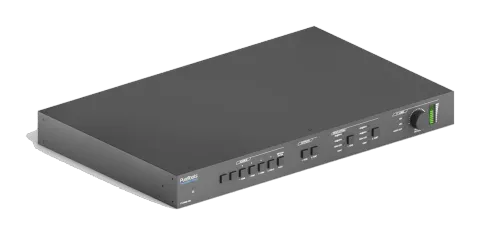
Abandonné
PT-PMS-42S
Ensemble de matrices de présentation multiformat 4x2 4K 18 Gbps sans coupure
Le Matrix de présentation sans coupure Multiformat 4x2 4K 18Gbps est un Switcher AV qui prend en charge les signaux HDMI et USB-C avec des sorties HDMI et HDBaseT matricées. Il offre des résolutions de sortie mises à …
ManuelCommandes (TCP/IP)FAQCEInterfaces de contrôle disponibles. Développez un type actif pour afficher le tableau complet des commandes.
Aucune commande correspondante.
Commandes RS23278 commandesActif
ConnexionBaud rate: 9600 Data bit: 8 Stop bit: 1 Parity bit: none All commands needs to be ended with “ <CR><LF> ”. In the commands, “ [ ”and “ ] ” are symbols for easy reading and do not need to be typed in actual operation. Type the command carefully, it is case-sensitive.↓ CSV
Source : manuel, chapitre RS232 Command, page 42
| Commande | Description | Exemple | Réponse | |
|---|---|---|---|---|
| #SYS_SET_DEVICE_MODLE **** | Renommer le modèle du système en ****. | #SYS_SET_DEVICE_MODLE PT-PMS-42S PT-PMS-42S | ||
| #SET_PWR_STATE ON | Système allumé. | @PWR_STATE PWON | ||
| #SET_PWR_STATE OFF | Mise en veille du système. | @PWR_STATE PWOFF | ||
| #GET_PWR_STATE | Obtenir l'état d'alimentation du système. | @PWR_STATE PWON @PWR_STATE PWOFF | ||
| #SET_KEYPAD_LOCK ON | Verrouiller les boutons du panneau avant. | @KEYPAD_LOCK ON | ||
| #SET_KEYPAD_LOCK OFF | Déverrouiller les boutons du panneau avant. | @KEYPAD_LOCK OFF | ||
| #GET_KEYPAD_LOCK | Obtenir l'état de verrouillage des boutons du panneau avant. | @KEYPAD_LOCK ON @KEYPAD_LOCK OFF | ||
| #GET_DEVICE_TYPE | Obtenir le modèle système. | PT-PMS-42S | ||
| #GET_DEVICE_IPADDR | Obtenir l'adresse IP de l'interface graphique. | @IP_ADDR: 192.168.0.178 | ||
| #FACTORY_RESET | Réinitialiser aux paramètres d’usine. | FACTORY_RESET | ||
| #GET_DEVICE_FIRMWAREINF | Obtenir la version du firmware. | FIRMWARE V1.0.0 | ||
| #SET_PORT_RELAY 01 ON | Activer PoC pour le port de sortie HDBT. Le Receiver PT-HDBT-210-RX peut être alimenté par le switcher. | @PORT_RELAY 01 ON | ||
| #SET_PORT_RELAY 01 OFF | Désactiver le PoC pour le port de sortie HDBT. | @PORT_RELAY 01 OFF | ||
| #GET_PORT_RELAY 01 | Obtenir le statut PoC. | @PORT_RELAY 00 @PORT_RELAY 01 | ||
| #SET_BADURATE_MODE [PARAM] | Définir le débit en bauds du Switcher à [PARAM]. [PARAM]=01~07 [PARAM] Débit en bauds 01 2400 02 4800 03 9600 04 19200 05 38400 06 57600 07 115200 | #SET_BADURATE_MODE 05 | ||
| #UPDATE_MODE MAIN [PARAM] | Mettre à jour le circuit intégré 3458 du port [PARAM]. [PARAM]=01~04 (port entrée). [PARAM]=05~06 (port sortie). | #UPDATE_MODE MAIN 01 | @UPDATE_MODE MAIN 01 @Updating... @UPDATE_MODE MAIN: SUCCESS | |
| #UPDATE_MODE HDCP22 [PARAM] | Mettre à jour le HDCP 2.2 du port [PARAM]. [PARAM]=01~04 (port entrée). [PARAM]=05~06 (port sortie). | #UPDATE_MODE HDCP22 01 | @UPDATE_MODE HDCP22 01 @Updating... @UPDATE_MODE HDCP22: SUCCESS | |
| #SET_MODE_DOWNSCLAR ON | Activer la réduction de résolution vidéo. | @DOWNSCLAR_MODE ON | ||
| #SET_MODE_DOWNSCLAR OFF | Désactiver la réduction de résolution vidéo. | @DOWNSCLAR_MODE OFF | ||
| #GET_MODE_DOWNSCLA | Obtenir l'état de réduction de résolution vidéo. | @DOWNSCLAR_MODE ON @DOWNSCLAR_MODE OFF | ||
| #SET_AUTO_SWITCH [PARAM] ON | Activer le mode de commutation automatique pour la sortie HDMI ou HDBT. [PARAM] = 01 (HDMI)/02 (HDBT) | #SET_AUTO_SWITCH 01 ON @AUTOSWITCH 01 ON | ||
| #SET_AUTO_SWITCH [PARAM] OFF | Désactiver le mode de commutation automatique pour la sortie HDMI ou HDBT. [PARAM] = 01 (HDMI)/02 (HDBT) | #SET_AUTO_SWITCH 01 OFF @AUTOSWITCH 01 OFF | ||
| #GET_AUTO_SWITCH | Obtenir le mode de commutation automatique des sorties HDMI et HDBT. | @AUTOSWITCH 01 ON @AUTOSWITCH 02 OFF | ||
| #SET_AV [INPARAM] TO [OUTPARAM1] [OUTPARAM2]… | Basculez l’entrée [INPARAM] vers la sortie [OUTPARAM1] [OUTPARAM2]… [INPARAM]=01 ~ 04 [OUTPARAM1] [OUTPARAM2]…= 01 ~ 02, ALL | #SET_AV 01 TO 02 #SET_AV 01 TO 01 02 #SET_AV 04 TO ALL @AV 01 TO 02 @AV 01 TO 01 02 @AV 04 TO ALL | ||
| #GET_AV | Obtenir le canal d’entrée sur chaque canal de sortie un par un. | @Video&Audio OUT 01 02 IN 04 04 | ||
| #GET_AV OUT [PARAM] | Obtenir le canal d’entrée sur la sortie [PARAM]. [PARAM]=01~02. | #GET_AV OUT 01 @AV 01 TO 01 | ||
| #GET_AV IN [PARAM] | Obtenir le canal de sortie sur l'entrée [PARAM]. [PARAM]=01~04. | #GET_AV IN 01 @AV 01 TO 01 02 | ||
| #SAVE_PRESET_MODE [PARAM] | Enregistrer l’état de commutation actuel dans la mémoire [PARAM]. [PARAM]=01~10. | #SAVE_PRESET_MODE 01 @SAVE_PRESET_MODE 01 | ||
| #RECALL_PRESET_MODE [PARAM] | Rappeler le preset [PARAM]. [PARAM]=01~10. | #RECALL_PRESET_MODE 04 @CALL_PRESET_MODE 04 @Video&Audio OUT 01 02 IN 01 03 | ||
| #CLR_PRESET_MODE [PARAM] | Effacer le préréglage [PARAM]. [PARAM] = 01~10. | #CLR_PRESET_MODE 01 @CLEAR_PRESET_MODE 01 | ||
| #SET_IIS_SEL [PARAM] | Définir la source audio du port de sortie audio (L+R) à [PARAM]. [PARAM]=01 ~ 02 01=Audio sortie HDMI 02=Audio sortie HDBT | #SET_IIS_SEL 01 @IIS_AUDIO 01 | ||
| #GET_IIS_SEL | Obtenir la source audio du port de sortie audio (L+R). | @IIS_AUDIO 01 | ||
| #SET_SPDIF_SEL [PARAM] | Définir la source audio du port de sortie SPDIF à [PARAM]. [PARAM]=01 ~ 03 01=Audio sortie HDMI 02=Audio sortie HDBT 03=Audio ARC depuis le receiver | #SET_SPDIF_SEL 01 @SPDIF_AUDIO 01 | ||
| #GET_SPDIF_SEL | Obtenir la source audio du port de sortie SPDIF. | @SPDIF_AUDIO 01 | ||
| #SET_AUDIO_ARC ON | Activer le mode ARC du Receiver PT-HDBT-210-RX. | @SET_AUDIO_ARC ON | ||
| #SET_AUDIO_ARC OFF | Désactiver le mode ARC du Receiver PT-HDBT-210-RX. | @SET_AUDIO_ARC OFF | ||
| #GET_AUDIO_ARC | Obtenir le statut ARC. | @SET_AUDIO_ARC ON @SET_AUDIO_ARC OFF | ||
| #SET_AUDIO_MUTE [PARAM] ON | Couper le son [PARAM]. [PARAM]=01~05, ALL 01=son de sortie HDMI 02=son de sortie HDBT 03=son MIX 04=son MIC 05=son L+R ALL=Tout le son. | #SET_AUDIO_MUTE 01 ON #SET_AUDIO_MUTE ALL ON @AUDIO_MUTE 01 ON @AUDIO_MUTE ALL ON | ||
| #SET_AUDIO_MUTE [PARAM] OFF | Réactiver l'audio [PARAM]. [PARAM]=01~05, ALL 01=Audio de sortie HDMI 02=Audio de sortie HDBT 03=Audio MIX 04=Audio MIC 05=Audio sortie L+R ALL=Tous les audios. | #SET_AUDIO_MUTE 01 OFF #SET_AUDIO_MUTE ALL OFF @AUDIO_MUTE 01 OFF @AUDIO_MUTE ALL OFF | ||
| #GET_AUDIO_MUTE [PARAM] | Obtenir l'état de sortie de l'audio [PARAM]. [PARAM]=01~05, ALL 01=Audio de sortie HDMI 02=Audio de sortie HDBT 03=Audio MIX 04=Audio MIC 05=Audio de sortie L+R ALL=Tout l'audio. | #GET_AUDIO_MUTE 01 #GET_AUDIO_MUTE ALL @AUDIO MUTE 01 ON @AUDIO MUTE OUT 01 02 03 04 05 STA 01 01 01 01 01 | ||
| #SET_VOL [PARAM1] [PARAM2] | Set the volume of [PARAM1] audio to [PARAM2]. [PARAM1]=01~05 01=HDMI output audio 02=HDBT output audio 03=MIX audio 04=MIC audio 05=L+R output audio [PARAM2]=0~60 | #SET_VOL 01 60 @VOL HDMI 60 | ||
| #GET_VOL [PARAM] | Obtenir le volume audio de la sortie [PARAM]. [PARAM]= HDMI, HDBT, ALL. | #GET_VOL HDMI #GET_VOL ALL @VOL HDMI 60 @VOL HDBT 60 @VOL MIX 60 @VOL MIC 30 @VOL L+R 30 | ||
| #SET_AUDIO_EMBEDDED ON | Sélectionnez l'audio équilibré externe (5 broches) à intégrer dans l'entrée 1.HDMI. | @AUDIO_EMBEDDED ON | ||
| #SET_AUDIO_EMBEDDED OFF | Sélectionnez le flux audio HDMI interne de l'appareil source pour l'entrée 1.HDMI. | @AUDIO_EMBEDDED OFF | ||
| #GET_AUDIO_EMBEDDED 01 | Obtenir la source audio de l’entrée HDMI 1. | @AUDIO_EMBEDDED ON @AUDIO_EMBEDDED OFF | ||
| #SET_AUDIO_MIX [PARAM1] [PARAM2] | Activer/désactiver la sortie audio [PARAM1] pour la mixer avec l’audio MIX. [PARAM1]=01~02, ALL 01=Sortie HDMI 02=Sortie HDBT ALL=Toutes les sorties [PARAM2]=ON/OFF | #SET_AUDIO_MIX 01 ON #SET_AUDIO_MIX ALL ON @AUDIO_MIX 01 ON @AUDIO_MIX 01 OFF @AUDIO_MIX ALL OFF @AUDIO_MIX ALL ON | ||
| #GET_AUDIO_MIX [PARAM] | Obtenir le statut audio MIX de la sortie [PARAM]. [PARAM]=01~02, ALL 01=Sortie HDMI 02=Sortie HDBT ALL=Toutes les sorties | #GET_AUDIO_MIX 01 #GET_AUDIO_MIX ALL @AUDIO_MIX 01 ON @AUDIO_MIX 02 OFF | ||
| #SET_AUDIO_MIC [PARAM1] [PARAM2] | Activer/désactiver la sortie audio [PARAM1] pour la mixer avec l’audio MIC. [PARAM1]=01~02, ALL 01=Sortie HDMI 02=Sortie HDBT ALL=Toutes les sorties [PARAM2]=ON/OFF | #SET_AUDIO_MIC 01 ON #SET_AUDIO_MIC ALL ON @AUDIO_MIC 01 ON @AUDIO_MIC 01 OFF @AUDIO_MIC ALL OFF @AUDIO_MIC ALL ON | ||
| #GET_AUDIO_MIC [PARAM] | Obtenir le statut audio MIC de la sortie [PARAM]. [PARAM]=01~02, ALL 01=Sortie HDMI 02=Sortie HDBT ALL=Toutes les sorties | #GET_AUDIO_MIC 01 #GET_AUDIO_MIC ALL @AUDIO_MIC 01 OFF @AUDIO_MIC 02 OFF | ||
| #SET_OUTPUT_RES [PARAM1] TO [PARAM2] | Set the output resolution of output [PARAM2] to [PARAM1]. [PARAM2]=01~02 [PARAM2] Output 01 HDMI 02 HDBT [PARAM1]=1~10 1 4K@60HZ 4:4:4 2 4K@30Hz 4:4:4 3 1920X1200@60Hz 4 1080P@60Hz 5 1080P@50Hz 6 1600x1200@60Hz 7 1360x768@60Hz 8 1024x768@60Hz 9 720P@60Hz 10 720P@50Hz | #SET_OUTPUT_RES 01 TO 01 @OUTPUT_RES 4k@60 TO 01 | ||
| #GET_OUTPUT_RES [PARAM] | Obtenir la résolution vidéo de la sortie [PARAM]. [PARAM]=01~02, ALL | #GET_OUTPUT_RES 01 @OUTPUT RES 1080@60 TO 01 | ||
| #SET_EDID_MODE CAL:[PARAM1] TO [PARAM2] | L'entrée HDMI [PARAM2] invoque l'EDID intégré [PARAM1]. [PARAM1]=01~03 (EDID) [PARAM2]=01~03 (1.HDMI IN~3.HDMI IN) [PARAM1] EDID 01 1080P@60Hz 2CH 02 4K@30Hz 4:4:4 2CH 03 4K@60Hz 4:4:4 2CH | #SET_EDID_MODE CAL:01 TO 02 @EDID_MODE CAL:01 TO 02 | ||
| #SET_EDID_MODE LRN:[PARAM1] TO [PARAM2] | Définir les données EDID de la sortie [PARAM1] sur l'entrée [PARAM2]. | |||
| #SEND_CECCMD [port]:00 | Confirmer l’opération (Entrée). | #SEND_CECCMD 03:00 [CEC]: blue ray OK. | ||
| #SEND_CECCMD [port]:01 | UP. | #SEND_CECCMD 03:01 [CEC]: blue ray up. | ||
| #SEND_CECCMD [port]:02 | BAS. | #SEND_CECCMD 03:02 [CEC]: blue ray down. | ||
| #SEND_CECCMD [port]:03 | GAUCHE. | #SEND_CECCMD 03:03 [CEC]: blue ray left. | ||
| #SEND_CECCMD [port]:04 | DROITE. | #SEND_CECCMD 03:04 [CEC]: blue ray right. | ||
| #SEND_CECCMD [port]:09 | Retour au sous-menu. | #SEND_CECCMD 03:09 [CEC]: blue ray menu. | ||
| #SEND_CECCMD [port]:0D | Quitter. | #SEND_CECCMD 03:0D [CEC]: blue ray Exit. | ||
| #SEND_CECCMD [port]:41 | Augmenter le volume. | #SEND_CECCMD 03:41 [CEC]: blue ray Volume Up. | ||
| #SEND_CECCMD [port]:42 | Baisser le volume. | #SEND_CECCMD 03:42 [CEC]: blue ray Volume Down | ||
| #SEND_CECCMD [port]:44 | Lecture. | #SEND_CECCMD 03:44 [CEC]: blue ray play. | ||
| #SEND_CECCMD [port]:45 | Arrêt. | #SEND_CECCMD 03:45 [CEC]: blue ray stop. | ||
| #SEND_CECCMD [port]:46 | Pause. | #SEND_CECCMD 03:46 [CEC]: blue ray pause. | ||
| #SEND_CECCMD [port]:48 | Rembobiner | #SEND_CECCMD 03:48 [CEC]: blue ray backward. | ||
| #SEND_CECCMD [port]:49 | Avance rapide. | #SEND_CECCMD 03:49 [CEC]: blue ray forward. | ||
| #SEND_CECCMD [port]:4B | Avancer. | #SEND_CECCMD 03:4B [CEC]: blue ray skid forward. | ||
| #SEND_CECCMD [port]:4C | Reculer. | #SEND_CECCMD 03:4C [CEC]: blue ray skid backward. | ||
| #SEND_CECCMD [port]:6C | Éteindre. | #SEND_CECCMD 03:6C [CEC]: Source Power off. | ||
| #SEND_CECCMD [port]:6D | Allumer. | #SEND_CECCMD 03:6D [CEC]: Source Power on. | ||
| #SEND_CECCMD [port]:34 | Sélection du canal d’entrée. | #SEND_CECCMD 04:34 [CEC]: TV input select | ||
| #SEND_CECCMD [port]:41 | Augmenter le volume. | #SEND_CECCMD 04:41 [CEC]: TV VOL + | ||
| #SEND_CECCMD [port]:42 | Baisser le volume. | #SEND_CECCMD 04:42 [CEC]: TV VOL - | ||
| #SEND_CECCMD [port]:43 | Muet | #SEND_CECCMD 04:43 [CEC]: TV VOL Mute | ||
| #SEND_CECCMD [port]:36 | Éteindre. | #SEND_CECCMD 04:36 [CEC]: TV Power off | ||
| #SEND_CECCMD [port]:04 | Allumer. | #SEND_CECCMD 04:04 [CEC]: TV Power on | ||
| #SEND_[PARAM1]_[PARAM2]_[PARAM3]:XXXX | Send the ASCII or HEX command to control the third-party device. [PARAM1]=A/H: Represents the command format. [PARAM1] Command Format A ASCII H HEX [PARAM2]=01~02: Represents the RS232 port. [PARAM2] RS232 Port 01 The RS232 port of the switcher. 02 The RS232 port of the far-end HDBaseT receiver. [PARAM3]=01~07: Represents the baud rate |
RS232 Command5 commandesActif
Source : manuel, chapitre RS232 Command, page 53
| Commande | Description | Exemple | Réponse | |
|---|---|---|---|---|
| #SEND_[PARAM1]_[PARAM2]_[PARAM3]:XXXX | Send the ASCII or HEX command to control the third-party device. [PARAM1]=A/H: Represents the command format. [PARAM1] | Command Format A | ASCII H | HEX [PARAM2]=01~02: Represents the RS232 port. [PARAM2] | RS232 Port 01 | The RS232 port of the switcher. 02 | The RS232 port of the far-end HDBaseT receiver. [PARAM3]=01~07: Represents the baud rate of third-party device. [PARAM3] | Baud Rate 01 | 2400 02 | 4800 03 | 9600 04 | 19200 05 | 38400 06 | 57600 07 | 115200 XXXX: ASCII or HEX characters. | #SEND_A_01_05:123456789 #SEND_H_02_05:30 31 32 33 34 | ||
| #SET_ON_[PARAM1]_[PARAM2]_[PARAM3]:XXXX | When power on system, automatically send the ASCII or HEX command to the third-party device. [PARAM1]=A/H: Represents the command format. [PARAM1] | Command Format A | ASCII H | HEX [PARAM2]=01~02: Represents the RS232 port. [PARAM2] | RS232 Port 01 | The RS232 port of the switcher. 02 | The RS232 port of the far-end HDBaseT receiver. [PARAM3]=01~07: Represents the baud rate of third-party device. [PARAM3] | Baud Rate 01 | 2400 02 | 4800 03 | 9600 04 | 19200 05 | 38400 06 | 57600 07 | 115200 XXXX: ASCII or HEX characters. | #SET_OF_A_01_03:123456789 #SET_OF_H_02_03:30 31 32 33 34 | ||
| #GET_ON_[PARAM1]_[PARAM2] | Get the feedback command which to be sent to the third-party device when the system is powered on. [PARAM1]=01~02: Represents the RS232 port. [PARAM1] | RS232 Port 01 | The RS232 port of the switcher. 02 | The RS232 port of the far-end HDBaseT receiver. [PARAM2]=01~07: Represents the baud rate of third-party device. [PARAM2] | Baud Rate 01 | 2400 02 | 4800 03 | 9600 04 | 19200 05 | 38400 06 | 57600 07 | 115200 | |||
| #SET_OF_[PARAM1]_[PARAM2]_[PARAM3]:XXXX | When power off system or enter system standby mode, automatically send the ASCII or HEX command to the third-party device. [PARAM1]=A/H: Represents the command format. [PARAM1] | Command Format A | ASCII H | HEX [PARAM2]=01~02: Represents the RS232 port. [PARAM2] | RS232 Port 01 | The RS232 port of the switcher. 02 | The RS232 port of the far-end HDBaseT receiver. [PARAM3]=01~07: Represents the baud rate of third-party device. [PARAM3] | Baud Rate 01 | 2400 02 | 4800 03 | 9600 04 | 19200 05 | 38400 06 | 57600 07 | 115200 XXXX: ASCII or HEX characters. | #SET_OF_A_01_03:123456789 #SET_OF_H_02_03:30 31 32 33 34 | ||
| #GET_OF_[PARAM1]_[PARAM2] | Get the feedback command which to be sent to the third-party device when the system is powered off or enter standby mode. [PARAM1]=01~02: Represents the RS232 port. [PARAM1] | RS232 Port 01 | The RS232 port of the switcher. 02 | The RS232 port of the far-end HDBaseT receiver. [PARAM2]=01~07: Represents the baud rate of third-party device. [PARAM2] | Baud Rate 01 | 2400 02 | 4800 03 | 9600 04 | 19200 05 | 38400 06 | 57600 07 | 115200 |