
Actif
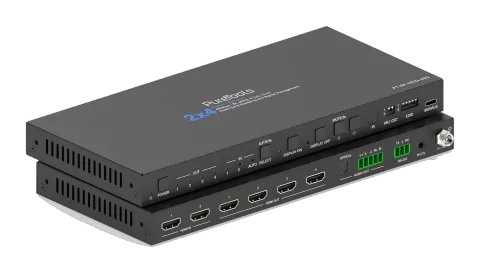
PT-SP-HD24-48G
Répartiteur 2x4 HDMI 2.1 - 48Gbps avec Scaler et Audio De-Embedding
Le PT-SP-HD24-48G est un Splitter et Switcher HDMI 2.1 2x4 supportant les signaux HDMI 2.1 jusqu'à 48Gbps FRL, permettant le 8K à 60Hz (4:2:0, 12bit) et le 4K à 120Hz (4:4:4, 12bit), avec une compatibilité avancée des …
ManuelCommandes (TCP/IP)SpécificationsFiche techniqueDéclaration CE ↗Interfaces de contrôle disponibles. Développez un type actif pour afficher le tableau complet des commandes.
Aucune commande correspondante.
Port de service (RS232 virtuel USB-C)38 commandesActif
ConnexionDébit en bauds : 115200 (Fixe) ; Bit de données : 8 ; Bit d’arrêt : 1 ; Bit de parité : aucun↓ CSV
Source : manuel, chapitre API Commands, page 15
| Commande | Description | Exemple | Réponse | |
|---|---|---|---|---|
| ? | Obtenir la liste de toutes les commandes | ? | ||
| help | Obtenir la liste de toutes les commandes | help | ||
| get fw version | Obtenir la version du firmware | get fw version | MCU version: 1.00.02 Chip 1 PS8419 version: 13.28 Chip 2 PS8419 version: 13.28 | |
| set power on/off | Allumer/Éteindre l'appareil | set power on set power off | Power on… System Initializing... Initialization Finished! FW: 1.0.0 Power off… | |
| get power | Obtenir l’état d’alimentation de l’appareil | get power | Power on | |
| set reboot | Redémarrer l'appareil | set reboot | Reboot… System Initializing... Initialization Finished! FW: 1.0.0 | |
| set reset | Réinitialiser aux paramètres d’usine. | set reset | Sure to RESET to default settings? Type "Yes" after next prompt to confirm… | |
| get status | Obtenir l'état système | get status | Please refer to the note at the end of the list | |
| set IR on/off | Activez/désactivez l’IR | set IR on set IR off | Set IR on Set IR off on | |
| get IR | Obtenir le statut IR activé/désactivé | get IR | IR on | |
| set key x on/off | Définir la touche du panneau avant (x=0~6) activée/désactivée x=0 : Toutes les touches x=1 : Touche Marche/Arrêt x=2 : Touche Sélection x=3 : Touche affichage activé x=4 : Touche affichage désactivé x=5 : Touche volume - x=6 : Touche volume + | set key 0 on set key 2 off | Set all key on Set select key off on | |
| get key x | Obtenir l'état activé/désactivé de la touche du panneau avant (x=0~6) | get key get key 0 get key 2 | All key on All key on Select key on | |
| set baud x | Définir le débit RS232 à x bps x=1 : 4800 x=2 : 9600 x=3 : 19200 x=4 : 38400 x=5 : 57600 x=6 : 115200 | set baud 6 | Set baud rate 115200 115200 | |
| get baud | Obtenir le débit en bauds RS232 | get baud | Baud rate 115200 | |
| set input x | Définir la vidéo d’entrée (x=0~2) x=0 : Désactivé x=1~2 : Entrée HDMI 1~2 | set input 1 | Set input HDMI 1 1 | |
| get input | Obtenir le port d'entrée | get input | Input HDMI 1 | |
| get hdmi5v | Obtenir le 5V HDMI de l'entrée | get hdmi5v | HDMI 1: 5V HDMI 2: none | |
| set autoswitch x | Activer/désactiver l'auto-commutation (détection HDMI 5V) x=On, Off | set autoswitch on | Set autoswitch on on | |
| get autoswitch | Obtenir l’état de la commutation automatique | get autoswitch | Autoswitch on | |
| set output x downscale y | Définir le mode de réduction d'échelle de sortie (x=0~4) (y=0~1) x=0 : toutes les sorties x=1~4 : sortie HDMI 1~4 y=0 : Automatique selon la capacité de l'écran y=1 : Contourner la vidéo y=2 : Forcer 1080p | set output 0 downscale 0 | Set all outputs downscale auto 0 | |
| get output x downscale | Obtenir le mode de réduction d’échelle de sortie (x=0~4) | get output 0 downscale | HDMI output 1 downscale auto HDMI output 2 downscale auto HDMI output 3 downscale auto HDMI output 4 downscale auto | |
| set output x display y | Définir le mode d'affichage de sortie (x=0~4) (y=0~3) x=0 : toutes les sorties x=1~4 : sortie HDMI 1~4 y=0 : Désactivé (désactiver la sortie TMDS) y=1 : Vidéo d'entrée y=2 : AVMUTE y=3 : Motif interne Note : Quand y est 1, 2 ou 3, x doit être 0. | set output 0 display 2 | Set all outputs display internal pattern 1 | |
| get output x display | Obtenir le mode d’affichage de sortie (x=0~4) | get output 0 display | HDMI output 1 display internal pattern HDMI output 2 display internal pattern HDMI output 3 display internal pattern HDMI output 4 display internal pattern | |
| set output x HDCP y | Définir le mode HDCP de sortie (x=0~4) (y=0~3) x=0 : toutes les sorties x=1~4 : sortie HDMI 1~4 y=0 : Réservé y=1 : Suivre le récepteur y=2 : Suivre la source y=3 : Forcer HDCP 1.4 y=4 : Forcer HDCP 2.2 | set output 0 HDCP 1 | Set all outputs HDCP follow sink 1 | |
| get output x HDCP | Obtenir le mode HDCP de sortie (x=0~4) | get output 0 HDCP | HDMI output 1 HDCP follow sink HDMI output 2 HDCP follow sink HDMI output 3 HDCP follow sink HDMI output 4 HDCP follow sink | |
| set CEC on/off | Activez/désactivez le CEC | set CEC on set CEC off | Set CEC enable Set CEC disable Disable | |
| get CEC | Obtenir le statut CEC activé/désactivé | get CEC | CEC enable CEC disable | |
| set generator x y | Définir la résolution du générateur de signal interne (x=1~15) motif (y=1~13) x=01 : 8K30Hz x=02 : 4K120Hz x=03 : 4K100Hz x=04 : 5K60Hz x=05 : 5K50Hz x=06 : 5K30Hz x=07 : 5K25Hz x=08 : 5K24Hz x=09 : 4K60Hz x=10 : 4K50Hz x=11 : 4K25Hz x=12 : 4K24Hz x=13 : 1080P60Hz x=14 : 480P60Hz x=15 : 5760P50Hz y=01 : Barre de couleur y=02 : Damier y=03 : Bande y=04 : Rouge y=05 : Vert y=06 : Bleu y=07 : Blanc y=08 : Rampe y=09 : Rampe rouge y=10 : Rampe verte y=11 : Rampe bleue y=12 : PRBS y=13 : Noir | set generator 1 1 | Set generator 8K30Hz color bar | |
| get generator | Obtenir la résolution et le motif de sortie du générateur de signal interne | get generator | Generator 8K30Hz color bar | |
| set analog mute x | Activer/désactiver la mise en sourdine audio analogique x=Activé, Désactivé | set analog mute on | Set analog mute on off | |
| get analog mute | Obtenir l’état de sourdine audio analogique | get analog mute | off | |
| set analog gain x | Définir le gain audio analogique (x=0dB ~ -79dB) | set analog gain -79dB | Set analog gain -79dB 0dB | |
| get analog gain | Obtenir la valeur du gain audio analogique | get analog gain | Analog gain -79dB | |
| set edid x to y | Définir les ports d’entrée (x=0~2) à l’EDID (y=0~41) x=0 : toutes les entrées x=1~2 : Entrée HDMI 1~2 y=00 : HDMI 1080p@60Hz, Audio 2CH PCM (par défaut) y=01 : HDMI 1080p@60Hz, Audio 5.1CH DTS/DOLBY y=02 : HDMI 1080p@60Hz, Audio 7.1CH DTS/DOLBY/HD y=03 : HDMI 4K@60Hz 4:4:4, 8 bits, Audio 2CH PCM y=04 : HDMI 4K@60Hz 4:4:4, 8 bits, Audio 5.1CH DTS/DOLBY y=05 : HDMI 4K@60Hz 4:4:4, 8 bits, Audio 7.1CH DTS/DOLBY/HD y=06 : HDMI 4K@120Hz 4:4:4, 8 bits, Audio 2CH PCM y=07 : HDMI 4K@120Hz 4:4:4, 8 bits, Audio 5.1CH DTS/DOLBY y=08 : HDMI 4K@120Hz 4:4:4, 8 bits, Audio 7.1CH DTS/DOLBY/HD y=09 : HDMI 4K@120Hz 4:4:4, 10 bits HDR/DV, Audio 2CH PCM y=10 : HDMI 4K@120Hz 4:4:4, 10 bits HDR/DV, Audio 5.1CH DTS/DOLBY y=11 : HDMI 4K@120Hz 4:4:4, 10 bits HDR/DV, Audio 7.1CH DTS/DOLBY/HD y=32 : Passage EDID (copie depuis Sink 1) y=33 : Passage EDID (copie depuis Sink 2) y=34 : Passage EDID (copie depuis Sink 3) y=35 : Passage EDID (copie depuis Sink 4) y=36 : Réservé y=37 : Réservé y=38 : Réservé y=39 : Réservé y=40 : EDID utilisateur 1 y=41 : EDID utilisateur 2 | set edid 0 to 0 | Set all inputs EDID to SDF_00: HDMI 1080p@60Hz, Audio 2CH PCM (default) 0 | |
| get edid x | Obtenir les EDID des ports d'entrée x=0 : toutes les entrées x=1~2 : entrée HDMI 1~2 | get edid 0 | HDMI input 1 EDID SDF_00: HDMI 1080p@60Hz, Audio 2CH PCM (default) HDMI input 2 EDID SDF_00: HDMI 1080p@60Hz, Audio 2CH PCM (default) | |
| get edid data x | Obtenir les données EDID des ports d'entrée x=0 : toutes les entrées x=1~2 : entrée HDMI 1~2 | get edid data 0 | HDMI input 1 EDID HDMI input 2 EDID | |
| set user edid x | Définir l'EDID défini par l'utilisateur (x=1~2) x=1 : Définition utilisateur 1 x=2 : Définition utilisateur 2 y = 00 FF FF FF ….. (y est une donnée EDID de 256 octets) | set user edid 1 | User defined 1 EDID is loaded successfully | |
| get user edid x | Obtenir l'EDID défini par l'utilisateur (x=1~2) x=1 : Défini par utilisateur 1 x=2 : Défini par utilisateur 2 | get user edid 1 | User defined 1 EDID |
Port Phoenix RS23238 commandesActif
ConnexionDébit en bauds : 4800~115200 (Configurable) ; Bit de données : 8 ; Bit d’arrêt : 1 ; Bit de parité : aucun↓ CSV
Source : manuel, chapitre API Commands, page 15
| Commande | Description | Exemple | Réponse | |
|---|---|---|---|---|
| ? | Obtenir la liste de toutes les commandes | ? | ||
| help | Obtenir la liste de toutes les commandes | help | ||
| get fw version | Obtenir la version du firmware | get fw version | MCU version: 1.00.02 Chip 1 PS8419 version: 13.28 Chip 2 PS8419 version: 13.28 | |
| set power on/off | Allumer/Éteindre l'appareil | set power on set power off | Power on… System Initializing... Initialization Finished! FW: 1.0.0 Power off… | |
| get power | Obtenir l’état d’alimentation de l’appareil | get power | Power on | |
| set reboot | Redémarrer l'appareil | set reboot | Reboot… System Initializing... Initialization Finished! FW: 1.0.0 | |
| set reset | Réinitialiser aux paramètres d’usine. | set reset | Sure to RESET to default settings? Type "Yes" after next prompt to confirm… | |
| get status | Obtenir l'état système | get status | Please refer to the note at the end of the list | |
| set IR on/off | Activez/désactivez l’IR | set IR on set IR off | Set IR on Set IR off on | |
| get IR | Obtenir le statut IR activé/désactivé | get IR | IR on | |
| set key x on/off | Définir la touche du panneau avant (x=0~6) activée/désactivée x=0 : Toutes les touches x=1 : Touche Marche/Arrêt x=2 : Touche Sélection x=3 : Touche affichage activé x=4 : Touche affichage désactivé x=5 : Touche volume - x=6 : Touche volume + | set key 0 on set key 2 off | Set all key on Set select key off on | |
| get key x | Obtenir l'état activé/désactivé de la touche du panneau avant (x=0~6) | get key get key 0 get key 2 | All key on All key on Select key on | |
| set baud x | Définir le débit RS232 à x bps x=1 : 4800 x=2 : 9600 x=3 : 19200 x=4 : 38400 x=5 : 57600 x=6 : 115200 | set baud 6 | Set baud rate 115200 115200 | |
| get baud | Obtenir le débit en bauds RS232 | get baud | Baud rate 115200 | |
| set input x | Définir la vidéo d’entrée (x=0~2) x=0 : Désactivé x=1~2 : Entrée HDMI 1~2 | set input 1 | Set input HDMI 1 1 | |
| get input | Obtenir le port d'entrée | get input | Input HDMI 1 | |
| get hdmi5v | Obtenir le 5V HDMI de l'entrée | get hdmi5v | HDMI 1: 5V HDMI 2: none | |
| set autoswitch x | Activer/désactiver l'auto-commutation (détection HDMI 5V) x=On, Off | set autoswitch on | Set autoswitch on on | |
| get autoswitch | Obtenir l’état de la commutation automatique | get autoswitch | Autoswitch on | |
| set output x downscale y | Définir le mode de réduction d'échelle de sortie (x=0~4) (y=0~1) x=0 : toutes les sorties x=1~4 : sortie HDMI 1~4 y=0 : Automatique selon la capacité de l'écran y=1 : Contourner la vidéo y=2 : Forcer 1080p | set output 0 downscale 0 | Set all outputs downscale auto 0 | |
| get output x downscale | Obtenir le mode de réduction d’échelle de sortie (x=0~4) | get output 0 downscale | HDMI output 1 downscale auto HDMI output 2 downscale auto HDMI output 3 downscale auto HDMI output 4 downscale auto | |
| set output x display y | Définir le mode d'affichage de sortie (x=0~4) (y=0~3) x=0 : toutes les sorties x=1~4 : sortie HDMI 1~4 y=0 : Désactivé (désactiver la sortie TMDS) y=1 : Vidéo d'entrée y=2 : AVMUTE y=3 : Motif interne Note : Quand y est 1, 2 ou 3, x doit être 0. | set output 0 display 2 | Set all outputs display internal pattern 1 | |
| get output x display | Obtenir le mode d’affichage de sortie (x=0~4) | get output 0 display | HDMI output 1 display internal pattern HDMI output 2 display internal pattern HDMI output 3 display internal pattern HDMI output 4 display internal pattern | |
| set output x HDCP y | Définir le mode HDCP de sortie (x=0~4) (y=0~3) x=0 : toutes les sorties x=1~4 : sortie HDMI 1~4 y=0 : Réservé y=1 : Suivre le récepteur y=2 : Suivre la source y=3 : Forcer HDCP 1.4 y=4 : Forcer HDCP 2.2 | set output 0 HDCP 1 | Set all outputs HDCP follow sink 1 | |
| get output x HDCP | Obtenir le mode HDCP de sortie (x=0~4) | get output 0 HDCP | HDMI output 1 HDCP follow sink HDMI output 2 HDCP follow sink HDMI output 3 HDCP follow sink HDMI output 4 HDCP follow sink | |
| set CEC on/off | Activez/désactivez le CEC | set CEC on set CEC off | Set CEC enable Set CEC disable Disable | |
| get CEC | Obtenir le statut CEC activé/désactivé | get CEC | CEC enable CEC disable | |
| set generator x y | Définir la résolution du générateur de signal interne (x=1~15) motif (y=1~13) x=01 : 8K30Hz x=02 : 4K120Hz x=03 : 4K100Hz x=04 : 5K60Hz x=05 : 5K50Hz x=06 : 5K30Hz x=07 : 5K25Hz x=08 : 5K24Hz x=09 : 4K60Hz x=10 : 4K50Hz x=11 : 4K25Hz x=12 : 4K24Hz x=13 : 1080P60Hz x=14 : 480P60Hz x=15 : 5760P50Hz y=01 : Barre de couleur y=02 : Damier y=03 : Bande y=04 : Rouge y=05 : Vert y=06 : Bleu y=07 : Blanc y=08 : Rampe y=09 : Rampe rouge y=10 : Rampe verte y=11 : Rampe bleue y=12 : PRBS y=13 : Noir | set generator 1 1 | Set generator 8K30Hz color bar | |
| get generator | Obtenir la résolution et le motif de sortie du générateur de signal interne | get generator | Generator 8K30Hz color bar | |
| set analog mute x | Activer/désactiver la mise en sourdine audio analogique x=Activé, Désactivé | set analog mute on | Set analog mute on off | |
| get analog mute | Obtenir l’état de sourdine audio analogique | get analog mute | off | |
| set analog gain x | Définir le gain audio analogique (x=0dB ~ -79dB) | set analog gain -79dB | Set analog gain -79dB 0dB | |
| get analog gain | Obtenir la valeur du gain audio analogique | get analog gain | Analog gain -79dB | |
| set edid x to y | Définir les ports d’entrée (x=0~2) à l’EDID (y=0~41) x=0 : toutes les entrées x=1~2 : Entrée HDMI 1~2 y=00 : HDMI 1080p@60Hz, Audio 2CH PCM (par défaut) y=01 : HDMI 1080p@60Hz, Audio 5.1CH DTS/DOLBY y=02 : HDMI 1080p@60Hz, Audio 7.1CH DTS/DOLBY/HD y=03 : HDMI 4K@60Hz 4:4:4, 8 bits, Audio 2CH PCM y=04 : HDMI 4K@60Hz 4:4:4, 8 bits, Audio 5.1CH DTS/DOLBY y=05 : HDMI 4K@60Hz 4:4:4, 8 bits, Audio 7.1CH DTS/DOLBY/HD y=06 : HDMI 4K@120Hz 4:4:4, 8 bits, Audio 2CH PCM y=07 : HDMI 4K@120Hz 4:4:4, 8 bits, Audio 5.1CH DTS/DOLBY y=08 : HDMI 4K@120Hz 4:4:4, 8 bits, Audio 7.1CH DTS/DOLBY/HD y=09 : HDMI 4K@120Hz 4:4:4, 10 bits HDR/DV, Audio 2CH PCM y=10 : HDMI 4K@120Hz 4:4:4, 10 bits HDR/DV, Audio 5.1CH DTS/DOLBY y=11 : HDMI 4K@120Hz 4:4:4, 10 bits HDR/DV, Audio 7.1CH DTS/DOLBY/HD y=32 : Passage EDID (copie depuis Sink 1) y=33 : Passage EDID (copie depuis Sink 2) y=34 : Passage EDID (copie depuis Sink 3) y=35 : Passage EDID (copie depuis Sink 4) y=36 : Réservé y=37 : Réservé y=38 : Réservé y=39 : Réservé y=40 : EDID utilisateur 1 y=41 : EDID utilisateur 2 | set edid 0 to 0 | Set all inputs EDID to SDF_00: HDMI 1080p@60Hz, Audio 2CH PCM (default) 0 | |
| get edid x | Obtenir les EDID des ports d'entrée x=0 : toutes les entrées x=1~2 : entrée HDMI 1~2 | get edid 0 | HDMI input 1 EDID SDF_00: HDMI 1080p@60Hz, Audio 2CH PCM (default) HDMI input 2 EDID SDF_00: HDMI 1080p@60Hz, Audio 2CH PCM (default) | |
| get edid data x | Obtenir les données EDID des ports d'entrée x=0 : toutes les entrées x=1~2 : entrée HDMI 1~2 | get edid data 0 | HDMI input 1 EDID HDMI input 2 EDID | |
| set user edid x | Définir l'EDID défini par l'utilisateur (x=1~2) x=1 : Définition utilisateur 1 x=2 : Définition utilisateur 2 y = 00 FF FF FF ….. (y est une donnée EDID de 256 octets) | set user edid 1 | User defined 1 EDID is loaded successfully | |
| get user edid x | Obtenir l'EDID défini par l'utilisateur (x=1~2) x=1 : Défini par utilisateur 1 x=2 : Défini par utilisateur 2 | get user edid 1 | User defined 1 EDID |