
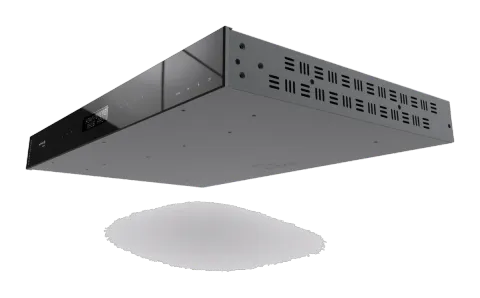
MHUB MAX
CONTENTS SYSTEM: MHUB MAX
IN THE BOX
- 1x MHUB MAX (4x4) matrix hub
- 1x MHUB (4x4) infra-red (IR) remote control
- 1x IEC power lead
- 1x IR RX
- 2x 19” rack mounting ears
MHUB MAX is an Ultra HD Premium™ 4x4 HDMI 2.0 matrix with maximum bandwidth capabilities - the ultimate matrix option for cinema purists, it supports the full HDMI 2.0 (a/b) 18Gbps max data rate, capable of carrying the most premium UHD/4K 60 4:4:4 content, with all HDR formats (10 & 12-bit), Dolby Vision®, HDR10+ and HLG. Integration needs are well catered for, with each of the four display outputs featuring both multichannel digital audio extraction and stereo downmixing, making for easy integration with multizone amplifiers or audio matrices.
Users can easily switch between sources at every display location via the included remote, the free uControl App or with the hands-free convenience of Alexa voice control. MHUB MAX also features remote management, designed to reduce the necessity for callouts and site visits.
MHUB MAX features HDA’s ‘carbonite’ premium industrial design language with disappearing backlit touch controls so that the user interface makes way for design minimalism when not required. With no ugly buttons, labels or switches MHUB MAX is one of the most attractive devices in the rack.
Note: Please fully read and adhere to the setup information and operational instructions contained within this installation manual.
MHUB MAX
SYSTEM FEATURES
- HDMI® 2.0 (a/b) HDCP 2.2 compliant
- 18Gbps data rate throughout
- Backlit fade in/out touch panel controls
- Web GUI for easy config and setup (MHUB-OS)
- Remote system monitoring and management (HDA Cloud)
- Advanced EDID management
- Supports all resolutions up to and inc. Ultra HD 4K 60 4:4:4
- Supports all current High Dynamic Range (HDR) formats
- Supports all current audio formats up to Dolby Atmos® and DTS:X®
- Multichannel audio extraction via digi coax
- Multichannel audio downmix via stereo jack
- 3/4-year guarantee (Cloud registration required)
MHUB MAX
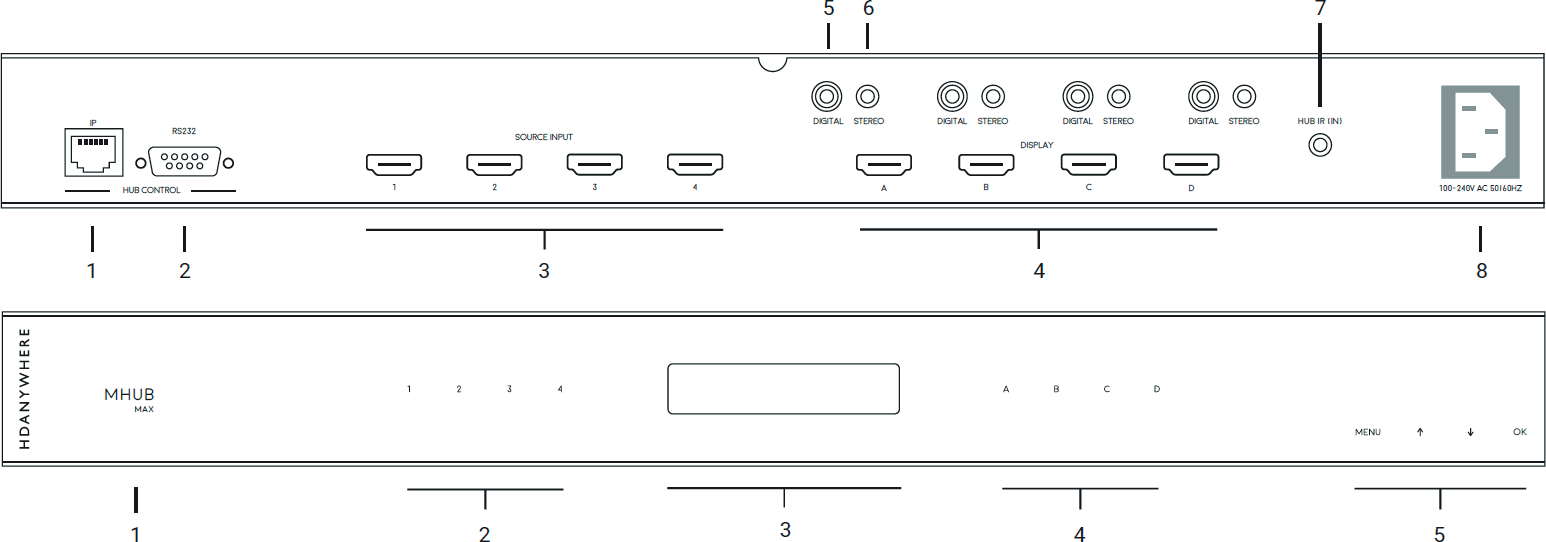
MHUB MAX (4x4) TOUCH PANEL (FRONT)MHUB MAX (4x4) CHASSIS (REAR)
- “HUB CONTROL IP” Port: Connect the MHUB system to your router via this port to enable controllability via TCP/IP commands, web GUI access and system control via the uControl App.
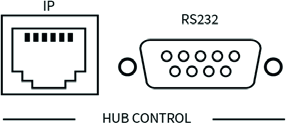
- “HUB CONTROL RS232” Port: Use to integrate your MHUB with a control system via RS232
- “SOURCE INPUTS” [1-4]: Use to connect HDMI source devices to the MHUB
- “DISPLAY OUTPUTS” [A-D]: Use to connect HDMI displays
- “DIGITAL” audio port: Use this port to extract multi-channel audio via a coaxial cable
- “STEREO” audio port: Use this port to extract down-mixed stereo audio via a 3.5mm jack cable
- “HUB IR (IN)”: Connect an IR RX to this port to control your MHUB via IR locally
- AC input: Connect the supplied IEC power cable to this port to provide power to your matrix
- MHUB ON/OFF: Press and hold for 2 seconds to turn MHUB on or off
- Source Selector (1-4): Select which source you want to switch to
- LCD Panel: Displays MHUB system information and switching status
- Display Selector (A-D): Select which display you want to output to
- Menu and Navigation Control: Brings up EDID and IP menu settings
- Press and hold menu for 5 seconds to show IP address on the centre LCD display.
MHUB MAX

WIRING DIAGRAM
- HDMI Cable
- Ethernet Cable
- Digi-Coax Cable
- IR Receiver
- IR Receiver
- IR Signal
uControl
MHUB MAX
HD CONNECTIVITY LTD, trading as HDANYWHERE registered in England and Wales. Company No: 06046737 Registered office: Unit 23 Link Business Centre, Link Way, Malvern, Worcestershire, WR14 1UQ. Contact: support@hdanywhere.com Tel: 00441684575324
IP
RS232
HUB CONTROL 1 2 3 4 A B C D
SOURCE INPUT
DISPLAY
hub ir (IN)
100-240V AC 50/60HZ
DIGITAL STEREO DIGITAL STEREO DIGITAL STEREO DIGITAL STEREO
Zone A Zone B
MHUB-OS
MHUB-OS
A
B
C
D
HDANYWHERE
WIRING DIAGRAM
- HDMI Cable
- Ethernet Cable
- Digi-Coax Cable
- IR Receiver
- IR Receiver
- IR Signal
uControl
MHUB MAX
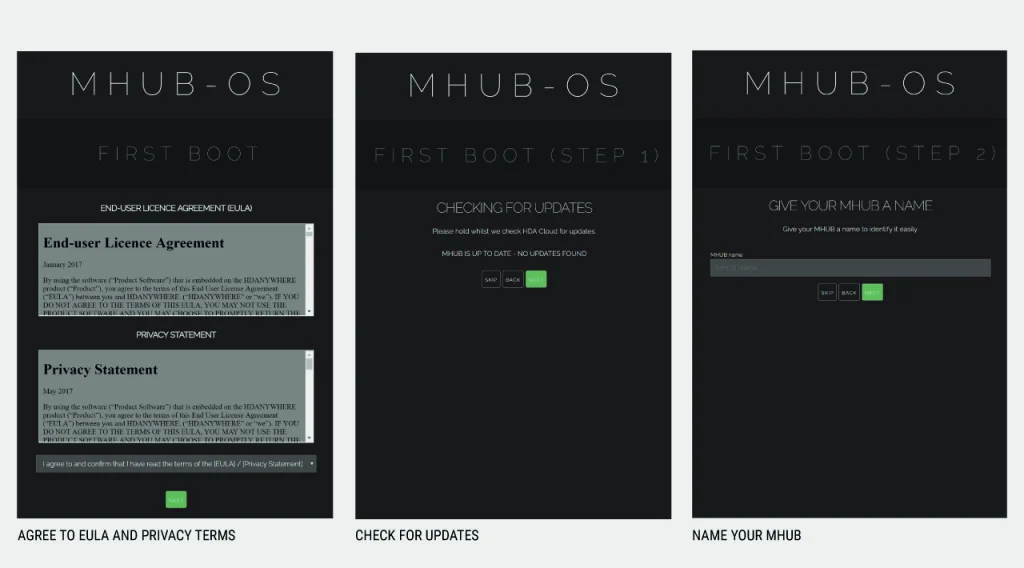
MHUB-OS FIRST BOOT PROCESS
Note: BEFORE STARTING: Read and agree to the End User Licence Agreement (EULA) and Privacy Statement
- First Boot Step 1 – Check for MOS updates This is where your MHUB requests available updates from HDA cloud so your unit will update to the latest version. This is done before proceeding.
- First Boot Step 2 – Name your MHUB Here you can give your MHUB a personal name, this can also be used to differentiate multiple installations by HDA Pro’s
- First Boot Step 3 – Name your sources/inputs On this page you can label your input devices, such as Sky, Apple or Tivo. These labels are used in the uControl app and with voice control.
SETUP CONTINUED...
- Power off all displays and all HDMI source devices.
- Connect the unpowered HDMI sources to the HDMI inputs on the matrix hub using suitably robust HDMI cabling options (i.e. guaranteed to support 18Gbps bandwidth).
- Connect each display such as a HDTV or Projector to the HDMI output ports on the matrix hub using suitably robust HDMI cabling options (i.e. guaranteed to support 18Gbps bandwidth).
- Plug in the power for the matrix hub.
- Power on each HDMI source device followed by each display.
- At this point the four displays should show the video and audio of the HDMI source devices connected to the matrix.
Note: Make sure MHUB is connected up correctly before starting the first boot process on MHUB-OS
HDANYWHERE(HDA) recommends that every MHUB install goes through its first boot process to ensure that the MHUB is setup correctly. Please follow the quick start guide (inside MHUB packaging) to make sure your MHUB is connected correctly to your source devices, displays and has an active network connection before proceeding.
I don’t use MHUB-OS or go through the first boot process, will it still work like a normal matrix?
Yes. You do not need to access MHUB-OS if you don’t want to. MHUB will work distributing video as normal and will be controllable using the included remote controls. Please note that you will not be able to access advanced features such as voice control, the uControl app or build Sequences.
Accessing MHUB-OS (MOS)
- Download our app, uControl, from the iOS or Google Play Store and let it find MHUB (and run you through the first boot) for you.
- Go to your MHUB and press and hold the “MENU” button for 5 seconds to reveal its IP address. (For example 192.168.1.200) Make a note of it then put that address into any web browser on the same network. You will be forwarded to your MHUB-OS and prompted to complete the first boot process.
First Boot Step 4 – Name your Displays/Rooms/outputs This page is similar to the previous step. You can choose to label them as display manufacturers or room names. Again please follow best practice guidelines available here – [Best Practices]
First Boot Step 5 – Turn update notifications On/Off MOS updates are released periodically, here you can choose to be notified when an update is available.
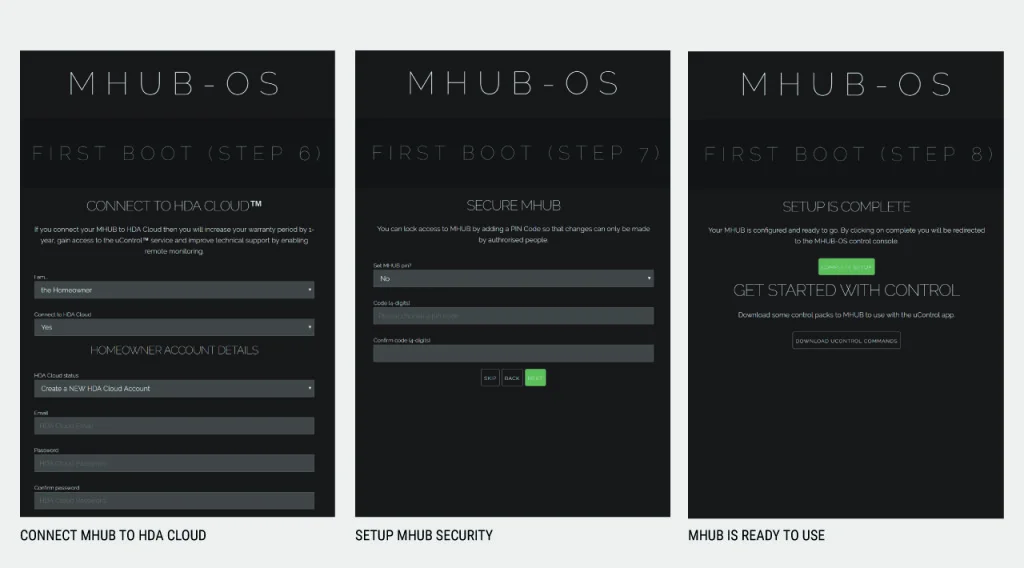
First Boot Step 6 – Create or link your MHUB to a HDA cloud account, read and agree to our Terms and Conditions MHUB 4K and MHUB 4K PRO units can be linked to a cloud based account. When registering as a homeowner this enables a couple of things. Firstly when you register, your warranty period is extended by 1 year, in addition to that cloud access is required when using the uControl IR engine feature allowing you to control source and display devices. Cloud access is also required for voice integration. For a HDA PRO the cloud account allows you to manage your MHUB installations remotely, getting system information as well as a host of other features.
First Boot Step 7 – Secure MHUB with a PIN number If you wish you can lock local access to MOS stopping any unwanted configuration changes from being made.
First Boot Step 8 – Complete First Boot Setup Once you have completed the first boot process you can either ‘COMPLETE SETUP’ and go to the MOS DASHBOARD page, or go to the uControl page to start adding device/source control.
MHUB MAX

MHUB MAX
OPERATION
Integrating and operating MHUB MAX with a third party control system
Via the touch panel
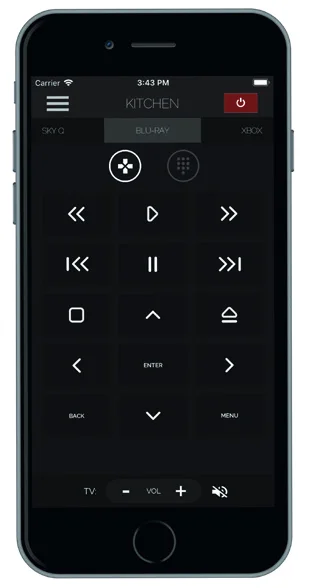
The HDANYWHERE uControl App
It is highly recommended that you learn more about uControl at HDANYWHERE.com or visit the dedicated uControl support pages at http://support.hdanywhere.com/ucontrol/
Using the supplied IR remote control
You can switch between connected HDMI sources (1, 2, 3 and 4) at displays (A, B, C and D) manually by using the touch controls on the front of the matrix hub. First press one of the four “Display output” buttons (A, B, C or D) for the required output to be changed. Next select which input is to be routed to that output by pressing one of the “Source selector” buttons (1, 2, 3 and 4). For example, press ‘Display A’ followed by ‘Source 3’ to view input device 3 on the first output.
- Connect the included IR RX cable to the 3.5mm jack port labelled ‘HUB IR’
- Test IR functionality using the included IR remote control
The MHUB can be integrated with a third party control system via IP or RS232. Drivers for the most popular brands can be found on the MHUB MAX product page on our online support site. http://support.hdanywhere.com/products/multiroom-hd/mhubmax/
Download the free HDANYWHERE uControl App to your phone or tablet. With uControl and the MHUB MAX you can control which source is being routed to what display.
The remote control packaged with the system can control the matrix once you have set it up as follows.
BACK PAGE PAGE BACK HELP
uControl
HDANYWHERE
MHUB MAX
REMOTE MANAGEMENT
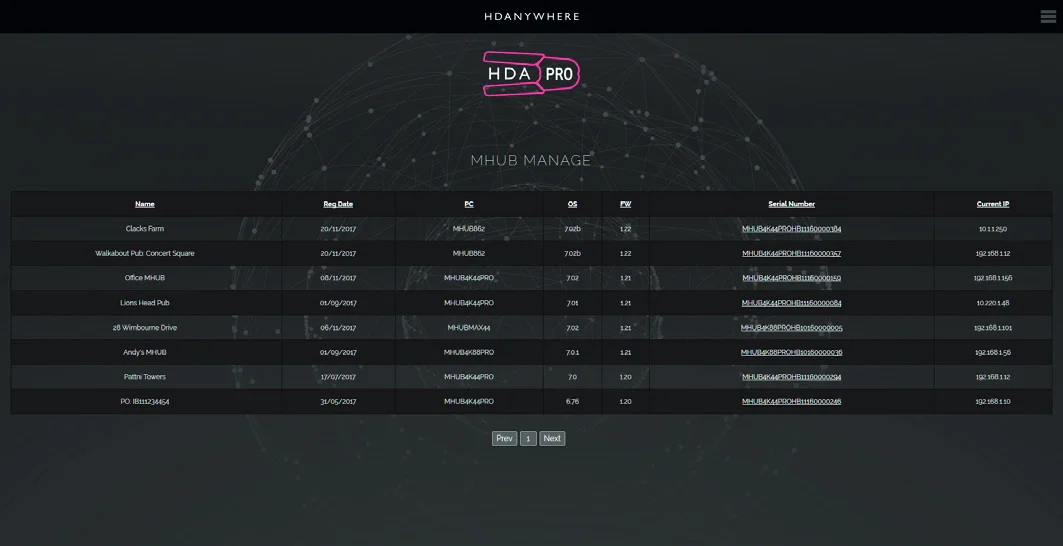
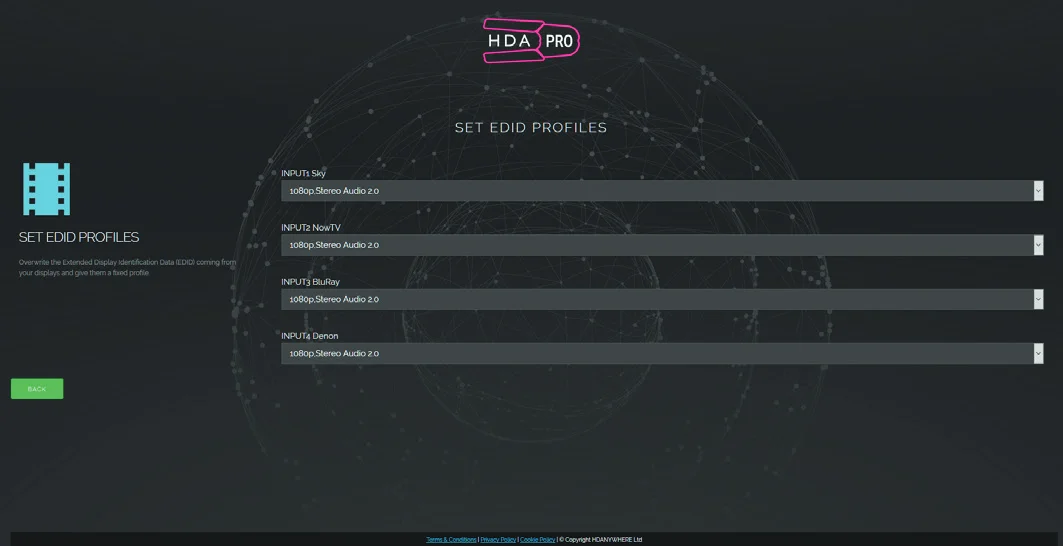
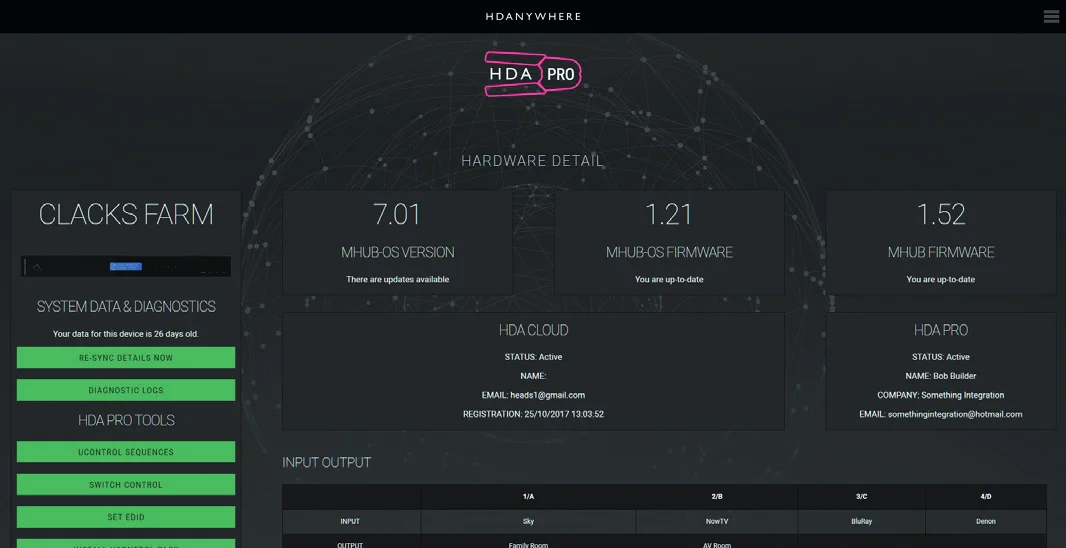
MHUB MAX features remote management software, designed to reduce the necessity for callouts and site visits. Whether at the office, roadside service station or working from home, the HDA PRO Cloud dashboard offers a secure portal to remotely monitor and manage network-connected MHUB installations across multiple client sites. Power-cycling, software rebooting, diagnostics, EDID changes and uControl configuration changes can all be performed without ever having to visit the unit in person.
R E M O T E LY MONITORABLE
- Projects list
- Advanced EDID management
- MHUB system dashboard
MHUB MAX
SPECIFICATIONS
These specifications may change or be improved without notice. HDANYWHERE may not be held
IMPORTANT INFORMATION
Terms and Policies, including General Data Protection Regulation (GDPR) and other Data Protection Laws.
During the setup process of this device, the HDA Pro (Installer) and End-User are required to agree to a set of terms, conditions, rules, policies and license agreements, including the HDANYWHERE Privacy Policy. These terms, notices and policies are, collectively, the “Agreements”. By installing or using this MHUB, you agree to be bound by the Agreements.
EU Conformity
Hereby, HDANYWHERE declares that this HDMI connectivity device is in compliance with the essential requirements and other relevant provisions of the following Directives: 2006/95/EC (LVD Directive); 2004/108/EC (EMC Directive); 1999/5/EC (R&TTE Directive). The full text of the EU declaration of conformity is available in the compliance section at HDANYWHERE.com/legals
Recycling your device properly
In some areas, the disposal of certain electronic devices is regulated. Make sure you dispose of or recycle your device in accordance with your local laws and regulations.
| Form factor | 19”/1U aluminum rack-mountable unit |
|---|---|
| Inputs / outputs | 4 HDMI / 4 HDMI |
| Transmission tech. | Native HDMI |
| Video bandwidth | 594MHz - 18Gbps |
| ESD protection | ± 8kV (air-gap discharge) ± 4kV (contact discharge) |
| Hub control | Web GUI, IR, TCP/IP, RS232, App, Alexa |
| App control | Source selection / hub only |
| Device weight | 1820g |
| Package weight | 3500g |
| Dimensions (W/D/H) | 440 / 284 / 43mm (without feet) |
| Power | Internal 110-240v IEC connection |
| Guarantee | 3/4-year guarantee (Cloud registration required) |
| Operating temperature | 0 ºC~40 ºC / 32 ºF~104 ºF |
| Storage temperature | 0 ºC~40 ºC / 32 ºF~104 ºF |
| Relative humidity | 20~90 % RH (non-condensing) |
| Power consumption | 30W (max) / 0.5W (standby) |
MHUB MAX
HDANYWHERE LIMITED PRODUCT
(3/4 YEAR) GUARANTEE
WHO WE ARE
We are HD CONNECTIVITY LTD trading as HDANYWHERE (“HDA”), a limited company registered under number 06046737 in England and Wales with its registered offices at Unit 23 Link Business Centre, Link Way, Malvern, Worcestershire, WR14 1UQ.
OUR GUARANTEE TO YOU
We, HDANYWHERE warrant to you, the end user of the HDA hardware (the “Products”) that on the date of delivery of the Products to you, and for a period of 3 years from that date of delivery, the Products shall:
(a) match any description that has been provided to you;
(b) be free from any significant defects in their design, the materials used to make them, and the way they are made;
(c) be of satisfactory quality (within the meaning of the Consumer Rights Act 2015); and
(d) be fit for any purpose held out by us.
This 3 year period, or, if the period has been extending to 4 years in accordance with paragraph 3, will be the “Guarantee Period”. We offer this guarantee to all our customers who are resident and have an address in Great Britain and Northern Ireland.
EXTENDING YOUR GUARANTEE
On registering your Products with the HDA Cloud, the guarantee offered in paragraph 2 by us will automatically extend for a period of one year, provided that your registration takes place within 30 days from the date of delivery. The one year guarantee extension starts automatically from the date that the original 3 year guarantee ends.
HOW TO CLAIM ON YOUR GUARANTEE AND YOUR REMEDIES
- Up to 30 days: we will repair or replace your Products or provide you with a full refund of the price of the defective Products at your option.
- Up to 6 Months: we will repair or replace your Products. If we are unable to repair or replace your Products we will provide you with a full refund of the price of the defective Products.
- Up to 3 (4) Years: we will repair or replace your Products. If we are unable to repair or replace your Products we will provide you with a partial refund of the price of the defective Products based upon the devaluation of the Products since the time of purchase.
- In order to claim under the guarantee given to you in paragraph 2 you will need to:
- give us notice in writing of your intention to claim under the guarantee during the Guarantee Period, and do so within a reasonable time after finding that some or all of the Products do not comply with the guarantee set out in paragraph 2;
- show that the Products that you claim are defective, have been examined by a HDA Pro or other authorised or suitably qualified installer, and that they have confirmed in writing that the suspected defect in the Products stems solely from a fault in the HDA hardware;
- give us a reasonable opportunity to examine the Products in question;
- provide us with an order number and a dated sales or delivery receipt from an HDA Distributor, HDA Pro or other authorised dealer, reseller or installer of the Products.
- obtain from us in advance of returning the Products a return merchandise authorisation and/or case number ; and
- (if asked to do so by us) return such Products to our place of business at our cost.
CIRCUMSTANCES WHERE YOUR GUARANTEE DOESN’T APPLY
- If you make any further use of the Products after giving us notice of an issue in accordance with paragraph 5;
- the defect arises because you failed to follow our oral or written instructions as to the storage, installation, use and maintenance of the Products;
- the defect arises as a result of your use of the Products with any other software or hardware that is not compatible with the Products;
- the products are used by you for any commercial purpose, including rental or demonstrative purposes;
- you alter or repair the Products without the written consent of HDA;
- the defect arises as a result of an act of god, fair wear and tear, or your misuse, abuse, unreasonable use, wilful damage, negligence, or abnormal storage of the Products or by any other causes unrelated to defective hardware or manufacturing;
- where the serial number has been altered, defaced or removed;
- where the warranty seal on the system has been altered, defaced or removed; or
- where the Products differ from their description as a result of changes made to ensure they comply with applicable statutory or regulatory requirements.
TRANSFERRING YOUR GUARANTEE TO SOMEONE ELSE
[HDA will not accept any liability under such guarantee unless you are the original customer or can produce a letter or chain of letters from the original customer and subsequent customers (where appropriate) transferring the benefit of the guarantee to you.]
PRODUCTS THAT ARE NOT COVERED BY THIS GUARANTEE
This guarantee does not cover products sold and clearly marked “as is”, “B-grade”, or with faults. This guarantee does not apply to any system software that is preinstalled in the HDA hardware, or is subsequently provided via update or upgrade releases. Any and all HDA software is licensed to you under the terms of a separate end user licence agreement found here: [EULA Link]
HOW THIS GUARANTEE WORKS WITH OUR EULA
We may void this guarantee if we reasonably believe that the HDA system has been used in a manner that violates terms of our separate End User Licence Agreement (EULA) for the HDA software. You assume all-risk and liabilities associated with the use of third party products in conjunction with the Products.
YOUR STATUTORY RIGHTS
This guarantees is in addition to your statutory rights (including under the Consumer Rights Act) which are not affected by this guarantee
GENERAL TERMS OF THIS GUARANTEE
Except as provided in this guarantee, we shall have no liability to you in respect of the Products’ failure to comply with the guarantee set out in paragraph 2.
We reserve the right to amend or withdraw this guarantee at any time although for the avoidance of doubt any guarantees that are in existence at such a time will be honoured.
These Conditions shall apply to any repaired or replacement Product supplied by us.
GUARANTEE CONTACT INFORMATION
To contact (support@hdanywhere.com) or call HDANYWHERE Technical Support (call charges will depend on your telephone provider. Please check with your operator for exact charges). The team is available 9am - 5pm weekdays.
To help us handle your query promptly, please have your invoice number and model SKU and serial ready.
MHUB MAX
HD CONNECTIVITY LTD, trading as HDANYWHERE registered in England and Wales. Company No: 06046737 Registered office: Unit 23 Link Business Centre, Link Way, Malvern, Worcestershire, WR14 1UQ. Contact: support@hdanywhere.com Tel: 00441684575324
Please give us your feedback
We love to hear ideas for how we might improve our products and your experiences using them. If we can make something better, we will, at the earliest opportunity. Whether that be a software or hardware change. So don’t keep it to yourself, let us know. And if your idea gets used - we will credit you publicly and send you a nice gift to say thanks!
Use the uControl App to send us feedback, or go to HDANYWHERE.com/feedback
Legal & Compliance
Product identification
Model: HDA-250748 – manual version 1.0
Trademarks and disclaimer
Product model and logo are trademarks. All other company and product names mentioned are trademarks of their respective owners. All rights reserved. No part of this publication may be copied or reproduced without prior written permission. We reserve the right to make changes to the device, packaging or manual and accept no liability for misprints.
WEEE reg. no.: DE 93847290
Packaging
Dispose of packaging separately by material (paper/cardboard, plastics) via the local collection systems. Keep packaging material away from children – risk of suffocation. Packaging register LUCID: DE5958616449295.