
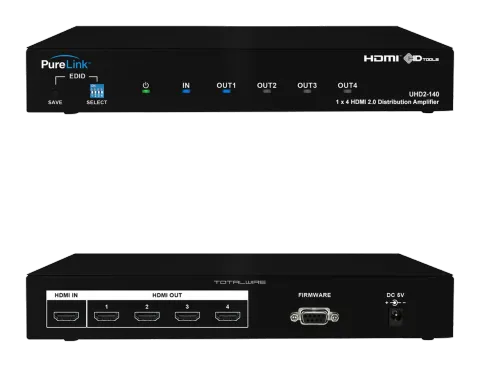
EDID Management
1-1 Package Contents
Please make sure all of the following items are included in the package:
- UHD2-140 Unit
- DC 5V 2A Power supply adapter
- Owner’s Manual
1-2 General Specification
PureLink UHD2-140 1x4 HDMI 2.0 distribution amplifier is designed to distribute a single HDMI/DVI digital signal into multiple monitor without any degradation of original signal quality or distortion of the image. In addition, a dedicated IC chipset makes UHD2-140 capable of amplifying and distributing highest quality of video signal and UHD digital contents. UHD2-140 is compact, durable and low power consumption design makes it ideal solution for connection for high definition video and audio signal of digital display device, such as LCD, Plasma, LED, Projector, and etc. In addition, UHD2-140 offers quick and easy plug and play, installation for commercial or residential system.
| Item | Description |
|---|---|
| Model | UHD2-140 |
| Input type | HDMI Single Link , 1port |
| Output type | HDMI Single Link , 4port |
| Graphic Resolution | VGA / SVGA / XGA / UXGA / WUXGA 480i/p , 720i/p , 1080i/p@60hz, 4096 x 2160 @50/60Hz (RGB 4:4:4 YCbCr 4:4:4, 4:2:2, 4:2:0) |
| Connector type | DC Power Jack HDMI 19 Pin Female Serial Female |
| Supported format | DDWG DVI 1.0 HDMI 2.0 |
| HDCP Compliant | HDCP 2.2 |
| Power Consumption | DC +5V 2A, 1,00mA (max) |
| Dimension (WxDxH) | 6.6” x 3.96” x 1.58” (167 x 100.5 x 40 mm) |
| Weight | 1 lb (0.46 kg) |
1-3 Operation and Reliability Specification
- Operating Environment Temperature : 32F ~ 140F (0℃~ 60℃) Humidity : 10% ~ 80% Altitude : 3,000m Max.
- Transit Environment Temperature : -13F ~ 140F (-25℃~ 60℃) Humidity : 5% ~ 95% Altitude : 15,000m Max.
- Storage Environment Temperature : -4F ~ -185F (-20℃~ 85℃) Humidity : 5% ~ 95% Altitude : 3,000m Max.
- Reliability MTBF: 90% at over 50,000 hours aging test • In compliance with LCD Monitor reliability test standard
1-4 Main Features
- High Quality Picture - No Signal Loss and Digital Noise Free Our Distribution Amplifiers are built to deliver the highest quality picture preserving the native resolutions of the video sources without any signal loss. At the same time, the digital noises that may affect the picture quality will be eliminated. Due to the nature of the digital signals and passing through multiple stages of connection when using distribution amplifiers, it is important to eliminate the digital noises and boost the signal strength to preserve/enhance the video signal quality.
- Signal Amplification for signal reliability and long length signal transmission Our 5V power adapter supplies adequate power to amplify the video signals from the video source. This is necessary as the overall length from the video source to the displays is longer when using the distribution amplifiers (distance from the video source to the distribution amplifier + distance from the distribution amplifier to the display). In most cases, the overall distance that the HDMI signal will need to travel is over 10ft. Due to the nature of HDMI signals, amplification is necessary to warrant the video quality and reliability. (Without amplification, there may be occasional blackouts or blinking effects) With this amplification feature, your video display can be extended up to 2,300 ft using our fiber optical HDMI cables.
- HDMI (High Definition Multimedia Interface) v 2.0 UHD2-140 is consisting of HDMI input and output ports, and it is conforms to HDMI 2.0 standard.
- HDCP 2.2 (High-bandwidth Digital Content Protection) Compliant Our HDMI distribution amplifiers are fully HDCP compliant. Many video sources such as Blu-ray players and Satellite/Cable Receivers are HDCP encrypted. For these video sources to be displayed correctly, HDCP compliant devices (e.g., TV, HDMI Switch, distribution amplifier) are required.
- 4 HDMI outputs from a single HDMI source
- Supports resolutions up to 4K@60Hz 4:4:4
- Supports HDR (High Dynamic Range) formats
- High bandwidth support – up to 18 Gbps
- Supports BT.2020 color representation
- Auto-EDID management – factory default settings and EDID emulation
- CEC pass-through (output #1)
- Active input & output LED indicators
Video Connection
- Turn off the whole system before connecting.
- Connect your video source’s HDMI output port to the UHD2-140’s HDMI input port using standard HDMI cables (not included).
- Connect your HDMI display’s HDMI input port to UHD2-140’s HDMI output port.
- Plug the 5V power supply to UHD2-140
- Plug the 5V wall mount power supply into the wall outlet.
- Turn on UHD2-140
- Turn on your monitor
- Turn on your video source.
PureLink UHD2-140 provides Auto EDID management system; easy and fail safe way to handle EDID, via pre-loaded factory default 1080p 2ch and EDID emulation.
What's EDID?
Extended Display Identification Data (EDID) is an information set that digital display provides to describe its capabilities to a Video source. Video source will know what kinds of displays are connected and it will determine which resolution to Output according to the EDID information received from the display. The EDID normally includes manufacturer name and serial number, sets of capable resolution including native resolution, supported timing, pixel mapping data (for digital displays only) and etc.
In a digital connectivity environment; in order to support the maximum resolution of connected monitor, EDID handshake is critical because improper EDID handshake between sources to the display will result in no image on the display.
EDID handshake may sound simple; however, with multiple peripheral devices within the chain, display's EDID information easily get lost or blocked while it is traveling to the source device.
UHD2-140 provides Auto EDID management system to meet today’s sophisticated digital connectivity integration environment. There is an EDID setting DIP switch on the front of the unit;
| DIP Switch Position | EDID function |
|---|---|
| Dip switch 1,2,3,4 “up” position | Communicate EDID with factory default at 1080p 2ch |
| Dip switch 1 "down" position & 2,3,4"up" position and then SAVE button | Communicate EDID with output #1 connected display |
| Dip switch 2 "down" position & 1,3,4 "up" position and then SAVE button | Communicate EDID with output #2 connected display |
| Dip switch 3 "down" position & 1,2,4"up" position and then SAVE button | Communicate EDID with output #3 connected display |
| Dip switch 4 "down" position & 1,2,3 "up" position and then SAVE button | Communicate EDID with output #4 connected display |
| Dip switch "down" position combination and then SAVE button | Analyze EDID of “down” position outputs connected displays and create an unified EDID for the displays |
Note: Example of “down” position combination
If DIP switch 1,2,3 are down position, and then press “SAVE” button, the unit will analyze EDID of output 1,2,3’s connected displays and create a new unified EDID to support all three monitors screen resolution.

1-6 UHD2-140 Mechanical Specification
UHD2-140 Dimension: 6.6” x 3.96” x 1.58” (167 x 100.5 x 40 mm)
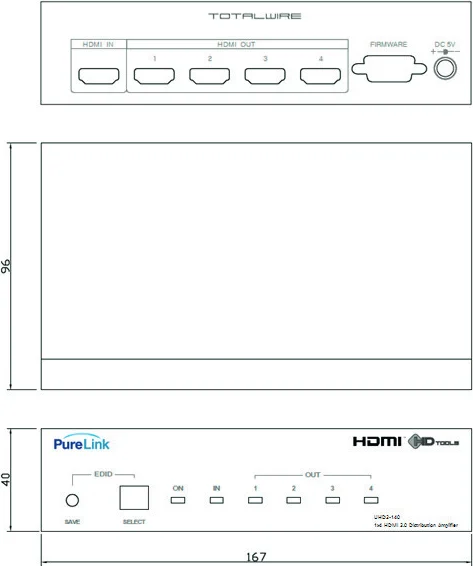
RS-232 Port is used to connect to PC for firmware upload
1-7 Technical Specification
Frequency bandwidth: 18 Gbps
Supporting Graphic Resolution: Supports all standard display resolutions up to UltraHD/4K 4096x2160@50/60Hz (RGB 4:4:4 YCbCr 4:4:4, 4:2:2, 4:2:0) , 480i, 576i, 720p, 1080i, 1080p@60Hz
Inputs: Single HDMI Input
Output: Dual HDMI Output
Power supply: DC 5V, 2A Adapter included
Connector Pin Assignment
| Part No. | Pin No. | Description |
|---|---|---|
| HDMI 19pin | 1 | TMDS DATA 2P |
| 2 | TMDS DATA 2 Shield | |
| 3 | TMDS DATA 2M | |
| 4 | TMDS DATA 1P | |
| 5 | TMDS DATA 1 Shield | |
| 6 | TMDS DATA 1M | |
| 7 | TMDS DATA 0P | |
| 8 | TMDS DATA 0 Shield | |
| 9 | TMDS DATA 0M | |
| 10 | TMDS Clock P | |
| 11 | TMDS Clock Shield | |
| 12 | TMDS Clock M | |
| 13 | CEC | |
| 14 | RESERVED | |
| 15 | DDC Clock | |
| 16 | DDC DATA | |
| 17 | GND | |
| 18 | +5v | |
| 19 | Hot Plug Detect |
Legal & Compliance
Product identification
Model: PRO-UHD2-140 – manual version 1.0
Trademarks and disclaimer
Product model and logo are trademarks. All other company and product names mentioned are trademarks of their respective owners. All rights reserved. No part of this publication may be copied or reproduced without prior written permission. We reserve the right to make changes to the device, packaging or manual and accept no liability for misprints.
Disposal of electrical and electronic equipment
WEEE reg. no.: DE 93847290
The crossed-out wheelie bin symbol on the product, packaging or in this manual means that electrical and electronic equipment must not be disposed of with household waste at the end of its life. Hand in old devices free of charge at a public collection point or return them to a distributor obliged to take them back. Remove batteries and lamps that can be removed without destroying the device before handing it in, and delete any personal data stored on the device. Details are regulated by national law. By returning old devices you help protect the environment.
Packaging
Dispose of packaging separately by material (paper/cardboard, plastics) via the local collection systems. Keep packaging material away from children – risk of suffocation. Packaging register LUCID: DE5958616449295.