
DiscontinuedPossible alternative: PT-HDBT-703-TXWP-F
PT-HDBT-703-TXWP
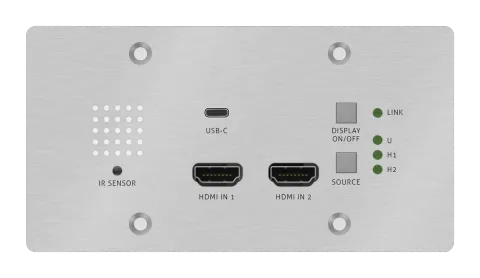
PureTools - HDBaseT Wallplate Transmitter, 2x HDMI & USB-C Inputs, 4K, 40m 4K / 70m 1080p
The PureTools HDBaseT Wallplate Transmitter features 2 HDMI inputs and a USB-C input, supporting transmission of 4K signals up to 40m and 1080p signals up to 70m over HDBaseT.
ManualControl (TCP/IP)FAQAlternative availableFirmwareCEAvailable control interfaces. Expand an active type to see the full command table.
No matching commands.
RS232 Command29 commandsActive
ConnectionRS232 Communication Protocol Baud rate: 9600 Data bit: 8 Stop bit: 1 Parity bit: none↓ CSV
Source: manual, chapter RS232 Command, page 18
| Command | Description | Response | |
|---|---|---|---|
| 50617% | Restore factory default | FACTORY RESET | |
| 50699% | Get firmware version | VERSION Vx.x.x | |
| 50740% | Disable DISPLAY ON/OFF button. | DISABLE DISPLAY ON/OFF KEY | |
| 50741% | Enable DISPLAY ON/OFF button. | ENABLE DISPLEY ON/OFF KEY | |
| 50701% | Switch to HDMI 1. | SWITCH TO HDMI1 | |
| 50702% | Switch to HDMI 2. | SWITCH TO HDMI2 | |
| 50704% | Switch to USB-C. | SWITCH TO USB-C | |
| 50710% | Enable auto switching mode. | AUTO SWITCHING | |
| 50711% | Enable manual switching mode. | MANUAL SWITCHING | |
| 50712% | Get the Source Switching mode. | AUTO SWITCHING MANUAL SWITCHING | |
| 50768% | 720P PCM 2CH | EDID:720P, PCM 2CH | |
| 50769% | 720P Dolby/DTS PCM 6CH | EDID:720P, DOLBY/DTS PCM 6CH | |
| 50770% | 1080P PCM 2CH | EDID:1080P,PCM 2CH | |
| 50771% | 1080P Dolby/DTS PCM 6CH | EDID:1080P, DOLBY/DTS 6CH | |
| 50772% | 4K@30Hz PCM 2CH | EDID:4K30, PCM 2CH | |
| 50773% | 4K@30Hz Dolby/DTS 5.1 | EDID:4K30, DOLBY/DTS 5.1 | |
| 50774% | 1280x720@60Hz DVI | EDID:1280x720@60, DVI | |
| 50775% | 1920x1080@60Hz DVI | EDID:1920x1080@60, DVI | |
| 50776% | 1920x1200 PCM 2CH 6CH | EDID:1920x1200, PCM 2CH 6CH | |
| 50777% | 3840x2160@60Hz 4:2:0 8 bit | EDID:3840x2160@60, 4:2:0 8BIT | |
| 50782% | Enable EDID user-defined mode. Uploading the user-defined EDID file by Micro-USB port within 10 seconds. | EDID: USER | |
| 50783% | EDID bypass | EDID: BYPASS | |
| 50784% | Get the current EDID. | EDID:720P, PCM 2CH EDID:720P, DOLBY/DTS PCM 6CH EDID:1080P,PCM 2CH EDID:1080P, DOLBY/DTS 6CH EDID:4K30, PCM 2CH EDID:4K30, DOLBY/DTS 5.1 EDID:1280x720@60, DVI EDID:1920x1080@60, DVI EDID:1920x1200, PCM 2CH 6CH EDID:3840x2160@60, 4:2:0 8BIT EDID: USER EDID: BYPASS | |
| 50730% | Volume up. | CEC VOLUME INCREASE | |
| 50731% | Volume down. | CEC VOLUME DECREASE | |
| 50732% | Volume mute toggle. | CEC VOLUME MUTE | |
| 50733% | Display on. | CEC DISPLAY ON | |
| 50734% | Display off. | CEC DISPLAY OFF | |
| CEC | Send CEC command “xx:xx:xx…” to control display device. | CEC |
RS-232 Commands3 commandsActive
Source: manual, chapter Button User-defined, page 22
| Command | Description | Example | Response | |
|---|---|---|---|---|
| /+kb: | k=0, Set the DISPLAY ON k=1, Set the DISPLAY OFF xxxx: ASCII characters b=0, Baud rate is 2400 b=1, Baud rate is 4800 b=2, Baud rate is 9600 b=3, Baud rate is 19200 b=4, Baud rate is 38400 b=5, Baud rate is 57600 b=6, Baud rate is 115200 | /+02:abc123 Set the DISPLAY ON to send the ASCII characters abc123. | ||
| /-kb: | k=0, Set the DISPLAY ON k=1, Set the DISPLAY OFF xx xx xx xx: HEX characters b=0, Baud rate is 2400 b=1, Baud rate is 4800 b=2, Baud rate is 9600 b=3, Baud rate is 19200 b=4, Baud rate is 38400 b=5, Baud rate is 57600 b=6, Baud rate is 115200 | /-12:30 31 32 33 Set the DISPLAY OFF to send the HEX characters 30 31 32 33. | ||
| /x0:xxx | Set the booking shutdown time to xxx. | SET TIME TO xxx MINUTES TO TURN OFF THE DISPLAY IF NO SOURCE DETECTED |