
DiscontinuedReplaced by PT-MA-HD44
PT-MA-HD42UHD
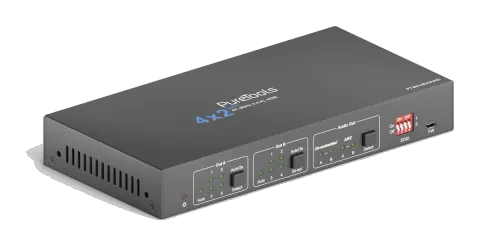
4x2 4K 18Gbps HDMI Matrix with Scaler and Audio De-Embedding
The PT-MA-HD42UHD is a 4x2 HDMI 2.0 matrix switcher that routes any of four HDMI sources to two independent HDMI outputs, supporting resolutions up to 4K UltraHD at 60Hz with 4:4:4 chroma subsampling, bandwidths up to …
ManualControl (TCP/IP)FAQSpecificationsHas successorFirmwareCE declaration ↗Available control interfaces. Expand an active type to see the full command table.
No matching commands.
RS-232 Commands21 commandsActive
Source: manual, chapter RS232 Communication Command, page 23
| Command | Description | Response | |
|---|---|---|---|
| >SetPowerOn Dis | System standby. | <PowerOn False | |
| >SetPowerOn En | System on. | <PowerOn True | |
| >GetPowerOn | Get the system power status. | <PowerOn False | |
| >GetFirmwareVersion | Get firmware version. | <V1.0.0 | |
| >SetFactoryReset | Reset to factory default. | <FactoryReset_True | |
| >SetReboot | System reboot. | <Reboot_True | |
| >GetStatus | Get device status. | ||
| >SetIpAddr XXX.XXX.XXX.XXX | Set static IP address to XXX.XXX.XXX.XXX | <IpAddr 192.168.0.178 | |
| >GetIpAddr | Get IP address. | <IpAddr 192.168.0.178 | |
| >SetRS232Baudrate [PARAM] | Set the baud rate of switcher to [PARAM]. [PARAM]=1~7. [PARAM] Baud Rate 1 115200 2 57600 3 38400 4 19200 5 9600 6 4800 6 2400 | >SetRS232Baudrate 5 <RS232Baudrate 9600 | |
| >GetRS233Baudrate | Get the baud rate of switcher. | <RS232Baudrate 2400 | |
| >SetKeyboardLock [PARAM] | Unlock/lock front panel buttons and IR remote buttons. [PARAM]=Dis, En Dis: Unlock; En: Lock | >SetKeyboardLock Dis <KeyboardLock False | |
| >GetKeyboardLock | Get the buttons locking status. | <KeyboardLock True | |
| >SetDhcp [PARAM] | Enable or disable DHCP. [PARAM]=En, Dis En: Enable DHCP, the switcher automatically get IP. Dis: Disable DHCP, Manually set the IP of switcher. After reset the switcher, the DHCP is enabled, and the switcher will automatically get IP again. | >SetDhcp En <Dhcp True | |
| >GetDhcp | Get DHCP status. | <Dhcp True | |
| >SetSubnetMask XXX.XXX.XXX.XXX | Set subnet mask to XXX.XXX.XXX.XXX. | <SubnetMask 255.255.255.0 | |
| >GetSubnetMask | Get subnet mask. | <SubnetMask 255.255.255.0 | |
| >SetGateWay XXX.XXX.XXX.XXX | Set gateway to XXX.XXX.XXX.XXX. | <GateWay 192.168.0.1 | |
| >GetGateWay | Get gateway. | <GateWay 192.168.0.1 | |
| >SetMacAddr XX:XX:XX:XX:XX:XX | Set the MAC address to XX:XX:XX:XX:XX:XX. | <MacAddr 1A:23:34:45:56:67 | |
| >GetMacAddr | Get the MAC address. | <MacAddr 1A:23:34:45:56:67 |
Signal Switching Commands8 commandsActive
Source: manual, chapter Signal Switching Commands, page 25
| Command | Description | Example | Response | |
|---|---|---|---|---|
| >SetAV [PARAM1] [PARAM2] | Switch HDMI input [PARAM2] to output [PARAM1]. [PARAM1]=A, B [PARAM2]=H1, H2, H3, H4 | >SetAV B H1 <AV OutB H1 | <AV OutB H1 | |
| >GetAV | Get the input channel on output channel one by one. | <AV OutA H1 <AV OutB H1 | ||
| >SetAutoSwitch [PARAM1] [PARAM2] | Enable/disable the auto switching mode for the output A or output B. [PARAM1]=A,B [PARAM2]=En, Dis En: Enable auto switching mode. Dis: Disable auto switching mode. | >SetAutoSwitch B En <AutoSwitch OutB True | <AutoSwitch OutB True | |
| >GetAutoSwitch | Get the auto switching mode of output A and output B. | <AutoSwitch OutA False <AutoSwitch OutB True | ||
| >SetSignalDet [PARAM] | Set the signal auto detection method to [PARAM]. [PARAM]=5V, TMDS. The default detection method is 5V. | >SetSignalDet 5V <SignalDetMode 5V | <SignalDetMode 5V | |
| >GetSignalDet | Get the signal auto detection method. | <SignalDetMode 5V | ||
| >SetDownScaler [PARAM] | Enable/disable down-scaling function of output A. [PARAM]=En, Dis En: Enable down-scaling function. Dis: Disable down-scaling function. | >SetDownScaler En <Downscale True | <Downscale True | |
| >GetDownScaler | Get the down-scaling function of output A. | <Downscale True |
EDID Setting Commands1 commandsActive
Source: manual, chapter EDID Setting Commands, page 26
| Command | Description | Response | |
|---|---|---|---|
| >SetUpdateEdid | Upload user-defined EDID. The EDID DIP switch should be set as “1111”. | <User EDID ready Please send EDID data within 10 seconds ... <UpdateEdid True |
Audio Setting Commands4 commandsActive
Source: manual, chapter Audio Setting Commands, page 26
| Command | Description | Example | Response | |
|---|---|---|---|---|
| >SetAudioSrc [PARAM] | Set the audio source of analog audio and SPDIF audio. [PARAM]=1, 2, 3, 4 1: OUTA de-embedded 2: OUTB de-embedded 3: OUTA ARC 4: OUTB ARC | >SetAudioSrc 1 <AudioSrc OutA De-embedded | <AudioSrc OutA De-embedded | |
| >SetSpdif [PARAM] | Mute/unmute the SPDIF audio output. [PARAM]=Mute, UnMute. | >SetSpdif Mute <Spdif Mute | <Spdif Mute | |
| >SetIis [PARAM] | Mute/unmute the analog audio output (3.5mm jack). [PARAM]=Mute, UnMute. | >SetIis UnMute <Iis UnMute | <Iis UnMute | |
| >GetAudioSta | Get audio status. | <AudioSrc OutA De-embedded <Iis UnMute <Spdif Mute |