
Active
PT-MA-HDBT42
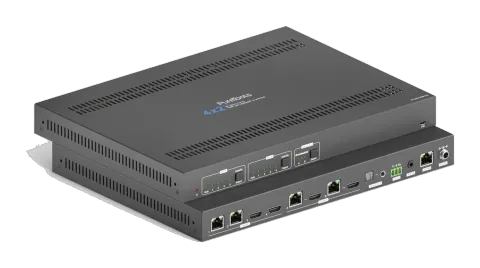
4x2 4K 18Gbps HDMI HDBaseT Matrix with Scaler
The 4x2 4K HDMI and HDBaseT Matrix Switcher PT-MA-HDBT42 is a matrix switcher with two HDBaseT and two HDMI inputs that distributes signals to two HDBaseT outputs, each with a mirrored HDMI loop-out. It supports HDMI …
ManualControl (TCP/IP)FAQFirmwareCEAvailable control interfaces. Expand an active type to see the full command table.
No matching commands.
RS-232 Commands26 commandsActive
Source: manual, chapter RS232 Communication Commands, page 40
| Command | Description | Example | Response | |
|---|---|---|---|---|
| >SetPowerOn [param1] | Enter/ exit standby mode. [param1] = En, Dis En - Power on. Dis - Standy mode. | >SetPowerOn En >SetPowerOn Dis <PowerOn True | ||
| >GetFirmwareVersion | Get the firmware version. | <V1.0.0 | ||
| >SetFactoryReset | Reset to factory default. | <FactoryReset_True | ||
| >SetReboot | Device reboot. | <Reboot_True | ||
| >GetStatus | Get system working status. | ... | ||
| >SetRS232Baudrate [param1] | Set the serial baud rate of matrix switcher to [param1]. [param1] = 1~7 1- 115200 2 - 57600 3 - 38400 4 - 19200 5 - 9600 6 - 4800 7 - 2400 | >SetRS232Baudrate 3 <RS232Baudrate 9600 | ||
| >GetRS232Baudrate | Get the baud rate of switcher. | <RS232Baudrate 9600 | ||
| >SetKeyboardLock [param1] | Lock/unlock front panel buttons. [param1] = En, Dis | >SetKeyboardLock En >SetKeyboardLock Dis | ||
| >GetKeyboardLock | Get the front panel locking status. | <KeyboardLock False | ||
| >SetSignalDet [param1] | Set the input signal detection method. [param1] = 5V, TMDS. | >SetSignalDet TMDS >SetSignalDet 5V <SignalDetMode 5V | ||
| >GetSignalDet | Get the input signal detection method. | <SignalDetMode 5V | ||
| >Set5VSource [param1] | In auto switching mode, set the detection method of HDBT inputs to detect the signal of transmitter to ensure different transmitters can be used. [param1] = HW, FW. HW - Hardware detection. FW - Firmware detection. | >Set5VSource HW >Set5VSource FW <HDBTIN5VSourceFrom FW | ||
| >Get5VSource | Get the detection method of HDBT inputs to detect the signal of transmitter to ensure different transmitters can be used. | <HDBTIN5VSourceFrom FW | ||
| >SetDownScaler [param1] [param2] | Set the down-scaling function of output [param1]. [param1] = OutA, OutB. [param1] = Null, all outputs. [param2] = En, Dis. En - Enable down-scaling function. Dis - Disable down-scaling function. | >SetDownScaler En >SetDownScaler Dis <DownScaler False | ||
| >GetDownScaler [param1] | Get the down-scaling function setting status of output [param1]. [param1] = OutA, OutB. [param1] = Null, all outputs. | >GetDownScaler <DownScaler False | ||
| >SetDhcp [param1] | Enable/disable DHCP (Dynamic Host Configuration Protocol). [param1] = En, Dis. En - Enable DHCP. Dis - Disable DHCP. | >SetDhcp En >SetDhcp Dis <Dhcp False | ||
| >GetDhcp | Get DHCP status. | <Dhcp False | ||
| >SetIpAddr [param1].[param2].[param3].[param4] | Set GUI IP. [param1] = 0 ~ 255. [param2] = 0 ~ 255. [param3] = 0 ~ 255. [param4] = 0 ~ 255. | >SetIpAddr 192.168.0.178 <SetIpAddr 192.168.0.178 | ||
| >GetIpAddr | Get GUI IP. | <SetIpAddr 192.168.0.178 | ||
| >SetSubnetMask [param1].[param2].[param3].[param4] | Set the subnet mask address of the GUI. [param1] = 0 ~ 255. [param2] = 0 ~ 255. [param3] = 0 ~ 255. [param4] = 0 ~ 255. | >SetSubnetMask 255.255.255.0 <SetSubnetMask 255.255.255.0 | ||
| >GetSubnetMask | Get the subnet mask address of the GUI. | <SetSubnetMask 255.255.255.0 | ||
| >SetGateWay [param1].[param2].[param3].[param4] | Set the gateway address of the GUI. [param1] = 0 ~ 255. [param2] = 0 ~ 255. [param3] = 0 ~ 255. [param4] = 0 ~ 255. | >SetGateWay 192.168.0.1 <SetGateWay 192.168.0.1 | ||
| >GetGateWay | Get the gateway address of the GUI. | <SetGateWay 192.168.0.1 | ||
| >SetPoCOut [param1] [param2] | Turn on/off PoC. [param1] = IN1, IN2, OutA, OutB, Null. IN1 - HDBT input 1. IN2 - HDBT input 2. OutA - HDBT output A. OutB - HDBT output B. Null - all HDBT inputs and outputs. [param2] = En, Dis En - Turn on PoC. Dis - Turn off PoC. | >SetPoCOut Dis >SetPoCOut En >SetPoCOut IN1 Dis >SetPoCOut IN1 En >SetPoCOut IN2 Dis >SetPoCOut IN2 En >SetPoCOut OutA Dis >SetPoCOut OutA En >SetPoCOut OutB Dis >SetPoCOut OutB En <PoCOut OutB On | ||
| >GetPoCOut [param1] | Get PoC setting status. [param1] = IN1, IN2, OutA, OutB, Null. IN1 - HDBT input 1. IN2 - HDBT input 2. OutA - HDBT output A. OutB - HDBT output B. Null - all HDBT inputs and outputs. | >GetPoCOut >GetPoCOut IN1 >GetPoCOut IN2 >GetPoCOut OutA >GetPoCOut OutB <PoCOut OutB On | ||
| >SetAV [param1] [param2] | Switch video input [param2] to video output [param1]. [param1] = OutA, OutB. [param1] = Null, all outputs. [param2] = H1, H2, H3, H4 H1 - HDBT input 1. H2 - HDBT input 2. H3 - HDMI input 3. H4 - HDMI input 4. | >SetAV H1 >SetAV OutA H1 >SetAV OutB H1 <AV OutB H1 |
RS-232 Commands27 commandsActive
Source: manual, chapter Command Description, page 44
| Command | Description | Example | Response | |
|---|---|---|---|---|
| >GetAV [param1] | Get input source for output [param1]. | [param1] = OutA, OutB. | [param1] = Null, all outputs. | >GetAV | >GetAV OutA | >GetAV OutB | | <AV OutA H1 | <AV OutB H1 | |
| >SetAutoSwitch [param1] [param2] | Enable/disable auto switching mode for output[param1]. | [param1] = OutA, OutB. | [param1] = Null, all outputs. | [param2] = En, Dis | En - Enable | Dis - Disable | >SetAutoSwitch En | >SetAutoSwitch Dis | >SetAutoSwitch OutA En | >SetAutoSwitch OutA Dis | >SetAutoSwitch OutB En | >SetAutoSwitch OutB Dis | | <AutoSwitch OutA Enable | <AutoSwitch OutA Disable | <AutoSwitch OutB Enable | <AutoSwitch OutB Disable | |
| >GetAutoSwitch [param1] | Get the auto switching mode setting of output[param1]. | [param1] = OutA, OutB. | [param1] = Null, all outputs. | >GetAutoSwitch | >GetAutoSwitch OutA | >GetAutoSwitch OutB | | <AutoSwitch OutA Enable | <AutoSwitch OutA Disable | <AutoSwitch OutB Enable | <AutoSwitch OutB Disable | |
| >SaveScreenMode [param1] | Store the current switching status to present[param1]. [param1] = 1~6. | >SaveScreenMode 1 | <CallScreenMode 1 | | ||
| >RecallScreenMode [param1] | Recall present [param1]. [param1] = 1~6. | >RecallScreenMode 2 | <CallScreenMode 2 | | ||
| >ClearScreenMode [param1] | Clear present [param1]. [param1] = 1~6. | >ClearScreenMode 2 | <ClearScreenMode 2 | | ||
| >SetAudioSrc [param1] | Set the audio source of SPDIF + Stereo audio outputs. [param1] = OutA, OutB OutA - Audio de-embedding from output A. OutB - Audio de-embedding from output B. | >SetAudioSrc OutA >SetAudioSrc OutB | <AudioSrc OutA De-embedded <AudioSrc OutB De-embedded | |
| >SetSpdif [param1] | Mute/unmute the SPDIF audio output. [param1] = Mute, Unmute | >SetSpdif Mute >SetSpdif Unmute | <Spdif Mute <Spdif UnMute | |
| >SetIis [param1] | Mute/unmute the Stereo (I2S) audio output. [param1] = Mute, Unmute | >SetIis Mute >SetIis Unmute | <Iis Mute <Iis UnMute | |
| >GetAudioSta | Get audio output status. | <AudioSrc OutA De-embedded <AudioSrc OutB De-embedded <Spdif Mute <Spdif UnMute <Iis Mute <Iis UnMute | ||
| >SetHdcpOutput [param1] [param2] | Set the HDCP mode of output. [param1] = OutA, OutB. [param1] = Null, all outputs. [param2] = Active, Passive, Off. Active - HDCP 1.4 Passive - Follows the HDCP of input signal, supports up to HDCP 2.2. Off - No HDCP content. | >SetHdcpOutput Active >SetHdcpOutput Passive >SetHdcpOutput Off | <HdcpOutput Active <HdcpOutput Passive <HdcpOutput Off | |
| >GetHdcpOutput | Get HDCP setting status of output. | <HdcpOutput Active <HdcpOutput Passive <HdcpOutput Off | ||
| >SetUpdateEdid [param1] | Upload a user-defined EDID. The EDID can be saved for invoking at any time. When the command is applied, system prompts to upload the EDID file (.bin). Operation will be cancelled in 10 seconds. [param1] = 1, 2. 1 - Upload user-defined EDID 1. 2 - Upload user-defined EDID 2. | >SetUpdateEdid 1 | <User 1 EDID Ready Please Send EDID Data Within 10 Seconds | |
| >SetEdidMode [param1] [param2] | Set the EDID of input. [param1] = H1, H2, H3, H4, Null H1 - HDBT input 1. H2 - HDBT input 2. H3 - HDMI input 3. H4 - HDMI input 4. Null - All inputs. [param2] = 1~12 1 - HDBT OUTA EDID Copy 2 - HDBT OUTB EDID Copy 3 - 1920x1080@60Hz 8bit Stereo 4 - 1920x1080 8bit High Definition Audio 5 - 3840x2160@30Hz 8bit Stereo Audio 6 - 3840x2160@30Hz Deep Color High Definition Audio 7 - 3840x2160@60Hz 4:2:0 Deep Color Stereo Audio 8 - 3840x2160@60Hz Deep Color Stereo Audio 9 - 3840x2160@60Hz Deep Color High Definition Audio 10 - 3840x2160@60Hz Deep Color HDR LPCM 6CH 11 - user-defined EDID 1 12 - user-defined EDID 2 | >SetEdidMode 8 >SetEdidMode H1 8 >SetEdidMode H2 8 >SetEdidMode H3 8 >SetEdidMode H4 8 | <EDIDMode H1 8 <EDIDMode H2 8 <EDIDMode H3 8 <EDIDMode H4 8 | |
| >GetEdidMode [param1] | Get the EDID of input. [param1] = H1, H2, H3, H4, Null H1 - HDBT input 1. H2 - HDBT input 2. H3 - HDMI input 3. H4 - HDMI input 4. Null - All inputs. | >GetEdidMode >GetEdidMode H1 >GetEdidMode H2 >GetEdidMode H3 >GetEdidMode H4 | <EDIDMode H1 8 <EDIDMode H2 8 <EDIDMode H3 8 <EDIDMode H4 8 | |
| >SetSrcCecControl [param1] [param2] | Send CEC command to control source device. [param1] = H1, H2, H3, H4, Null H1 - HDBT input 1. H2 - HDBT input 2. H3 - HDMI input 3. H4 - HDMI input 4. Null - All inputs. [param2] = 1~18 1 - Volume- 2 - Menu 3 - Volume+ 4 - Back 5 - Up 6 – Enter 7 - Left 8 – Down 9 - Right 10 – On 11 - Off 12 - Stop 13 - Previous 14 – Next 15 - Pause 16 – REW 17 - FF 18 - Play | >SetSrcCecControl H1 1 >SetSrcCecControl H2 1 >SetSrcCecControl H3 1 >SetSrcCecControl H4 1 | <SourceCECCommand H1 1 <SourceCECCommand H2 1 <SourceCECCommand H3 1 <SourceCECCommand H4 1 | |
| >SetDisCecControl [param1] [param2] | Send CEC command to control display device. [param1] = OutA, OutB. [param1] = Null, all outputs. [param2] = 1~6 1 - On 2 - Off 3 - Source 4 - Mute 5 - Volume- 6 - Volume+ | >SetDisCecControl OutA 1 >SetDisCecControl OutB 1 | <DisplayCECCommand OutA 1 <DisplayCECCommand OutB 1 | |
| >SetUserCecControl [param1] [param2] | Customize CEC command to control source or display device. [param1] = 1~6 1 - HDBT input 1. 2 - HDBT input 2. 3 - HDMI input 3. 4 - HDMI input 4. 5 - HDBT output A. 6 - HDBT output B. [param2] = XX:XX......(HEX) | >SetUserCecControl 5 40:36 | <UserCECCommand 1 XX:XX….. | |
| >SetRS232Mode [param1] | Set the RS232 mode. [param1] = 1~4 1 - Local Control. 2 - HDBT Transmitter Pass Through 3 - HDBT Receiver Pass Through 4 - Pass Through Between Transmitter and Receiver. Note: The RS232 mode can be set by GUI RS232 tab. | >SetRS232Mode 1 >SetRS232Mode 2 >SetRS232Mode 3 >SetRS232Mode 4 | <RS232Mode 1 <RS232Mode 2 <RS232Mode 3 <RS232Mode 4 | |
| >GetRS232Mode | Get the RS232 control mode. | <RS232Mode 2 | ||
| >SetOn_[param1]_[param2]:[param3] | When the switcher is powered on, it automatically sends the saved RS232 command to control the far-end third-party devices. [param1] = A, H. A - ASCII command format. H - HEX command format. [param2] = 1~7 (Baud rate) 1 - 115200 2 - 57600 3 - 38400 4 - 19200 5 - 9600 6 - 4800 7 - 2400 [param3] = ASCII string or HEX string. (e.g. The string is used to turn on display device) Note: The command does not need command ending “ ”. | >SetOn_A_1:abc123 | <SetOn_Ascii (Baud)115200 abc123 | |
| >SetOff_[param1]_[param2]_[param3]:[param4] | When the switcher is powered off, it automatically sends the saved RS232 command to control the far-end third-party devices. [param1] = A, H. A - ASCII command format. H - HEX command format. [param2] = 1~7 (Baud rate). 1 - 115200 2 - 57600 3 - 38400 4 - 19200 5 - 9600 6 - 4800 7 - 2400 [param3] = 1, 2 1 - Send the RS232 string once. 2 - Send the RS232 string two times. [param4] = ASCII string or HEX string. (e.g. The string is used to turn off display device) Note: The command does not need command ending “ ”. | >SetOff_A_1_2:abc123 | SetOff_Ascii (Baud)115200 (Repeat)2 abc123 | |
| >SetOffRptDly [param1] | When the above Off RS232 command is set to be repeated 2 times, the interval between the two commands can be set by this command. [param1] = 300-10000 (ms) | >SetOffRptDly 300 | <OffRptDly 300 | |
| >GetOffRptDly | Get the sending interval between two Off RS232 commands. | <OffRptDly 300 | ||
| >Send_A_[param1]_[param2]:[param3] | Send ASCII command to the desired RS232 port. [param1] = 1~5 1 - Local 2 - HDBT input 1 3 - HDBT input 2 4 - HDBT output A. 5 - HDBT output B. [param2] = 1~7 (Baud rate) 1 - 115200 2 - 57600 3 - 38400 4 - 19200 5 - 9600 6 - 4800 7 - 2400 [param3] = ASCII string. Note: The command does not need command ending “ ”. | >Send_A_1_1:abc123 … | ||
| >Send_H_[param1]_[param2]:[param3] | Send HEX command to the desired RS232 port. [param1] = 1~5 1 - Local 2 - HDBT input 1 3 - HDBT input 2 4 - HDBT output A. 5 - HDBT output B. [param2] = 1~7 (Baud rate) 1 - 115200 2 - 57600 3 - 38400 4 - 19200 5 - 9600 6 - 4800 7 - 2400 [param3] = HEX string Note: The command does not need command ending “ ”. | >Send_H_1_1:31 32 33 … | ||
| >SetDisplayOn [param1] [param2] | Turn on/off the display devices by simultaneously sending CEC command and the saved RS232 command. [param1] = OutA, OutB. [param1] = Null, all outputs. [param2] = En, Dis En - Turn on display devices. Dis - Turn off display devices. | >SetDisplayOn En >SetDisplayOn Dis >SetDisplayOn OutA En >SetDisplayOn OutA Dis >SetDisplayOn OutB En >SetDisplayOn OutB Dis | <Display OutA Off <Display OutA On <Display OutB Off <Display OutB On |