
Discontinued
PT-PMS-42
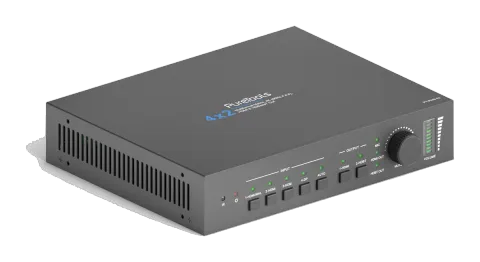
PureTools - Scaler Matrix 4x2, 4K, 3-Level MIC, Audio Matrix, Repeater, HDMI & HDBaseT Outputs
The PureTools Scaler Matrix 4x2 is a matrix switcher that supports 4K resolution and features 4 inputs and 2 outputs with HDMI and HDBaseT interfaces. It includes a 3-level microphone input, an audio matrix, and an …
ManualControl (TCP/IP)FAQSpecificationsCEAvailable control interfaces. Expand an active type to see the full command table.
No matching commands.
RS-232 Commands89 commandsActive
Source: manual, chapter RS232 Communication Command, page 11
| Command | Description | Example | Response | |
|---|---|---|---|---|
| PowerON. | Power on system. | Power ON! | ||
| PowerOFF. | System standby. | Power OFF! | ||
| /*Name. | Report system name. | 4x2 Matrix Switcher | ||
| /*Type. | Report system model. | PT-PMS-42 | ||
| /^Version. | Report firmware version. | V1.0.0 | ||
| STA. | Report system status. | … … | ||
| Lock. | Lock front panel buttons. | Front Panel Locked! | ||
| Unlock. | Unlock front panel buttons. | Front Panel UnLock! | ||
| GetGuiIP. | Report GUI IP. | GUI_IP:192.168.0.178 | ||
| SetGuiIP:[xxx.xxx.xxx.xxx]. | Set GUI IP to [xxx.xxx.xxx.xxx]. | |||
| SetNoSigTime:[xxx]. | Set the automatic power-off time to xxx. Set the “xxx” as “0” to disable this function. | No Signal Auto StandBy Time Is 0S! | ||
| Rs232HDBTBypassON. | Enable RS232 pass-through mode. Note: This function can only be disabled by Telnet or GUI. | Rs232 HDBT Bypass ON! | ||
| Rs232HDBTBypassOFF. | Disable RS232 pass-through mode. Note: The command must be send by Telnet port or GUI RS232 tab. | Rs232 HDBT Bypass OFF! | ||
| RemoteCtrMcuON. | Allows the switcher to be controlled by the far-end control device which is connected to the RS232 port of HDBaseT receiver. | Remote Control MCU ON! | ||
| RemoteCtrMcuOFF. | The switcher cannot be controlled by the far-end control device | Remote Control MCU OFF! | ||
| RST. | Factory reset. | Factory Default! | ||
| HDMI[x]. | Switch input [x] to HDMI output. x=1~4. Example: HDMI4. | HDMI Out Switch To 04! | ||
| HDBT[x]. | Switch input [x] to HDBT output. x=1~4. Example: HDBT4. | HDBT Out Switch To 04! | ||
| [x]ALL. | Switch input [x] to HDMI and HDBT outputs. x=1~4. Example: 1ALL. | HDMI Out Switch To 01! HDBT Out Switch To 01! | ||
| HDBTA. | Automatically switch input source to HDBT output. | HDBT Out Switch Auto Mode! | ||
| HDBTM. | Manually switch input source to HDBT output. | HDBT Out Switch Manual Mode! | ||
| HDMIA. | Automatically switch input source to HDMI output. | HDMI Out Switch Auto Mode! | ||
| HDMIM. | Manually switch input source to HDMI output. | HDMI Out Switch Manual Mode! | ||
| HDBTBlackON. | Enable HDBT output black screen. | HDBT Out Black ON! | ||
| HDBTBlackOFF. | Disable HDBT output black screen. | HDBT Out Black OFF! | ||
| HDMIBlackON. | Enable HDMI output black screen. | HDMI Out Black ON! | ||
| HDBTBlackOFF. | Disable HDMI output black screen. | HDMI Out Black OFF! | ||
| [x]Gain:[y]. | Set the audio gain of input [x] to [y]. x=1~4, y=0~10. Example: 1Gain:5. | Input 1 Gain Level 5! | ||
| HDMIABON. | Enable HDMI output audio bypass mode. | HDMI Audio Bypass ON! | ||
| HDMIABOFF. | Disable HDMI output audio bypass mode. | HDMI Audio Bypass OFF! | ||
| HDBTABON. | Enable HDBT output audio bypass mode. | HDBT Audio Bypass ON! | ||
| HDBTABOFF. | Disable HDBT output audio bypass mode. | HDBT Audio Bypass OFF! | ||
| MicVolume:xx. | Set the MIC volume to xx. | Volume of MIC 80! | ||
| MicVolume+. | Increase MIC volume. | Volume of MIC 81! | ||
| MicVolume-. | Decrease MIC volume. | Volume of MIC 79! | ||
| MicMute. | Mute MIC audio. | Volume of MIC Mute! | ||
| MicUnMute. | Unmute MIC audio. | Volume of MIC UnMute! | ||
| LineVolume:xx. | Set the line volume to xx. | Volume of Line 50! | ||
| LineVolume+. | Increase line volume. | Volume of Line 51! | ||
| LineVolume-. | Decrease line volume. | Volume of Line 49! | ||
| LineMute. | Mute line audio. | Volume of Line Mute! | ||
| LineUnMute. | Unmute line audio. | Volume of Line Unmute! | ||
| HDMIOutVolume:xx. | Set the HDMI output volume to xx. | Volume of HDMI Out 70! | ||
| HDMIOutVolume+. | Increase HDMI output volume. | Volume of HDMI Out 71! | ||
| HDMIOutVolume-. | Decrease HDMI output volume. | Volume of HDMI Out 69! | ||
| HDMIOutVolumeMute. | Mute HDMI output audio. | Volume of HDMI Out Mute! | ||
| HDMIOutVolumeUnMute. | Unmute HDMI output audio. | Volume of HDMI Out Unmute! | ||
| HDBTOutVolume:xx. | Set the HDBT output volume to xx. | Volume of HDBT Out 60! | ||
| HDBTOutVolume+. | Increase HDBT output volume. | Volume of HDBT Out 61! | ||
| HDBTOutVolume-. | Decrease HDBT output volume. | Volume of HDBT Out 59! | ||
| HDBTOutVolumeMute. | Mute HDBT output audio. | Volume of HDBT Out Mute! | ||
| HDBTOutVolumeUnMute. | Unmute HDBT output audio. | Volume of HDBT Out Unmute! | ||
| PresetSave[x]. | Store the current switching status to preset [x]. x=1~ 4. Example: PresetSave1. | Preset1 Save Success! | ||
| PresetRecall[x]. | Recall the preset [x]. x=1~ 4. Example: PresetRecall1. | Preset1 Recall Success! HDMI Out Switch To 04! HDBT Out Switch To 01! | ||
| EDIDSTA[xx]. | Get the EDID status of input [xx]. xx=00 ~ 05. xx Input 00 All inputs 01 1-HDMI/MHL 02 2-HDMI 03 3-HDMI 04 4-DP 1 05 4-DP 2 | EDIDSTA02. EDIDSTA03 | Input 2 EDID From 02 Internal EDID! Input 3 EDID From User Define EDID! | |
| EDIDUpgrade[x]. | Upgrade the EDID data of the input port [x]. x=0: All inputs. x=1~4: 1~4 input. x=U: User-defined EDID. When the command applied, system prompts to upload the EDID file (.bin). Operation will be cancelled in 10 seconds. Please disconnect HDBT connection before sending command to ensure the data can be received successfully. | Please send the EDID file … EDID Upgrade OK! | ||
| EDID/[x]/[y]. | The input [x] invoke built-in EDID [y]. x=0: All inputs. x=1~4: 1~4 input. y EDID 1 720p 2D PCM 2 1080p 2D PCM 3 4K@60Hz 4:2:0 Dolby/DTS 5.1 CH 4 4K@60Hz 4:4:4 HDR 7.1CH 5 User-defined EDID | EDID/3/3 | ||
| EDIDGHDMI. | Get the EDID data from HDMI output. | |||
| EDIDGHDBT. | Get the EDID data from HDBT output. | |||
| EDIDM[x]B[y]. | Set the EDID data of output [x] to input [y]. x=1~2, y=1~4. Example: EDIDM1B1. | Input 1 EDID Upgrade OK By 01 EXT EDID! | ||
| CEC_ON. | Enable CEC | CEC ON! | ||
| CEC_OFF. | Disable CEC | CEC OFF! | ||
| CECI[port]00. | Confirm operation (Enter). | CECI0100. CEC_IN_01_SEND_SUCCESS! | ||
| CECI[port]01. | UP. | CECI0101. CEC_IN_01_SEND_SUCCESS! | ||
| CECI[port]02. | DOWN. | CECI0102. CEC_IN_01_SEND_SUCCESS! | ||
| CECI[port]03. | LEFT. | CECI0103. CEC_IN_01_SEND_SUCCESS! | ||
| CECI[port]04. | RIGHT. | CECI0104. CEC_IN_01_SEND_SUCCESS! | ||
| CECI[port]0A. | Enter main menu. | CECI010A. CEC_IN_01_SEND_SUCCESS! | ||
| CECI[port]0D. | Exit menu. | CECI010D. CEC_IN_01_SEND_SUCCESS! | ||
| CECI[port]41. | Volume up. | CECI0141. CEC_IN_01_SEND_SUCCESS! | ||
| CECI[port]42. | Volume down. | CECI0142. CEC_IN_01_SEND_SUCCESS! | ||
| CECI[port]43. | Mute | CECI0143. CEC_IN_01_SEND_SUCCESS! | ||
| CECI[port]44. | Play. | CECI0144. CEC_IN_01_SEND_SUCCESS! | ||
| CECI[port]45. | Stop. | CECI0145. CEC_IN_01_SEND_SUCCESS! | ||
| CECI[port]46. | Pause. | CECI0146. CEC_IN_01_SEND_SUCCESS! | ||
| CECI[port]48. | Rewind. | CECI0148. CEC_IN_01_SEND_SUCCESS! | ||
| CECI[port]49. | Fast forward. | CECI0149. CEC_IN_01_SEND_SUCCESS! | ||
| CECI[port]4B. | Forward. | CECI014B. CEC_IN_01_SEND_SUCCESS! | ||
| CECI[port]4C. | Backward. | CECI014C. CEC_IN_01_SEND_SUCCESS! | ||
| CECI[port]6C. | Power off. | CECI016C. CEC_IN_01_SEND_SUCCESS! | ||
| CECI[port]6D. | Power on. | CECI016D. CEC_IN_01_SEND_SUCCESS! | ||
| CECO[port]41. | Volume up. | CECO0141. CEC_OUT_01_SEND_SUCCESS! | ||
| CECO[port]42. | Volume down. | CECO0142. CEC_OUT_01_SEND_SUCCESS! | ||
| CECO[port]43. | Mute | CECO0143. CEC_OUT_01_SEND_SUCCESS! | ||
| CECO[port]6C. | Power off. | CECO016C. CEC_OUT_01_SEND_SUCCESS! | ||
| CECO[port]6D. | Power on. | CECO016D. CEC_OUT_01_SEND_SUCCESS! | ||
| /+[X]/[Y]:xxx. | xxx: ASCII characters. Y: Represents the RS232 port. Y=1: The RS232 port of PT-PMS-42 switcher. Y=2: The RS232 port of HDBaseT receiver. X: Represents the baud rate of third-party device. X=1, 2400 X=2, 4800 X=3, 9600 X=4, 19200 X=5, 38400 X=6, 57600 X=7, 115200 | /+3/2:123456. Send the command “123456” to the third-party device. The baud rate is 9600. | ||
| CMDON/+[X]:xxx. | Power on the third-party device. | CMDON/+3:455665. | ||
| CMDOFF/+[X]:xxx. | Power off the third-party device. | CMDOFF/+3:455666. |