
Discontinued
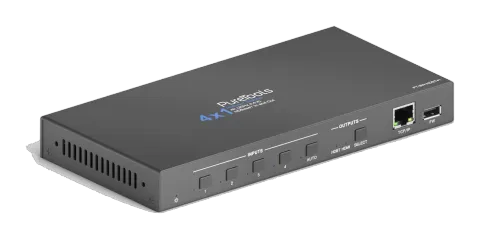
PT-SW-HDBT41
4x1 4K HDBaseT In and Out Switcher
The PT-SW-HDBT41 is a 4x1 AV switcher that allows switching between four HDBaseT inputs and routing signals to either an HDMI or HDBaseT output, supporting flexible cable topologies. It is compatible with HDMI 1.4 and …
ManualControl (TCP/IP)DatasheetFirmwareCE declaration ↗Available control interfaces. Expand an active type to see the full command table.
No matching commands.
RS-232 Commands25 commandsActive
ConnectionBaud Rate: default 9600 (changeable with BAUD command), Data bits: not specified, Stop bits: not specified, Parity: not specified↓ CSV
Source: manual, chapter RS232 Command, page 24
| Command | Description | Response | |
|---|---|---|---|
| KEYLOCK. | Lock front panel buttons. | Key Lock | |
| KEYUNLOCK. | Unlock front panel buttons. | Key Unlock | |
| GETKEYS. | Report the button locking status. | Key Lock Key Unlock | |
| RST. | Reset to factory default. | Factory Default | |
| SETPOCON. | Turn on PoC of HDBT output. | Set POC 48V ON | |
| SETPOCOFF. | Turn off PoC of HDBT output. | Set POC 48V OFF | |
| SETIP . | Set GUI IP to xxx.xxx.xxx.xxx. | SET GUI IP:192.168.0.177! | |
| GETIP. | Report GUI IP. | GUI IP:192.168.0.177! | |
| GETSTATE. | Report system status. | V1.0.0 Key Lock Set POC 48V ON HDBT1 IN TO HDMI OUT HDBT1 IN TO HDBT OUT HDMI Auto Switch Enable HDBT Auto Switch Enable | |
| SET x TO y. | Switch input x to output y. x (1~4) Input Port 1 HDBT 1 2 HDBT 2 3 HDBT 3 4 HDBT 4 y (1~2) Output Port 1 HDBT 2 HDMI | HDBTx IN TO HDBT OUT HDBTx IN TO HDMI OUT | |
| GETHDMIS. | Report the input channel of HDMI output. | HDBTx IN TO HDMI OUT | |
| GETHDBTS. | Report the input channel of HDBT output. | HDBTx IN TO HDBT OUT | |
| HDBTA. | Automatically switch input to the HDBT output. | HDBT Auto Switch Enable | |
| HDBTM. | Manually switch input to the HDBT output. | HDBT Auto Switch Disable | |
| GETHDBTM. | Report the switch mode of HDBT output. | HDBT Auto Switch Enable HDBT Auto Switch Disable | |
| HDMIA. | Automatically switch input to the HDMI output. | HDMI Auto Switch Enable | |
| HDMIM. | Manually switch input to the HDMI output. | HDMI Auto Switch Disable | |
| GETHDMIM. | Report the switch mode of HDMI output. | HDMI Auto Switch Enable HDMI Auto Switch Disable | |
| BAUD:2400. | Set the baud rate of RS232 port to 2400. | Baud:2400 | |
| BAUD:4800. | Set the baud rate of RS232 port to 4800. | Baud:4800 | |
| BAUD:9600. | Set the baud rate of RS232 port to 9600. | Baud:9600 | |
| BAUD:19200. | Set the baud rate of RS232 port to 19200. | Baud:19200 | |
| BAUD:38400. | Set the baud rate of RS232 port to 38400. | Baud:38400 | |
| BAUD:57600. | Set the baud rate of RS232 port to 57600. | Baud:57600 | |
| BAUD:115200. | Set the baud rate of RS232 port to 115200. | Baud:115200 |
IR Control7 commandsActive
Source: manual, chapter IR Control, page 27
| Command | Description | Response | |
|---|---|---|---|
| 40FF00 | Select the HDBT 1 input channel. | ||
| 40FF01 | Select the HDBT 2 input channel. | ||
| 40FF42 | Select the HDBT 3 input channel. | ||
| 40FF03 | Select the HDBT 4 input channel. | ||
| 40FF41 | Enable AUTO or Manual switch mode. | ||
| 40FF03 | Select the HDMI output channel. | ||
| 40FF02 | Select the HDBT output channel. |