
Fuori produzione
PT-PMS-42
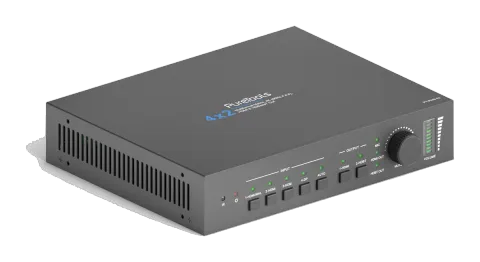
PureTools - Scaler Matrix 4x2, 4K, 3-Livelli MIC, Matrice Audio, Repeater, Uscite HDMI & HDBaseT
Il PureTools Scaler Matrix 4x2 è un matrix switcher che supporta la risoluzione 4K e dispone di 4 ingressi e 2 uscite con interfacce HDMI e HDBaseT. Include un ingresso microfono a 3 livelli, una matrice audio e un …
ManualeComandi (TCP/IP)FAQSpecificheCEInterfacce di controllo disponibili. Espanda un tipo attivo per visualizzare la tabella completa dei comandi.
Nessun comando corrispondente.
Comandi RS23289 comandiAttivo
Fonte: manuale, capitolo RS232 Communication Command, pagina 11
| Comando | Descrizione | Esempio | Risposta | |
|---|---|---|---|---|
| PowerON. | Accendi il sistema. | Power ON! | ||
| PowerOFF. | Sistema in standby. | Power OFF! | ||
| /*Name. | Riporta il nome del sistema. | 4x2 Matrix Switcher | ||
| /*Type. | Riporta il modello del sistema. | PT-PMS-42 | ||
| /^Version. | Riporta la versione firmware. | V1.0.0 | ||
| STA. | Riporta lo stato del sistema. | … … | ||
| Lock. | Blocca i pulsanti del pannello frontale. | Front Panel Locked! | ||
| Unlock. | Sbloccare i tasti del pannello frontale. | Front Panel UnLock! | ||
| GetGuiIP. | Riporta l'IP GUI. | GUI_IP:192.168.0.178 | ||
| SetGuiIP:[xxx.xxx.xxx.xxx]. | Impostare IP GUI su [xxx.xxx.xxx.xxx]. | |||
| SetNoSigTime:[xxx]. | Impostare il tempo di spegnimento automatico a xxx. Impostare “xxx” a “0” per disabilitare questa funzione. | No Signal Auto StandBy Time Is 0S! | ||
| Rs232HDBTBypassON. | Abilita la modalità di passaggio RS232. Nota: Questa funzione può essere disabilitata solo tramite Telnet o GUI. | Rs232 HDBT Bypass ON! | ||
| Rs232HDBTBypassOFF. | Disabilita la modalità pass-through RS232. Nota: il comando deve essere inviato tramite porta Telnet o scheda RS232 nell’interfaccia GUI. | Rs232 HDBT Bypass OFF! | ||
| RemoteCtrMcuON. | Permette al Switcher di essere controllato dal dispositivo di controllo remoto collegato alla porta RS232 del Receiver HDBaseT. | Remote Control MCU ON! | ||
| RemoteCtrMcuOFF. | Lo Switcher non può essere controllato dal dispositivo di controllo remoto | Remote Control MCU OFF! | ||
| RST. | Ripristino alle impostazioni di fabbrica. | Factory Default! | ||
| HDMI[x]. | Switch input [x] to HDMI output. x=1~4. Example: HDMI4. | HDMI Out Switch To 04! | ||
| HDBT[x]. | Switch input [x] to HDBT output. x=1~4. Example: HDBT4. | HDBT Out Switch To 04! | ||
| [x]ALL. | Switch input [x] to HDMI and HDBT outputs. x=1~4. Example: 1ALL. | HDMI Out Switch To 01! HDBT Out Switch To 01! | ||
| HDBTA. | Commuta automaticamente la sorgente di ingresso verso l'uscita HDBT. | HDBT Out Switch Auto Mode! | ||
| HDBTM. | Commutare manualmente la sorgente di input all'output HDBT. | HDBT Out Switch Manual Mode! | ||
| HDMIA. | Commuta automaticamente la sorgente di ingresso verso l'uscita HDMI. | HDMI Out Switch Auto Mode! | ||
| HDMIM. | Commutare manualmente la sorgente di input all'output HDMI. | HDMI Out Switch Manual Mode! | ||
| HDBTBlackON. | Abilita lo schermo nero in uscita HDBT. | HDBT Out Black ON! | ||
| HDBTBlackOFF. | Disabilita lo schermo nero in uscita HDBT. | HDBT Out Black OFF! | ||
| HDMIBlackON. | Abilita lo schermo nero in uscita HDMI. | HDMI Out Black ON! | ||
| HDBTBlackOFF. | Disabilita lo schermo nero in uscita HDMI. | HDMI Out Black OFF! | ||
| [x]Gain:[y]. | Set the audio gain of input [x] to [y]. x=1~4, y=0~10. Example: 1Gain:5. | Input 1 Gain Level 5! | ||
| HDMIABON. | Abilita la modalità di bypass audio in uscita HDMI. | HDMI Audio Bypass ON! | ||
| HDMIABOFF. | Disabilita la modalità bypass audio in uscita HDMI. | HDMI Audio Bypass OFF! | ||
| HDBTABON. | Abilita la modalità di bypass audio in uscita HDBT. | HDBT Audio Bypass ON! | ||
| HDBTABOFF. | Disabilita la modalità bypass audio in uscita HDBT. | HDBT Audio Bypass OFF! | ||
| MicVolume:xx. | Impostare il volume del MIC su xx. | Volume of MIC 80! | ||
| MicVolume+. | Aumenta il volume MIC. | Volume of MIC 81! | ||
| MicVolume-. | Riduci il volume del MIC. | Volume of MIC 79! | ||
| MicMute. | Disattiva l'audio MIC. | Volume of MIC Mute! | ||
| MicUnMute. | Riattivare l'audio MIC. | Volume of MIC UnMute! | ||
| LineVolume:xx. | Impostare il volume della linea a xx. | Volume of Line 50! | ||
| LineVolume+. | Aumenta il volume della linea. | Volume of Line 51! | ||
| LineVolume-. | Riduci il volume della linea. | Volume of Line 49! | ||
| LineMute. | Disattiva l'audio della linea. | Volume of Line Mute! | ||
| LineUnMute. | Riattivare l'audio di linea. | Volume of Line Unmute! | ||
| HDMIOutVolume:xx. | Impostare il volume in uscita HDMI su xx. | Volume of HDMI Out 70! | ||
| HDMIOutVolume+. | Aumenta il volume in uscita HDMI. | Volume of HDMI Out 71! | ||
| HDMIOutVolume-. | Riduci il volume dell’output HDMI. | Volume of HDMI Out 69! | ||
| HDMIOutVolumeMute. | Disattiva l'audio dell'output HDMI. | Volume of HDMI Out Mute! | ||
| HDMIOutVolumeUnMute. | Riattivare l'audio in uscita HDMI. | Volume of HDMI Out Unmute! | ||
| HDBTOutVolume:xx. | Impostare il volume in uscita HDBT su xx. | Volume of HDBT Out 60! | ||
| HDBTOutVolume+. | Aumenta il volume in uscita HDBT. | Volume of HDBT Out 61! | ||
| HDBTOutVolume-. | Riduci il volume dell’output HDBT. | Volume of HDBT Out 59! | ||
| HDBTOutVolumeMute. | Disattiva l'audio dell'output HDBT. | Volume of HDBT Out Mute! | ||
| HDBTOutVolumeUnMute. | Riattivare l'audio in uscita HDBT. | Volume of HDBT Out Unmute! | ||
| PresetSave[x]. | Store the current switching status to preset [x]. x=1~ 4. Example: PresetSave1. | Preset1 Save Success! | ||
| PresetRecall[x]. | Recall the preset [x]. x=1~ 4. Example: PresetRecall1. | Preset1 Recall Success! HDMI Out Switch To 04! HDBT Out Switch To 01! | ||
| EDIDSTA[xx]. | Get the EDID status of input [xx]. xx=00 ~ 05. xx Input 00 All inputs 01 1-HDMI/MHL 02 2-HDMI 03 3-HDMI 04 4-DP 1 05 4-DP 2 | EDIDSTA02. EDIDSTA03 | Input 2 EDID From 02 Internal EDID! Input 3 EDID From User Define EDID! | |
| EDIDUpgrade[x]. | Aggiorna i dati EDID della porta di ingresso [x]. x=0: Tutti gli ingressi. x=1~4: ingressi 1~4. x=U: EDID definito dall’utente. Quando il comando è applicato, il sistema invita a caricare il file EDID (.bin). L’operazione sarà annullata in 10 secondi. Si prega di disconnettere la connessione HDBT prima di inviare il comando per garantire che i dati possano essere ricevuti correttamente. | Please send the EDID file … EDID Upgrade OK! | ||
| EDID/[x]/[y]. | L'Input [x] richiama l'EDID integrato [y]. x=0: Tutti gli input. x=1~4: input 1~4. y EDID 1 720p 2D PCM 2 1080p 2D PCM 3 4K@60Hz 4:2:0 Dolby/DTS 5.1 CH 4 4K@60Hz 4:4:4 HDR 7.1CH 5 EDID definito dall'utente | EDID/3/3 | ||
| EDIDGHDMI. | Ottieni i dati EDID dall'output HDMI. | |||
| EDIDGHDBT. | Ottieni i dati EDID dall'output HDBT. | |||
| EDIDM[x]B[y]. | Set the EDID data of output [x] to input [y]. x=1~2, y=1~4. Example: EDIDM1B1. | Input 1 EDID Upgrade OK By 01 EXT EDID! | ||
| CEC_ON. | Abilita CEC | CEC ON! | ||
| CEC_OFF. | Disabilita CEC | CEC OFF! | ||
| CECI[port]00. | Conferma operazione (Invio). | CECI0100. CEC_IN_01_SEND_SUCCESS! | ||
| CECI[port]01. | UP. | CECI0101. CEC_IN_01_SEND_SUCCESS! | ||
| CECI[port]02. | GIÙ. | CECI0102. CEC_IN_01_SEND_SUCCESS! | ||
| CECI[port]03. | LEFT. | CECI0103. CEC_IN_01_SEND_SUCCESS! | ||
| CECI[port]04. | DESTRA. | CECI0104. CEC_IN_01_SEND_SUCCESS! | ||
| CECI[port]0A. | Entra nel menu principale. | CECI010A. CEC_IN_01_SEND_SUCCESS! | ||
| CECI[port]0D. | Esci dal menu. | CECI010D. CEC_IN_01_SEND_SUCCESS! | ||
| CECI[port]41. | Aumenta il volume. | CECI0141. CEC_IN_01_SEND_SUCCESS! | ||
| CECI[port]42. | Riduci il volume. | CECI0142. CEC_IN_01_SEND_SUCCESS! | ||
| CECI[port]43. | Disattiva audio | CECI0143. CEC_IN_01_SEND_SUCCESS! | ||
| CECI[port]44. | Riproduci. | CECI0144. CEC_IN_01_SEND_SUCCESS! | ||
| CECI[port]45. | Stop. | CECI0145. CEC_IN_01_SEND_SUCCESS! | ||
| CECI[port]46. | Pausa. | CECI0146. CEC_IN_01_SEND_SUCCESS! | ||
| CECI[port]48. | Riavvolgi. | CECI0148. CEC_IN_01_SEND_SUCCESS! | ||
| CECI[port]49. | Avanzamento rapido. | CECI0149. CEC_IN_01_SEND_SUCCESS! | ||
| CECI[port]4B. | Avanti. | CECI014B. CEC_IN_01_SEND_SUCCESS! | ||
| CECI[port]4C. | Indietro. | CECI014C. CEC_IN_01_SEND_SUCCESS! | ||
| CECI[port]6C. | Spegni. | CECI016C. CEC_IN_01_SEND_SUCCESS! | ||
| CECI[port]6D. | Accendi. | CECI016D. CEC_IN_01_SEND_SUCCESS! | ||
| CECO[port]41. | Aumenta il volume. | CECO0141. CEC_OUT_01_SEND_SUCCESS! | ||
| CECO[port]42. | Riduci il volume. | CECO0142. CEC_OUT_01_SEND_SUCCESS! | ||
| CECO[port]43. | Disattiva audio | CECO0143. CEC_OUT_01_SEND_SUCCESS! | ||
| CECO[port]6C. | Spegni. | CECO016C. CEC_OUT_01_SEND_SUCCESS! | ||
| CECO[port]6D. | Accendi. | CECO016D. CEC_OUT_01_SEND_SUCCESS! | ||
| /+[X]/[Y]:xxx. | xxx: ASCII characters. Y: Represents the RS232 port. Y=1: The RS232 port of PT-PMS-42 switcher. Y=2: The RS232 port of HDBaseT receiver. X: Represents the baud rate of third-party device. X=1, 2400 X=2, 4800 X=3, 9600 X=4, 19200 X=5, 38400 X=6, 57600 X=7, 115200 | /+3/2:123456. Send the command “123456” to the third-party device. The baud rate is 9600. | ||
| CMDON/+[X]:xxx. | Accendi il dispositivo di terze parti. | CMDON/+3:455665. | ||
| CMDOFF/+[X]:xxx. | Spegni il dispositivo di terze parti. | CMDOFF/+3:455666. |