
Fuori produzione
PT-PSW-42
Switcher di presentazione multiformato 4x2 4K con KVM e set di scaler
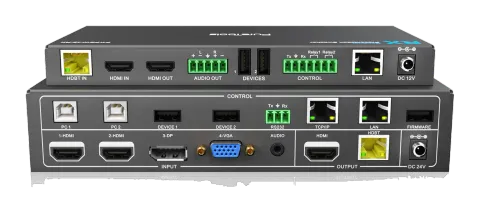
Lo Switcher Scaler per Teleconferenze PureTools 4x2 è uno switcher per presentazioni con 2 ingressi HDMI e 1 ingresso DisplayPort o VGA, dotato di uscite HDMI e HDBaseT specchiate. Supporta risoluzioni fino a 4K UltraHD …
ManualeComandi (TCP/IP)FAQSpecificheScheda tecnicaDichiarazione CE ↗Interfacce di controllo disponibili. Espanda un tipo attivo per visualizzare la tabella completa dei comandi.
Nessun comando corrispondente.
Comandi RS23260 comandiAttivo
ConnessioneBaud rate: 9600 Data bit: 8 Stop bit: 1 Parity bit: none The end mark of command is “<CR><LF>”.↓ CSV
Fonte: manuale, capitolo RS232 Control, pagina 20
| Comando | Descrizione | Esempio | Risposta | |
|---|---|---|---|---|
| SWIN H1 | Selezionare l’ingresso 1-HDMI. | Switch to HDMI1 | ||
| SWIN H2 | Selezionare l’ingresso 2-HDMI. | Switch to HDMI2 | ||
| SWIN DP | Selezionare l’ingresso 3-DP. | Switch to DP | ||
| SWIN VG | Selezionare l’ingresso 4-VGA. | Switch to VGA | ||
| SWIN RXHDMI | Passa all'input HDMI RX. | Switch to RX HDMI | ||
| AUTO 01 | Abilita commutazione automatica. | Auto Switching | ||
| AUTO 00 | Abilita la commutazione manuale. | Manual Switching | ||
| ?GET IN | Get the input source of Transmitter. (HDMI1,HDMI2,DP,VGA) | TX Device Input: HDMI1 | ||
| ?GET IN | Get the input source of Receiver. (HDMI,HDBT) | RX Device Input: HDMI | ||
| ?GET AUTO | Ottieni la modalità di commutazione. | Manual Switching/Auto Switching | ||
| VGAA | Regolazione automatica del parametro di input (solo VGA). | VGA Input Auto | ||
| AUMT S1 | Disattiva l'audio della sorgente. | Audio Mute Source: Enable | ||
| AUMT S0 | Disattiva il silenziamento audio della sorgente. | Audio Mute Source: Disable | ||
| AUMT V1 | Disattiva l'audio dell'ingresso VGA ausiliario. | Audio Mute VGA: Enable | ||
| AUMT V0 | Riattivare l'audio dell'ingresso ausiliario VGA. | Audio Mute VGA: Disable | ||
| ?GET AUMT | Get the Source mute status. | Audio Mute Source: Enable | ||
| ?GET AUMT | Get the VGA auxiliary audio mute status. | Audio Mute VGA: Enable | ||
| VOLS AP | Aumentare il volume audio della sorgente (xx=00~60). | Source Volume: xx | ||
| VOLS AN | Abbassa il volume audio della sorgente (xx=00~60). | Source Volume: xx | ||
| VOLV AP | Aumentare il volume audio ausiliario VGA (xx=00~60). | VGA Volume: xx | ||
| VOLV AN | Abbassa il volume audio ausiliario VGA (xx=00~60). | VGA Volume: xx | ||
| VOLS xx | Imposta il volume audio della sorgente (xx=00~60). | Source Volume: xx | ||
| VOLV xx | Impostare il volume dell'audio ausiliario VGA (xx=00~60). | VGA Volume: xx | ||
| ?GET VOL | Get the source audio volume (xx=00~60). | Source Volume: xx | ||
| ?GET VOL | Get the VGA auxiliary audio volume (xx=00~60). | VGA Volume: xx | ||
| TRES 01 | Impostare la risoluzione di output per il Transmitter a 3840x2160@30Hz. | TX Device Resolution: 3840x2160 | ||
| TRES 02 | Impostare la risoluzione di output per il Transmitter a 1920X1080. | TX Device Resolution: 1920x1080 | ||
| TRES 03 | Impostare la risoluzione di output per il Transmitter a 1280x720. | TX Device Resolution: 1280x720 | ||
| RRES 01 | Impostare la risoluzione di output per il Receiver a 3840x2160@30Hz. | RX Device Resolution: 3840x2160 | ||
| RRES 02 | Impostare la risoluzione di output per il Receiver a 1920x1080. | RX Device Resolution: 1920x1080 | ||
| RRES 03 | Impostare la risoluzione di output per il Receiver a 1280x720. | RX Device Resolution: 1280x720 | ||
| ?GET RES | Get the output resolution for Transmitter. | TX Device Resolution: 1920x1080 | ||
| ?GET RES | Get the output resolution for Receiver. | TX Device Resolution: 1920x1080 | ||
| ?GET TIME | Verifica modalità di spegnimento automatico. | Auto Switch Mode no input to shutdown time: Disable Manual Switch Mode no input to shutdown time: Disable | ||
| TIME AD | Modalità Auto Switch: Disabilita la funzione di spegnimento automatico. | Auto Switch Mode no input to shutdown time: Disable | ||
| TIME A1 | Modalità Auto Switch: Imposta il tempo di spegnimento automatico a 1 minuto in assenza di segnale di input. | Auto Switch Mode no input to shutdown time: 1 minutes | ||
| TIME A2 | Modalità Auto Switch: Imposta il tempo di spegnimento automatico a 2 minuti in assenza di segnale di input. | Auto Switch Mode no input to shutdown time: 2 minutes | ||
| TIME A3 | Modalità Auto Switch: Imposta il tempo di spegnimento automatico a 5 minuti in assenza di segnale di input. | Auto Switch Mode no input to shutdown time: 5 minutes | ||
| TIME A4 | Modalità Auto Switch: Imposta il tempo di spegnimento automatico a 10 minuti in assenza di segnale di input. | Auto Switch Mode no input to shutdown time: 10 minutes | ||
| TIME MD | Modalità commutazione manuale: disabilita la funzione di spegnimento automatico. | Manual Switch Mode no input to shutdown time: Disable | ||
| TIME M1 | Modalità commutazione manuale: Impostare il tempo di spegnimento su 1 minuto. | Manual Switch Mode no input to shutdown time: 1 minutes | ||
| TIME M2 | Modalità commutazione manuale: Impostare il tempo di spegnimento su 2 minuti. | Manual Switch Mode no input to shutdown time: 2 minutes | ||
| TIME M3 | Modalità commutazione manuale: Impostare il tempo di spegnimento su 5 minuti. | Manual Switch Mode no input to shutdown time: 5 minutes | ||
| TIME M4 | Modalità commutazione manuale: Impostare il tempo di spegnimento su 10 minuti. | Manual Switch Mode no input to shutdown time: 10 minutes | ||
| RLY1 ON | Accendi il Relay 1. | Relay 1 on | ||
| RLY1 OFF | Spegni il Relay 1. | Relay 1 off | ||
| RLY2 ON | Accendi il Relay 2. | Relay 2 on | ||
| RLY2 OFF | Spegni il Relay 2. | Relay 2 off | ||
| EDID DF | Il dispositivo sorgente ottiene l'EDID predefinito 3840x2160@30Hz. | EDID: Initial | ||
| EDID US | Carica dati EDID personalizzati da U-disk. | EDID: User | ||
| ?GET EDID | Ottieni stato EDID. | EDID: Initial/ User | ||
| SFUD TX | Aggiorna il software del Transmitter. | TX Device Software Update | ||
| SFUD RX | Aggiorna il software del Receiver. | RX Device Software Update | ||
| ?GET REV | Ottieni la versione del sistema. | Vx.x.x | ||
| FRST | Ripristina ai valori predefiniti di fabbrica. | Factor Reset | ||
| WAKE | Riattiva il sistema. | Wake Up | ||
| STBY | Mette questo sistema in modalità standby. | Go To Standby | ||
| ?GET IP | Ottieni l'indirizzo IP. | 192.168.0.178! | ||
| /+pb:xxxxxxxxx | Send ASCII command to control the third party device based on RS232 pass-through function. p = 0~1 is for RS232 control mode. When the "p=0", send command to control the local third party device which is connected to the transmitter. When the "p=1", the command is sent to control remote third party device which is connected to the receiver. b = 0~6 is for baud rate. b | Baud Rate 0 | 2400 1 | 4800 2 | 9600 3) xxxxxxxxx is for ASCII data (max 48 Byte). | /+12:123456789 | ||
| /-pb:xx xx xx xx | Send HEX command to control the third party device based on RS232 pass-through function. b | Baud Rate 0 | 2400 1 | 4800 2 | 9600 3 | 19200 4 | 38400 5 | 57600 6 | 115200 3) xx xx xx xx is for HEX data (max 48 Byte). | /-12:30 31 32 33 34 |