
Attivo
PT-SW-U324
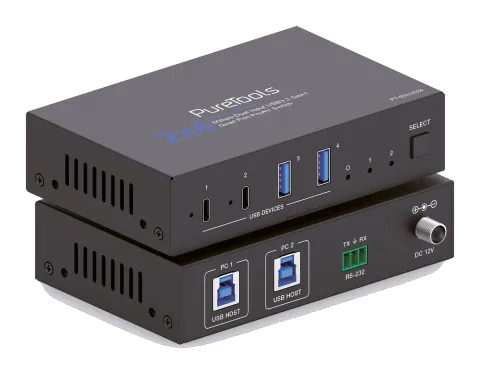
Switch 2x4 USB 3.2 Gen1 con 5Gbps e protezione di corrente
Il PT-SW-U324 è uno Switcher USB 3.2 Gen1 con due porte ospite USB-B indipendentemente commutabili e quattro porte dispositivo—due USB-C e due USB-A—con supporto per velocità dati fino a 5Gbps. Ogni porta dispositivo …
ManualeComandi (TCP/IP)FAQSpecificheScheda tecnicaCEInterfacce di controllo disponibili. Espanda un tipo attivo per visualizzare la tabella completa dei comandi.
Nessun comando corrispondente.
Comandi API15 comandiAttivo
ConnessioneVelocità di trasmissione: 19200 (fisso) Bit dati: 8 Bit stop: 1 Bit di parità: nessuno↓ CSV
Fonte: manuale, capitolo API Commands, pagina 14
| Comando | Descrizione | Esempio | Risposta | |
|---|---|---|---|---|
| ? | Ottieni l'elenco di tutti i comandi | ? | ||
| help | Ottieni l'elenco di tutti i comandi | help | ||
| get fw version | Ottenere la versione del firmware | get fw version | 1.0.0 | |
| set reboot | Riavvia il dispositivo | set reboot | Reboot... System Initializing... Initialization Finished! FW: 1.0.0 | |
| set reset | Reimposta ai valori predefiniti di fabbrica | set reset | Sure to RESET to default settings? Type "Yes" after next prompt to confirm... Input 1 | |
| get status | Ottieni stato sistema | get status | Please refer to the note at the end of the list. | |
| set key on/off | Imposta tasto pannello frontale on/off Predefinito: acceso | set key on set key off | Set key on. Set key off. | |
| get key | Ottenere lo stato on/off del tasto frontale | get key | Key on. | |
| set input x | Imposta ingresso host USB (x=1~2) x=1: ingresso host USB 1 x=2: ingresso host USB 2 Default: 1 | set input 1 | Set USB host input 1. | |
| get input | Ottieni porta ingresso host USB | get input | 1 | |
| get usb5v | Ottieni alimentazione ingresso host USB 5V | get usb5v | Host 1: 5V Host 2: none | |
| set autoswitch x | Imposta attivazione/disattivazione cambio ingresso automatico (rilevamento USB 5V) x=On, Off Predefinito: attivo | set autoswitch x | Set autoswitch on. | |
| get autoswitch | Ottieni lo stato della commutazione automatica | get autoswitch | Autoswitch on. | |
| set output x usb5v y | Imposta l'output dispositivo USB (x=0~4) 5V su y x=[0...4]:0:Tutti, 1:USB-C 1, 2:USB-C 2, 3:USB-A 3, 4:USB-A 4 y=0: Disabilita output 5V y=1: Segui host y=2: Forza sempre output 5V Default: 1 | set output 0 usb5v 1 | Set all USB device output 5V:follow host. | |
| get output x usb5v | Ottieni stato alimentazione 5V uscita dispositivo USB (x=0~4) | get output 0 usb5v | USB-C 1 5V: follow host USB-C 2 5V: follow host USB-A 3 5V: follow host USB-A 4 5V: follow host |