
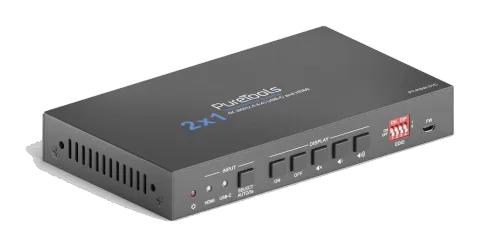
Üretimi durduOlası alternatif: PT-PSW-21HC-KVM
PT-PSW-21C
KVM ile 2x1 4K 18Gbps Çok Formatlı Sunum Anahtarlayıcı
PureTools 2x1 KVM Switcher (HDMI, USB-C), 1 HDMI ve 1 USB-C sinyalini tek bir HDMI çıkışına geçiş yapmaya olanak tanır ve 4K UltraHD 60Hz çözünürlükler için 18Gbps bant genişliğini destekler. Cihaz, veri ve AV iletim …
KılavuzKontrol (TCP/IP)SSSVeri sayfasıAlternatif mevcutYazılımCEMevcut kontrol arayüzleri. Komut tablosunun tamamını görmek için etkin bir türü genişletin.
Eşleşen komut yok.
RS232 Komutları35 komutEtkin
BağlantıRS232 Communication Protocol Baud rate: 9600 Data bit: 8 Stop bit: 1 Parity bit: none All commands must end with “<CR><LF>”. In the commands, “[”and “]” are symbols for easy reading and do not need to be typed in actual operation.↓ CSV
Kaynak: kılavuz, bölüm RS232 Command, sayfa 22
| Komut | Açıklama | Yanıt | |
|---|---|---|---|
| #GET_FIRMWARE_VERSION | Firmware sürümünü al. | @V1.0.0 | |
| #FACTORY_RESET | Fabrika ayarlarına sıfırla. | @FACTORY_RESET | |
| #REBOOT | System reboot | @REBOOT | |
| #HELP | Get the command details. Example: #HELP SET_AV Feedback: @SELECT VIDEO AND AUDIO INPUT PORT | ||
| #SET_AV PARAM1 PARAM1=H,C H - HDMI C - TYPE-C | |||
| #SET_AV H | Switch to HDMI input. | @AV H | |
| #SET_AV C | Switch to USB-C input. | @AV C | |
| #GET_AV | Mevcut giriş kaynağını al. | @AV H @AV C | |
| #SET_AUTO_SWITCH 1 | otomatik geçiş modunu etkinleştir. | @AUTO_SWITCH 1 | |
| #SET_AUTO_SWITCH 0 | Disable auto switching mode. | @AUTO_SWITCH 0 | |
| #GET_AUTO_SWITCH | Otomatik geçiş durumunu al. | @AUTO_SWITCH 1 @AUTO_SWITCH 0 | |
| #UPLOAD_USER_EDID [X] X =1~5, represents the EDID, its DIP switch status shows as below: | X DIP Switch Status 1 1011 2 1100 3 1101 4 1110 5 1111 Operation: Prepare the EDID file (.bin). Set the 4-pin DIP switch status, for example: “1011”. Send the command “#UPLOAD_USER_EDID 1.”, and the feedback is “@USER_EDID 1 READY PLEASE SEND EDID DATA IN 10S”. Send the EDID file (.bin). If successfully upload, the feedback is: “OK”. | ||
| #SET_SYNCACT_CEC 1 | Enable the function of automatically sending CEC commands. When detecting video input signal or not detecting any video signal, the switcher will automatically send the corresponding CEC command to control the display device. | @SYNCACT_CEC 1 | |
| #SET_SYNCACT_CEC 0 | Disable the function of automatically sending CEC commands. | @SYNCACT_CEC 0 | |
| #GET_SYNCACT_CEC | CEC komutlarının otomatik gönderim işlev ayar durumunu al. | @SYNCACT_CEC 1 | |
| #SET_SYNCACT_RS232 1 | Enable the function of automatically sending RS232 commands. When detecting video input signal or not detecting any video signal, the switcher will automatically send the corresponding RS232 command to control the display device. | @SYNCACT_RS232 1 | |
| #SET_SYNCACT_RS232 0 | Disable the function of automatically sending RS232 commands. | @SYNCACT_RS232 0 | |
| #GET_SYNCACT_RS232 | RS232 komutlarının otomatik gönderim işlev ayar durumunu al. | @SYNCACT_RS232 1 | |
| #SET_DTIME [PARAM1]:[PARAM2] | When not detecting video input signal, set the auto power-off time of display device to [PARAM1]: [PARAM2]. The default time is 15 minutes. [PARAM1]=0~30 minutes. [PARAM2]=0~1800 seconds. | #SET_DTIME 1:30 @DTIME 1:30 | |
| #GET_DTIME | Get the auto power-off time of display device. | @DTIME 30:0 | |
| #SET_AUDIO_MUTE | Mute/unmute the display audio through CEC and RS232 channels. | @AUDIO_MUTE_UNMUTE | |
| #SET_VOL + | Increase the display audio through CEC and RS232 channels. | @VOL - | |
| #SET_VOL - | Decrease the display audio through CEC and RS232 channels. | @VOL + | |
| #SET_DISPLAY 1 | Ekranı açın. | @DISPLAY 0 | |
| #SET_DISPLAY 0 | Ekranı kapatın. | @DISPLAY 1 | |
| #SET_RS232_BAUD 0 | Set the RS232 baud rate to 115200. | @RS232_BAUD 0 | |
| #SET_RS232_BAUD 1 | Set the RS232 baud rate to 57600. | @RS232_BAUD 1 | |
| #SET_RS232_BAUD 2 | Set the RS232 baud rate to 38400. | @RS232_BAUD 2 | |
| #SET_RS232_BAUD 3 | Set the RS232 baud rate to 19200. | @RS232_BAUD 3 | |
| #SET_RS232_BAUD 4 | Set the RS232 baud rate to 9600. | @RS232_BAUD 4 | |
| #SET_RS232_BAUD 5 | Set the RS232 baud rate to 4800. | @RS232_BAUD 5 | |
| #SET_RS232_BAUD 6 | Set the RS232 baud rate to 2400. | @RS232_BAUD 6 | |
| #GET_RS232_BAUD | RS232 baud hızını Al. | @RS232_BAUD 0 @RS232_BAUD 1 @RS232_BAUD 2 @RS232_BAUD 3 @RS232_BAUD 4 @RS232_BAUD 5 @RS232_BAUD 6 | |
| #SET_ON_[PARAM1]_[PARAM2]:XXXX | Set the ASCII RS232 command XXXX to be sent to control the third-party device when the DISPLAY ON button is pressed. [PARAM1] = 00~06 (Baud Rate) 00 - 115200 01 - 57600 02 - 38400 03 - 19200 04 - 9600 05 - 4800 06 - 2400 [PARAM2] = 00~99. The delay time of sending command. XXXX: Any ASCII code (up to 48 bytes). | #SET_ON_05_30:1234567 @BAUDRATE: 4800 @DELAY TIME: 30 s @DISPLAY ON TO SEND:1234567 | |
| #SET_H_ON_[PARAM1]_[PARAM2]:XX XX | Set the HEX RS232 command XX XX to be sent to control the third-party device when the DISPLAY ON button is pressed. [PARAM1] = 00~06 (Baud Rate) 00 - 115200 01 - 57600 02 - 38400 03 - 19200 04 - 9600 05 - 4800 06 - 2400 [PARAM2] = 00~99. The delay time of sending command. | #SET_H_ON_05_30:31 32 33 34 35 @BAUDRATE: 4800 @DELAY TIME: 30 s @DISPLAY ON HEX TO SEND:31 32 33 34 35 |