
Aktif
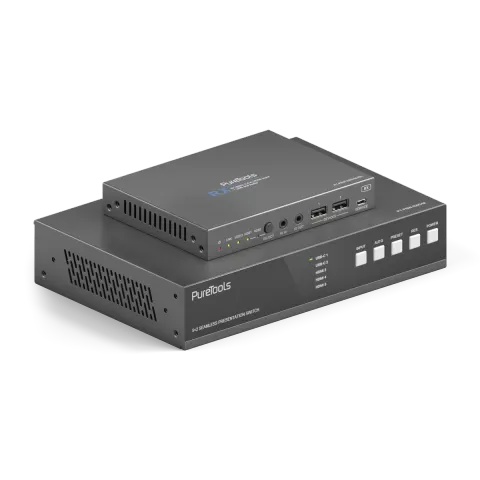
PT-PSW-52KVM
Dante ve Multi-View özellikli 18 Gbps USB-C İşbirliği Anahtarlama Seti
PT-PSW-52KVM, HDMI, USB-C DP Alt-Mode ve USB-B arayüzleri arasında kaynak seçimini destekleyen 5x2 HDBaseT 3.0 işbirliği Switcher’ıdır. Mirror edilmiş HDMI 2.0 döngü çıkışı ile HDBaseT 3.0 üzerinden sıkıştırılmamış …
KılavuzKontrol (TCP/IP)SSSTeknik özelliklerVeri sayfasıWeb arayüzüYazılımCE beyanı ↗Mevcut kontrol arayüzleri. Komut tablosunun tamamını görmek için etkin bir türü genişletin.
Eşleşen komut yok.
RS232 Komutları61 komutEtkin
BağlantıBaund hızı: 9600 (varsayılan), Veri bitleri: 8bit, Durdurma bitleri: 1, Parity biti: yok↓ CSV
Kaynak: kılavuz, bölüm RS-232 Control Command, sayfa 31
| Komut | Açıklama | Örnek | Yanıt | |
|---|---|---|---|---|
| help | Tüm komutların listesini al | help | =================== Help Info MCU 1.1.0 Web 1.1.0 Scaler 20230228-10 FPGA 1.1.0 RX 1.18.02 help Get the list of all commands | |
| r type | Cihaz modelini al | r type | PT-PSW-52KVM | |
| r status | Cihazın mevcut durumunu al | r status | Please refer to the note at the end of the list. | |
| r fw version | Firmware sürümünü al | r fw version | MCU 1.1.0 Web 1.1.0 Scaler 20230228-10 FPGA 1.1.0 RX 1.18.02 | |
| s power on | Cihazı açın | s power on | Power on System Initializing... Initialization Finished! MCU 1.1.0 Web 1.1.0 Scaler 20230228-10 FPGA 1.1.0 RX 1.18.02 | |
| s power off | Cihazı kapatın | s power off | Power off | |
| r power | Mevcut güç durumunu al | r power | power on /power off | |
| s reboot | Cihazı yeniden başlat | s reboot | Reboot… System Initializing... Initialization Finished! MCU 1.1.0 Web 1.1.0 Scaler 20230228-10 FPGA 1.1.0 RX 1.18.02 | |
| s reset | Fabrika ayarlarına dön | s reset | Reset to factory defaults System Initializing... Initialization Finished! MCU 1.1.0 Web 1.1.0 Scaler 20230228-10 FPGA 1.1.0 RX 1.18.02 | |
| s front button x | Ön düğme kilidini aç/kapa (x=0~1) 0. Kilit açık 1. Kilitli | s front button 0 | Front button: Unlocked | |
| r front button | Ön panel tuş kilidi açık/kapalı durumunu al | r front button | Front button: Unlocked | |
| s beep x | Buzzer’ı aç/kapat olarak ayarla (x=0~1) 0. Kapalı 1. Açık | s beep 1 | Beep: On | |
| r beep | Buzzer açık/kapalı durumunu al | r beep | Beep: Off | |
| s ir x | IR açma/kapama ayarı (x=0~1) 0. Kapalı 1. Açık | s ir 1 | IR: On | |
| r ir | IR açık/kapalı durumunu al | r ir | IR: Off | |
| s UsbcAccessNetwork x | USB-C erişim ağ özelliğini aç/kapat (x=0~1) 0. Kapalı 1. Açık | s UsbcAccessNetwork 1 | USB-C Access Network: On | |
| r UsbcAccessNetwork | USB-C erişim ağ özelliği açık/kapalı durumunu al | r UsbcAccessNetwork | USB-C Access Network: On | |
| s fan speed x | Fan hızını ayarla (x=0~4) 0. Otomatik 1. %25 2. %50 3. %75 4. %100 | s fan speed 0 | Fan Speed: Auto | |
| r fan speed | Fan hızını al | r fan speed | Fan Speed: Auto | |
| r temp | Cihazın dahili sıcaklığını al | r temp | Temp: 65C | |
| r input x EDID | Giriş EDID modunu al (x=0~5) x=0: tüm girişler x=1: USB-C 1 x=2: USB-C 2 x=3: HDMI 3 x=4: HDMI 4 x=5: HDMI 5 | r input 0 EDID | Input USB-C 1 EDID: Auto Input USB-C 2 EDID: Auto Input HDMI 3 EDID: Auto Input HDMI 4 EDID: Auto Input HDMI 5 EDID: Auto | |
| r input x EdidData | Giriş EDID Verisini al (x=0~5) x=0: tüm girişler x=1: USB-C 1 x=2: USB-C 2 x=3: HDMI 3 x=4: HDMI 4 x=5: HDMI 5 | r input 0 EdidData | Input USB-C 1 EDID Data: Input USB-C 2 EDID Data: Input HDMI 3 EDID Data: Input HDMI 4 EDID Data: Input HDMI 5 EDID Data: | |
| s input x EDID y | Giriş EDID'ini ayarla (x=0~5) (y=1~16) x=0: tüm girişler x=1: USB-C 1 x=2: USB-C 2 x=3: HDMI 3 x=4: HDMI 4 x=5: HDMI 5 y=1: Otomatik (HDBT veya HDMI veya HDBT+HDMI) y=2: HDMI Çıkışını Kopyala y=3: HDBT Çıkışını Kopyala y=4: 4K2K60_444, Stereo Ses 2.0 y=5: 4K2K30_444, Stereo Ses 2.0 y=6: 1080P, Stereo Ses 2.0 y=7: 720p, Stereo Ses 2.0 y=8: 1920x1200, Stereo Ses 2.0 y=9: 1680x1050, Stereo Ses 2.0 y=10: 1600x1200, Stereo Ses 2.0 y=11: 1440x900, Stereo Ses 2.0 y=12: 1360x768, Stereo Ses 2.0 y=13: 1280x1024, Stereo Ses 2.0 y=14: 1024x768, Stereo Ses 2.0 y=15: Kullanıcı Tanımlı 1 y=16: Kullanıcı Tanımlı 2 | s input 0 EDID 1 | Input USB-C 1 EDID: Auto Input USB-C 2 EDID: Auto Input HDMI 3 EDID: Auto Input HDMI 4 EDID: Auto Input HDMI 5 EDID: Auto | |
| s output res x | Çıkış Çözünürlüğünü ayarla (x=1~15) x=1: Otomatik x=2: 3840x2160p60 x=3: 3840x2160p50 x=4: 4096x2160p60 x=5: 4096x2160p50 x=6: 3840x2160p30 x=7: 3840x2160p25 x=8: 1920x1200p60RB x=9: 1920x1080p60 x=10: 1920x1080p50 x=11: 1360x768p60 x=12: 1280x800p60 x=13: 1280x720p60 x=14: 1280x720p50 x=15: 1024x768p60 | s output res 1 | Out Resolution: Auto | |
| r output res | Çıkış çözünürlüğünü al | r output res | Out Resolution: Auto | |
| s output x hdcp y | Çıkış (x=0~2) hdcp ayarla (y=1~3) x=0: tüm çıkışlar (HDMI/HDBT) x=1: HDMI çıkışı x=2: HDBT çıkışı y=1: Otomatik y=2: HDCP 1.4 y=3: HDCP 2.2 | s output 0 hdcp 1 | Output HDMI HDCP: Auto Output HDBT HDCP: Auto | |
| r output x hdcp | Çıkış hdcp durumunu al (x=0~2) x=0: tüm çıkışlar (HDMI/HDBT) x=1: HDMI çıkışı x=2: HDBT çıkışı | r output 0 hdcp | Output All HDCP: Auto | |
| s output avmute x | Çıkış avmute aç/kapat olarak ayarla (x=0~1) x=0: Kapalı x=1: Açık | s output avmute 1 | Output AV Mute: On | |
| r output avmute | Çıkış avmute açık/kapalı durumunu al | r output avmute | Output AV Mute: On | |
| s output freeze x | Çıkış dondurma aç/kapat olarak ayarla (x=0~1) x=0: Kapalı x=1: Açık | s output freeze 1 | Output Freeze: On | |
| r output freeze | Çıkış ekran dondurma açık/kapalı durumunu al | r output freeze | Output Freeze: On | |
| s output itc x | Çıkış video modunu ayarla (x=1~2) x=1: Video modu x=2: PC modu | s output itc 1 | Output ITC: Video Mode | |
| r output itc | Çıkış video modunu al | r output itc | Output ITC: Video Mode | |
| s main in audio x | Ana Giriş (HDMI/USB-C Girişi) ses kaynağını ayarla (x=1~6) x=1: Pencere 1 x=2: USB-C 1 x=3: USB-C 2 x=4: HDMI 3 x=5: HDMI 4 x=6: HDMI 5 | s main in audio 1 | Main In Audio: Window 1 | |
| r main in audio | Ana Giriş (HDMI/USB-C Girişi) ses kaynağını al | r main in audio | Main In Audio: Window 1 | |
| s output x audio y | Çıkış (x=0~3) ses kaynağını (y=1~3) ayarla x=0: tüm çıkışlar (HDMI/HDBT, Line, Dante) x=1: Ana Giriş (HDMI/USB-C Giriş) x=2: Line Giriş x=3: Dante Giriş | s output 0 audio 1 | Output HDMI/HDBT Audio: Main In (HDMI/USB-C In) Output Line Audio: Main In (HDMI/USB-C In) Output Dante Audio: Main In (HDMI/USB-C In) | |
| r output x audio | Çıkış (x=0~3) ses kaynağını al x=0: tüm çıkışlar (HDMI/HDBT, Line, Dante) x=1: HDMI/HDBT Çıkışı x=2: Line Çıkışı x=3: Dante Çıkışı | r output 1 audio | Output HDMI/HDBT Audio: Main In (HDMI/USB-C In) | |
| s input x audio vol+ | Giriş (x=0~3) ses seviyesini artır x=0: tüm girişler (HDMI/USB-C, Line, Dante) x=1: Ana Giriş (HDMI/USB-C Giriş) x=2: Line Giriş x=3: Dante Giriş | s input 1 audio vol+ | Input Main In (HDMI/USB-C In) Audio Volume: 50 | |
| s input x audio vol- | Giriş (x=0~3) ses seviyesini azalt x=0: tüm girişler (HDMI/USB-C, Line, Dante) x=1: Ana Giriş (HDMI/USB-C Giriş) x=2: Line Girişi x=3: Dante Girişi | s input 1 audio vol- | Input Main In (HDMI/USB-C In) Audio Volume: 50 | |
| s input x audio vol y | Giriş (x=0~3) ses seviyesi değerini ayarla (y=0~100) x=0: tüm girişler (HDMI/USB-C, Hat, Dante) x=1: Ana Giriş (HDMI/USB-C Giriş) x=2: Hat Girişi x=3: Dante Girişi | s input 1 audio vol 50 | Input Main In (HDMI/USB-C In) Audio Volume: 50 | |
| r input x audio vol | Giriş (x=0~3) ses ses seviyesi değerini al x=0: tüm girişler (HDMI/USB-C, Line, Dante) x=1: Ana Giriş (HDMI/USB-C Giriş) x=2: Line Girişi x=3: Dante Girişi | r input 1 audio vol | Input Main(HDMI/USB-C In) Audio Volume: | |
| s input x audio mute y | Giriş (x=0~3) ses susturmasını aç/kapa (y=0~1) x=0: tüm girişler (HDMI/USB-C, Hat, Dante) x=1: Ana Giriş (HDMI/USB-C Giriş) x=2: Hat Girişi x=3: Dante Girişi y=0: susturma kapalı y=1: susturma açık | s input 0 audio mute 1 | Input Main(HDMI/USB-C In) Audio Mute: On Input Line Audio Mute: On Input Dante Audio Mute: On | |
| r input x audio mute | Giriş (x=0~3) ses kapama açık/kapalı durumunu al x=0: tüm girişler (HDMI/USB-C, Line, Dante) x=1: Ana Giriş (HDMI/USB-C Giriş) x=2: Line Girişi x=3: Dante Girişi | r input 0 audio mute | Input Main (HDMI/USB-C In) Audio Mute: On Input Line Audio Mute: On Input Dante Audio Mute: On | |
| s master member x y z | Ana çıkış üyesini ayarla (x/y/z=0~1) x=0: HDMI/HDBT Çıkışı Hariç Tut x=1: HDMI/HDBT Çıkışını Dahil Et y=0: Hat Çıkışını Hariç Tut y=1: Hat Çıkışını Dahil Et z=0: Dante Çıkışını Hariç Tut z=1: Dante Çıkışını Dahil Et | s master member 1 1 1 | Master Member: 111 | |
| r master member | Master çıkış üyesini al | r master member | Master Member: 111 | |
| s master audio vol+ | Ana çıkış ses seviyesini artır. | s master audio vol+ | Master Audio Volume: 50 | |
| s master audio vol- | Ana çıkış ses seviyesini azalt | s master audio vol- | Master Audio Volume: 50 | |
| s master audio vol x | Ana çıkış ses seviyesini ayarla (x=0~100) | s master audio vol 50 | Master Audio Volume: 50 | |
| r master audio vol | Master çıkış ses ses seviyesi değerini al | r master audio vol | Master Audio Volume: 50 | |
| s master audio mute x | Ana çıkış ses susturmasını aç/kapa (x=0~1) x=0: susturma kapalı x=1: susturma açık | s master audio mute 1 | Master Audio Mute: On | |
| r master audio mute | Master çıkış ses susturma açık/kapalı durumunu al | r master audio mute | Master Audio Mute: On | |
| s output x audio vol+ | Çıkış ses seviyesini artır (x=0~3) x=0: tüm çıkışlar (HDMI/HDBT, Line, Dante) x=1: HDMI/HDBT OUT x=2: Line OUT x=3: Dante OUT | s output 1 audio vol+ | Output HDMI/HDBT Audio Volume: 50 | |
| s output x audio vol- | Çıkış (x=0~3) ses seviyesini azalt x=0: tüm çıkışlar (HDMI/HDBT, Line, Dante) x=1: HDMI/HDBT Çıkış x=2: Line Çıkış x=3: Dante Çıkış | s output 1 audio vol+ | Output HDMI/HDBT Audio Volume: 50 | |
| s output x audio vol y | Çıkış (x=0~3) ses ses seviyesini ayarla (y=0~100) x=0: tüm çıkışlar (HDMI/HDBT, Line, Dante) x=1: HDMI/HDBT çıkışı x=2: Line çıkışı x=3: Dante çıkışı | s output 1 audio vol 50 | Output HDMI/HDBT Audio Volume: 50 | |
| r output x audio vol | Çıkış (x=0~3) ses ses seviyesi değerini al x=0: tüm çıkışlar (HDMI/HDBT, Line, Dante) x=1: HDMI/HDBT Çıkışı x=2: Line Çıkışı x=3: Dante Çıkışı | r output 1 audio vol | Output HDMI/HDBT Audio Volume: 50 | |
| s output x audio mute y | Çıkış (x=0~3) ses sessize alma aç/kapat (y=0~1) x=0: tüm çıkışlar (HDMI/HDBT, Line, Dante) x=1: HDMI/HDBT çıkışı x=2: Line çıkışı x=3: Dante çıkışı y=0: sessiz kapalı y=1: sessiz açık | s output 0 audio mute 1 | Output HDMI/HDBT Audio Mute: On Output Line Audio Mute: On Output Dante Audio Mute: On | |
| r output x audio mute | Çıkış (x=0~3) ses susturma açık/kapalı durumunu al x=0: tüm çıkışlar (HDMI/HDBT, Line, Dante) x=1: HDMI/HDBT Çıkışı x=2: Line Çıkışı x=3: Dante Çıkışı | r output 0 audio mute | Output HDMI/HDBT Audio Mute: On Output Line Audio Mute: On Output Dante Audio Mute: On | |
| s output x audio mix y | Çıkış (x=0~3) ses miksini (y=1~4) ayarla x=0: tüm çıkışlar (HDMI/HDBT, Line, Dante) x=1: HDMI/HDBT çıkışı x=2: Line çıkışı x=3: Dante çıkışı y=1: Stereo y=2: Sol y=3: Sağ y=4: Sol ve Sağ | s output 0 audio mix 1 | Output HDMI/HDBT Audio Mix: Stereo Output Line Audio Mix: Stereo Output Dante Audio Mix: Stereo | |
| r output x audio mix | Çıkış (x=0~3) ses karıştırma modunu al x=0: tüm çıkışlar (HDMI/HDBT, Line, Dante) x=1: HDMI/HDBT Çıkışı x=2: Line Çıkışı x=3: Dante Çıkışı | r output 0 audio mix | Output HDMI/HDBT Audio Mix: Stereo Output Line Audio Mix: Stereo Output Dante Audio Mix: Stereo | |
| s output x audio delay y | Çıkış (x=0~3) ses gecikmesini (y=0~50) ayarla x=0: tüm çıkışlar (HDMI/HDBT, Line, Dante) x=1: HDMI/HDBT çıkışı x=2: Line çıkışı x=3: Dante çıkışı y=[0~50]: Gecikme Süresi, Milisaniye | s output 0 audio delay 50 | Output HDMI/HDBT Audio Delay: 50ms Output Line Audio Delay: 50ms Output Dante Audio Delay: 50ms | |
| r output x audio delay | Çıkış (x=0~3) ses gecikme değerini al x=0: tüm çıkışlar (HDMI/HDBT, Line, Dante) x=1: HDMI/HDBT Çıkışı x=2: Line Çıkışı x=3: Dante Çıkışı | r output 0 audio delay | Output HDMI/HDBT Audio Delay: 50ms Output Line Audio Delay: 50ms Output Dante Audio Delay: 50ms |
RS232 Komutları69 komutEtkin
BağlantıBaund hızı: 115200/57600/56000/38400/19200/9600/4800/2400 Veri bitleri: 7/8 Parity: n (Yok) /o(Tek) /e(Çift) Durdurma bitleri: 1/2↓ CSV
Kaynak: kılavuz, bölüm RS-232 Control Command, sayfa 39
| Komut | Açıklama | Örnek | Yanıt | |
|---|---|---|---|---|
| r output x audio delay | Çıkış (x=0~3) ses gecikme değerini al | x=0: tüm çıkışlar (HDMI/HDBT, Line, Dante) x=1: HDMI/HDBT Çıkışı x=2: Line Çıkışı x=3: Dante Çıkışı | Output HDMI/HDBT Audio Delay: 50ms Output Line Audio Delay: 50ms Output Dante Audio Delay: 50ms | ||
| s output x audio eq y val z | Çıkış (x=0~3) ses GEQ indeksini (y=1~31) değere (z=0~20) ayarla | x=0: tüm çıkışlar (HDMI/HDBT, Line, Dante) x=1: HDMI/HDBT çıkışı x=2: Line çıkışı x=3: Dante çıkışı y=[1~31]: EQ İndeksi z=[0~20]: EQ Değeri | s output 0 audio eq 1 val 20 | Output HDMI/HDBT Audio EQ Index 1 to Value 20 Output Line Audio EQ Index 1 to Value 20 Output Dante Audio EQ Index 1 to Value 20 Output Dante Audio EQ Preset is Flat Mode | |
| r output x audio eq y val | Çıkış (x=0~3) ses GEQ İndeksi (y=1~31) değerini al | x=0: tüm çıkışlar (HDMI/HDBT, Line, Dante) x=1: HDMI/HDBT Çıkışı x=2: Line Çıkışı x=3: Dante Çıkışı y=[1~31]: EQ İndeksi | r output 0 audio eq 1 val | Output HDMI/HDBT Audio EQ Index 1 to Value 20 Output Line Audio EQ Index 1 to Value 20 Output Dante Audio EQ Index 1 to Value 20 | |
| s output x audio eq preset y | Çıkış (x=0~3) ses GEQ ön ayarına (y=1~6) ayarla | x=0: tüm çıkışlar (HDMI/HDBT, Line, Dante) x=1: HDMI/HDBT çıkışı x=2: Line çıkışı x=3: Dante çıkışı y=1: Düz y=2: Özel1 y=3: Özel2 y=4: Özel3 y=5: Özel4 y=6: Özel5 | s output 0 audio eq preset 1 | Output HDMI/HDBT Audio EQ Preset 1 Output Line Audio EQ Preset 1 Output Dante Audio EQ Preset 1 | |
| r output x audio eq preset | Çıkış (x=0~3) ses GEQ ön ayarını al | x=0: tüm çıkışlar (HDMI/HDBT, Line, Dante) x=1: HDMI/HDBT Çıkışı x=2: Line Çıkışı x=3: Dante Çıkışı | r output 0 audio eq preset | Output HDMI/HDBT Audio EQ Preset 1 Output Line Audio EQ Preset 1 Output Dante Audio EQ Preset 1 | |
| s output x audio eq reset | Çıkış (x=0~3) ses GEQ sıfırla | x=0: tüm çıkışlar (HDMI/HDBT, Line, Dante) x=1: HDMI/HDBT çıkışı x=2: Line çıkışı x=3: Dante çıkışı | s output 0 audio eq reset | Output HDMI/HDBT Audio EQ Reset Output Line Audio EQ Reset Output Dante Audio EQ Reset | |
| s auto switch x | Otomatik geçiş modunu etkinleştir/devre dışı bırak (x=0~1) | x=0: Otomatik geçiş devre dışı x=1: Otomatik geçiş etkin | s auto switch 0 | Auto Switch: Off | |
| r auto switch | Otomatik anahtar özelliğini al | r auto switch | Auto Switch: Off | |
| s input source x | Giriş kaynağını çıkışa yönlendir (x=1~5) | x=1: USB-C 1 x=2: USB-C 2 x=3: HDMI 3 x=4: HDMI 4 x=5: HDMI 5 | s input source 1 | Input Source: USB-C 1 | |
| r input source | Çıkış seçili giriş kaynağını al | r input source | Input Source: USB-C 1 | |
| s fallback input x | Yedek giriş kaynağını ayarla (x=0~5) | x=0: Sonraki Giriş x=1: USB-C 1 x=2: USB-C 2 x=3: HDMI 3 x=4: HDMI 4 x=5: HDMI 5 | s fallback input 0 | Fallback Input: Next Input | |
| r fallback input | Yedek giriş kaynağını al | r fallback input | Fallback Input: Next Input | |
| s multiview x | Çoklu görüntüleme modunu ayarla (x=1~5) | x=1: Tek x=2: PIP x=3: PBP x=4: Üçlü x=5: Dörtlü | s multiview 1 | Multiview: Single | |
| r multiview | Çoklu görüntüleme modunu al | r multiview | Multiview: Single | |
| s window x in y | Pencere (x=0~4) kaynağını (y=1~5) olarak ayarla | x=0: Tüm Pencereler x=1: Pencere 1 x=2: Pencere 2 x=3: Pencere 3 x=4: Pencere 4 y=1: USB-C 1 y=2: USB-C 2 y=3: HDMI 3 y=4: HDMI 4 y=5: HDMI 5 | s window 1 in 1 | Window 1 in USB-C 1 | |
| r window x in | Pencere (x=0~4) kaynağını al | x=0: Tüm Pencereler x=1: Pencere 1 x=2: Pencere 2 x=3: Pencere 3 x=4: Pencere 4 | r window 0 in | Window 1 in USB-C 1 Window 2 in USB-C 2 Window 3 in HDMI 3 Window 4 in HDMI 4 | |
| s PIP position x | PIP pencere konumunu ayarla (x=1~4) | x=1: Sol Üst x=2: Sol Alt x=3: Sağ Üst x=4: Sağ Alt | s PIP position 4 | PIP Position: Right Bottom | |
| r PIP position | PIP pencere konumunu al | r PIP position | PIP Position: Right Bottom | |
| s PIP size x | PIP pencere boyutunu al (x=1~3) | x=1: Küçük x=2: Orta x=3: Büyük | s PIP size 3 | PIP Size: Large | |
| r PIP size | PIP pencere boyutunu al | r PIP size | PIP Size: Large | |
| s PBP mode x | PBP pencerelerinin görüntü modunu ayarla (x=1~2) | x=1: PBP Mod 1 x=2: PBP Mod 2 | s PBP mode 1 | PBP Mode: Mode 1 | |
| r PBP mode | PBP pencere görüntüleme modunu al | r PBP mode | PBP Mode: Mode 1 | |
| s PBP aspect x | PBP pencerelerinin görüntü en-boy oranını ayarla (x=1~2) | x=1: Tam ekran x=2: 16:9 | s PBP aspect 1 | s PBP aspect 1 | |
| r PBP aspect | PBP pencereleri görüntü en-boy oranını al | r PBP aspect | PBP Aspect: Full Screen | |
| s triple mode x | Üçlü pencere görüntüleme modunu ayarla (x=1~2) | x=1: Üçlü Mod 1 x=2: Üçlü Mod 2 | s triple mode 1 | Triple Mode: Mode 1 | |
| r triple mode | Üçlü pencere görüntü modunu al | r triple mode | Triple Mode: Mode 1 | |
| s triple aspect x | Üçlü pencere görüntüleme en-boy oranını ayarla (x=1~2) | x=1: Tam ekran x=2: 16:9 | s triple aspect 1 | Triple Aspect: Full Screen | |
| r triple aspect | Üçlü pencere görüntü en-boy oranını al | r triple aspect | Triple Aspect: Full Screen | |
| s quad mode x | Dörtlü pencere görüntü modunu ayarla (x=1~2) | x=1: Dörtlü Mod 1 x=2: Dörtlü Mod 2 | s quad mode 1 | Quad Mode: Mode 1 | |
| r quad mode | Dörtlü pencere görüntü modunu al | r quad mode | Quad Mode: Mode 1 | |
| s quad aspect x | Dörtlü pencere görüntü en-boy oranını ayarla (x=1~2) | x=1: Tam ekran x=2: 16:9 | s quad aspect 1 | Quad Aspect: Full Screen | |
| r quad aspect | Dörtlü pencere görüntü en-boy oranını al | r quad aspect | Quad Aspect: Full Screen | |
| s window x border y | Belirtilen pencerenin (x=0~4) çerçeve (y=0~9) modunu ayarlayın | x=0: Tümü x=1: Pencere 1 x=2: Pencere 2 x=3: Pencere 3 x=4: Pencere 4 y=0: Kapalı y=1: Siyah y=2: Kırmızı y=3: Yeşil y=4: Mavi y=5: Sarı y=6: Macenta y=7: Cam Göbeği y=8: Beyaz y=9: Gri | s window 0 border 0 | Window 1 Border: Off Window 2 Border: Yellow Window 3 Border: Off Window 4 Border: Cyan | |
| r window x border | Belirtilen pencerenin (x=0~4) çerçeve modunu al | x=0: Hepsi x=1: Pencere 1 x=2: Pencere 2 x=3: Pencere 3 x=4: Pencere 4 | r window 0 border | Window 1 Border: Off Window 2 Border: Yellow Window 3 Border: Off Window 4 Border: Cyan | |
| s rx input x | RX giriş kaynağını ayarla (x=1~2) | x=1: HDBT IN x=2: HDMI IN | s rx input 1 | RX Input: HDBT Error,RX not ready! | |
| r rx input | RX giriş kaynağını al | r rx input | RX Input: HDBT | |
| r rx hdmi5v | RX HDMI giriş gücü 5V durumunu al | r rx hdmi5v | RX HDMI 5V: 1 | |
| r rx host5v | RX USB host güç 5V durumunu al | r rx host5v | RX Host 5V: 1 | |
| s rx auto switch mode x | RX Otomatik Anahtar algılama modunu ayarla (x=1~2) | x=1: TMDS x=2: 5V | s rx auto switch mode 1 | RX Auto Switch Mode: TMDS | |
| r rx auto switch mode | RX Otomatik Geçiş algılama modunu al | r rx auto switch mode | RX Auto Switch Mode: TMDS | |
| s rx auto switch x | RX Otomatik Anahtarı aç/kapat durumu ayarla (x=0~1) | x=0: Kapalı x=1: Açık | s rx auto switch 1 | RX Auto Switch: On | |
| r rx auto switch | RX Otomatik Geçiş açık/kapalı durumunu al | r rx auto switch | RX Auto Switch: On | |
| s cec power on | CEC güç açma komutunu ayarla | s cec power on | CEC Power On | |
| s cec power off | CEC güç kapatma komutunu ayarla | s cec power off | CEC Power Off | |
| s auto power feature x | Ekran otomatik güç özelliğini aç/kapat olarak ayarla (x=0~1) | x=0: Kapalı x=1: Açık | s auto power feature 1 | Auto Power Feature: On | |
| r auto power feature | Ekran otomatik güç özelliğinin açık/kapalı durumunu al | r auto power feature | Auto Power Feature: On | |
| s auto power off timer x | Otomatik kapanma komutu (CEC/RS232) x (x=1~6) sonra gönderilecektir | x=1: 5 sn x=2: 10 sn x=3: 30 sn x=4: 1 dk x=5: 5 dk x=6: 10 dk | s auto power off timer 4 | Auto Power Off Timer: 1 min | |
| r auto power off timer | Otomatik kapanma zamanlayıcısını al | r auto power off timer | Auto Power Off Timer: 1 min | |
| s auto power control x | Otomatik güç özelliği kontrolünü (x=1~3) üzerinden ayarla | x=1: CEC x=2: RS232 x=3: CEC ve RS232 | s auto power control 1 | Auto Power Control: CEC | |
| r auto power control | Otomatik güç özellik kontrol tipini al | r auto power control | Auto Power Control: CEC | |
| s UsbSwitchMode x | USB anahtar modunu ayarla (x=1~3) | x=1: Otomatik mod (USB 5V algılayıp sonra geçiş yapar) x=2: Manuel mod x=3: Video uyumlu (HDMI 3, USB Host 3 ile bağlı) | s UsbSwitchMode 1 | UsbSwitchMode: Auto mode | |
| r UsbSwitchMode | USB geçiş modunu al | r UsbSwitchMode | UsbSwitchMode: Auto mode | |
| s UsbManual x | USB manuel anahtarı ayarla (x=1~3) | x=1: USB-C 1 x=2: USB-C 2 x=3: USB Host 3 | s UsbManual 3 | UsbManual: USB Host 3 | |
| r UsbSwitchStatus | USB geçiş durumunu al | r UsbSwitchStatus | UsbSwitchStatus: USB-C 1 | |
| s serial x setting y | Seri portu (x=0~2) ayarını y olarak belirleyin | x=0: Tüm RS232 (Yerel ve HDBT) x=1: Yerel RS232 x=2: HDBT RS232 y= 115200-8n1 Baud hızı: 115200/57600/56000/38400/19200/9600/4800/2400 Veri bitleri: 7/8 Parite: n (Yok) /o (Tek) /e (Çift) Dur bitleri: 1/2 | s serial 0 setting 115200-8n1 | Local RS-232: 115200-8n1 HDBT RS-232: 115200-8n1 | |
| r serial x setting | Seri port (x=0~2) ayarını al | x=0: Tüm RS232 (Yerel ve HDBT) x=1: Yerel RS232 x=2: HDBT RS232 | r serial 0 setting | Local RS-232: 115200-8n1 HDBT RS-232: 115200-8n1 | |
| s preset save x | Mevcut ünitenin ayarlarını belirtilen ön ayara (x=1~5) kaydedin Ağ ayarı hariç tüm ayarlar. x=1: Ön Ayar 1 x=2: Ön Ayar 2 x=3: Ön Ayar 3 x=4: Ön Ayar 4 x=5: Ön Ayar 5 | s preset save 1 | Preset Save: Preset 1 | |
| s preset recall x | Belirtilen ön ayarı cihaza çağır (x=1~5) Ağ ayarları hariç tüm ayarlar. x=1: Ön ayar 1 x=2: Ön ayar 2 x=3: Ön ayar 3 x=4: Ön ayar 4 x=5: Ön ayar 5 | s preset recall 1 | Preset Recall: Preset 1 | |
| s preset clear x | Bir birimde belirtilen bir ön ayarı temizle (x=1~5) Ağ ayarları hariç tüm ayarlar. x=1: Ön ayar 1 x=2: Ön ayar 2 x=3: Ön ayar 3 x=4: Ön ayar 4 x=5: Ön ayar 5 | s preset clear 1 | Preset Clear: Preset 1 | |
| s preset x name y | Önayar (x=1~5) adını y olarak ayarla (en fazla 16 karakter) x=1: Önayar 1 x=2: Önayar 2 x=3: Önayar 3 x=4: Önayar 4 x=5: Önayar 5 | s preset 1 name MeetingRoom 1 | Preset 1 Name: MeetingRoom 1 | |
| r preset x name | Önayar (x=1~5) adını al x=1: Önayar 1 x=2: Önayar 2 x=3: Önayar 3 x=4: Önayar 4 x=5: Önayar 5 | r preset x name | Preset 1 Name: MeetingRoom 1 | |
| r ipconfig | Mevcut IP Yapılandırmasını Al | r ipconfig | IP Mode: DHCP IP: 192.168.62.106 Subnet Mask: 255.255.255.0 Gateway: 192.168.62.1 TCP/IP port: 4001 Telnet port: 23 MAC: 6C:DF:FB:0C:B3:8E (Static: 169.254.100.200 255.255.0.0 169.254.100.1) default static IP is 192.168.0.178/255.255.0.0/192.168.0.1 | |
| r mac addr | Ağ MAC adresini al | r mac addr | MAC: 6C:DF:FB:0C:B3:8E | |
| s ip mode x | Ağ IP modunu statik IP veya DHCP olarak ayarla (x=0~1) x=0: Statik x=1: DHCP | s ip mode 0 | IP mode: Static (Please use "s net reboot!" command or repower device to apply new config!) | |
| r ip mode | Ağ IP modunu al | r ip mode | IP mode: DHCP | |
| s ip addr xxx.xxx.xxx.xxx | Ağ IP adresini ayarla | s ip addr 192.168.1.178 | IP address: 192.168.1.178 (Please use "s net reboot!" command or repower device to apply new config!) DHCP on, Device can't config static address, set DHCP off first. | |
| r ip addr | Ağ IP adresini al | r ip addr | IP: 192.168.62.106 | |
| s subnet xxx.xxx.xxx.xxx | Ağ alt ağ maskesini ayarla | s subnet 255.255.255.0 | Subnet Mask: 255.255.255.0 (Please use "s net reboot!" command or repower device to apply new config!) DHCP on, Device can't config subnet mask, set DHCP off first. | |
| r subnet | Ağ alt ağ maskesini al | r subnet | Subnet Mask: 255.255.255.0 |
RS232 Kontrol Komutu13 komutEtkin
Kaynak: kılavuz, bölüm RS-232 Control Command, sayfa 47
| Komut | Açıklama | Örnek | Yanıt | |
|---|---|---|---|---|
| s subnet xxx.xxx.xxx.xxx | Ağ alt ağ maskesini ayarla | s subnet 255.255.255.0 | Subnet Mask: 255.255.255.0 (Please use "s net reboot!" command or repower device to apply new config!) DHCP on, Device can't config subnet mask, set DHCP off first. | |
| r subnet | Ağ alt ağ maskesini al | r subnet | Subnet Mask: 255.255.255.0 | |
| s gateway xxx.xxx.xxx.xxx | Ağ geçidini ayarla | s gateway 192.168.1.1 | Gateway: 192.168.1.1 (Please use "s net reboot!" command or repower device to apply new config!) DHCP on, Device can't config gateway, set DHCP off first. | |
| r gateway | Ağ varsayılan geçidini al | r gateway | Gateway: 192.168.1.1 | |
| s tcp/ip port x | Ağ TCP/IP portunu ayarla (x=1~65535) | s tcp/ip port 4001 | TCP/IP port: 4001 | |
| r tcp/ip port | Ağ TCP/IP portunu al | r tcp/ip port | TCP/IP port: 4001 | |
| s telnet port x | Ağ telnet portunu ayarla (x=1~65535) | s telnet port 23 | Telnet port: 23 | |
| r telnet port | Ağ telnet portunu al | r telnet port | Telnet port: 23 | |
| s net reboot | Ağ modüllerini yeniden başlat | s net reboot | Search for IP, Please wait ...! IP Mode: DHCP IP: 192.168.62.106 Subnet Mask: 255.255.255.0 Gateway: 192.168.62.1 TCP/IP port: 4001 Telnet port: 23 MAC: C:DF:FB:0C:B3:8E (Static: 169.254.100.200 255.255.0.0 169.254.100.1) | |
| s admin password x | Yönetici giriş şifresini ayarla (x=[en fazla 16 karakter]) | s admin password admin | admin password: admin | |
| r admin password | Yönetici giriş şifresini al | r admin password | admin password: admin | |
| s user password x | Kullanıcı giriş parolasını ayarla (x=[en fazla 16 karakter]) | s user password user | user password: user | |
| r user password | Kullanıcı giriş şifresini al | r user password | user password: user |