
Aktif
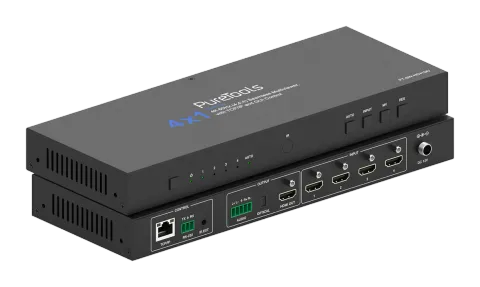
PT-SW-HD41MV
4x1 Çoklu Görüntü Değiştirici - 18G
PT-SW-HD41MV, dört HDMI 2.0b girişine sahip 4x1 çoklu görüntülü kesintisiz UHD video Switcher'dır ve maksimum 18Gbps video bant genişliğinde 4K 60Hz (4:4:4) video çözünürlüklerini destekler, ayrıca HDCP 2.2/1.x …
KılavuzKontrol (TCP/IP)SSSTeknik özelliklerCEMevcut kontrol arayüzleri. Komut tablosunun tamamını görmek için etkin bir türü genişletin.
Eşleşen komut yok.
API Komutları65 komutEtkin
Kaynak: kılavuz, bölüm API Commands, sayfa 8
| Komut | Açıklama | Örnek | Yanıt | |
|---|---|---|---|---|
| ? | Tüm komutların listesini al | ? | help! | |
| help! | Tüm komutların listesini al | help! | ||
| get model | Cihaz modelini al | get model | PT-SW-HD41MV | |
| status | Cihazın mevcut durumunu al | status | Please see "Status Feedback" sheet | |
| get version | Donanım yazılımı sürümünü al | get version | BOOT: Vx.xx.xx MCU: Vx.xx.xx SCALER: xxxxxxxx-xx WEB: Vx.xx.xx | |
| power on | Cihazı açın | power on | Power: on | |
| power off | Cihazı kapatın | power off | Power: off | |
| get power | Mevcut güç durumunu al | get power | Power: on | |
| reboot | Cihazı yeniden başlat | reboot | Reboot… | |
| reset | Evrensel ayarları varsayılanlara sıfırla (Onaylamak için "Yes", iptal etmek için "No" yazılmalıdır) | reset | Sure to reset universal settings to default? Type "Yes" after next prompt to confirm... | |
| reset all | Tüm ayarları varsayılanlara sıfırla (Onaylamak için "Yes", iptal etmek için "No" yazılmalıdır) | reset all | Sure to reset all settings to default? Type "Yes" after next prompt to confirm… | |
| set front button x | Ön düğme kilidini aç/kapa (x=0~1) x=0: Kilit açık x=1: Kilitli | set front button 0 | Button: unlocked 0 | |
| get front button | Ön panel tuş kilidi açık/kapalı durumunu al | get front button | Button: unlocked | |
| set ir x | IR açma/kapama ayarı (x=0~1) x=0: Kapalı x=1: Açık | set ir 1 | IR: on 1 | |
| get ir | IR açık/kapalı durumunu al | get ir | IR: on | |
| get temp | Cihazın dahili sıcaklığını al | get temp | 65°C | |
| get uptime | Cihaz çalışma süresini al (Gün:Saat:Dakika:Saniye) | get uptime | 000:00:13:04 | |
| set input x edid y | Giriş (x=0~4) EDID'i ayarlayın (y=1~20) x=0: Tüm Girişler x=1: HDMI Girişi 1 x=2: HDMI Girişi 2 x=3: HDMI Girişi 3 x=4: HDMI Girişi 4 y=1: 4K2K60_444, Stereo Ses 2.0 y=2: 4K2K60_444, Dolby/DTS 5.1 y=3: 4K2K60_444, HD Ses 7.1 y=4: 4K2K30_444, Stereo Ses 2.0 y=5: 4K2K30_444, Dolby/DTS 5.1 y=6: 4K2K30_444, HD Ses 7.1 y=7: 1080P, Stereo Ses 2.0 y=8: 1080P, Dolby/DTS 5.1 y=9: 1080P, HD Ses 7.1 y=10: 1920x1200, Stereo Ses 2.0 y=11: 1680x1050, Stereo Ses 2.0 y=12: 1600x1200, Stereo Ses 2.0 y=13: 1440x900, Stereo Ses 2.0 y=14: 1360x768, Stereo Ses 2.0 y=15: 1280x1024, Stereo Ses 2.0 y=16: 1024x768, Stereo Ses 2.0 y=17: 720p, Stereo Ses 2.0 y=18: Otomatik y=19: Kullanıcı Tanımlı 1 y=20: Kullanıcı Tanımlı 2 Varsayılan: 1 | set input 0 edid 1 | HDMI input 1 EDID: 4K2K60_444, Stereo Audio 2.0 HDMI input 2 EDID: 4K2K60_444, Stereo Audio 2.0 HDMI input 3 EDID: 4K2K60_444, Stereo Audio 2.0 HDMI input 4 EDID: 4K2K60_444, Stereo Audio 2.0 | |
| get input x edid | Giriş (x=0~4) EDID modunu al x=0: Tüm Girişler x=1: HDMI Girişi 1 x=2: HDMI Girişi 2 x=3: HDMI Girişi 3 x=4: HDMI Girişi 4 | get input 0 edid | HDMI input 1 EDID: 4K2K60_444, Stereo Audio 2.0 HDMI input 2 EDID: 4K2K60_444, Stereo Audio 2.0 HDMI input 3 EDID: 4K2K60_444, Stereo Audio 2.0 HDMI input 4 EDID: 4K2K60_444, Stereo Audio 2.0 | |
| set user edid x | Kullanıcı tanımlı EDID’i (x=1~2) ayarla x=1: Kullanıcı Tanımlı 1 x=2: Kullanıcı Tanımlı 2 y = 00 FF FF FF ... (y 256 bayt EDID verisidir) | set user edid 1 | User defined 1 EDID is loaded successfully | |
| get edid data x | EDID verisini al (x=0~4) x=0: Tüm Girişler x=1: HDMI Girişi 1 x=2: HDMI Girişi 2 x=3: HDMI Girişi 3 x=4: HDMI Girişi 4 | get edid data 0 | HDMI 1 input EDID data HDMI 2 input EDID data HDMI 3 input EDID data HDMI 4 input EDID data | |
| set output res x | Çıkış çözünürlüğünü ayarla (x=1~15) x=1: 4096x2160p60 x=2: 4096x2160p50 x=3: 3840x2160p60 x=4: 3840x2160p50 x=5: 3840x2160p30 x=6: 3840x2160p25 x=7: 1920x1200p60RB x=8: 1920x1080p60 x=9: 1920x1080p50 x=10: 1360x768p60 x=11: 1280x800p60 x=12: 1280x720p60 x=13: 1280x720p50 x=14: 1024x768p60 x=15: Otomatik Varsayılan: 15 | set output res 1 | Output resolution: 4096x2160p60 | |
| get output res | Çıkış çözünürlüğünü al | get output res | Output resolution: 4096x2160p60 | |
| set output hdcp x | Çıkış hdcp modunu ayarla (x=1~2) x=1: HDCP 1.4 x=2: HDCP 2.2 Varsayılan: 1 | set output hdcp 1 | Output HDCP: HDCP 1.4 | |
| get output hdcp | Çıkış hdcp modunu al | get output hdcp | Output HDCP: HDCP 1.4 | |
| set output vka x | Çıkış video aktif kalma desenini ayarla (x=1~2) x=1: Siyah Ekran x=2: Mavi Ekran Varsayılan: 1 | set output vka 1 | Output VKA pattern: black screen | |
| get output vka | Çıkış video aktif kalma desenini al | get output vka | Output VKA pattern: black screen | |
| set output itc x | Çıkış video modunu ayarla(x=1~2) x=1: Video Modu x=2: PC Modu Varsayılan: 1 | set output itc 1 | Output ITC: video mode | |
| get output itc | Çıkış video modunu al | get output itc | Output ITC: video mode | |
| set output freeze x | Çıkış dondurma aç/kapat olarak ayarla (x=0~1) x=0: Kapalı x=1: Açık | set output freeze 1 | Output freeze: on 0 | |
| get output freeze | Çıkış ekran dondurma açık/kapalı durumunu al | get output freeze | Output freeze: on | |
| set auto switch x | Otomatik geçiş özelliğini etkinleştir/devre dışı bırak (x=0~1) x=0: Kapalı x=1: Açık | set auto switch 0 | Auto switch: off 0 | |
| get auto switch | Otomatik anahtar özelliğini al | get auto switch | Auto switch: off | |
| set in source x | Giriş kaynağını çıkışa yönlendir (1~4) x=1: HDMI Girişi 1 x=2: HDMI Girişi 2 x=3: HDMI Girişi 3 x=4: HDMI Girişi 4 Varsayılan: 1 | set in source 1 | Output: HDMI input 1 | |
| get in source | Tek ekran modunda seçili giriş kaynağını al | get in source | Output: HDMI input 1 | |
| set multiview x | Çoklu görüntüleyici görüntüleme modunu ayarla (x=1~5) x=1: Tek Ekran x=2: PIP x=3: PBP x=4: Üçlü Ekran x=5: Dörtlü Ekran Varsayılan: 1 | set multiview 1 | Multiview: single screen | |
| get multiview | Çoklu görüntüleyici görüntüleme modunu al | get multiview | Multiview: single screen | |
| set window x in y | Geçerli Çoklu görünüm modunda bir görüntü penceresi (x=1~4) için bir girdi (y=1~4) seçin x=1: Pencere 1 x=2: Pencere 2 x=3: Pencere 3 x=4: Pencere 4 y=1: HDMI Girişi 1 y=2: HDMI Girişi 2 y=3: HDMI Girişi 3 y=4: HDMI Girişi 4 | set window 1 in 1 | Window 1 select: HDMI input 1 | |
| get window x in | Pencerelerin seçili giriş kaynağını al (x=0~4) x=0: Tüm x=1: Pencere 1 x=2: Pencere 2 x=3: Pencere 3 x=4: Pencere 4 | get window 1 in | Window 1 select: HDMI input 1 | |
| set window x border y | Pencerenin çerçeve modunu ayarlayın (x=0~4, y=0~9) x=0: Tümü x=1: Pencere 1 x=2: Pencere 2 x=3: Pencere 3 x=4: Pencere 4 y=0: Kapalı y=1: Siyah y=2: Kırmızı y=3: Yeşil y=4: Mavi y=5: Sarı y=6: Macenta y=7: Cam Göbeği y=8: Beyaz y=9: Gri Varsayılan: 0 | set window 1 border 0 | Window 1 border: off 0 | |
| get window x border | Pencerenin (x=0~4) çerçeve modunu al x=0: Hepsi x=1: Pencere 1 x=2: Pencere 2 x=3: Pencere 3 x=4: Pencere 4 | get window 1 border | Window 1 border: off | |
| set window source osd x | Pencere kaynağı osd anahtarını ayarla (x=0~1) x=0: Kapalı x=1: Açık Varsayılan: 0 | set window source osd 1 | Window source osd: on | |
| get window source osd | Pencere kaynağı OSD anahtarını al | get window source osd | Window source osd: on | |
| set PIP position x | PIP pencere konumunu ayarla (x=1~4) x=1: Sol Üst x=2: Sol Alt x=3: Sağ Üst x=4: Sağ Alt Varsayılan: 3 | set PIP position 3 | PIP position: right top | |
| get PIP position | PIP pencere konumunu al | get window source osd | PIP position: right top | |
| set PIP size x | PIP pencere boyutunu ayarla (x=1~3) x=1: Küçük x=2: Orta x=3: Büyük Varsayılan: 3 | set PIP size 3 | PIP size: large | |
| get PIP size | PIP pencere boyutunu al | get PIP size | PIP size: large | |
| set PBP mode x | PBP pencerelerinin görüntü modunu ayarla (x=1~2) x=1: PBP Mod 1 x=2: PBP Mod 2 Varsayılan: 1 | set PBP mode 1 | PBP mode 1 | |
| get PBP mode | PBP pencere görüntüleme modunu al | get PBP mode | PBP mode 1 | |
| set PBP aspect x | PBP pencerelerinin görüntü en-boy oranını ayarla (x=1~2) x=1: Tam Ekran x=2: 16:9 Varsayılan: 1 | set PBP aspect 1 | PBP aspect: full screen | |
| get PBP aspect | PBP pencereleri görüntü en-boy oranını al | get PBP aspect | PBP aspect: full screen | |
| set triple mode x | Üçlü pencere görüntüleme modunu ayarla (x=1~3) x=1: Üçlü Mod 1 x=2: Üçlü Mod 2 x=3: Üçlü Mod 3 Varsayılan: 1 | set triple mode 1 | Triple mode 1 | |
| get triple mode | Üçlü pencere görüntü modunu al | get triple mode | Triple mode 1 | |
| set triple aspect x | Üçlü pencere görüntüleme en-boy oranını ayarla (x=1~2) x=1: Tam Ekran x=2: 16:9 Varsayılan: 1 | set triple aspect 1 | Triple aspect: full screen | |
| get triple aspect | Üçlü pencere görüntü en-boy oranını al | get triple aspect | Triple aspect: full screen | |
| set quad mode x | Dörtlü pencere görüntü modunu ayarla (x=1~2) x=1: Dörtlü Mod 1 x=2: Dörtlü Mod 2 Varsayılan: 1 | set quad mode 1 | Quad mode 1 | |
| get quad mode | Dörtlü pencere görüntü modunu al | get quad mode | Quad mode 1 | |
| set quad aspect x | Dörtlü pencere görüntü en-boy oranını ayarla (x=1~2) x=1: Tam Ekran x=2: 16:9 Varsayılan: 1 | set quad aspect 1 | Quad aspect: full screen | |
| get quad aspect | Dörtlü pencere görüntü en-boy oranını al | get quad aspect | Quad aspect: full screen | |
| set output audio vol+ | Çıkış ses seviyesini artır | set output audio vol+ | Output audio volume: 30 | |
| set output audio vol- | Çıkış ses seviyesini azalt | set output audio vol- | Output audio volume: 30 | |
| set output audio vol x | Çıkış ses seviyesi değerini ayarla (x=0~100) | set output audio vol 30 | Output audio volume: 30 | |
| get output audio vol | Çıkış ses seviyesini al | get output audio vol | Output audio volume: 30 | |
| set output audio mute x | Çıkış ses susturmayı aç/kapat olarak ayarla (x=0~1) x=0: Kapalı x=1: Açık Varsayılan: 0 | set output audio mute 0 | Output audio mute: off | |
| get output audio mute | Çıkış ses sessize alma açık/kapalı durumunu al | get output audio mute | Output audio mute: off |
Ses ayarı2 komutEtkin
Kaynak: kılavuz, bölüm API Commands, sayfa 33
| Komut | Açıklama | Örnek | Yanıt | |
|---|---|---|---|---|
| set output audio x | Çıkış ses kaynağını ayarla (x=0~4) x=0: Pencere 1 Seçili Kaynağı Takip Et x=1: HDMI 1 Giriş Sesi x=2: HDMI 2 Giriş Sesi x=3: HDMI 3 Giriş Sesi x=4: HDMI 4 Giriş Sesi Varsayılan: 0Kaynak: kılavuz, bölüm System Diagram, sayfa 34 | set output audio 0 | Output audio: follow window 1 video source | |
| get output audio | Çıkış ses kaynağını al | get output audio | Output audio: follow window 1 video source |
RS232 Ayarı2 komutEtkin
Kaynak: kılavuz, bölüm System Diagram, sayfa 34
| Komut | Açıklama | Örnek | Yanıt | |
|---|---|---|---|---|
| set baud x | RS232 veri hızını x bps olarak ayarla (x=115200/57600/38400/19200/9600/4800) Varsayılan: 9600 | set baud 115200 | Baud rate: 115200 | |
| get baud | RS232 baud hızını al | get baud | Baud rate: 115200 |
Ön ayar Ayarı5 komutEtkin
Kaynak: kılavuz, bölüm System Diagram, sayfa 34
| Komut | Açıklama | Örnek | Yanıt | |
|---|---|---|---|---|
| set preset save x | Mevcut ünitenin ayarlarını belirtilen ön ayara (x=1~8) kaydedin x=1~8: Ön Ayar 1 ~ Ön Ayar 8 | set preset save 1 | Preset 1: save | |
| set preset recall x | Belirtilen ön ayarı cihaza çağır (x=1~8) x=1~8: Ön ayar 1 ~ Ön ayar 8 | set preset recall 1 | Preset 1: recall | |
| set preset clear x | Bir birimde belirtilen bir ön ayarı temizle (x=1~8) x=1~8: Ön ayar 1 ~ Ön ayar 8 | set preset clear 1 | Preset 1: clear | |
| set preset x name y | Önayar (x=1~8) adını y olarak ayarla (y=[en fazla 32 karakter]) x=1~8: Önayar 1 ~ Önayar 8 | set preset 1 name Preset 1 | preset 1 name: Preset 1 | |
| get preset x name | Önayar (x=1~8) adını al x=1~8: Önayar 1 ~ Önayar 8 | get preset 1 name | preset 1 name: Preset 1 |
Ağ Ayarları11 komutEtkin
Kaynak: kılavuz, bölüm System Diagram, sayfa 35
| Komut | Açıklama | Örnek | Yanıt | |
|---|---|---|---|---|
| set subnet xxx.xxx.xxx.xxx | Ağ alt ağ maskesini ayarla | set subnet 255.255.0.0 | Subnet mask: 255.255.0.0 (Please use "set net reboot" command to apply new config!) DHCP on, device can't config subnet mask, set DHCP off first. | |
| get subnet | Ağ alt ağ maskesini al | get subnet | Subnet mask: 255.255.0.0 | |
| set gateway xxx.xxx.xxx.xxx | Ağ geçidini ayarla | set gateway 192.168.1.1 | Gateway: 192.168.1.1 (Please use "set net reboot" command to apply new config!) DHCP on, device can't config gateway, set DHCP off first. | |
| get gateway | Ağ varsayılan geçidini al | get gateway | Gateway: 192.168.1.1 | |
| set tcp/ip port x | Ağ TCP/IP portunu ayarla (x=1~65535) Varsayılan: 4001 | set tcp/ip port 8000 | TCP/IP port: 8000 | |
| get tcp/ip port | Ağ TCP/IP portunu al | get tcp/ip port | TCP/IP port: 8000 | |
| set telnet port x | Ağ Telnet portunu ayarla (x=1~65535) Varsayılan: 23 | set telnet port 23 | Telnet port: 23 | |
| get telnet port | Ağ Telnet portunu al | get telnet port | Telnet port: 23 | |
| set net reboot | Ağ modüllerini yeniden başlat | set net reboot | Network reboot... | |
| set net hostname x | Ağ ana bilgisayar adını x olarak ayarla (x=[en fazla 32 karakter]) Varsayılan: PT-SW-HD41MV- (Mac [4], Mac [5]) | set net hostname 1234 | Hostname: 1234 (Please use "set net reboot" command to apply new config!) | |
| get net hostname | Ağ ana bilgisayar adını al | get net hostname | Hostname: 1234 |
Şifre Ayarı4 komutEtkin
Kaynak: kılavuz, bölüm System Diagram, sayfa 37
| Komut | Açıklama | Örnek | Yanıt | |
|---|---|---|---|---|
| set admin password x | Yönetici giriş şifresini x olarak ayarla (x=[en fazla 16 karakter]) Varsayılan: admin | set admin password admin | Admin password: admin | |
| get admin password | Yönetici giriş şifresini al | get admin password | Admin password: admin | |
| set user password x | Kullanıcı giriş parolasını x olarak ayarla (x=[en fazla 16 karakter]) Varsayılan: user | set user password user | User password: user | |
| get user password | Kullanıcı giriş şifresini al | get user password | User password: user |