
Aktif
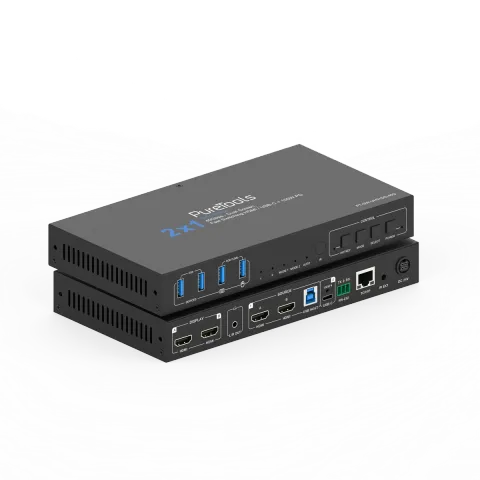
PT-SW-UH21DS-40G
2x1 Çift Ekranlı USB-C / HDMI İşbirliği Anahtarlayıcısı - 40G
PT-SW-UH21DS-40G, HDMI ve USB-C DP Alt-Mode girişlerine sahip çift ekranlı bir HDMI 2.1 işbirliği Switcher’ıdır ve profesyonel AV ortamlarında çoklu kaynak yönetimi için tasarlanmıştır. HDMI 2.1 üzerinden 40Gbps veri …
KılavuzKontrol (TCP/IP)SSSTeknik özelliklerCE beyanı ↗Mevcut kontrol arayüzleri. Komut tablosunun tamamını görmek için etkin bir türü genişletin.
Eşleşen komut yok.
ASCII Komutu22 komutEtkin
Kaynak: kılavuz, bölüm API Commands, sayfa 17
| Komut | Açıklama | Örnek | Yanıt | |
|---|---|---|---|---|
| ? | Tüm komutların listesini al | ? | ||
| help | Tüm komutların listesini al | help | ||
| get model | Cihaz modelini al | get model | PT-SW-UH21DS-40G | |
| status | Cihazın mevcut durumunu al | status | Please refer to the note at the end of the list. | |
| get version | Donanım yazılımı sürümünü al | get version | FW v1.1.0 KVM v1.1.0 | |
| power on/off | Cihazı aç/kapat | power on | Power on… System Initializing... Initialization Finished! FW v1.1.0 KVM v1.1.0 | |
| get power | Mevcut güç durumunu al | get power | Power on | |
| reboot | Cihazı yeniden başlat | reboot | Reboot… System Initializing... Initialization Finished! FW v1.1.0 KVM v1.1.0 | |
| reset | Sistem ayarlarını varsayılanlara sıfırla (Onaylamak için "Yes", iptal etmek için "No" yazılmalıdır) | reset | Sure to Reset System Settings To Default? Type "Yes" after next prompt to confirm… | |
| reset all | Sistem ve ağ ayarlarını varsayılanlara sıfırla (Onaylamak için "Yes", iptal etmek için "No" yazılmalıdır) | reset all | Sure to Reset System and Network Settings To Default? Type "Yes" after next prompt to confirm… | |
| set key on/off | Ön panel tuşunu aç/kapa | set key on | Set key on on | |
| get key | Ön panel tuşunun açık/kapalı durumunu al | get key | On | |
| set ir on/off | IR açma/kapama ayarla | set ir off | Set IR on on | |
| get ir | IR açık/kapalı durumunu al | get ir | On | |
| set beep on/off | Buzzer’ı aç/kapat olarak ayarla | set beep off | Set beep off off | |
| get beep | Buzzer açık/kapalı durumunu al | get beep | Off | |
| set hotkey on/off | Kısayol tuşu işlevini aç/kapa | set hotkey on | Set hotkey on on | |
| get hotkey | Kısayol tuşu fonksiyonunun açık/kapalı durumunu al | get hotkey | On | |
| set hotkeys x | Kısayol tuşlarını ayarla (x=1~5) x=1: PC1 giriş kısayolları x=2: PC2 giriş kısayolları x=3: Sonraki giriş kısayolları x=4: Önceki giriş kısayolları x=5: Buzzer açma/kapatma | set hotkeys 1 | Type hotkeys… | |
| get hotkeys x | Kısayol tuşu ayarlarını al (x=1~5) x=1: PC1 giriş kısayolu x=2: PC2 giriş kısayolu x=3: Sonraki giriş kısayolu x=4: Önceki giriş kısayolu x=5: Buzzer açma/kapatma | get hotkeys 1 | "Ctrl" + "Ctrl" + "1" | |
| set baud x | RS232 veri hızını x bps olarak ayarla x=1: 4800 x=2: 9600 x=3: 19200 x=4: 38400 x=5: 57600 x=6: 115200 | set baud 6 | Set baud rate 115200 9600 | |
| get baud | RS232 baud hızını al | get baud | 115200 |
API Komutları57 komutEtkin
Kaynak: kılavuz, bölüm API Commands, sayfa 27
| Komut | Açıklama | Örnek | Yanıt | |
|---|---|---|---|---|
| set input x | Girişi ayarla (x=1~2) x=1: PC1 girişi x=2: PC2 girişi | set input 1 | Set PC1 input 1 | |
| get input | PC girişini al | get input | PC1 | |
| set usb x | USB kaynağını ayarla (x=0~2) x=0: Video girişine uyumlu x=1: PC1 USB host x=2: PC2 USB host | set usb 0 | Set USB follow video input 0 | |
| get usb | USB girişini al | get usb | Follow video input | |
| get usb5v | USB host giriş 5V durumunu al | get usb5v | PC1 USB: 5V PC2 USB: None | |
| set autoswitch on/off | Otomatik anahtarlamayı aç/kapat olarak ayarla | set autoswitch on | Set autoswitch on on | |
| get autoswitch | Otomatik anahtarlama açık/kapalı durumunu al | get autoswitch | On | |
| set autoswitch mode x | Otomatik anahtarlama algılama modunu ayarla x=0: 5V algılama x=1: Sinyal algılama | set autoswitch mode 1 | Set autoswitch mode to signal detection signal detection | |
| get autoswitch mode | Otomatik anahtarlama algılama modunu al | get autoswitch mode | Signal detection | |
| get edid x | Giriş portlarının (x=0~4) EDID'sini al x=0: Tüm girişler x=1: USB-C A girişi x=2: USB-C B girişi x=3: HDMI A girişi x=4: HDMI B girişi | get edid 0 | USB-C A EDID 00: Copy EDID from HDMI output (default) USB-C B EDID 00: Copy EDID from HDMI output (default) HDMI A EDID 00: Copy EDID from HDMI output (default) HDMI B EDID 00: Copy EDID from HDMI output (default) | |
| get edid data x | Giriş portlarının (x=0~4) EDID verisini al x=0: Tüm girişler x=1: USB-C A girişi x=2: USB-C B girişi x=3: HDMI A girişi x=4: HDMI B girişi | get edid data 0 | USB-C A EDID USB-C B EDID HDMI A EDID HDMI B EDID | |
| set user edid x | Kullanıcı tanımlı EDID’i (x=0~2) y olarak ayarla x=0: Kullanıcı Tanımlı 1 ve Kullanıcı Tanımlı 2 x=1: Kullanıcı Tanımlı 1 x=2: Kullanıcı Tanımlı 2 y=00 FF FF FF ….. (y 256 bayt EDID verisidir) | set user edid 1 | User Defined 1 EDID is loaded | |
| get user edid x | Kullanıcı tanımlı EDID (x=0~2) verisini al x=0: Kullanıcı Tanımlı 1 ve Kullanıcı Tanımlı 2 x=1: Kullanıcı Tanımlı 1 x=2: Kullanıcı Tanımlı 2 | get user edid 1 | ||
| set output mode x | Çıkış modunu (x=1~2) olarak ayarla x=1: Çıkış modu 1 x=2: Çıkış modu 2 | set output mode 1 | Set output to mode 1 1 | |
| get output mode | Çıkış modunu al | get output mode | Mode 1 | |
| set output x stream on/off | Çıkış (x=0~2) akışını aç/kapat olarak ayarla x=0: Tüm çıkışlar x=1: Çıkış A x=2: Çıkış B | set output 0 stream off | Set All outputs off on | |
| get output x stream | Çıkış (x=0~2) akış açık/kapalı durumunu al x=0: Tüm çıkışlar x=1: Çıkış A x=2: Çıkış B | get output 0 stream | Output A on Output B on | |
| set output hdcp y | Çıkış HDCP modunu ayarla (y=0~3) y=0: Rezerve y=1: Otomatik y=2: HDCP 1.4 y=3: HDCP 2.2 | set output hdcp 1 | Set output HDCP to auto 1 | |
| get output hdcp | Çıkış HDCP modunu al | get output hdcp | Auto | |
| set audio mute on/off | De-embedding ses susturmayı aç/kapat olarak ayarla Varsayılan: kapalı | set audio mute on set audio mute off | Set de-embedding audio mute on Set de-embedding audio mute off | |
| get audio mute | De-embedding ses susturma açık/kapalı durumunu al | get audio mute | Mute on | |
| set output x usb5v y | USB cihaz port çıkışını (x=0~4) 5V olarak y'ye ayarla x=0: Tüm USB cihaz portları x=1: USB-A cihaz 1 x=2: USB-A cihaz 2 x=3: USB-A cihaz 3 x=4: USB-A cihaz 4 y=0: 5V çıkışı devre dışı y=1: Ana cihaza uyumlu y=2: 5V çıkışı her zaman zorla | set output 0 usb5v 1 | Set all USB device output 5V follow host. 1 | |
| get output x usb5v | USB cihaz port çıkışı (x=0~4) 5V durumunu al | get output 0 usb5v | USBA_1 5V: follow host USBA_2 5V: follow host USBA_3 5V: follow host USBA_4 5V: follow host | |
| set cec power on/off | CEC güç açma/kapama komutunu ayarla | set cec power on set cec power off | CEC power on CEC power off | |
| set auto power feature on/off | Ekran otomatik güç özelliğini aç/kapat olarak ayarla | set auto power feature on | Set auto power on off | |
| get auto power feature | Ekran otomatik güç özelliğinin açık/kapalı durumunu al | get auto power feature | Auto power on | |
| set auto power off timer x | Otomatik kapanma komutu x (x=1~6) sonra gönderilecektir x=1: 5 sn x=2: 10 sn x=3: 30 sn x=4: 1 dk x=5: 5 dk x=6: 10 dk | set auto power off timer 1 | Set auto power off timer: 5 sec 5 sec | |
| get auto power off timer | Otomatik kapanma zamanlayıcısını al | get auto power off timer | 5 sec | |
| set auto power control x | Otomatik güç özelliği kontrolünü (x=1~3) üzerinden ayarla x=1: CEC x=2: RS232 x=3: CEC ve RS232 | set auto power control 1 | Set auto power control: CEC CEC | |
| get auto power control | Otomatik güç özellik kontrol tipini al | get auto power control | CEC | |
| set RS-232 setting x | RS232 ayarını x olarak ayarla x=115200-8n1 Veri hızı: 115200/57600/38400/19200/9600/4800/2400 Veri bitleri: 7/8 Parite: n(Yok)/ o(Tek) / e(Çift) Dur bitleri: 1/2 | set RS-232 setting 115200-8n1 | Set RS-232: 115200-8n1 9600-8n1 | |
| get RS-232 setting | RS232 ayarını al | get RS-232 setting | 115200-8n1 | |
| set RS-232 command on/off | RS232 komutunu açma/kapama ayarla Varsayılan: kapalı | set RS-232 command on set RS-232 command off | Set RS-232 command on Set RS-232 command off | |
| get RS-232 command | RS232 komut açık/kapalı durumunu al | get RS-232 command | On | |
| set RS-232 HEX/ASCII power on delay1 input delay2 | RS232 HEX/ASCII açılış gecikmesi1, giriş gecikmesi2 ayarla Komut formatı HEX veya ASCII y1= RS232 açılış komutu y2= 0~1200sn y3= RS232 giriş portu seçimi y4= 0~1200sn NOT: gecikme1, giriş gecikmesi2 NULL olabilir | set RS-232 ASCII power on delay1 input delay2 set RS-232 ASCII power on set RS-232 HEX power on delay1 input | Set RS-232 ASCII power on delay1 input delay2 Set RS-232 ASCII power on Set RS-232 HEX power on delay1 input | |
| set preset clear x | Bir birimde belirtilen bir ön ayarı temizle (x=1~5) Ağ ayarları hariç tüm ayarlar. x=1~5: Ön ayar 1 ~ Ön ayar 5 | set preset clear 1 | Set preset 1 clear | |
| set preset x name y | Önayar (x=1~5) adını y olarak ayarla (en fazla 16 karakter) x=1~5: Önayar 1 ~ Önayar 5 | set preset 1 name Blueriver | Set preset 1 name Blueriver | |
| get preset x name | Önayar (x=1~5) adını al x=1~5: Önayar 1 ~ Önayar 5 | get preset 1 name | Blueriver | |
| get ipconfig | Mevcut IP Yapılandırmasını al Varsayılan: varsayılan statik IP 192.168.0.178/255.255.0.0/192.168.0.1 | get ipconfig | IP Mode: DHCP IP: 192.168.62.106 Subnet Mask: 255.255.255.0 Gateway: 192.168.62.1 TCP/IP port: 8000 Telnet port: 23 MAC: 6C:DF:FB:0C:B3:8E (Static: 169.254.100.200 255.255.0.0 169.254.100.1) | |
| get mac addr | Ağ MAC adresini al | get mac addr | MAC: 6C:DF:FB:0C:B3:8E | |
| set ip mode x | Ağ IP modunu statik IP veya DHCP olarak ayarla (x=0~1) x=0: Statik x=1: DHCP Varsayılan: 1 | set ip mode 0 | Set IP mode static (Please use "set net reboot" command or repower device to apply new config!) | |
| get ip mode | Ağ IP modunu al | get ip mode | DHCP | |
| set ip addr xxx.xxx.xxx.xxx | Ağ IP adresini ayarla | set ip addr 192.168.1.100 | Set IP address 192.168.1.100 (Please use "set net reboot" command or repower device to apply new config!) DHCP on, Device can't config static address, set DHCP off first. | |
| get ip addr | Ağ IP adresini al | get ip addr | 192.168.62.106 | |
| set subnet xxx.xxx.xxx.xxx | Ağ alt ağ maskesini ayarla | set subnet 255.255.255.0 | Set subnet mask 255.255.255.0 (Please use "set net reboot" command or repower device to apply new config!) DHCP on, Device can't config subnet mask, set DHCP off first. | |
| get subnet | Ağ alt ağ maskesini al | get subnet | 255.255.255.0 | |
| set gateway xxx.xxx.xxx.xxx | Ağ geçidini ayarla | set gateway 192.168.1.1 | Set gateway 192.168.1.1 (Please use "sst net reboot!" command or repower device to apply new config!) DHCP on, Device can't config gateway, set DHCP off first. | |
| get gateway | Ağ varsayılan geçidini al | get gateway | 192.168.1.1 | |
| set tcp/ip port x | Ağ TCP/IP portunu ayarla (x=1~65535) Varsayılan: 4001 | set tcp/ip port 8000 | Set TCP/IP port 8000 | |
| get tcp/ip port | Ağ TCP/IP portunu al | get tcp/ip port | 8000 | |
| set telnet port x | Ağ telnet portunu ayarla (x=1~65535) Varsayılan: 23 | set telnet port 23 | Set telnet port 23 | |
| get telnet port | Ağ telnet portunu al | get telnet port | 23 | |
| set net reboot | Ağ modüllerini yeniden başlat | set net reboot | Search for IP,Please wait ...! IP Mode: DHCP IP: 192.168.62.106 Subnet Mask: 255.255.255.0 Gateway: 192.168.62.1 TCP/IP port: 8000 Telnet port: 23 MAC: 6C:DF:FB:0C:B3:8E (Static: 169.254.100.200 255.255.0.0 169.254.100.1) | |
| set admin password x | Yönetici giriş şifresini ayarla (x=[en fazla 16 karakter]) Varsayılan: admin | set admin password admin | Set admin password admin | |
| get admin password | Yönetici giriş şifresini al | get admin password | admin | |
| set user password x | Kullanıcı giriş parolasını ayarla (x=[en fazla 16 karakter]) Varsayılan: user | set user password user | Set user password user | |
| get user password | Kullanıcı giriş şifresini al | get user password | user |