
Aktiv
PT-MA-HDBT42
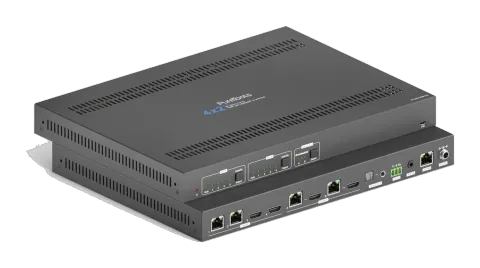
4x2 4K 18Gbps HDMI HDBaseT-matrix med scaler
4x2 4K HDMI og HDBaseT Matrix Switcher PT-MA-HDBT42 er en matrix switcher med to HDBaseT- og to HDMI-indgange, der distribuerer signaler til to HDBaseT-udgange, hver med en spejlet HDMI loop-out. Den understøtter HDMI …
ManualStyring (TCP/IP)FAQFirmwareCETilgængelige styringsinterfaces. Udvid en aktiv type for at se den fulde kommandotabel.
Ingen matchende kommandoer.
RS232 Kommandoer26 kommandoerAktiv
Kilde: manual, kapitel RS232 Communication Commands, side 40
| Kommando | Beskrivelse | Eksempel | Svar | |
|---|---|---|---|---|
| >SetPowerOn [param1] | Gå ind/ud af standbytilstand. [param1] = En, Dis En - Tænd for strømmen. Dis - Standbytilstand. | >SetPowerOn En >SetPowerOn Dis <PowerOn True | ||
| >GetFirmwareVersion | Hent firmwareversion. | <V1.0.0 | ||
| >SetFactoryReset | Nulstil til fabriksindstillinger. | <FactoryReset_True | ||
| >SetReboot | Genstart enhed. | <Reboot_True | ||
| >GetStatus | Hent system driftsstatus. | ... | ||
| >SetRS232Baudrate [param1] | Indstil matrix Switchers serielle baudrate til [param1]. [param1] = 1~7 1- 115200 2 - 57600 3 - 38400 4 - 19200 5 - 9600 6 - 4800 7 - 2400 | >SetRS232Baudrate 3 <RS232Baudrate 9600 | ||
| >GetRS232Baudrate | Hent baudrate for Switcher. | <RS232Baudrate 9600 | ||
| >SetKeyboardLock [param1] | Lås/oplås frontpanelknapper. [param1] = En, Dis | >SetKeyboardLock En >SetKeyboardLock Dis | ||
| >GetKeyboardLock | Hent låsestatus for frontpanel. | <KeyboardLock False | ||
| >SetSignalDet [param1] | Indstil metoden til indgangssignalregistrering. [param1] = 5V, TMDS. | >SetSignalDet TMDS >SetSignalDet 5V <SignalDetMode 5V | ||
| >GetSignalDet | Hent metoden til input signalregistrering. | <SignalDetMode 5V | ||
| >Set5VSource [param1] | I automatisk switch-tilstand, indstil registreringsmetoden for HDBT-inputs til at registrere transmitterens signal for at sikre, at forskellige transmittere kan anvendes. [param1] = HW, FW. HW - Hardwareregistrering. FW - Firmware-registrering. | >Set5VSource HW >Set5VSource FW <HDBTIN5VSourceFrom FW | ||
| >Get5VSource | Hent detektionsmetode for HDBT-inputs til at detektere signal fra Transmitter for at sikre, at forskellige Transmittere kan bruges. | <HDBTIN5VSourceFrom FW | ||
| >SetDownScaler [param1] [param2] | Indstil nedskalering-funktionen for output [param1]. [param1] = OutA, OutB. [param1] = Null, alle outputs. [param2] = En, Dis. En - Aktiver nedskalering-funktionen. Dis - Deaktiver nedskalering-funktionen. | >SetDownScaler En >SetDownScaler Dis <DownScaler False | ||
| >GetDownScaler [param1] | Hent status for nedskaleringsfunktionens indstilling for output [param1]. [param1] = OutA, OutB. [param1] = Null, alle output. | >GetDownScaler <DownScaler False | ||
| >SetDhcp [param1] | Aktivér/deaktiver DHCP (Dynamic Host Configuration Protocol). [param1] = En, Dis. En - Aktivér DHCP. Dis - Deaktiver DHCP. | >SetDhcp En >SetDhcp Dis <Dhcp False | ||
| >GetDhcp | Hent DHCP-status. | <Dhcp False | ||
| >SetIpAddr [param1].[param2].[param3].[param4] | Indstil GUI IP. [param1] = 0 ~ 255. [param2] = 0 ~ 255. [param3] = 0 ~ 255. [param4] = 0 ~ 255. | >SetIpAddr 192.168.0.178 <SetIpAddr 192.168.0.178 | ||
| >GetIpAddr | Hent GUI IP. | <SetIpAddr 192.168.0.178 | ||
| >SetSubnetMask [param1].[param2].[param3].[param4] | Indstil subnetmaske-adressen for GUI. [param1] = 0 ~ 255. [param2] = 0 ~ 255. [param3] = 0 ~ 255. [param4] = 0 ~ 255. | >SetSubnetMask 255.255.255.0 <SetSubnetMask 255.255.255.0 | ||
| >GetSubnetMask | Hent subnet maske adresse for GUI. | <SetSubnetMask 255.255.255.0 | ||
| >SetGateWay [param1].[param2].[param3].[param4] | Indstil gateway-adressen for GUI. [param1] = 0 ~ 255. [param2] = 0 ~ 255. [param3] = 0 ~ 255. [param4] = 0 ~ 255. | >SetGateWay 192.168.0.1 <SetGateWay 192.168.0.1 | ||
| >GetGateWay | Hent gateway-adresse for GUI. | <SetGateWay 192.168.0.1 | ||
| >SetPoCOut [param1] [param2] | Tænd/sluk for PoC. [param1] = IN1, IN2, OutA, OutB, Null. IN1 - HDBT input 1. IN2 - HDBT input 2. OutA - HDBT output A. OutB - HDBT output B. Null - alle HDBT inputs og outputs. [param2] = En, Dis En - Tænd for PoC. Dis - Sluk for PoC. | >SetPoCOut Dis >SetPoCOut En >SetPoCOut IN1 Dis >SetPoCOut IN1 En >SetPoCOut IN2 Dis >SetPoCOut IN2 En >SetPoCOut OutA Dis >SetPoCOut OutA En >SetPoCOut OutB Dis >SetPoCOut OutB En <PoCOut OutB On | ||
| >GetPoCOut [param1] | Hent PoC-indstillingsstatus. [param1] = IN1, IN2, OutA, OutB, Null. IN1 - HDBT input 1. IN2 - HDBT input 2. OutA - HDBT output A. OutB - HDBT output B. Null - alle HDBT-input og output. | >GetPoCOut >GetPoCOut IN1 >GetPoCOut IN2 >GetPoCOut OutA >GetPoCOut OutB <PoCOut OutB On | ||
| >SetAV [param1] [param2] | Skift video input [param2] til video output [param1]. [param1] = OutA, OutB. [param1] = Null, alle outputs. [param2] = H1, H2, H3, H4 H1 - HDBT input 1. H2 - HDBT input 2. H3 - HDMI input 3. H4 - HDMI input 4. | >SetAV H1 >SetAV OutA H1 >SetAV OutB H1 <AV OutB H1 |
RS232 Kommandoer27 kommandoerAktiv
Kilde: manual, kapitel Command Description, side 44
| Kommando | Beskrivelse | Eksempel | Svar | |
|---|---|---|---|---|
| >GetAV [param1] | Hent inputkilde for output [param1]. | [param1] = OutA, OutB. | [param1] = Null, alle outputs. | >GetAV | >GetAV OutA | >GetAV OutB | | <AV OutA H1 | <AV OutB H1 | |
| >SetAutoSwitch [param1] [param2] | Aktivér/deaktivér automatisk switch-tilstand for output[param1]. | [param1] = OutA, OutB. | [param1] = Null, alle outputs. | [param2] = En, Dis | En - Aktivér | Dis - Deaktivér | >SetAutoSwitch En | >SetAutoSwitch Dis | >SetAutoSwitch OutA En | >SetAutoSwitch OutA Dis | >SetAutoSwitch OutB En | >SetAutoSwitch OutB Dis | | <AutoSwitch OutA Enable | <AutoSwitch OutA Disable | <AutoSwitch OutB Enable | <AutoSwitch OutB Disable | |
| >GetAutoSwitch [param1] | Hent indstilling for automatisk skifte-tilstand for output[param1]. | [param1] = OutA, OutB. | [param1] = Null, alle outputs. | >GetAutoSwitch | >GetAutoSwitch OutA | >GetAutoSwitch OutB | | <AutoSwitch OutA Enable | <AutoSwitch OutA Disable | <AutoSwitch OutB Enable | <AutoSwitch OutB Disable | |
| >SaveScreenMode [param1] | Gem den aktuelle skiftestatus til preset [param1]. [param1] = 1~6. | >SaveScreenMode 1 | <CallScreenMode 1 | | ||
| >RecallScreenMode [param1] | Hent forudindstilling [param1]. [param1] = 1~6. | >RecallScreenMode 2 | <CallScreenMode 2 | | ||
| >ClearScreenMode [param1] | Ryd den nuværende [param1]. [param1] = 1~6. | >ClearScreenMode 2 | <ClearScreenMode 2 | | ||
| >SetAudioSrc [param1] | Indstil lydkilden for SPDIF + stereo audio outputs. [param1] = OutA, OutB OutA - Lyd de-embedding fra output A. OutB - Lyd de-embedding fra output B. | >SetAudioSrc OutA >SetAudioSrc OutB | <AudioSrc OutA De-embedded <AudioSrc OutB De-embedded | |
| >SetSpdif [param1] | Slå SPDIF audio output fra/til. [param1] = Mute, Unmute | >SetSpdif Mute >SetSpdif Unmute | <Spdif Mute <Spdif UnMute | |
| >SetIis [param1] | Slå Stereo (I2S) audio output fra/til. [param1] = Mute, Unmute | >SetIis Mute >SetIis Unmute | <Iis Mute <Iis UnMute | |
| >GetAudioSta | Hent lyd Output-status. | <AudioSrc OutA De-embedded <AudioSrc OutB De-embedded <Spdif Mute <Spdif UnMute <Iis Mute <Iis UnMute | ||
| >SetHdcpOutput [param1] [param2] | Indstil HDCP-tilstanden for output. [param1] = OutA, OutB. [param1] = Null, alle outputs. [param2] = Aktiv, Passiv, Fra. Aktiv - HDCP 1.4 Passiv - Følger HDCP på indgangssignalet, understøtter op til HDCP 2.2. Fra - Ingen HDCP-indhold. | >SetHdcpOutput Active >SetHdcpOutput Passive >SetHdcpOutput Off | <HdcpOutput Active <HdcpOutput Passive <HdcpOutput Off | |
| >GetHdcpOutput | Hent HDCP-indstillingsstatus for output. | <HdcpOutput Active <HdcpOutput Passive <HdcpOutput Off | ||
| >SetUpdateEdid [param1] | Upload en brugerdefineret EDID. EDID kan gemmes til brug når som helst. Når kommandoen anvendes, opfordrer systemet til at uploade EDID-fil (.bin). Operation annulleres efter 10 sekunder. [param1] = 1, 2. 1 - Upload brugerdifineret EDID 1. 2 - Upload brugerdifineret EDID 2. | >SetUpdateEdid 1 | <User 1 EDID Ready Please Send EDID Data Within 10 Seconds | |
| >SetEdidMode [param1] [param2] | Indstil EDID for input. [param1] = H1, H2, H3, H4, Null H1 - HDBT input 1. H2 - HDBT input 2. H3 - HDMI input 3. H4 - HDMI input 4. Null - Alle input. [param2] = 1~12 1 - HDBT OUTA EDID-kopi 2 - HDBT OUTB EDID-kopi 3 - 1920x1080@60Hz 8bit Stereo 4 - 1920x1080 8bit High Definition Audio 5 - 3840x2160@30Hz 8bit Stereo Audio 6 - 3840x2160@30Hz Deep Color High Definition Audio 7 - 3840x2160@60Hz 4:2:0 Deep Color Stereo Audio 8 - 3840x2160@60Hz Deep Color Stereo Audio 9 - 3840x2160@60Hz Deep Color High Definition Audio 10 - 3840x2160@60Hz Deep Color HDR LPCM 6CH 11 - brugerdefineret EDID 1 12 - brugerdefineret EDID 2 | >SetEdidMode 8 >SetEdidMode H1 8 >SetEdidMode H2 8 >SetEdidMode H3 8 >SetEdidMode H4 8 | <EDIDMode H1 8 <EDIDMode H2 8 <EDIDMode H3 8 <EDIDMode H4 8 | |
| >GetEdidMode [param1] | Hent EDID fra input. [param1] = H1, H2, H3, H4, Null H1 - HDBT input 1. H2 - HDBT input 2. H3 - HDMI input 3. H4 - HDMI input 4. Null - Alle inputs. | >GetEdidMode >GetEdidMode H1 >GetEdidMode H2 >GetEdidMode H3 >GetEdidMode H4 | <EDIDMode H1 8 <EDIDMode H2 8 <EDIDMode H3 8 <EDIDMode H4 8 | |
| >SetSrcCecControl [param1] [param2] | Send CEC-kommando til styring af kildemodulet. [param1] = H1, H2, H3, H4, Null H1 - HDBT input 1. H2 - HDBT input 2. H3 - HDMI input 3. H4 - HDMI input 4. Null - Alle inputs. [param2] = 1~18 1 - Lydstyrke- 2 - Menu 3 - Lydstyrke+ 4 - Tilbage 5 - Op 6 – Enter 7 - Venstre 8 – Ned 9 - Højre 10 – Tænd 11 - Sluk 12 - Stop 13 - Forrige 14 – Næste 15 - Pause 16 – REW 17 - FF 18 - Afspil | >SetSrcCecControl H1 1 >SetSrcCecControl H2 1 >SetSrcCecControl H3 1 >SetSrcCecControl H4 1 | <SourceCECCommand H1 1 <SourceCECCommand H2 1 <SourceCECCommand H3 1 <SourceCECCommand H4 1 | |
| >SetDisCecControl [param1] [param2] | Send CEC-kommando til styring af displayenhed. [param1] = OutA, OutB. [param1] = Null, alle output. [param2] = 1~6 1 - Tænd 2 - Sluk 3 - Kilde 4 - Lydløs 5 - Lydstyrke- 6 - Lydstyrke+ | >SetDisCecControl OutA 1 >SetDisCecControl OutB 1 | <DisplayCECCommand OutA 1 <DisplayCECCommand OutB 1 | |
| >SetUserCecControl [param1] [param2] | Tilpas CEC-kommando til at styre kilde- eller skærmenhed. [param1] = 1~6 1 - HDBT input 1. 2 - HDBT input 2. 3 - HDMI input 3. 4 - HDMI input 4. 5 - HDBT output A. 6 - HDBT output B. [param2] = XX:XX......(HEX) | >SetUserCecControl 5 40:36 | <UserCECCommand 1 XX:XX….. | |
| >SetRS232Mode [param1] | Indstil RS232-tilstand. [param1] = 1~4 1 - Lokal kontrol. 2 - HDBT Transmitter Pass Through 3 - HDBT Receiver Pass Through 4 - Pass Through mellem Transmitter og Receiver. Bemærk: RS232-tilstanden kan indstilles via GUI RS232-fanen. | >SetRS232Mode 1 >SetRS232Mode 2 >SetRS232Mode 3 >SetRS232Mode 4 | <RS232Mode 1 <RS232Mode 2 <RS232Mode 3 <RS232Mode 4 | |
| >GetRS232Mode | Hent RS232 kontroltilstand. | <RS232Mode 2 | ||
| >SetOn_[param1]_[param2]:[param3] | Når Switcher tændes, sender den automatisk den gemte RS232-kommando for at kontrollere tredjepartsenheder i den fjerne ende. [param1] = A, H. A - ASCII-kommandformat. H - HEX-kommandformat. [param2] = 1~7 (Baudhastighed) 1 - 115200 2 - 57600 3 - 38400 4 - 19200 5 - 9600 6 - 4800 7 - 2400 [param3] = ASCII-streng eller HEX-streng. (f.eks. Strengen bruges til at tænde displayenhed) Bemærk: Kommandoen behøver ikke et kommandoafslutningstegn " ". | >SetOn_A_1:abc123 | <SetOn_Ascii (Baud)115200 abc123 | |
| >SetOff_[param1]_[param2]_[param3]:[param4] | Når Switcher slukkes, sender den automatisk den gemte RS232-kommando for at kontrollere tredjepartsenheder i den fjerne ende. [param1] = A, H. A - ASCII-kommandformat. H - HEX-kommandformat. [param2] = 1~7 (Baudhastighed). 1 - 115200 2 - 57600 3 - 38400 4 - 19200 5 - 9600 6 - 4800 7 - 2400 [param3] = 1, 2 1 - Send RS232-strengen én gang. 2 - Send RS232-strengen to gange. [param4] = ASCII-streng eller HEX-streng. (f.eks. Strengen bruges til at slukke displayenhed) Bemærk: Kommandoen behøver ikke et kommandoafslutningstegn " ". | >SetOff_A_1_2:abc123 | SetOff_Ascii (Baud)115200 (Repeat)2 abc123 | |
| >SetOffRptDly [param1] | Når den ovenstående Off RS232-kommando er indstillet til at gentage 2 gange, kan intervallet mellem de to kommandoer angives med denne kommando. [param1] = 300-10000 (ms) | >SetOffRptDly 300 | <OffRptDly 300 | |
| >GetOffRptDly | Hent sendefrekvensen mellem to Off RS232 kommandoer. | <OffRptDly 300 | ||
| >Send_A_[param1]_[param2]:[param3] | Send ASCII-kommando til ønsket RS232-port. [param1] = 1~5 1 - Lokal 2 - HDBT input 1 3 - HDBT input 2 4 - HDBT output A. 5 - HDBT output B. [param2] = 1~7 (Baud rate) 1 - 115200 2 - 57600 3 - 38400 4 - 19200 5 - 9600 6 - 4800 7 - 2400 [param3] = ASCII-streng. Bemærk: Kommandoen behøver ikke afslutningstegn " ". | >Send_A_1_1:abc123 … | ||
| >Send_H_[param1]_[param2]:[param3] | Send HEX-kommando til ønsket RS232-port. [param1] = 1~5 1 - Lokal 2 - HDBT input 1 3 - HDBT input 2 4 - HDBT output A. 5 - HDBT output B. [param2] = 1~7 (Baud rate) 1 - 115200 2 - 57600 3 - 38400 4 - 19200 5 - 9600 6 - 4800 7 - 2400 [param3] = HEX-streng Bemærk: Kommandoen behøver ikke afslutningstegn " ". | >Send_H_1_1:31 32 33 … | ||
| >SetDisplayOn [param1] [param2] | Tænd/sluk for displayenheder ved samtidigt at sende CEC-kommando og den gemte RS232-kommando. [param1] = OutA, OutB. [param1] = Null, alle outputs. [param2] = En, Dis En - Tænd for displayenheder. Dis - Sluk for displayenheder. | >SetDisplayOn En >SetDisplayOn Dis >SetDisplayOn OutA En >SetDisplayOn OutA Dis >SetDisplayOn OutB En >SetDisplayOn OutB Dis | <Display OutA Off <Display OutA On <Display OutB Off <Display OutB On |