
Udgået
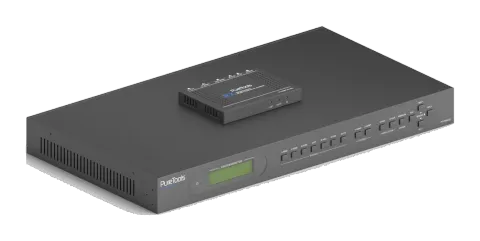
PT-PMS-62
6x2 4K multiformat præsentationsmatrix med skaleringssæt
PT-PMS-62 er en professionel scaling presentation Matrix med to fuldstændig uafhængige output, inklusive en 4K HDMI port og en HDBaseT port, der kan transmittere op til 70m ved 1080p eller 40m ved 4K med den medfølgende …
ManualStyring (TCP/IP)FAQSpecifikationerCETilgængelige styringsinterfaces. Udvid en aktiv type for at se den fulde kommandotabel.
Ingen matchende kommandoer.
RS232 Kommandoer99 kommandoerAktiv
Kilde: manual, kapitel RS232 Control, side 41
| Kommando | Beskrivelse | Eksempel | Svar | |
|---|---|---|---|---|
| PWON. | Tænd systemet. | PWON | ||
| PWOFF. | Sluk systemet. Sluk for HDBaseT-strømforsyning. | PWOFF | ||
| STANDBY. | System standby. Tryk på en vilkårlig knap for at vække. | STANDBY | ||
| /*Type; | Rapportér systemmodel. | PT-PMS-62S | ||
| /^Version; | Rapportér firmwareversion. | V1.0.0 | ||
| /%Lock; | Lås frontpanelknapper. | System Locked | ||
| /%Unlock; | Lås op for frontpanelknapper. | System Unlock! | ||
| %9964. | Rapportér IP-adresse. | IP:192.168.0.178 | ||
| USBUpdata:[x]. | Opgrader 3458 IC på port [x]. X Port 1~6 Input port 7~8 Output port | |||
| %9961. | Rapporter systemets låsestatus. | System UnLock/Lock! | ||
| %9962. | Rapporter systemets strømstatus. | PWON/PWOFF | ||
| %0911. | Nulstil til fabriksindstillinger. Bemærk: Switcheren skal genstartes efter fabriksnulstilling for at sikre signaloutput. | |||
| Demo. | Skift til demo testtilstand, skift AV 1>1, 1>2 og så videre. | Demo Mode: AV:01->01 AV:01->02 AV:02->01 AV:02->02 AV:03->01 AV:03->02 AV:04->01 AV:04->02 AV:05->01 AV:05->02 AV:06->01 AV:06->02 Normal Mod | ||
| Undo. | Annuller den nuværende operation og vend tilbage til den tidligere skiftestatus. | Undo Ok! | ||
| [x]All. | Skift input [x] til HDMI og HDBT outputs. x=1~6. Eksempel: 4ALL. | 4 To All | ||
| All#. | Skift alle inputsignaler til den tilsvarende outputkanal. 1->1, 2->2 | All Through. | ||
| All$. | Sluk for alle kanaler. | All Closed. | ||
| [x]#. | Skift input [x] til output [x]. x=1~2. | 1 Through | ||
| [x]$. | Sluk for output [x]. x=1~2. | 1 Closed. | ||
| [x]@. | Tænd for output [x]. x=1~2. | 01 Open. | ||
| All@. | Tænd for alle outputs. | All Open | ||
| [x]V[y]. | Skift input [x] til output [y]. x=1~8, y=1~2. | AV: 1-> 1 | ||
| %9975. | Rapporter kildeomskiftningsstatus. | Out 1 2 In 4 4 | ||
| Status[x]. | Rapportér status for output [x]. x=1~2 | AV: 5-> 1 | ||
| Status. | Rapportér input-kanal på outputkanaler én efter én. | AV:01->01 AV:01->02 | ||
| Save[y]. | Gem den aktuelle skiftestatus til preset [y]. y=0~9. | Save To F0 | ||
| Recall[y]. | Hent forudindstilling [y]. y=0~9. | Recall From F0 | ||
| Clear[y]. | Ryd preset [y]. | Clear F0 | ||
| Embedded:[x]. | Vælg ekstern balanceret lyd (L+R) for input [x]. x=1~2. | HDMI1 Embedded | ||
| UnEmbedded:[x]. | Vælg intern lyd for input [x]. x=1~2. | HDMI1 UnEmbedded | ||
| MIXOUT:[x]. | Output [x] lyd blandes med MIX lyd. | HDMI1 OUT MIX | ||
| UnMIXOUT:[x]. | Output [x] lyd blandes ikke med MIX lyd. | HDMI1 OUT UnMIX | ||
| SetHDMIVol:xx. | Indstil HDMI output lydstyrken til xx. xx=0~60. | Volume of HDMI: 30. | ||
| HDMIVolume+. | Forøg HDMI output lydstyrke. | Volume of HDMI: 31. | ||
| HDMIVolume-. | Formindsk HDMI output lydvolumen. | Volume of HDMI: 29. | ||
| HDMIMute. | Slå lyd fra på HDMI output. | HDMI Mute. | ||
| HDMIUnmute. | Slå lyd fra HDMI output til lyd til. | HDMI Unmute. | ||
| SetHDBTVol:xx. | Indstil HDBT output lydstyrken til xx. xx=0~60. | Volume of HDBT: 30. | ||
| HDBTVolume+. | Forøg HDBT output lydstyrke. | Volume of HDBT: 31. | ||
| HDBTVolume-. | Formindsk HDBT output lydvolumen. | Volume of HDBT: 29. | ||
| HDBTMute. | Slå lyd fra på HDBT output. | HDBT Mute. | ||
| HDBTUnmute. | Slå lyd fra HDBT output til lyd til. | HDBT Unmute. | ||
| SetMIXVol:xx. | Indstil MIX input lydstyrken til xx. xx=0~60. | Volume of MIX: 30. | ||
| MIXVolume+. | Forøg MIX input lydstyrke. | Volume of MIX: 31. | ||
| MIXVolume-. | Formindsk MIX input lydvolumen. | Volume of MIX: 29. | ||
| MIXMute. | Slå MIX input lyd fra. | MIX Mute. | ||
| MIXUnmute. | Slå lyd fra MIX input lyd til lyd til. | MIX Unmute. | ||
| %9941. | Rapportér lydstatus. | HDBT Unmute. HDMI Mute. MIX Mute. | ||
| %9942. | Rapportér lydvolumen. | Volume of HDBT: 9. Volume of HDMI: 30. Volume of MIX: 6. | ||
| %9943. | Rapportér ekstern lydstatus. | HDMI1 Unembedded HDMI2 Embedded | ||
| VRES/X:Y. | Indstil outputopløsningen for port [X] til [Y]. 1) X=7/8: X Output Port 7 HDMI 8 HDBT 2) Y=1~10: Y Opløsning 1 4K@60Hz 2 4K@30Hz 3 1920X1200@60Hz 4 1080P@60Hz 5 1080P@50Hz 6 1600x1200@60Hz 7 1360x768@60Hz 8 1024x768@60Hz 9 720P@60Hz 10 720P@50Hz | Outport HDMI:720p@50Hz Outport HDBT:720p@50Hz | ||
| EDID/[x]/[y]. | Input [x] påkalder indbygget EDID [y]. x=1~3, 5. y EDID 1 1080P@60Hz 2 4K@30Hz 4:4:4 3 4K@60Hz 4:4:4 | |||
| EDID Upgrade[x]. | Opgrader EDID-data på inputport [x]. x=1~3, 5. Når kommandoen anvendes, opfordrer systemet til at uploade EDID-fil (.bin). Operation annulleres efter 10 sekunder. Afbryd venligst HDBT-forbindelsen før afsendelse af kommando for at sikre, at data modtages korrekt. | |||
| EDIDM[x]B[y]. | Indstil EDID data for output [x] til input [y]. x=1~2, y=1~3, 5. | Example: EDIDM1B1. Feedback: Input 1 EDID Upgrade OK By 01 EXT EDID! | ||
| EDIDMInit. | Nulstil fabriksindstillinger for EDID til alle inputporte. | All input EDID Set Default 1080P! | ||
| %9945. | Rapportér EDID-data fra alle porte. | Inport 1 : Edid_2 Inport 2 : Edid_4 Inport 3 : Edid_1 Inport 4 : Edid_3 Inport 6 : Edid_3 Outport 1 : Edid_3 Outport 2 : Edid_3 | ||
| Relay ON[X]. | Tænd for relæ [X], X=1~2. | Relay 1 ON | ||
| Relay OFF[X]. | Sluk for relæ [X], X=1~2. | Relay 1 OFF | ||
| Relay AutomationCtl:[X],[Y]. | Indstil auto stop tid for relay [X] til Y sekunder. X=1~2, Y=0~20. | Relay 1 Turn On, delay 0.0 seconds turn off | ||
| ToggleRelay[X]. | Skift relæ [X], X=1~2. | |||
| SetVGAPhase:XX. | Indstil fasepositionen til XX. XX=0~100. | |||
| SetVGABrightness: XX. | Indstil lysstyrken til XX. XX=0~100. | SetVGABrightness: 070 | ||
| SetVGAContrast: XX. | Indstil kontrasten til XX. XX=0~100. | SetVGAContrast: 050 | ||
| SetVGAColor: XX. | Indstil farven til XX. XX=0~100. | SetVGAColor: 020 | ||
| SetVGAAutoSync:X. | X=0, deaktiver Auto-Sync-tilstand. X=1, aktiver Auto-Sync-tilstand. | SetVGAAutoSync: AutoSync OFF/ON | ||
| SetVGASharpness:XX. | Indstil skarpheden til XX. XX=0~100. | SetVGASharpness: 050 | ||
| SetVGAColorTemp:X. | Auto-juster farvetemperaturen til X. X=0~3 (Normal/Kølig/Varm) | SetVGAColorTemp: COLORTEMP MEDIUM SetVGAColorTemp: COLORTEMP COOL SetVGAColorTemp: COLORTEMP USER | SetVGAColorTemp: COLORTEMP WARM | |
| SetVGAAspetRatio:X. | Indstil billedformat til X. X=0~2 (16:9/4:3/auto) | SetVGAAspetRatio:AspetRatio 4X3 SetVGAAspetRatio:AspetRatio Auto | SetVGAAspetRatio:AspetRatio 16X9 | |
| SetVGAPicMode:X. | Indstil billedtilstand til X. X=0~3. (dynamisk/standard/blød/bruger) | SetVGAPicMode: PICTURE NORMAL MODE SetVGAPicMode: PICTURE VIVID MODE SetVGAPicMode: PICTURE USER MODE | SetVGAPicMode: PICTURE SOFT MODE | |
| Baud rate 2400. | Indstil Switcher RS232 baudrate til 2400. | Set Local RS232 baud rate is 2400! | ||
| Baud rate 4800. | Indstil Switcher RS232 baudrate til 4800. | Set Local RS232 baud rate is 4800! | ||
| Baud rate 9600. | Indstil Switcher RS232 baudrate til 9600. | Set Local RS232 baud rate is 9600! | ||
| Baud rate 19200. | Indstil Switcher RS232 baudrate til 19200. | Set Local RS232 baud rate is 19200! | ||
| Baud rate 38400. | Indstil Switcher RS232 baudrate til 38400. | Set Local RS232 baud rate is 38400! | ||
| Baud rate 57600. | Indstil Switcher RS232 baudrate til 57600. | Set Local RS232 baud rate is 57600! | ||
| Baud rate 115200. | Indstil Switcher RS232 baudrate til 115200. | Set Local RS232 baud rate is 115200! | ||
| CECON. | Aktivér CEC | CEC Turn ON! | ||
| CECOFF. | Deaktiver CEC | CEC Turn OFF! | ||
| CECI[port]00. | Bekræft handling (Enter). | CECI0100. [CEC]: blue ray OK. | ||
| CECI[port]01. | UP. | CECI0101. [CEC]: blue ray up. | ||
| CECI[port]02. | NED. | CECI0102. [CEC]: blue ray down. | ||
| CECI[port]03. | VENSTRE. | CECI0103. [CEC]: blue ray left. | ||
| CECI[port]05. | HØJRE. | CECI0105. [CEC]: blue ray right. | ||
| CECI[port]09. | Tilbage til undermenu. | CECI0109. [CEC]: blue ray menu. | ||
| CECI[port]0D. | Afslut. | CECI010D. [CEC]: blue ray Exit. | ||
| CECI[port]41. | Lydstyrke op. | CECI0141. [CEC]: Source VOL + | ||
| CECI[port]42. | Lydstyrke ned. | CECI0142. [CEC]: Source VOL - | ||
| CECI[port]44. | Afspil. | CECI0144. [CEC]: blue ray play. | ||
| CECI[port]45. | Stop. | CECI0145. [CEC]: blue ray stop. | ||
| CECI[port]46. | Pause. | CECI0146. [CEC]: blue ray pause. | ||
| CECI[port]48. | Spol tilbage | CECI0148. [CEC]: blue ray backward. | ||
| CECI[port]49. | Hurtig fremad. | CECI0149. [CEC]: blue ray forward. | ||
| CECI[port]4B. | Fremad. | CECI014B. [CEC]: blue ray skid forward. | ||
| CECI[port]4C. | Bagud. | CECI014C. [CEC]: blue ray skid backward. | ||
| CECI[port]6C. | Sluk. | CECI016C. [CEC]: Source Power off. | ||
| CECI[port]6D. | Tænd. | CECI016D. [CEC]: Source Power on. | ||
| CECO[port]34. | Input kanal valg. | CECO0634. [CEC]: TV input select | ||
| CECO[port]41. | Lydstyrke op. | CECO0641. [CEC]: TV VOL + | ||
| CECO[port]42. | Lydstyrke ned. |
RS232-kommandoer12 kommandoerAktiv
Kilde: manual, kapitel RS232 Control, side 51
| Kommando | Beskrivelse | Eksempel | Svar | |
|---|---|---|---|---|
| CECI[port]6C. | Sluk. | CECI016C. [CEC]: Source Power off. | ||
| CECI[port]6D. | Tænd. | CECI016D. [CEC]: Source Power on. | ||
| CECO[port]34. | Input kanal valg. | CECO0634. [CEC]: TV input select | ||
| CECO[port]41. | Lydstyrke op. | CECO0641. [CEC]: TV VOL + | ||
| CECO[port]42. | Lydstyrke ned. | CECO0642. [CEC]: TV VOL - | ||
| CECO[port]43. | Dæmp | CECO0643. [CEC]: TV VOL Mute | ||
| CECO[port]36. | Sluk. | CECO0636. [CEC]: TV Power off | ||
| CECO[port]04. | Tænd. | CECO0604. [CEC]: TV Power on | ||
| UARTPassThrough:Y. | RS232-tilstandsvalg: Y=0, Lokal kontrol: RS232-porten på switcheren bruges til at forbinde kontrolenheden (f.eks. PC) for at styre switcheren. Y=1, HDBT Receiver Pass Through: Etabler RS232 pass-through kommunikation mellem switcheren og HDBaseT Receiver (f.eks. PT-HDBT-200-RX). RS232-porten på switcheren kan bruges til at overføre kommandoer for at styre tredjepartsenheden, som er tilsluttet HDBaseT Receiver. | |||
| /+[Y]/[X]:******. | xxx: ASCII-tegn. Y: Repræsenterer RS232-porten. 1) Y=1: RS232-porten på switcher. 2) Y=2: RS232-porten på HDBaseT Receiver. 3) Y=3: RS232-porten på HDBaseT Transmitter. X: Repræsenterer baudraten for tredjepartsenhed. 1) X=1, 2400 2) X=2, 4800 3) X=3, 9600 4) X=4, 19200 5) X=5, 38400 6) X=6, 57600 7) X=7, 115200 | /+3/3:123456. Send the command “123456” to the third-party device. The baud rate is 9600. | ||
| /#[X]/[B]:******. | xxxxxx: HEX-tegn. X: Repræsenterer RS232-porten. X RS232-port 1 RS232-porten på Matrix switcher. 2 RS232-porten på den fjerneste HDBaseT Receiver. B: Repræsenterer baudraten for tredjepartsenhed. B Baudrate 1 2400 2 4800 3 9600 4 19200 5 38400 6 57600 7 115200 | /#3/3:01 02 03 Send the HEX command “123456” to the third-party device whose baud rate is 9600. | ||
| /+[Y]/[B]:******. | xxxxxx: Feedback-kommando (ASCII-tegn). Y: Repræsenterer RS232-porten. 1) Y=A: Ved systemstart modtages feedback-kommando fra RS232-porten på switcher. 2) Y=B: Ved systemstart modtages feedback-kommando fra RS232-porten på HDBaseT Receiver. 3) Y=a: Ved systemsluk modtages feedback-kommando fra RS232-porten på switcher. 4) Y=b: Ved systemsluk modtages feedback-kommando fra RS232-porten på HDBaseT Receiver. B: Repræsenterer baudraten for tredjepartsenhed. | /+A/3: Play ON 123. When power on system, receive the feedback command “Play ON 123.” from the RS232 port of switcher. |