
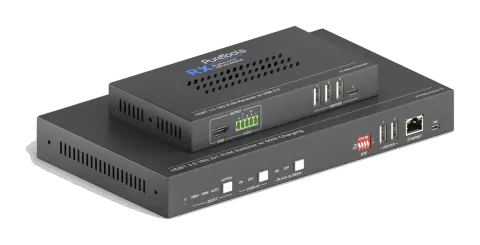
UdgåetMuligt alternativ: PT-PSW-21KVM-40G
PT-PSW-21KVM
2x1 4K 18 Gbps multiformat-samarbejdsswitchersæt
PT-PSW-21KVM er et HDBaseT 3.0 samarbejds-Extender-sæt, der transmitterer ukomprimeret 4K-video, USB-data og Ethernet over lange afstande, med HDMI- og USB-C DP Alt-Mode-indgange for fleksibel enhedsforbindelse. Det …
ManualStyring (TCP/IP)FAQAlternativ tilgængeligFirmwareCETilgængelige styringsinterfaces. Udvid en aktiv type for at se den fulde kommandotabel.
Ingen matchende kommandoer.
RS232 Kommandoer1 kommandoerAktiv
ForbindelseBaud Rate: Supports 9600, 19200, 38400, 57600, 115200
Command Ending: NULL, CR, LF or CR+LF can be chosen.↓ CSV
Kilde: manual, kapitel RS232 Tab, side 19
| Kommando | Beskrivelse | Svar | |
|---|---|---|---|
| Type the command in the box to control the third-party device which is connected to the RS232 port of the PT-PSW-21KVM. | Control the third-party device connected to the RS232 port. |
RS232 Kommandoer30 kommandoerAktiv
Kilde: manual, kapitel RS232 Command, side 27
| Kommando | Beskrivelse | Eksempel | Svar | |
|---|---|---|---|---|
| PHDBTON. | HDBaseT OUT POC power on | HDBT 01 Power ON! | ||
| PHDBTOFF. | HDBaseT OUT POC power off | HDBT 01 Power OFF! | ||
| HDMIA. | Auto-switch mode on HDMI Out | HDMI Out Switch Auto Mode! | ||
| HDMIM. | Manual-switch mode on HDMI Out | HDMI Out Switch Manual Mode! | ||
| HDMI[x]. | HDMI input source selection. x = 1 & 2 1 – Type-C 2 – HDMI | HDMI Out Switch To 01! | HDMI Out Switch To 01! | |
| POWON. | Turn off standby mode | Power ON! | ||
| POWOFF. | Turn on standby mode | Power OFF! | ||
| SIGNALTRG[xx]MODE. | When setting the detection mode xx=1, it is 5V detection, and when it is 2, it is TMDS detection. | Set Trigger Mode To 5V. | ||
| SIGNALTRGSTA. | Forespørg metoden for signalregistrering (TMDS eller 5V) | Get Trigger Mode Is 5V. | ||
| RST. | Gendan fabriksindstillinger | Factory Default! | ||
| Lock. | Tænd for frontpanel lås | Front Panel Locked! | ||
| Unlock. | Sluk for frontpanel-lås | Front Panel UnLock! | ||
| STA. | Statusforespørgsel | PT-PSW-21KVM V1.0.0 PWON! HDBT 01 Power ON! HDMI OUT 01 Down Scale OFF! HDMI OUT 02 Down Scale OFF! HDMI Out Switch Auto Mode! Get Trigger Mode Is 5V. System Unlock! Baudrate9600! GUI_IP:192.168.0.200! HDMI Out Switch To 02! Set Output Black Screen ON! IN 1 2 LINK Y Y OUT 1 2 LINK Y Y Input 1 EDID From 1 User Define EDID! Input 2 EDID From 1 Internal EDID! OUT 01 HDCP MAT DISPLAY! OUT 02 HDCP MAT DISPLAY! Set POFF Delay To 600 Second(s)! | ||
| RS232ONSAVE:[Y],[xxx]. | Save the display terminal boot command sent when the input is detected. Y is the baud rate, 1--2400; 2--4800; 3--9600; 4--19200; 5--38400; 6-57600; 7 --115200; xxx is the command data | |||
| RS232OFFSAVE:[Y],[xxx]. | Save the display terminal shutdown command sent when no input is detected. Y is the baud rate, 1--2400; 2--4800; 3--9600; 4--19200; 5--38400; 6-57600; 7--115200; xxx is the command data | |||
| RS232DLYOUT[xx]:[yy]. | Set the delayed sending time of the display terminal shutdown command (CEC and RS232). Send when no input is detected; the default time is 10 minutes 600s [xx]=output,00~02 [yy]=second,01~600 | |||
| TVON. | Turn on TV by CEC control | CEC_TV_POWON! CEC Output 01 Send Success. CEC Output 02 Send Success. | ||
| TVOFF. | Turn off TV by CEC control | CEC_TV_POWOFF! CEC Output 01 Send Success. CEC Output 02 Send Success. | ||
| TVVOL+. | TV volume plus by CEC control | CEC_TV_VOLUP! CEC Output 01 Send Success. CEC Output 02 Send Success. | ||
| TVVOL-. | TV volume down by CEC control | CEC_TV_VOLDOWN! CEC Output 01 Send Success. CEC Output 02 Send Success. | ||
| TVMUTE. | TV mute via CEC kontrol | CEC_TV_VOLMUTE/UNMUTE! CEC Output 01 Send Success. CEC Output 02 Send Success. | ||
| DS[x]ON. | Turn on the DOWN SCALE of the HDMI output. (Compatible with [X]/[XX]) [x] Value 0-2 or 00-02, 0 means all output | HDMI OUT 01 Down Scale ON! HDMI OUT 02 Down Scale ON! | ||
| DS[x]OFF. | Turn off the DOWN SCALE of the HDMI output. (Compatible with [X]/[XX]) [x] Value 0-2 or 00-02, 0 means all output | HDMI OUT 01 Down Scale OFF! HDMI OUT 02 Down Scale OFF! | ||
| STA_IN. | Source connection status | IN 1 2 LINK N N | ||
| /+[X]/[YY]:XXX. | RS232 sends commands to control peripheral devices. [YY]The value is 00 or 01; [X] is 1--2400; 2--4800; 3--9600; 4--19200; 5--38400; 6-57600; 7--115200 | 123456 | ||
| @OUT[xx]. | Turn on the HDMI 5V of the output port. [xx] The value 00-01, 00 means all outputs. | Set Output Black Screen ON! | ||
| $OUT[xx]. | Turn off the HDMI 5V of the output port. [xx] The value 00-01,00 means all outputs. | Set Output Black Screen OFF! | ||
| GETGUIIP. | Forespørg GUI IP | GUI_IP:192.168.0.173! | ||
| SetGuiIP_DHCP ON. | Dynamic DHCP | GUI IP DHCP ON! | ||
| SetGuiIP_DHCP OFF:xxx.xxx.x.xxx. | Static DHCP+set IP (default is 192.168.0.178) | GUI IP DHCP OFF!SETGUIIP:192.168.0.123! |