
Udgået
PT-PSW-42
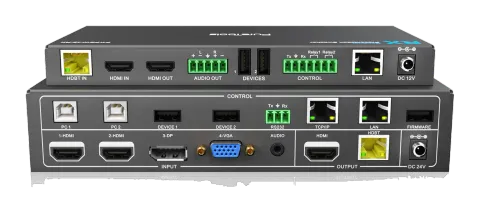
4x2 4K Multiformat Presentation Switcher med KVM og scaler-sæt
PureTools Teleconference Scaler Switcher 4x2 er en præsentationsswitcher med 2 HDMI-inputs og 1 DisplayPort eller VGA-input, der har spejlede HDMI- og HDBaseT-outputs. Den understøtter opløsninger op til 4K UltraHD …
ManualStyring (TCP/IP)FAQSpecifikationerDatabladCE-erklæring ↗Tilgængelige styringsinterfaces. Udvid en aktiv type for at se den fulde kommandotabel.
Ingen matchende kommandoer.
RS232 Kommandoer60 kommandoerAktiv
ForbindelseBaud rate: 9600 Data bit: 8 Stop bit: 1 Parity bit: none The end mark of command is “<CR><LF>”.↓ CSV
Kilde: manual, kapitel RS232 Control, side 20
| Kommando | Beskrivelse | Eksempel | Svar | |
|---|---|---|---|---|
| SWIN H1 | Skift til 1-HDMI input. | Switch to HDMI1 | ||
| SWIN H2 | Skift til 2-HDMI input. | Switch to HDMI2 | ||
| SWIN DP | Skift til 3-DP input. | Switch to DP | ||
| SWIN VG | Skift til 4-VGA input. | Switch to VGA | ||
| SWIN RXHDMI | Skift til RX HDMI Input. | Switch to RX HDMI | ||
| AUTO 01 | Aktivér automatisk skift. | Auto Switching | ||
| AUTO 00 | Aktivér manuel skift. | Manual Switching | ||
| ?GET IN | Get the input source of Transmitter. (HDMI1,HDMI2,DP,VGA) | TX Device Input: HDMI1 | ||
| ?GET IN | Get the input source of Receiver. (HDMI,HDBT) | RX Device Input: HDMI | ||
| ?GET AUTO | Hent skiftemode. | Manual Switching/Auto Switching | ||
| VGAA | Auto-juster inputparametrene (kun VGA). | VGA Input Auto | ||
| AUMT S1 | Slå kilde lyd fra. | Audio Mute Source: Enable | ||
| AUMT S0 | Slå lyd fra kilde til lyd til. | Audio Mute Source: Disable | ||
| AUMT V1 | Slå lyd fra på VGA hjælpeindgang. | Audio Mute VGA: Enable | ||
| AUMT V0 | Slå VGA hjælpeinput-lyd til. | Audio Mute VGA: Disable | ||
| ?GET AUMT | Get the Source mute status. | Audio Mute Source: Enable | ||
| ?GET AUMT | Get the VGA auxiliary audio mute status. | Audio Mute VGA: Enable | ||
| VOLS AP | Skru op for kildens lydstyrke (xx=00~60). | Source Volume: xx | ||
| VOLS AN | Skru ned for kildeaudioens lydstyrke (xx=00~60). | Source Volume: xx | ||
| VOLV AP | Skru op for VGA hjælpelydstyrke (xx=00~60). | VGA Volume: xx | ||
| VOLV AN | Skru ned for VGA hjælpeaudioens lydstyrke (xx=00~60). | VGA Volume: xx | ||
| VOLS xx | Indstil lydstyrken på kilde (xx=00~60). | Source Volume: xx | ||
| VOLV xx | Indstil VGA hjælpeaudio volumen (xx=00~60). | VGA Volume: xx | ||
| ?GET VOL | Get the source audio volume (xx=00~60). | Source Volume: xx | ||
| ?GET VOL | Get the VGA auxiliary audio volume (xx=00~60). | VGA Volume: xx | ||
| TRES 01 | Indstil outputopløsningen for Transmitter til 3840x2160@30Hz. | TX Device Resolution: 3840x2160 | ||
| TRES 02 | Indstil outputopløsningen for Transmitter til 1920X1080. | TX Device Resolution: 1920x1080 | ||
| TRES 03 | Indstil outputopløsningen for Transmitter til 1280x720. | TX Device Resolution: 1280x720 | ||
| RRES 01 | Indstil outputopløsningen for Receiver til 3840x2160@30Hz. | RX Device Resolution: 3840x2160 | ||
| RRES 02 | Indstil outputopløsningen for Receiver til 1920x1080. | RX Device Resolution: 1920x1080 | ||
| RRES 03 | Indstil outputopløsningen for Receiver til 1280x720. | RX Device Resolution: 1280x720 | ||
| ?GET RES | Get the output resolution for Transmitter. | TX Device Resolution: 1920x1080 | ||
| ?GET RES | Get the output resolution for Receiver. | TX Device Resolution: 1920x1080 | ||
| ?GET TIME | Kontroller automatisk slukkemodus. | Auto Switch Mode no input to shutdown time: Disable Manual Switch Mode no input to shutdown time: Disable | ||
| TIME AD | Auto Switch-tilstand: Deaktiver automatisk sluk-funktion. | Auto Switch Mode no input to shutdown time: Disable | ||
| TIME A1 | Auto Switch-tilstand: Indstil automatisk sluk-tid til 1 minut ved intet signalinput. | Auto Switch Mode no input to shutdown time: 1 minutes | ||
| TIME A2 | Auto Switch-tilstand: Indstil automatisk sluk-tid til 2 minutter ved intet signalinput. | Auto Switch Mode no input to shutdown time: 2 minutes | ||
| TIME A3 | Auto Switch-tilstand: Indstil automatisk sluk-tid til 5 minutter ved intet signalinput. | Auto Switch Mode no input to shutdown time: 5 minutes | ||
| TIME A4 | Auto Switch-tilstand: Indstil automatisk sluk-tid til 10 minutter ved intet signalinput. | Auto Switch Mode no input to shutdown time: 10 minutes | ||
| TIME MD | Manuel Switcher-tilstand: Deaktiver automatisk slukningstid. | Manual Switch Mode no input to shutdown time: Disable | ||
| TIME M1 | Manuel skiftemodus: Indstil strømtilslutningstiden til 1 minut. | Manual Switch Mode no input to shutdown time: 1 minutes | ||
| TIME M2 | Manuel skiftemodus: Indstil strømtilslutningstiden til 2 minutter. | Manual Switch Mode no input to shutdown time: 2 minutes | ||
| TIME M3 | Manuel skiftemodus: Indstil strømtilslutningstiden til 5 minutter. | Manual Switch Mode no input to shutdown time: 5 minutes | ||
| TIME M4 | Manuel skiftemodus: Indstil strømtilslutningstiden til 10 minutter. | Manual Switch Mode no input to shutdown time: 10 minutes | ||
| RLY1 ON | Tænd for Relæ 1. | Relay 1 on | ||
| RLY1 OFF | Sluk for Relæ 1. | Relay 1 off | ||
| RLY2 ON | Tænd for Relæ 2. | Relay 2 on | ||
| RLY2 OFF | Sluk for Relæ 2. | Relay 2 off | ||
| EDID DF | Kildeenheden henter den forudindstillede EDID 3840x2160@30Hz. | EDID: Initial | ||
| EDID US | Indlæs tilpassede EDID-data fra U-drev. | EDID: User | ||
| ?GET EDID | Hent EDID-status. | EDID: Initial/ User | ||
| SFUD TX | Opdater softwaren på Transmitter. | TX Device Software Update | ||
| SFUD RX | Opdater softwaren på Receiver. | RX Device Software Update | ||
| ?GET REV | Hent systemversion. | Vx.x.x | ||
| FRST | Gendan til fabriksindstillinger. | Factor Reset | ||
| WAKE | Væk systemet op. | Wake Up | ||
| STBY | Sæt dette system i standby-tilstand. | Go To Standby | ||
| ?GET IP | Hent IP-adressen. | 192.168.0.178! | ||
| /+pb:xxxxxxxxx | Send ASCII command to control the third party device based on RS232 pass-through function. p = 0~1 is for RS232 control mode. When the "p=0", send command to control the local third party device which is connected to the transmitter. When the "p=1", the command is sent to control remote third party device which is connected to the receiver. b = 0~6 is for baud rate. b | Baud Rate 0 | 2400 1 | 4800 2 | 9600 3) xxxxxxxxx is for ASCII data (max 48 Byte). | /+12:123456789 | ||
| /-pb:xx xx xx xx | Send HEX command to control the third party device based on RS232 pass-through function. b | Baud Rate 0 | 2400 1 | 4800 2 | 9600 3 | 19200 4 | 38400 5 | 57600 6 | 115200 3) xx xx xx xx is for HEX data (max 48 Byte). | /-12:30 31 32 33 34 |