
Aktiv
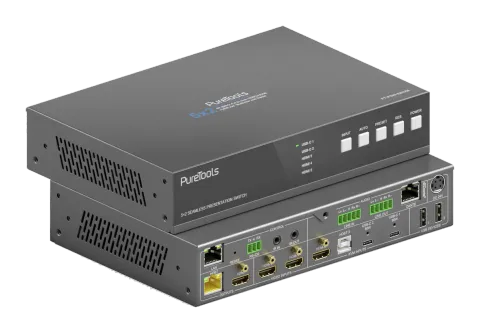
PT-PSW-52KVM-TX
18 Gbps USB-C-samarbejdssender med Dante og Multi-View
PT-PSW-52KVM-TX er en multi-format AV Switcher, der muliggør problemfri skift mellem to HDMI-kilder, én HDMI plus USB-B og to USB-C DP Alt-Mode-porte med 60W Power Delivery, som understøtter video, data og strøm gennem …
ManualStyring (TCP/IP)FAQSpecifikationerDatabladFirmwareCE-erklæring ↗Tilgængelige styringsinterfaces. Udvid en aktiv type for at se den fulde kommandotabel.
Ingen matchende kommandoer.
RS232 Kommandoer61 kommandoerAktiv
Kilde: manual, kapitel RS-232 Control Command, side 31
| Kommando | Beskrivelse | Eksempel | Svar | |
|---|---|---|---|---|
| help | Hent listen over alle kommandoer | help | =================== Help Info MCU 1.1.0 Web 1.1.0 Scaler 20230228-10 FPGA 1.1.0 RX 1.18.02 help Get the list of all commands | |
| r type | Hent enhedsmodel | r type | PT-PSW-52KVM | |
| r status | Hent enhedens aktuelle status | r status | Please refer to the note at the end of the list. | |
| r fw version | Hent firmwareversion | r fw version | MCU 1.1.0 Web 1.1.0 Scaler 20230228-10 FPGA 1.1.0 RX 1.18.02 | |
| s power on | Tænd enheden | s power on | Power on System Initializing... Initialization Finished! MCU 1.1.0 Web 1.1.0 Scaler 20230228-10 FPGA 1.1.0 RX 1.18.02 | |
| s power off | Sluk for enheden | s power off | Power off | |
| r power | Hent aktuel strømstatus | r power | power on /power off | |
| s reboot | Genstart enheden | s reboot | Reboot… System Initializing... Initialization Finished! MCU 1.1.0 Web 1.1.0 Scaler 20230228-10 FPGA 1.1.0 RX 1.18.02 | |
| s reset | Nulstil til fabriksindstillinger | s reset | Reset to factory defaults System Initializing... Initialization Finished! MCU 1.1.0 Web 1.1.0 Scaler 20230228-10 FPGA 1.1.0 RX 1.18.02 | |
| s front button x | Indstil frontknap låst til/fra (x=0~1) 0. Ulåst 1. Låst | s front button 0 | Front button: Unlocked | |
| r front button | Hent status for låsning af frontknap tændt/slukket | r front button | Front button: Unlocked | |
| s beep x | Indstil buzzer til/fra (x=0~1) 0. Fra 1. Til | s beep 1 | Beep: On | |
| r beep | Hent buzzer til/fra status | r beep | Beep: Off | |
| s ir x | Indstil IR til/fra (x=0~1) 0. Fra 1. Til | s ir 1 | IR: On | |
| r ir | Hent IR til/fra-status | r ir | IR: Off | |
| s UsbcAccessNetwork x | Indstil USB-C adgangsnetværksfunktion til/fra (x=0~1) 0. Fra 1. Til | s UsbcAccessNetwork 1 | USB-C Access Network: On | |
| r UsbcAccessNetwork | Hent USB-C adgangsnetværksfunktion til/fra | r UsbcAccessNetwork | USB-C Access Network: On | |
| s fan speed x | Indstil blæserhastighed (x=0~4) 0. Auto 1. 25% 2. 50% 3. 75% 4. 100% | s fan speed 0 | Fan Speed: Auto | |
| r fan speed | Hent blæserhastighed | r fan speed | Fan Speed: Auto | |
| r temp | Hent enhedens interne temperatur | r temp | Temp: 65C | |
| r input x EDID | Hent input EDID-tilstand (x=0~5) x=0: alle input x=1: USB-C 1 x=2: USB-C 2 x=3: HDMI 3 x=4: HDMI 4 x=5: HDMI 5 | r input 0 EDID | Input USB-C 1 EDID: Auto Input USB-C 2 EDID: Auto Input HDMI 3 EDID: Auto Input HDMI 4 EDID: Auto Input HDMI 5 EDID: Auto | |
| r input x EdidData | Hent input EDID-data (x=0~5) x=0: alle input x=1: USB-C 1 x=2: USB-C 2 x=3: HDMI 3 x=4: HDMI 4 x=5: HDMI 5 | r input 0 EdidData | Input USB-C 1 EDID Data: Input USB-C 2 EDID Data: Input HDMI 3 EDID Data: Input HDMI 4 EDID Data: Input HDMI 5 EDID Data: | |
| s input x EDID y | Indstil input EDID (x=0~5) (y=1~16) x=0: alle input x=1: USB-C 1 x=2: USB-C 2 x=3: HDMI 3 x=4: HDMI 4 x=5: HDMI 5 y=1: Auto (HDBT eller HDMI eller HDBT+HDMI) y=2: Kopier HDMI OUT y=3: Kopier HDBT OUT y=4: 4K2K60_444, Stereo Audio 2.0 y=5: 4K2K30_444, Stereo Audio 2.0 y=6: 1080P, Stereo Audio 2.0 y=7: 720p, Stereo Audio 2.0 y=8: 1920x1200, Stereo Audio 2.0 y=9: 1680x1050, Stereo Audio 2.0 y=10: 1600x1200, Stereo Audio 2.0 y=11: 1440x900, Stereo Audio 2.0 y=12: 1360x768, Stereo Audio 2.0 y=13: 1280x1024, Stereo Audio 2.0 y=14: 1024x768, Stereo Audio 2.0 y=15: Brugerdefineret 1 y=16: Brugerdefineret 2 | s input 0 EDID 1 | Input USB-C 1 EDID: Auto Input USB-C 2 EDID: Auto Input HDMI 3 EDID: Auto Input HDMI 4 EDID: Auto Input HDMI 5 EDID: Auto | |
| s output res x | Indstil Output-opløsning (x=1~15) x=1: Auto x=2: 3840x2160p60 x=3: 3840x2160p50 x=4: 4096x2160p60 x=5: 4096x2160p50 x=6: 3840x2160p30 x=7: 3840x2160p25 x=8: 1920x1200p60RB x=9: 1920x1080p60 x=10: 1920x1080p50 x=11: 1360x768p60 x=12: 1280x800p60 x=13: 1280x720p60 x=14: 1280x720p50 x=15: 1024x768p60 | s output res 1 | Out Resolution: Auto | |
| r output res | Hent output opløsning | r output res | Out Resolution: Auto | |
| s output x hdcp y | Indstil output (x=0~2) HDCP (y=1~3) x=0: alle outputs (HDMI/HDBT) x=1: HDMI output x=2: HDBT output y=1: Auto y=2: HDCP 1.4 y=3: HDCP 2.2 | s output 0 hdcp 1 | Output HDMI HDCP: Auto Output HDBT HDCP: Auto | |
| r output x hdcp | Hent output hdcp-status (x=0~2) x=0: alle outputs (HDMI/HDBT) x=1: HDMI output x=2: HDBT output | r output 0 hdcp | Output All HDCP: Auto | |
| s output avmute x | Indstil output avmute til/fra (x=0~1) x=0: Fra x=1: Til | s output avmute 1 | Output AV Mute: On | |
| r output avmute | Hent output avmute tændt/slukket status | r output avmute | Output AV Mute: On | |
| s output freeze x | Indstil output freeze til/fra (x=0~1) x=0: Fra x=1: Til | s output freeze 1 | Output Freeze: On | |
| r output freeze | Hent output frys tændt/slukket status | r output freeze | Output Freeze: On | |
| s output itc x | Indstil output videotilstand (x=1~2) x=1: Video tilstand x=2: PC tilstand | s output itc 1 | Output ITC: Video Mode | |
| r output itc | Hent output video-tilstand | r output itc | Output ITC: Video Mode | |
| s main in audio x | Indstil hovedindgang (HDMI/USB-C Indgang) lyd fra (x=1~6) x=1: Vindue 1 x=2: USB-C 1 x=3: USB-C 2 x=4: HDMI 3 x=5: HDMI 4 x=6: HDMI 5 | s main in audio 1 | Main In Audio: Window 1 | |
| r main in audio | Hent Main In (HDMI/USB-C In) lydkilde | r main in audio | Main In Audio: Window 1 | |
| s output x audio y | Indstil output (x=0~3) audio kilde fra (y=1~3) x=0: alle outputs (HDMI/HDBT, Line, Dante) x=1: Main In (HDMI/USB-C In) x=2: Line In x=3: Dante In | s output 0 audio 1 | Output HDMI/HDBT Audio: Main In (HDMI/USB-C In) Output Line Audio: Main In (HDMI/USB-C In) Output Dante Audio: Main In (HDMI/USB-C In) | |
| r output x audio | Hent output (x=0~3) lydkilde x=0: alle output (HDMI/HDBT, Line, Dante) x=1: HDMI/HDBT Out x=2: Line Out x=3: Dante Out | r output 1 audio | Output HDMI/HDBT Audio: Main In (HDMI/USB-C In) | |
| s input x audio vol+ | Forøg input (x=0~3) lydstyrke x=0: alle inputs (HDMI/USB-C, Line, Dante) x=1: Main IN (HDMI/USB-C IN) x=2: Line IN x=3: Dante IN | s input 1 audio vol+ | Input Main In (HDMI/USB-C In) Audio Volume: 50 | |
| s input x audio vol- | Formindsk input (x=0~3) lydvolumen x=0: alle inputs (HDMI/USB-C, Line, Dante) x=1: Main In (HDMI/USB-C In) x=2: Line In x=3: Dante In | s input 1 audio vol- | Input Main In (HDMI/USB-C In) Audio Volume: 50 | |
| s input x audio vol y | Indstil input (x=0~3) lydstyrke værdi (y=0~100) x=0: alle input (HDMI/USB-C, Line, Dante) x=1: Hoved In (HDMI/USB-C In) x=2: Line In x=3: Dante In | s input 1 audio vol 50 | Input Main In (HDMI/USB-C In) Audio Volume: 50 | |
| r input x audio vol | Hent input (x=0~3) lydstyrkeværdi x=0: alle input (HDMI/USB-C, Line, Dante) x=1: Main In (HDMI/USB-C In) x=2: Line In x=3: Dante In | r input 1 audio vol | Input Main(HDMI/USB-C In) Audio Volume: | |
| s input x audio mute y | Indstil input (x=0~3) lydmute til/fra (y=0~1) x=0: alle input (HDMI/USB-C, Line, Dante) x=1: Hoved In (HDMI/USB-C In) x=2: Line In x=3: Dante In y=0: mute fra y=1: mute til | s input 0 audio mute 1 | Input Main(HDMI/USB-C In) Audio Mute: On Input Line Audio Mute: On Input Dante Audio Mute: On | |
| r input x audio mute | Hent input (x=0~3) lyd mute tændt/slukket x=0: alle input (HDMI/USB-C, Line, Dante) x=1: Main In (HDMI/USB-C In) x=2: Line In x=3: Dante In | r input 0 audio mute | Input Main (HDMI/USB-C In) Audio Mute: On Input Line Audio Mute: On Input Dante Audio Mute: On | |
| s master member x y z | Indstil master output medlem (x/y/z=0~1) x=0: Ekskluder HDMI/HDBT Out x=1: Inkluder HDMI/HDBT Out y=0: Ekskluder Line Out y=1: Inkluder Line Out z=0: Ekskluder Dante Out z=1: Inkluder Dante Out | s master member 1 1 1 | Master Member: 111 | |
| r master member | Hent master output medlem | r master member | Master Member: 111 | |
| s master audio vol+ | Forøg master output lydstyrke | s master audio vol+ | Master Audio Volume: 50 | |
| s master audio vol- | Formindsk master output lydvolumen | s master audio vol- | Master Audio Volume: 50 | |
| s master audio vol x | Indstil master lyd output volumenværdi (x=0~100) | s master audio vol 50 | Master Audio Volume: 50 | |
| r master audio vol | Hent master output lydvolumenværdi | r master audio vol | Master Audio Volume: 50 | |
| s master audio mute x | Indstil master lyd output mute til/fra (x=0~1) x=0: mute fra x=1: mute til | s master audio mute 1 | Master Audio Mute: On | |
| r master audio mute | Hent master output lydmutes tænd/sluk status | r master audio mute | Master Audio Mute: On | |
| s output x audio vol+ | Forøg output (x=0~3) lydstyrke x=0: alle output (HDMI/HDBT, Line, Dante) x=1: HDMI/HDBT OUT x=2: Line OUT x=3: Dante OUT | s output 1 audio vol+ | Output HDMI/HDBT Audio Volume: 50 | |
| s output x audio vol- | Formindsk output (x=0~3) lydvolumen x=0: alle outputs (HDMI/HDBT, Line, Dante) x=1: HDMI/HDBT Out x=2: Line Out x=3: Dante Out | s output 1 audio vol+ | Output HDMI/HDBT Audio Volume: 50 | |
| s output x audio vol y | Indstil output (x=0~3) audio volumenværdi (y=0~100) x=0: alle outputs (HDMI/HDBT, Line, Dante) x=1: HDMI/HDBT Out x=2: Line Out x=3: Dante Out | s output 1 audio vol 50 | Output HDMI/HDBT Audio Volume: 50 | |
| r output x audio vol | Hent output (x=0~3) lydvolumenværdi x=0: alle output (HDMI/HDBT, Line, Dante) x=1: HDMI/HDBT Out x=2: Line Out x=3: Dante Out | r output 1 audio vol | Output HDMI/HDBT Audio Volume: 50 | |
| s output x audio mute y | Indstil output (x=0~3) audio mute til/fra (y=0~1) x=0: alle outputs (HDMI/HDBT, Line, Dante) x=1: HDMI/HDBT Out x=2: Line Out x=3: Dante Out y=0: mute fra y=1: mute til | s output 0 audio mute 1 | Output HDMI/HDBT Audio Mute: On Output Line Audio Mute: On Output Dante Audio Mute: On | |
| r output x audio mute | Hent output (x=0~3) lyd mute tænd/sluk x=0: alle output (HDMI/HDBT, Line, Dante) x=1: HDMI/HDBT Out x=2: Line Out x=3: Dante Out | r output 0 audio mute | Output HDMI/HDBT Audio Mute: On Output Line Audio Mute: On Output Dante Audio Mute: On | |
| s output x audio mix y | Indstil output (x=0~3) audio mix (y=1~4) x=0: alle outputs (HDMI/HDBT, Line, Dante) x=1: HDMI/HDBT Out x=2: Line Out x=3: Dante Out y=1: Stereo y=2: Venstre y=3: Højre y=4: Venstre og Højre | s output 0 audio mix 1 | Output HDMI/HDBT Audio Mix: Stereo Output Line Audio Mix: Stereo Output Dante Audio Mix: Stereo | |
| r output x audio mix | Hent output (x=0~3) lyd miksningstilstand x=0: alle output (HDMI/HDBT, Line, Dante) x=1: HDMI/HDBT Out x=2: Line Out x=3: Dante Out | r output 0 audio mix | Output HDMI/HDBT Audio Mix: Stereo Output Line Audio Mix: Stereo Output Dante Audio Mix: Stereo | |
| s output x audio delay y | Indstil output (x=0~3) audio forsinkelse (y=0~50) x=0: alle outputs (HDMI/HDBT, Line, Dante) x=1: HDMI/HDBT Out x=2: Line Out x=3: Dante Out y=[0~50]: Forsinkelsestid, millisekund | s output 0 audio delay 50 | Output HDMI/HDBT Audio Delay: 50ms Output Line Audio Delay: 50ms Output Dante Audio Delay: 50ms | |
| r output x audio delay | Hent output (x=0~3) lydforsinkelsesværdi x=0: alle output (HDMI/HDBT, Line, Dante) x=1: HDMI/HDBT Out x=2: Line Out x=3: Dante Out | r output 0 audio delay | Output HDMI/HDBT Audio Delay: 50ms Output Line Audio Delay: 50ms Output Dante Audio Delay: 50ms |
RS232 Kommandoer69 kommandoerAktiv
ForbindelseBaudrate: 115200/57600/56000/38400/19200/9600/4800/2400 Databits: 7/8 Paritet: n (Ingen) /o(Ulig) /e(Jævn) Stopbits: 1/2↓ CSV
Kilde: manual, kapitel RS-232 Control Command, side 39
| Kommando | Beskrivelse | Eksempel | Svar | |
|---|---|---|---|---|
| r output x audio delay | Hent output (x=0~3) lydforsinkelsesværdi | x=0: alle output (HDMI/HDBT, Line, Dante) x=1: HDMI/HDBT Out x=2: Line Out x=3: Dante Out | Output HDMI/HDBT Audio Delay: 50ms Output Line Audio Delay: 50ms Output Dante Audio Delay: 50ms | ||
| s output x audio eq y val z | Indstil output (x=0~3) audio GEQ indeks (y=1~31) til værdi (z=0~20) | x=0: alle outputs (HDMI/HDBT, Line, Dante) x=1: HDMI/HDBT Out x=2: Line Out x=3: Dante Out y=[1~31]: EQ indeks z=[0~20]: EQ værdi | s output 0 audio eq 1 val 20 | Output HDMI/HDBT Audio EQ Index 1 to Value 20 Output Line Audio EQ Index 1 to Value 20 Output Dante Audio EQ Index 1 to Value 20 Output Dante Audio EQ Preset is Flat Mode | |
| r output x audio eq y val | Hent output (x=0~3) lyd GEQ indeks (y=1~31) værdi | x=0: alle output (HDMI/HDBT, Line, Dante) x=1: HDMI/HDBT Out x=2: Line Out x=3: Dante Out y=[1~31]: EQ-indeks | r output 0 audio eq 1 val | Output HDMI/HDBT Audio EQ Index 1 to Value 20 Output Line Audio EQ Index 1 to Value 20 Output Dante Audio EQ Index 1 to Value 20 | |
| s output x audio eq preset y | Indstil output (x=0~3) audio GEQ til forudindstilling (y=1~6) | x=0: alle outputs (HDMI/HDBT, Line, Dante) x=1: HDMI/HDBT Out x=2: Line Out x=3: Dante Out y=1: Flad y=2: Custom1 y=3: Custom2 y=4: Custom3 y=5: Custom4 y=6: Custom5 | s output 0 audio eq preset 1 | Output HDMI/HDBT Audio EQ Preset 1 Output Line Audio EQ Preset 1 Output Dante Audio EQ Preset 1 | |
| r output x audio eq preset | Hent output (x=0~3) lyd GEQ forindstilling | x=0: alle output (HDMI/HDBT, Line, Dante) x=1: HDMI/HDBT Out x=2: Line Out x=3: Dante Out | r output 0 audio eq preset | Output HDMI/HDBT Audio EQ Preset 1 Output Line Audio EQ Preset 1 Output Dante Audio EQ Preset 1 | |
| s output x audio eq reset | Nulstil output (x=0~3) audio GEQ | x=0: alle outputs (HDMI/HDBT, Line, Dante) x=1: HDMI/HDBT Out x=2: Line Out x=3: Dante Out | s output 0 audio eq reset | Output HDMI/HDBT Audio EQ Reset Output Line Audio EQ Reset Output Dante Audio EQ Reset | |
| s auto switch x | Aktivér/deaktiver auto switch funktion (x=0~1) | x=0: Deaktiver auto switch x=1: Aktivér auto switch | s auto switch 0 | Auto Switch: Off | |
| r auto switch | Hent auto switch-funktion | r auto switch | Auto Switch: Off | |
| s input source x | Rute inputkilde til output (x=1~5) | x=1: USB-C 1 x=2: USB-C 2 x=3: HDMI 3 x=4: HDMI 4 x=5: HDMI 5 | s input source 1 | Input Source: USB-C 1 | |
| r input source | Hent valgt inputkilde for output | r input source | Input Source: USB-C 1 | |
| s fallback input x | Indstil fallback inputkilde (x=0~5) | x=0: Næste Input x=1: USB-C 1 x=2: USB-C 2 x=3: HDMI 3 x=4: HDMI 4 x=5: HDMI 5 | s fallback input 0 | Fallback Input: Next Input | |
| r fallback input | Hent tilbagefalds inputkilde | r fallback input | Fallback Input: Next Input | |
| s multiview x | Indstil multiview visningstilstand (x=1~5) | x=1: Enkel x=2: PIP x=3: PBP x=4: Trippel x=5: Quad | s multiview 1 | Multiview: Single | |
| r multiview | Hent multiview visningstilstand | r multiview | Multiview: Single | |
| s window x in y | Indstil vindue (x=0~4) kilde fra (y=1~5) | x=0: Alle vinduer x=1: Vindue 1 x=2: Vindue 2 x=3: Vindue 3 x=4: Vindue 4 y=1: USB-C 1 y=2: USB-C 2 y=3: HDMI 3 y=4: HDMI 4 y=5: HDMI 5 | s window 1 in 1 | Window 1 in USB-C 1 | |
| r window x in | Hent vindues (x=0~4) kilde | x=0: Alle vinduer x=1: Vindue 1 x=2: Vindue 2 x=3: Vindue 3 x=4: Vindue 4 | r window 0 in | Window 1 in USB-C 1 Window 2 in USB-C 2 Window 3 in HDMI 3 Window 4 in HDMI 4 | |
| s PIP position x | Indstil PIP-vindues position (x=1~4) | x=1: Venstre Top x=2: Venstre Bund x=3: Højre Top x=4: Højre Bund | s PIP position 4 | PIP Position: Right Bottom | |
| r PIP position | Hent PIP-vinduets position | r PIP position | PIP Position: Right Bottom | |
| s PIP size x | Hent PIP-vinduets størrelse (x=1~3) | x=1: Lille x=2: Mellem x=3: Stor | s PIP size 3 | PIP Size: Large | |
| r PIP size | Hent PIP-vinduets størrelse | r PIP size | PIP Size: Large | |
| s PBP mode x | Indstil PBP-vindues displaytilstand (x=1~2) | x=1: PBP-tilstand 1 x=2: PBP-tilstand 2 | s PBP mode 1 | PBP Mode: Mode 1 | |
| r PBP mode | Hent PBP-vinduesvisningstilstand | r PBP mode | PBP Mode: Mode 1 | |
| s PBP aspect x | Indstil PBP-vindues display billedformat (x=1~2) | x=1: Fuld skærm x=2: 16:9 | s PBP aspect 1 | s PBP aspect 1 | |
| r PBP aspect | Hent PBP-vindues visningsformat | r PBP aspect | PBP Aspect: Full Screen | |
| s triple mode x | Indstil visningstilstand for tredobbelt vindue (x=1~2) | x=1: Triple Mode 1 x=2: Triple Mode 2 | s triple mode 1 | Triple Mode: Mode 1 | |
| r triple mode | Hent visningstilstand for triple windows | r triple mode | Triple Mode: Mode 1 | |
| s triple aspect x | Indstil billedformat for tredobbelt vinduesvisning (x=1~2) | x=1: Fuld skærm x=2: 16:9 | s triple aspect 1 | Triple Aspect: Full Screen | |
| r triple aspect | Hent billedformat for triple windows display | r triple aspect | Triple Aspect: Full Screen | |
| s quad mode x | Indstil quad vinduers visningstilstand (x=1~2) | x=1: Quad tilstand 1 x=2: Quad tilstand 2 | s quad mode 1 | Quad Mode: Mode 1 | |
| r quad mode | Hent quad vinduers display tilstand | r quad mode | Quad Mode: Mode 1 | |
| s quad aspect x | Indstil quad vinduers visningsformat (x=1~2) | x=1: Fuld skærm x=2: 16:9 | s quad aspect 1 | Quad Aspect: Full Screen | |
| r quad aspect | Hent quad vinduers display billedformat | r quad aspect | Quad Aspect: Full Screen | |
| s window x border y | Indstil kant(y=0~9)-tilstanden for det specificerede vindue (x=0~4) | x=0: Alle x=1: Vindu 1 x=2: Vindu 2 x=3: Vindu 3 x=4: Vindu 4 y=0: Fra y=1: Sort y=2: Rød y=3: Grøn y=4: Blå y=5: Gul y=6: Magenta y=7: Cyan y=8: Hvid y=9: Grå | s window 0 border 0 | Window 1 Border: Off Window 2 Border: Yellow Window 3 Border: Off Window 4 Border: Cyan | |
| r window x border | Hent kanttilstand for det angivne vindue (x=0~4) | x=0: Alle x=1: Vindue 1 x=2: Vindue 2 x=3: Vindue 3 x=4: Vindue 4 | r window 0 border | Window 1 Border: Off Window 2 Border: Yellow Window 3 Border: Off Window 4 Border: Cyan | |
| s rx input x | Indstil RX inputkilde (x=1~2) | x=1: HDBT IN x=2: HDMI IN | s rx input 1 | RX Input: HDBT Error,RX not ready! | |
| r rx input | Hent RX input-kilde | r rx input | RX Input: HDBT | |
| r rx hdmi5v | Hent RX HDMI input strøm 5V | r rx hdmi5v | RX HDMI 5V: 1 | |
| r rx host5v | Hent RX USB host strøm 5V | r rx host5v | RX Host 5V: 1 | |
| s rx auto switch mode x | Indstil RX Auto Switch detektionsmode (x=1~2) | x=1: TMDS x=2: 5V | s rx auto switch mode 1 | RX Auto Switch Mode: TMDS | |
| r rx auto switch mode | Hent RX Auto Switch detektionsmodus | r rx auto switch mode | RX Auto Switch Mode: TMDS | |
| s rx auto switch x | Indstil RX Auto Switch til/fra (x=0~1) | x=0: Fra x=1: Til | s rx auto switch 1 | RX Auto Switch: On | |
| r rx auto switch | Hent RX Auto Switch til/fra | r rx auto switch | RX Auto Switch: On | |
| s cec power on | Indstil CEC strøm til-kommando | s cec power on | CEC Power On | |
| s cec power off | Indstil CEC strøm fra-kommando | s cec power off | CEC Power Off | |
| s auto power feature x | Indstil display automatisk strømfunktion til/fra (x=0~1) | x=0: Fra x=1: Til | s auto power feature 1 | Auto Power Feature: On | |
| r auto power feature | Hent status for visnings automatisk tænd/sluk-funktion | r auto power feature | Auto Power Feature: On | |
| s auto power off timer x | Indstil automatisk sluk-kommando (CEC/RS232) der sendes efter x (x=1~6) | x=1: 5 sek x=2: 10 sek x=3: 30 sek x=4: 1 min x=5: 5 min x=6: 10 min | s auto power off timer 4 | Auto Power Off Timer: 1 min | |
| r auto power off timer | Hent auto power off timer | r auto power off timer | Auto Power Off Timer: 1 min | |
| s auto power control x | Indstil automatisk strømstyringsfunktion via (x=1~3) | x=1: CEC x=2: RS232 x=3: CEC og RS232 | s auto power control 1 | Auto Power Control: CEC | |
| r auto power control | Hent auto power funktionsstyringstype | r auto power control | Auto Power Control: CEC | |
| s UsbSwitchMode x | Indstil USB switch-tilstand (x=1~3) | x=1: Auto-tilstand (registrer USB 5V, og skift så) x=2: Manuel tilstand x=3: Følg video (HDMI 3 bundet med USB vært 3) | s UsbSwitchMode 1 | UsbSwitchMode: Auto mode | |
| r UsbSwitchMode | Hent USB switch-tilstand | r UsbSwitchMode | UsbSwitchMode: Auto mode | |
| s UsbManual x | Indstil USB manuel switch (x=1~3) | x=1: USB-C 1 x=2: USB-C 2 x=3: USB vært 3 | s UsbManual 3 | UsbManual: USB Host 3 | |
| r UsbSwitchStatus | Hent USB switch-status | r UsbSwitchStatus | UsbSwitchStatus: USB-C 1 | |
| s serial x setting y | Indstil seriel port (x=0~2) indstilling til y | x=0: Alle RS232 (Lokal og HDBT) x=1: Lokal RS232 x=2: HDBT RS232 y= 115200-8n1 Baudrate: 115200/57600/56000/38400/19200/9600/4800/2400 Databit: 7/8 Paritet: n (Ingen) /o(Ulig) /e(Jævn) Stopbit: 1/2 | s serial 0 setting 115200-8n1 | Local RS-232: 115200-8n1 HDBT RS-232: 115200-8n1 | |
| r serial x setting | Hent seriel port (x=0~2) indstilling | x=0: Alle RS232 (Lokal og HDBT) x=1: Lokal RS232 x=2: HDBT RS232 | r serial 0 setting | Local RS-232: 115200-8n1 HDBT RS-232: 115200-8n1 | |
| s preset save x | Gem den aktuelle enhedsindstilling til det angivne preset (x=1~5) Alle indstillinger undtagen netværksindstillinger. x=1: Preset 1 x=2: Preset 2 x=3: Preset 3 x=4: Preset 4 x=5: Preset 5 | s preset save 1 | Preset Save: Preset 1 | |
| s preset recall x | Hent en specificeret forudindstilling til enheden (x=1~5) Alle indstillinger undtagen netværksindstillinger. x=1: Forudindstilling 1 x=2: Forudindstilling 2 x=3: Forudindstilling 3 x=4: Forudindstilling 4 x=5: Forudindstilling 5 | s preset recall 1 | Preset Recall: Preset 1 | |
| s preset clear x | Ryd en specificeret preset i enheden (x=1~5) Alle indstillinger undtagen netværksindstilling. x=1: Preset 1 x=2: Preset 2 x=3: Preset 3 x=4: Preset 4 x=5: Preset 5 | s preset clear 1 | Preset Clear: Preset 1 | |
| s preset x name y | Indstil forudindstilling (x=1~5) navn til y (max 16 tegn) x=1: Forudindstilling 1 x=2: Forudindstilling 2 x=3: Forudindstilling 3 x=4: Forudindstilling 4 x=5: Forudindstilling 5 | s preset 1 name MeetingRoom 1 | Preset 1 Name: MeetingRoom 1 | |
| r preset x name | Hent forindstilling (x=1~5) navn x=1: Forindstilling 1 x=2: Forindstilling 2 x=3: Forindstilling 3 x=4: Forindstilling 4 x=5: Forindstilling 5 | r preset x name | Preset 1 Name: MeetingRoom 1 | |
| r ipconfig | Hent den aktuelle IP-konfiguration | r ipconfig | IP Mode: DHCP IP: 192.168.62.106 Subnet Mask: 255.255.255.0 Gateway: 192.168.62.1 TCP/IP port: 4001 Telnet port: 23 MAC: 6C:DF:FB:0C:B3:8E (Static: 169.254.100.200 255.255.0.0 169.254.100.1) default static IP is 192.168.0.178/255.255.0.0/192.168.0.1 | |
| r mac addr | Hent netværks MAC-adresse | r mac addr | MAC: 6C:DF:FB:0C:B3:8E | |
| s ip mode x | Indstil netværks IP-tilstand til statisk IP eller DHCP (x=0~1) x=0: Statisk x=1: DHCP | s ip mode 0 | IP mode: Static (Please use "s net reboot!" command or repower device to apply new config!) | |
| r ip mode | Hent netværks IP-tilstand | r ip mode | IP mode: DHCP | |
| s ip addr xxx.xxx.xxx.xxx | Indstil netværks IP-adresse | s ip addr 192.168.1.178 | IP address: 192.168.1.178 (Please use "s net reboot!" command or repower device to apply new config!) DHCP on, Device can't config static address, set DHCP off first. | |
| r ip addr | Hent netværks IP-adresse | r ip addr | IP: 192.168.62.106 | |
| s subnet xxx.xxx.xxx.xxx | Indstil netværks subnetmaske | s subnet 255.255.255.0 | Subnet Mask: 255.255.255.0 (Please use "s net reboot!" command or repower device to apply new config!) DHCP on, Device can't config subnet mask, set DHCP off first. | |
| r subnet | Hent netværks subnetmaske | r subnet | Subnet Mask: 255.255.255.0 |
RS232 Kontrolkommando13 kommandoerAktiv
Kilde: manual, kapitel RS-232 Control Command, side 47
| Kommando | Beskrivelse | Eksempel | Svar | |
|---|---|---|---|---|
| s subnet xxx.xxx.xxx.xxx | Indstil netværks subnetmaske | s subnet 255.255.255.0 | Subnet Mask: 255.255.255.0 (Please use "s net reboot!" command or repower device to apply new config!) DHCP on, Device can't config subnet mask, set DHCP off first. | |
| r subnet | Hent netværks subnetmaske | r subnet | Subnet Mask: 255.255.255.0 | |
| s gateway xxx.xxx.xxx.xxx | Indstil netværks gateway | s gateway 192.168.1.1 | Gateway: 192.168.1.1 (Please use "s net reboot!" command or repower device to apply new config!) DHCP on, Device can't config gateway, set DHCP off first. | |
| r gateway | Hent netværks gateway | r gateway | Gateway: 192.168.1.1 | |
| s tcp/ip port x | Indstil netværks TCP/IP port (x=1~65535) | s tcp/ip port 4001 | TCP/IP port: 4001 | |
| r tcp/ip port | Hent netværks TCP/IP-port | r tcp/ip port | TCP/IP port: 4001 | |
| s telnet port x | Indstil netværks telnet port (x=1~65535) | s telnet port 23 | Telnet port: 23 | |
| r telnet port | Hent netværks Telnet-port | r telnet port | Telnet port: 23 | |
| s net reboot | Genstart netværksmoduler | s net reboot | Search for IP, Please wait ...! IP Mode: DHCP IP: 192.168.62.106 Subnet Mask: 255.255.255.0 Gateway: 192.168.62.1 TCP/IP port: 4001 Telnet port: 23 MAC: C:DF:FB:0C:B3:8E (Static: 169.254.100.200 255.255.0.0 169.254.100.1) | |
| s admin password x | Indstil admin login password (x=[max 16 tegn]) | s admin password admin | admin password: admin | |
| r admin password | Hent administrator login-adgangskode | r admin password | admin password: admin | |
| s user password x | Indstil brugerlogin-adgangskode (x=[maks. 16 tegn]) | s user password user | user password: user | |
| r user password | Hent bruger login kodeord | r user password | user password: user |