
Aktiv
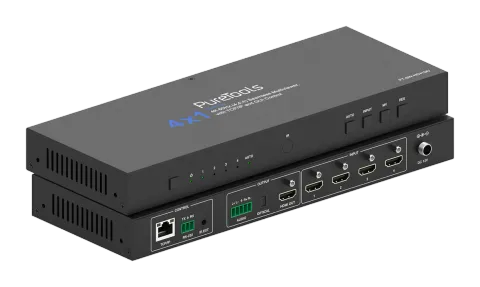
PT-SW-HD41MV
4x1 Multi-View-omskifter – 18G
PT-SW-HD41MV er en 4x1 multi-view sømløs UHD video Switcher med fire HDMI 2.0b indgange og understøtter videoopløsninger op til 4K ved 60Hz (4:4:4) med en maksimal videobåndbredde på 18Gbps, og er kompatibel med HDCP …
ManualStyring (TCP/IP)FAQSpecifikationerCETilgængelige styringsinterfaces. Udvid en aktiv type for at se den fulde kommandotabel.
Ingen matchende kommandoer.
API Kommandoer65 kommandoerAktiv
Kilde: manual, kapitel API Commands, side 8
| Kommando | Beskrivelse | Eksempel | Svar | |
|---|---|---|---|---|
| ? | Hent listen over alle kommandoer | ? | help! | |
| help! | Hent listen over alle kommandoer | help! | ||
| get model | Hent enhedsmodel | get model | PT-SW-HD41MV | |
| status | Hent enhedens aktuelle status | status | Please see "Status Feedback" sheet | |
| get version | Hent firmwareversion | get version | BOOT: Vx.xx.xx MCU: Vx.xx.xx SCALER: xxxxxxxx-xx WEB: Vx.xx.xx | |
| power on | Tænd enheden | power on | Power: on | |
| power off | Sluk for enheden | power off | Power: off | |
| get power | Hent aktuel strømstatus | get power | Power: on | |
| reboot | Genstart enheden | reboot | Reboot… | |
| reset | Nulstil universelle indstillinger til standard (skriv "Yes" for at bekræfte, "No" for at afvise) | reset | Sure to reset universal settings to default? Type "Yes" after next prompt to confirm... | |
| reset all | Nulstil alle indstillinger til standard (skriv "Yes" for at bekræfte, "No" for at afvise) | reset all | Sure to reset all settings to default? Type "Yes" after next prompt to confirm… | |
| set front button x | Indstil frontknap låst til/fra (x=0~1) x=0: Ulåst x=1: Låst | set front button 0 | Button: unlocked 0 | |
| get front button | Hent status for låsning af frontknap tændt/slukket | get front button | Button: unlocked | |
| set ir x | Indstil IR til/fra (x=0~1) x=0: Fra x=1: Til | set ir 1 | IR: on 1 | |
| get ir | Hent IR til/fra-status | get ir | IR: on | |
| get temp | Hent enhedens interne temperatur | get temp | 65°C | |
| get uptime | Hent enhedens driftstid (Dag:Time:Min:Sek) | get uptime | 000:00:13:04 | |
| set input x edid y | Indstil input (x=0~4) EDID (y=1~20) x=0: Alle input x=1: HDMI Input 1 x=2: HDMI Input 2 x=3: HDMI Input 3 x=4: HDMI Input 4 y=1: 4K2K60_444, Stereo Audio 2.0 y=2: 4K2K60_444, Dolby/DTS 5.1 y=3: 4K2K60_444, HD Audio 7.1 y=4: 4K2K30_444, Stereo Audio 2.0 y=5: 4K2K30_444, Dolby/DTS 5.1 y=6: 4K2K30_444, HD Audio 7.1 y=7: 1080P, Stereo Audio 2.0 y=8: 1080P, Dolby/DTS 5.1 y=9: 1080P, HD Audio 7.1 y=10: 1920x1200, Stereo Audio 2.0 y=11: 1680x1050, Stereo Audio 2.0 y=12: 1600x1200, Stereo Audio 2.0 y=13: 1440x900, Stereo Audio 2.0 y=14: 1360x768, Stereo Audio 2.0 y=15: 1280x1024, Stereo Audio 2.0 y=16: 1024x768, Stereo Audio 2.0 y=17: 720p, Stereo Audio 2.0 y=18: Auto y=19: Brugerdefineret 1 y=20: Brugerdefineret 2 Standard: 1 | set input 0 edid 1 | HDMI input 1 EDID: 4K2K60_444, Stereo Audio 2.0 HDMI input 2 EDID: 4K2K60_444, Stereo Audio 2.0 HDMI input 3 EDID: 4K2K60_444, Stereo Audio 2.0 HDMI input 4 EDID: 4K2K60_444, Stereo Audio 2.0 | |
| get input x edid | Hent input (x=0~4) EDID-tilstand x=0: Alle input x=1: HDMI Input 1 x=2: HDMI Input 2 x=3: HDMI Input 3 x=4: HDMI Input 4 | get input 0 edid | HDMI input 1 EDID: 4K2K60_444, Stereo Audio 2.0 HDMI input 2 EDID: 4K2K60_444, Stereo Audio 2.0 HDMI input 3 EDID: 4K2K60_444, Stereo Audio 2.0 HDMI input 4 EDID: 4K2K60_444, Stereo Audio 2.0 | |
| set user edid x | Indstil brugerdefineret EDID (x=1~2) x=1: Brugerdefineret 1 x=2: Brugerdefineret 2 y = 00 FF FF FF ... (y er 256 byte EDID-data) | set user edid 1 | User defined 1 EDID is loaded successfully | |
| get edid data x | Hent EDID-data (x=0~4) x=0: Alle Inputs x=1: HDMI Input 1 x=2: HDMI Input 2 x=3: HDMI Input 3 x=4: HDMI Input 4 | get edid data 0 | HDMI 1 input EDID data HDMI 2 input EDID data HDMI 3 input EDID data HDMI 4 input EDID data | |
| set output res x | Indstil output opløsning (x=1~15) x=1: 4096x2160p60 x=2: 4096x2160p50 x=3: 3840x2160p60 x=4: 3840x2160p50 x=5: 3840x2160p30 x=6: 3840x2160p25 x=7: 1920x1200p60RB x=8: 1920x1080p60 x=9: 1920x1080p50 x=10: 1360x768p60 x=11: 1280x800p60 x=12: 1280x720p60 x=13: 1280x720p50 x=14: 1024x768p60 x=15: Auto Standard: 15 | set output res 1 | Output resolution: 4096x2160p60 | |
| get output res | Hent output opløsning | get output res | Output resolution: 4096x2160p60 | |
| set output hdcp x | Indstil output hdcp-tilstand (x=1~2) x=1: HDCP 1.4 x=2: HDCP 2.2 Standard: 1 | set output hdcp 1 | Output HDCP: HDCP 1.4 | |
| get output hdcp | Hent output hdcp-tilstand | get output hdcp | Output HDCP: HDCP 1.4 | |
| set output vka x | Indstil output video hold aktivt mønster (x=1~2) x=1: Sort skærm x=2: Blå skærm Standard: 1 | set output vka 1 | Output VKA pattern: black screen | |
| get output vka | Hent output video hold aktivt mønster | get output vka | Output VKA pattern: black screen | |
| set output itc x | Indstil output videotilstand(x=1~2) x=1: Video tilstand x=2: PC tilstand Standard: 1 | set output itc 1 | Output ITC: video mode | |
| get output itc | Hent output video-tilstand | get output itc | Output ITC: video mode | |
| set output freeze x | Indstil output freeze til/fra (x=0~1) x=0: Fra x=1: Til | set output freeze 1 | Output freeze: on 0 | |
| get output freeze | Hent output frys tændt/slukket status | get output freeze | Output freeze: on | |
| set auto switch x | Aktivér/deaktiver auto switch funktion (x=0~1) x=0: Fra x=1: Til | set auto switch 0 | Auto switch: off 0 | |
| get auto switch | Hent auto switch-funktion | get auto switch | Auto switch: off | |
| set in source x | Rute inputkilde til output (1~4) x=1: HDMI Input 1 x=2: HDMI Input 2 x=3: HDMI Input 3 x=4: HDMI Input 4 Standard: 1 | set in source 1 | Output: HDMI input 1 | |
| get in source | Hent valgt inputkilde i enkelt skærm-tilstand for output | get in source | Output: HDMI input 1 | |
| set multiview x | Indstil multi-viewer visningstilstand (x=1~5) x=1: Enkel skærm x=2: PIP x=3: PBP x=4: Tripel skærm x=5: Quad skærm Standard: 1 | set multiview 1 | Multiview: single screen | |
| get multiview | Hent multi-viewer visningstilstand | get multiview | Multiview: single screen | |
| set window x in y | Vælg et input (y=1~4) til et displayvindue (x=1~4) for den aktuelle Multiview-tilstand x=1: Vindue 1 x=2: Vindue 2 x=3: Vindue 3 x=4: Vindue 4 y=1: HDMI Input 1 y=2: HDMI Input 2 y=3: HDMI Input 3 y=4: HDMI Input 4 | set window 1 in 1 | Window 1 select: HDMI input 1 | |
| get window x in | Hent valgte inputkilde for vinduer (x=0~4) x=0: Alle x=1: Vindue 1 x=2: Vindue 2 x=3: Vindue 3 x=4: Vindue 4 | get window 1 in | Window 1 select: HDMI input 1 | |
| set window x border y | Indstil kanttilstanden for vindue (x=0~4, y=0~9) x=0: Alle x=1: Vindu 1 x=2: Vindu 2 x=3: Vindu 3 x=4: Vindu 4 y=0: Fra y=1: Sort y=2: Rød y=3: Grøn y=4: Blå y=5: Gul y=6: Magenta y=7: Cyan y=8: Hvid y=9: Grå Standard: 0 | set window 1 border 0 | Window 1 border: off 0 | |
| get window x border | Hent kanttilstand for vindue (x=0~4) x=0: Alle x=1: Vindue 1 x=2: Vindue 2 x=3: Vindue 3 x=4: Vindue 4 | get window 1 border | Window 1 border: off | |
| set window source osd x | Indstil vindueskilde OSD-bytte (x=0~1) x=0: Fra x=1: Til Standard: 0 | set window source osd 1 | Window source osd: on | |
| get window source osd | Hent vindues kilde OSD-switch | get window source osd | Window source osd: on | |
| set PIP position x | Indstil PIP-vindues position (x=1~4) x=1: Venstre Top x=2: Venstre Bund x=3: Højre Top x=4: Højre Bund Standard: 3 | set PIP position 3 | PIP position: right top | |
| get PIP position | Hent PIP-vinduets position | get window source osd | PIP position: right top | |
| set PIP size x | Indstil PIP-vindues størrelse (x=1~3) x=1: Lille x=2: Mellem x=3: Stor Standard: 3 | set PIP size 3 | PIP size: large | |
| get PIP size | Hent PIP-vinduets størrelse | get PIP size | PIP size: large | |
| set PBP mode x | Indstil PBP-vindues displaytilstand (x=1~2) x=1: PBP-tilstand 1 x=2: PBP-tilstand 2 Standard: 1 | set PBP mode 1 | PBP mode 1 | |
| get PBP mode | Hent PBP-vinduesvisningstilstand | get PBP mode | PBP mode 1 | |
| set PBP aspect x | Indstil PBP-vindues display billedformat (x=1~2) x=1: Fuld skærm x=2: 16:9 Standard: 1 | set PBP aspect 1 | PBP aspect: full screen | |
| get PBP aspect | Hent PBP-vindues visningsformat | get PBP aspect | PBP aspect: full screen | |
| set triple mode x | Indstil visningstilstand for tredobbelt vindue (x=1~3) x=1: Triple Mode 1 x=2: Triple Mode 2 x=3: Triple Mode 3 Standard: 1 | set triple mode 1 | Triple mode 1 | |
| get triple mode | Hent visningstilstand for triple windows | get triple mode | Triple mode 1 | |
| set triple aspect x | Indstil billedformat for tredobbelt vinduesvisning (x=1~2) x=1: Fuld skærm x=2: 16:9 Standard: 1 | set triple aspect 1 | Triple aspect: full screen | |
| get triple aspect | Hent billedformat for triple windows display | get triple aspect | Triple aspect: full screen | |
| set quad mode x | Indstil quad vinduers visningstilstand (x=1~2) x=1: Quad tilstand 1 x=2: Quad tilstand 2 Standard: 1 | set quad mode 1 | Quad mode 1 | |
| get quad mode | Hent quad vinduers display tilstand | get quad mode | Quad mode 1 | |
| set quad aspect x | Indstil quad vinduers visningsformat (x=1~2) x=1: Fuld skærm x=2: 16:9 Standard: 1 | set quad aspect 1 | Quad aspect: full screen | |
| get quad aspect | Hent quad vinduers display billedformat | get quad aspect | Quad aspect: full screen | |
| set output audio vol+ | Forøg output lydstyrke | set output audio vol+ | Output audio volume: 30 | |
| set output audio vol- | Formindsk output lydvolumen | set output audio vol- | Output audio volume: 30 | |
| set output audio vol x | Indstil output lydstyrke værdi (x=0~100) | set output audio vol 30 | Output audio volume: 30 | |
| get output audio vol | Hent output lydstyrke | get output audio vol | Output audio volume: 30 | |
| set output audio mute x | Indstil output lyd mute til/fra (x=0~1) x=0: Fra x=1: Til Standard: 0 | set output audio mute 0 | Output audio mute: off | |
| get output audio mute | Hent output lyd mute tændt/slukket | get output audio mute | Output audio mute: off |
Audio-indstilling2 kommandoerAktiv
Kilde: manual, kapitel API Commands, side 33
| Kommando | Beskrivelse | Eksempel | Svar | |
|---|---|---|---|---|
| set output audio x | Indstil output lydkilde (x=0~4) x=0: Følg Vindue 1 Valgt Kilde x=1: HDMI 1 Input Lyd x=2: HDMI 2 Input Lyd x=3: HDMI 3 Input Lyd x=4: HDMI 4 Input Lyd Standard: 0Kilde: manual, kapitel System Diagram, side 34 | set output audio 0 | Output audio: follow window 1 video source | |
| get output audio | Hent output lydkilde | get output audio | Output audio: follow window 1 video source |
RS232-indstilling2 kommandoerAktiv
Kilde: manual, kapitel System Diagram, side 34
| Kommando | Beskrivelse | Eksempel | Svar | |
|---|---|---|---|---|
| set baud x | Indstil RS232 baudrate til x bps (x=115200/57600/38400/19200/9600/4800) Standard: 9600 | set baud 115200 | Baud rate: 115200 | |
| get baud | Hent RS232 baud rate | get baud | Baud rate: 115200 |
Forindstil indstilling5 kommandoerAktiv
Kilde: manual, kapitel System Diagram, side 34
| Kommando | Beskrivelse | Eksempel | Svar | |
|---|---|---|---|---|
| set preset save x | Gem den aktuelle enhedsindstilling til det angivne preset (x=1~8) x=1~8: Preset 1 ~ Preset 8 | set preset save 1 | Preset 1: save | |
| set preset recall x | Hent en specificeret forudindstilling til enheden (x=1~8) x=1~8: Forudindstilling 1 ~ Forudindstilling 8 | set preset recall 1 | Preset 1: recall | |
| set preset clear x | Ryd en specificeret preset i enheden (x=1~8) x=1~8: Preset 1 ~ Preset 8 | set preset clear 1 | Preset 1: clear | |
| set preset x name y | Indstil forudindstilling (x=1~8) navn til y (y=[max 32 tegn]) x=1~8: Forudindstilling 1 ~ Forudindstilling 8 | set preset 1 name Preset 1 | preset 1 name: Preset 1 | |
| get preset x name | Hent forindstilling (x=1~8) navn x=1~8: Forindstilling 1 ~ Forindstilling 8 | get preset 1 name | preset 1 name: Preset 1 |
Netværksindstilling11 kommandoerAktiv
Kilde: manual, kapitel System Diagram, side 35
| Kommando | Beskrivelse | Eksempel | Svar | |
|---|---|---|---|---|
| set subnet xxx.xxx.xxx.xxx | Indstil netværks subnetmaske | set subnet 255.255.0.0 | Subnet mask: 255.255.0.0 (Please use "set net reboot" command to apply new config!) DHCP on, device can't config subnet mask, set DHCP off first. | |
| get subnet | Hent netværks subnetmaske | get subnet | Subnet mask: 255.255.0.0 | |
| set gateway xxx.xxx.xxx.xxx | Indstil netværks gateway | set gateway 192.168.1.1 | Gateway: 192.168.1.1 (Please use "set net reboot" command to apply new config!) DHCP on, device can't config gateway, set DHCP off first. | |
| get gateway | Hent netværks gateway | get gateway | Gateway: 192.168.1.1 | |
| set tcp/ip port x | Indstil netværks TCP/IP port (x=1~65535) Standard: 4001 | set tcp/ip port 8000 | TCP/IP port: 8000 | |
| get tcp/ip port | Hent netværks TCP/IP-port | get tcp/ip port | TCP/IP port: 8000 | |
| set telnet port x | Indstil netværks Telnet port (x=1~65535) Standard: 23 | set telnet port 23 | Telnet port: 23 | |
| get telnet port | Hent netværks Telnet-port | get telnet port | Telnet port: 23 | |
| set net reboot | Genstart netværksmoduler | set net reboot | Network reboot... | |
| set net hostname x | Indstil netværks værtsnavn til x (x=[max 32 tegn]) Standard: PT-SW-HD41MV- ( Mac [4], Mac[5]) | set net hostname 1234 | Hostname: 1234 (Please use "set net reboot" command to apply new config!) | |
| get net hostname | Hent netværks hostname | get net hostname | Hostname: 1234 |
Adgangskodeindstilling4 kommandoerAktiv
Kilde: manual, kapitel System Diagram, side 37
| Kommando | Beskrivelse | Eksempel | Svar | |
|---|---|---|---|---|
| set admin password x | Indstil admin login password til x (x=[max 16 tegn]) Standard: admin | set admin password admin | Admin password: admin | |
| get admin password | Hent administrator login-adgangskode | get admin password | Admin password: admin | |
| set user password x | Indstil brugerlogin-adgangskode til x (x=[maks. 16 tegn]) Standard: bruger | set user password user | User password: user | |
| get user password | Hent bruger login kodeord | get user password | User password: user |