
Aktiv
PT-SW-U324
2x4 USB 3.2 Gen1-switch med 5Gbps og strømbeskyttelse
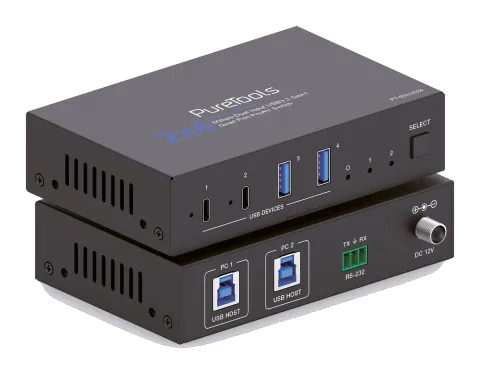
PT-SW-U324 er en USB 3.2 Gen1 Switcher med to uafhængigt skiftbare USB-B host-porte og fire enhedsporte – to USB-C og to USB-A – med understøttelse af datahastigheder op til 5Gbps. Hver enhedsport tilbyder …
ManualStyring (TCP/IP)FAQSpecifikationerDatabladCETilgængelige styringsinterfaces. Udvid en aktiv type for at se den fulde kommandotabel.
Ingen matchende kommandoer.
API Kommandoer15 kommandoerAktiv
Kilde: manual, kapitel API Commands, side 14
| Kommando | Beskrivelse | Eksempel | Svar | |
|---|---|---|---|---|
| ? | Hent listen over alle kommandoer | ? | ||
| help | Hent listen over alle kommandoer | help | ||
| get fw version | Hent firmwareversion | get fw version | 1.0.0 | |
| set reboot | Genstart enheden | set reboot | Reboot... System Initializing... Initialization Finished! FW: 1.0.0 | |
| set reset | Nulstil til fabriksindstillinger | set reset | Sure to RESET to default settings? Type "Yes" after next prompt to confirm... Input 1 | |
| get status | Hent systemstatus | get status | Please refer to the note at the end of the list. | |
| set key on/off | Indstil frontpanelknap til/fra Standard: tændt | set key on set key off | Set key on. Set key off. | |
| get key | Hent status for frontpanelknap tændt/slukket | get key | Key on. | |
| set input x | Indstil USB vært input (x=1~2) x=1: USB vært input 1 x=2: USB vært input 2 Standard: 1 | set input 1 | Set USB host input 1. | |
| get input | Hent USB host input port | get input | 1 | |
| get usb5v | Hent USB host input 5V | get usb5v | Host 1: 5V Host 2: none | |
| set autoswitch x | Indstil automatisk omskiftning til/fra (USB 5V detektion) x=Til, Fra Standard: til | set autoswitch x | Set autoswitch on. | |
| get autoswitch | Hent auto-switching status | get autoswitch | Autoswitch on. | |
| set output x usb5v y | Indstil USB-enhedsoutput (x=0~4) 5V til y x=[0...4]:0:Alle, 1:USB-C 1, 2:USB-C 2, 3:USB-A 3, 4:USB-A 4 y=0: Deaktiver 5V output y=1: Følg vært y=2: Tving altid 5V output Standard: 1 | set output 0 usb5v 1 | Set all USB device output 5V:follow host. | |
| get output x usb5v | Hent USB-enhedsoutput (x=0~4) 5V-status | get output 0 usb5v | USB-C 1 5V: follow host USB-C 2 5V: follow host USB-A 3 5V: follow host USB-A 4 5V: follow host |