
Aktiv
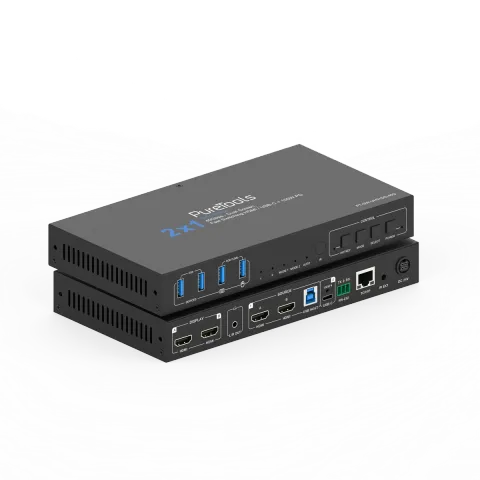
PT-SW-UH21DS-40G
2x1 USB-C/HDMI-samarbejdsswitch med to skærme – 40G
PT-SW-UH21DS-40G er en dual-screen HDMI 2.1 samarbejds-Switcher med HDMI- og USB-C DP Alt-Mode indgange, designet til multi-source styring i professionelle AV-miljøer. Den understøtter en 40Gbps datahastighed over HDMI …
ManualStyring (TCP/IP)FAQSpecifikationerCE-erklæring ↗Tilgængelige styringsinterfaces. Udvid en aktiv type for at se den fulde kommandotabel.
Ingen matchende kommandoer.
ASCII Kommando22 kommandoerAktiv
ForbindelseRS232 Baudrate: 115200; Databit: 8; Stopbit: 1; Paritetsbit: ingen; TCP/IP Port: 8000↓ CSV
Kilde: manual, kapitel API Commands, side 17
| Kommando | Beskrivelse | Eksempel | Svar | |
|---|---|---|---|---|
| ? | Hent listen over alle kommandoer | ? | ||
| help | Hent listen over alle kommandoer | help | ||
| get model | Hent enhedsmodel | get model | PT-SW-UH21DS-40G | |
| status | Hent enhedens aktuelle status | status | Please refer to the note at the end of the list. | |
| get version | Hent firmwareversion | get version | FW v1.1.0 KVM v1.1.0 | |
| power on/off | Tænd/sluk enheden | power on | Power on… System Initializing... Initialization Finished! FW v1.1.0 KVM v1.1.0 | |
| get power | Hent aktuel strømstatus | get power | Power on | |
| reboot | Genstart enheden | reboot | Reboot… System Initializing... Initialization Finished! FW v1.1.0 KVM v1.1.0 | |
| reset | Nulstil systemindstillinger til standard (skriv "Yes" for at bekræfte, "No" for at afvise) | reset | Sure to Reset System Settings To Default? Type "Yes" after next prompt to confirm… | |
| reset all | Nulstil system- og netværksindstillinger til standard (skriv "Yes" for at bekræfte, "No" for at afvise) | reset all | Sure to Reset System and Network Settings To Default? Type "Yes" after next prompt to confirm… | |
| set key on/off | Indstil frontpanelknap til/fra | set key on | Set key on on | |
| get key | Hent status for frontpanelknap tændt/slukket | get key | On | |
| set ir on/off | Indstil IR til til/fra | set ir off | Set IR on on | |
| get ir | Hent IR til/fra-status | get ir | On | |
| set beep on/off | Indstil buzzer til/fra | set beep off | Set beep off off | |
| get beep | Hent buzzer til/fra status | get beep | Off | |
| set hotkey on/off | Indstil genvejstastfunktion til/fra | set hotkey on | Set hotkey on on | |
| get hotkey | Hent status for genvejstast funktion tændt/slukket | get hotkey | On | |
| set hotkeys x | Indstil genvejstaster (x=1~5) x=1: PC1 input genvejstaster x=2: PC2 input genvejstaster x=3: Næste input genvejstaster x=4: Forrige input genvejstaster x=5: Aktiver/deaktiver buzzer | set hotkeys 1 | Type hotkeys… | |
| get hotkeys x | Hent genvejstaster (x=1~5) indstillinger x=1: PC1 input genvejstaster x=2: PC2 input genvejstaster x=3: Næste input genvejstaster x=4: Forrige input genvejstaster x=5: Aktiver/deaktiver summetone | get hotkeys 1 | "Ctrl" + "Ctrl" + "1" | |
| set baud x | Indstil RS232 baudrate til x bps x=1: 4800 x=2: 9600 x=3: 19200 x=4: 38400 x=5: 57600 x=6: 115200 | set baud 6 | Set baud rate 115200 9600 | |
| get baud | Hent RS232 baud rate | get baud | 115200 |
API Kommandoer57 kommandoerAktiv
ForbindelseRS232 Baudrate: 115200; Databit: 8; Stopbit: 1; Paritetsbit: ingen; TCP/IP Port: 8000↓ CSV
Kilde: manual, kapitel API Commands, side 27
| Kommando | Beskrivelse | Eksempel | Svar | |
|---|---|---|---|---|
| set input x | Indstil input fra (x=1~2) x=1: PC1 input x=2: PC2 input | set input 1 | Set PC1 input 1 | |
| get input | Hent PC-input | get input | PC1 | |
| set usb x | Indstil USB fra (x=0~2) x=0: Følg video input x=1: PC1 USB vært x=2: PC2 USB vært | set usb 0 | Set USB follow video input 0 | |
| get usb | Hent USB input | get usb | Follow video input | |
| get usb5v | Hent USB host input 5V | get usb5v | PC1 USB: 5V PC2 USB: None | |
| set autoswitch on/off | Indstil automatisk omskiftning til/fra | set autoswitch on | Set autoswitch on on | |
| get autoswitch | Hent auto-switching til/fra status | get autoswitch | On | |
| set autoswitch mode x | Indstil automatisk omskiftningsdetekteringsmode x=0: 5V detektion x=1: Signal detektion | set autoswitch mode 1 | Set autoswitch mode to signal detection signal detection | |
| get autoswitch mode | Hent auto-switching detektionsmetode | get autoswitch mode | Signal detection | |
| get edid x | Hent inputporte (x=0~4) EDID x=0: Alle input x=1: USB-C A input x=2: USB-C B input x=3: HDMI A input x=4: HDMI B input | get edid 0 | USB-C A EDID 00: Copy EDID from HDMI output (default) USB-C B EDID 00: Copy EDID from HDMI output (default) HDMI A EDID 00: Copy EDID from HDMI output (default) HDMI B EDID 00: Copy EDID from HDMI output (default) | |
| get edid data x | Hent inputporte (x=0~4) EDID-data x=0: Alle input x=1: USB-C A input x=2: USB-C B input x=3: HDMI A input x=4: HDMI B input | get edid data 0 | USB-C A EDID USB-C B EDID HDMI A EDID HDMI B EDID | |
| set user edid x | Indstil brugerdefineret EDID (x=0~2) til y x=0: Brugerdefineret 1 og Brugerdefineret 2 x=1: Brugerdefineret 1 x=2: Brugerdefineret 2 y=00 FF FF FF ….. (y er 256 byte EDID-data) | set user edid 1 | User Defined 1 EDID is loaded | |
| get user edid x | Hent brugerdefineret EDID (x=0~2) data x=0: Brugerdefineret 1 og Brugerdefineret 2 x=1: Brugerdefineret 1 x=2: Brugerdefineret 2 | get user edid 1 | ||
| set output mode x | Indstil output tilstand til (x=1~2) x=1: Output tilstand 1 x=2: Output tilstand 2 | set output mode 1 | Set output to mode 1 1 | |
| get output mode | Hent output tilstand | get output mode | Mode 1 | |
| set output x stream on/off | Indstil output (x=0~2) stream til/fra x=0: Alle outputs x=1: Output A x=2: Output B | set output 0 stream off | Set All outputs off on | |
| get output x stream | Hent output (x=0~2) stream tænd/sluk status x=0: Alle output x=1: Output A x=2: Output B | get output 0 stream | Output A on Output B on | |
| set output hdcp y | Indstil output HDCP tilstand til (y=0~3) y=0: Reserveret y=1: Auto y=2: HDCP 1.4 y=3: HDCP 2.2 | set output hdcp 1 | Set output HDCP to auto 1 | |
| get output hdcp | Hent output HDCP-tilstand | get output hdcp | Auto | |
| set audio mute on/off | Indstil de-embedding lyd mute til/fra Standard: fra | set audio mute on set audio mute off | Set de-embedding audio mute on Set de-embedding audio mute off | |
| get audio mute | Hent de-embedding lyd mute til/fra status | get audio mute | Mute on | |
| set output x usb5v y | Indstil USB-enhedsporte output (x=0~4) 5V til y x=0: Alle USB-enhedsporte x=1: USB-A enhed 1 x=2: USB-A enhed 2 x=3: USB-A enhed 3 x=4: USB-A enhed 4 y=0: Deaktiver 5V output y=1: Følg vært y=2: Tving altid 5V output | set output 0 usb5v 1 | Set all USB device output 5V follow host. 1 | |
| get output x usb5v | Hent USB-enhedsportoutput (x=0~4) 5V-status | get output 0 usb5v | USBA_1 5V: follow host USBA_2 5V: follow host USBA_3 5V: follow host USBA_4 5V: follow host | |
| set cec power on/off | Indstil CEC strøm til/fra-kommando | set cec power on set cec power off | CEC power on CEC power off | |
| set auto power feature on/off | Indstil display automatisk strømfunktion til/fra | set auto power feature on | Set auto power on off | |
| get auto power feature | Hent status for visnings automatisk tænd/sluk-funktion | get auto power feature | Auto power on | |
| set auto power off timer x | Indstil automatisk sluk-kommando der sendes efter x (x=1~6) x=1: 5 sek x=2: 10 sek x=3: 30 sek x=4: 1 min x=5: 5 min x=6: 10 min | set auto power off timer 1 | Set auto power off timer: 5 sec 5 sec | |
| get auto power off timer | Hent auto power off timer | get auto power off timer | 5 sec | |
| set auto power control x | Indstil automatisk strømstyringsfunktion via (x=1~3) x=1: CEC x=2: RS232 x=3: CEC og RS232 | set auto power control 1 | Set auto power control: CEC CEC | |
| get auto power control | Hent auto power funktionsstyringstype | get auto power control | CEC | |
| set RS-232 setting x | Indstil RS232 indstilling til x x=115200-8n1 Baudrate: 115200/57600/38400/19200/9600/4800/2400 Databit: 7/8 Paritet: n(Ingen)/ o(Ulig) / e(Lige) Stopbit: 1/2 | set RS-232 setting 115200-8n1 | Set RS-232: 115200-8n1 9600-8n1 | |
| get RS-232 setting | Hent RS232 indstilling | get RS-232 setting | 115200-8n1 | |
| set RS-232 command on/off | Indstil RS232 kommando til tændt/slukket Standard: slukket | set RS-232 command on set RS-232 command off | Set RS-232 command on Set RS-232 command off | |
| get RS-232 command | Hent RS232 kommando til/fra-status | get RS-232 command | On | |
| set RS-232 HEX/ASCII power on delay1 input delay2 | Indstil RS232 HEX/ASCII tændingsforsinkelse1 indgangsforsinkelse2 Kommandoformat er HEX eller ASCII y1= RS232 tændingskommando y2= 0~1200sek y3= RS232 inputportvalg y4= 0~1200sek BEMÆRK: forsinkelse1 indgangsforsinkelse2 kan være NULL | set RS-232 ASCII power on delay1 input delay2 set RS-232 ASCII power on set RS-232 HEX power on delay1 input | Set RS-232 ASCII power on delay1 input delay2 Set RS-232 ASCII power on Set RS-232 HEX power on delay1 input | |
| set preset clear x | Ryd en specificeret preset i enheden (x=1~5) Alle indstillinger undtagen netværksindstilling. x=1~5: Preset 1 ~ Preset 5 | set preset clear 1 | Set preset 1 clear | |
| set preset x name y | Indstil forudindstilling (x=1~5) navn til y (max 16 tegn) x=1~5: Forudindstilling 1 ~ Forudindstilling 5 | set preset 1 name Blueriver | Set preset 1 name Blueriver | |
| get preset x name | Hent forindstilling (x=1~5) navn x=1~5: Forindstilling 1 ~ Forindstilling 5 | get preset 1 name | Blueriver | |
| get ipconfig | Hent den aktuelle IP-konfiguration Standard: standard statisk IP er 192.168.0.178/255.255.0.0/192.168.0.1 | get ipconfig | IP Mode: DHCP IP: 192.168.62.106 Subnet Mask: 255.255.255.0 Gateway: 192.168.62.1 TCP/IP port: 8000 Telnet port: 23 MAC: 6C:DF:FB:0C:B3:8E (Static: 169.254.100.200 255.255.0.0 169.254.100.1) | |
| get mac addr | Hent netværks MAC-adresse | get mac addr | MAC: 6C:DF:FB:0C:B3:8E | |
| set ip mode x | Indstil netværks IP-tilstand til statisk IP eller DHCP (x=0~1) x=0: Statisk x=1: DHCP Standard: 1 | set ip mode 0 | Set IP mode static (Please use "set net reboot" command or repower device to apply new config!) | |
| get ip mode | Hent netværks IP-tilstand | get ip mode | DHCP | |
| set ip addr xxx.xxx.xxx.xxx | Indstil netværks IP-adresse | set ip addr 192.168.1.100 | Set IP address 192.168.1.100 (Please use "set net reboot" command or repower device to apply new config!) DHCP on, Device can't config static address, set DHCP off first. | |
| get ip addr | Hent netværks IP-adresse | get ip addr | 192.168.62.106 | |
| set subnet xxx.xxx.xxx.xxx | Indstil netværks subnetmaske | set subnet 255.255.255.0 | Set subnet mask 255.255.255.0 (Please use "set net reboot" command or repower device to apply new config!) DHCP on, Device can't config subnet mask, set DHCP off first. | |
| get subnet | Hent netværks subnetmaske | get subnet | 255.255.255.0 | |
| set gateway xxx.xxx.xxx.xxx | Indstil netværks gateway | set gateway 192.168.1.1 | Set gateway 192.168.1.1 (Please use "sst net reboot!" command or repower device to apply new config!) DHCP on, Device can't config gateway, set DHCP off first. | |
| get gateway | Hent netværks gateway | get gateway | 192.168.1.1 | |
| set tcp/ip port x | Indstil netværks TCP/IP port (x=1~65535) Standard: 4001 | set tcp/ip port 8000 | Set TCP/IP port 8000 | |
| get tcp/ip port | Hent netværks TCP/IP-port | get tcp/ip port | 8000 | |
| set telnet port x | Indstil netværks telnet port (x=1~65535) Standard: 23 | set telnet port 23 | Set telnet port 23 | |
| get telnet port | Hent netværks Telnet-port | get telnet port | 23 | |
| set net reboot | Genstart netværksmoduler | set net reboot | Search for IP,Please wait ...! IP Mode: DHCP IP: 192.168.62.106 Subnet Mask: 255.255.255.0 Gateway: 192.168.62.1 TCP/IP port: 8000 Telnet port: 23 MAC: 6C:DF:FB:0C:B3:8E (Static: 169.254.100.200 255.255.0.0 169.254.100.1) | |
| set admin password x | Indstil admin login password (x=[max 16 tegn]) Standard: admin | set admin password admin | Set admin password admin | |
| get admin password | Hent administrator login-adgangskode | get admin password | admin | |
| set user password x | Indstil brugerlogin-adgangskode (x=[maks. 16 tegn]) Standard: bruger | set user password user | Set user password user | |
| get user password | Hent bruger login kodeord | get user password | user |