
DiscontinuedPossible alternative: PT-PSW-42MV
PT-PSW-52
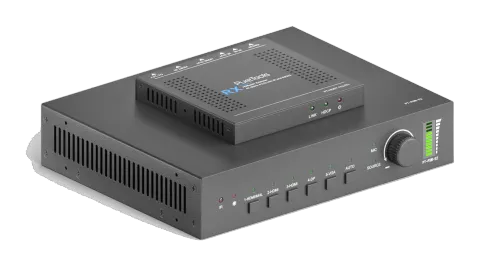
PureTools - Seamless Scaler Switcher 5x2, 1080P, 3-Level MIC, HDMI & HDBT Output
The PureTools Seamless Scaler Switcher 5x2 is a scaler switcher with five inputs and two outputs, supporting resolutions up to 1080P. It features HDMI and HDBT outputs and includes a 3-level MIC input.
ManualControl (TCP/IP)SpecificationsAlternative availableFirmwareCEAvailable control interfaces. Expand an active type to see the full command table.
No matching commands.
RS-232 Control1 commandsActive
Source: manual, chapter RS232 Control
| Command | Description | Example | Response | |
|---|---|---|---|---|
| 50701% | Example command to send to the device via RS232 | 50701% | Any response from the connected device will appear in red |
RS232 Commands133 commandsActive
ConnectionCommunication protocol: RS232 Communication Protocol Baud rate: 9600 Data bit: 8 Stop bit: 1 Parity bit: none↓ CSV
Source: manual, chapter User Manual
| Command | Description | Response | |
|---|---|---|---|
| 50701% | Switch to 1-HDMI/MHL input | Switch to HDMI 1 | |
| 50702% | Switch to 2-HDMI input | Switch to HDMI 2 | |
| 50703% | Switch to 3-HDMI input | Switch to HDMI 3 | |
| 50704% | Switch to 4-DP input | Switch to DP | |
| 50705% | Switch to 5-VGA input | Switch to VGA 1/YPbPr/AV | |
| 50683% | Set the signal format to VGA for 5-VGA input | Input 5 Set & Switch to VGA | |
| 50684% | Set the signal format to YPbPr for 5-VGA input | Input 5 Set & Switch to YPbPr | |
| 50685% | Set the signal format to AV(C-video) for 5-VGA input | Input 5 Set & Switch to AV | |
| 50785% | Enable auto-switching | Auto Switching | |
| 50786% | Disable auto-switching | Manual Switching | |
| 50600% | MUTE Source audio | Source Mute | |
| 50601% | UnMute Source audio | Source Unmute | |
| 50602% | Increase the volume of source audio | Source Volume: xx (xx=00~60) | |
| 50603% | Decrease the volume of source audio | Source Volume: xx (xx=00~60) | |
| 50722% | Mute MIC audio | MIC Mute | |
| 50723% | Unmute MIC audio | MIC Unmute | |
| 50726% | Mute VGA audio | VGA audio Mute | |
| 50727% | Unmute VGA audio | VGA audio Unmute | |
| 50728% | Mute DP audio | DP audio Mute | |
| 50729% | Unmute DP audio | DP audio Unmute | |
| 50724% | Increase the volume of MIC audio | MIC Volume: xx (xx=00~60) | |
| 50725% | Decrease the volume of MIC audio | MIC Volume: xx (xx=00~60) | |
| 508xx% | Set the volume of MIC audio | MIC Volume: xx (xx=00~60) | |
| 510xx% | Set the volume of source audio | Source Volume: xx (xx=00~60) | |
| 50706% | Select embedded audio as audio input for DP video signal | DP Audio from Embedded | |
| 50707% | Select external audio as audio input for DP video signal | DP Audio from External | |
| 50619% | Set the output resolution to 1360X768 HD | Resolution: 1360x768 | |
| 50626% | Set the output resolution to 1024X768 XGA | Resolution: 1024x768 | |
| 50627% | Set the output resolution to 1280X720 720P | Resolution: 1280x720 | |
| 50628% | Set the output resolution to 1280X800 WXGA | Resolution: 1280x800 | |
| 50629% | Set the output resolution to 1920X1080 1080P | Resolution: 1920x1080 | |
| 50620% | Set the output resolution to1920X1200 WUXGA | Resolution: 1920x1200 | |
| 50621% | Set the output resolution to1600X1200 UXGA | Resolution: 1600x1200 | |
| 50624% | Set the output resolution to 1600X900 | Resolution: 1600x900 | |
| 50604% | Lock the front panel buttons | Front Panel lock | |
| 50605% | Unlock the front panel buttons | Front Panel Unlock | |
| 502xx% | Set the brightness to xx. | Brightness: xx (xx=00~99) | |
| 503xx% | Set the contrast to xx. | Contrast: xx (xx=00~99) | |
| 504xx% | Set the saturation to xx. | Saturation: xx (xx=00~99) | |
| 505xx% | Set the sharpness to xx. | Sharpness: xx (xx=00~99) | |
| 50607% | Adjust the color temperature | Color Temperature: xx (xx=Cool/ Medium/ Warm/ User.) | |
| 50608% | Set the aspect ratio | Aspect Ratio: xx (xx=16:9/ 4:3/ auto) | |
| 50614% | Set the picture mode | Picture Mode: xx (xx= dynamic/ standard/ mild/ user) | |
| 50655% | Freeze output image | Freeze: enable | |
| 50656% | Cancel the freezing of output image | Freeze: disable | |
| 50646% | Enable MIC Volume Icon display | Volume Icon: enable | |
| 50647% | Disable MIC Volume Icon display | Volume Icon: disable | |
| 50761% | Disable the mute icon of Source audio display | Source Mute Icon: disable | |
| 50762% | Enable the mute icon of Source audio display | Source Mute Icon: enable | |
| 50763% | Disable the mute icon of MIC audio display | MIC Mute Icon: disable | |
| 50764% | Enable the mute icon of MIC audio display | MIC Mute Icon: enable | |
| 50765% | Enable the freeze icon display | Freeze Icon: enable | |
| 50766% | Disable freeze icon display | Freeze Icon: disable | |
| 50644% | Enable channel status display | Input Icon: enable | |
| 50645% | Disable channel status display | Input Icon: disable | |
| 50650% | Check the channel status | Input Icon: xx | |
| 50606% | Auto-adjust the input parameter(VGA only) | VGA Input Auto | |
| 50699% | Check the system version | Version Vx.x.x | |
| 50688% | Enable MIC noise detecting | MIC detect: enable | |
| 50689% | Disable MIC noise detecting | MIC detect: disable | |
| 50690% | Check MIC noise detecting statue | MIC detect: XXXX | |
| 50767% | Restore default EDID | EDID: initial | |
| 50768% | Bypass EDID data from output to input | EDID: bypass | |
| 50769% | Upload custom EDID data to the switcher | EDID: user | |
| 50770% | Inquire EDID status | EDID: initial | EDID: bypass | EDID: user | |
| 50782% | EDID management, copy the best resolution data of one output to HDMI input | EDID manage | Resolution:1920x1080 | |
| 50714% | Auto Switch Mode: Disable the automatic power off function | Auto Switch Mode: Set no input to power off function: Disable | |
| 50715% | Auto Switch Mode: Set the automatic power off time to 1 minute for No signal input | Auto Switch Mode: Set no input to power off time: 1 minute | |
| 50716% | Auto Switch Mode: Set the automatic power off time to 2 minutes for No signal input | Auto Switch Mode: Set no input to power off time: 2 minutes | |
| 50717% | Auto Switch Mode: Set the automatic power off time to 5 minutes for No signal input | Auto Switch Mode: Set no input to power off time: 5 minutes | |
| 50718% | Auto Switch Mode: Set the automatic power off time to 10 minutes for No signal input | Auto Switch Mode: Set no input to power off time: 10 minutes | |
| 50719% | Check the automatic power off time | Auto Switch Mode: Set no input to power off time: 1 minutes | Manual Switch Mode: Set no input to power off function: Disable | |
| 50740% | Manual Switch Mode: Disable automatic power off function | Manual Switch Mode: Set no input to power off time: 0 minutes | |
| 50741% | Manual Switch Mode: Set the power off time to 1 minute | Manual Switch Mode: Set no input to power off time: 1 minute | |
| 50742% | Manual Switch Mode: Set the power off time to 2 minute | Manual Switch Mode: Set no input to power off time: 2 minutes | |
| 50743% | Manual Switch Mode: Set the power off time to 5 minute | Manual Switch Mode: Set no input to power off time: 5 minutes | |
| 50744% | Manual Switch Mode: Set the power off time to 10 minute | Manual Switch Mode: Set no input to power off time: 10 minutes | |
| 50697% | Exit standby mode | Wake up! | |
| 50797% | Enter standby mode | Go to standby! | |
| 50698% | Software update | Software update | |
| 50617% | Reset to factory defaults | Factory Reset | |
| 50609% | OK for OSD selection | Key: ok | |
| 50610% | LEFT button | Key: left | |
| 50611% | RIGHT button | Key: right | |
| 50612% | UP button | Key: up | |
| 50613% | DOWN button | Key: down | |
| 50616% | MENU button (enter OSD) | OSD: Enter | |
| 50618% | EXIT button (exit OSD) | OSD: Exit | |
| 50630% | Check the volume level | Source Volume: xx (xx=00~60) MIC Volume: xx (xx=00~60) | |
| 50631% | Check the input source | Input: xx (xx= HDMI1/ HDMI2/ HDMI3/ DP/ VGA/ YPbPr/ AV) | |
| 50632% | Check the output resolution | Resolution: xx (xx=1920×1200/ 1920×1080/ 1600×1200/ 1360×768/ 1280×800/ 1280×720/ 1024×768/1600×900 | |
| 50633% | Check the image mode | Picture Mode: xx (xx= Dynamic/ Standard/ Mild/ User) | |
| 50635% | Check the image aspect ratio | Aspect Ratio: xx (xx= 16:9/ 4:3/ auto/) | |
| 50636% | Check the brightness | Brightness: xx (xx=00~99) | |
| 50637% | Check the contrast | Contrast: xx (xx=00~99) | |
| 50638% | Check the saturation | Saturation: xx (xx=00~99) | |
| 50639% | Check sharpness | Sharpness: xx (xx=00~99) | |
| 50640% | Check the color temperature | Color Temperature: xx (xx= Cool/ Medium/ Warm/ User.) | |
| 50651% | Check Volume Icon display status | Volume Icon: xxxx | |
| 50712% | Check the audio input sources for DP | DP Audio from Embedded | |
| 50751% | Check whether the Source audio is mute or not | Source Mute/Unmute | |
| 50752% | Check whether the MIC audio is mute or not | MIC Mute/Unmute | |
| 50753% | Check the freeze status | Freeze: enable/disable | |
| 50754% | Check the panel locked status | Front Panel Lock/UnLock | |
| 50783% | Display statues including MIC, Source audio, Resolution, Manual/Auto-switching modes, VGA audio mute on/off, DP audio status | Source Volume: XX | Mic Volume: XX | Input: XXXX | Resolution: XXXX | LINE Mute/Unmute | MIC Mute/Unmute | Switch status: XXXX | VGA Mute/Unmute | DP Mute/Unmute | DP Audio from Embedded/External | |
| 50657% | Check IP address | 192.168.0.178! | |
| 50712% | Check DP audio path | DP Audio from Embedded/External | |
| 50678% | Enable screen output adjusting | Enter Output Position Adjust | |
| 50679% | Disable screen output adjusting | Exit Output Position Adjust | |
| 50670% | Move the image to left | Output Position Adjust X xx | |
| 50671% | Move the image to right | Output Position Adjust X xx | |
| 50672% | Move the image up | Output Position Adjust Y xx | |
| 50673% | Move the image down | Output Position Adjust Y xx | |
| 50674% | Stretch left from left side (increase image width) | Output Width Adjust xx | |
| 50675% | Pull right from left side (decrease image width) | Output Width Adjust xx | |
| 50676% | Stretch upwards from bottom side (decrease image height) | Output Height Adjust xx | |
| 50677% | Stretch downwards from bottom side (increase image height) | Output Height Adjust xx | |
| 50730% | Turn off HDMI output | HDMI power off | |
| 50731% | Turn on HDMI output | HDMI power on | |
| 50732% | Turn off HDBT output | HDBT power off | |
| 50733% | Turn on HDBT output | HDBT power on | |
| 50734% | Turn on HDMI& HDBT output synchronously | HDMI HDBT power on | |
| 50687% | Disable CEC | HDMI CEC OFF | |
| 50686% | Enable CEC | HDMI CEC ON | |
| 50901% | Play&pause | CEC cmd: play&pause | |
| 50902% | Stop | CEC cmd: stop | |
| 50903% | Menu | CEC cmd: menu | |
| 50904% | Retreat | CEC cmd: rev | |
| 50905% | Forward | CEC cmd: fwd | |
| 50906% | Up | CEC cmd: up | |
| 50907% | Down | CEC cmd: down | |
| 50908% | Left | CEC cmd: left | |
| 50909% | Right | CEC cmd: right |
CEC Commands6 commandsActive
Source: manual, chapter CEC Commands
| Command | Description | Response | |
|---|---|---|---|
| 50910% | Confirm command | CEC cmd: select | |
| 50911% | Exit command | CEC cmd: exit | |
| 50913% | Source power on | Source power on | |
| 50914% | Source power off | Source power off | |
| 50920% | TV power on | Display power on | |
| 50921% | TV power off | Display power off |
RS232 Control Mode3 commandsActive
Source: manual, chapter RS232 Control Mode
| Command | Description | Example | Response | |
|---|---|---|---|---|
| 50787% | RS232 control mode 1: Control the scaler switcher and the far-end third party device from local RS232 port. | RS232 Mode 1: RS232 Control Scaler & Remote | ||
| 50788% | RS232 control mode 2: Control scaler switcher from local or remote RS232 port. | RS232 Mode 2: RS232 Control Scaler | ||
| /+1b:xxxxxxxx | Send ASCII command to control far-end third party device from the scaler switcher to receiver based on RS232 pass-through function. ① b = 0~6 is for baud rate. b | Baud Rate 0 | 2400 1 | 4800 2 | 9600 3 | 19200 4 | 38400 5 | 57600 6 | 115200 ② xxxxxxxx is for ASCII data (max 48 Byte). | /+12:123456789 Send the ASCII command “123456789” to control the third party device of which baud rate is 9600. |
RS232 Control Mode4 commandsActive
Source: manual, chapter RS232 Control Mode
| Command | Description | Response | |
|---|---|---|---|
| 50787% | serial control mode 1, factory default. Control PT-PSW-52 or 3rd Party Device from Local | ||
| 50788% | Control PT-PSW-52 or 3rd Party Device form Remote | ||
| 50678% | to turn on screen output adjusting | ||
| 50791% | set as HDCP Active mode, the video signal can’t support seamless switching. |