
Active
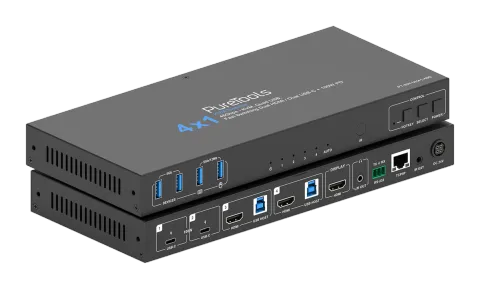
PT-SW-UH41-48G
4x1 USB-C / HDMI 48G Collaboration Switcher
The PT-SW-UH41-48G is a 4x1 switcher featuring two HDMI 2.1 and two USB-C inputs, with support for HDMI 2.1 FRL, video signals up to 48Gbps, and resolutions including 8K at 60Hz, 5K at 60Hz, 4K at 120/144Hz, and 1080p …
ManualControl (TCP/IP)FAQSpecificationsDatasheetCE declaration ↗Available control interfaces. Expand an active type to see the full command table.
No matching commands.
API Commands60 commandsActive
ConnectionRS-232 Baud rate: 115200; Data bit: 8; Stop bit: 1; Parity bit: none; TCP/IP Port: 8000↓ CSV
Source: manual, chapter API Commands, page 16
| Command | Description | Example | Response | |
|---|---|---|---|---|
| ? | Get the list of all commands | ? | ||
| help | Get the list of all commands | help | ||
| get model | Get device model | get model | PT-SW-UH41-48G | |
| status | Get device current status Please refer to the note at the end of the list. | status | ||
| get version | Get firmware version | get version | MCU v1.1.0 Web v1.1.0 KVM v1.1.0 | |
| power on/off | Power on/off the device | power on | Power on… System Initializing... Initialization Finished! MCU v1.1.0 Web v1.1.0 KVM v1.1.0 | |
| get power | Get current power state | get power | Power on | |
| reboot | Reboot the device | reboot | Reboot… System Initializing... Initialization Finished! MCU v1.1.0 Web v1.1.0 KVM v1.1.0 | |
| reset | Reset system settings to default (Should type "Yes" to confirm, "No" to discard) | reset | Sure to Reset System Settings To Default? Type "Yes" after next prompt to confirm… | |
| reset all | Reset system and network settings to default (Should type "Yes" to confirm, "No" to discard) | reset all | Sure to Reset System and Network Settings To Default? Type "Yes" after next prompt to confirm… | |
| set key on/off | Set front panel key on/off Default: on | set key on | Set key on | |
| get key | Get front panel key on/off status | get key | On | |
| set ir on/off | Set IR on/off Default: on | set ir off | Set IR on | |
| get ir | Get IR on/off status | get ir | On | |
| set beep on/off | Set buzzer on/off Default: off | set beep off | Set beep off | |
| get beep | Get buzzer on/off status | get beep | Off | |
| set hotkey on/off | Set hotkey function on/off Default: on | set hotkey on | Set hotkey on | |
| get hotkey | Get hotkey function on/off status | get hotkey | On | |
| set hotkeys x | Set hotkeys (x=1~7) x=1: PC1 input hotkeys x=2: PC2 input hotkeys x=3: PC3 input hotkeys x=4: PC4 input hotkeys x=5: Next input hotkeys x=6: Previous input hotkeys x=7: Enable/disable buzzer | set hotkeys 1 | Type hotkeys… | |
| get hotkeys x | Get hotkeys (x=1~7) settings x=1: PC1 input hotkeys x=2: PC2 input hotkeys x=3: PC3 input hotkeys x=4: PC4 input hotkeys x=5: Next input hotkeys x=6: Previous input hotkeys x=7: Enable/disable buzzer | get hotkeys 1 | "Ctrl" + "Ctrl" + "1" | |
| set baud x | Set RS-232 baud rate to x bps x=1: 4800 x=2: 9600 x=3: 19200 x=4: 38400 x=5: 57600 x=6: 115200 Default: 9600 | set baud 6 | Set baud rate 115200 | |
| get baud | Get RS-232 baud rate | get baud | 115200 | |
| set input x | Set input from (x=1~4) x=1: PC1 input x=2: PC2 input x=3: PC3 input x=4: PC4 input Default: 1 | set input 1 | Set PC1 input | |
| get input | Get PC input | get input | PC1 | |
| set usb x | Set USB from (x=0~4) x=0: Follow video input x=1: PC1 USB host x=2: PC2 USB host x=3: PC3 USB host x=4: PC4 USB host Default: 0 | set usb 0 | Set USB follow video input | |
| get usb | Get USB input | get usb | Follow video input | |
| get usb5v | Get USB host input 5V | get usb5v | PC1 USB: 5V PC2 USB: 5V PC3 USB: 5V PC4 USB: None | |
| set autoswitch on/off | Set auto-switching on/off Default: on | set autoswitch on | Set autoswitch on | |
| get autoswitch | Get auto-switching on/off status | get autoswitch | On | |
| set autoswitch mode x | Set auto-switching detection mode x=0: 5V detection x=1: Signal detection Default: signal detection | set autoswitch mode 1 | Set autoswitch mode to signal detection | |
| get autoswitch mode | Get auto-switching detection mode | get autoswitch mode | Signal detection | |
| set edid x to y | Set input ports (x=0~4) EDID to (y=0~22) x=0: All inputs x=1: PC1 input x=2: PC2 input x=3: PC3 input x=4: PC4 input y=00: Copy EDID from HDMI output (default) y=01: 1920x1080p60Hz 4:4:4, Audio 2CH PCM y=02: 3840x2160p30Hz 4:4:4, Audio 2CH PCM y=03: 4096x2160p30Hz 4:4:4, Audio 2CH PCM y=04: 3840x2160p50Hz 4:4:4, Audio 2CH PCM y=05: 4096x2160p50Hz 4:4:4, Audio 2CH PCM y=06: 3840x2160p60Hz 4:4:4, Audio 2CH PCM y=07: 4096x2160p60Hz 4:4:4, Audio 2CH PCM y=08: 3840x2160p100Hz 4:4:4, Audio 2CH PCM y=09: 4096x2160p100Hz 4:4:4, Audio 2CH PCM y=10: 3840x2160p120Hz 4:4:4, Audio 2CH PCM y=11: 4096x2160p120Hz 4:4:4, Audio 2CH PCM y=12: 5120x2160p50Hz 4:4:4, Audio 2CH PCM y=13: 5120x2160p60Hz 4:4:4, Audio 2CH PCM y=14: 7680x4320p30Hz 4:4:4, Audio 2CH PCM y=15: 7680x4320p50Hz 4:2:0, Audio 2CH PCM y=16: 7680x4320p60Hz 4:2:0, Audio 2CH PCM y=17: WUXGA 1920x1200p60Hz, Audio 2CH PCM y=18: DVI 1280x1024p60Hz, Audio None y=19: DVI 1920x1080p60Hz, Audio None y=20: DVI 1920x1200p60Hz, Audio None y=21: User Defined 1 y=22: User Defined 2 | set edid 0 to 0 | Set all inputs EDID to 00: Copy EDID from HDMI output (default) | |
| set user edid x | Set user defined EDID (x=0~2) to y x=0: User Defined 1 and User Defined 2 x=1: User Defined 1 x=2: User Defined 2 y=00 FF FF FF ….. (y is 256 bytes EDID data) | set user edid 1 | User Defined 1 EDID is loaded | |
| get edid x | Get input ports (x=0~4) EDID x=0: All inputs x=1: PC1 input x=2: PC2 input x=3: PC3 input x=4: PC4 input | get edid 0 | PC1 EDID 00: Copy EDID from HDMI output (default) PC2 EDID 00: Copy EDID from HDMI output (default) PC3 EDID 00: Copy EDID from HDMI output (default) PC4 EDID 00: Copy EDID from HDMI output (default) | |
| get edid data x | Get input ports (x=0~4) EDID data x=0: All inputs x=1: PC1 input x=2: PC2 input x=3: PC3 input x=4: PC4 input | get edid data 0 | PC1 EDID PC2 EDID PC3 EDID PC4 EDID | |
| get user edid x | Get user defined EDID (x=0~2) data x=0: User Defined 1 and User Defined 2 x=1: User Defined 1 x=2: User Defined 2 | get user edid 1 | ||
| set output stream on/off | Set output (x=0~1) stream on/off x=0: All outputs x=1: HDMI output Default: on | set output stream off set output 0 stream off | Set All outputs off | |
| get output stream get output x stream | Get output (x=0~1) stream on/off status x=0: All outputs x=1: HDMI output | get output stream get output 0 stream | On | |
| set output hdcp y | Set output HDCP mode to (y=0~4) y=0: Reserved y=1: Auto y=2: HDCP 1.4 y=3: HDCP 2.2 Default: 1 | set output hdcp 1 | Set output HDCP to auto | |
| get output hdcp | Get output HDCP mode | get output hdcp | Auto | |
| set audio mute on/off set audio mute on set audio mute off | Set de-embedding audio mute on/off Default: off | set audio mute on set audio mute off | Set de-embedding audio mute on Set de-embedding audio mute off | |
| get audio mute | Get de-embedding audio mute on/off status | get audio mute | Mute on | |
| set output x usb5v y | Set USB device port output (x=0~4) 5V to y x=0: All USB device ports x=1: USB-A device 1 x=2: USB-A device 2 x=3: USB-A device 3 x=4: USB-A device 4 y=0: Disable 5V output y=1: Follow host y=2: Force 5V always output | set output 0 usb5v 1 set output 0 usb5v 1 1 | ||
| get output x usb5v | Get USB device port output (x=0~4) 5V status | get output 0 usb5v | USBA_1 5V: follow host USBA_2 5V: follow host USBA_3 5V: follow host USBA_4 5V: follow host | |
| set cec power on/off | Set CEC power on/off command | set cec power on set cec power off | CEC power on CEC power off | |
| set auto power feature on/off | Set display auto power feature on/off Default: on | set auto power feature on | Set auto power | |
| get auto power feature | Get display auto power feature on/off status | get auto power feature | Auto power on | |
| set auto power off timer x | Set auto power off command will be sent out after x (x=1~6) x=1: 5 sec x=2: 10 sec x=3: 30 sec x=4: 1 min x=5: 5 min x=6: 10 min Default: 5 sec | set auto power off timer 1 | Set auto power off timer: 5 sec | |
| get auto power off timer | Get auto power off timer | get auto power off timer | 5 sec | |
| set auto power control x | Set auto power feature control via (x=1~3) x=1: CEC x=2: RS-232 x=3: CEC and RS-232 Default: CEC | set auto power control 1 | Set auto power control: CEC | |
| get auto power control | Get auto power feature control type | get auto power control | CEC | |
| set RS-232 setting x | Set RS-232 setting to x x= 115200-8n1 Baud rate: 115200/57600/38400/19200/9600/4800/2400 Data bits: 7/8 Parity: n(None)/ o(Odd)/ e(Even) Stop bits: 1/2 Default: 9600-8n1 | set RS-232 setting 115200-8n1 | Set RS-232: 115200-8n1 | |
| get RS-232 setting | Get RS-232 setting | get RS-232 setting | 115200-8n1 | |
| set RS-232 command on/off | Set RS-232 command on/off Default: off | set RS-232 command on set RS-232 command off | Set RS-232 command on Set RS-232 command off | |
| get RS-232 command | Get RS-232 command on/off status | get RS-232 command | On | |
| set RS-232 HEX/ASCII power on delay1 input delay2 | Set RS-232 HEX/ASCII power on delay1 input delay2 Command format is HEX or ASCII y1= RS-232 power on command y2= 0~1200sec y3= RS-232 input port selection y4= 0~1200sec NOTE: delay1 input delay2 can be NULL | set RS-232 ASCII power on delay1 input delay2 set RS-232 ASCII power on set RS-232 HEX power on delay1 input | Set RS-232 ASCII power on delay1 input delay2 Set RS-232 ASCII power on Set RS-232 HEX power on delay1 input | |
| get RS-232 power on command | Get RS-232 power on command | get RS-232 power on command | RS-232 ASCII power on delay1 input delay2 | |
| set RS-232 HEX/ASCII power off delay | Set RS-232 HEX/ASCII power off delay Command format is HEX or ASCII y1= RS-232 power off command y2= 0~1200sec NOTE: delay can be NULL | set RS-232 ASCII power off delay set RS-232 HEX power off | Set RS-232 ASCII power off delay Set RS-232 HEX power off | |
| get RS-232 power off command | Get RS-232 power off command | get RS-232 power off command | RS-232 ASCII power off delay | |
| set RS-232 HEX/ASCII command end z | Set RS-232 HEX/ASCII command ending with (z=0~3) Command format is HEX or ASCII y= RS-232 command z=0: Null z=1: z=2: z=3: | set RS-232 ASCII command end 0 set RS-232 HEX command end 3 | Set RS-232 ASCII command Set RS-232 HEX command |