
Uitgefaseerd
PT-HDBT-701-TXWP
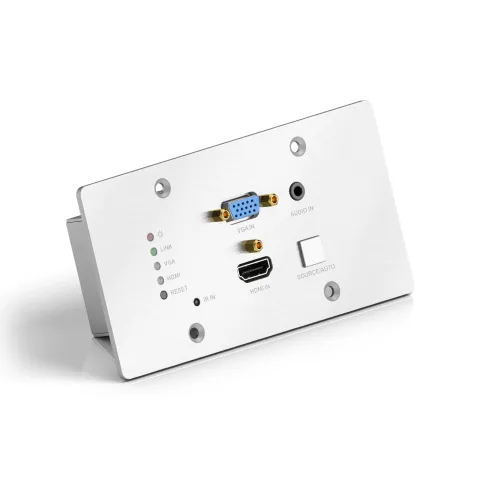
PureTools - HDBaseT Wallplate Transmitter, HDMI & VGA ingangen, 4K, 40m 4K / 70m 1080p
De PureTools HDBaseT Wallplate Transmitter beschikt over HDMI- en VGA-ingangen en ondersteunt signaaloverdracht van 4K over afstanden tot 40m en 1080p tot 70m.
HandleidingBesturing (TCP/IP)FAQSpecificatiesFirmwareCEBeschikbare besturingsinterfaces. Klap een actief type uit om de volledige commandotabel te zien.
Geen passende commando’s.
RS232-commando's1 commando’sActief
Bron: handleiding, hoofdstuk RS232 Control Software, pagina 18
| Commando | Beschrijving | Voorbeeld | Antwoord | |
|---|---|---|---|---|
| 50701% | Voorbeeldcommando verzonden naar het apparaat | 50701% | Any response from the connected device will appear in red |
RS232-commando's55 commando’sActief
VerbindingCommunicatieprotocol: RS232 Communicatieprotocol Baudrate: 9600 Databits: 8 Stopbit: 1 Pariteitsbit: geen↓ CSV
Bron: handleiding, hoofdstuk RS232 Command, pagina 13
| Commando | Beschrijving | Antwoord | |
|---|---|---|---|
| 50779% | Overschakelen naar RS232 modus 1 (standaard), aansturen van scaler switcher en externe third-party apparaten. | RS232 Mode 1: RS232 Control Scaler & Remote. | |
| 50780% | Overschakelen naar RS232 modus 2, afstandsbediening van scaler switcher. | RS232 Mode 2:RS232 & Remote Control Scaler | |
| 50770% | Automatische schakeling inschakelen | Auto Switching | |
| 50771% | Schakel automatisch schakelen uit | Manual Switching | |
| 50701% | Overschakelen naar HDMI input | Switch to HDMI | |
| 50704% | Schakel naar VGA input | Switch to VGA | |
| 50632% | Controleer de outputresolutie | Resolution: xx | |
| 50619% | Verander resolutie naar 1360X768 HD | Resolution: 1360x768 | |
| 50626% | Verander resolutie naar 1024X768 XGA | Resolution: 1024x768 | |
| 50627% | Verander resolutie naar 1280X720 720P | Resolution: 1280x720 | |
| 50628% | Verander resolutie naar 1280X800 WXGA | Resolution: 1280x800 | |
| 50629% | Verander resolutie naar 1920X1080 1080P | Resolution: 1920x1080 | |
| 50620% | Verander resolutie naar 1920X1200 WUXGA | Resolution: 1920x1200 | |
| 50621% | Verander resolutie naar 1600X1200 UXGA | Resolution: 1600x1200 | |
| 50790% | Stel de HDCP status van de HDMI Output socket in op Actief | HDCP Active | |
| 50793% | Controleer HDCP-status | HDCP Off/ HDCP On/ HDCP Active (default) | |
| 50636% | Controleer de helderheid | Brightness: xx (xx=0099) | |
| 502xx% | Stel de helderheid in op xx. | Brightness: xx (xx=0099) | |
| 50637% | Controleer het contrast | Contrast: xx (xx=0099) | |
| 503xx% | Stel het contrast in op xx. | Contrast: xx (xx=0099) | |
| 50638% | Controleer de verzadiging | Saturation: xx (xx=0099) | |
| 504xx% | Stel de verzadiging in op xx. | Saturation: xx (xx=0099) | |
| 50639% | Controleer scherpte | Sharpness: xx (xx=0099) | |
| 505xx% | Stel de scherpte in op xx. | Sharpness: xx (xx=0099) | |
| 50606% | Pas automatisch de inputparameter aan | VGA Input Auto | |
| 50640% | Controleer de kleurtemperatuur | Color Temperature: xx (xx can be medium, warm, user, or cool.) | |
| 50607% | Pas de kleurtemperatuur aan | Color Temperature: xx (xx can be medium, warm, user, or cool.) | |
| 50635% | Controleer de beeldverhouding | Aspect Ratio: xx (xx can be 16:9, 4:3, or auto.) | |
| 50608% | Stel de beeldverhouding in | Aspect Ratio: xx (xx can be 16:9, 4:3, or auto.) | |
| 50633% | Controleer de beeldmodus | Picture Mode: xx (xx can be dynamic, standard, mild, or user.) | |
| 50614% | Stel de beeldmodus in | Picture Mode: xx (xx can be dynamic, standard, mild, or user.) | |
| 50707% | Controleer de huidige resolutie en polariteit | 1920x1080 Hpolarity:1 Vpolarity:0 | |
| 50705% | Verander de horizontale polariteit naar de tegenovergestelde | Hpolarity:0/1 | |
| 50706% | Verander de verticale polariteit naar de tegenovergestelde | Vpolarity:0/1 | |
| 50678% | Schakel het aanpassen van de schermuitgang in | Enter Output Position Adjust | |
| 50679% | Schakel scherm output aanpassing uit | Exit Output Position Adjust | |
| 50670% | Beweeg het beeld naar links | Output Position Adjust X xx | |
| 50671% | Beweeg het beeld naar rechts | Output Position Adjust X xx | |
| 50672% | Beweeg het beeld omhoog | Output Position Adjust Y xx | |
| 50673% | Beweeg het beeld naar beneden | Output Position Adjust Y xx | |
| 50674% | Trek links vanaf de rechterkant (vermindert beeldbreedte) | Output Width Adjust xx | |
| 50675% | Uitrekken naar rechts vanaf rechterkant (verhoog beeldbreedte) | Output Width Adjust xx | |
| 50676% | Uitrekken naar boven vanaf onderzijde (verlaag beeldhoogte) | Output Height Adjust xx | |
| 50677% | Uitrekken naar beneden vanaf onderzijde (verhoog beeldhoogte) | Output Height Adjust xx | |
| 50772% | EDID doorgave (standaard) | EDID: bypass mode | |
| 50773% | Stel EDID-gegevens in op 1080P PCM 2.0ch | EDID:1080P&PCM 2ch | |
| 50774% | Stel EDID-gegevens in op 1080P Dolby 5.1 | EDID:1080P&5.1ch | |
| 50775% | Stel EDID-gegevens in op 1080P3D Dolby 5.1 | EDID:1080P3d&5.1ch | |
| 50776% | Stel EDID-gegevens in op 1080i PCM 2.0ch | EDID:1080i&PCM 2ch | |
| 50777% | Stel EDID-gegevens in op 4Kx2K PCM 2.0ch | EDID:4K&PCM 2ch | |
| 50778% | Controleer EDID-gegevens | EDID: bypass mode EDID:1080P&PCM 2ch EDID:1080P&5.1ch EDID:1080P3d&5.1ch EDID:4K&PCM 2ch | |
| 50799% | Programmeert EDID-bestand, verzend EDID-gegevens binnen 10s | Waiting for edid within 10 secs! | |
| 50698% | Software aan het upgraden | ||
| 50699% | Controleer de softwareversie | Version Vx.x.x | |
| 50617% | Herstel fabrieksinstellingen |