
Actief
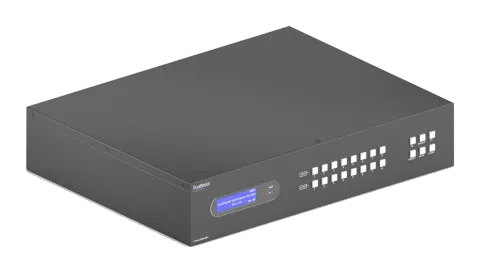
PT-MA-HD88HDBT
8x8 4K 18Gbps HDMI HDBaseT-matrix met audiomatrix en ARC
De 8x8 4K 18Gbps HDMI HDBaseT Matrix met Audiomatrix en ARC is een rack-monteerbare Matrix Switcher met 8 HDMI/HDBaseT-uitgangen en mirrored HDMI-uitgangen, die 18Gbps bandbreedte en 4K@60Hz resolutie ondersteunt met …
HandleidingBesturing (TCP/IP)FAQSpecificatiesCEBeschikbare besturingsinterfaces. Klap een actief type uit om de volledige commandotabel te zien.
Geen passende commando’s.
RS232-commando's45 commando’sActief
Bron: handleiding, hoofdstuk RS232 Control, pagina 54
| Commando | Beschrijving | Voorbeeld | Antwoord | |
|---|---|---|---|---|
| PowerON. | Schakel het systeem in. | Power ON! | ||
| PowerOFF. | Schakel het systeem uit. | Power OFF! | ||
| /*Name. | Rapporteer productnaam. | MUH88T-H2 | ||
| /*Type. | Rapporteer productmodel. | HDBaseT Matrix | ||
| /^Version. | Rapporteer softwareversie. | V1.0.0 CPLD:V1.0.0 VideoDriverVersion:V1.0.0 | ||
| RST. | Reset naar fabrieksinstellingen. | Factory Default! | ||
| Lock. | Vergrendel knoppen op het voorpaneel. | Front Panel Locked! | ||
| Unlock. | Ontgrendel knoppen op het frontpaneel. | Front Panel UnLock! | ||
| GetGuiIP. | Geef het GUI IP-adres weer. | GUI_IP:192.168.0.178! | ||
| SetGuiIP:xxx.xxx.xxx.xxx. | Stel de GUI IP in op xxx.xxx.xxx.xxx. | SetGuiIP:192.168.0.176. SetGuiIP:192.168.0.176! | ||
| Baudrate115200. | Stel de seriële baudrate van de Matrix Switcher in op 115200. | Set Local RS232 Baudrate Is 115200! | ||
| Baudrate57600. | Stel de seriële baudrate van de Matrix Switcher in op 57600. | Set Local RS232 Baudrate Is 57600! | ||
| Baudrate38400. | Stel de seriële baudrate van de Matrix Switcher in op 38400. | Set Local RS232 Baudrate Is 38400! | ||
| Baudrate19200. | Stel de seriële baudrate van de Matrix Switcher in op 19200 | Set Local RS232 Baudrate Is 19200! | ||
| Baudrate9600. | Stel de seriële baudrate van de Matrix Switcher in op 9600. | Set Local RS232 Baudrate Is 9600! | ||
| PHDBTON. | PoC van HDBT-uitgangen inschakelen voor voeding van HDBaseT Receivers. | HDBT Power ON! | ||
| PHDBTOFF. | Schakel PoC van HDBT outputs uit. | HDBT Power OFF! | ||
| STA_PHDBT. | Geef de PoC-status van HDBT Outputs weer. | HDBT Power ON! | ||
| DS[XX]ON. | Enable the video resolution auto-downscaling function of HDMI output [XX]. [XX]=00~08. The “ [XX]=00” represents all HDMI outputs. | DS00ON. HDMI OUT 01 Down Scale ON! HDMI OUT 02 Down Scale ON! … … HDMI OUT 08 Down Scale ON! | ||
| DS[XX]OFF. | Disable the video resolution auto-downscaling function of HDMI output [XX]. [XX]=00~08. The “ [XX]=00” represents all HDMI outputs. | DS00OFF. HDMI OUT 01 Down Scale OFF! … … HDMI OUT 08 Down Scale OFF! | ||
| STA_DS. | Geef de auto-downscaling-functie van HDMI Outputs weer. | HDMI OUT 01 Down Scale OFF! HDMI OUT 02 Down Scale OFF! … … HDMI OUT 08 Down Scale OFF! | ||
| RS232RCM[XX]ON. | Enable the RS232 remote-control mode for HDBT output [XX] that the matrix switcher can be controlled from remote PC. [XX]=00~08. The “ [XX]=00” represents all HDBT outputs. | RS232RCM00ON. RS232 Remote 01 Control MCU ON! RS232 Remote 02 Control MCU ON! … … RS232 Remote 08 Control MCU ON! | ||
| RS232RCM[XX]OFF. | Disable the RS232 remote-control mode for HDBT output [XX] that the matrix switcher cannot be controlled from remote PC. [XX]=00~08. The “ [XX]=00” represents all HDBT outputs. | RS232RCM00OFF. RS232 Remote 01 Control MCU OFF! RS232 Remote 02 Control MCU OFF! … … RS232 Remote 08 Control MCU OFF! | ||
| STA_RS232RCM. | Geef de status van de RS232-afstandsbedieningsmodus weer. | RS232 Remote 01 Control MCU OFF! RS232 Remote 02 Control MCU OFF! … … RS232 Remote 08 Control MCU OFF! | ||
| IRRCM[XX]ON. | Enable the IR remote-control mode for HDBT output [XX] that the matrix switcher can be controlled by the IR remote at the far-end HDBaseT receivers’ position. [XX]=00~08. The “ [XX]=00” represents all HDBT outputs. | IRRCM00ON. IR Remote 01 Control MCU ON! IR Remote 02 Control MCU ON! … … IR Remote 08 Control MCU ON! | ||
| IRRCM[XX]OFF. | Disable the IR remote-control mode for HDBT output [XX] that the matrix switcher cannot be controlled by the IR remote at the far-end HDBaseT receivers’ position. [XX]=00~08. The “ [XX]=00” represents all HDBT outputs. | IRRCM00OFF. IR Remote 01 Control MCU OFF! IR Remote 02 Control MCU OFF! … … IR Remote 08 Control MCU OFF! | ||
| STA_IRRCM. | Geef de status van de IR-afstandsbedieningsmodus weer. | IR Remote 01 Control MCU ON! IR Remote 02 Control MCU ON! … … IR Remote 08 Control MCU ON! | ||
| @OUT[XX]. | Turn on output [XX]. [XX]=00~16. The “ [XX]=00” represents all outputs. [XX]=01~08, represents HDBT output 1~8. [XX]=09~16, represents HDMI output 1~8. | @OUT00. Turn ON Output 01! Turn ON Output 02! … … Turn ON Output 16! | ||
| $OUT[XX]. | Turn off output [XX]. [XX]=00~16. The “ [XX]=00” represents all outputs. [XX]=01~08, represents HDBT output 1~8. [XX]=09~16, represents HDMI output 1~8. | $OUT00. Turn OFF Output 01! Turn OFF Output 02! … … Turn OFF Output 16! | ||
| STA_POUT. | Geef de aan/uit-status van alle Outputs weer. | Turn ON Output 01! Turn ON Output 02! … … Turn ON Output 16! | ||
| STA. | Rapporteer alle systeemstatus. | GUI Or RS232 Query Status: HDBaseT Matrix MUH88T-H2 V1.0.0 Power ON! HDBT Power ON! Front Panel UnLock! Local RS232 Baudrate Is 9600! GUI_IP:192.168.0.178! Output 01 Switch To In 01! …… | ||
| STA_IN. | Geef de verbindingsstatus weer van alle HDMI Input-poorten. | IN 1 2 3 4 5 6 7 8 LINK N N N Y N Y N Y | ||
| STA_OUT. | Geef de verbindingsstatus weer van alle HDMI- en HDBT Outputs. | OUT 1 2 3 4 5 6 7 8 9 10 11 12 13 14 15 16 LINK N N N Y N N N N N N N Y N N N N | ||
| IRFVON. | Schakel in dat de IR-switching de videoswitching volgt. | IR Follow Video ON! | ||
| IRFVOFF. | Schakel IR schakeling uit om video schakeling te volgen. | IR Follow Video OFF! | ||
| OUT[XX]:[YY]. | Switch video input [YY] to video output [XX]. [XX]=00~08, [YY]=01~08. The “ [XX]=00” represents all outputs. | OUT01:04. Output 01 Switch To In 04! | ||
| STA_VIDEO. | Geef het ingangskanaal weer voor alle Outputs. | Output 01 Switch To In 01! Output 02 Switch To In 02! Output 03 Switch To In 03! … … Output 08 Switch To In 08! | ||
| IR[XX]:[YY]. | Switch far-end IR IN [YY] to local IR OUT [XX]. [XX]=01~08, [YY]=00~08. The “ [YY]=00” represents all far-end IR IN ports. | IR01:03. Local 01 IR Out Switch To Remote 03 IR IN! | ||
| STA_IR. | Rapporteer IR-schakelstatus. | IR Follow Video ON! Local 01 IR Out Switch To Remote 01 IR IN! Local 02 IR Out Switch To Remote 02 IR IN! … … Local 08 IR Out Switch To Remote 04 IR IN! | ||
| PresetSave[XX]. | Sla de huidige schakelstatus op in preset [XX]. [XX]=01~09. | PresetSave01. Preset 01 Save Success! Preset 01 Sta: Out 01 In 01! Out 02 In 02! … … Out 08 In 08! | ||
| PresetRecall[XX]. | Roep preset [XX] op. [XX]=01~09. | PresetRecall02. Preset 02 Recall: Output 01 Switch To In 02! Local 02 IR Out Switch To Remote 01 IR IN! Output 02 Switch To In 02! Local 02 IR Out Switch To Remote 02 IR IN! Output 03 Switch To In 02! Local 02 IR Out Switch To Remote 03 IR IN! Output 04 Switch To In 02! Local 02 IR Out Switch To Remote 04 IR IN! | ||
| PresetSta[XX]. | Rapporteer de preset [XX]. [XX]=01~09. | PresetSta01. Preset 01 Sta: Out 01 In 01! Out 02 In 01! Out 03 In 01! … … Out 08 In 01! | ||
| SPDIF[XX]:[YY]. | Select audio source [YY] for SPDIF audio output [XX]. [XX]=00~08, The “ [XX]=00” represents all SPDIF audio outputs. [YY]=01~24. | SPDIF01:04. | ||
| STA_SPDIF. | Rapporteer SPDIF-audiostatus. | SPDIF Out 01 Switch To Video In 01! SPDIF Out 02 Switch To Video In 02! … …. SPDIF Out 08 Switch To Video In 08! | ||
| AVOLUME[XX]:[YY]. | Set the volume of analog L+R audio output [XX] to [YY]. [XX]=00~08, The “ [XX]=00” represents all L+R audio outputs. | AVOLUME00:V+. AVOLUME00:V-. AVOLUME01:MU. AVOLUME01:UM. AVOLUME01:05. AVOLUME01:100. | Analog Out 01 Volume 61! … … Analog Out 08 Volume 61! Analog Out 01 Volume Mute! … … Analog Out 08 Volume Mute! Analog Out 01 Volume UnMute! … … Analog Out 08 Volume UnMute! |
RS232-besturing26 commando’sActief
VerbindingThe manual does not specify baud rate, data bits, stop bits or parity for RS232 interface.↓ CSV
Bron: handleiding, hoofdstuk RS232 Control, pagina 63
| Commando | Beschrijving | Voorbeeld | Antwoord | |
|---|---|---|---|---|
| ANALOG[XX]:[YY]. | Selecteer de audio bron [YY] voor analoge L+R audio output [XX]. [XX]=00~08, De "[XX]=00" vertegenwoordigt alle L+R audio outputs. [YY]=01~16. | ANALOG01:04. | Analog Out 01 Switch To Video In 04! Analog Out 02 Switch To Video Out 02! … … Analog Out 08 Switch To Video Out 08! | |
| STA_ANALOG. | Rapporteer analoge L+R audiostatus. | Analog Out Volume UnMute! Analog Out Volume 76! Analog Out 01 Switch To Video In 04! Analog Out 02 Switch To Video Out 02! … … Analog Out 08 Switch To Video Out 08! | ||
| EDIDMInit. | Reset fabrieksinstellingen EDID voor alle Input-poorten. | All Input EDID Set Default! | ||
| EDIDUpgrade[XX]. | EDID-data upgraden van de inputpoort [XX]. [XX]=00~08, U. [XX]=00 staat voor alle inputs. [XX]=01~08 staat voor HDMI input 1~8. [XX]=U, upload een gebruikersgedefinieerde EDID. De EDID kan worden opgeslagen om op elk moment te worden opgeroepen. Wanneer het commando wordt toegepast, vraagt het systeem om het EDID-bestand (.bin) te uploaden. De bewerking wordt na 10 seconden geannuleerd. Koppel de HDBT-verbinding los voordat u het commando verzendt om te zorgen dat de gegevens correct worden ontvangen. | EDIDUpgrade01. EDIDUpgradeU. | ||
| EDID/[XX]/[YY]. | De input [XX] roept de ingebedde EDID [YY] op. [XX]=00~08. De “00” staat voor alle inputs. [YY]=01~07. | EDID/03/01. | ||
| EDIDGOUT[XX]. | Geef de EDID-gegevens weer van Output [XX]. [XX]=01~16. [XX]=01~08 staat voor HDBT Output 1~8. [XX]=09~16 staat voor HDMI Output 1~8. | EDIDGOUT04. | ||
| EDIDM[XX]B[YY]. | Kopieer de EDID-gegevens van output [XX] naar input [YY]. [XX]=01~16, YY=00~08. [XX]=01~08 staat voor HDBT output 1~8. [XX]=09~16 staat voor HDMI output 1~8. [YY]=00 staat voor alle inputs. [YY]=01~08 staat voor HDMI input 1~8. | EDIDM04B01. | ||
| EDIDSTA[XX]. | Geef de EDID-status weer van input [XX]. [XX]=00~08. [XX]=00 staat voor alle inputs. [XX]=01~08 staat voor HDMI Input 1~8. | EDIDSTA00. | ||
| /+[X]/[YY]:xxx. | Verzend het ASCII-commando “xxx” om het externe apparaat van derden te bedienen. ⚫ xxx: ASCII-tekenreeks. ⚫ De “[X]=1~7” geeft de baudrate van het apparaat van derden aan. [X]=1, de baudrate is 2400 [X]=2, de baudrate is 4800 [X]=3, de baudrate is 9600 [X]=4, de baudrate is 19200 [X]=5, de baudrate is 38400 [X]=6, de baudrate is 57600 [X]=7, de baudrate is 115200 ⚫ De “[YY]=00” geeft alle HDBT-outputs aan. ⚫ De “[YY]=01~08” geeft HDBT-output 1~8 aan. | /+3/01:123456. | ||
| CMDON/+[X]/[YY]:xxx. | Bij inschakelen van de matrix switcher wordt automatisch het ASCII-commando “xxx” verzonden om het externe derde apparaat in te schakelen. ⚫ xxx: ASCII-string. ⚫ De “[X]=1~7” geeft de baudrate van het derde apparaat aan. [X]=1, baudrate is 2400 [X]=2, baudrate is 4800 [X]=3, baudrate is 9600 [X]=4, baudrate is 19200 [X]=5, baudrate is 38400 [X]=6, baudrate is 57600 [X]=7, baudrate is 115200 ⚫ De “[YY]=00” staat voor alle HDBT-uitgangen. ⚫ De “[YY]=01~08” staat voor HDBT-uitgang 1~8. | CMDON/+3/01:123456. | ||
| CMDOFF/+[X]/[YY]:xxx. | Bij uitschakelen van de matrix switcher wordt automatisch het ASCII-commando “xxx” verzonden om het externe derde apparaat uit te schakelen. ⚫ xxx: ASCII-string. ⚫ De “[X]=1~7” geeft de baudrate van het derde apparaat aan. [X]=1, baudrate is 2400 [X]=2, baudrate is 4800 [X]=3, baudrate is 9600 [X]=4, baudrate is 19200 [X]=5, baudrate is 38400 [X]=6, baudrate is 57600 [X]=7, baudrate is 115200 ⚫ De “[YY]=00” staat voor alle HDBT-uitgangen. ⚫ De “[YY]=01~08” staat voor HDBT-uitgang 1~8. | CMDOFF/+3/01:123456. | ||
| CECI[AA][BB][CC]00. | Bevestig bewerking (Enter). | CECI02044400 CEC Input 02 Send Success! | ||
| CECI[AA][BB][CC]01. | OMHOOG-richting. | CECI01044401. CEC Input 01 Send Success! | ||
| CECI[AA][BB][CC]02. | OMHOOG-richting. | CECI01044402. CEC Input 01 Send Success! | ||
| CECI[AA][BB][CC]03. | LINKS richting. | CECI03044403. CEC Input 03 Send Success! | ||
| CECI[AA][BB][CC]04. | RECHTER richting. | CECI03044404. CEC Input 03 Send Success! | ||
| CECI[AA][BB][CC]09. | Terug naar submenu. | CECI03044409. CEC Input 03 Send Success! | ||
| CECI[AA][BB][CC]0A. | Ga naar hoofdmenu. | CECI0304440A. CEC Input 03 Send Success! | ||
| CECI[AA][BB][CC]0D. | Menu afsluiten. | CECI0204440D. CEC Input 02 Send Success! | ||
| CECI[AA][BB][CC]6D. | Inschakelen. | CECI0204446D. CEC Input 02 Send Success! | ||
| CECI[AA][BB][CC]6C. | Uitschakelen. | CECI0204446C. CEC Input 02 Send Success! | ||
| CECO[AA][BB][CC]41. | Volume omhoog. | CECO05404441. CEC Output 05 Send Success! | ||
| CECO[AA][BB][CC]42. | Volume omlaag. | CECO05404442. CEC Output 05 Send Success! | ||
| CECO[AA][BB][CC]43. | Dempen | CECO05404443. CEC Output 05 Send Success! | ||
| CECO[AA][BB]04. | Inschakelen. | CECO038004. CEC Output 03 Send Success! | ||
| CECO[AA][BB]36. | Uitschakelen. | CECO038036. CEC Output 03 Send Success! |