
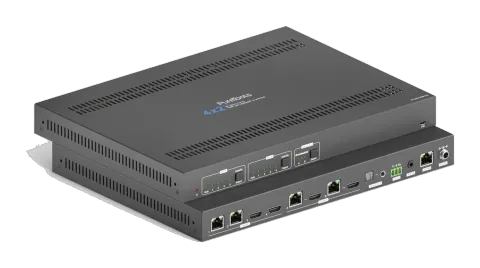
Actief
PT-MA-HDBT42
4x2 4K 18Gbps HDMI HDBaseT-matrix met scaler
De 4x2 4K HDMI en HDBaseT Matrix Switcher PT-MA-HDBT42 is een Matrix Switcher met twee HDBaseT- en twee HDMI-ingangen die signalen distribueert naar twee HDBaseT-uitgangen, elk met een spiegelende HDMI-loop-out. Deze …
HandleidingBesturing (TCP/IP)FAQFirmwareCEBeschikbare besturingsinterfaces. Klap een actief type uit om de volledige commandotabel te zien.
Geen passende commando’s.
RS232-commando's26 commando’sActief
Bron: handleiding, hoofdstuk RS232 Communication Commands, pagina 40
| Commando | Beschrijving | Voorbeeld | Antwoord | |
|---|---|---|---|---|
| >SetPowerOn [param1] | In- of uitschakelen van standby modus. [param1] = En, Dis En - Aanzetten. Dis - Standbymodus. | >SetPowerOn En >SetPowerOn Dis <PowerOn True | ||
| >GetFirmwareVersion | Ontvang de firmwareversie. | <V1.0.0 | ||
| >SetFactoryReset | Reset naar fabrieksinstellingen. | <FactoryReset_True | ||
| >SetReboot | Apparaat opnieuw opstarten. | <Reboot_True | ||
| >GetStatus | Haal systeem werkstatus op. | ... | ||
| >SetRS232Baudrate [param1] | Stel de seriële baudrate van de Matrix Switcher in op [param1]. [param1] = 1~7 1- 115200 2 - 57600 3 - 38400 4 - 19200 5 - 9600 6 - 4800 7 - 2400 | >SetRS232Baudrate 3 <RS232Baudrate 9600 | ||
| >GetRS232Baudrate | Ontvang de baudrate van de switcher. | <RS232Baudrate 9600 | ||
| >SetKeyboardLock [param1] | Vergrendel/deblokeer knoppen op het voorpaneel. [param1] = En, Dis | >SetKeyboardLock En >SetKeyboardLock Dis | ||
| >GetKeyboardLock | Ontvang de vergrendelingsstatus van het voorpaneel. | <KeyboardLock False | ||
| >SetSignalDet [param1] | Stel de methode voor het detecteren van het ingangssignaal in. [param1] = 5V, TMDS. | >SetSignalDet TMDS >SetSignalDet 5V <SignalDetMode 5V | ||
| >GetSignalDet | Haal de detectiemethode van het inputsignaal op. | <SignalDetMode 5V | ||
| >Set5VSource [param1] | In automatische schakelmethode stelt u de detectiemethode van HDBT-ingangen in om het signaal van de Transmitter te detecteren om te verzekeren dat verschillende Transmitters kunnen worden gebruikt. [param1] = HW, FW. HW - Hardwaredetectie. FW - Firmwaredetectie. | >Set5VSource HW >Set5VSource FW <HDBTIN5VSourceFrom FW | ||
| >Get5VSource | Ontvang de detectiemethode van HDBT-ingangen om het signaal van de Transmitter te detecteren zodat verschillende Transmitters kunnen worden gebruikt. | <HDBTIN5VSourceFrom FW | ||
| >SetDownScaler [param1] [param2] | Stel de downscale-functie van output [param1] in. [param1] = OutA, OutB. [param1] = Null, alle outputs. [param2] = En, Dis. En - Schakel downscale-functie in. Dis - Schakel downscale-functie uit. | >SetDownScaler En >SetDownScaler Dis <DownScaler False | ||
| >GetDownScaler [param1] | Ontvang de status van de instelling van de down-scaling functie van output [param1]. [param1] = OutA, OutB. [param1] = Null, alle outputs. | >GetDownScaler <DownScaler False | ||
| >SetDhcp [param1] | Schakel DHCP (Dynamic Host Configuration Protocol) in of uit. [param1] = En, Dis. En - DHCP inschakelen. Dis - DHCP uitschakelen. | >SetDhcp En >SetDhcp Dis <Dhcp False | ||
| >GetDhcp | Haal DHCP-status op. | <Dhcp False | ||
| >SetIpAddr [param1].[param2].[param3].[param4] | Stel GUI IP in. [param1] = 0 ~ 255. [param2] = 0 ~ 255. [param3] = 0 ~ 255. [param4] = 0 ~ 255. | >SetIpAddr 192.168.0.178 <SetIpAddr 192.168.0.178 | ||
| >GetIpAddr | Haal GUI IP op. | <SetIpAddr 192.168.0.178 | ||
| >SetSubnetMask [param1].[param2].[param3].[param4] | Stel het subnetmaskeradres van de GUI in. [param1] = 0 ~ 255. [param2] = 0 ~ 255. [param3] = 0 ~ 255. [param4] = 0 ~ 255. | >SetSubnetMask 255.255.255.0 <SetSubnetMask 255.255.255.0 | ||
| >GetSubnetMask | Haal het subnetmaskeradres van de GUI op. | <SetSubnetMask 255.255.255.0 | ||
| >SetGateWay [param1].[param2].[param3].[param4] | Stel het gateway-adres van de GUI in. [param1] = 0 ~ 255. [param2] = 0 ~ 255. [param3] = 0 ~ 255. [param4] = 0 ~ 255. | >SetGateWay 192.168.0.1 <SetGateWay 192.168.0.1 | ||
| >GetGateWay | Ontvang het gateway-adres van de GUI. | <SetGateWay 192.168.0.1 | ||
| >SetPoCOut [param1] [param2] | PoC in- of uitschakelen. [param1] = IN1, IN2, OutA, OutB, Null. IN1 - HDBT Input 1. IN2 - HDBT Input 2. OutA - HDBT Output A. OutB - HDBT Output B. Null - alle HDBT inputs en outputs. [param2] = En, Dis En - PoC inschakelen. Dis - PoC uitschakelen. | >SetPoCOut Dis >SetPoCOut En >SetPoCOut IN1 Dis >SetPoCOut IN1 En >SetPoCOut IN2 Dis >SetPoCOut IN2 En >SetPoCOut OutA Dis >SetPoCOut OutA En >SetPoCOut OutB Dis >SetPoCOut OutB En <PoCOut OutB On | ||
| >GetPoCOut [param1] | PoC-instelstatus ophalen. [param1] = IN1, IN2, OutA, OutB, Null. IN1 - HDBT-ingang 1. IN2 - HDBT-ingang 2. OutA - HDBT-uitgang A. OutB - HDBT-uitgang B. Null - alle HDBT-ingangen en uitgangen. | >GetPoCOut >GetPoCOut IN1 >GetPoCOut IN2 >GetPoCOut OutA >GetPoCOut OutB <PoCOut OutB On | ||
| >SetAV [param1] [param2] | Schakel video input [param2] naar video output [param1]. [param1] = OutA, OutB. [param1] = Null, alle outputs. [param2] = H1, H2, H3, H4 H1 - HDBT input 1. H2 - HDBT input 2. H3 - HDMI input 3. H4 - HDMI input 4. | >SetAV H1 >SetAV OutA H1 >SetAV OutB H1 <AV OutB H1 |
RS232-commando's27 commando’sActief
Bron: handleiding, hoofdstuk Command Description, pagina 44
| Commando | Beschrijving | Voorbeeld | Antwoord | |
|---|---|---|---|---|
| >GetAV [param1] | Haal de ingangbron op voor output [param1]. | [param1] = OutA, OutB. | [param1] = Null, alle outputs. | >GetAV | >GetAV OutA | >GetAV OutB | | <AV OutA H1 | <AV OutB H1 | |
| >SetAutoSwitch [param1] [param2] | Automatische wisselmodus in-/uitschakelen voor uitgang [param1]. | [param1] = OutA, OutB. | [param1] = Null, alle uitgangen. | [param2] = En, Dis | En - Inschakelen | Dis - Uitschakelen | >SetAutoSwitch En | >SetAutoSwitch Dis | >SetAutoSwitch OutA En | >SetAutoSwitch OutA Dis | >SetAutoSwitch OutB En | >SetAutoSwitch OutB Dis | | <AutoSwitch OutA Enable | <AutoSwitch OutA Disable | <AutoSwitch OutB Enable | <AutoSwitch OutB Disable | |
| >GetAutoSwitch [param1] | Automatische schakelmodus-instelling ophalen van output[param1]. | [param1] = OutA, OutB. | [param1] = Null, alle outputs. | >GetAutoSwitch | >GetAutoSwitch OutA | >GetAutoSwitch OutB | | <AutoSwitch OutA Enable | <AutoSwitch OutA Disable | <AutoSwitch OutB Enable | <AutoSwitch OutB Disable | |
| >SaveScreenMode [param1] | Sla de huidige schakelstatus op in preset[param1]. [param1] = 1~6. | >SaveScreenMode 1 | <CallScreenMode 1 | | ||
| >RecallScreenMode [param1] | Roep preset [param1] op. [param1] = 1~6. | >RecallScreenMode 2 | <CallScreenMode 2 | | ||
| >ClearScreenMode [param1] | Wis de huidige [param1]. [param1] = 1~6. | >ClearScreenMode 2 | <ClearScreenMode 2 | | ||
| >SetAudioSrc [param1] | Stel de audio bron in van SPDIF + stereo audio-uitgangen. [param1] = OutA, OutB OutA - Audio de-embedding van output A. OutB - Audio de-embedding van output B. | >SetAudioSrc OutA >SetAudioSrc OutB | <AudioSrc OutA De-embedded <AudioSrc OutB De-embedded | |
| >SetSpdif [param1] | Dempen/ondempen van de SPDIF audio-uitgang. [param1] = Mute, Unmute | >SetSpdif Mute >SetSpdif Unmute | <Spdif Mute <Spdif UnMute | |
| >SetIis [param1] | Dempen/ondempen van de stereo (I2S) audio-uitgang. [param1] = Mute, Unmute | >SetIis Mute >SetIis Unmute | <Iis Mute <Iis UnMute | |
| >GetAudioSta | Haal de audio-uitgangsstatus op. | <AudioSrc OutA De-embedded <AudioSrc OutB De-embedded <Spdif Mute <Spdif UnMute <Iis Mute <Iis UnMute | ||
| >SetHdcpOutput [param1] [param2] | Stel de HDCP modus van Output in. [param1] = OutA, OutB. [param1] = Null, alle Outputs. [param2] = Actief, Passief, Uit. Actief - HDCP 1.4 Passief - Volgt de HDCP van het ingangssignaal, ondersteunt tot HDCP 2.2. Uit - Geen HDCP-inhoud. | >SetHdcpOutput Active >SetHdcpOutput Passive >SetHdcpOutput Off | <HdcpOutput Active <HdcpOutput Passive <HdcpOutput Off | |
| >GetHdcpOutput | Haal HDCP-instellingsstatus van output op. | <HdcpOutput Active <HdcpOutput Passive <HdcpOutput Off | ||
| >SetUpdateEdid [param1] | Upload een gebruikersgedefinieerde EDID. De EDID kan worden opgeslagen voor oproeping op elk moment. Wanneer het commando wordt toegepast, vraagt het systeem om het EDID-bestand (.bin) te uploaden. De bewerking wordt na 10 seconden geannuleerd. [param1] = 1, 2. 1 - Upload gebruikersgedefinieerde EDID 1. 2 - Upload gebruikersgedefinieerde EDID 2. | >SetUpdateEdid 1 | <User 1 EDID Ready Please Send EDID Data Within 10 Seconds | |
| >SetEdidMode [param1] [param2] | Stel de EDID van input in. [param1] = H1, H2, H3, H4, Null H1 - HDBT input 1. H2 - HDBT input 2. H3 - HDMI input 3. H4 - HDMI input 4. Null - Alle inputs. [param2] = 1~12 1 - HDBT OUTA EDID-kopie 2 - HDBT OUTB EDID-kopie 3 - 1920x1080@60Hz 8bit Stereo 4 - 1920x1080 8bit High Definition Audio 5 - 3840x2160@30Hz 8bit Stereo Audio 6 - 3840x2160@30Hz Deep Color High Definition Audio 7 - 3840x2160@60Hz 4:2:0 Deep Color Stereo Audio 8 - 3840x2160@60Hz Deep Color Stereo Audio 9 - 3840x2160@60Hz Deep Color High Definition Audio 10 - 3840x2160@60Hz Deep Color HDR LPCM 6CH 11 - gebruiker-gedefinieerde EDID 1 12 - gebruiker-gedefinieerde EDID 2 | >SetEdidMode 8 >SetEdidMode H1 8 >SetEdidMode H2 8 >SetEdidMode H3 8 >SetEdidMode H4 8 | <EDIDMode H1 8 <EDIDMode H2 8 <EDIDMode H3 8 <EDIDMode H4 8 | |
| >GetEdidMode [param1] | EDID van input ophalen. [param1] = H1, H2, H3, H4, Null H1 - HDBT input 1. H2 - HDBT input 2. H3 - HDMI input 3. H4 - HDMI input 4. Null - Alle inputs. | >GetEdidMode >GetEdidMode H1 >GetEdidMode H2 >GetEdidMode H3 >GetEdidMode H4 | <EDIDMode H1 8 <EDIDMode H2 8 <EDIDMode H3 8 <EDIDMode H4 8 | |
| >SetSrcCecControl [param1] [param2] | Stuur CEC-commando om het bronapparaat te bedienen. [param1] = H1, H2, H3, H4, Null H1 - HDBT ingang 1. H2 - HDBT ingang 2. H3 - HDMI ingang 3. H4 - HDMI ingang 4. Null - Alle ingangen. [param2] = 1~18 1 - Volume- 2 - Menu 3 - Volume+ 4 - Terug 5 - Omhoog 6 – OK 7 - Links 8 – Omlaag 9 - Rechts 10 – Aan 11 - Uit 12 - Stop 13 - Vorige 14 – Volgende 15 - Pauze 16 – REW 17 - FF 18 - Afspelen | >SetSrcCecControl H1 1 >SetSrcCecControl H2 1 >SetSrcCecControl H3 1 >SetSrcCecControl H4 1 | <SourceCECCommand H1 1 <SourceCECCommand H2 1 <SourceCECCommand H3 1 <SourceCECCommand H4 1 | |
| >SetDisCecControl [param1] [param2] | Stuur CEC-commando om het weergaveapparaat te bedienen. [param1] = OutA, OutB. [param1] = Null, alle uitgangen. [param2] = 1~6 1 - Aan 2 - Uit 3 - Bron 4 - Dempen 5 - Volume- 6 - Volume+ | >SetDisCecControl OutA 1 >SetDisCecControl OutB 1 | <DisplayCECCommand OutA 1 <DisplayCECCommand OutB 1 | |
| >SetUserCecControl [param1] [param2] | Pas CEC-commando aan om bron- of weergaveapparaat te bedienen. [param1] = 1~6 1 - HDBT input 1. 2 - HDBT input 2. 3 - HDMI input 3. 4 - HDMI input 4. 5 - HDBT output A. 6 - HDBT output B. [param2] = XX:XX......(HEX) | >SetUserCecControl 5 40:36 | <UserCECCommand 1 XX:XX….. | |
| >SetRS232Mode [param1] | Stel de RS232-modus in. [param1] = 1~4 1 - Lokale besturing. 2 - HDBT Transmitter Pass Through 3 - HDBT Receiver Pass Through 4 - Pass Through tussen Transmitter en Receiver. Opmerking: De RS232-modus kan worden ingesteld via het GUI RS232-tabblad. | >SetRS232Mode 1 >SetRS232Mode 2 >SetRS232Mode 3 >SetRS232Mode 4 | <RS232Mode 1 <RS232Mode 2 <RS232Mode 3 <RS232Mode 4 | |
| >GetRS232Mode | RS232-besturingsmodus ophalen. | <RS232Mode 2 | ||
| >SetOn_[param1]_[param2]:[param3] | Wanneer de Switcher wordt ingeschakeld, stuurt deze automatisch het opgeslagen RS232-commando om externe apparaten van derden aan te sturen. [param1] = A, H. A - ASCII-commandoformaat. H - HEX-commandoformaat. [param2] = 1~7 (Baudrate) 1 - 115200 2 - 57600 3 - 38400 4 - 19200 5 - 9600 6 - 4800 7 - 2400 [param3] = ASCII-string of HEX-string. (bijv. de string wordt gebruikt om het weergaveapparaat in te schakelen) Opmerking: het commando hoeft geen afsluitende “ ” te bevatten. | >SetOn_A_1:abc123 | <SetOn_Ascii (Baud)115200 abc123 | |
| >SetOff_[param1]_[param2]_[param3]:[param4] | Wanneer de Switcher wordt uitgeschakeld, stuurt deze automatisch het opgeslagen RS232-commando om externe apparaten van derden aan te sturen. [param1] = A, H. A - ASCII-commandoformaat. H - HEX-commandoformaat. [param2] = 1~7 (Baudrate). 1 - 115200 2 - 57600 3 - 38400 4 - 19200 5 - 9600 6 - 4800 7 - 2400 [param3] = 1, 2 1 - Stuurt de RS232-reeks één keer. 2 - Stuurt de RS232-reeks twee keer. [param4] = ASCII-string of HEX-string. (bijv. de string wordt gebruikt om het weergaveapparaat uit te schakelen) Opmerking: het commando hoeft geen afsluitende “ ” te bevatten. | >SetOff_A_1_2:abc123 | SetOff_Ascii (Baud)115200 (Repeat)2 abc123 | |
| >SetOffRptDly [param1] | Wanneer het bovenstaande Off RS232-commando 2 keer wordt herhaald, kan de interval tussen de twee commando's met dit commando worden ingesteld. [param1] = 300-10000 (ms) | >SetOffRptDly 300 | <OffRptDly 300 | |
| >GetOffRptDly | Haal het verzendinterval op tussen twee Off RS232-commando's. | <OffRptDly 300 | ||
| >Send_A_[param1]_[param2]:[param3] | Stuur ASCII-commando naar de gewenste RS232-poort. [param1] = 1~5 1 - Lokaal 2 - HDBT ingang 1 3 - HDBT ingang 2 4 - HDBT uitgang A. 5 - HDBT uitgang B. [param2] = 1~7 (Baudrate) 1 - 115200 2 - 57600 3 - 38400 4 - 19200 5 - 9600 6 - 4800 7 - 2400 [param3] = ASCII-string. Opmerking: Voor het commando is geen command einde “ ” nodig. | >Send_A_1_1:abc123 … | ||
| >Send_H_[param1]_[param2]:[param3] | Stuur HEX-commando naar de gewenste RS232-poort. [param1] = 1~5 1 - Lokaal 2 - HDBT ingang 1 3 - HDBT ingang 2 4 - HDBT uitgang A. 5 - HDBT uitgang B. [param2] = 1~7 (Baudrate) 1 - 115200 2 - 57600 3 - 38400 4 - 19200 5 - 9600 6 - 4800 7 - 2400 [param3] = HEX-string Opmerking: Voor het commando is geen command einde “ ” nodig. | >Send_H_1_1:31 32 33 … | ||
| >SetDisplayOn [param1] [param2] | De weergaveapparaten in- of uitschakelen door gelijktijdig CEC-commando en het opgeslagen RS232-commando te verzenden. [param1] = OutA, OutB. [param1] = Null, alle outputs. [param2] = En, Dis En - Weergaveapparaten inschakelen. Dis - Weergaveapparaten uitschakelen. | >SetDisplayOn En >SetDisplayOn Dis >SetDisplayOn OutA En >SetDisplayOn OutA Dis >SetDisplayOn OutB En >SetDisplayOn OutB Dis | <Display OutA Off <Display OutA On <Display OutB Off <Display OutB On |