
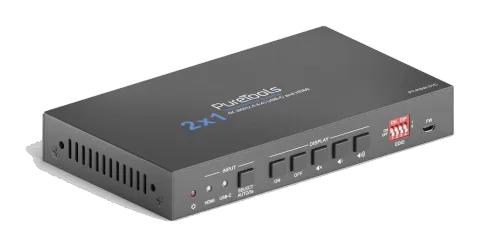
UitgefaseerdMogelijk alternatief: PT-PSW-21HC-KVM
PT-PSW-21C
2x1 4K 18Gbps Multiformat presentatieswitcher met KVM
De PureTools 2x1 KVM Switcher (HDMI, USB-C) maakt het mogelijk om te schakelen tussen 1 HDMI- en 1 USB-C-signaal naar één enkele HDMI Output, met ondersteuning voor 18Gbps bandbreedte voor resoluties tot 4K UltraHD …
HandleidingBesturing (TCP/IP)FAQDatasheetAlternatief beschikbaarFirmwareCEBeschikbare besturingsinterfaces. Klap een actief type uit om de volledige commandotabel te zien.
Geen passende commando’s.
RS232-commando's35 commando’sActief
VerbindingRS232 Communication Protocol Baud rate: 9600 Data bit: 8 Stop bit: 1 Parity bit: none All commands must end with “<CR><LF>”. In the commands, “[”and “]” are symbols for easy reading and do not need to be typed in actual operation.↓ CSV
Bron: handleiding, hoofdstuk RS232 Command, pagina 22
| Commando | Beschrijving | Antwoord | |
|---|---|---|---|
| #GET_FIRMWARE_VERSION | Ontvang de firmwareversie. | @V1.0.0 | |
| #FACTORY_RESET | Fabrieksreset. | @FACTORY_RESET | |
| #REBOOT | System reboot | @REBOOT | |
| #HELP | Get the command details. Example: #HELP SET_AV Feedback: @SELECT VIDEO AND AUDIO INPUT PORT | ||
| #SET_AV PARAM1 PARAM1=H,C H - HDMI C - TYPE-C | |||
| #SET_AV H | Switch to HDMI input. | @AV H | |
| #SET_AV C | Switch to USB-C input. | @AV C | |
| #GET_AV | Ontvang de huidige inputbron. | @AV H @AV C | |
| #SET_AUTO_SWITCH 1 | Automatische schakelmodus inschakelen. | @AUTO_SWITCH 1 | |
| #SET_AUTO_SWITCH 0 | Disable auto switching mode. | @AUTO_SWITCH 0 | |
| #GET_AUTO_SWITCH | Ontvang de status van de automatische omschakeling. | @AUTO_SWITCH 1 @AUTO_SWITCH 0 | |
| #UPLOAD_USER_EDID [X] X =1~5, represents the EDID, its DIP switch status shows as below: | X DIP Switch Status 1 1011 2 1100 3 1101 4 1110 5 1111 Operation: Prepare the EDID file (.bin). Set the 4-pin DIP switch status, for example: “1011”. Send the command “#UPLOAD_USER_EDID 1.”, and the feedback is “@USER_EDID 1 READY PLEASE SEND EDID DATA IN 10S”. Send the EDID file (.bin). If successfully upload, the feedback is: “OK”. | ||
| #SET_SYNCACT_CEC 1 | Enable the function of automatically sending CEC commands. When detecting video input signal or not detecting any video signal, the switcher will automatically send the corresponding CEC command to control the display device. | @SYNCACT_CEC 1 | |
| #SET_SYNCACT_CEC 0 | Disable the function of automatically sending CEC commands. | @SYNCACT_CEC 0 | |
| #GET_SYNCACT_CEC | Ontvang de status van de functie-instelling voor het automatisch verzenden van CEC-opdrachten. | @SYNCACT_CEC 1 | |
| #SET_SYNCACT_RS232 1 | Enable the function of automatically sending RS232 commands. When detecting video input signal or not detecting any video signal, the switcher will automatically send the corresponding RS232 command to control the display device. | @SYNCACT_RS232 1 | |
| #SET_SYNCACT_RS232 0 | Disable the function of automatically sending RS232 commands. | @SYNCACT_RS232 0 | |
| #GET_SYNCACT_RS232 | Ontvang de status van de functie-instelling voor het automatisch verzenden van RS232-opdrachten. | @SYNCACT_RS232 1 | |
| #SET_DTIME [PARAM1]:[PARAM2] | When not detecting video input signal, set the auto power-off time of display device to [PARAM1]: [PARAM2]. The default time is 15 minutes. [PARAM1]=0~30 minutes. [PARAM2]=0~1800 seconds. | #SET_DTIME 1:30 @DTIME 1:30 | |
| #GET_DTIME | Get the auto power-off time of display device. | @DTIME 30:0 | |
| #SET_AUDIO_MUTE | Mute/unmute the display audio through CEC and RS232 channels. | @AUDIO_MUTE_UNMUTE | |
| #SET_VOL + | Increase the display audio through CEC and RS232 channels. | @VOL - | |
| #SET_VOL - | Decrease the display audio through CEC and RS232 channels. | @VOL + | |
| #SET_DISPLAY 1 | Schakel het display in. | @DISPLAY 0 | |
| #SET_DISPLAY 0 | Display uitschakelen. | @DISPLAY 1 | |
| #SET_RS232_BAUD 0 | Set the RS232 baud rate to 115200. | @RS232_BAUD 0 | |
| #SET_RS232_BAUD 1 | Set the RS232 baud rate to 57600. | @RS232_BAUD 1 | |
| #SET_RS232_BAUD 2 | Set the RS232 baud rate to 38400. | @RS232_BAUD 2 | |
| #SET_RS232_BAUD 3 | Set the RS232 baud rate to 19200. | @RS232_BAUD 3 | |
| #SET_RS232_BAUD 4 | Set the RS232 baud rate to 9600. | @RS232_BAUD 4 | |
| #SET_RS232_BAUD 5 | Set the RS232 baud rate to 4800. | @RS232_BAUD 5 | |
| #SET_RS232_BAUD 6 | Set the RS232 baud rate to 2400. | @RS232_BAUD 6 | |
| #GET_RS232_BAUD | RS232-baudrate ophalen. | @RS232_BAUD 0 @RS232_BAUD 1 @RS232_BAUD 2 @RS232_BAUD 3 @RS232_BAUD 4 @RS232_BAUD 5 @RS232_BAUD 6 | |
| #SET_ON_[PARAM1]_[PARAM2]:XXXX | Set the ASCII RS232 command XXXX to be sent to control the third-party device when the DISPLAY ON button is pressed. [PARAM1] = 00~06 (Baud Rate) 00 - 115200 01 - 57600 02 - 38400 03 - 19200 04 - 9600 05 - 4800 06 - 2400 [PARAM2] = 00~99. The delay time of sending command. XXXX: Any ASCII code (up to 48 bytes). | #SET_ON_05_30:1234567 @BAUDRATE: 4800 @DELAY TIME: 30 s @DISPLAY ON TO SEND:1234567 | |
| #SET_H_ON_[PARAM1]_[PARAM2]:XX XX | Set the HEX RS232 command XX XX to be sent to control the third-party device when the DISPLAY ON button is pressed. [PARAM1] = 00~06 (Baud Rate) 00 - 115200 01 - 57600 02 - 38400 03 - 19200 04 - 9600 05 - 4800 06 - 2400 [PARAM2] = 00~99. The delay time of sending command. | #SET_H_ON_05_30:31 32 33 34 35 @BAUDRATE: 4800 @DELAY TIME: 30 s @DISPLAY ON HEX TO SEND:31 32 33 34 35 |