
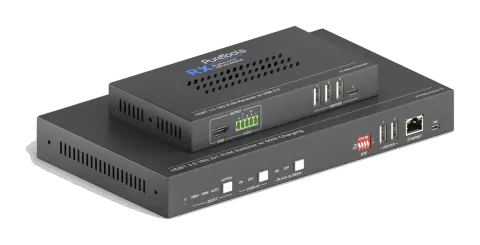
UitgefaseerdMogelijk alternatief: PT-PSW-21KVM-40G
PT-PSW-21KVM
2x1 4K 18 Gbps multi-format samenwerkingsschakelaar set
De PT-PSW-21KVM is een HDBaseT 3.0 samenwerking extender-set die ongecomprimeerde 4K-video, USB-gegevens en Ethernet over lange afstanden verzendt, met HDMI- en USB-C DP Alt-Mode-ingangen voor flexibele …
HandleidingBesturing (TCP/IP)FAQAlternatief beschikbaarFirmwareCEBeschikbare besturingsinterfaces. Klap een actief type uit om de volledige commandotabel te zien.
Geen passende commando’s.
RS232-commando's1 commando’sActief
VerbindingBaud Rate: Supports 9600, 19200, 38400, 57600, 115200
Command Ending: NULL, CR, LF or CR+LF can be chosen.↓ CSV
Bron: handleiding, hoofdstuk RS232 Tab, pagina 19
| Commando | Beschrijving | Antwoord | |
|---|---|---|---|
| Type the command in the box to control the third-party device which is connected to the RS232 port of the PT-PSW-21KVM. | Control the third-party device connected to the RS232 port. |
RS232-commando's30 commando’sActief
Bron: handleiding, hoofdstuk RS232 Command, pagina 27
| Commando | Beschrijving | Voorbeeld | Antwoord | |
|---|---|---|---|---|
| PHDBTON. | HDBaseT OUT POC power on | HDBT 01 Power ON! | ||
| PHDBTOFF. | HDBaseT OUT POC power off | HDBT 01 Power OFF! | ||
| HDMIA. | Auto-switch mode on HDMI Out | HDMI Out Switch Auto Mode! | ||
| HDMIM. | Manual-switch mode on HDMI Out | HDMI Out Switch Manual Mode! | ||
| HDMI[x]. | HDMI input source selection. x = 1 & 2 1 – Type-C 2 – HDMI | HDMI Out Switch To 01! | HDMI Out Switch To 01! | |
| POWON. | Turn off standby mode | Power ON! | ||
| POWOFF. | Turn on standby mode | Power OFF! | ||
| SIGNALTRG[xx]MODE. | When setting the detection mode xx=1, it is 5V detection, and when it is 2, it is TMDS detection. | Set Trigger Mode To 5V. | ||
| SIGNALTRGSTA. | Methode van signaaldetectie opvragen (TMDS of 5V) | Get Trigger Mode Is 5V. | ||
| RST. | Fabrieksherstel | Factory Default! | ||
| Lock. | Schakel vergrendeling van het frontpaneel in | Front Panel Locked! | ||
| Unlock. | Schakel het frontpaneelvergrendeling uit | Front Panel UnLock! | ||
| STA. | Status opvragen | PT-PSW-21KVM V1.0.0 PWON! HDBT 01 Power ON! HDMI OUT 01 Down Scale OFF! HDMI OUT 02 Down Scale OFF! HDMI Out Switch Auto Mode! Get Trigger Mode Is 5V. System Unlock! Baudrate9600! GUI_IP:192.168.0.200! HDMI Out Switch To 02! Set Output Black Screen ON! IN 1 2 LINK Y Y OUT 1 2 LINK Y Y Input 1 EDID From 1 User Define EDID! Input 2 EDID From 1 Internal EDID! OUT 01 HDCP MAT DISPLAY! OUT 02 HDCP MAT DISPLAY! Set POFF Delay To 600 Second(s)! | ||
| RS232ONSAVE:[Y],[xxx]. | Save the display terminal boot command sent when the input is detected. Y is the baud rate, 1--2400; 2--4800; 3--9600; 4--19200; 5--38400; 6-57600; 7 --115200; xxx is the command data | |||
| RS232OFFSAVE:[Y],[xxx]. | Save the display terminal shutdown command sent when no input is detected. Y is the baud rate, 1--2400; 2--4800; 3--9600; 4--19200; 5--38400; 6-57600; 7--115200; xxx is the command data | |||
| RS232DLYOUT[xx]:[yy]. | Set the delayed sending time of the display terminal shutdown command (CEC and RS232). Send when no input is detected; the default time is 10 minutes 600s [xx]=output,00~02 [yy]=second,01~600 | |||
| TVON. | Turn on TV by CEC control | CEC_TV_POWON! CEC Output 01 Send Success. CEC Output 02 Send Success. | ||
| TVOFF. | Turn off TV by CEC control | CEC_TV_POWOFF! CEC Output 01 Send Success. CEC Output 02 Send Success. | ||
| TVVOL+. | TV volume plus by CEC control | CEC_TV_VOLUP! CEC Output 01 Send Success. CEC Output 02 Send Success. | ||
| TVVOL-. | TV volume down by CEC control | CEC_TV_VOLDOWN! CEC Output 01 Send Success. CEC Output 02 Send Success. | ||
| TVMUTE. | TV dempen via CEC-besturing | CEC_TV_VOLMUTE/UNMUTE! CEC Output 01 Send Success. CEC Output 02 Send Success. | ||
| DS[x]ON. | Turn on the DOWN SCALE of the HDMI output. (Compatible with [X]/[XX]) [x] Value 0-2 or 00-02, 0 means all output | HDMI OUT 01 Down Scale ON! HDMI OUT 02 Down Scale ON! | ||
| DS[x]OFF. | Turn off the DOWN SCALE of the HDMI output. (Compatible with [X]/[XX]) [x] Value 0-2 or 00-02, 0 means all output | HDMI OUT 01 Down Scale OFF! HDMI OUT 02 Down Scale OFF! | ||
| STA_IN. | Source connection status | IN 1 2 LINK N N | ||
| /+[X]/[YY]:XXX. | RS232 sends commands to control peripheral devices. [YY]The value is 00 or 01; [X] is 1--2400; 2--4800; 3--9600; 4--19200; 5--38400; 6-57600; 7--115200 | 123456 | ||
| @OUT[xx]. | Turn on the HDMI 5V of the output port. [xx] The value 00-01, 00 means all outputs. | Set Output Black Screen ON! | ||
| $OUT[xx]. | Turn off the HDMI 5V of the output port. [xx] The value 00-01,00 means all outputs. | Set Output Black Screen OFF! | ||
| GETGUIIP. | GUI IP opvragen | GUI_IP:192.168.0.173! | ||
| SetGuiIP_DHCP ON. | Dynamic DHCP | GUI IP DHCP ON! | ||
| SetGuiIP_DHCP OFF:xxx.xxx.x.xxx. | Static DHCP+set IP (default is 192.168.0.178) | GUI IP DHCP OFF!SETGUIIP:192.168.0.123! |