
Uitgefaseerd
PT-PSW-41RS
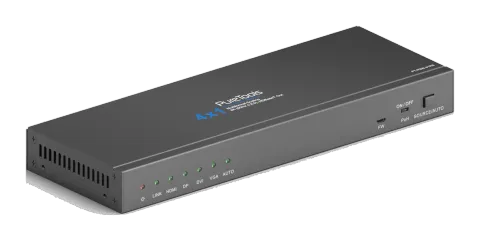
PureTools - Scaler Switcher 4x1, 4K, HDBT uitgang
PureTools - Scaler Switcher 4x1, 4K, HDBT Output.
HandleidingBesturing (TCP/IP)FAQSpecificatiesFirmwareCEBeschikbare besturingsinterfaces. Klap een actief type uit om de volledige commandotabel te zien.
Geen passende commando’s.
IR-besturing via RS2322 commando’sActief
Bron: handleiding, hoofdstuk IR Control, pagina 15
| Commando | Beschrijving | Antwoord | |
|---|---|---|---|
| 50782% | Stel in op IR-modus 2 (fabrieksinstelling), om de Scaler Switcher te bedienen met een IR-afstandsbediening. | ||
| 50781% | Stel in op IR-modus 1, om het displayapparaat aan de andere kant (zoals HDTV) lokaal te bedienen met behulp van de IR-afstandsbediening. |
RS232-commando's32 commando’sActief
Verbindingbaudrate: 2400, 4800, 9600, 19200, 38400, 57600 of 115200; data bits, stop bits en parity bit correct instellen in de besturingssoftware↓ CSV
Bron: handleiding, hoofdstuk RS232 Control, pagina 20
| Commando | Beschrijving | Antwoord | |
|---|---|---|---|
| 50701% | Overschakelen naar HDMI input | Switch to HDMI | |
| 50702% | Overschakelen naar DP input | Switch to DP | |
| 50703% | Overschakelen naar DVI input | Switch to DVI | |
| 50704% | Schakel naar VGA input | Switch to VGA | |
| 50680% | Converteer naar VGA signaalformaat voor VGA-ingang | Input VGA Set & Switch to VGA 1 | |
| 50681% | Converteer naar YPbPr signaalformaat voor VGA-ingang | Input VGA Set & Switch to YPbPr 1 | |
| 50682% | Converteer naar C-video signaalformaat voor VGA-ingang | Input VGA Set & Switch to AV 1 | |
| 50683% | Converteer naar VGA signaalformaat voor DVI-ingang | Input DVI Set & Switch to VGA 2 | |
| 50684% | Converteer naar YPbPr signaalformaat voor DVI-ingang | Input DVI Set & Switch to YPbPr 2 | |
| 50685% | Converteer naar C-video signaalformaat voor DVI-ingang | Input DVI Set & Switch to AV 2 | |
| 50686% | Converteer naar digitale signaalformaat voor DVI-ingang | Input DVI Set & Switch to Digital | |
| 50770% | Automatische schakeling inschakelen | Auto Switching | |
| 50771% | Schakel automatisch schakelen uit | Manual Switching | |
| 50708% | Selecteer de embedded audio als DVI audio input | DVI Audio from Embedded | |
| 50709% | Selecteer de externe audio als DVI audio-ingang | DVI Audio from Embedded | |
| 50619% | Stel de outputresolutie in op 1360x768 HD | Resolution: 1360x768 | |
| 50620% | Stel de outputresolutie in op 1920X1200 WUXGA | Resolution: 1920x1200 | |
| 50621% | Stel de outputresolutie in op 1600X1200 UXGA | Resolution: 1600x1200 | |
| 50626% | Stel de outputresolutie in op 1024X768 XGA | Resolution: 1024x768 | |
| 50627% | Stel de outputresolutie in op 1280X720 720P | Resolution: 1280x720 | |
| 50628% | Verander resolutie naar 1280X800 WXGA | Resolution: 1280x800 | |
| 50629% | Stel de outputresolutie in op 1920X1080 1080P | Resolution: 1920x1080 | |
| 50779% | RS232-bedieningsmodus 1: Bedien het externe apparaat van derden door RS232-commando's te versturen via PC, | RS232 Mode 1: Enable RS232 Control Remote | |
| 50780% | RS232-bedieningsmodus 2: Bedien de Scaler Switcher door RS232-commando's te versturen via PC. | RS232 Mode 2: Disable RS232 Control Remote | |
| 50781% | IR-besturingsmodus 1:Bestuur het derde apparaat op afstand met de IR-afstandsbediening hiervan. | IR Mode 1:IR Control Remote | |
| 50782% | IR-besturingsmodus 2: Bestuur de Scaler Switcher met de IR-afstandsbediening. | IR Mode 2:IR Control Scaler | |
| 50772% | EDID doorgavemodus | EDID:bypass mode | |
| 50773% | EDID 1080P 2PCM | EDID:1080P&PCM 2ch | |
| 50774% | EDID 1080P 5.1 | EDID:1080P&5.1ch | |
| 50775% | EDID 1080P3D 5.1 | EDID:1080P3d&5.1ch | |
| 50776% | EDID 1080I 2PCM | EDID:1080i&PCM 2ch | |
| 50777% | EDID 4K*2K 2PCM | EDID:4K&PCM 2ch |
Beeldinstellingen commando's8 commando’sActief
Bron: handleiding, hoofdstuk Image Setup Commands, pagina 23
| Commando | Beschrijving | Antwoord | |
|---|---|---|---|
| 502xx% | Stel de helderheid in op xx. | Brightness: xx (xx=00~99) | |
| 503xx% | Stel het contrast in op xx. | Contrast: xx (xx=00~99) | |
| 504xx% | Stel de verzadiging in op xx. | Saturation: xx (xx=00~99) | |
| 505xx% | Stel de scherpte in op xx. | Sharpness: xx (xx=00~99) | |
| 50606% | Automatisch de invoerparameter aanpassen voor VGA-signaal | VGA Input Auto | |
| 50607% | Pas de kleurtemperatuur aan | Color Temperature: xx (xx= Cool/ Medium/ Warm/ User.) | |
| 50608% | Stel de beeldverhouding in | Aspect Ratio: xx (xx= 16:9/ 4:3/auto | |
| 50614% | Stel de beeldmodus in | Picture Mode: xx (xx= dynamic/standard/ mild/ user) |
RS232-commando's7 commando’sActief
Bron: handleiding, hoofdstuk Image adjustment Commands, pagina 23
| Commando | Beschrijving | Antwoord | |
|---|---|---|---|
| 50678% | Schakel het aanpassen van de schermuitgang in | Enter Output Position Adjust | |
| 50679% | Schakel scherm output aanpassing uit | Exit Output Position Adjust | |
| 50670% | Beweeg het beeld naar links | Output Position Adjust X xx | |
| 50671% | Beweeg het beeld naar rechts | Output Position Adjust X xx | |
| 50672% | Beweeg het beeld omhoog | Output Position Adjust Y XX | |
| 50673% | Beweeg het beeld naar beneden | Output Position Adjust Y xx | |
| 50674% | Uitrekken naar links vanaf linkerkant (verhoog beeldbreedte) | Output Width Adjust xx |
Onbekende interface5 commando’sActief
Bron: handleiding, hoofdstuk Image adjustment Commands, pagina 24
| Commando | Beschrijving | Antwoord | |
|---|---|---|---|
| 50675% | Trek rechts vanaf de linkerkant (vermindert beeldbreedte) | Output Width Adjust xx | |
| 50676% | Uitrekken naar boven vanaf onderzijde (verlaag beeldhoogte) | Output Height Adjust xx | |
| 50677% | Uitrekken naar beneden vanaf onderzijde (verhoog beeldhoogte) | Output Height Adjust xx | |
| 50705% | Verander de horizontale polariteit naar de tegenovergestelde | Hpolarity:0/1 | |
| 50706% | Verander de verticale polariteit naar de tegenovergestelde | Vpolarity:0/1 |
Opvraagcommando's9 commando’sActief
Bron: handleiding, hoofdstuk Inquire Commands, pagina 24
| Commando | Beschrijving | Antwoord | |
|---|---|---|---|
| 50631% | Controleer de huidige inputbron | Input: xx (xx= HDMI/ DP/ DVI/ VGA) | |
| 50632% | Controleer de outputresolutie | Resolution: xx (xx=1920×1200/1920×1080/1360×768/1280×800/ 1280×720/ 1024×768) | |
| 50633% | Controleer de beeldmodus | Picture Mode: xx (xx= Dynamic/Standard/ Mild/ User) | |
| 50635% | Controleer de beeldverhouding | Aspect Ratio: xx (xx= 16:9/ 4:3/auto) | |
| 50636% | Controleer de helderheid | Brightness: xx (xx=00~99) | |
| 50637% | Controleer het contrast | Contrast: xx (xx=00~99) | |
| 50638% | Controleer de verzadiging | Saturation: xx (xx=00~99) | |
| 50639% | Controleer scherpte | Sharpness: xx (xx=00~99) | |
| 50640% | Controleer de kleurtemperatuur | Color Temperature: xx (XX= Cool/ Medium/ Warm/ User.) |
RS232-commando's4 commando’sActief
Bron: handleiding, hoofdstuk Inquire Commands, pagina 25
| Commando | Beschrijving | Antwoord | |
|---|---|---|---|
| 50778% | Controleer de EDID | EDID: xx (xx=1080P&PCM 2ch/1080P&5.1ch/1080P3d&5.1ch/4K&PCM 2ch) | |
| 50793% | Controleer de HDCP-status | HDCP Off/ HDCP On/ HDCP Active | |
| 50707% | Controleer de huidige outputresolutie en polariteit. | 1920x1080 Hpolarity:1/0 Vpolarity:0/1 | |
| 50699% | Controleer de firmwareversie | Version Vx.x.x (x=0~9) |
RS232-commando's3 commando’sActief
Bron: handleiding, hoofdstuk System Commands, pagina 25
| Commando | Beschrijving | Antwoord | |
|---|---|---|---|
| 50697% | Activeer het apparaat of breng het in standby-modus. | STANDBY. /PWON. | |
| 50698% | Software aan het updaten | ||
| 50617% | Herstel de fabrieksinstellingen |