
Actief
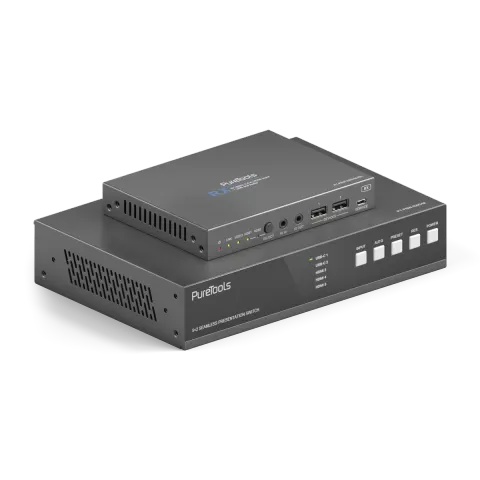
PT-PSW-52KVM
18 Gbps USB-C-samenwerkingsschakelaar met Dante en Multi-View
De PT-PSW-52KVM is een 5x2 HDBaseT 3.0 samenwerking Switcher die bronselectie ondersteunt tussen HDMI, USB-C DP Alt-Mode en USB-B interfaces. Het maakt ongecomprimeerde 18Gbps 4K (60Hz 4:4:4) signaaloverdracht over …
HandleidingBesturing (TCP/IP)FAQSpecificatiesDatasheetWeb-GUIFirmwareCE-verklaring ↗Beschikbare besturingsinterfaces. Klap een actief type uit om de volledige commandotabel te zien.
Geen passende commando’s.
RS232-commando's61 commando’sActief
Bron: handleiding, hoofdstuk RS-232 Control Command, pagina 31
| Commando | Beschrijving | Voorbeeld | Antwoord | |
|---|---|---|---|---|
| help | Haal de lijst van alle commando's op | help | =================== Help Info MCU 1.1.0 Web 1.1.0 Scaler 20230228-10 FPGA 1.1.0 RX 1.18.02 help Get the list of all commands | |
| r type | Haal het apparaattype op | r type | PT-PSW-52KVM | |
| r status | Haal de huidige status van het apparaat op | r status | Please refer to the note at the end of the list. | |
| r fw version | Haal firmwareversie op | r fw version | MCU 1.1.0 Web 1.1.0 Scaler 20230228-10 FPGA 1.1.0 RX 1.18.02 | |
| s power on | Schakel het apparaat in | s power on | Power on System Initializing... Initialization Finished! MCU 1.1.0 Web 1.1.0 Scaler 20230228-10 FPGA 1.1.0 RX 1.18.02 | |
| s power off | Apparaat uitschakelen | s power off | Power off | |
| r power | Haal de huidige stroomstatus op | r power | power on /power off | |
| s reboot | Herstart het apparaat | s reboot | Reboot… System Initializing... Initialization Finished! MCU 1.1.0 Web 1.1.0 Scaler 20230228-10 FPGA 1.1.0 RX 1.18.02 | |
| s reset | Reset naar fabrieksinstellingen | s reset | Reset to factory defaults System Initializing... Initialization Finished! MCU 1.1.0 Web 1.1.0 Scaler 20230228-10 FPGA 1.1.0 RX 1.18.02 | |
| s front button x | Stel vergrendeling van de voorknop aan/uit in (x=0~1) 0. Ontgrendeld 1. Vergrendeld | s front button 0 | Front button: Unlocked | |
| r front button | Status vergrendeling voorpaneelknop aan/uit opvragen | r front button | Front button: Unlocked | |
| s beep x | Schakel zoemer aan/uit (x=0~1) 0. Uit 1. Aan | s beep 1 | Beep: On | |
| r beep | Haal de aan/uit-status van de zoemer op | r beep | Beep: Off | |
| s ir x | Zet IR aan/uit (x=0~1) 0. Uit 1. Aan | s ir 1 | IR: On | |
| r ir | Haal IR aan/uit-status op | r ir | IR: Off | |
| s UsbcAccessNetwork x | Schakel USB-C netwerktoegang functie aan/uit (x=0~1) 0. Uit 1. Aan | s UsbcAccessNetwork 1 | USB-C Access Network: On | |
| r UsbcAccessNetwork | USB-C netwerktoegangsfunctie aan/uit ophalen | r UsbcAccessNetwork | USB-C Access Network: On | |
| s fan speed x | Stel ventilatorsnelheid in (x=0~4) 0. Auto 1. 25% 2. 50% 3. 75% 4. 100% | s fan speed 0 | Fan Speed: Auto | |
| r fan speed | Ventilatorsnelheid opvragen | r fan speed | Fan Speed: Auto | |
| r temp | Haal de interne temperatuur van het apparaat op | r temp | Temp: 65C | |
| r input x EDID | Input EDID-modus opvragen (x=0~5) x=0: alle inputs x=1: USB-C 1 x=2: USB-C 2 x=3: HDMI 3 x=4: HDMI 4 x=5: HDMI 5 | r input 0 EDID | Input USB-C 1 EDID: Auto Input USB-C 2 EDID: Auto Input HDMI 3 EDID: Auto Input HDMI 4 EDID: Auto Input HDMI 5 EDID: Auto | |
| r input x EdidData | Input EDID-gegevens opvragen (x=0~5) x=0: alle inputs x=1: USB-C 1 x=2: USB-C 2 x=3: HDMI 3 x=4: HDMI 4 x=5: HDMI 5 | r input 0 EdidData | Input USB-C 1 EDID Data: Input USB-C 2 EDID Data: Input HDMI 3 EDID Data: Input HDMI 4 EDID Data: Input HDMI 5 EDID Data: | |
| s input x EDID y | Stel EDID in voor invoer (x=0~5) (y=1~16) x=0: alle ingangen x=1: USB-C 1 x=2: USB-C 2 x=3: HDMI 3 x=4: HDMI 4 x=5: HDMI 5 y=1: Auto (HDBT of HDMI of HDBT+HDMI) y=2: Kopieer HDMI OUT y=3: Kopieer HDBT OUT y=4: 4K2K60_444, Stereo Audio 2.0 y=5: 4K2K30_444, Stereo Audio 2.0 y=6: 1080P, Stereo Audio 2.0 y=7: 720p, Stereo Audio 2.0 y=8: 1920x1200, Stereo Audio 2.0 y=9: 1680x1050, Stereo Audio 2.0 y=10: 1600x1200, Stereo Audio 2.0 y=11: 1440x900, Stereo Audio 2.0 y=12: 1360x768, Stereo Audio 2.0 y=13: 1280x1024, Stereo Audio 2.0 y=14: 1024x768, Stereo Audio 2.0 y=15: Door gebruiker gedefinieerd 1 y=16: Door gebruiker gedefinieerd 2 | s input 0 EDID 1 | Input USB-C 1 EDID: Auto Input USB-C 2 EDID: Auto Input HDMI 3 EDID: Auto Input HDMI 4 EDID: Auto Input HDMI 5 EDID: Auto | |
| s output res x | Stel Output-resolutie in (x=1~15) x=1: Auto x=2: 3840x2160p60 x=3: 3840x2160p50 x=4: 4096x2160p60 x=5: 4096x2160p50 x=6: 3840x2160p30 x=7: 3840x2160p25 x=8: 1920x1200p60RB x=9: 1920x1080p60 x=10: 1920x1080p50 x=11: 1360x768p60 x=12: 1280x800p60 x=13: 1280x720p60 x=14: 1280x720p50 x=15: 1024x768p60 | s output res 1 | Out Resolution: Auto | |
| r output res | Haal output resolutie op | r output res | Out Resolution: Auto | |
| s output x hdcp y | Stel output (x=0~2) hdcp in (y=1~3) x=0: alle outputs (HDMI/HDBT) x=1: HDMI output x=2: HDBT output y=1: Auto y=2: HDCP 1.4 y=3: HDCP 2.2 | s output 0 hdcp 1 | Output HDMI HDCP: Auto Output HDBT HDCP: Auto | |
| r output x hdcp | Haal HDCP-status van output op (x=0~2) x=0: alle outputs (HDMI/HDBT) x=1: HDMI output x=2: HDBT output | r output 0 hdcp | Output All HDCP: Auto | |
| s output avmute x | Stel output avmute in aan/uit (x=0~1) x=0: Uit x=1: Aan | s output avmute 1 | Output AV Mute: On | |
| r output avmute | Haal AV-mute on/off status van output op | r output avmute | Output AV Mute: On | |
| s output freeze x | Stel output freeze in aan/uit (x=0~1) x=0: Uit x=1: Aan | s output freeze 1 | Output Freeze: On | |
| r output freeze | Haal freeze on/off status van output op | r output freeze | Output Freeze: On | |
| s output itc x | Stel output videomodus in (x=1~2) x=1: Videomodus x=2: PC-modus | s output itc 1 | Output ITC: Video Mode | |
| r output itc | Haal video modus van output op | r output itc | Output ITC: Video Mode | |
| s main in audio x | Stel Main In (HDMI/USB-C In) audio in van (x=1~6) x=1: Venster 1 x=2: USB-C 1 x=3: USB-C 2 x=4: HDMI 3 x=5: HDMI 4 x=6: HDMI 5 | s main in audio 1 | Main In Audio: Window 1 | |
| r main in audio | Haal audio bron van Main In (HDMI/USB-C In) op | r main in audio | Main In Audio: Window 1 | |
| s output x audio y | Stel audio bron van output (x=0~3) in op (y=1~3) x=0: alle outputs (HDMI/HDBT, Line, Dante) x=1: HDMI/HDBT Out x=2: Line Out x=3: Dante Out y=1: Hoofd In (HDMI/USB-C In) y=2: Line In y=3: Dante In | s output 0 audio 1 | Output HDMI/HDBT Audio: Main In (HDMI/USB-C In) Output Line Audio: Main In (HDMI/USB-C In) Output Dante Audio: Main In (HDMI/USB-C In) | |
| r output x audio | Haal de audio bron op van output (x=0~3) x=0: alle outputs (HDMI/HDBT, Line, Dante) x=1: HDMI/HDBT Out x=2: Line Out x=3: Dante Out | r output 1 audio | Output HDMI/HDBT Audio: Main In (HDMI/USB-C In) | |
| s input x audio vol+ | Verhoog audiovolume input (x=0~3) x=0: alle inputs (HDMI/USB-C, Line, Dante) x=1: Main In (HDMI/USB-C In) x=2: Line In x=3: Dante In | s input 1 audio vol+ | Input Main In (HDMI/USB-C In) Audio Volume: 50 | |
| s input x audio vol- | Verlaag het audiovolume van input (x=0~3) x=0: alle inputs (HDMI/USB-C, Line, Dante) x=1: Hoofd In (HDMI/USB-C In) x=2: Line In x=3: Dante In | s input 1 audio vol- | Input Main In (HDMI/USB-C In) Audio Volume: 50 | |
| s input x audio vol y | Stel audiovolume in voor invoer (x=0~3) (y=0~100) x=0: alle ingangen (HDMI/USB-C, Line, Dante) x=1: Hoofd In (HDMI/USB-C In) x=2: Line In x=3: Dante In | s input 1 audio vol 50 | Input Main In (HDMI/USB-C In) Audio Volume: 50 | |
| r input x audio vol | Audiovolume van input (x=0~3) waarde opvragen x=0: alle inputs (HDMI/USB-C, Line, Dante) x=1: Hoofd In (HDMI/USB-C In) x=2: Line In x=3: Dante In | r input 1 audio vol | Input Main(HDMI/USB-C In) Audio Volume: | |
| s input x audio mute y | Stel audio dempen aan/uit in voor invoer (x=0~3) (y=0~1) x=0: alle ingangen (HDMI/USB-C, Line, Dante) x=1: Hoofd In (HDMI/USB-C In) x=2: Line In x=3: Dante In y=0: dempen uit y=1: dempen aan | s input 0 audio mute 1 | Input Main(HDMI/USB-C In) Audio Mute: On Input Line Audio Mute: On Input Dante Audio Mute: On | |
| r input x audio mute | Geluid dempen aan/uit op input (x=0~3) opvragen x=0: alle inputs (HDMI/USB-C, Line, Dante) x=1: Hoofd In (HDMI/USB-C In) x=2: Line In x=3: Dante In | r input 0 audio mute | Input Main (HDMI/USB-C In) Audio Mute: On Input Line Audio Mute: On Input Dante Audio Mute: On | |
| s master member x y z | Stel master output lid in (x/y/z=0~1) x=0: Sluit HDMI/HDBT Out uit x=1: Neem HDMI/HDBT Out mee y=0: Sluit Line Out uit y=1: Neem Line Out mee z=0: Sluit Dante Out uit z=1: Neem Dante Out mee | s master member 1 1 1 | Master Member: 111 | |
| r master member | Haal het master output lid op | r master member | Master Member: 111 | |
| s master audio vol+ | Verhoog master output audiovolume | s master audio vol+ | Master Audio Volume: 50 | |
| s master audio vol- | Verlaag het hoofdvolume van de output audio. | s master audio vol- | Master Audio Volume: 50 | |
| s master audio vol x | Stel volumewaarde in van master output audio (x=0~100) | s master audio vol 50 | Master Audio Volume: 50 | |
| r master audio vol | Haal de waarde van het master output audiovolume op | r master audio vol | Master Audio Volume: 50 | |
| s master audio mute x | Stel dempen van master output audio aan/uit in (x=0~1) x=0: dempen uit x=1: dempen aan | s master audio mute 1 | Master Audio Mute: On | |
| r master audio mute | Haal de mute aan/uit status van het master output audio op | r master audio mute | Master Audio Mute: On | |
| s output x audio vol+ | Verhoog het audio volume van output (x=0~3) audio volume x=0: alle outputs (HDMI/HDBT, Line, Dante) x=1: HDMI/HDBT Out x=2: Line Out x=3: Dante Out | s output 1 audio vol+ | Output HDMI/HDBT Audio Volume: 50 | |
| s output x audio vol- | Verlaag het audiovolume van output (x=0~3) x=0: alle outputs (HDMI/HDBT, Line, Dante) x=1: HDMI/HDBT Out x=2: Line Out x=3: Dante Out | s output 1 audio vol+ | Output HDMI/HDBT Audio Volume: 50 | |
| s output x audio vol y | Stel audio volume waarde van output (x=0~3) in (y=0~100) x=0: alle outputs (HDMI/HDBT, Line, Dante) x=1: HDMI/HDBT Out x=2: Line Out x=3: Dante Out | s output 1 audio vol 50 | Output HDMI/HDBT Audio Volume: 50 | |
| r output x audio vol | Haal de waarde van het audio volume op van output (x=0~3) x=0: alle outputs (HDMI/HDBT, Line, Dante) x=1: HDMI/HDBT Out x=2: Line Out x=3: Dante Out | r output 1 audio vol | Output HDMI/HDBT Audio Volume: 50 | |
| s output x audio mute y | Schakel output (x=0~3) audio dempen aan/uit (y=0~1) x=0: alle outputs (HDMI/HDBT, Line, Dante) x=1: HDMI/HDBT Out x=2: Line Out x=3: Dante Out y=0: dempen uit y=1: dempen aan | s output 0 audio mute 1 | Output HDMI/HDBT Audio Mute: On Output Line Audio Mute: On Output Dante Audio Mute: On | |
| r output x audio mute | Haal de audio mute aan/uit op van output (x=0~3) x=0: alle outputs (HDMI/HDBT, Line, Dante) x=1: HDMI/HDBT Out x=2: Line Out x=3: Dante Out | r output 0 audio mute | Output HDMI/HDBT Audio Mute: On Output Line Audio Mute: On Output Dante Audio Mute: On | |
| s output x audio mix y | Stel output (x=0~3) audio mix in (y=1~4) x=0: alle outputs (HDMI/HDBT, Line, Dante) x=1: HDMI/HDBT Out x=2: Line Out x=3: Dante Out y=1: Stereo y=2: Links y=3: Rechts y=4: Links en Rechts | s output 0 audio mix 1 | Output HDMI/HDBT Audio Mix: Stereo Output Line Audio Mix: Stereo Output Dante Audio Mix: Stereo | |
| r output x audio mix | Haal de audio mixmodus op van output (x=0~3) x=0: alle outputs (HDMI/HDBT, Line, Dante) x=1: HDMI/HDBT Out x=2: Line Out x=3: Dante Out | r output 0 audio mix | Output HDMI/HDBT Audio Mix: Stereo Output Line Audio Mix: Stereo Output Dante Audio Mix: Stereo | |
| s output x audio delay y | Stel output (x=0~3) audio vertraging in (y=0~50) x=0: alle outputs (HDMI/HDBT, Line, Dante) x=1: HDMI/HDBT Out x=2: Line Out x=3: Dante Out y=[0~50]: Vertragingstijd, milliseconde | s output 0 audio delay 50 | Output HDMI/HDBT Audio Delay: 50ms Output Line Audio Delay: 50ms Output Dante Audio Delay: 50ms | |
| r output x audio delay | Haal de audio vertraging waarde op van output (x=0~3) x=0: alle outputs (HDMI/HDBT, Line, Dante) x=1: HDMI/HDBT Out x=2: Line Out x=3: Dante Out | r output 0 audio delay | Output HDMI/HDBT Audio Delay: 50ms Output Line Audio Delay: 50ms Output Dante Audio Delay: 50ms |
RS232-commando's69 commando’sActief
VerbindingBaudrate: 115200/57600/56000/38400/19200/9600/4800/2400 Data bits: 7/8 Parity: n (Geen) /o (Oneven) /e (Even) Stop bits: 1/2↓ CSV
Bron: handleiding, hoofdstuk RS-232 Control Command, pagina 39
| Commando | Beschrijving | Voorbeeld | Antwoord | |
|---|---|---|---|---|
| r output x audio delay | Haal de audio vertraging waarde op van output (x=0~3) | x=0: alle outputs (HDMI/HDBT, Line, Dante) x=1: HDMI/HDBT Out x=2: Line Out x=3: Dante Out | Output HDMI/HDBT Audio Delay: 50ms Output Line Audio Delay: 50ms Output Dante Audio Delay: 50ms | ||
| s output x audio eq y val z | Stel output (x=0~3) audio GEQ Index (y=1~31) in op waarde (z=0~20) | x=0: alle outputs (HDMI/HDBT, Line, Dante) x=1: HDMI/HDBT Out x=2: Line Out x=3: Dante Out y=[1~31]: EQ Index z=[0~20]: EQ Waarde | s output 0 audio eq 1 val 20 | Output HDMI/HDBT Audio EQ Index 1 to Value 20 Output Line Audio EQ Index 1 to Value 20 Output Dante Audio EQ Index 1 to Value 20 Output Dante Audio EQ Preset is Flat Mode | |
| r output x audio eq y val | Haal de audio GEQ Index (y=1~31) waarde op van output (x=0~3) | x=0: alle outputs (HDMI/HDBT, Line, Dante) x=1: HDMI/HDBT Out x=2: Line Out x=3: Dante Out y=[1~31]: EQ Index | r output 0 audio eq 1 val | Output HDMI/HDBT Audio EQ Index 1 to Value 20 Output Line Audio EQ Index 1 to Value 20 Output Dante Audio EQ Index 1 to Value 20 | |
| s output x audio eq preset y | Stel output (x=0~3) audio GEQ in op preset (y=1~6) | x=0: alle outputs (HDMI/HDBT, Line, Dante) x=1: HDMI/HDBT Out x=2: Line Out x=3: Dante Out y=1: Vlak y=2: Aangepast1 y=3: Aangepast2 y=4: Aangepast3 y=5: Aangepast4 y=6: Aangepast5 | s output 0 audio eq preset 1 | Output HDMI/HDBT Audio EQ Preset 1 Output Line Audio EQ Preset 1 Output Dante Audio EQ Preset 1 | |
| r output x audio eq preset | Haal de audio GEQ preset op van output (x=0~3) | x=0: alle outputs (HDMI/HDBT, Line, Dante) x=1: HDMI/HDBT Out x=2: Line Out x=3: Dante Out | r output 0 audio eq preset | Output HDMI/HDBT Audio EQ Preset 1 Output Line Audio EQ Preset 1 Output Dante Audio EQ Preset 1 | |
| s output x audio eq reset | Reset output (x=0~3) audio GEQ | x=0: alle outputs (HDMI/HDBT, Line, Dante) x=1: HDMI/HDBT Out x=2: Line Out x=3: Dante Out | s output 0 audio eq reset | Output HDMI/HDBT Audio EQ Reset Output Line Audio EQ Reset Output Dante Audio EQ Reset | |
| s auto switch x | Schakel de automatische switchfunctie in of uit (x=0~1) | x=0: Automatisch switchen uitschakelen x=1: Automatisch switchen inschakelen | s auto switch 0 | Auto Switch: Off | |
| r auto switch | Haal de automatische schakelvoorziening op | r auto switch | Auto Switch: Off | |
| s input source x | Routeer inputbron naar output (x=1~5) | x=1: USB-C 1 x=2: USB-C 2 x=3: HDMI 3 x=4: HDMI 4 x=5: HDMI 5 | s input source 1 | Input Source: USB-C 1 | |
| r input source | Haal geselecteerde input source van output op | r input source | Input Source: USB-C 1 | |
| s fallback input x | Stel noodinvoerbron in (x=0~5) | x=0: Volgende invoer x=1: USB-C 1 x=2: USB-C 2 x=3: HDMI 3 x=4: HDMI 4 x=5: HDMI 5 | s fallback input 0 | Fallback Input: Next Input | |
| r fallback input | Terugval-Inputbron opvragen | r fallback input | Fallback Input: Next Input | |
| s multiview x | Stel multiview weergavemodus in (x=1~5) | x=1: Enkelvoudig x=2: PIP x=3: PBP x=4: Drievoudig x=5: Viervoudig | s multiview 1 | Multiview: Single | |
| r multiview | Haal de weergavemodus van de multiview op | r multiview | Multiview: Single | |
| s window x in y | Stel venster (x=0~4) bron in van (y=1~5) | x=0: Alle vensters x=1: Venster 1 x=2: Venster 2 x=3: Venster 3 x=4: Venster 4 y=1: USB-C 1 y=2: USB-C 2 y=3: HDMI 3 y=4: HDMI 4 y=5: HDMI 5 | s window 1 in 1 | Window 1 in USB-C 1 | |
| r window x in | Haal bron van venster (x=0~4) op | x=0: Alle vensters x=1: Venster 1 x=2: Venster 2 x=3: Venster 3 x=4: Venster 4 | r window 0 in | Window 1 in USB-C 1 Window 2 in USB-C 2 Window 3 in HDMI 3 Window 4 in HDMI 4 | |
| s PIP position x | Stel PIP-venster positie in (x=1~4) | x=1: Links boven x=2: Links onder x=3: Rechts boven x=4: Rechts onder | s PIP position 4 | PIP Position: Right Bottom | |
| r PIP position | PIP-vensterpositie ophalen | r PIP position | PIP Position: Right Bottom | |
| s PIP size x | PIP-venstergrootte ophalen (x=1~3) | x=1: Klein x=2: Medium x=3: Groot | s PIP size 3 | PIP Size: Large | |
| r PIP size | PIP-venstergrootte ophalen | r PIP size | PIP Size: Large | |
| s PBP mode x | Stel PBP-vensters weergavemodus in (x=1~2) | x=1: PBP Modus 1 x=2: PBP Modus 2 | s PBP mode 1 | PBP Mode: Mode 1 | |
| r PBP mode | PBP-vensters displaymodus ophalen | r PBP mode | PBP Mode: Mode 1 | |
| s PBP aspect x | Stel PBP-vensters beeldverhouding in (x=1~2) | x=1: Volledig scherm x=2: 16:9 | s PBP aspect 1 | s PBP aspect 1 | |
| r PBP aspect | Haal PBP-venster weergaveverhouding op | r PBP aspect | PBP Aspect: Full Screen | |
| s triple mode x | Stel de weergavemodus in voor drie vensters (x=1~2) | x=1: Drievoudige modus 1 x=2: Drievoudige modus 2 | s triple mode 1 | Triple Mode: Mode 1 | |
| r triple mode | Haal de weergavemodus van de triple windows display op | r triple mode | Triple Mode: Mode 1 | |
| s triple aspect x | Stel de beeldverhouding in voor drie vensters weergave (x=1~2) | x=1: Volledig scherm x=2: 16:9 | s triple aspect 1 | Triple Aspect: Full Screen | |
| r triple aspect | Haal de beeldverhouding van de triple windows display op | r triple aspect | Triple Aspect: Full Screen | |
| s quad mode x | Stel weergavemodus quadvensters in (x=1~2) | x=1: Quad modus 1 x=2: Quad modus 2 | s quad mode 1 | Quad Mode: Mode 1 | |
| r quad mode | Haal display modus quad vensters op | r quad mode | Quad Mode: Mode 1 | |
| s quad aspect x | Stel aspectratio weergave quadvensters in (x=1~2) | x=1: Volledig scherm x=2: 16:9 | s quad aspect 1 | Quad Aspect: Full Screen | |
| r quad aspect | Haal beeldverhouding quad vensters weergeven op | r quad aspect | Quad Aspect: Full Screen | |
| s window x border y | Stel de randmodus (y=0~9) van het opgegeven venster in (x=0~4) | x=0: Alles x=1: Venster 1 x=2: Venster 2 x=3: Venster 3 x=4: Venster 4 y=0: Uit y=1: Zwart y=2: Rood y=3: Groen y=4: Blauw y=5: Geel y=6: Magenta y=7: Cyaan y=8: Wit y=9: Grijs | s window 0 border 0 | Window 1 Border: Off Window 2 Border: Yellow Window 3 Border: Off Window 4 Border: Cyan | |
| r window x border | Ontvang de randmodus van het gespecificeerde venster (x=0~4) | x=0: Alles x=1: Venster 1 x=2: Venster 2 x=3: Venster 3 x=4: Venster 4 | r window 0 border | Window 1 Border: Off Window 2 Border: Yellow Window 3 Border: Off Window 4 Border: Cyan | |
| s rx input x | Selecteer RX inputbron (x=1~2) | x=1: HDBT IN x=2: HDMI IN | s rx input 1 | RX Input: HDBT Error,RX not ready! | |
| r rx input | RX-ingangbron ophalen | r rx input | RX Input: HDBT | |
| r rx hdmi5v | RX HDMI-ingangsvoeding 5V ophalen | r rx hdmi5v | RX HDMI 5V: 1 | |
| r rx host5v | RX USB-hostvoeding 5V ophalen | r rx host5v | RX Host 5V: 1 | |
| s rx auto switch mode x | Stel de RX Auto Switch detectiemodus in (x=1~2) | x=1: TMDS x=2: 5V | s rx auto switch mode 1 | RX Auto Switch Mode: TMDS | |
| r rx auto switch mode | RX Auto Switch-detectiemodus ophalen | r rx auto switch mode | RX Auto Switch Mode: TMDS | |
| s rx auto switch x | Schakel RX Auto Switch aan/uit (x=0~1) | x=0: Uit x=1: Aan | s rx auto switch 1 | RX Auto Switch: On | |
| r rx auto switch | RX Auto Switch aan/uit ophalen | r rx auto switch | RX Auto Switch: On | |
| s cec power on | Stel CEC aan-commando in | s cec power on | CEC Power On | |
| s cec power off | Stel CEC uit-commando in | s cec power off | CEC Power Off | |
| s auto power feature x | Schakel display automatische stroomfunctie aan/uit (x=0~1) | x=0: Uit x=1: Aan | s auto power feature 1 | Auto Power Feature: On | |
| r auto power feature | Status van de functie automatische weergave-uitschakeling opvragen | r auto power feature | Auto Power Feature: On | |
| s auto power off timer x | Stel automatische uitschakelopdracht (CEC/RS232) in die wordt verzonden na x (x=1~6) | x=1: 5 sec x=2: 10 sec x=3: 30 sec x=4: 1 min x=5: 5 min x=6: 10 min | s auto power off timer 4 | Auto Power Off Timer: 1 min | |
| r auto power off timer | Haal de timer voor automatische uitschakeling op | r auto power off timer | Auto Power Off Timer: 1 min | |
| s auto power control x | Stel automatische stroomvoorzieningsfunctie in via (x=1~3) | x=1: CEC x=2: RS232 x=3: CEC en RS232 | s auto power control 1 | Auto Power Control: CEC | |
| r auto power control | Haal het type automatische energiebesturing op | r auto power control | Auto Power Control: CEC | |
| s UsbSwitchMode x | Stel USB-schakelmodus in (x=1~3) | x=1: Automodus (detecteer USB 5V en schakel) x=2: Handmatige modus x=3: Volg video (HDMI 3 gekoppeld aan USB Host 3) | s UsbSwitchMode 1 | UsbSwitchMode: Auto mode | |
| r UsbSwitchMode | USB-schakelmodus ophalen | r UsbSwitchMode | UsbSwitchMode: Auto mode | |
| s UsbManual x | Stel USB-handmatige schakelaar in (x=1~3) | x=1: USB-C 1 x=2: USB-C 2 x=3: USB Host 3 | s UsbManual 3 | UsbManual: USB Host 3 | |
| r UsbSwitchStatus | USB-schakelstatus ophalen | r UsbSwitchStatus | UsbSwitchStatus: USB-C 1 | |
| s serial x setting y | Stel seriële poort (x=0~2) instelling in op y | x=0: Alle RS232 (Lokaal en HDBT) x=1: Lokale RS232 x=2: HDBT RS232 y= 115200-8n1 Baudrate: 115200/57600/56000/38400/19200/9600/4800/2400 Databits: 7/8 Pariteit: n (Geen) /o (Oneven) /e (Even) Stopbits: 1/2 | s serial 0 setting 115200-8n1 | Local RS-232: 115200-8n1 HDBT RS-232: 115200-8n1 | |
| r serial x setting | Haal seriële poort (x=0~2) instelling op | x=0: Alle RS232 (Lokaal en HDBT) x=1: Lokaal RS232 x=2: HDBT RS232 | r serial 0 setting | Local RS-232: 115200-8n1 HDBT RS-232: 115200-8n1 | |
| s preset save x | Sla de huidige instellingen van het apparaat op in de opgegeven preset (x=1~5) Alle instellingen behalve netwerkconfiguratie. x=1: Preset 1 x=2: Preset 2 x=3: Preset 3 x=4: Preset 4 x=5: Preset 5 | s preset save 1 | Preset Save: Preset 1 | |
| s preset recall x | Roep een gespecificeerde preset op in de unit (x=1~5) Alle instellingen behalve netwerkinstellingen. x=1: Preset 1 x=2: Preset 2 x=3: Preset 3 x=4: Preset 4 x=5: Preset 5 | s preset recall 1 | Preset Recall: Preset 1 | |
| s preset clear x | Wis een opgegeven preset in het apparaat (x=1~5) Alle instellingen behalve netwerkinstellingen. x=1: Preset 1 x=2: Preset 2 x=3: Preset 3 x=4: Preset 4 x=5: Preset 5 | s preset clear 1 | Preset Clear: Preset 1 | |
| s preset x name y | Stel preset (x=1~5) naam in op y (maximaal 16 tekens) x=1: Preset 1 x=2: Preset 2 x=3: Preset 3 x=4: Preset 4 x=5: Preset 5 | s preset 1 name MeetingRoom 1 | Preset 1 Name: MeetingRoom 1 | |
| r preset x name | Haal preset (x=1~5) naam op x=1: Preset 1 x=2: Preset 2 x=3: Preset 3 x=4: Preset 4 x=5: Preset 5 | r preset x name | Preset 1 Name: MeetingRoom 1 | |
| r ipconfig | De huidige IP-configuratie ophalen | r ipconfig | IP Mode: DHCP IP: 192.168.62.106 Subnet Mask: 255.255.255.0 Gateway: 192.168.62.1 TCP/IP port: 4001 Telnet port: 23 MAC: 6C:DF:FB:0C:B3:8E (Static: 169.254.100.200 255.255.0.0 169.254.100.1) default static IP is 192.168.0.178/255.255.0.0/192.168.0.1 | |
| r mac addr | Haal het MAC-adres van het netwerk op | r mac addr | MAC: 6C:DF:FB:0C:B3:8E | |
| s ip mode x | Stel netwerk IP-modus in op statisch IP of DHCP (x=0~1) x=0: Statisch x=1: DHCP | s ip mode 0 | IP mode: Static (Please use "s net reboot!" command or repower device to apply new config!) | |
| r ip mode | Haal de IP-modus van het netwerk op | r ip mode | IP mode: DHCP | |
| s ip addr xxx.xxx.xxx.xxx | Stel netwerk IP-adres in | s ip addr 192.168.1.178 | IP address: 192.168.1.178 (Please use "s net reboot!" command or repower device to apply new config!) DHCP on, Device can't config static address, set DHCP off first. | |
| r ip addr | Haal het IP-adres van het netwerk op | r ip addr | IP: 192.168.62.106 | |
| s subnet xxx.xxx.xxx.xxx | Stel netwerk subnetmasker in | s subnet 255.255.255.0 | Subnet Mask: 255.255.255.0 (Please use "s net reboot!" command or repower device to apply new config!) DHCP on, Device can't config subnet mask, set DHCP off first. | |
| r subnet | Haal het subnetmasker van het netwerk op | r subnet | Subnet Mask: 255.255.255.0 |
RS232-besturingscommando13 commando’sActief
Bron: handleiding, hoofdstuk RS-232 Control Command, pagina 47
| Commando | Beschrijving | Voorbeeld | Antwoord | |
|---|---|---|---|---|
| s subnet xxx.xxx.xxx.xxx | Stel netwerk subnetmasker in | s subnet 255.255.255.0 | Subnet Mask: 255.255.255.0 (Please use "s net reboot!" command or repower device to apply new config!) DHCP on, Device can't config subnet mask, set DHCP off first. | |
| r subnet | Haal het subnetmasker van het netwerk op | r subnet | Subnet Mask: 255.255.255.0 | |
| s gateway xxx.xxx.xxx.xxx | Stel netwerk gateway in | s gateway 192.168.1.1 | Gateway: 192.168.1.1 (Please use "s net reboot!" command or repower device to apply new config!) DHCP on, Device can't config gateway, set DHCP off first. | |
| r gateway | Haal de gateway van het netwerk op | r gateway | Gateway: 192.168.1.1 | |
| s tcp/ip port x | Stel netwerk TCP/IP-poort in (x=1~65535) | s tcp/ip port 4001 | TCP/IP port: 4001 | |
| r tcp/ip port | Haal de TCP/IP-poort van het netwerk op | r tcp/ip port | TCP/IP port: 4001 | |
| s telnet port x | Stel netwerk telnet-poort in (x=1~65535) | s telnet port 23 | Telnet port: 23 | |
| r telnet port | Haal de Telnet-poort van het netwerk op | r telnet port | Telnet port: 23 | |
| s net reboot | Herstart netwerkmodules | s net reboot | Search for IP, Please wait ...! IP Mode: DHCP IP: 192.168.62.106 Subnet Mask: 255.255.255.0 Gateway: 192.168.62.1 TCP/IP port: 4001 Telnet port: 23 MAC: C:DF:FB:0C:B3:8E (Static: 169.254.100.200 255.255.0.0 169.254.100.1) | |
| s admin password x | Stel beheerdersloginwachtwoord in (x=[maximaal 16 tekens]) | s admin password admin | admin password: admin | |
| r admin password | Beheerdersloginwachtwoord ophalen | r admin password | admin password: admin | |
| s user password x | Stel gebruikersloginwachtwoord in (x=[maximaal 16 tekens]) | s user password user | user password: user | |
| r user password | Haal gebruikersloginwachtwoord op | r user password | user password: user |