
Uitgefaseerd
PT-PSW-61
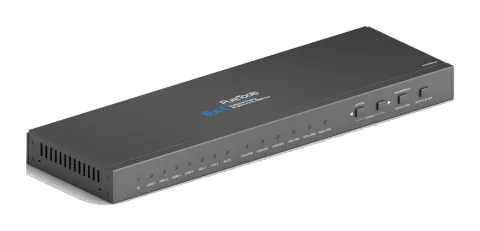
PureTools - Scaler Switcher 6x1, 4K, HDMI-uitgang
PureTools - Scaler Switcher 6x1, 4K, HDMI Output.
HandleidingBesturing (TCP/IP)FAQSpecificatiesCEBeschikbare besturingsinterfaces. Klap een actief type uit om de volledige commandotabel te zien.
Geen passende commando’s.
RS232-commando's69 commando’sActief
Bron: handleiding, hoofdstuk RS232 Control, pagina 17
| Commando | Beschrijving | Antwoord | |
|---|---|---|---|
| 50701% | Overschakelen naar HDMI 1 input | Switch to HDMI 1 | |
| 50702% | Overschakelen naar HDMI 2 input | Switch to HDMI 2 | |
| 50703% | Overschakelen naar HDMI 3 input | Switch to HDMI 3 | |
| 50704% | Overschakelen naar HDMI 4 input | Switch to HDMI 4 | |
| 50705% | Schakel naar VGA 1 input | Switch to VGA 1 | |
| 50706% | Schakel naar VGA 2 input | Switch to VGA 2 | |
| 50785% | Automatische schakeling inschakelen | Auto Switching | |
| 50786% | Schakel automatisch schakelen uit | Manual Switching | |
| 50619% | Verander resolutie naar 1360X768 | Resolution: 1360x768 | |
| 50620% | Verander resolutie naar 1920X1200 WUXGA | Resolution: 1920x1200 | |
| 50626% | Verander resolutie naar 1024X768 XGA | Resolution: 1024x768 | |
| 50627% | Verander resolutie naar 1280X720 720P | Resolution: 1280x720 | |
| 50628% | Verander resolutie naar 1280X800 WXGA | Resolution: 1280x800 | |
| 50629% | Verander resolutie naar 1920X1080 1080P | Resolution: 1920x1080 | |
| 50604% | Vergrendel de knoppen op het voorpaneel | Front Panel lock | |
| 50605% | Ontgrendel de knoppen op het frontpaneel | Front Panel Unlock | |
| 502xx% | Stel de helderheid in op xx (xx varieert van 0 tot 99) voor VGA-input | Brightness: xx | |
| 503xx% | Stel het contrast in op xx (xx varieert van 0 tot 99) voor VGA-input | Contrast: xx | |
| 504xx% | Stel de verzadiging in op xx (xx varieert van 0 tot 99) voor VGA Input | Saturation: xx | |
| 505xx% | Stel de scherpte in op xx (xx varieert van 0 tot 99) voor VGA Input | Sharpness: xx | |
| 50607% | Pas de kleurtemperatuur aan voor VGA-input | Color Temperature: xx (xx= Cool/ Medium/ Warm/ User.) | |
| 50608% | Stel de beeldverhouding voor de VGA-input in | Aspect Ratio: xx (xx= 16:9/ 4:3/ auto/) | |
| 50614% | Stel de beeldmodus in voor VGA Input | Picture Mode: xx (xx= dynamic/ standard/ mild/ user) | |
| 50615% | Stel SM audiomodus in voor VGA-invoer | Sound Mode: xx Sound Mode: xx (xx= standard/ music/ movie/ sports/ user) | |
| 50648% | HDMI ingebedde audio-uitgang inschakelen | Embedded Audio Output: enable | |
| 50649% | Schakel HDMI embedded audio output uit | Embedded Audio Output: disable | |
| 50606% | Automatisch de invoerparameter aanpassen voor (alleen VGA) | VGA Input Auto | |
| 50699% | Controleer de systeerversie | Version Vx.x.x | |
| 50697% | Standbymodus verlaten | Wake up! | |
| 50797% | Ga in standby modus | Go to standby! | |
| 50698% | Software-update | ||
| 50617% | Reset naar fabrieksinstellingen | Factory Reset | |
| 50707% | Verander de horizontale polariteit naar de tegenovergestelde, 1 betekent positieve polariteit, 0 betekent negatieve polariteit | Hpolarity:0/1 | |
| 50708% | Verander de verticale polariteit naar de tegenovergestelde, 1 betekent positieve polariteit, 0 betekent negatieve polariteit | Vpolarity:0/1 | |
| 50769% | Lees het EDID-bestand (het bestand moet EDID.bin heten) naar het flashgeheugen vanaf een U-flash disk | ||
| 50772% | Stel de EDID-data van alle inputpoorten in: bypass-modus | EDID:bypass mode | |
| 50773% | Stel de EDID-data van alle inputpoorten in: 1080P & PCM 2ch | EDID:1080P&PCM 2ch | |
| 50774% | Stel de EDID-data van alle inputpoorten in: 1080P & 5.1ch | EDID:1080P&5.1ch | |
| 50775% | Stel de EDID-data van alle inputpoorten in: 1080P 3D & 5.1ch | EDID:1080P3d&5.1ch | |
| 50776% | Stel de EDID-data van alle inputpoorten in: 1080i & PCM 2ch | EDID:1080i&PCM 2ch | |
| 50777% | Stel de EDID-data van alle inputpoorten in: 4K & PCM 2ch | EDID:4K&PCM 2ch | |
| 50787% | Stel de EDID-data van alle inputpoorten in: gebruiker | EDID:user | |
| 50653% | Schakel audio- en video-output uit | Output black:enable | |
| 50654% | Schakel audio- en video-output in | Output black:disable | |
| 50631% | Controleer de inputbron | Input: xx | |
| 50632% | Controleer de outputresolutie | Resolution: xx | |
| 50633% | Controleer de beeldmodus | Picture Mode: xx | |
| 50634% | Controleer de audiomodus | Sound Mode: xx | |
| 50635% | Controleer de beeldverhouding | Aspect Ratio: xx | |
| 50636% | Controleer de helderheid | Brightness: xx | |
| 50637% | Controleer het contrast | Contrast: xx | |
| 50638% | Controleer de verzadiging | Saturation: xx | |
| 50639% | Controleer scherpte | Sharpness: xx | |
| 50640% | Controleer de kleurtemperatuur | Color Temperature: xx | |
| 50652% | Controleer status digitale audio-uitgang | Embedded Audio Output: enable/disable | |
| 50655% | Controleer de video- en audio-uitgangstatus | 50655% Black screen Disable/ Black screen Enable | |
| 50709% | Controleer de huidige resolutie en polariteit | 1920x1080 Hpolarity:1 Vpolarity:0 | |
| 50754% | Controleer de status van het vergrendelde paneel | Front Panel Lock/UnLock | |
| 50778% | Onderzoek EDID s | EDID:xx | |
| 50670% | Beweeg het beeld naar links | Output Position Adjust X xx | |
| 50671% | Beweeg het beeld naar rechts | Output Position Adjust X xx | |
| 50672% | Beweeg het beeld omhoog | Output Position Adjust Y xx | |
| 50673% | Beweeg het beeld naar beneden | Output Position Adjust Y xx | |
| 50674% | Uitrekken naar links vanaf linkerkant (verhoog beeldbreedte) | Output Width Adjust xx | |
| 50675% | Trek rechts vanaf de linkerkant (vermindert beeldbreedte) | Output Width Adjust xx | |
| 50676% | Strek omhoog vanaf de bovenzijde (verhoog de beeldhoogte) | Output Height Adjust xx | |
| 50677% | Uitrekken naar beneden vanaf bovenzijde (verlaag beeldhoogte) | Output height adjust xx | |
| 50678% | Schakel het aanpassen van de schermuitgang in | Enter Output Position Adjust | |
| 50679% | Schakel scherm output aanpassing uit | Exit Output Position Adjust |