
Actief
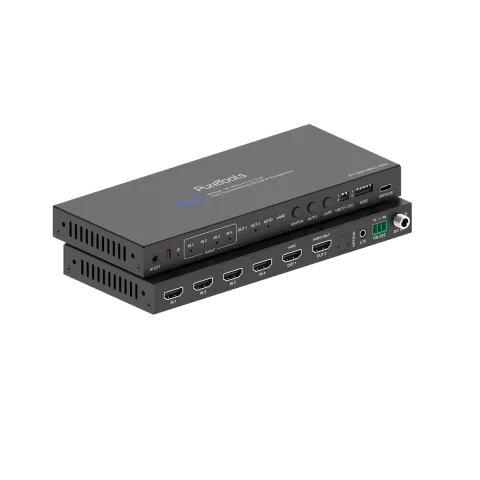
PT-SW-HD41-48G
4x1 HDMI 2.1-schakelaar - 48 Gbps
De PT-SW-HD41-48G is een professionele 4x1 HDMI Switcher die het volledige HDMI 2.1 functiepakket ondersteunt met 48Gbps FRL bandbreedte, in staat om bronnen te schakelen tot 8K 60Hz of 4K 120Hz. Het verwerkt een …
HandleidingBesturing (TCP/IP)FAQSpecificatiesDatasheetCEBeschikbare besturingsinterfaces. Klap een actief type uit om de volledige commandotabel te zien.
Geen passende commando’s.
RS232-commando's22 commando’sActief
Bron: handleiding, hoofdstuk API Commands, pagina 15
| Commando | Beschrijving | Voorbeeld | Antwoord | |
|---|---|---|---|---|
| help! | Lijst alle opdrachten | help! | ||
| r type! | Haal het apparaattype op | r type! | 8K 4x1 HDMI switcher | |
| r info! | Haal de huidige status van het apparaat op | r info! | current unit status: mcu fw version: Vx.xx.xx power status: on hdmi input1: disconnect hdmi input2: disconnect hdmi input3: disconnect hdmi input4: disconnect hdmi output1: disconnect hdmi output2: disconnect connection route: input1->output1 output 1 hdcp: user mode on hdcp dip mode: hdcp follow source cec dip mode: cec off auto switch: on earc mode: off auto switch mode: TMDS mode input edid mode: copy from output | |
| r fw version! | Haal firmwareversie op | r fw version! | MCU FW version x.xx.xx | |
| power z! | Schakel het apparaat in/uit, z=0~1 (z=0 uit, z=1 aan) | power 1! | power on System Initializing... Initialization Finished! MCU FW version x.xx.xx | |
| r power! | Haal de huidige stroomstatus op | r power! | power on /power off | |
| r temperature! | haal temperatuur op | r temperature! | gsv chip temperature: 47 | |
| reboot! | Herstart het apparaat | reboot! | Reboot… System Initializing... Initialization Finished! MCU FW version x.xx.xx | |
| reset! | Reset naar fabrieksinstellingen | reset! | Reset to factory defaults System Initializing... Initialization Finished! MCU FW version x.xx.xx | |
| s user edid! | Upload lokale EDID | s user edid! | Please send the edid file… edid: 1080P60, Audio 2.0CH | |
| r input edid! | Input EDID-modus opvragen | r input edid! | input edid: 4K2K60_444, Stereo Audio 2.0 | |
| s auto switch x! | Schakel de automatische switchfunctie in of uit (x=0~1) 0. Automatisch switchen uitschakelen 1. Automatisch switchen inschakelen | s auto switch 0! | auto switch off auto switch: on | |
| r auto switch! | Haal de automatische schakelvoorziening op | r auto switch! | auto switch: on | |
| s auto mode x! | stel automatische schakelmethode in (x=0~1) 0.TMDS-modus 1.5V-modus | s auto mode 1! | auto switch mode: 5v mode auto switch mode: TMDS mode! | |
| r auto mode! | haal automatische schakelmethode op | r auto switch! | auto switch mode: TMDS mode | |
| s earc x! | Schakel de Earc-functie in of uit (x=0~1) 0. earc uit 1. earc aan | s earc 0! | earc off earc off | |
| r earc! | Earc-functie opvragen | r earc! | earc off | |
| s in source x! | Routeer inputbron naar output (1~4) 1. HDMI 1 2. HDMI 2 3. HDMI 3 4. HDMI 4 | s in source 1! | output->input1 input 1 | |
| r in source! | Haal geselecteerde input source van output op | r in source! | output->input1 | |
| s output hdcp x! | schakel de gebruikersmodus aan/uit (x=0~1) | s output hdcp 0! | output: user mode on user mode off | |
| r output hdcp! | haal output hdcp-status op | r output hdcp! | output: user mode off | |
| s baud rate z! | stel rs232-seriële poort baudrate in (z=115200, 57600, 38400, 19200, 9600, 4800, 2400) | s baud rate 115200! | set the baud rate to 115200 baud rate: 115200 |