
Actief
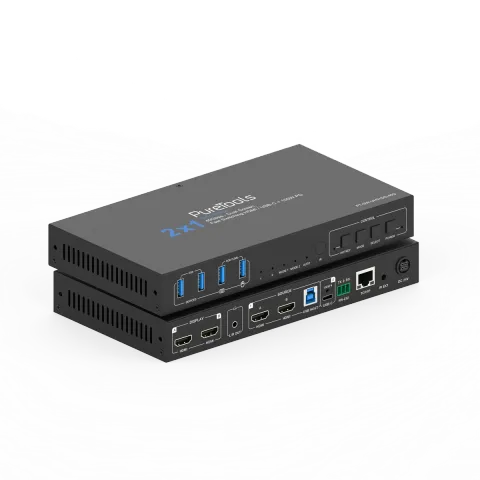
PT-SW-UH21DS-40G
2x1 USB-C/HDMI-schakelaar met twee schermen voor samenwerking – 40G
De PT-SW-UH21DS-40G is een dual-screen HDMI 2.1 samenwerking Switcher met HDMI- en USB-C DP Alt-Mode-ingangen, ontworpen voor multi-bronbeheer in professionele AV-omgevingen. Hij ondersteunt een datasnelheid van 40Gbps …
HandleidingBesturing (TCP/IP)FAQSpecificatiesCE-verklaring ↗Beschikbare besturingsinterfaces. Klap een actief type uit om de volledige commandotabel te zien.
Geen passende commando’s.
ASCII-commando22 commando’sActief
VerbindingRS232 Baudrate: 115200; Data bits: 8; Stop bit: 1; Pariteitsbit: geen; TCP/IP-poort: 8000↓ CSV
Bron: handleiding, hoofdstuk API Commands, pagina 17
| Commando | Beschrijving | Voorbeeld | Antwoord | |
|---|---|---|---|---|
| ? | Haal de lijst van alle commando's op | ? | ||
| help | Haal de lijst van alle commando's op | help | ||
| get model | Haal het apparaattype op | get model | PT-SW-UH21DS-40G | |
| status | Haal de huidige status van het apparaat op | status | Please refer to the note at the end of the list. | |
| get version | Firmwareversie opvragen | get version | FW v1.1.0 KVM v1.1.0 | |
| power on/off | Schakel het apparaat in/uit | power on | Power on… System Initializing... Initialization Finished! FW v1.1.0 KVM v1.1.0 | |
| get power | Haal de huidige stroomstatus op | get power | Power on | |
| reboot | Herstart het apparaat | reboot | Reboot… System Initializing... Initialization Finished! FW v1.1.0 KVM v1.1.0 | |
| reset | Reset systeeminstellingen naar standaardwaarden (Typ "Yes" om te bevestigen, "No" om te annuleren) | reset | Sure to Reset System Settings To Default? Type "Yes" after next prompt to confirm… | |
| reset all | Reset systeem- en netwerkinstellingen naar standaardwaarden (Typ "Yes" om te bevestigen, "No" om te annuleren) | reset all | Sure to Reset System and Network Settings To Default? Type "Yes" after next prompt to confirm… | |
| set key on/off | Stel toets op het voorpaneel in aan/uit | set key on | Set key on on | |
| get key | Status van frontpaneelknop aan/uit opvragen | get key | On | |
| set ir on/off | Schakel IR aan/uit | set ir off | Set IR on on | |
| get ir | Haal IR aan/uit-status op | get ir | On | |
| set beep on/off | Schakel zoemer aan/uit | set beep off | Set beep off off | |
| get beep | Haal de aan/uit-status van de zoemer op | get beep | Off | |
| set hotkey on/off | Stel hotkey-functie aan/uit in | set hotkey on | Set hotkey on on | |
| get hotkey | Status hotkeyfunctie aan/uit opvragen | get hotkey | On | |
| set hotkeys x | Stel hotkeys in (x=1~5) x=1: PC1 invoer hotkeys x=2: PC2 invoer hotkeys x=3: Volgende invoer hotkeys x=4: Vorige invoer hotkeys x=5: Buzzer aan/uit zetten | set hotkeys 1 | Type hotkeys… | |
| get hotkeys x | Hotkey-instellingen opvragen (x=1~5) x=1: PC1 Input hotkeys x=2: PC2 Input hotkeys x=3: Volgende Input hotkeys x=4: Vorige Input hotkeys x=5: Buzzer in-/uitschakelen | get hotkeys 1 | "Ctrl" + "Ctrl" + "1" | |
| set baud x | Stel RS232 bitsnelheid in op x bps x=1: 4800 x=2: 9600 x=3: 19200 x=4: 38400 x=5: 57600 x=6: 115200 | set baud 6 | Set baud rate 115200 9600 | |
| get baud | RS232-baudrate ophalen | get baud | 115200 |
API-commando's57 commando’sActief
VerbindingRS232 Baudrate: 115200; Data bits: 8; Stop bit: 1; Pariteitsbit: geen; TCP/IP-poort: 8000↓ CSV
Bron: handleiding, hoofdstuk API Commands, pagina 27
| Commando | Beschrijving | Voorbeeld | Antwoord | |
|---|---|---|---|---|
| set input x | Stel ingang in van (x=1~2) x=1: PC1 ingang x=2: PC2 ingang | set input 1 | Set PC1 input 1 | |
| get input | PC-ingang ophalen | get input | PC1 | |
| set usb x | Stel USB-bron in (x=0~2) x=0: Volg video-invoer x=1: PC1 USB-host x=2: PC2 USB-host | set usb 0 | Set USB follow video input 0 | |
| get usb | USB-ingang ophalen | get usb | Follow video input | |
| get usb5v | USB-hostingang 5V ophalen | get usb5v | PC1 USB: 5V PC2 USB: None | |
| set autoswitch on/off | Schakel automatische omschakeling aan/uit | set autoswitch on | Set autoswitch on on | |
| get autoswitch | Haal de aan/uit-status van automatische schakeling op | get autoswitch | On | |
| set autoswitch mode x | Stel automatische schakeldetectiemodus in x=0: 5V detectie x=1: Signaaldetectie | set autoswitch mode 1 | Set autoswitch mode to signal detection signal detection | |
| get autoswitch mode | Haal de detectiemodus voor automatische schakeling op | get autoswitch mode | Signal detection | |
| get edid x | EDID van inputpoorten opvragen (x=0~4) x=0: Alle inputs x=1: USB-C A input x=2: USB-C B input x=3: HDMI A input x=4: HDMI B input | get edid 0 | USB-C A EDID 00: Copy EDID from HDMI output (default) USB-C B EDID 00: Copy EDID from HDMI output (default) HDMI A EDID 00: Copy EDID from HDMI output (default) HDMI B EDID 00: Copy EDID from HDMI output (default) | |
| get edid data x | EDID-gegevens van inputpoorten opvragen (x=0~4) x=0: Alle inputs x=1: USB-C A input x=2: USB-C B input x=3: HDMI A input x=4: HDMI B input | get edid data 0 | USB-C A EDID USB-C B EDID HDMI A EDID HDMI B EDID | |
| set user edid x | Stel gebruikersgedefinieerde EDID (x=0~2) in op y x=0: Gebruikersgedefinieerd 1 en Gebruikersgedefinieerd 2 x=1: Gebruikersgedefinieerd 1 x=2: Gebruikersgedefinieerd 2 y=00 FF FF FF ….. (y is 256 bytes EDID data) | set user edid 1 | User Defined 1 EDID is loaded | |
| get user edid x | Haal de user-defined EDID (x=0~2) gegevens op x=0: User Defined 1 en User Defined 2 x=1: User Defined 1 x=2: User Defined 2 | get user edid 1 | ||
| set output mode x | Stel outputmodus in op (x=1~2) x=1: Output modus 1 x=2: Output modus 2 | set output mode 1 | Set output to mode 1 1 | |
| get output mode | Haal output modus op | get output mode | Mode 1 | |
| set output x stream on/off | Schakel output (x=0~2) stream aan/uit x=0: Alle outputs x=1: Output A x=2: Output B | set output 0 stream off | Set All outputs off on | |
| get output x stream | Haal de stream aan/uit status op van output (x=0~2) x=0: Alle outputs x=1: Output A x=2: Output B | get output 0 stream | Output A on Output B on | |
| set output hdcp y | Stel output HDCP modus in op (y=0~3) y=0: Gereserveerd y=1: Auto y=2: HDCP 1.4 y=3: HDCP 2.2 | set output hdcp 1 | Set output HDCP to auto 1 | |
| get output hdcp | Haal de HDCP-modus van output op | get output hdcp | Auto | |
| set audio mute on/off | Schakel dempen van gedemonteerde audio aan/uit Standaard: uit | set audio mute on set audio mute off | Set de-embedding audio mute on Set de-embedding audio mute off | |
| get audio mute | Haal de aan/uit-status van de de-embedding audio mute op | get audio mute | Mute on | |
| set output x usb5v y | Stel USB-apparaatpoort output in (x=0~4) 5V naar y x=0: Alle USB-apparaatpoorten x=1: USB-A apparaat 1 x=2: USB-A apparaat 2 x=3: USB-A apparaat 3 x=4: USB-A apparaat 4 y=0: Schakel 5V-uitgang uit y=1: Volg host y=2: Forceer altijd 5V-uitgang | set output 0 usb5v 1 | Set all USB device output 5V follow host. 1 | |
| get output x usb5v | USB-apparaatpoortuitgang (x=0~4) 5V-status ophalen | get output 0 usb5v | USBA_1 5V: follow host USBA_2 5V: follow host USBA_3 5V: follow host USBA_4 5V: follow host | |
| set cec power on/off | Stel CEC aan/uit-commando in | set cec power on set cec power off | CEC power on CEC power off | |
| set auto power feature on/off | Schakel display automatische stroomfunctie aan/uit | set auto power feature on | Set auto power on off | |
| get auto power feature | Status van de functie automatische weergave-uitschakeling opvragen | get auto power feature | Auto power on | |
| set auto power off timer x | Stel automatische uitschakelopdracht in die wordt verzonden na x (x=1~6) x=1: 5 sec x=2: 10 sec x=3: 30 sec x=4: 1 min x=5: 5 min x=6: 10 min | set auto power off timer 1 | Set auto power off timer: 5 sec 5 sec | |
| get auto power off timer | Haal de timer voor automatische uitschakeling op | get auto power off timer | 5 sec | |
| set auto power control x | Stel automatische stroomvoorzieningsfunctie in via (x=1~3) x=1: CEC x=2: RS232 x=3: CEC en RS232 | set auto power control 1 | Set auto power control: CEC CEC | |
| get auto power control | Haal het type automatische energiebesturing op | get auto power control | CEC | |
| set RS-232 setting x | Stel RS232 instellingen in op x x=115200-8n1 Bitsnelheid: 115200/57600/38400/19200/9600/4800/2400 Databits: 7/8 Pariteit: n(geen)/ o(odd) / e(even) Stopbits: 1/2 | set RS-232 setting 115200-8n1 | Set RS-232: 115200-8n1 9600-8n1 | |
| get RS-232 setting | RS232-instelling ophalen | get RS-232 setting | 115200-8n1 | |
| set RS-232 command on/off | Schakel RS232 opdracht in/uit Standaard: uit | set RS-232 command on set RS-232 command off | Set RS-232 command on Set RS-232 command off | |
| get RS-232 command | RS232-commando aan/uit-status ophalen | get RS-232 command | On | |
| set RS-232 HEX/ASCII power on delay1 input delay2 | Stel RS232 HEX/ASCII inschakelvertraging1 ingang vertraing2 in Opdrachtformaat is HEX of ASCII y1= RS232 inschakelopdracht y2= 0~1200sec y3= RS232 inputpoorta selectie y4= 0~1200sec OPMERKING: vertraging1 ingang vertraing2 kan NULL zijn | set RS-232 ASCII power on delay1 input delay2 set RS-232 ASCII power on set RS-232 HEX power on delay1 input | Set RS-232 ASCII power on delay1 input delay2 Set RS-232 ASCII power on Set RS-232 HEX power on delay1 input | |
| set preset clear x | Wis een opgegeven preset in het apparaat (x=1~5) Alle instellingen behalve netwerkinstellingen. x=1~5: Preset 1 ~ Preset 5 | set preset clear 1 | Set preset 1 clear | |
| set preset x name y | Stel preset (x=1~5) naam in op y (maximaal 16 tekens) x=1~5: Preset 1 ~ Preset 5 | set preset 1 name Blueriver | Set preset 1 name Blueriver | |
| get preset x name | Haal preset (x=1~5) naam op x=1~5: Preset 1 ~ Preset 5 | get preset 1 name | Blueriver | |
| get ipconfig | Haal huidige IP-configuratie op Standaard: standaard statisch IP is 192.168.0.178/255.255.0.0/192.168.0.1 | get ipconfig | IP Mode: DHCP IP: 192.168.62.106 Subnet Mask: 255.255.255.0 Gateway: 192.168.62.1 TCP/IP port: 8000 Telnet port: 23 MAC: 6C:DF:FB:0C:B3:8E (Static: 169.254.100.200 255.255.0.0 169.254.100.1) | |
| get mac addr | Haal het MAC-adres van het netwerk op | get mac addr | MAC: 6C:DF:FB:0C:B3:8E | |
| set ip mode x | Stel netwerk IP-modus in op statisch IP of DHCP (x=0~1) x=0: Statisch x=1: DHCP Standaard: 1 | set ip mode 0 | Set IP mode static (Please use "set net reboot" command or repower device to apply new config!) | |
| get ip mode | Haal de IP-modus van het netwerk op | get ip mode | DHCP | |
| set ip addr xxx.xxx.xxx.xxx | Stel netwerk IP-adres in | set ip addr 192.168.1.100 | Set IP address 192.168.1.100 (Please use "set net reboot" command or repower device to apply new config!) DHCP on, Device can't config static address, set DHCP off first. | |
| get ip addr | Haal het IP-adres van het netwerk op | get ip addr | 192.168.62.106 | |
| set subnet xxx.xxx.xxx.xxx | Stel netwerk subnetmasker in | set subnet 255.255.255.0 | Set subnet mask 255.255.255.0 (Please use "set net reboot" command or repower device to apply new config!) DHCP on, Device can't config subnet mask, set DHCP off first. | |
| get subnet | Haal het subnetmasker van het netwerk op | get subnet | 255.255.255.0 | |
| set gateway xxx.xxx.xxx.xxx | Stel netwerk gateway in | set gateway 192.168.1.1 | Set gateway 192.168.1.1 (Please use "sst net reboot!" command or repower device to apply new config!) DHCP on, Device can't config gateway, set DHCP off first. | |
| get gateway | Haal de gateway van het netwerk op | get gateway | 192.168.1.1 | |
| set tcp/ip port x | Stel netwerk TCP/IP-poort in (x=1~65535) Standaard: 4001 | set tcp/ip port 8000 | Set TCP/IP port 8000 | |
| get tcp/ip port | Haal de TCP/IP-poort van het netwerk op | get tcp/ip port | 8000 | |
| set telnet port x | Stel netwerk telnet-poort in (x=1~65535) Standaard: 23 | set telnet port 23 | Set telnet port 23 | |
| get telnet port | Haal de Telnet-poort van het netwerk op | get telnet port | 23 | |
| set net reboot | Herstart netwerkmodules | set net reboot | Search for IP,Please wait ...! IP Mode: DHCP IP: 192.168.62.106 Subnet Mask: 255.255.255.0 Gateway: 192.168.62.1 TCP/IP port: 8000 Telnet port: 23 MAC: 6C:DF:FB:0C:B3:8E (Static: 169.254.100.200 255.255.0.0 169.254.100.1) | |
| set admin password x | Stel beheerdersloginwachtwoord in (x=[maximaal 16 tekens]) Standaard: admin | set admin password admin | Set admin password admin | |
| get admin password | Beheerdersloginwachtwoord ophalen | get admin password | admin | |
| set user password x | Stel gebruikersloginwachtwoord in (x=[maximaal 16 tekens]) Standaard: user | set user password user | Set user password user | |
| get user password | Haal gebruikersloginwachtwoord op | get user password | user |