
Udgået
PT-PMS-42
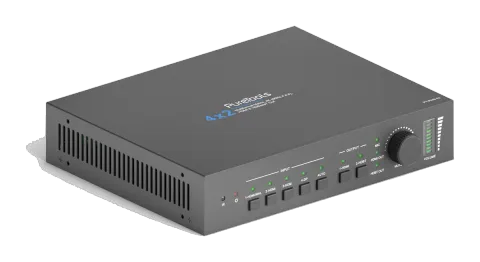
PureTools - Scaler Matrix 4x2, 4K, 3-niveau MIC, Audio Matrix, Repeater, HDMI & HDBaseT udgange
PureTools Scaler Matrix 4x2 er en Matrix Switcher, der understøtter 4K-opløsning og har 4 inputs og 2 outputs med HDMI- og HDBaseT-interfaces. Den inkluderer en mikrofonindgang med 3 niveauer, en audiomatrix og en …
ManualStyring (TCP/IP)FAQSpecifikationerCETilgængelige styringsinterfaces. Udvid en aktiv type for at se den fulde kommandotabel.
Ingen matchende kommandoer.
RS232 Kommandoer89 kommandoerAktiv
Kilde: manual, kapitel RS232 Communication Command, side 11
| Kommando | Beskrivelse | Eksempel | Svar | |
|---|---|---|---|---|
| PowerON. | Tænd systemet. | Power ON! | ||
| PowerOFF. | System standby. | Power OFF! | ||
| /*Name. | Rapportér systemnavn. | 4x2 Matrix Switcher | ||
| /*Type. | Rapportér systemmodel. | PT-PMS-42 | ||
| /^Version. | Rapportér firmwareversion. | V1.0.0 | ||
| STA. | Rapportér systemstatus. | … … | ||
| Lock. | Lås frontpanelknapper. | Front Panel Locked! | ||
| Unlock. | Lås op for frontpanelknapper. | Front Panel UnLock! | ||
| GetGuiIP. | Rapportér GUI IP. | GUI_IP:192.168.0.178 | ||
| SetGuiIP:[xxx.xxx.xxx.xxx]. | Indstil GUI IP til [xxx.xxx.xxx.xxx]. | |||
| SetNoSigTime:[xxx]. | Indstil automatisk slukketid til xxx. Sæt “xxx” til “0” for at deaktivere denne funktion. | No Signal Auto StandBy Time Is 0S! | ||
| Rs232HDBTBypassON. | Aktivér RS232 pass-through-tilstand. Bemærk: Denne funktion kan kun deaktiveres via Telnet eller GUI. | Rs232 HDBT Bypass ON! | ||
| Rs232HDBTBypassOFF. | Deaktiver RS232 pass-through-tilstand. Bemærk: Kommandoen skal sendes via Telnet-port eller GUI RS232-faneblad. | Rs232 HDBT Bypass OFF! | ||
| RemoteCtrMcuON. | Tillader switcheren at blive kontrolleret af en fjernbetjeningsenhed, som er tilsluttet RS232-porten på HDBaseT Receiver. | Remote Control MCU ON! | ||
| RemoteCtrMcuOFF. | Switcher kan ikke styres af den fjernbetjente enhed | Remote Control MCU OFF! | ||
| RST. | Gendan fabriksindstillinger. | Factory Default! | ||
| HDMI[x]. | Skift input [x] til HDMI output. x=1~4. Eksempel: HDMI4. | HDMI Out Switch To 04! | ||
| HDBT[x]. | Skift input [x] til HDBT output. x=1~4. Eksempel: HDBT4. | HDBT Out Switch To 04! | ||
| [x]ALL. | Skift input [x] til HDMI og HDBT outputs. x=1~4. Eksempel: 1ALL. | HDMI Out Switch To 01! HDBT Out Switch To 01! | ||
| HDBTA. | Skift automatisk inputkilde til HDBT-output. | HDBT Out Switch Auto Mode! | ||
| HDBTM. | Manuelt skift inputkilden til HDBT-output. | HDBT Out Switch Manual Mode! | ||
| HDMIA. | Skift automatisk inputkilde til HDMI-output. | HDMI Out Switch Auto Mode! | ||
| HDMIM. | Manuelt skift inputkilden til HDMI-output. | HDMI Out Switch Manual Mode! | ||
| HDBTBlackON. | Aktivér HDBT output sort skærm. | HDBT Out Black ON! | ||
| HDBTBlackOFF. | Deaktiver sort skærm på HDBT output. | HDBT Out Black OFF! | ||
| HDMIBlackON. | Aktivér HDMI output sort skærm. | HDMI Out Black ON! | ||
| HDBTBlackOFF. | Deaktiver sort skærm på HDMI output. | HDMI Out Black OFF! | ||
| [x]Gain:[y]. | Indstil lydforstærkning for input [x] til [y]. x=1~4, y=0~10. Eksempel: 1Gain:5. | Input 1 Gain Level 5! | ||
| HDMIABON. | Aktivér HDMI output lyd bypass-tilstand. | HDMI Audio Bypass ON! | ||
| HDMIABOFF. | Deaktiver HDMI output lyd bypass-tilstand. | HDMI Audio Bypass OFF! | ||
| HDBTABON. | Aktivér HDBT output lyd bypass-tilstand. | HDBT Audio Bypass ON! | ||
| HDBTABOFF. | Deaktiver HDBT output lyd bypass-tilstand. | HDBT Audio Bypass OFF! | ||
| MicVolume:xx. | Indstil MIC volumen til xx. | Volume of MIC 80! | ||
| MicVolume+. | Forøg MIC-volumen. | Volume of MIC 81! | ||
| MicVolume-. | Formindsk MIC volumen. | Volume of MIC 79! | ||
| MicMute. | Dæmp MIC-lyd. | Volume of MIC Mute! | ||
| MicUnMute. | Slå MIC-lyd til. | Volume of MIC UnMute! | ||
| LineVolume:xx. | Indstil linjevolumen til xx. | Volume of Line 50! | ||
| LineVolume+. | Forøg linjevolumen. | Volume of Line 51! | ||
| LineVolume-. | Formindsk linjevolumen. | Volume of Line 49! | ||
| LineMute. | Slå linjelyd fra. | Volume of Line Mute! | ||
| LineUnMute. | Slå linje-lyd til. | Volume of Line Unmute! | ||
| HDMIOutVolume:xx. | Indstil HDMI output volumen til xx. | Volume of HDMI Out 70! | ||
| HDMIOutVolume+. | Forøg HDMI output-volumen. | Volume of HDMI Out 71! | ||
| HDMIOutVolume-. | Formindsk HDMI output volumen. | Volume of HDMI Out 69! | ||
| HDMIOutVolumeMute. | Dæmp HDMI-outputlyd. | Volume of HDMI Out Mute! | ||
| HDMIOutVolumeUnMute. | Slå HDMI output-lyd til. | Volume of HDMI Out Unmute! | ||
| HDBTOutVolume:xx. | Indstil HDBT output volumen til xx. | Volume of HDBT Out 60! | ||
| HDBTOutVolume+. | Forøg HDBT output-volumen. | Volume of HDBT Out 61! | ||
| HDBTOutVolume-. | Formindsk HDBT output volumen. | Volume of HDBT Out 59! | ||
| HDBTOutVolumeMute. | Dæmp HDBT-outputlyd. | Volume of HDBT Out Mute! | ||
| HDBTOutVolumeUnMute. | Slå HDBT output-lyd til. | Volume of HDBT Out Unmute! | ||
| PresetSave[x]. | Gem den aktuelle omskiftningsstatus til forudindstilling [x]. x=1~ 4. Eksempel: PresetSave1. | Preset1 Save Success! | ||
| PresetRecall[x]. | Hent forudindstilling [x]. x=1~4. Eksempel: PresetRecall1. | Preset1 Recall Success! HDMI Out Switch To 04! HDBT Out Switch To 01! | ||
| EDIDSTA[xx]. | Hent EDID-status for input [xx]. xx=00 ~ 05. xx Input 00 Alle inputs 01 1-HDMI/MHL 02 2-HDMI 03 3-HDMI 04 4-DP 1 05 4-DP 2 | EDIDSTA02. EDIDSTA03 | Input 2 EDID From 02 Internal EDID! Input 3 EDID From User Define EDID! | |
| EDIDUpgrade[x]. | Opgrader EDID-data på inputport [x]. x=0: Alle input. x=1~4: 1~4 input. x=U: Brugerdefineret EDID. Når kommandoen anvendes, opfordrer systemet til at uploade EDID-fil (.bin). Operation annulleres efter 10 sekunder. Afbryd venligst HDBT-forbindelsen før afsendelse af kommando for at sikre, at data modtages korrekt. | Please send the EDID file … EDID Upgrade OK! | ||
| EDID/[x]/[y]. | Input [x] påkalder indbygget EDID [y]. x=0: Alle inputs. x=1~4: 1~4 input. y EDID 1 720p 2D PCM 2 1080p 2D PCM 3 4K@60Hz 4:2:0 Dolby/DTS 5.1 CH 4 4K@60Hz 4:4:4 HDR 7.1CH 5 Brugerdefineret EDID | EDID/3/3 | ||
| EDIDGHDMI. | Hent EDID-dataene fra HDMI output. | |||
| EDIDGHDBT. | Hent EDID-dataene fra HDBT output. | |||
| EDIDM[x]B[y]. | Indstil EDID-dataen for output [x] til input [y]. x=1~2, y=1~4. Eksempel: EDIDM1B1. | Input 1 EDID Upgrade OK By 01 EXT EDID! | ||
| CEC_ON. | Aktivér CEC | CEC ON! | ||
| CEC_OFF. | Deaktiver CEC | CEC OFF! | ||
| CECI[port]00. | Bekræft handling (Enter). | CECI0100. CEC_IN_01_SEND_SUCCESS! | ||
| CECI[port]01. | UP. | CECI0101. CEC_IN_01_SEND_SUCCESS! | ||
| CECI[port]02. | NED. | CECI0102. CEC_IN_01_SEND_SUCCESS! | ||
| CECI[port]03. | VENSTRE. | CECI0103. CEC_IN_01_SEND_SUCCESS! | ||
| CECI[port]04. | HØJRE. | CECI0104. CEC_IN_01_SEND_SUCCESS! | ||
| CECI[port]0A. | Indtast hovedmenuen. | CECI010A. CEC_IN_01_SEND_SUCCESS! | ||
| CECI[port]0D. | Afslut menu. | CECI010D. CEC_IN_01_SEND_SUCCESS! | ||
| CECI[port]41. | Lydstyrke op. | CECI0141. CEC_IN_01_SEND_SUCCESS! | ||
| CECI[port]42. | Lydstyrke ned. | CECI0142. CEC_IN_01_SEND_SUCCESS! | ||
| CECI[port]43. | Dæmp | CECI0143. CEC_IN_01_SEND_SUCCESS! | ||
| CECI[port]44. | Afspil. | CECI0144. CEC_IN_01_SEND_SUCCESS! | ||
| CECI[port]45. | Stop. | CECI0145. CEC_IN_01_SEND_SUCCESS! | ||
| CECI[port]46. | Pause. | CECI0146. CEC_IN_01_SEND_SUCCESS! | ||
| CECI[port]48. | Spol tilbage. | CECI0148. CEC_IN_01_SEND_SUCCESS! | ||
| CECI[port]49. | Hurtig fremad. | CECI0149. CEC_IN_01_SEND_SUCCESS! | ||
| CECI[port]4B. | Fremad. | CECI014B. CEC_IN_01_SEND_SUCCESS! | ||
| CECI[port]4C. | Bagud. | CECI014C. CEC_IN_01_SEND_SUCCESS! | ||
| CECI[port]6C. | Sluk. | CECI016C. CEC_IN_01_SEND_SUCCESS! | ||
| CECI[port]6D. | Tænd. | CECI016D. CEC_IN_01_SEND_SUCCESS! | ||
| CECO[port]41. | Lydstyrke op. | CECO0141. CEC_OUT_01_SEND_SUCCESS! | ||
| CECO[port]42. | Lydstyrke ned. | CECO0142. CEC_OUT_01_SEND_SUCCESS! | ||
| CECO[port]43. | Dæmp | CECO0143. CEC_OUT_01_SEND_SUCCESS! | ||
| CECO[port]6C. | Sluk. | CECO016C. CEC_OUT_01_SEND_SUCCESS! | ||
| CECO[port]6D. | Tænd. | CECO016D. CEC_OUT_01_SEND_SUCCESS! | ||
| /+[X]/[Y]:xxx. | xxx: ASCII-tegn. Y: Repræsenterer RS232-porten. Y=1: RS232-porten på PT-PMS-42 Switcher. Y=2: RS232-porten på HDBaseT Receiver. X: Repræsenterer baudraten for tredjepartsenhed. X=1, 2400 X=2, 4800 X=3, 9600 X=4, 19200 X=5, 38400 X=6, 57600 X=7, 115200 | /+3/2:123456. Send the command “123456” to the third-party device. The baud rate is 9600. | ||
| CMDON/+[X]:xxx. | Tænd den tredjepartsenhed. | CMDON/+3:455665. | ||
| CMDOFF/+[X]:xxx. | Sluk den tredjepartsenhed. | CMDOFF/+3:455666. |